All Emperor2011's Software in one thread !! (updated daily)

7e7da73859fb0e4f1ccaa4fc4d11348a.jpg


MP05 for Siemens Solid Edge 2026 (x64) | Size: 508.21 MB
Language: English


Siemens Digital Industries has released Solid Edge 2025 Update 13 (MP0013) is an integrated set of powerful, comprehensive, and accessible tools that advance all aspects of the product development process.

Solid Edge 2025 introduces Solid Edge X, Solid Edge software in a secure SaaS environment, with new Artificial Intelligence (AI) tools to help you work smarter. Solid Edge 2025 also includes a range of enhancements to increase modeling speed, improved etch and bend features for sheet metal design, and simplified Model-based definition (MBD) creation. Expand your innovation toolkit with access to advanced capabilities on demand with token licensing bundles and take advantage of seamless integration with industry-leading solutions across the Siemens Xcelerator portfolio. Solid Edge, which is part of the Siemens Xcelerator portfolio, the comprehensive and integrated portfolio of software, hardware and services, provides you with an innovative and comprehensive approach to product development for the mainstream market.

Solid Edge 2025 Update 13 (Version: 225.00.13.04) Release Notes - Date: March 16, 2026
This Solid Edge Update resolves the following PRs:

===Assembly===
PR 11355008: Some members in this FOA assembly file are always OOD.
PR 11385344: Crash issues with the display-related event.
PR 11393442: The parts library no longer updates automatically.
PR 11112974: Assembly feature fails after modifying a dimension
PR 11356362: Selecting the assembly feature parent node and pressing delete causes all frames to be removed.
PR 11370716: Downstream Assembly features fail after editing one feature
PR 11383769: Assembly file with Modeling in assembly Internal Component is always computing
PR 10816794: Create in Place has a different Part color than the template if no material is used
===Part/Profile/Sheetmetal===
PR 11377718: Only Body Mesh options available for a Surface study
PR 11388232: Can't delete two or more arcs selected using fence select.
PR 11246807: Solid Edge window flickers when editing a feature within a part of an assembly
PR 11386950: Unexpected behavior when modifying the profile of a flange
PR 11388247: Reproducible SE2025 Crash when editing Blue Surf.
PR 11400116: No bend line in flat patterns
===Draft===
PR 11389465: Can't deactivate link to part list within balloon, regression from SE2024
===SEEC===
PR 11320441: Solid Edge crashed while copying a document no from the assembly file properties.
PR 11378234: Changing the role does not apply the correct access.
PR 11375595: In Teamcenter X, many files show empty datasets.
PR 11393031: Continuation with slow-opening assemblies for users who do not have read access.
PR 11389406: After replacing a sub-component of an Assembly in Teamcenter.
PR 11358870: Unable to use the "Use Existing" option when using Add to Teamcenter Interactive.
PR 12092970: Solid Edge crashes when Hosted AW is launched.
===Translators===
PR 11362760: JT file generated using SePvAdp.exe contains unexpected Converge Solid body.
PR 11382663: Unable to open Catia V5 part in Solid Edge 2025 Update 11.
PR 11391962: Saving a Solid Edge file as STL will corrupt the file.
===TechPub===
PR 11393893: Highlighting problems in a published HTML file.
PR 12033740: Inserting text with CTRL V in Description does not work correctly.

Solid Edge from Siemens Digital Industries Software is one of the most widely used 3D CAD systems worldwide. Solid Edge is powered by Siemens' Parasolid software - the most widely used computer-based geometric modeling kernel in the industry. Based on this, Solid Edge and its add-ons are continuously being developed and are therefore always up to date. Solid Edge offers a complete product development portfolio. With its unique combination of sequential modeling and synchronous technology, it is the perfect solution for modern product design. The technology combines the speed and simplicity of direct modeling with the flexibility and control options of parametric design.

Introducing Solid Edge 2025: Innovate without limits

Siemens Digital Industries (DI) is an innovation leader in automation and digitalization. Closely collaborating with partners and customers, DI drives the digital transformation in the process and discrete industries. With its Digital Enterprise portfolio, DI provides companies of all sizes with an end-to-end set of products, solutions and services to integrate and digitalize the entire value chain. Optimized for the specific needs of each industry, DI's unique portfolio supports customers to achieve greater productivity and flexibility. DI is constantly adding innovations to its portfolio to integrate cutting-edge future technologies. Siemens Digital Industries has its global headquarters in Nuremberg, Germany, and has around 75,000 employees internationally.

HOMEPAGE:
Код:
https://solidedge.siemens.com/

FREE DOWNLOAD LINKS:

Код:
https://rapidgator.net/file/4504d079b544dccca68883cdf8200485/MP05_for_Siemens_Solid_Edge_2026_x64.rar

Код:
https://nitroflare.com/view/30CBE81B80D2073/MP05_for_Siemens_Solid_Edge_2026_x64.rar
 
c7e1ba402b791ae9a70333c2cb37a6c6.jpg


MediaMonkey Gold 2024.2.2.3221 RC4 Multilingual | Size: 121.47 MB
Language: English


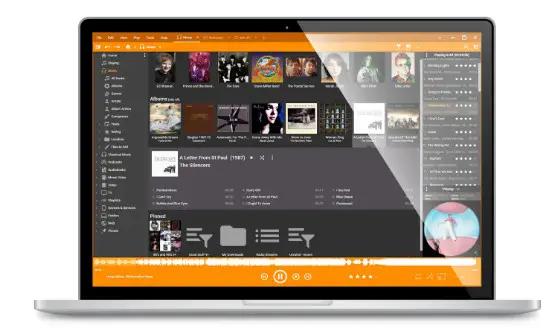
MediaMonkey is a music manager and media jukebox for serious music collectors and iPod users. It catalogs your CDs, OGG, WMA, MPC, FLAC, APE, WAV and MP3 audio files. It looks up missing Album Art and track information via Freedb and the web, and includes an intelligent tag editor and an automated file and directory renamer to organize your music library. It includes a CD ripper, CD/DVD Burner, and audio converter for saving music, and manual or automated playlist editors for creating music mixes.

Its player automatically adjusts volume levels so that you don't have continually fiddle with the volume control and supports hundreds of Winamp plug-ins and visualizations; or if you prefer, it can use Winamp as the default player.It also includes portable audio device synchronization that allows you to synch tracks and play lists with devices such as the iPod and other portable audio devices.

Standard FEATURES:
- Organize music and edit tags in your audio library with a powerful, intuitive interface
- Automatically lookup and tag Album Art and other metadata
- Manage 50,000+ files in your music collection without bogging down
- Play MP3s and other audio formats, and never again worry about varying volume
- Record CDs into OGG, MP3, FLAC and WMA files
- Convert MP3s, OGG, FLAC and WMA files into other formats with the Audio Converter
- Create playlists and music mixes quickly and easily to suit any occasion
- Synchronize with iPods / MP3 players effortlessly and convert tracks on-the-fly
Plus much more.

Gold FEATURES:
- Find music with advanced search functionality that digs through your collection to find tracks according to almost any criteria that you can think of. Search for Composer, Year, Beats per minute; find Lyrics, etc. and stop pulling your hair out trying to find music you know you have.
- Customize your library by setting filters to display only Artists or Albums that match criteria that you set. For example, set a filter that causes Artists to appear in the tree only if they contain Albums that are currently available, and are of any genre other than 'Children'.
- Encode unlimited MP3s without having to manually install a new MP3 encoder (the free version of MediaMonkey includes a time-limited LAME MP3 encoder. If you're so inclined, you can manually replace it with the free LAME encoder, or you can just upgrade to MediaMonkey Gold).
- Catalog your physical CDs and use the Virtual CD feature to keep track of what CDs you own and at the same time see which subset of tracks from those CDs are copied to your hard drive. Instead of tracking your CDs and tracks separately, the virtual CD function gives you an integrated view.
- Import and save audio tracks from Audio CDs and MP3 CDs with unprecedented flexibility using the Virtual CD. It allows you to sample tracks from various sources, select which ones you want to import, and then import and save the files in a single operation.
- Create Previews, short samples of audio tracks, that you can use when trying to decide which audio files you want to add to your collection.
- Use a Sleep Timer to play your music, gradually fade it over a set period of time, and then turn off your PC - perfect for listening to tunes before you go to sleep.
- Burn CDs at the maximum speed permitted by your hardware.

Operating System: Windows 7, 8/8.1, 10, 11

HOMEPAGE:
Код:
http://www.mediamonkey.com/

FREE DOWNLOAD LINKS:

Код:
https://rapidgator.net/file/20e60ef13be76bc3aa3820eb18e0b127/MediaMonkey_Gold_2024.2.2.3221_RC4_Multilingual.rar

Код:
https://nitroflare.com/view/699C71B0A555A0C/MediaMonkey_Gold_2024.2.2.3221_RC4_Multilingual.rar
 
72fbf79342ccb6e3dcb8f2f629f9d34c.jpg


MiniTool Power Data Recovery 12.9 Business Technician Multilingual Boot ISO | Size: 819.56 MB
Language: English


MiniTool Power Data Recovery is a read-only File Recovery Software and Data Recovery Software. Power data recovery software could help you recover all your data no matter the data is lost by accidental deletion, format, re-partition, system crash or virus attack. Power data recovery is able to scan your device sector by sector to recover what ever left on your device. Power Data Recovery provide deep scan module which can scan and analyze raw data format including Microsoft Office files, digital graphics/pictures, audio/video files. Please visit deep scan page for complete raw file format list.

Feature overview:
• Recover data after accidental deletion
• Recover data after an accidental format
• Recover data from an inaccessible volume (logical drive)
• Recover data after FAT corruption
• Recover data after repartition (fdisk)
• Recover data from a crashed physical device
• Recover data after an MBR corruption
• Recover data from a hard disk drive, camera card, USB drive, Zip, floppy disk
• Recover data for any error except physical damage

Key Features:
• Supports FAT 12/16/32
• Supports NTFS
• Supports NTFS compressed and encrypted files
• Supports Dynamic Volume including Simple Volume, Spanned Volume, Stripe Volume, Mirror Volume and Raid Volume.
• Supports RAW data recovery
• Built-in preview function
• Built-in resume recovery function
• Built-in Recovery Wizard

Operating Systems: Windows 11/10/8.1/8/7/Vista/XP

HOMEPAGE:
Код:
https://www.minitool.com/

FREE DOWNLOAD LINKS:

Код:
https://rapidgator.net/file/f64461f79bbadcefed32c845d56ddccd/MiniTool_Power_Data_Recovery_12.9_Business_Technician_Multilingual_Boot_ISO.rar

Код:
https://nitroflare.com/view/A30365AFB166011/MiniTool_Power_Data_Recovery_12.9_Business_Technician_Multilingual_Boot_ISO.rar
 
4dd768aad5f62169f470c0f0146a03ef.png


MiniTool Power Data Recovery Personal / Business 12.9 Multilingual | Size: 201.26 MB
Language: English


MiniTool Data Recovery Business Technician is a special license designed for data recovery service providers & company runners who need to provide customers with quality data recovery services. This license type is used to recover data for enterprises, service providers, IT admins, academics, organizations, etc.

Missing Operating System
Operating system not found? Missing operating system? Operating system crashes? Now, with MiniTool, you can effectively and safely recover data when operating system cannot boot.

Format Or RAW Recovery
Format partition, disk, SD card, USB drive accidentally? Hard drive becomes RAW? MiniTool can effectively recover data from damaged, formatted and RAW partition without any further damage.

Email Recovery
Safely recover Microsoft Outlook or Outlook Express emails that are most important for your business from hard drive, memory card, USB drive and other removable devices.

Deleted Files Recovery
Accidentally deleted files? Don't worry, MiniTool Power Data Recovery can get valuable document, image, video, and audio files deleted unexpectedly back easily and quickly.

Operating System: Windows 7/8/10/11 and Windows Server 2003/2008/2012/2016/2019/2022

Edition: Personal Standard, Deluxe, Ultimate / Business Standard, Deluxe, Enterprise, Technician

HOMEPAGE:
Код:
https://www.minitool.com/

FREE DOWNLOAD LINKS:

Код:
https://rapidgator.net/file/b3f0f5fdeaf4aba27c520d1a72a53dc2/MiniTool_Power_Data_Recovery_Personal_Business_12.9_Multilingual.rar

Код:
https://nitroflare.com/view/8E13179816E8145/MiniTool_Power_Data_Recovery_Personal_Business_12.9_Multilingual.rar
 
910fe2cb31d002be6b6f60c3727daa0e.jpg


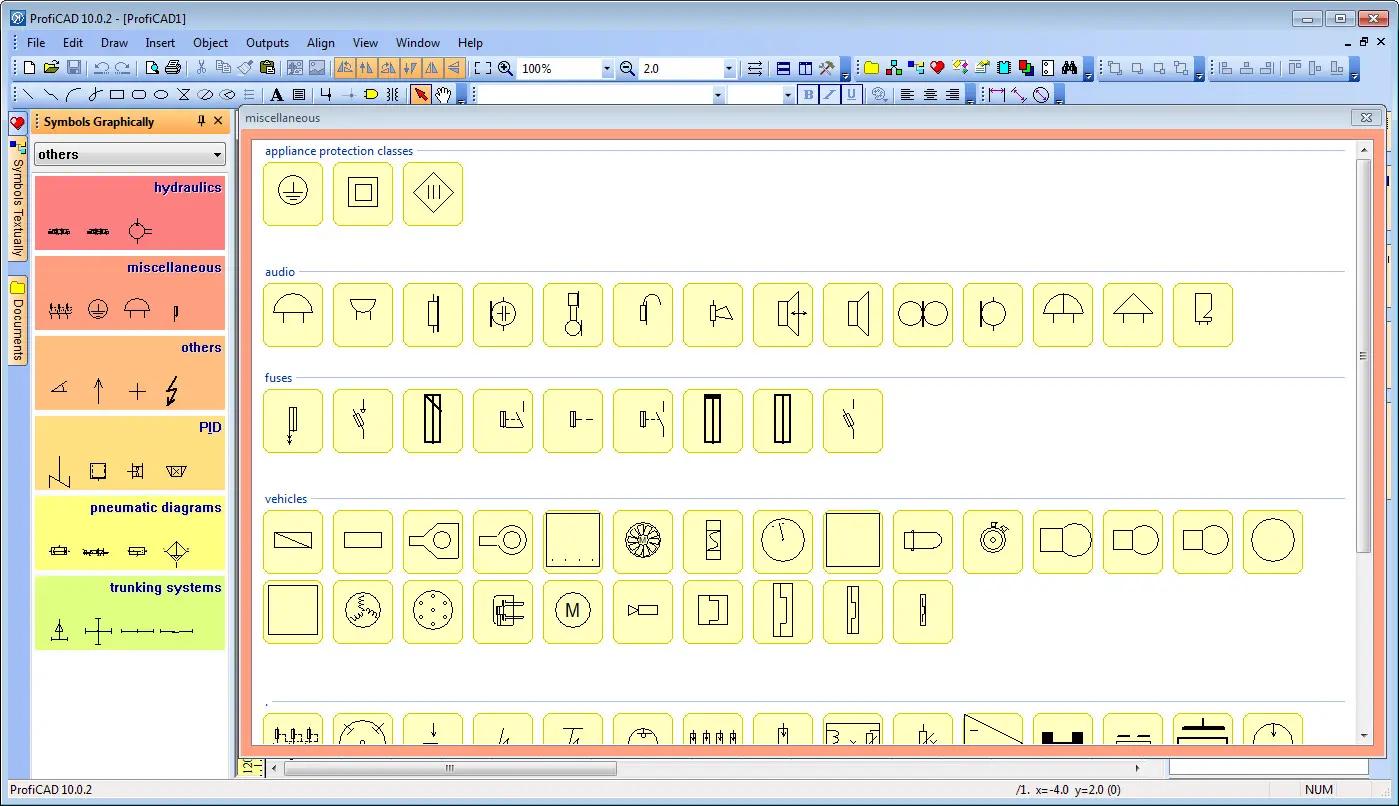
ProfiCAD 13.5.4 Multilingual | Size: 19.61 MB
Language: English


ProfiCAD is designed for drawing of electrical and electronic diagrams, schematics, control circuit diagrams and can also be used for pneumatics, hydraulics and other types of technical diagrams.

Features:
The easiest CAD for electrical circuits. Maximum care was paid to ergonomics and ease of use. Just place electrical symbols into the drawing and attach the wires.
Ships with more than one thousand symbols. You can easily create your own symbols in the symbols editor or have them drawn for you for a fee.
Supports automatic numbering of symbols, generation of netlists, lists of wires, bills of material, drawing of striped wires and further advanced features.
The program supports cross references between wires and between symbols belonging to one component (e.g. relay coil + contacts). A linked symbol on a different page can be accessed by clicking on the cross reference.

Software Requirements:
Windows 11 or later is required
Ensure that all Windows updates are installed.
It is not recommended to install any antivirus programs other than Windows Defender, as they may cause the program to malfunction.

HOMEPAGE:
Код:
https://www.proficad.com/

FREE DOWNLOAD LINKS:

Код:
https://rapidgator.net/file/c0a0ca7149b96e56c25512ea9a9481a4/ProfiCAD_13.5.4_Multilingual.rar

Код:
https://nitroflare.com/view/487C4059DF7D0EF/ProfiCAD_13.5.4_Multilingual.rar
 
a08355589efc5acab68ad05bbfea5529.jpg


Resolume Arena 7.26.0 rev 6593 (x64) Multilingual | Size: 1005.33 MB
Language: English


Resolume Arena Media Server. Arena has everything Avenue has, plus advanced options for projection mapping and blending projectors. Control it from a lighting desk and sync to the DJ via SMPTE timecode.

Live Video Mixing
Resolume puts you in charge. You can play your videos when you want, how you want. Forwards, backwards, scratch and adjust tempo to the beat. Mix and match your visuals quickly and easily and play Resolume like an instrument.

Intuitive Interface
Whatever your style is, Resolume offers you an easy interface to rock it. Use as little or as many videos and effects as you like. The only limit is your computer's raw power and your imagination.

From Your Local Club to Main Stage
You can play on any amount of screens. From a simple screen behind the DJ in your local club to main stage at Ultra. As long as your computer can recognise it as an output, Resolume will let you use it.

Audio Visual Playback
Resolume plays both audio and video files. Animate pixels and drop beats, combine any video file with any audio file.

Audio Visual Effects
Resolume has both audio effects and video effects. Use them separately or combine them to create exciting new audio visual effects.

Audio Analysis
Make clips and effects dance to the beat. Resolume can analyse audio to make any parameter bounce to the music.

Projection Mapping with Arena
Project video on any type of surface. Complex geometrical structures or whole buildings. Resolume does all the hard work, so you can concentrate on the important part: being creative.

Blend Projectors with Arena
With edge blending you can seamlessly project one beautiful widescreen image with two or more projectors. It can even wrap around for a full 360 degree experience.

Project on Cars, Buildings or Pumpkins
With Arena you can take on any size mapping project. From projecting on DJ booths to cars, buildings and LED mappings on giant stages like Ultra.

LED There Be Light
Think outside the screen and colour the lights too! With Arena you can send out colours to DMX fixtures and the lights will be in sync with your visuals.

Live Composite & Effects
Adjust the scale and position of your clips to suit your needs. Apply effects to drastically change the look of your video. Everything runs on the video card so you get the fastest performance and best image quality possible.

Real Time Rendering
Apply effects, blend, mix, cut and edit, everything happens on the spot.

Audio & Visual Plugins
All visual effects in Resolume are plugins and you can easily add more effects by download 3rd party plugins. You can even program your own using OpenGL. On the audio side you can use VST plugins to play your favourite effects.

Integrate With Other Apps
With Syphon on the Mac and Spout on Windows you can share visuals in real-time between Resolume and other apps running on the same computer. You can even program your own apps that integrate with Resolume.

All Hands on Deck
Liberate yourself from the mouse. Use your favourite MIDI controller or get physical with your iPhone via OSC.

Control from a Lighting Desk
You can control Arena from a lighting desk using DMX. So you can operate the lights and video with the touch of a fader.

What's New In Resolume 7?

UNDO
You now have a little guardian angel looking over your shoulder. Made a mistake? Just hit undo and you're back to where you were. Accidentally removed a deck instead of renamed it? Hit CTRL + Z and all your clips are back. Phew! Undo is also a great design tool. Feel free to experiment with the look of your clips, apply effects, change the colors and if you do not like what you see you can always go back with undo.

Color Eye Dropper
Pick a color from anywhere on your screen and apply it in your composition.

Multiple MIDI Devices
What's better than an APC40? Two APC40's! Connecting multiple MIDI devices was always possible but their MIDI signals would get mixed. Resolume can now distinguish MIDI coming from different devices making them work nicely together almost magically.

Improved Random Playback
Random playback was always a bit too . well . random. But you now have a lot more control over random playback. You determine how often it will jump to a new random position and how far it is allowed to jump.

Color Palette Animation
Pink Green Pink Green Pink Green. Pink Green Animate your favorite colors in a color palette.

Autopilot Loops
You can now determine how often a clip should loop before advancing to the next.

MetaBalls, Sine Wave, Spiral
They say it's more sustainable to buy local produce. So we worked together with The Hague based artist Darien Brito to create a few versatile generators so you can create even more visuals right within Resolume.

System Requirements:
- Windows 7 SP 1 or later, 64 bit
- AMD or NVIDIA graphics card with 256MB of VRAM
- 4GB RAM

Recommended Specs:
- Windows 10, 11
- i7 Processor, 2.6 GHz
- NVidia RTX 2070
- SSD
16GB Ram

HOMEPAGE:
Код:
https://resolume.com/

FREE DOWNLOAD LINKS:

Код:
https://rapidgator.net/file/095a16aa0e1eeb58ec8e12d398b9e1b1/Resolume_Arena_7.26.0_rev_6593_x64_Multilingual.rar

Код:
https://nitroflare.com/view/000245612E48273/Resolume_Arena_7.26.0_rev_6593_x64_Multilingual.rar
 
37adb8ad86a6bb007683af7e79184fb5.jpg


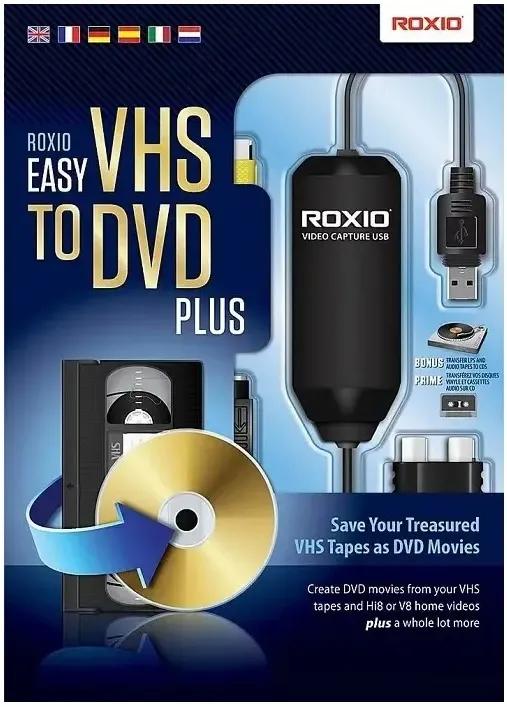
Roxio Easy VHS to DVD Plus 4.0.20 | Size: 1.68 GB
Language: English


Technology changes and time passes, but you can keep your memories current. Imagine the excitement among your friends and family when they unwrap the gift of video! Now you can quickly convert old VHS tapes to DVD or digital, right at home! It's easy. You'll find yourself equipped with all the tools you need to not only convert video, but to enhance it and even add titles. Then, when you're ready, simply export your revived video to digital, or burn it to disc complete with chapters and menus. Keep the memories alive!

1. Connect
Connect your VHS player or camcorder to your PC with an RCA cable* and the Roxio capture device.

2. Capture & Edit
Import and capture video from your device. Organize media, trim video,and add titles or transitions.

3. Share
Burn to DVD with chapters and menus or save to popular formats to share online or to device.

Easy VHS to DVD 4 Plus - VHS to DVD Converter
- Convert VHS to DVD or digital
- Capture video from your camcorder
- Burn videos to disc with menus and chapters
- Make quick edits, trim video, enhance color
- Add transitions and titles

Capture and convert videos
- Give your old videos new life and convert legacy footage to digital
- Convert VHS to DVD in a few easy steps or import video from your camcorder
- With your capture device connected, play your video on your camcorder or VCR to capture and convert your video to digital
- You can even convert your analog LPs and cassettes to audio CDs or MP3s
- Easily convert video and audio to your preferred formats

Edit and enhance videos
- VHS to DVD Plus is more than just a video converter; edit and enhance your video before you export and share it
- Make quick video edits and trim and cut video clips
- Stabilize shaky video
- Improve color balance and lighting with easy-to-use controls
- Add titles or rolling credits
- Add quick transitions between your videos
- Give your old videos new life and convert VHS to digital-even enhancing color before you export it to share!

A video you'll be proud to share
- Export video in your preferred format or burn it to disc
- Give your video the packaging it deserves and burn it to disc with chapters and customizable menus
- Choose from themed templates to build your disc menu
- Split movies across multiple discs
- Export video to digital files and share on social media
- Export videos to play back on popular mobile devices
- Revive old videos for family and new friends - give the gift of treasured stories!

The perfect gift - give your old videos new life
Videos bring back so many memories and remind us of long-forgotten treasured moments. From one-of-a-kind vacations to graduations, you can convert those VHS stories to DVD or digital, right at home! Imagine the faces of your parents, grandparents, siblings, and friends when you give them the gift of videos they haven't seen in years! Bring back those special memories, and give your old videos new life with Roxio Easy VHS to DVD - it's easier than you think to get started!

What are you waiting for? Convert VHS to DVD or digital:

Easier than you think
- Convert VHS to DVD or digital
- Convert camcorder to DVD or digital
- Convert LP or cassettes to digital

Preserve old videos
- No skill level required
- Start with a single VHS
- It makes the perfect gift

What are the Minimum System Requirements:
- Microsoft Windows 10, Windows 8, Windows 7 SP1
- MyDVD requires a 64-bit operating system
- Processor and RAM, 1.6 GHz processor and 512 MB RAM or more, or the minimum system requirements of the OS, whichever is higher
- 2 GB free hard drive space for installation
- One available USB 2.0 port
- Minimum screen resolution 1024x768

Input Formats:
- Video: MPEG2, AVC (H.264)
- Audio: WAV, mp3, ogg Vorbis, FLAC, WMA, AAC (m4a)

Output Formats:
- Video: DVD, ISO, MPEG2, AVC (H.264)
- Audio: WAV, mp3, ogg Vorbis, FLAC, WMA, AAC
- Disc: DVD, Mini DVD

Supported Languages:
English, Français, Italiano, Deutsch, Español, Nederlands, 日本語

HOMEPAGE:
Код:
https://www.roxio.com

FREE DOWNLOAD LINKS:

Код:
https://rapidgator.net/file/45e21e906984283a991e6961900e8e55/Roxio_Easy_VHS_to_DVD_Plus_4.0.20.rar

Код:
https://nitroflare.com/view/169A28C342333C4/Roxio_Easy_VHS_to_DVD_Plus_4.0.20.rar
 
79823c1f546e4d6e2a76d7164a818fba.png


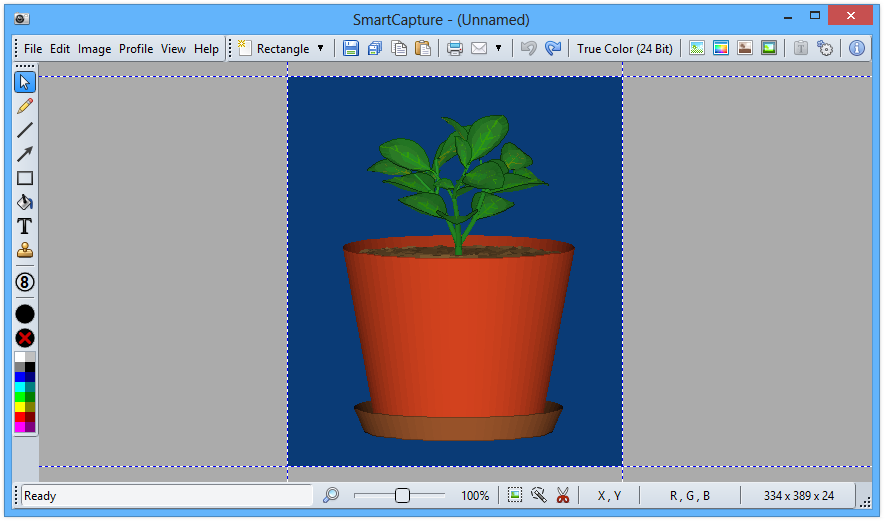
SmartCapture 3.23 | Size: 1.81 MB
Language: English


SmartCapture is the professional, easy to use screen capture tool for Windows! The clear and intuitive user interface and powerful features make it the ideal utility for everyone who wants to capture any contents of the Windows desktop. It can capture rectangular screen areas, whole objects, windows or screens and it can acquire images from imaging devices (e.g. scanners, digital cameras, etc.) The captured images can be cropped very easily and the color depth can be changed to any desired value from monochrome to true color.

Images can be printed, saved, copied to the clipboard, sent to an email recipient, MS Word or any image editor. SmartCapture supports all major file formats, image manipulations (e.g. resize, flip, rotate, color replace, invert, optimized color palettes, dither, etc.), multiple monitors, full automation, capture wizards, capture profiles, multi-level undo and much more. Many options allow the customization of all actions to individual user needs. SmartCapture is not only one of the most powerful screen capture utilities available - it was also designed to be the most user-friendly tool of all!

Key Features
Capture modes: rectangle, window, active window, screen, area, fixed size
Capture the mouse cursor
Multiple monitor support
Separate Hot-Keys for different capture modes
Twain data source support (scanners, digital cameras, etc.)
Image sources: capture, paste, load, acquire from Twain compatible data source
Image destinations: save, print, copy, email, edit, MS Word, send
Drag and Drop the "Save As" button to any folder, program, email, etc. to send the image to that program or location
Supported file formats: BMP, GIF, JPG, PNG, TIF
Photocopy
File conversion
User definable profiles for each task
Color conversion: 1, 4, 8, 24 Bit, color or grayscale
Color reduction: dither or nearest color, optimized or standard color palettes
Color replace, invert, auto invert
Brightness, contrast, gamma, saturation, hue
Image geometry: resize, flip, rotate, sharpen, soften
Print size support (dimensions and DPI)
Undo and redo (multi-level)
Automation, script support
Clipboard text accumulator, URL launcher
Print multiple images on one page (collect mode)
Header and footer on printed pages
Image editing and drawing functions
Silent installation and uninstallation for mass deployment
Now with Windows 10 support!

System requirements:
Supported operating systems (32 and 64 bit):
Windows XP
Windows Vista
Windows 7
Windows 8
Windows 10
Windows Home Server
Windows Server 2003
Windows Server 2008
Windows Server 2012

HOMEPAGE:
Код:
http://www.desksoft.com/

FREE DOWNLOAD LINKS:

Код:
https://rapidgator.net/file/9a812dbb3f2cd3c7e129273dd0f20987/SmartCapture_3.23.rar

Код:
https://nitroflare.com/view/0A58D1127F53C0A/SmartCapture_3.23.rar
 

15655c52983df43fd974defb6f95df9a.png


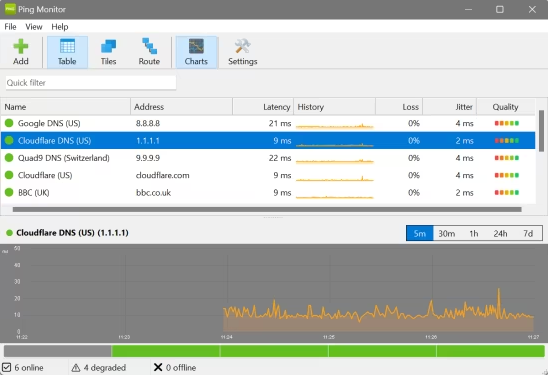
SoftPerfect Ping Monitor 26.4 | Size: 7.64 MB
Language: English


SoftPerfect Ping Monitor is a free desktop application that continuously monitors network hosts via ICMP ping. It tracks latency, packet loss and jitter in real time and presents the results in three flexible view modes: a sortable table with sparklines, a visual tile grid, and a hop-by-hop route trace. Configurable thresholds automatically classify host status as good, degraded or critical, while desktop notifications and optional sound alerts keep you informed of any changes.

The application runs on Windows, macOS and Linux, stores all data in a local SQLite database, and requires no external services or subscriptions.

Key features
Real-time monitoring - Continuous ICMP ping with configurable intervals, latency/loss/jitter tracking, and colour-coded status indicators.
Three view modes - Table view with sortable columns and sparklines, tile view with three size options, and route trace with hop-by-hop analysis.
Detailed graphs - Interactive latency charts with five time ranges (5 min to 7 days), plus 24-hour quality heat strips.
Customisable thresholds - Per-host or global latency thresholds (good/degraded/critical) with automatic status classification.
Desktop alerts - Notifications and optional sound alerts when hosts go offline, degrade, or recover.
Colour schemes - Seven built-in graph colour themes with full customisation, plus light/dark mode support.
Cross-platform - Windows (32/64-bit, ARM64), macOS, and Linux.

FREE DOWNLOAD LINKS:

Код:
https://rapidgator.net/file/9861544362a25bc63dfdfbe0fcf6f0d0/SoftPerfect_Ping_Monitor_26.4.rar

Код:
https://nitroflare.com/view/20E93AB14680A59/SoftPerfect_Ping_Monitor_26.4.rar
 
15862ba138e7651ed1f8831953e43e49.jpg


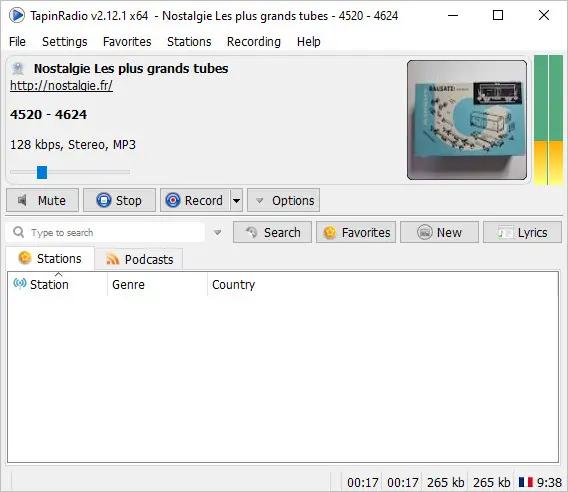
TapinRadio Pro 2.16.16 Multilingual | Size: 37.09 MB
Language: English


TapinRadio Pro is simple, fairly reliable and works most of the time. Plenty of stations to choose from and continuously updated. Supports most of the internet radio formats - mp3, wma, ogg, aac. Quick search. Graphic Equalizer. Scheduled recordings. Record what you are listening to - as separate tracks or continuously. Automatic checking for software and station listing (only if configured in settings). Show your favorites in groups. Alarm feature. Sleep timer to shutdown TapinRadio or even your computer!

Key features
· Plenty of stations to choose from
· Supports most of the internet radio formats - mp3, wma, ogg vorbis, aac+ and so on
· Quick and reliable search
· Smooth switching between stations
· Record what you are listening to - including separate song files
· Automatic checking for software and radio stations updates
· Show your favorites in groups

Operating System: Windows XP/Vista/7/8/10/11

HOMEPAGE:
Код:
http://www.raimersoft.com

FREE DOWNLOAD LINKS:

Код:
https://rapidgator.net/file/0645d9ede2bd802c3bbffcb5529bdd40/TapinRadio_Pro_2.16.16_Multilingual.rar

Код:
https://nitroflare.com/view/E3989AA443EBA2F/TapinRadio_Pro_2.16.16_Multilingual.rar
 
bf2ac4971e768b3850ca8f5819dec599.jpg


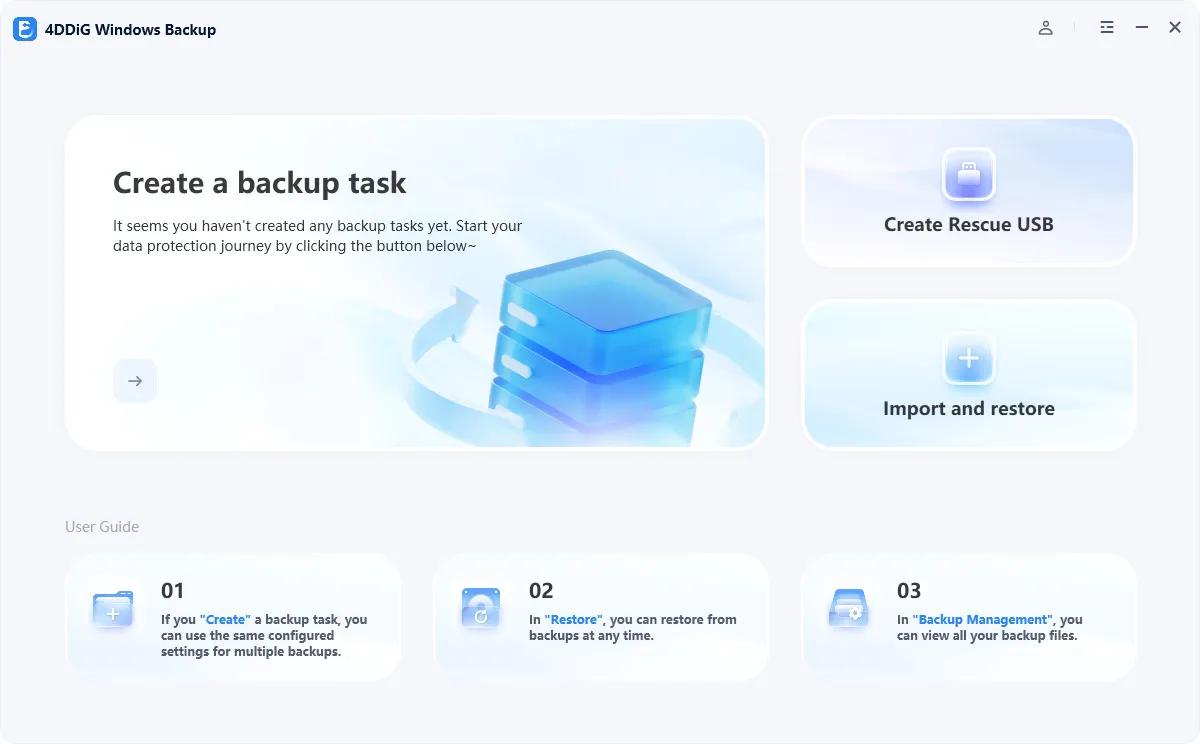
Tenorshare 4DDiG Windows Backup 1.1.2 Multilingual | Size: 70.59 MB
Language: English


Reliable Windows Backup Tool. Backup file, partition or computer to computer or external device. Full system backup to keep your system safe. Restore a specific partition from a full backup to save time. Task management dashboard to backup effortlessly.

One-click Backup Your Data
PC Backup - Simple Like That
Deletion, overwrite, corruption or sudden crash can cause data loss. To keep data safe, easily create a backup of your files, partition, disk or system with 4DDiG Windows Backup. Create a backup task, select what you want to backup and where you store the backup. Complete the backup process, and you can restore it at anytime.

File Backup
Backup important files for data safety. Restore files to original version whether it is lost, overwritten or corrupted.

Partition/Disk Backup
Keep a backup of partition or the whole disk to prevent data loss.

System Backup
Backup system so that you can restore to previous version when your computer crash or in bad performance.

System Supported
Operating System: Windows 11/10/8.1/8/7
Files System: NTFS, exFAT, and FAT16/FAT32

HOMEPAGE:
Код:
https://www.4ddig.net/4ddig-windows-backup.html

FREE DOWNLOAD LINKS:

Код:
https://rapidgator.net/file/5a8fb8580696781138df01e0607ccf7a/Tenorshare_4DDiG_Windows_Backup_1.1.2_Multilingual.rar

Код:
https://nitroflare.com/view/8D250BE97E703D8/Tenorshare_4DDiG_Windows_Backup_1.1.2_Multilingual.rar
 
c7985e9a88fbd0d3d6fc7ed64aeded97.jpg


Total Commander 11.57 RC6 Multilingual | Size: 10.94 MB
Language: English


Total Commander (former Wincmd) is a file manager for Windows similar to the Windows Explorer. But Total Commander uses a different approach: it has two fixed windows side by side like a well-known file manager for DOS.

Features:
Two file windows side by side
Multiple language and Unicode support
Enhanced search function
Compare files (now with editor) / synchronize directories
Quick View panel with bitmap display
ZIP, ARJ, LZH, RAR, UC2, TAR, GZ, CAB, ACE archive handling + plugins
Built-in FTP client with FXP (server to server) and HTTP proxy support
Parallel port link, multi-rename tool
Tabbed interface, regular expressions, history+favorites buttons
Thumbnails view, custom columns, enhanced search
Compare editor, cursor in lister, separate trees, logging, enhanced overwrite dialog etc.
Unicode names almost everywhere, long names (>259 characters), password manager for ftp and plugins, synchronize empty dirs, 64 bit context menu, quick file filter (Ctrl+S)
New: USB port connection via special direct transfer cable, partial branch view (Ctrl+Shift+B), and many imporvements to ftp, synchronizing and other functions
And many more!

Operating System:
32-bit version only (Windows 95 up to Windows 11, runs on 32-bit AND 64-bit machines!)
64-bit version only (Windows XP up to Windows 11, runs ONLY on 64-bit machines!)

HOMEPAGE:
Код:
http://www.ghisler.com/

FREE DOWNLOAD LINKS:

Код:
https://rapidgator.net/file/077c4c037cc86b4eb5510868e0ee10f7/Total_Commander_11.57_RC6_Multilingual.rar

Код:
https://nitroflare.com/view/C8A269DBF01E01E/Total_Commander_11.57_RC6_Multilingual.rar
 
57e3d68a5d4836f660354de09427d26f.jpg


Tower 12.0.556 | Size: 79.93 MB
Language: English


Over 100,000 developers and designers are more productive with Tower - the most powerful Git client for Windows.

Pull Requests
Create, merge, close, comment and inspect Pull Requests right from within Tower! Integrated into our clear, responsive, and powerful desktop interface, Pull Requests become so much more useful.

Quick Actions
The brand new Quick Actions dialog gives you superpowers: Give it a branch name and it will offer a checkout. Give it a file name and it will present the file's history. Give it a commit hash and it will show it in the commit history. Fast as lightning, easy as pie.

Interactive Rebase
Interactive Rebase is an incredibly powerful tool - but also quite awkward to use. But now, in Tower, it has become as easy as drag and drop!

Navigation
We've added so many new levels of detail in the new Tower. And at the same time, navigating Tower is now as simple as browsing the web: with the new "back" and "forth" buttons and the improved "Navigation Bar".

Commit Details
We've reworked countless areas in the new Tower. Let's take the brand new "Commit Details" view as an example: with the changeset on the left and lots of space for the diff on the right, you can inspect and review a commit in a more focused manner.

Reflog
A little-known feature, but one with enormous power: Reflog can restore lost commits or branches, move back to a rolled back state, undo a cherry-pick or commit. and is now available in Tower!

Operating System: Windows 7+

HOMEPAGE:
Код:
https://www.git-tower.com/windows

FREE DOWNLOAD LINKS:

Код:
https://rapidgator.net/file/72b2207314016271b8d84c4d55b639f2/Tower_12.0.556.rar

Код:
https://nitroflare.com/view/2EA416B32799939/Tower_12.0.556.rar
 
414a700188c74b7017d91afc844d8b0f.png


TreeSize Professional 9.8.0.2300 Multilingual | Size: 111.33 MB
Language: English


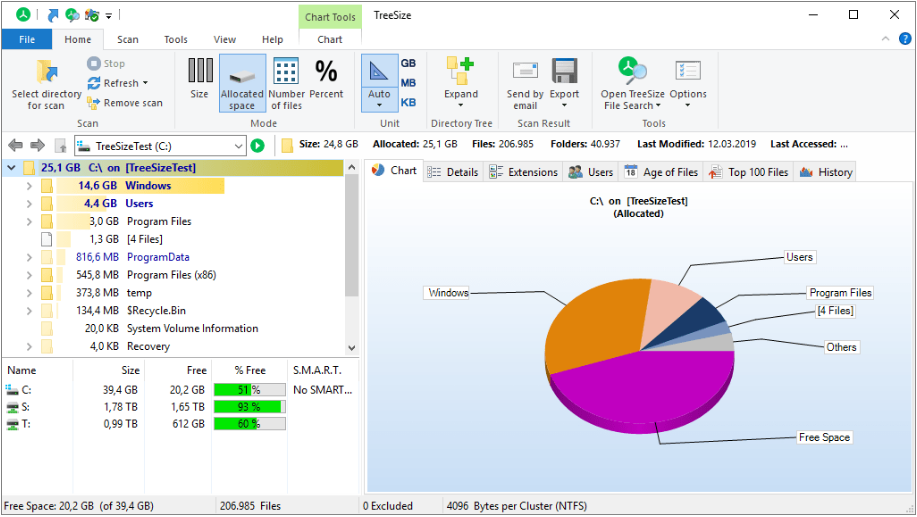
TreeSize Professional is a powerful and flexible hard disk space manager for all windows. Find out which folders are the largest on your drives and recover megabytes on your disks. TreeSize Professional shows you the size, allocated and wasted space, the number of files, 3D charts, the last access date, the file owner and permissions, the NTFS compression rate and much more information for several folders or drives you choose. It also lets you search drives, entire servers or the entire network for old, big, temporary and duplicate files. The search results can be moved, deleted or exported. The application has an intuitive Explorer-like user interface, it is fast and multi-threaded and supports Unicode and scheduled scans. You can print detailed reports or export the collected data to Excel and to an HTML, XML or text file. TreeSize Professional can be started from the context menu of every folder or drive.

Why TreeSize Professional:
- Manage and clean up disk space efficiently
- Visualize disk usage
- Detailed analysis, right down to the lowest directory levels
- Find and remove redundant files
- Numerous export and reporting options
- The versatile duplicate file search

Manage disk space and scan your hard disks
Find out which folders are the largest on your drives and recover precious disk space. Use TreeSize as a hard disk cleanup tool: find space hogs and remove them. Graphical analyses provide a quick visualization of disk space usage. TreeSize Professional shows you folder size and allocated disk space as well as owner and permissions, the last access date, the NTFS compression rate, and much more information for selected folders or drives.

Search for Redundant Files
The integrated versatile file search helps you find old, big, temporary, and duplicate files on drives, entire servers or the entire network. Search results can be moved, deleted or exported to a ZIP file.

Print, Export, or Compare Results
You can print detailed reports and charts or export the collected data to many different formats such as XML, XLS, TXT, CSV and many more. Compare XML reports or take shapshots of your disk space usage to track its development over time.

The application has an intuitive Explorer-like user interface and supports drag and drop operations. It is fast, multi-threaded, and supports Unicode- and NTFS-specific features. TreeSize Professional can be started from the context menu of every folder or drive.

Efficient Disk Space Management from all perspectives
- See the size of all folders including their subfolders and break it down to the file level.
- Visualize disk usage in the pie or bar chart.
- Tree maps visualize hierarchies and sizes of subfolders in the selected directory.
- Detailed view with single files and additional information (e.g. date of last access).
- Statistics about file types and file owners for every branch.
- Filter the file system tree on the left by a certain user or file type.
- See a list of the 100 largest files.
- Distribution of occupied disk space by file age.
- Scan FTP, WebDAV, and SharePoint servers.
- Disk Space Management on smartphones and mobile devices.

Versatile File Search
- Integrated file search.
- Fully customizable file search.
- Archive, copy, or move the results of the TreeSize File Search, for instance lar, old, or temporary files or files of a certain type.
- Search multiple drives, whole servers and even your entire network neighborhood.
- Search results can be exported, moved, deleted or passed to any executable file or script.
- TreeSize offers a powerful duplicate file search, optionally with MD5 or SHA256 checksums. TreeSize also enables you to easily deduplicate files using hardlinks.

Exporting and Reporting
- TreeSize enables you to export scan results (showing the directory structure) to many different formats such as Excel, XML, HTML, text/CSV file, clipboard, or email.
- Export a list of all files in the scanned folder and its subfolders, for example for use in a database.

Track Growth
- Save the data to an XML file and load it again later.
- See which folders have grown: Compare a saved XML file to a current version of the file system branch, TreeSize Professional displays the difference between the two scans.
- Take snapshots of the current state of disk space usage and compare them with snapshots Windows takes automatically.

Customized Analyses & Views
- Configure displayed columns for the details view, Excel export, text file and printed reports.
- Include and exclude certain files or folders in your scans.

Scheduled Scans
- Command line options allow automatic and scheduled scans of your hard disk (e.g. overnight) and generating reports.
- Comfortable interface simplifies creation and editing of scheduled scans and exports as Windows tasks.

High Performance thanks to Multithreading
- Browse the results during scanning.
- Scan and view several folders at the same time.
- Automatic adjustment of the number of threads that are used for a scan.

Full NTFS Support
- Unicode file and folder names are supported.
- File based NTFS compression.
- Hardlinks and Alternate Data Streams (ADS).
- File paths longer than 255 characters will be found and processed correctly.
- Analyse NTFS permissions.

Perfect Integration with the Windows Explorer
- Explorer context menu supported inside the TreeSize window.
- TreeSize Professional can be started from within the Windows Explorer.
- Drag and Drop is enabled.
- On a Windows Core Server TreeSize can serve as a graphical user interface.

Full Network Support
- TreeSize Professional offers full support for network drives and scans UNC paths like Servershare.

Compatible with:
Windows 11
Windows 10
Windows 8.1
Windows Vista / 7 / 8
Windows Server 2012 R2
Windows Server 2008 - 2016
Windows Server 2019 - 2022
(64 Bit)

HOMEPAGE:
Код:
https://www.jam-software.de/treesize/

FREE DOWNLOAD LINKS:

Код:
https://rapidgator.net/file/4db64e1e7345f5ee634459cd335af0b5/TreeSize_Professional_9.8.0.2300_Multilingual.rar

Код:
https://nitroflare.com/view/8201B15EB3AE37F/TreeSize_Professional_9.8.0.2300_Multilingual.rar
 
d9dec62867251e831e2e4c556228cb63.jpg


VovSoft AI Automator 1.1 | Size: 7.28 MB
Language: English


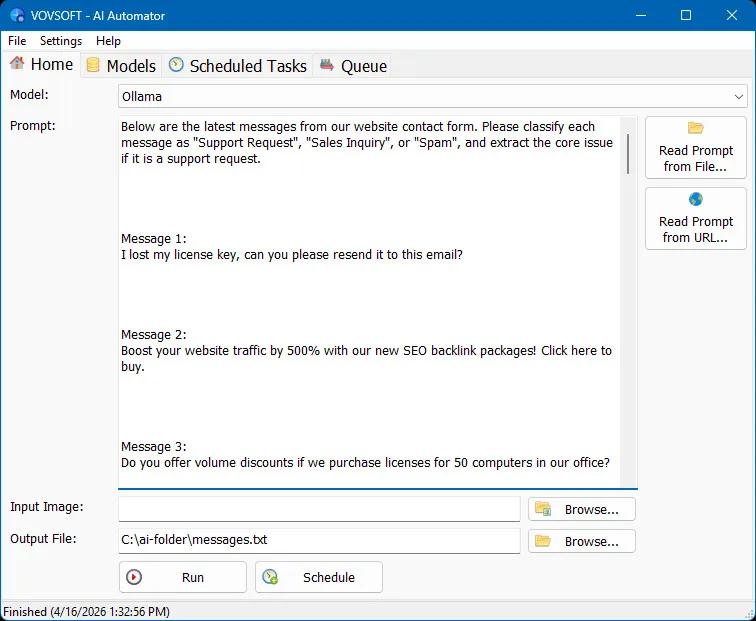
Vovsoft AI Automator is a lightweight Windows utility designed to manage, schedule, and execute your language model workflows directly from your desktop. Let AI do the work. Your data stays home. Built with a local-first philosophy, this tool ensures your personal information and files remain securely on your own computer. You maintain absolute control over your API keys, prompts, and output files without relying on intrusive web platforms or being tied to mandatory subscription fees.

Whether you are leveraging the power of your local hardware or tapping into cloud intelligence, the software adapts to your specific development and processing needs. You can run automated prompts completely offline using Ollama, taking full advantage of your graphics card for maximum privacy and rapid local execution. For tasks requiring different capabilities, the program seamlessly connects to industry-leading cloud APIs, providing comprehensive support for OpenAI, Anthropic Claude, and Gemini. This flexibility allows you to choose the exact model required for every unique query.

AI Task Scheduler
Setting up recurring queries is completely effortless. You can assign tasks to your preferred AI to run at specific time intervals, automating routine research, regular content generation, or periodic data extraction. By configuring the execution timer, the software operates silently in the background, continuously interacting with your chosen language models and saving the results directly to your local drive. This transforms repetitive API interactions into a smooth, completely unattended process.

Batch Prompt Scheduler
Processing large volumes of information is equally straightforward. The built-in queue system allows you to load extensive batches of text prompts or image inputs to be processed sequentially. Instead of manually waiting for one response to finish before sending the next, you can line up hundreds of tasks and step away. The program will systematically route each input to Ollama, Claude, Gemini, or OpenAI, and accurately compile the generated outputs into your specified destination files.

Streamlined Simplicity
The true advantage of this utility lies in its absolute simplicity. While complex automation platforms like n8n or AI agents like OpenClaw offer broad capabilities, they often introduce unnecessary overhead. They typically require configuring and maintaining dedicated servers or cloud instances, which completely contradicts a private, local-first workflow. Furthermore, because of their complex agentic background processes, they can consume massive amounts of tokens, quickly making API usage unexpectedly pricey. In contrast, Vovsoft AI Automator operates entirely as a standard desktop application on your existing Windows machine. It executes exactly what you schedule with complete transparency, ensuring predictable token usage without any hidden server costs or complicated infrastructure to manage.

HOMEPAGE:
Код:
https://vovsoft.com/software/ai-automator/

FREE DOWNLOAD LINKS:

Код:
https://rapidgator.net/file/1a0b1f0d356feaa45ad380cfb5b3ad4d/VovSoft_AI_Automator_1.1.rar

Код:
https://nitroflare.com/view/09709DA7884B338/VovSoft_AI_Automator_1.1.rar
 
97f8fbced77429ca6a46df552aa0cbf3.jpg


WinRAR 7.21 (x64) Final | Size: 3.81 MB
Language: English


WinRAR is a powerful archive manager. RAR files can usually compress content by 8 percent to 15 percent more than ZIP files can. WinRAR is a powerful compression tool with many integrated additional functions to help you organize your compressed archives. It can backup your data and reduce size of email attachments, decompress RAR, ZIP and other files downloaded from Internet and create new archives in RAR and ZIP file format.

WinRAR puts you ahead of the crowd when it comes to compression. By consistently creating smaller archives, WinRAR is often faster than the competition. This will save you disc space, transmission costs AND valuable working time as well. WinRAR is ideal for multimedia files. WinRAR automatically recognizes and selects the best compression method. The special compression algorithm compresses multimedia files, executables and object libraries

Features of WinRAR:
- WinRAR provides complete support for RAR and ZIP archives and is able to unpack CAB, ARJ, LZH, TAR, GZ, UUE, BZ2, JAR, ISO, 7Z, XZ, Z archives.
- WinRAR offers a graphic interactive interface utilizing mouse and menus as well as the command line interface.
- When you purchase WinRAR license you are buying a license to the complete technology, no need to purchase add-ons to create self-extracting files, it's all included.
- WinRAR is easier to use than many other archivers with the inclusion of a special "Wizard" mode which allows instant access to the basic archiving functions through a simple question and answer procedure. This avoids confusion in the early stages of use.
- WinRAR offers you the benefit of industry strength archive encryption using AES (Advanced Encryption Standard) with a key of 256 bits.
- WinRAR supports files and archives up to 8,589 billion gigabytes in size. The number of archived files is, for all practical purposes, unlimited.
- WinRAR offers the ability to create self-extracting and multivolume archives.
- Recovery record and recovery volumes allow to reconstruct even physically damaged archives.
- WinRAR features are constantly being developed to keep WinRAR ahead of the pack.

Language : English

Operating System: Windows all

HOMEPAGE:
Код:
http://www.rarlab.com/

FREE DOWNLOAD LINKS:

Код:
https://rapidgator.net/file/cd0640fc65e265e5a5ecedfdf8206778/WinRAR_7.21_x64_Final.zip

Код:
https://nitroflare.com/view/875F995D37B1874/WinRAR_7.21_x64_Final.zip
 
54bdcc4a21ffe7f1445a681a95c7374e.png


WindowManager 10.26.2 | Size: 1.36 MB
Language: English


WindowManager helps you to improve your work flow by remembering and restoring the position and size of your programs and windows. Many programs don't remember their position and size between sessions and even Windows Explorer does not restore windows to their last position under Windows 7 or higher.

This is where WindowManager steps in and makes sure your windows are placed exactly where you want them every time you open them. WindowManager even allows you to lock the position and size of any window, so that it will always open at the same spot no matter where you move it. The window handling is fully customizable and you can set up special rules for your favorite or most frequently used windows.

You can also make WindowManager send keystrokes or mouse-clicks to a program when its window is opened, run additional programs and other advanced actions. With WindowManager, you can also minimize most windows to the system tray. Furthermore, WindowManager supports and enhances the virtual desktop functions of Windows 10 and 11 (switching desktops with Hot-Keys, individual desktop icons, etc.)

Features:
Remembers and restores the position and size of your programs and windows
Supports explorer windows, programs, dialogs, etc.
Configurable rules for moving or sizing only, activating, closing windows, etc.
Advanced actions for typing text into windows, pressing keys, clicking mouse buttons, etc.
Can be configured to work like "Save Workspace" for Excel users
Multi-monitor support
Multiple profiles
Powerful trigger system for profile switching
Hot-key support
Minimize windows to the system tray area
Virtual desktop support & enhancements (hot-keys, individual desktop icons, etc.) for Windows 10 and 11
Fully customizable
Silent installation and uninstallation for mass deployment
Especially designed for Windows 10 and 11

System Requirements:
Supported operating systems (32 and 64 bit):
Windows Vista
Windows 7
Windows 8
Windows 10
Windows 11
Windows Server

HOMEPAGE:
Код:
https://www.desksoft.com/

FREE DOWNLOAD LINKS:

Код:
https://rapidgator.net/file/8c9119f70756f838e16c1ff4f7f5d5fc/WindowManager_10.26.2.rar

Код:
https://nitroflare.com/view/53AF3DDABCF85C7/WindowManager_10.26.2.rar
 
0cbfe2c2d56fba161151b9a63ff5ca9b.jpg


WizFlow Flowcharter Professional 7.52.2222 | Size: 6.15 MB
Language: English


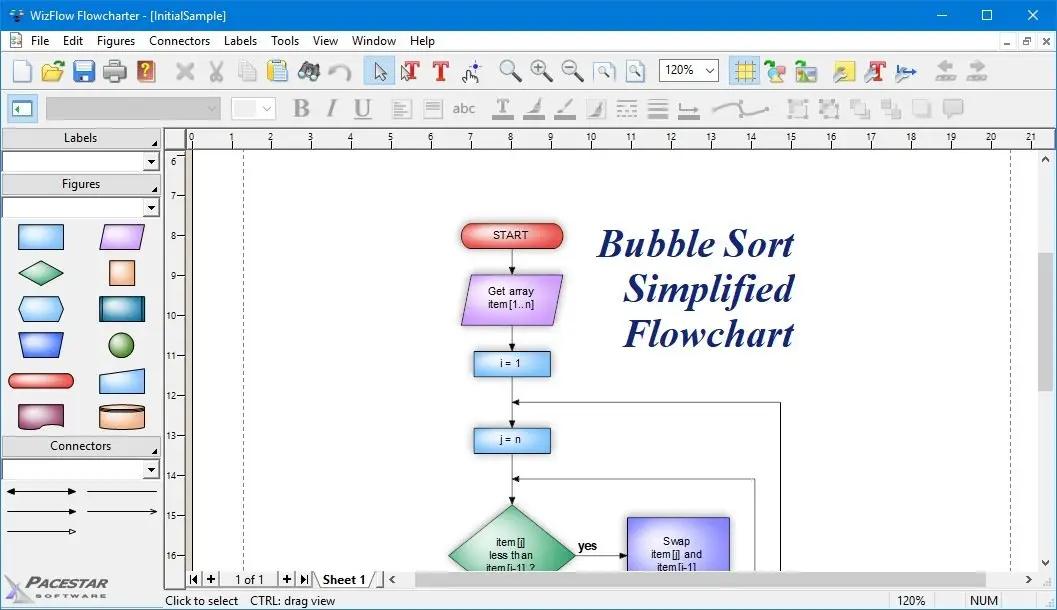
WizFlow Flowcharter is an easy-to-use, feature-rich, flowcharting and diagram drawing tool for Windows. WizFlow lets you define shape "styles" using over a hundred predefined shapes and arrowheads. Save your styles in diagram templates to establish your own diagramming methods. WizFlow comes with complete flowcharting templates to get you started.

WizFlow can create flowcharts and similar diagrams with minimal effort. As you draw your diagram, WizFlow connects lines to figures and attaches labels to lines. It remembers these relationships and adjusts automatically when you move objects around. It can also adjust the size of a shape when you add text to it.

Features:
- Includes hundreds of pre-defined shapes and symbols organized in the Figure Symbol Gallery.
- Auto-save and Auto-backup. Choose to save backup versions whenever you save a file, or have a backup file saved periodically. Fully programmable.
- Includes several pre-defined diagram templates for flowcharts and block diagrams.
- Attach / detach figures in "flows". Drop a symbol onto a line and the symbol merges into the flow automatically.
- Create your own styles combining the attributes, shapes, colors, and behaviors of your own figures
- New diagram wizard lets you select sizes, color schemes, and initial fonts with great convenience.
- Create custom diagram templates to represent your own diagramming methodologies and to store your custom symbol libraries.
- Enable "jogs" (also called jumps or crossovers) to clarify line routing.
- Full zoom and scrolling capability with dozens of intuitive and convenient features for easy navigation around even the most complex diagrams
- Add freeform text labels anywhere on your diagram or add specialty labels described below. You can control text justification, color, point size, font, bold, italic, underline, subscript, superscript, and so on.
- Connectors can have many different lines styles, colors, curves, patterns, end symbols (arrows), and designs. Plus you can select flow symbols that are drawn along the path of the line.
- Connector labels attach to a line and adjust when the line moves.
- Connectors can have many possible terminators (arrowheads). Many are included in the End Symbol Gallery.
- Flow labels attach to the point where a line meets a symbol and adjust automatically when either the symbol or the line moves.
- Snap grid for precise placement. The snap grid can be visible or invisible, enabled or disabled, or customized to different sizes for any diagram.
- Branch labels such as 'yes' and 'no' in flowcharts can be snapped into place in a single step and remain attached to their respective symbol/line.
- Create large multi-page wall posters. Pages can be managed separately or cropped and attached to create a poster.
- Line spacing is programmable. Select from many line spacing options.
- Group objects to create larger objects. Features include Group, Ungroup, Ungroup All, and Regroup.
- Alignment and arrangement tools. In addition to the usual aligning, centering, and spacing features, the program also performs subtle behind-the-scenes steps to help you keep your diagram organized and looking good.
- Container symbols show divisions of larger diagrams by creating a "box around" a number of other symbols. The container also lets you work with the included symbols as a unit.
- Copy or export diagrams to other programs such as Microsoft Word with OLE. Simply copy and paste into most any other software, or link and embed into any OLE-enabled program for full control. Export formats include WMF, EMF, BMP, and JPG.
- English (inches) or metric (millimeters) measurement units
- Copy or export diagrams to other programs such as Microsoft Word with OLE. Simply copy and paste into most any other software, or link and embed into any OLE-enabled program for full control. Export formats include WMF, EMF, BMP, and JPG.
- Any figure or label can include text memos which show in text balloons
- Full install/uninstall. Does not modify your operating system files!
- Import external graphics and clip-art to use in your diagrams. Supports EMF, WMF, BMP, and JPG files.
- Comprehensive online help.

HOMEPAGE:
Код:
http://www.pacestar.com/

FREE DOWNLOAD LINKS:

Код:
https://rapidgator.net/file/f2bb28a3dd6ce95af10acda759c37ac3/WizFlow_Flowcharter_Professional_7.52.2222.rar

Код:
https://nitroflare.com/view/44AEF305F1B6B80/WizFlow_Flowcharter_Professional_7.52.2222.rar
 
3af5de9c62a44f34568e4de08557a1a2.jpg


XL-Connector 3.6.66.0 | Size: 315.7 MB
Language: English


XL-Connector is a popular plugin that safely integrates Excel and Salesforce to seamlessly export, import, refresh and transform data with a lightning fast-api connection. It offers Salesforce admins a comprehensive toolbox that easily performs data and metadata management operations in a familiar Excel environment.

Your ideal tool for Salesforce data management in Excel

Export from Salesforce to Excel
Pull data from an existing Salesforce report or build your own SOQL query directly into Excel.

Import data into Salesforce
Manage and transform your data in Excel, and push it back with one click.
- Use all the amazing Excel tools on your Salesforce data: pivot tables, charts, and formulas.
- Perform any data operation with no row limits!
- Ideal Salesforce data cleansing tool
- Access great metadata management tools

Get the most valuable Salesforce plugin for excel
- Saves hours and days of data-loading.
- Image not found
- Private and secure.
- Image not found
- Boosts team productivity.
- Amazing features for data manipulation.
- Image not found
- Improves the quality of your data by keeping it up to date.

Perform and automate any data operation in bulk
Mass create, update and upsert opportunities, accounts, leads, quotes and other SFDC objects with XL-Connector. Become a master of bulk updates and upserts in Salesforce with just a click of a button!

Manage your Salesforce duplicate records
Efficiently merge Salesforce Accounts, Contacts, and Leads in bulk (available in the Enterprise Admin edition).

Delete your Salesforce records in bulk
Mass delete records in Salesforce and keep your data fresh and updated.

Perform your Salesforce Data Migration with the help of XL-Connector
Safely migrate large amounts of data.

XL-Connector: Your Ideal tool for Salesforce metadata management.
XL-Connector is the only Excel to Salesforce connector that provides a complete assortment of metadata management tools that will hugely boost the productivity of Salesforce admins.

These tools enable management of such things as fields, validation rules, processes, picklists, security settings, custom metadata and much more. Tasks that normally take days, like updating the descriptions and help texts of data fields, will take minutes with XL-Connector.

Other XL-Connector great features you will appreciate

Super intuitive user interface
A climax between simplicity and comprehensiveness, The user interface is very friendly and presents a minimal learning curve.

Security by design
XL-Connector is a locally installed app that doesn't send your data anywhere outside of your secure environment. There's no cloud component to it, so the data travels directly between your PC and Salesforce instance over a secure encrypted channel.

HOMEPAGE:
Код:
https://www.xappex.com/

FREE DOWNLOAD LINKS:

Код:
https://rapidgator.net/file/3051d3e47c5345938a98560fde70d0a6/XL-Connector_3.6.66.0.rar

Код:
https://nitroflare.com/view/525C7D492F88642/XL-Connector_3.6.66.0.rar
 
040d32e2c182c15c961c0dd8298bfd6a.jpg


XYplorer 27.20.1300 Multilingual | Size: 7.34 MB
Language: English


XYplorer is a file manager for Windows. It features tabbed browsing, a powerful file search, a versatile preview, a highly customizable interface, optional dual pane, and a large array of unique ways to efficiently automate frequently recurring tasks. It's fast, light, and portable.

It's Tabbed
Tabs let you switch between folders most easily. Drag them around, hide them, lock them, name them, or drop files onto them. The tabs remember their configuration individually and across sessions. On top of this you get tabsets and dual pane.

t's Functional
XYplorer has been designed to make you faster. Numerous usability enhancements in an attractive interface help to streamline your workflow and increase your efficiency. You will definitely save a lot of time.

It's Scriptable
Yes, you can program this app. Individual solutions for individual tasks. No plugins needed, scripts run out-of-the-box. Even beginners can benefit from this feature since many ready-to-use scripts are available in the forum.

It's Fast
Speed has always been a major design goal with XYplorer. The code is constantly optimized for performance, zero tolerance for slowness. On top of that the app uses very little RAM, the executable is light (7 MB), and it loads almost instantly.

It's Reliable and Robust
You can trust XYplorer. It works as intended and expected, and is very hard to destroy. Any issues are immediately attended and usually fixed within hours. A large community is closely watching the development and permanently testing the frequent beta versions.

It's Customizable
You can fine-tune the app to look and behave exactly as you want it. This ranges from fonts and colors to custom toolbar buttons and even file icons and program associations. And every bit of it is fully portable. Even the dark mode.

It's Responsive
Your customer voice is listened to and taken seriously, most of the time you get instant feedback, and your wish might actually get implemented sooner than you'd think.

Operating System:
Windows 11, Windows 10, Server 2019, Server 2016, 8.1, 8, Server 2012, 7, Server 2008, Vista, XP, Server 2003; 32-bit and 64-bit versions.

HOMEPAGE:
Код:
https://www.xyplorer.com/

FREE DOWNLOAD LINKS:

Код:
https://rapidgator.net/file/5ff5ab1f873233c4e013451b7e5596f8/XYplorer_27.20.1300_Multilingual.rar

Код:
https://nitroflare.com/view/BA73CDFB619184A/XYplorer_27.20.1300_Multilingual.rar
 
Назад
Сверху Снизу