








All mitsumi'1s Applications !! (updated daily)

08f05664d9e745904f9ad067cea42ea5.webp

Free Download All Video Downloader Pro 10.5.1 (x64) | 158 Mb
All Video Downloader Pro is a Windows application for downloading and converting online videos from video-sharing websites. It supports multiple download tasks, resolution choices, playlist processing, subtitle downloads, and audio extraction, while also providing conversion tools for downloaded media.
The software is designed for users who need to save online videos for offline playback or convert media into formats suitable for computers and mobile devices. Its download manager supports pause and resume operations, scheduled tasks, simultaneous downloads, and drag-and-drop URL handling.


Software Overview
All Video Downloader Pro can download video content from YouTube, Facebook, Dailymotion, and hundreds of other video-sharing websites. Supported quality levels include 4K, 2K, Full HD, HD, and lower resolutions, allowing users to select an appropriate balance between image quality and file size.
The application also includes media conversion functions for downloaded files and local video or audio content. It can extract audio streams into several formats, apply ready-made format presets, and optimize media for a range of supported devices.

Key Features
  • Download videos from hundreds of video-sharing websites.
  • Support video resolutions including 4K, 2K, 1080p, 720p, 480p, 360p, and 240p.
  • Download videos in 3D formats where supported by the source.
  • Use multithreading to accelerate downloads.
  • Download audio directly from YouTube and save it as MP3.
  • Download complete YouTube playlists.
  • Process multiple video downloads simultaneously.
  • Download subtitles in selected languages and formats.
  • Pause and resume interrupted downloads.
  • Preview incomplete videos while they are being downloaded.
  • Convert downloaded videos to multiple video formats.
  • Extract audio from video files into MP3, WAV, WMA, AC3, AAC, OGG, M4A, FLAC, MP2, and other formats.
  • Convert local video and audio files between supported formats.
  • Use predefined video and audio conversion presets.
  • Customize output video and audio settings.
  • Optimize downloaded media for supported mobile and gaming devices.
  • Schedule downloads to begin at a specified time.
  • Automatically shut down the computer after scheduled downloads finish.
  • Start downloads by dragging video URLs into the application's Drop Box.
  • Play downloaded media through the included All Video Player.

Why Choose All Video Downloader Pro
All Video Downloader Pro combines online video downloading with local media conversion and playback tools. It is suitable for users who regularly save online videos, process playlists, extract audio, or convert media for playback on different devices.
Its download management features are useful for handling multiple files and interrupted transfers, while the built-in conversion and device presets provide additional options for preparing downloaded content for offline use.

System Requirements
Operating System: Windows 7, 8/8.1, 10, 11

Frequently Asked Questions

Which websites does All Video Downloader Pro support?
The software supports YouTube, Facebook, Dailymotion, and hundreds of other video-sharing websites.

Can All Video Downloader Pro download complete YouTube playlists?
Yes. It can process an entire YouTube playlist and download its videos automatically.

Can the software extract audio from videos?
Yes. Audio can be extracted from videos and saved in formats including MP3, WAV, WMA, AC3, AAC, OGG, M4A, FLAC, and MP2.

Does it support interrupted downloads?
Yes. Downloads can be paused and resumed, allowing interrupted transfers to continue without starting again from the beginning.

Can downloaded videos be converted?
Yes. The application can convert downloaded videos and local media into a range of video and audio formats, including MP4, FLV, WMV, MOV, AVI, MKV, MPG, OGV, TS, VOB, WEBM, and others.

Home Page

Код:
http://www.kotato.com/

Product Information
  • Software Name: All Video Downloader Pro
  • Version: 10.5.1
  • Architecture: x64
  • Languages: English
  • License type: Full Version
  • File Size: 158 Mb
Rapidgator
Код:
https://rapidgator.net/file/d0d0a862340535d30c458667a156af01/57iyd.All.Video.Downloader.Pro.10.5.1.x64.rar.html

Код:
https://nitroflare.com/view/40DC42891127F7A/57iyd.All.Video.Downloader.Pro.10.5.1.x64.rar
 
e2e6f2cadf4d4a0e7d78e385587fc0a2.webp

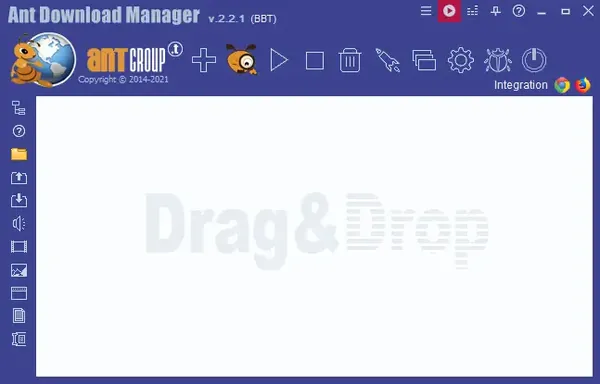
Free Download Ant Download Manager Pro 2.17.7.96580 (x64) Multilingual | 61 Mb
Ant Download Manager Pro is a Windows download manager designed to handle Internet file transfers, streaming media, and P2P downloads. It integrates with popular web browsers to capture downloadable links automatically while also supporting manual, batch, queued, and scheduled downloads.
The application uses multiple download streams to improve transfer performance and can resume interrupted downloads after connection problems, system shutdowns, or other temporary failures. It also provides tools for capturing audio and video streams, extracting audio tracks, and converting them to MP3.


Software Overview
Ant Download Manager Pro supports HTTP, HTTPS, FTP, and FTPS transfers as well as streaming protocols used for online audio and video. Its download engine can automatically handle temporary network errors, reconnect when necessary, and continue interrupted transfers when the server supports resuming.
The browser integration works with Chromium-based browsers and Firefox-based browsers, allowing download and media links to be captured directly from supported pages. Users can also operate the application independently by entering links manually, dragging URLs into the interface, or importing lists for batch processing.

Key Features
  • Accelerate downloads using multiple simultaneous streams.
  • Resume interrupted downloads after connection or network problems.
  • Automatically handle temporary download errors and server response delays.
  • Capture downloadable files and media links from supported browsers.
  • Download files individually, in batches, or through download queues.
  • Schedule downloads for a specified time.
  • Support HTTP, HTTPS, FTP, and FTPS protocols.
  • Support M3U8, MPEG-DASH, and VIMEO-STREAM media protocols.
  • Download streaming audio and video from supported websites.
  • Extract audio tracks from video files and convert them to MP3.
  • Support BitTorrent peer-to-peer downloads.
  • Support proxy servers, redirects, cookies, and authorization.
  • Integrate with Microsoft Edge, Google Chrome, Mozilla Firefox, and supported browser clones.
  • Operate independently without browser extensions.
  • Support premium link generators and debrid services.
  • Organize downloads using categories and priorities.
  • Record download activity in a download log.
  • Adjust download speed and task priorities.
  • Provide event sounds and a built-in CHM user guide.
  • Offer multilingual interface support.

Why Choose Ant Download Manager Pro
Ant Download Manager Pro is suitable for users who regularly transfer large files, manage multiple downloads, or need to resume interrupted transfers. Its browser integration can capture links directly while its standalone operation allows URLs to be added manually or imported in batches.
The combination of download queues, scheduling, streaming capture, P2P support, and multiple transfer protocols makes it suitable for handling different types of Internet downloads from a single application.

System Requirements
Windows (x32/x64) 7, 8, 10, 11
Google Chrome or clones: 360Chrome, Brave, CCleaner, Chedot, CocCoc, Comodo Dragon, MS EDGE, Maxthon6, Opera, Slimjet, SRWare Iron, Torch, UC Browser, Vivaldi, Yandex, etc.
Mozilla FireFox or clone: Comodo IceDragon, Waterfox, etc.

Frequently Asked Questions

Can Ant Download Manager resume interrupted downloads?
Yes. It can resume interrupted transfers caused by connection loss, network problems, computer shutdowns, or unexpected power outages when the server supports resuming.

Which browsers can integrate with Ant Download Manager?
It supports Microsoft Edge, Google Chrome, Mozilla Firefox, and numerous Chromium- and Firefox-based browser variants listed in the system requirements.

Does Ant Download Manager support streaming media?
Yes. The software can capture and download supported audio and video streams and works with protocols including M3U8, MPEG-DASH, and VIMEO-STREAM.

Can Ant Download Manager download torrents?
Yes. The application supports the BitTorrent peer-to-peer file-sharing protocol.

Can Ant Download Manager convert video audio tracks to MP3?
Yes. It can extract audio tracks from video files and convert them to MP3 while adding basic accompanying information.

Home Page

Код:
https://antdownloadmanager.com/

Product Information
  • Software Name: Ant Download Manager Pro
  • Version: 2.17.7.96580
  • Architecture: x64
  • Languages: Multilingual
  • License type: Full Version
  • File Size: 61 Mb
Rapidgator
Код:
https://rapidgator.net/file/1ce0e0a5d6b676dca7b7ba8dddb76b55/fyqpn.Ant.Download.Manager.Pro.2.17.7.96580.x64.Multilingual.rar.html

Код:
https://nitroflare.com/view/B8799E54C328107/fyqpn.Ant.Download.Manager.Pro.2.17.7.96580.x64.Multilingual.rar
 
3cffbb4f6228774040b9d6d97980b00c.webp

Free Download AnyTrans for iOS 8.9.14.20260804 (x64) Multilingual | 340 Mb
AnyTrans for iOS is a Windows utility for managing and transferring content between iPhone, iPad, iPod, iTunes, iCloud, and a computer. It provides direct transfer options for media, personal information, applications, messages, documents, and backups without relying exclusively on traditional synchronization workflows.
The software is designed for everyday device management as well as migration to a new iPhone. It can transfer selected content between devices, create and restore backups, manage iCloud data, and move information from an Android phone when setting up a new iOS device.


Software Overview
AnyTrans for iOS provides centralized access to content stored across Apple devices and related services. Users can transfer music, photos, contacts, messages, documents, and other data between supported devices and a computer using direct transfer operations.
The application also includes tools for iPhone migration, backup and restore, iCloud management, and application data handling. Its file management functions allow supported documents to be stored on an iPhone and browsed or shared through the AnyTrans iOS app.

Key Features
  • Transfer data between iPhone, iPad, iPod, iTunes, iCloud, and computer.
  • Move music between iOS devices, computers, and iTunes libraries.
  • Export songs and playlists from an iPhone to a computer or iTunes.
  • Transfer music to an iPhone without removing existing content.
  • Export photos by categories such as Live Photos, Selfies, and albums.
  • Convert HEIC photos to JPG when exporting.
  • Batch remove photos after they have been backed up.
  • Export and transfer contacts and messages.
  • Manage iPhone and iPad applications and associated app data from a computer.
  • Transfer application files between an iOS device and computer.
  • Back up and transfer WhatsApp, LINE, and Viber chats and files.
  • Store files and documents on an iPhone through the AnyTrans iOS app.
  • Browse, preview, and share stored files from an iPhone.
  • Migrate data from an old iPhone or Android phone to a new iPhone.
  • Transfer photos, music, contacts, messages, applications, and app data during device migration.
  • Create and restore iPhone backups.
  • Manage and extract content from iCloud backups.
  • Delete unwanted iCloud files to manage available storage.
  • Batch save iCloud photos to a computer.
  • Move files between iCloud accounts.
  • Transfer content between iPhones and iTunes libraries in both directions.

Why Choose AnyTrans for iOS
AnyTrans for iOS is suitable for users who need more direct control over data stored across Apple devices, iTunes, iCloud, and a computer. Its transfer tools cover common personal data categories, while its backup and migration functions help simplify device replacement and data recovery.
The application is also useful for managing iCloud content and organizing media libraries without depending solely on conventional iTunes synchronization.

System Requirements
The provided source does not specify system requirements for this release.

Frequently Asked Questions

What devices can AnyTrans for iOS manage?
The source describes support for iPhone, iPad, and iPod, along with management of iTunes, iCloud, and computer content.

Can AnyTrans transfer data to a new iPhone?
Yes. It can migrate photos, music, contacts, messages, applications, and app data from an existing iPhone or Android phone to a new iPhone.

Can AnyTrans manage iCloud content?
Yes. It can access iCloud files and backups, extract backup content, save photos to a computer, delete unwanted files, and move files between iCloud accounts.

Can AnyTrans back up an iPhone?
Yes. The software provides backup and restore functions intended to help protect iPhone data and recover it when required.

Can photos be converted when transferred?
Yes. The source states that AnyTrans can convert HEIC photos to JPG when exporting photos to a computer.

Home Page

Код:
https://www.imobie.com

Product Information
  • Software Name: AnyTrans for iOS
  • Version: 8.9.14.20260804
  • Architecture: x64
  • Languages: Multilingual
  • License type: Full Version
  • File Size: 340 Mb
Rapidgator
Код:
https://rapidgator.net/file/277d056d3a539a4097508a72081d771c/56giu.AnyTrans.for.iOS.8.9.14.20260804.x64.Multilingual.rar.html

Код:
https://nitroflare.com/view/F1865A20AB228D9/56giu.AnyTrans.for.iOS.8.9.14.20260804.x64.Multilingual.rar
 
70f62e1c4bcc4bc3a6b8bef67555728f.webp

Free Download Any Video Downloader Pro 10.4.10 (x64) | 187 Mb
Any Video Downloader Pro is a Windows application for downloading online videos from YouTube, Facebook, Dailymotion, Vimeo, and thousands of other video-sharing websites. It supports high-resolution downloads and uses a multithreaded transfer engine to accelerate file retrieval.
The software can save videos at resolutions ranging from HD to 8K and can also extract audio streams directly from YouTube. Downloaded videos can be converted into different formats and optimized for playback on computers, smartphones, tablets, and other supported devices.


Software Overview
Any Video Downloader Pro is designed for users who want to save online video content for offline playback. It supports HD 720p and 1080p video as well as 2K, 4K, and 8K resolutions when available from the source.
Its multithreaded download engine can use multiple connections to accelerate transfers. In addition to complete video downloads, the application can retrieve only the audio stream from supported YouTube content without downloading the associated video.

Key Features
  • Download videos from YouTube, Facebook, Dailymotion, Vimeo, and thousands of other video-sharing websites.
  • Support HD 720p and 1080p video downloads.
  • Download videos in 2K, 4K, and 8K resolutions when available.
  • Use multithreaded download acceleration.
  • Accelerate download transfers by up to 500% according to the source.
  • Download audio streams from YouTube without downloading the complete video.
  • Convert downloaded videos to different output formats.
  • Optimize downloaded videos for supported devices.
  • Prepare downloaded media for playback on PCs, iPhones, iPads, Android phones, and other portable devices.

Why Choose Any Video Downloader Pro
Any Video Downloader Pro combines online video downloading with conversion and device optimization tools in a single Windows application. It is suitable for users who need to save videos in different resolutions or prepare downloaded content for playback on various devices.
Support for high-resolution video and direct audio extraction also provides flexibility when downloading different types of media from supported websites.

System Requirements
Operating System: Windows Vista / 7 / 8 / 10 / 11

Frequently Asked Questions

Which websites does Any Video Downloader Pro support?
The software supports YouTube, Facebook, Dailymotion, Vimeo, and thousands of other video-sharing websites.

What video resolutions are supported?
It supports HD 720p, 1080p, 2K, 4K, and 8K video downloads when the source website provides those resolutions.

Can it download only audio from YouTube?
Yes. Any Video Downloader Pro can retrieve the audio stream from supported YouTube content without downloading the complete video file.

Can downloaded videos be converted?
Yes. Downloaded videos can be converted to different formats and optimized for playback on supported devices.

Home Page

Код:
http://www.anyvideosoftware.com/

Product Information
  • Software Name: Any Video Downloader Pro
  • Version: 10.4.10
  • Architecture: x64
  • Languages: English
  • License type: Full Version
  • File Size: 187 Mb
Rapidgator
Код:
https://rapidgator.net/file/e6bae62948e3a0f685d6b386287ccdbc/ji25e.Any.Video.Downloader.Pro.10.4.10.x64.rar.html

Код:
https://nitroflare.com/view/C01D554CDD25FBE/ji25e.Any.Video.Downloader.Pro.10.4.10.x64.rar
 
b14cc36f749140f90e9b73440595f0e7.webp

Free Download APU Software APU Loudness Series v5.7.0 | 86 MB
APU Software APU Loudness Series is a collection of audio processing and metering tools designed for managing loudness, dynamics, gain, and spectral information during audio production. The series includes dedicated processors for compression, limiting, leveling, loudness control, analysis, and gain management.
The tools are suited to workflows involving dialog, vocals, podcasts, streams, and other program material where maintaining a consistent perceived volume is important. APU Loudness Leveler, for example, continuously adjusts gain in real time to keep audio close to a defined target loudness range.


Software Overview
APU Loudness Series brings together several specialized audio utilities covering different stages of loudness management and analysis. The collection includes dynamics optimization, loudness compression, contour processing, real-time leveling, limiting, metering, spectrum analysis, and true-gain control.
APU Loudness Leveler is designed for real-time volume riding. Users can define a target loudness and tolerance, after which the processor continuously applies gain correction to keep the material around the selected level.

Key Features
  • APU Dynamics Optimizer for managing audio dynamics.
  • APU Loudness Compressor for loudness-focused compression.
  • APU Loudness Contour for loudness contour processing.
  • APU Loudness Leveler for real-time volume leveling and gain correction.
  • APU Loudness Limiter for controlling audio peaks and loudness.
  • APU Loudness Meter for monitoring loudness levels.
  • APU Spectrum Analyzer for analyzing the audio spectrum.
  • APU TrueGain for gain management.
  • Target loudness and tolerance controls for the Loudness Leveler.
  • Real-time gain correction for maintaining a consistent target loudness range.

Why Choose APU Software APU Loudness Series
The series provides separate tools for common loudness and audio analysis tasks, allowing users to work with dynamics, gain, metering, limiting, and spectral information within a focused set of processors.
The Loudness Leveler is particularly useful for material that needs consistent volume over time, including dialog, vocals, podcasts, streams, and other program content.

System Requirements
System requirements are not provided in the source article.

Frequently Asked Questions

What is APU Loudness Series?
APU Loudness Series is a collection of audio processing and analysis tools covering loudness, dynamics, gain, limiting, leveling, metering, and spectrum analysis.

What does APU Loudness Leveler do?
APU Loudness Leveler continuously applies gain correction in real time to keep audio within a selected target loudness range.

What types of audio can be used with the Loudness Leveler?
The source specifically identifies dialog, vocals, podcasts, streams, and general program material as suitable use cases.

Can the target loudness be adjusted?
Yes. The Loudness Leveler allows users to set a target loudness and choose a tolerance for the leveling process.

Does the series include audio analysis tools?
Yes. The collection includes both a Loudness Meter and a Spectrum Analyzer for monitoring and analyzing audio.

Home Page

Код:
https://apu.software/

Product Information
  • Software Name: APU Software APU Loudness Series
  • Version: v5.7.0
  • Languages: English
  • License type: Full Version
  • File Size: 86 MB
Rapidgator
Код:
https://rapidgator.net/file/866d78ee8185e8101d331963ebc3bd97/pljsb.APU.Software.APU.Loudness.Series.v5.7.0.rar.html

Код:
https://nitroflare.com/view/2FBBAB33B85FA3C/pljsb.APU.Software.APU.Loudness.Series.v5.7.0.rar
 
194e3415643a18b156338cca795b5b69.webp

Free Download Big Z Studios BluPrint v1.0.2 | 9 MB
Big Z Studios BluPrint is an audio reference and mixing plugin designed to help producers and engineers evaluate their mixes using visual analysis tools, reference tracks, and target placement guides. It provides a focused environment for comparing a working mix with reference material while monitoring frequency, waveform, loudness, phase, and stereo information.
BluPrint also includes a companion mobile application that can stream a mix directly to a phone, allowing users to perform a phone-based listening check without first bouncing and transferring the audio manually. Built-in genre presets provide starting points for placement targets, while custom targets can also be created.


Software Overview
BluPrint combines reference-track comparison with several visual analysis tools intended for mixing decisions. Users can load up to eight reference tracks, define loop points, and switch between their mix and reference material using A/B comparison.
The plugin provides frequency-spectrum analysis, an oscilloscope for waveform and loudness information, and a vectorscope for examining phase relationships and the stereo image. Placement guides provide target zones for individual sounds, with genre presets available alongside custom configurations.

Key Features
  • Load up to 8 reference tracks for mix comparison.
  • Set loop points for reference material.
  • A/B compare reference tracks with the current mix.
  • Analyze the frequency spectrum in detail.
  • Examine audio waveforms with the built-in oscilloscope.
  • View detailed loudness data.
  • Check phase relationships with the vectorscope.
  • Visualize the stereo image of a track.
  • Use placement guides with target zones for sounds.
  • Apply built-in genre presets for placement targets.
  • Create custom placement targets.
  • Stream mixes to a phone through the companion app.

Why Choose Big Z Studios BluPrint
BluPrint is designed for producers and mixing engineers who want reference material and objective visual information available during the mixing process. Its combination of reference-track comparison, spectrum analysis, waveform monitoring, and stereo visualization provides several ways to evaluate a mix.
The companion phone-streaming workflow adds another practical reference point, while customizable placement guides allow users to work with genre-specific targets or create their own approach.

System Requirements
Software platform: Audio plugin

Home Page

Код:
https://www.bigzstudios.com/

Product Information
  • Software Name: Big Z Studios BluPrint
  • Version: v1.0.2
  • Languages: English
  • License type: Full Version
  • File Size: 9 MB
Rapidgator
Код:
https://rapidgator.net/file/971aefba54e9fb5116ab1425206a6bdf/3e8n6.Big.Z.Studios.BluPrint.v1.0.2.rar.html

Код:
https://nitroflare.com/view/5C2EA028319B048/3e8n6.Big.Z.Studios.BluPrint.v1.0.2.rar
 
8b3af99ee86dbc3a7bf5c2c816303781.webp

Free Download Blackmagic Design DaVinci Resolve Studio 21.0.4 (x64) Multilingual Portable | 9 GB
Blackmagic Design DaVinci Resolve Studio is a professional post-production application that combines video editing, color grading, visual effects, motion graphics, and audio tools in a single environment. It is designed for demanding production workflows, with support for high-resolution media, GPU acceleration, advanced HDR processing, stereoscopic 3D, and professional audio finishing.
The Studio edition provides accelerated processing for supported hardware and professional 10-bit formats, along with hardware-accelerated H.264 and H.265 decoding and encoding. It also includes AI-assisted tools from the DaVinci Neural Engine, advanced noise reduction, additional Resolve FX, and capabilities for remote monitoring, grading, scripting, and workflow integration


Software Overview
DaVinci Resolve Studio supports projects up to 32K resolution at frame rates of up to 120fps and can use multiple GPUs for real-time playback of professional media formats. GPU acceleration is supported through Metal and Apple Silicon unified memory GPUs on Mac systems, as well as OpenCL and CUDA on Windows and Linux.
For image processing, the Studio edition includes temporal and AI spatial noise reduction, lens distortion correction using optical flow analysis, and professional HDR scopes for measuring ST.2084 and HLG imagery using nit or cd/m2 scales. Additional tools include Dolby Vision and HDR10+ grading and rendering, SuperScale, AI UltraNR noise reduction, and de-interlacing.
Audio workflows include immersive audio tools, AI voice isolation, music remixing, and dialogue separation. The application also supports stereoscopic 3D editing and grading, including convergence, floating windows, eye alignment, mastering, and output controls.

Key Features
  • Support resolutions up to 32K and frame rates up to 120fps.
  • Use multiple GPUs for accelerated real-time playback.
  • Support Metal, Apple Silicon unified memory GPUs, OpenCL, and CUDA acceleration.
  • Provide hardware-accelerated H.264 and H.265 decoding and encoding.
  • Apply temporal and AI spatial noise reduction.
  • Correct spherical lens distortion and other optical aberrations.
  • Analyze images using professional HDR scopes for ST.2084 and HLG content.
  • Support Dolby Vision and HDR10+ grading and rendering.
  • Include additional Resolve FX such as AI UltraNR, SuperScale, and de-interlacing.
  • Provide immersive audio processing and AI-assisted voice isolation.
  • Separate dialogue and remix music within supported audio workflows.
  • Edit and grade stereoscopic 3D projects.
  • Monitor and perform grading remotely through supported devices.
  • Use DaVinci color transformation scripts with GPU acceleration.
  • Support Python and LUA scripting for workflow automation.
  • Provide developer APIs for workflow integration and custom encoding options.
  • Support workflow integration plug-ins for local and remote asset management systems.
  • Enable full-screen playback on a second monitor.

Why Choose Blackmagic Design DaVinci Resolve Studio
DaVinci Resolve Studio brings a broad range of professional post-production functions into one application, making it suitable for projects that require high-resolution editing, advanced color work, visual processing, and audio finishing. Its GPU acceleration and support for professional media formats are intended for demanding production environments.
The Studio edition also provides extensive automation and integration capabilities. Python and LUA scripting, developer APIs, workflow plug-ins, and remote monitoring features can be used to connect DaVinci Resolve with customized production and asset-management workflows.

System Requirements
Software platform: Windows, macOS, Linux
Architecture: x64

Frequently Asked Questions

What is DaVinci Resolve Studio used for?
DaVinci Resolve Studio is used for professional video editing, color grading, visual processing, motion-related workflows, audio post-production, and related post-production tasks.

Does DaVinci Resolve Studio support high-resolution video?
Yes. The provided information specifies support for resolutions up to 32K at up to 120fps.

Does the Studio edition support GPU acceleration?
Yes. It supports GPU acceleration through Metal and Apple Silicon unified memory GPUs on Mac, along with OpenCL and CUDA on Windows and Linux. Multiple GPUs are also supported.

Can DaVinci Resolve Studio be automated with scripts?
Yes. The Studio edition supports Python and LUA scripting as well as developer APIs for workflow integrations and custom encoding options.

Does it include professional HDR tools?
Yes. It includes HDR scopes for ST.2084 and HLG imagery, along with Dolby Vision and HDR10+ grading and rendering capabilities.

Home Page

Код:
https://www.blackmagicdesign.com/products/davinciresolve/studio

Product Information
  • Software Name: Blackmagic Design DaVinci Resolve Studio
  • Version: 21.0.4
  • Architecture: x64
  • Languages: Multilingual
  • License type: Full Version
  • File Size: 9 GB
Rapidgator
Код:
https://rapidgator.net/file/2d179968287773a745bf80a20c9248f6/d28wb.Blackmagic.Design.DaVinci.Resolve.Studio.21.0.4.x64.Multilingual.Portable.7z.html

Код:
https://nitroflare.com/view/4BF56186838CF70/d28wb.Blackmagic.Design.DaVinci.Resolve.Studio.21.0.4.x64.Multilingual.Portable.7z
 
1f8535b01718ef1cb025f50fe4d0fc92.webp

Free Download Blackmagic Design DaVinci Resolve Studio 21.0.4 Multilingual macOS ARM | 8.9 GB
Blackmagic Design DaVinci Resolve Studio is a professional post-production application that combines video editing, color grading, visual effects, motion graphics, and audio tools in one environment. The Studio edition is designed for demanding production workflows, with GPU acceleration, high-resolution processing, HDR tools, advanced noise reduction, and stereoscopic 3D support.
The software supports up to 120 fps at resolutions as high as 32K and can use multiple GPUs for real-time playback of professional 10-bit formats. On supported systems, hardware acceleration is available for H.264 and H.265 decoding and encoding, while Apple Silicon systems benefit from Metal and unified memory optimization.
DaVinci Resolve Studio also integrates AI-assisted processing, immersive audio tools, remote monitoring, scripting, workflow plug-ins, and professional color transformation capabilities. These features allow editors, colorists, audio professionals, and post-production teams to build complex workflows around a single application.


Software Overview
DaVinci Resolve Studio provides an integrated post-production environment for editing, color correction, visual effects, motion work, and audio production. Its GPU-accelerated architecture is optimized for Apple Silicon through Metal and unified memory, while additional GPU technologies are supported on Windows and Linux.
The application includes temporal and AI spatial noise reduction, lens distortion correction, professional HDR scopes, and tools for stereoscopic 3D projects. HDR scopes can measure ST.2084 and HLG imagery using nit or cd/m²-based scales, providing detailed information for HDR grading workflows.
For production teams, Studio includes remote monitoring and grading capabilities, workflow integration plug-ins, scripting through Python and LUA, and developer APIs. DaVinci color transformation scripts provide GPU-accelerated image transformations that operate differently from conventional LUT-based workflows.

Key Features
  • Support video processing at up to 120 fps and 32K resolution.
  • Use multiple GPUs for real-time playback of professional 10-bit formats.
  • Accelerate H.264 and H.265 hardware decoding and encoding.
  • Use immersive audio production tools.
  • Apply AI voice isolation.
  • Use music remixer and dialogue separator tools.
  • Support Dolby Vision and HDR10+ grading and rendering.
  • Includes 45 additional Resolve FX.
  • Use AI UltraNR noise reduction.
  • Apply SuperScale processing.
  • Perform de-interlacing.
  • Use Metal optimization and unified memory on Apple Silicon systems.
  • Apply temporal and AI spatial noise reduction independently or together.
  • Analyze and correct spherical lens distortion and other optical aberrations.
  • Use professional HDR scopes for ST.2084 and HLG imagery.
  • Edit and grade stereoscopic 3D projects.
  • Control stereo convergence, floating windows, eye alignment, mastering, and output.
  • Monitor projects remotely through supported computers and mobile devices.
  • Perform interactive remote grading.
  • Use GPU-accelerated DaVinci color transformation scripts.
  • Automate workflows using Python and LUA scripting.
  • Use developer APIs for workflow integration and custom encoding options.
  • Connect local and remote asset management systems through workflow integration plug-ins.
  • Support jаvascript APIs for custom plug-in development.
  • Use full-screen playback on a second monitor.

Why Choose Blackmagic Design DaVinci Resolve Studio
DaVinci Resolve Studio is suited to professional post-production workflows that require editing, color grading, effects, and audio capabilities within one application. Its GPU acceleration and support for high-resolution media make it appropriate for projects with demanding processing requirements.
The Studio edition also provides specialized tools for HDR, noise reduction, stereoscopic 3D, remote collaboration, scripting, workflow integration, and AI-assisted processing, giving production teams options for building customized post-production environments.

System Requirements
Minimum System Requirements for macOS:
macOS 15 Sequoia or later.
8 GB of system memory or 16 GB when using Fusion.
At least 16 GB for advanced AI tools.
At least 32 GB for background rendering and analysis.
For monitoring, Blackmagic Design Desktop Video 12.9 or later.
Apple Silicon based computer.

Frequently Asked Questions

What is DaVinci Resolve Studio used for?
DaVinci Resolve Studio is used for professional video editing, color grading, visual effects, motion graphics, and audio post-production.

Does DaVinci Resolve Studio support Apple Silicon?
Yes. The provided requirements specify an Apple Silicon-based computer, and the Studio edition is optimized for Metal and Apple Silicon unified memory GPUs.

Does the Studio edition support HDR workflows?
Yes. It includes Dolby Vision and HDR10+ grading and rendering, along with HDR scopes for ST.2084 and HLG imagery.

Does DaVinci Resolve Studio support scripting?
Yes. The software supports Python and LUA scripting, as well as developer APIs for workflow integrations and custom encoding options.

What are the memory requirements for advanced workflows?
The provided macOS requirements specify 8 GB of system memory, or 16 GB when using Fusion. At least 16 GB is required for advanced AI tools, while at least 32 GB is specified for background rendering and analysis.

Home Page

Код:
https://www.blackmagicdesign.com/products/davinciresolve/studio

Product Information
  • Software Name: Blackmagic Design DaVinci Resolve Studio
  • Version: 21.0.4
  • Architecture: ARM
  • Languages: Multilingual
  • License type: Full Version
  • File Size: 8.9 GB
Rapidgator
Код:
https://rapidgator.net/file/f91ba9251b28c0dfb91506bdd7dc2825/tjwpv.Blackmagic.Design.DaVinci.Resolve.Studio.21.0.4.macOS.part2.rar.html
https://rapidgator.net/file/2c0e6b697b0c156fd0c8d9ceacea0c9b/tjwpv.Blackmagic.Design.DaVinci.Resolve.Studio.21.0.4.macOS.part3.rar.html

Код:
https://nitroflare.com/view/9BAC0404B991794/tjwpv.Blackmagic.Design.DaVinci.Resolve.Studio.21.0.4.macOS.part2.rar
https://nitroflare.com/view/ED2E86880677A1D/tjwpv.Blackmagic.Design.DaVinci.Resolve.Studio.21.0.4.macOS.part3.rar
 
d13b753e5a79d207aff237c5740b1170.webp

Free Download Carbon Copy Cloner 7.1.6.8368 Multilingual macOS | 26.4 Mb
Carbon Copy Cloner is a macOS backup and file-copying utility designed to provide precise control over how data is protected, transferred, and restored. It can handle individual files and folders as well as complete Mac recovery and migration tasks, while allowing users to define exactly what should be included in each backup.
Backup tasks can be scheduled hourly, daily, weekly, monthly, or according to detected changes. Users can also restrict when tasks are permitted to run, pause and resume operations, and build automated workflows using scripts and chained tasks.
CCC uses snapshots to preserve earlier file states, making it possible to recover deleted files or previous versions. It also supports local backups of cloud-only files from supported services and provides verification, auditing, notifications, and optional encryption for backup storage.


Software Overview
Carbon Copy Cloner provides a configurable backup workflow for Mac users who need control over both the source and destination of their data. Custom filtering allows users to define which files should or should not be copied, while CCC displays the amount of data included in a task.
Its Smart Copy system identifies files that have been added or modified and avoids unnecessarily copying unchanged data. The file-copying engine is designed around APFS features and modern solid-state storage, while interrupted tasks can resume from where they stopped.
CCC also supports automated mounting and unmounting of backup disks, shell scripts before or after tasks, and task chaining. These features allow individual backup operations to be combined into more elaborate workflows.

Key Features
  • Create customized backups for individual files, folders, or complete Mac systems.
  • Copy individual folders or migrate data to another Mac.
  • Schedule backups hourly, daily, weekly, monthly, or when changes are detected.
  • Restrict backup execution by day and time.
  • Pause and resume backup tasks.
  • Define custom rules for included and excluded files.
  • Preview the amount of data selected for backup.
  • Automatically mount and unmount backup disks.
  • Run shell scripts before or after backup tasks.
  • Chain multiple tasks together.
  • Copy only files that have been added or modified.
  • Use APFS filesystem features and modern solid-state storage.
  • Resume interrupted backups from where processing stopped.
  • Adjust copy performance while working on the Mac.
  • Create snapshots that preserve file states at specific points in time.
  • Search snapshots by file name.
  • Create local backups of cloud-only files.
  • Support cloud-only file backup workflows for iCloud, Google Drive, Dropbox, OneDrive, Box, and other services.
  • Store backups on user-owned storage without sending backup data to CCC's cloud.
  • Use read-only snapshots for additional protection against malware and ransomware.
  • Keep backup volumes encrypted and unmounted when required.
  • Store backups in a non-proprietary format accessible through Finder.
  • Audit backup tasks and review destination changes.
  • View backup activity and scheduled task information from the dashboard.
  • Verify files after copying or through automated Backup Health Check operations.
  • Perform ad-hoc verification and checksum comparisons.
  • Receive notifications about backup activity and problems.

Why Choose Carbon Copy Cloner
Carbon Copy Cloner is suitable for Mac users who need more control than a basic file-copy operation provides. Its configurable schedules, filtering rules, snapshots, task chaining, and scripting support allow backup routines to be adapted to different storage and recovery requirements.
The combination of local backups, cloud-only file retrieval, non-proprietary storage, verification tools, and detailed task auditing provides a comprehensive way to manage backup data while retaining direct access to the stored files.

System Requirements
macOS 13.1 or later
Apple Silicon or Intel Core processor

Frequently Asked Questions

What is Carbon Copy Cloner used for?
Carbon Copy Cloner is used to back up, copy, restore, and migrate files and data on macOS systems.

Can CCC back up only selected files?
Yes. Custom filter rules allow users to define which files should and should not be included in a backup task.

Does Carbon Copy Cloner support snapshots?
Yes. CCC can create snapshots that preserve the state of files at specific points in time, allowing users to recover deleted files or previous versions.

Can cloud-only files be backed up locally?
Yes. CCC can temporarily download cloud-only files from supported cloud-syncing services to create local backups.

Can backup files be verified?
Yes. CCC provides several verification methods, including post-copy verification, automated Backup Health Check operations, ad-hoc verification, and checksum comparison.

Home Page

Код:
https://bombich.com/

Product Information
  • Software Name: Carbon Copy Cloner
  • Version: 7.1.6.8368
  • Architecture: Apple Silicon or Intel Core processor
  • Languages: Multilingual
  • License type: Full Version
  • File Size: 26.4 Mb
Rapidgator
Код:
https://rapidgator.net/file/76b7e4ab9a63f2282e9bd6305719dbe1/9jfrq.Carbon.Copy.Cloner.7.1.6.8368.Multilingual.macOS.zip.html

Код:
https://nitroflare.com/view/68CDC34E5AA0D8D/9jfrq.Carbon.Copy.Cloner.7.1.6.8368.Multilingual.macOS.zip
 
a5ec41e2d2bfddae1835581c84a76eb6.webp

Free Download Blackmagic Design Fusion Studio 21.0.4 (x64) Multilingual | 6.2 GB
Blackmagic Design Fusion Studio is a professional compositing and visual effects application designed for VFX artists, broadcast designers, motion graphics creators, and 3D animators. Its node-based workflow allows complex image processing operations to be assembled by connecting dedicated tools, making it suitable for demanding compositing and graphics work.
Fusion combines compositing, keying, tracking, painting, animation, particle effects, virtual reality, stereoscopic 3D, and a true 3D workspace within a single environment. It can also work with 3D models and scenes, allowing them to be incorporated into composites without requiring separate applications for every stage of the workflow.


Software Overview
Fusion Studio uses a node-based interface in which effects, filters, images, and other processing operations are represented as individual nodes. These nodes can be connected in different configurations, allowing users to construct complex visual effects while maintaining direct control over individual processing stages.
The software provides tools for tasks such as keying, object tracking, image retouching, title animation, particle effects, compositing, and 3D work. Its 3D environment also supports importing and rendering 3D models and scenes alongside other elements of a composition.
Fusion has been used in feature films, television productions, and video game cinematics, including projects such as Ant-Man, Red Sparrow, London Has Fallen, Empire, NCIS, Emergence, Dawn of War III, and Halo 5.

Key Features
  • Node-based compositing workflow for building complex effects.
  • True 3D workspace for compositing and scene work.
  • Tools for keying, tracking, painting, retouching, and animation.
  • Particle effects and particle-based workflows.
  • Support for virtual reality and stereoscopic 3D.
  • 3D modeling and rendering capabilities within the Fusion environment.
  • Customizable Fusion effect templates for use on Edit and Cut pages.
  • Animation curve modifiers for automatically retiming animations.
  • Audio playback with waveform display in the keyframe editor.
  • Custom vector shape tools including ellipses, rectangles, polygons, and stars.
  • GPU-accelerated Resolve FX available on the Fusion page.
  • Node tree bookmarks for navigating large compositions.
  • Customizable toolbars for different workflows.
  • Vertical node tree layouts for the node editor.

Why Choose Blackmagic Design Fusion Studio
Fusion Studio brings compositing, motion graphics, animation, and 3D functionality into a unified workspace. Its node-based approach is particularly suited to projects where effects and image-processing operations need to be combined in complex arrangements while remaining individually adjustable.
The application is designed for professional visual effects and motion graphics workflows, from title animation and image retouching to advanced compositing, particle effects, and 3D scene integration.

What's New
Fusion 21 introduces several workflow improvements and new creative tools, including reusable effect templates, automatic animation retiming, audio synchronization features, vector shape tools, GPU-accelerated Resolve FX, and additional node editor customization options.

Customizable Effect Templates
Fusion compositions can be saved as templates and made available on the Edit and Cut pages. Users can create a composition, save it as a macro, expose selected parameters, and place the resulting Fusion effect onto clips through the library.

Automatic Animation Retiming
Animation curve modifiers allow keyframes to be stretched or compressed when the duration of a composition changes. Bounce, mirror, and loop behaviors can also be applied so animations adapt automatically when Fusion titles or effects are resized on the timeline.

Audio Synchronization
The Fusion page can play audio from the Edit or Cut page timeline. Users can select a timeline mixdown or source clip audio, while waveform information in the keyframe editor helps align animations with audio precisely.

Custom Vector Shapes
New vector shape tools provide ellipses, rectangles, polygons, and stars, together with boolean operations for combining shapes. Grid, jitter, offset, and transform controls can be used to customize animated shapes, which can also serve as particle sources.

GPU-Accelerated Resolve FX
The Fusion page adds 27 GPU-accelerated Resolve FX, including noise reduction and sharpening tools from the Color page. Additional effects cover areas such as lens blur, lighting, color processing, image restoration, textures, stylization, temporal processing, warping, and beauty effects.

Workflow Customization
Node tree bookmarks make it easier to move between different areas of large compositions. Customizable toolbars provide quick access to preferred tools, while vertical node tree layouts provide additional workspace for the spline and keyframe editors.

System Requirements
  • Windows 10 Creators Update.
  • 16 GB of system memory or 32 GB for improved performance.
  • For monitoring, Blackmagic Design Desktop Video 12.9 or later.
  • Integrated GPU or discrete GPU with at least 4 GB of VRAM.
  • GPU which supports OpenCL 1.2 or CUDA 12.8.
  • AMD/Intel official drivers from your GPU manufacturer.
  • NVIDIA Studio driver 570.65 or newer.

Home Page

Код:
https://www.blackmagicdesign.com/

Product Information
  • Software Name: Blackmagic Design Fusion Studio
  • Version: 21.0.4
  • Architecture: x64
  • Languages: Multilingual
  • License type: Full Version
  • File Size: 6.2 GB
Rapidgator
Код:
https://rapidgator.net/file/9148ad9904ec842c0f069cdc2af206e6/cth74.Blackmagic.Design.Fusion.Studio.21.0.4.rar.html

Код:
https://nitroflare.com/view/FC0AAA93703C122/cth74.Blackmagic.Design.Fusion.Studio.21.0.4.rar
 
b5d4c5b08279d04b02c853506b7e6618.webp

Free Download Boris FX Sequoia 2026.5.0 Build 26210 (x64) Multilingual | 661.2 Mb
Boris FX Sequoia is a professional digital audio workstation designed for demanding mastering, live production, classical recording, and broadcast workflows. It combines a hybrid audio engine with object-based editing, detailed routing, professional mastering tools, and support for high-resolution audio production.
Sequoia provides a workflow for working with complex audio projects where precise editing, stable performance, and flexible signal management are essential. Its object-based approach allows individual audio objects to have their own fades, effects, automation, and routing directly within the timeline.
For mastering and production environments, the software supports 32-bit floating-point recording at sample rates of up to 384 kHz, multi-codec export, artifact-free resampling, and extensive surround and object-based functions. Broadcast workflows can also integrate with CMS and automation systems while material is being recorded.


Software Overview
Sequoia uses a Hybrid Audio Engine with latency management designed to balance responsive monitoring with efficient processing of complex projects. The High Latency Engine supports sophisticated object, AUX, and surround functions while making better use of available system resources.
Object-based editing provides detailed control over individual sections of a project. Audio can be divided into multiple objects and positioned independently on the timeline, with each object supporting its own fades, effects, automation, and routing.
The software is also designed for mastering applications, providing professional editing tools, resampling algorithms, and multi-codec export. For live and classical productions, Sequoia can handle projects with up to 512 inputs and provides multi-synchronous cut and source/destination editing functions.
In broadcast environments, the application provides direct integration with broadcast CMS and automation systems. Audio material can be edited and sent toward broadcast workflows while recording is still in progress.

Key Features
  • Hybrid Audio Engine with integrated latency management.
  • High Latency Engine for complex object, AUX, and surround workflows.
  • 32-bit float recording support.
  • Sample rates of up to 384 kHz.
  • Object-based editing with independently configurable audio objects.
  • Per-object fades, effects, automation, and routing.
  • Professional mastering workflows with artifact-free resampling.
  • Multi-codec export for mastering and production tasks.
  • Support for live and classical productions with up to 512 inputs.
  • Multi-synchronous cut editing.
  • Source/destination editing.
  • Broadcast integration with CMS and automation systems.
  • Support for editing material while recording is in progress.
  • Dolby Atmos rendering for immersive 3D audio productions.

Why Choose Boris FX Sequoia
Sequoia is suited to professional audio environments where detailed editing, reliable operation, and flexible routing are important. Its object-based workflow allows engineers to make precise changes at the individual audio-object level without relying solely on track-wide processing.
The combination of mastering tools, high-resolution recording, live production capabilities, and broadcast integration makes Sequoia suitable for a wide range of professional audio workflows, from detailed mastering projects to track-intensive concert productions and broadcast operations.

System Requirements
A 64-bit version of one of the following operating systems is required: Windows 11 | Windows 10
Minimum System Requirements
Processor: Intel Core i-Serie, AMD Ryzen 2000
RAM: 8 GB (16 GB recommended)
Graphics card: iGPU or dedicated graphics card
Sound card: ASIO-compatible sound card (native ASIO driver recommended)
Available drive space: 2 GB for minimum installation, 14 GB with instruments and sounds

Frequently Asked Questions

What is Boris FX Sequoia used for?
Sequoia is designed for professional mastering, live and classical audio production, broadcast workflows, and other demanding audio editing tasks.

Does Sequoia support object-based editing?
Yes. Individual audio objects can be positioned on the timeline and configured with their own fades, effects, automation, and routing.

What recording quality does Sequoia support?
The software supports 32-bit float recording at sample rates of up to 384 kHz.

Can Sequoia be used for live productions?
Yes. The software supports live and classical production workflows and can handle up to 512 inputs.

Which languages are included?
The provided release information lists English, Deutsch, Français, and Español.

Home Page

Код:
https://borisfx.com/products/sequoia/

Product Information
  • Software Name: Boris FX Sequoia
  • Version: 2026.5.0 Build 26210
  • Architecture: x64
  • Languages: English, Deutsch, Français, Español
  • License type: Full Version
  • File Size: 661.2 Mb
Rapidgator
Код:
https://rapidgator.net/file/6632946f6f2e81361a931b560c100c59/0eeoz.Boris.FX.Sequoia.2026.5.0.Build.26210.x64.Multilingual.rar.html

Код:
https://nitroflare.com/view/83466AC2DB93366/0eeoz.Boris.FX.Sequoia.2026.5.0.Build.26210.x64.Multilingual.rar
 
164a13c64e5b85fb0039ea8bd3cea889.webp

Free Download Broadgun pdfMachine 20.61 All Editions | 22 Mb
Broadgun pdfMachine is a Windows-based PDF creation and document management application that provides tools for generating, editing, annotating, scanning, and handling PDF files. It is designed to preserve document formatting when files are printed, viewed, shared, or archived across different software and operating systems.
The software can create PDF documents through printing, open existing PDF files, and use OCR to convert scanned documents into searchable text. It also supports annotations, bookmarks, hyperlinks, watermarks, digital signatures, encryption, and document properties for more controlled PDF workflows.
pdfMachine includes integration features for Microsoft Office, Microsoft Internet Explorer, email, network installations, and Terminal Server environments. It also provides PDF/A support, multiple print profiles, file attachments, stationery, and document merging capabilities.


Software Overview
Broadgun pdfMachine provides a collection of tools for creating and working with PDF documents from Windows applications. Its PDF printer workflow allows users to generate documents while retaining the formatting of the original source, while support for searchable text and hyperlinks makes the resulting files suitable for digital distribution and archival.
The application can also process scanned documents through OCR, allowing text contained in scans to become searchable. Editing and markup tools provide options for comments and annotations, while security features support encryption and digital signatures.
For business and network environments, pdfMachine includes Microsoft Office integration, mail integration, network installation support, Terminal Server functionality, and multiple printer or print-profile configurations.

Key Features
  • Create PDF documents through printing.
  • Edit and mark up PDF files.
  • Support document scanning.
  • Use OCR to convert scanned PDFs into searchable text.
  • Open PDF documents.
  • Add comments and annotations.
  • Support multilingual fonts.
  • Integrate with email workflows.
  • Add voice annotations and text annotations.
  • Use PDF stationery.
  • Apply text and image watermarks.
  • Protect documents with security encryption.
  • Create active URLs and hyperlinks.
  • Use N-Up printing.
  • Integrate with Microsoft Office and Microsoft Internet Explorer.
  • Support network installations.
  • Edit PDF bookmarks.
  • Merge documents with pdfMachine merge.
  • Support Word Mail Merge.
  • Apply digital signatures.
  • Parse parameters for document workflows.
  • Customize the toolbar.
  • Support Terminal Server environments.
  • Configure the next action after processing.
  • Set PDF document properties.
  • Use multiple print profiles and printers.
  • Support Windows XP/Vista x64 drivers.
  • Embed or attach files to PDF documents.
  • Support PDF/A.

Why Choose Broadgun pdfMachine
Broadgun pdfMachine is suitable for users who need more than basic PDF creation. Its combination of PDF generation, OCR, editing, annotation, security, and document integration tools provides a broad workflow for preparing and managing electronic documents.
Its support for PDF/A, digital signatures, encryption, file attachments, and multiple print profiles also makes it suitable for document workflows where consistent output, controlled distribution, and long-term storage are important.

System Requirements
Operating System: Windows 2008 / 2012 / 2016 / 2019 / 7 SP1/ 8 / 10 / 11

Frequently Asked Questions

What is Broadgun pdfMachine used for?
It is used to create, edit, annotate, scan, and manage PDF documents on Windows systems.

Does pdfMachine support OCR?
Yes. Its OCR functionality can convert scanned PDF content into searchable text.

Can PDF documents be secured?
Yes. The software supports security encryption and digital signatures.

Does pdfMachine support PDF/A?
Yes. PDF/A is included among its supported document features.

Can files be attached to PDF documents?
Yes. The software supports embedding and attaching files to PDF documents.

Home Page

Код:
https://www.pdfmachine.com/

Product Information
  • Software Name: Broadgun pdfMachine
  • Version: 20.61
  • Languages: English
  • License type: Full Version
  • File Size: 22 Mb
Rapidgator
Код:
https://rapidgator.net/file/114acc60c8e125d120e68e8c8212e2e4/2l8p9.Broadgun.pdfMachine.20.61.rar.html

Код:
https://nitroflare.com/view/C7FA9055F984F91/2l8p9.Broadgun.pdfMachine.20.61.rar
 
f966fdd7dd474f772d40f8064fab4162.webp

Free Download Chaos Enscape 4.19.0.2748 (x64) | 792.1 Mb
Chaos Enscape is a real-time visualization plugin for CAD and BIM workflows, allowing architects and designers to explore projects as rendered 3D environments while continuing to work in their host applications. Its bidirectional geometry exchange keeps the visualization synchronized with project changes, while real-time walkthroughs provide immediate feedback during design development.
Enscape supports architectural visualization through virtual reality, material and asset libraries, site context, dynamic skies, and presentation modes such as White Mode. It also provides rendering and collaboration tools for sharing panoramas, renders, annotations, and virtual tours through Chaos Cloud.
The software includes NVIDIA Deep Learning Super Sampling support for walkthrough performance, NVIDIA ReLAX denoising for improved image quality, and a V-Ray scene exporter for transferring scene information to applications such as 3ds Max and Cinema 4D.


Software Overview
Chaos Enscape provides real-time 3D visualization directly within supported CAD and BIM applications. Changes made to the underlying project can be reflected in the rendered environment through bidirectional geometry exchange, allowing designers to evaluate materials, spatial arrangements, lighting, and project context without maintaining a separate visualization workflow.
Virtual reality support allows compatible headsets such as Meta Quest 3 and HTC Vive Pro 2 to be used for immersive walkthroughs. The NVIDIA ReLAX denoiser improves rendered imagery in challenging interior conditions, particularly where direct lighting is limited and glossy or metallic surfaces are present.
Enscape also includes tools for collaboration and presentation. Chaos Cloud can be used to upload renders and panoramas, add markup annotations, assign floor plans, and navigate tours with a mini-map. Site Context adds real-world surroundings without requiring extensive manual topography modeling.

Key Features
  • Visualize CAD and BIM projects as real-time rendered 3D environments.
  • Synchronize geometry between supported host applications and Enscape.
  • Navigate projects through interactive 3D walkthroughs.
  • Use NVIDIA Deep Learning Super Sampling support for walkthrough performance.
  • Explore projects through compatible virtual reality headsets.
  • Use NVIDIA ReLAX denoising for improved rendered image quality.
  • Export key scene data to V-Ray and supported design applications through .vrscene files.
  • Use Chaos AI Enhancer to improve Enscape people and vegetation assets.
  • Upload, enhance, and share images through Chaos Cloud.
  • Support Intel and AMD integrated graphics processing units.
  • Review designs through Chaos Cloud with renders and panoramas.
  • Add annotations and markup directly to visualizations.
  • Assign floor plans and use mini-map navigation for tours.
  • Collaborate with project teams and clients through shared visualizations.
  • Use Site Context to add real-world surroundings to architectural projects.
  • Access more than 425 predefined materials through the Enscape Material Library.
  • Populate scenes using the Enscape Asset Library.
  • Adjust cloud density and variety within the dynamic sky.
  • Change the time of day to control the appearance of the sky and clouds.
  • Use White Mode to display architectural elements in white while retaining glossiness and bump properties.

Why Choose Chaos Enscape
Chaos Enscape is suited to architects, designers, and other CAD or BIM users who need immediate visual feedback while developing a project. Real-time rendering and bidirectional geometry synchronization allow visualization to remain closely connected to the design model throughout the workflow.
Its combination of immersive walkthroughs, virtual reality, site context, material and asset libraries, and cloud-based collaboration also supports design reviews and client presentations without requiring a separate visualization environment for every stage of a project.

System Requirements
Operating system: Windows 10 or higher
Graphics card: NVIDIA or AMD dedicated GPU with 4GB VRAM that supports Vulkan 1.1
NVIDIA GeForce GTX 900 series / Quadro M series and newer
AMD Radeon RX 400 series / equivalent Radeon Pro series and newer
VRAM: 4GB VRAM
Unsupported hardware: Radeon 6000 mobile GPU's
Intel Integrated Graphics onboard GPU's SLI

Frequently Asked Questions

Which host applications support the Enscape plug-in?
The provided compatibility information lists Revit 2022, 2023, 2024, and 2025; SketchUp 2022, 2023, and 2024; Rhino 7.0 and 8.3 or later; Archicad 25, 26, 27, and 28; and Vectorworks 2022, 2023 with Service Pack 1 or later, 2024, and 2025.

Does Enscape support virtual reality?
Yes. Enscape supports virtual reality workflows with compatible headsets, including Meta Quest 3 and HTC Vive Pro 2.

What is Chaos Cloud used for?
Chaos Cloud can be used to upload renders and panoramas, add markup annotations, assign floor plans, navigate tours with a mini-map, and share visualizations for design review and collaboration.

What is Site Context in Enscape?
Site Context provides real-world surroundings for a project, reducing the need to manually model topography and import additional geometry when evaluating how a building relates to its site.

How many materials are included in the Enscape Material Library?
The provided information states that the Enscape Material Library contains more than 425 predefined materials.

Home Page

Код:
https://enscape3d.com/

Product Information
  • Software Name: Chaos Enscape
  • Version: 4.19.0.2748
  • Architecture: x64
  • Languages: English
  • License type: Full Version
  • File Size: 792.1 Mb
Rapidgator
Код:
https://rapidgator.net/file/5e570ce04c4e41cf57b1dd926fb8fc25/xwoj9.Chaos.Enscape.4.19.0.2748.x64.rar.html

Код:
https://nitroflare.com/view/E8117113293D95E/xwoj9.Chaos.Enscape.4.19.0.2748.x64.rar
 
c28d6d9072f771f7be69d45def4960c2.webp

Free Download Charles 5.2.1 (x64) | 79 Mb
Charles is a web debugging proxy designed to inspect the communication between a computer and internet services. It allows developers to examine HTTP and SSL/HTTPS traffic in detail, including requests, responses, headers, TLS information, compression, performance data, and binary protocols such as Protobuf over HTTP/1.1 and HTTP/2.
Charles is particularly useful when developing and troubleshooting websites, web services, and mobile applications. By exposing API requests and responses as they pass between a client and server, it helps developers identify communication problems and verify how applications exchange data.
The proxy also provides bandwidth simulation, structured inspection of common web data formats, and tools for simplifying proxy configuration on supported systems and applications.


Software Overview
Charles operates as an intermediary proxy between applications and internet services, providing a detailed view of network traffic for debugging and analysis. Its SSL proxying capability allows developers to inspect HTTPS sessions when the appropriate proxy configuration is in place.
The software can simulate slower network conditions by limiting available bandwidth and introducing latency. This makes it useful for evaluating how websites and applications behave under constrained connection conditions.
Charles also supports common web technologies and data formats, including AJAX, JSON, JSON-RPC, SOAP, and Flash Remoting. Structured views make exchanged data easier to inspect when troubleshooting client-server communication.

Key Features
  • Inspect HTTP and SSL/HTTPS traffic between a machine and internet services.
  • Analyze requests, responses, headers, and TLS information.
  • Inspect compression and performance-related network information.
  • Support HTTP/1.1 and HTTP/2 traffic analysis.
  • Inspect binary protocols such as Protobuf.
  • Debug API requests and responses for web and mobile applications.
  • Use SSL proxying to inspect HTTPS communication.
  • Simulate modem-like connection speeds with bandwidth throttling.
  • Introduce network latency for connection testing.
  • Inspect XML traffic generated by AJAX and XMLHTTP applications.
  • Display JSON, JSON-RPC, and SOAP data in structured tree views.
  • Inspect Adobe Flash LoadVariables, LoadMovie, and XML loads.
  • Support Flash Remoting through AMF0 and AMF3.
  • Automatically configure supported Windows proxy settings.
  • Configure Windows applications to use Charles as their proxy.

Why Choose Charles
Charles is useful for developers who need direct visibility into application and web traffic during development or troubleshooting. Examining requests and responses can help identify API communication issues, unexpected server responses, and problems related to HTTPS connections.
Its bandwidth throttling and latency simulation features also make it practical for testing applications under slower network conditions, while structured support for common web formats simplifies inspection of exchanged data.

System Requirements
Platform: Windows
Architecture: x64

Frequently Asked Questions

What is Charles used for?
Charles is used to inspect and debug HTTP and HTTPS communication between applications and internet services. It is commonly used for analyzing API requests and responses during web and mobile application development.

Can Charles inspect HTTPS traffic?
Yes. Charles provides SSL proxying that can be used to inspect HTTPS sessions when the required proxy configuration is established.

Can Charles simulate slow internet connections?
Yes. Its bandwidth throttling feature can limit connection speeds and introduce latency to simulate slower network conditions.

Which data formats can Charles display in a structured way?
The provided information lists native support for JSON, JSON-RPC, and SOAP, with data displayed in simplified tree structures for inspection and debugging.

Does Charles configure Windows proxy settings automatically?
Charles can automatically configure Windows proxy settings so supported Windows applications can use Charles as their proxy when the program starts.

Home Page

Код:
https://www.charlesproxy.com/

Product Information
  • Software Name: Charles
  • Version: 5.2.1
  • Architecture: x64
  • Languages: English
  • License type: Full Version
  • File Size: 79 Mb
Rapidgator
Код:
https://rapidgator.net/file/04cfa5f0477fc944978a5c972c0b0ea7/50gsr.Charles.5.2.1.x64.rar.html

Код:
https://nitroflare.com/view/1A2569D53C33653/50gsr.Charles.5.2.1.x64.rar
 
6c24b95f0c87cde2d1bcf8a3bfe54ec9.webp

Free Download Claris FileMaker Pro 26.0.2.212 (x64) Multilingual | 380 Mb
Claris FileMaker Pro is a low-code development platform for creating custom business applications tailored to the way teams work. It provides tools for building specialized solutions, integrating business systems, and adding AI capabilities without requiring every application to be developed from scratch.
The platform can be used to create applications for a wide range of business processes, including customer relationship management, project management, asset tracking, contracts, invoicing, events, content libraries, field research, and supply management.


Software Overview
Claris FileMaker Pro provides a flexible environment for developing custom applications around an organization's existing workflows and data. Its low-code approach allows teams to create business solutions while retaining the ability to extend applications with technologies such as jаvascript and JSON.
FileMaker can integrate with Claris Studio and Claris Connect, while its deployment options cover cloud, on-premise, hybrid, mobile, and offline environments. Applications can also be used across desktop, mobile, and web platforms.

Key Features
  • Build custom business applications using a low-code development approach.
  • Add AI capabilities to custom applications.
  • Integrate applications with existing business systems.
  • Connect with Claris Studio and Claris Connect.
  • Extend solutions using jаvascript and JSON.
  • Use scripting capabilities to develop and maintain business workflows.
  • Support enhanced JSON performance and organizational tools.
  • Manage users and application schedules.
  • Deploy applications across desktop and mobile environments.
  • Support Windows, macOS, Linux, iOS, iPadOS, and web deployment.
  • Deploy solutions in cloud, on-premise, hybrid, mobile, or offline environments.

Business Applications
  • CRM: Manage customer relationships and work with relevant business data.
  • Project Management: Organize projects and help teams monitor schedules and budgets.
  • Asset Tracking: Organize and analyze organizational assets.
  • Contract Management: Manage vendor and employee contracts.
  • Invoicing: Create invoices and estimates, track expenses, and manage payments.
  • Event Planning: Manage meetings, conferences, conventions, registrations, and follow-up activities.
  • Content Library: Organize, manage, and publish digital information throughout its lifecycle.
  • Field Research: Store, organize, and sort data collected by teams in the field.
  • Supply Management: Organize and distribute essential organizational resources.

Why Choose Claris FileMaker Pro
Claris FileMaker Pro is designed for organizations that need applications tailored to specific business processes rather than relying solely on generic software. Its low-code development model combines application creation, integration, automation, and deployment capabilities in one environment.
The platform also provides flexibility for teams that need to work across different devices and deployment models, while its support for jаvascript, JSON, Claris Studio, and Claris Connect allows solutions to be extended beyond the core application environment.

System Requirements
  • Windows 11 Enterprise and Pro Editions (23H2, 64-bit only)
  • Windows 10 Enterprise and Pro Editions (22H2, 64-bit only)

Home Page

Код:
https://www.claris.com

Product Information
  • Software Name: Claris FileMaker Pro
  • Version: 26.0.2.212
  • Architecture: x64
  • Languages: Multilingual
  • License type: Full Version
  • File Size: 380 Mb


Rapidgator
Код:
https://rapidgator.net/file/d7371d2831446db372f9cd22a666d034/12q8d.Claris.FileMaker.Pro.26.0.2.212.rar.html

Код:
https://nitroflare.com/view/D4A7BE36995253C/12q8d.Claris.FileMaker.Pro.26.0.2.212.rar
 
d98cbc9adcc0d217b8a040f0fb0b9f51.webp

Free Download CleanFrame 1.1.0 (x64) Multilingual | 304 MB
CleanFrame is a focused photo cleanup application designed to remove unwanted objects from images and reconstruct the area behind them. It uses the surrounding texture, color, and structure to fill the selected region while keeping the rest of the photo unchanged.
The application is intended for straightforward object removal, from small distractions and fine edges to larger objects surrounded by more complex backgrounds. Processing is performed locally on the computer, so photos remain on the user's device.


Software Overview
CleanFrame uses a brush-based workflow for selecting objects or areas that should be removed. The brush can be resized for detailed edges or broader selections, while an erase function allows the selection mask to be corrected before processing.
Once an area has been selected, CleanFrame reconstructs the covered portion using the surrounding image information. This approach can preserve the appearance of backgrounds such as skies, walls, and grass while limiting processing to the painted area.

Key Features
  • Remove unwanted objects from photos using a brush-based selection.
  • Resize the brush for detailed or broad selections.
  • Erase portions of the mask to refine the selected area.
  • Mark multiple objects for removal in the same image.
  • Reconstruct covered areas using surrounding texture, color, and structure.
  • Compare the original and processed image using a draggable split slider.
  • Preview results at full resolution before saving.
  • Process only the area selected by the user.
  • Preserve the rest of the image without processing.
  • Choose between Fast, Natural, and Detail fill levels.
  • Export results as PNG, JPG, or WebP.
  • Save the processed image as a new file without modifying the original.

Why Choose CleanFrame
CleanFrame is designed for users who need a dedicated tool for removing unwanted elements from photographs without applying changes to the entire image. Its localized processing keeps the selected area as the focus while leaving the remainder of the photo untouched.
Three fill levels provide different processing approaches for quick previews, everyday object removal, and larger selections with more complicated surrounding detail. The built-in comparison view also makes it possible to inspect the result before creating the final file.

System Requirements
  • Windows 10 version 17763.0 or higher

Frequently Asked Questions

What does CleanFrame do?
CleanFrame removes selected objects from photographs and reconstructs the background in the area that was removed.

Does CleanFrame process photos online?
No. The source states that photos remain on the user's own computer.

Which export formats are supported?
CleanFrame can save processed images as PNG, JPG, or WebP files.

Can the original photo be overwritten?
No. The processed result is written as a new file, while the original image is left unchanged.

Which languages are supported?
The supported languages are English, Simplified Chinese, Traditional Chinese, Japanese, Korean, French, German, Spanish, and Italian.

Home Page

Код:
https://cleanframe.iamdev.me

Product Information
  • Software Name: CleanFrame
  • Version: 1.1.0
  • Architecture: x64
  • Languages: Multilingual
  • License type: Full Version
  • File Size: 304 MB
Rapidgator
Код:
https://rapidgator.net/file/79cf21e53a71bb02cabfa38fb82f7f80/0rh9b.CleanFrame.1.1.0.rar.html

Код:
https://nitroflare.com/view/DB1DBC4C4EF2AA6/0rh9b.CleanFrame.1.1.0.rar
 
445163ba1b65de8228e63beb4dd35e3e.webp

Free Download Color Grading CineDream 1.1.11 | 222.6 Mb
Color Grading CineDream is a color grading plug-in designed for Adobe Premiere, DaVinci Resolve, and Final Cut Pro. It provides a guided approach to developing a clean, cinematic appearance without relying on manual LUT selection or extensive trial-and-error adjustments.
CineDream is intended for video editors and colorists who want to shape the visual character of their footage directly within supported editing applications. Its workflow focuses on helping users establish a consistent cinematic look while reducing the need for repeated manual adjustments.


Software Overview
Color Grading CineDream integrates its color grading workflow into supported professional video editing environments. By providing a guided approach to creating a cinematic look, the plug-in can be used as part of the finishing process for video projects.
The software is designed to reduce dependence on choosing and testing different LUTs or repeatedly adjusting individual settings. It can be used directly with Adobe Premiere, DaVinci Resolve, and Final Cut Pro.

Key Features
  • Provides a guided color grading workflow for video projects.
  • Designed for creating clean, cinematic visual looks.
  • Works with Adobe Premiere.
  • Supports DaVinci Resolve.
  • Supports Final Cut Pro.
  • Reduces reliance on LUT selection and repeated manual tweaking.

Why Choose Color Grading CineDream
Color Grading CineDream is suited to editors and colorists working in supported video production applications who want a more guided approach to cinematic color grading. Its focus on reducing LUT guessing and repeated adjustments can simplify the process of establishing a consistent visual style.

System Requirements
Compatible host applications: Adobe Premiere, DaVinci Resolve, Final Cut Pro

Home Page

Код:
https://www.cinedream.io/

Product Information
  • Software Name: Color Grading CineDream
  • Version: 1.1.11
  • Languages: English
  • License type: Full Version
  • File Size: 222.6 Mb
Rapidgator
Код:
https://rapidgator.net/file/ffab2187fcff41e6440618bc73505505/wm69g.Color.Grading.CineDream.1.1.11.rar.html

Код:
https://nitroflare.com/view/5915FC1554B1A47/wm69g.Color.Grading.CineDream.1.1.11.rar
 
0b299c98594f4c9614f10bbc87881ee7.webp

Free Download Coolmuster Android SMS + Contacts Recovery 6.2.10 Multilingual | 26.1 Mb
Coolmuster Android SMS + Contacts Recovery is a Windows utility for recovering lost or deleted SMS messages and contact information from Android smartphones. It can scan supported devices, display recoverable data before restoration, and let users select the information they want to retrieve.
The software is designed for situations where messages or contacts have been lost through accidental deletion, formatting, virus attacks, or hardware and software failures. Recovered information can include phone numbers, contact names, addresses, company details, email information, text messages, and SMS attachments.
Before the software can work with an Android device, the source states that the device must be rooted. Recovered messages and contacts can be saved to a Windows computer in several readable formats for backup or later reference.


Software Overview
Coolmuster Android SMS + Contacts Recovery provides a dedicated recovery workflow for SMS messages and contacts stored on Android smartphones. The program scans the connected device and presents detected information for review before recovery, allowing users to determine which records should be restored.
The software can recover contact and message information affected by accidental deletion, formatting, malware-related incidents, or hardware and software problems. It can also recover associated details such as contact addresses, company information, email addresses, and SMS attachments.
After recovery, the resulting data can be saved on a Windows PC in TXT, HTML, XML, or CSV formats. The source also states that recovered information can be synchronized back to an Android device with Coolmuster Android SMS+Contacts Downloader.

Key Features
  • Recover lost or deleted SMS messages from Android smartphones.
  • Recover lost or deleted contacts from Android devices.
  • Preview recoverable messages and contact information before restoration.
  • Recover phone numbers, contact names, addresses, company information, and email details.
  • Recover SMS attachments.
  • Support recovery after accidental deletion or formatting.
  • Support recovery in cases involving virus attacks, hardware failures, or software failures.
  • Save recovered information as TXT files.
  • Export recovered data in HTML format.
  • Save recovery results as XML or CSV files.
  • Allow recovered information to be backed up on a Windows PC.
  • Provide a read-only recovery workflow according to the source information.
  • Support Android smartphones from manufacturers including Samsung, HTC, LG, Sony, Motorola, ZTE, and Huawei.
  • Require an Android device to be rooted before recovery.

Why Choose Coolmuster Android SMS + Contacts Recovery
Coolmuster Android SMS + Contacts Recovery is intended for Android users who need to retrieve messages or contact information that is no longer readily available on their device. Its preview function allows recoverable records to be reviewed before selecting the information for recovery.
The ability to save recovered information in common formats also makes the software useful for creating readable backups on a Windows computer. Support for a range of Android smartphone manufacturers provides compatibility across multiple device families.

System Requirements
Operating System: Windows 11/10/8/7/Vista/XP

Frequently Asked Questions

What can Coolmuster Android SMS + Contacts Recovery recover?
The software can recover SMS messages and contacts, including phone numbers, contact names, addresses, company information, email details, and SMS attachments.

Does the Android device need to be rooted?
Yes. The provided information states that the Android device needs to be rooted before the recovery software can work with it.

Can recovered messages and contacts be previewed?
Yes. The program provides a preview of scanned SMS messages and contact information before recovery so users can identify the records they want to retrieve.

Which formats can be used to save recovered data?
Recovered SMS messages and contacts can be saved as TXT, HTML, XML, or CSV files on a Windows PC.

Which Android phones are supported?
The source lists popular Android manufacturers including Samsung, HTC, LG, Sony, Motorola, ZTE, and Huawei, along with compatibility with various Android OS versions.

Home Page

Код:
https://www.coolmuster.com/

Product Information
  • Software Name: Coolmuster Android SMS + Contacts Recovery
  • Version: 6.2.10
  • Languages: Multilingual
  • License type: Full Version
  • File Size: 26.1 Mb
Rapidgator
Код:
https://rapidgator.net/file/e0edc2a3b63e72ad3b017d18e1dcf484/bf6tb.Coolmuster.Android.SMS..Contacts.Recovery.6.2.10.Multilingual.rar.html

Код:
https://nitroflare.com/view/362B0CB3A9ED70E/bf6tb.Coolmuster.Android.SMS..Contacts.Recovery.6.2.10.Multilingual.rar
 
d982e56e27c6f4bd1b05698c004312d5.webp

Free Download Coolmuster Lab.Fone for Android 6.2.18 Multilingual | 26.1 Mb
Coolmuster Lab.Fone for Android is a data recovery utility for retrieving lost or deleted files from Android devices. It can access Android internal memory and external SD cards to recover information such as photos, videos, music, documents, contacts, and SMS messages.
The software is designed for recovery situations involving accidental deletion, factory resets, ROM flashing, rooting, water damage, broken screens, and other forms of data loss. Its recovery workflow lets users connect an Android phone or tablet, scan for available data, preview the results, and select specific items for recovery.
Lab.Fone for Android can export recovered SMS messages and contact information to a Windows computer in commonly readable formats. Photos, videos, music, and documents recovered from SD cards can also be saved in their original formats and quality according to the source information.


Software Overview
Coolmuster Lab.Fone for Android provides a guided recovery process for Android smartphones and tablets. After connecting a device to a computer, users can scan its available storage for lost and existing data, review the detected information, and select specific records before starting the recovery operation.
The software works with both Android internal memory and external SD cards. Recovery categories include SMS messages, contacts, photos, videos, music, and documents. SMS messages can be exported as TXT files, while contacts can be saved in CSV or XLS format with associated information such as names, phone numbers, email addresses, job titles, and addresses.
The preview interface separates lost and existing data visually, making it easier to identify the records that should be recovered. The source also states that the software supports a broad range of Android smartphones and tablets and recommends rooting the device beforehand for a complete recovery process.

Key Features
  • Recover lost or deleted files from Android devices.
  • Recover data from Android internal memory.
  • Recover files from external Android SD cards.
  • Retrieve deleted SMS messages and export them as TXT files.
  • Recover contacts and save them in CSV or XLS format.
  • Preserve contact names, numbers, emails, job titles, and addresses during contact export.
  • Recover photos, videos, music, and documents from Android SD cards.
  • Save recovered media in their original formats and quality according to the source information.
  • Scan connected Android devices for lost and existing data.
  • Preview scanned information before recovery.
  • Select specific data for recovery rather than restoring everything.
  • Display lost and existing data separately in the scan results.
  • Support recovery after deletion, factory reset, ROM flashing, rooting, water damage, and broken screens.
  • Support Android smartphones and tablets from manufacturers including Samsung, HTC, LG, Sony, Motorola, ZTE, and Huawei.
  • Support Android OS versions from Android 2.1 through 4.4 according to the provided compatibility information.

Why Choose Coolmuster Lab.Fone for Android
Coolmuster Lab.Fone for Android is suited to users who need to recover different types of information from Android phones or tablets through a Windows computer. Its support for both internal memory and external SD cards allows the recovery workflow to cover several common storage locations.
The preview and selective recovery functions are useful when only particular messages, contacts, or files are required. Export options for SMS and contacts also make it possible to retain recovered information on a computer for later reading or record keeping.

System Requirements
Operating System: Windows 11/10/8/7/Vista/XP

Frequently Asked Questions

What types of data can Lab.Fone for Android recover?
The software can recover SMS messages, contacts, photos, videos, music, and documents from supported Android storage locations.

Can Lab.Fone for Android recover data from an SD card?
Yes. The provided information states that the software can recover photos, videos, music, and documents from external SD cards used with Android devices.

Can recovered contacts be exported to a computer?
Yes. Contacts can be saved in CSV or XLS format, including available contact details such as names, phone numbers, email addresses, job titles, and addresses.

Can I preview data before recovering it?
Yes. The software scans available data and provides a preview so users can review the results and select the information they want to recover.

Is rooting required for Android recovery?
The source recommends rooting the Android phone beforehand to complete the recovery process.

Home Page

Код:
https://www.coolmuster.com/

Product Information
  • Software Name: Coolmuster Lab.Fone for Android
  • Version: 6.2.18
  • Languages: Multilingual
  • License type: Full Version
  • File Size: 26.1 Mb
Rapidgator
Код:
https://rapidgator.net/file/a0da0bf5e12ee636c801683f61e7d2ca/xe07d.Coolmuster.Lab.Fone.for.Android.6.2.18.Multilingual.rar.html

Код:
https://nitroflare.com/view/F478CB67B1852AF/xe07d.Coolmuster.Lab.Fone.for.Android.6.2.18.Multilingual.rar
 
Назад
Сверху Снизу