All mitsumi'1s Applications !! (updated daily)

698ffcc829def27f74e56e8ea411199e.jpg


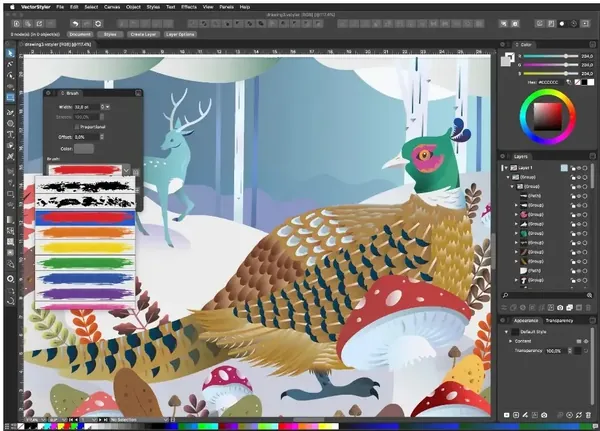
VectorStyler 1.3.021 | Size: 112 MB
Language: English


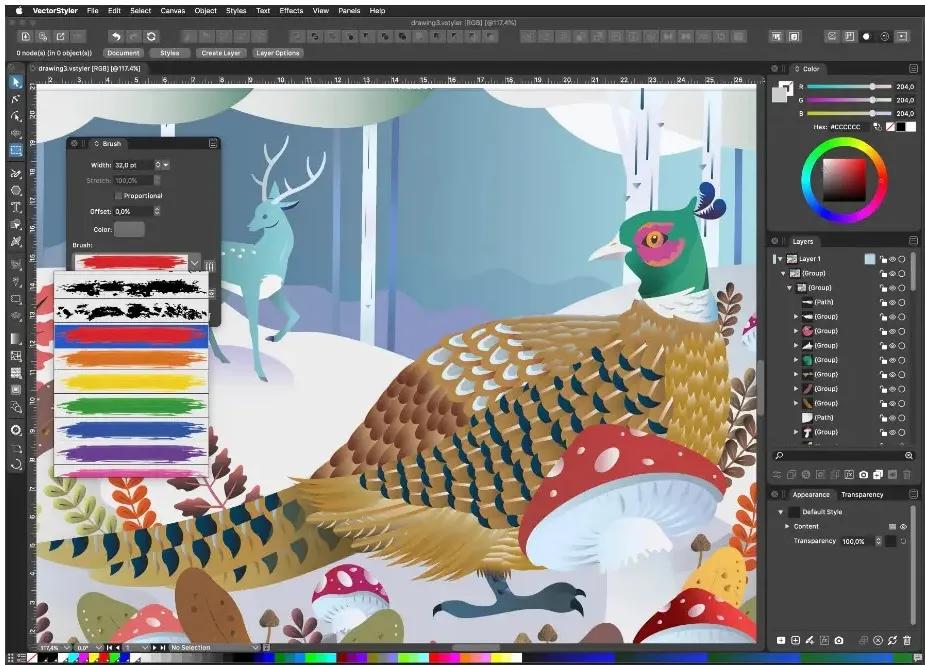
Professional illustration software. VectorStyler is an advanced illustration and drawing software. Create illustrations, logos, icons, drawings, typography, vector art for screen, print and web.

All the drawing tools without subscriptions
VectorStyler provides a complete set of drawing, design and illustration tools necessary for modern design. With its numerous new features , VectorStyler redefines and extends the tools available for illustrators and designers, improving the creation of complex illustrations and designs.

Guidelines at any Angle
Create and rotate guidelines at any angle. Objects will snap correctly to rotated guidelines, considering the object shape and guideline direction.

Vector Brushes
Paint with real scalable vector brushes. The vector brush shape and content remain editable. Create vector brushes from artwork, and dynamically link brush content to editable artwork. Import AI brush collections.

Typography
Create frame or point text for advanced typography. Flow text in and around any shape, and balance multiple columns inside a text frame. Use multi-line paragraph composer for better text justification.

Shape Effects
Apply non-destructive shape effects to vector objects, groups and point text. Edit the shape effect parameters interactively, or set them in the Shape Effect panel. Create envelope, mesh, elastic warp and other distortions, or dynamically offset the shape of objects.

Path Sketching
Create shapes using the Path Sketch tool. Sketches are dynamically intersected and merged. Extract from, or extend existing shapes using the sketch tool. Merge multiple shapes using path sketching.

Trim and Join
Use the trim and join tool to cut and merge intersecting shapes. Shapes can be joined at their intersection points. The trim and join tool also uses intersections with guidelines.

Text on Path
Place and edit text on any shape. The text on path alignment can be linked to the shape, to dynamically update as the shape is changed. Drag the baseline of a point text into a curve using the Node tool. Text on path can use the bend effect for smooth glyph distortions.

Open Native AI
Open or import native Adobe Illustrator CC and CS files (not just PDF), retaining high level artwork attributes. Vector brushes, tiling patterns, gradients are also imported.

Shape Effects
Create and edit non-destructive shape effects on objects or groups of objects. Shape effects can be used to adjust the shape of objects, creating various distortions or adding detail to shapes. Shape effect parameters can be edited interactively on the canvas. Use parametric distortion effects to change the shape of objects. Create mesh, envelope or elastic warp effect for fine tuned warp distortions. Create dynamic offsets of shapes and edit the offset distances interactively on canvas. Use the Shape Effects panel to create and edit multiple effects on selected objects.

Shape Bending Effect
The shape bending effect stretches the objects along an editable shape, using variable width profile to control the width along the shape. The shape used in bending can be edited with the Node tool, and additional options can be set in the Shape Effects panel.

Elastic Warp Effect
The elastic warp shape effect can be used to distort shapes by moving pin-points on a mesh grid. The mesh can be edited with the Node tool, or using the shape effect editor tool of the Shape Effects panel. Additional options can be set in the Shape Effects panel.

Displacement Effect
The displacement effect uses an image to displace vectors of a group of objects. The displacement image can any image imported into the document, or any group of objects. The vector shapes are displaced according to the intensities of the image.

Image Effects
Add live image effects to vector objects and groups. Select from over 100 image effects, each with multiple options. Image effects are non-destructive, and can be changed or removed at any time. Adjust image effect parameters interactively on canvas, for better visual control. Image effects can be created and edited using the Image Effects panel. All image effects are live, with the vector objects and shapes remaining editable. Combine multiple image effects to create custom filters compositions. Import and use SVG filter compositions directly from the Image Effects panel.

Operating System: Windows 10, 11

HOMEPAGE: Code:
Код:
https://www.vectorstyler.com/


DOWNLOAD LINKS:


Код:
https://rapidgator.net/file/55e44a962bc5a1350ec54ccd427501e6/VectorStyler_1.3.021.rar.html

Код:
https://nitroflare.com/view/EE0E0A6EB4A6B62/VectorStyler_1.3.021.rar
 
35b558bbcc013c9e4077fcac6a3f27a0.webp

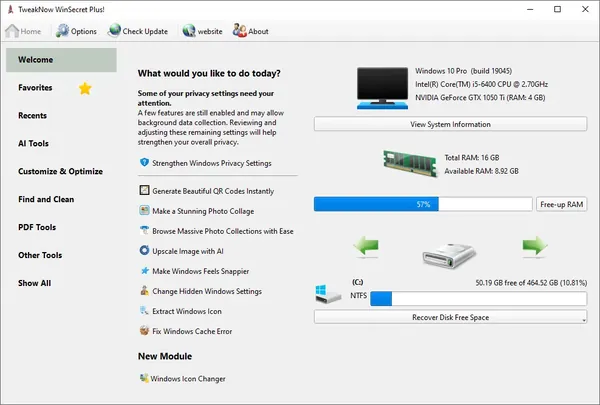
Free Download TweakNow WinSecret Plus 9.8.5 Portable | 61.5 Mb
TweakNow WinSecret Plus Portable is a Windows optimization and customization utility designed to help users manage system settings, access hidden options, and perform various maintenance tasks. The application provides a collection of tools for improving system control, adjusting Windows preferences, and managing everyday PC operations.
The software is suitable for both regular users and advanced Windows enthusiasts who want additional control over Windows 10 and Windows 11 features. It includes utilities for system information, privacy adjustments, file conversion, interface customization, and performance-related settings.
The Portable edition is distributed in a portable format that allows the application to be used without a traditional installation process, making it convenient for maintenance tasks on different computers.


Software Overview
TweakNow WinSecret Plus Portable combines multiple Windows utilities into a single application for system customization and maintenance. It provides access to hidden Windows settings, allowing users to adjust interface behavior, privacy options, and other system preferences.
The software includes tools for viewing hardware and system details, managing application performance priorities, converting files, handling PDF utilities, and performing additional desktop management tasks.
With its collection of integrated features, TweakNow WinSecret Plus helps simplify common Windows configuration and maintenance operations from one centralized interface.

Key Features
  • Access and customize hidden Windows 10 and Windows 11 settings.
  • Automatically switch between light and dark themes.
  • View detailed system and hardware information.
  • Adjust application priority levels for performance management.
  • Convert images and PDF files using offline tools.
  • Split and merge PDF documents.
  • Convert PDF pages into image files.
  • Convert HEIC images to JPG format.
  • Generate Wi-Fi connection QR codes.
  • Extract icons from Windows system libraries.
  • Prevent the computer from entering sleep or hibernation mode.

Why Choose TweakNow WinSecret Plus
TweakNow WinSecret Plus is designed for users who want centralized access to Windows customization and maintenance tools. Instead of managing multiple utilities separately, users can access different system functions from a single application.
The software is suitable for PC optimization tasks, Windows personalization, troubleshooting, and users who need additional control over system settings.

System Requirements
Operating System: Windows 10/11

Frequently Asked Questions

What is TweakNow WinSecret Plus used for?
TweakNow WinSecret Plus is used for Windows customization, system information viewing, maintenance tasks, and accessing additional configuration options.

Does TweakNow WinSecret Plus support Windows 11?
Yes. The software supports Windows 10 and Windows 11 systems.

Is this Portable edition installed on Windows?
No. The Portable edition is provided in a format designed for use without a traditional installation process.

Can TweakNow WinSecret Plus convert PDF files?
Yes. The software includes built-in PDF conversion tools for supported operations.

Home Page

Код:
https://www.tweaknow.com/

Product Information
  • Software Name: TweakNow WinSecret Plus
  • Version: 9.8.5
  • Languages: English
  • License type: Portable
  • File Size: 61.5 Mb
Rapidgator
Код:
https://rapidgator.net/file/22623b3f0bbc7175461281ce3e2b7df7/0kifm.TweakNow.WinSecret.Plus.9.8.5.Portable.rar.html

Код:
https://nitroflare.com/view/D93DFA460F4AA73/0kifm.TweakNow.WinSecret.Plus.9.8.5.Portable.rar
 
4850e1b53c39147302b0a2c56e1a4e3e.webp

Free Download VectorStyler 1.3.021 Portable | 90 MB
VectorStyler Portable is professional vector illustration software designed for creating logos, icons, typography, drawings, and scalable artwork for digital and print projects. It provides a comprehensive set of drawing, design, and illustration tools for graphic designers who need advanced control over vector-based artwork.
The Portable edition provides the same creative environment in a portable release format. VectorStyler includes advanced vector drawing features, typography controls, editable brushes, shape manipulation tools, and non-destructive effects for creating complex illustrations and design compositions.
With support for modern vector workflows and compatibility with Adobe Illustrator files, the software is suitable for illustrators, designers, and creative professionals working on branding, web graphics, print materials, and custom artwork.


Software Overview
VectorStyler provides a complete vector graphics environment with tools for drawing, editing, transforming, and enhancing vector objects. Users can create detailed illustrations using scalable vector brushes, advanced path editing, shape effects, and flexible typography features.
The software includes tools for creating and modifying complex shapes through non-destructive operations. Designers can apply editable distortions, warping effects, image-based vector displacement, and live image effects while keeping original vector objects editable.
VectorStyler supports importing native Adobe Illustrator CC and CS files while preserving important artwork properties such as brushes, gradients, and vector elements.

Key Features
  • Create vector illustrations, logos, icons, drawings, and typography designs.
  • Use advanced vector drawing and editing tools.
  • Create scalable vector brushes with editable artwork content.
  • Import Adobe Illustrator CC and CS native files.
  • Create and edit text frames, point text, and text on paths.
  • Flow text inside and around custom shapes.
  • Apply non-destructive shape effects to vector objects and groups.
  • Create envelope, mesh, elastic warp, and distortion effects.
  • Use Path Sketch tools to create and merge custom shapes.
  • Trim and join intersecting vector objects.
  • Apply live image effects while keeping vector objects editable.
  • Create dynamic shape offsets and bending effects.
  • Use displacement effects based on imported images.

Why Choose VectorStyler Portable
VectorStyler Portable is designed for users who need advanced vector illustration capabilities in a flexible portable format. It provides professional drawing tools, typography features, and editable effects for creating detailed vector artwork.
The software is suitable for graphic designers, illustrators, and creative users working on branding, publishing, web graphics, and digital illustration projects.

System Requirements
Windows 10, 11

Frequently Asked Questions

What is VectorStyler used for?
VectorStyler is used for creating vector illustrations, logos, icons, typography, and artwork for print and digital media.

Does VectorStyler support Adobe Illustrator files?
Yes. The software can open or import native Adobe Illustrator CC and CS files while preserving supported artwork attributes.

What type of graphics can be created with VectorStyler?
The software can be used to create scalable vector artwork including illustrations, branding elements, icons, and typography designs.

What does Portable mean in this release?
This release is distributed in a portable format that does not require a traditional installation process.

Home Page

Код:
https://www.vectorstyler.com/

Product Information
  • Software Name: VectorStyler
  • Version: 1.3.021
  • Architecture: x64
  • Languages: English
  • License type: Portable
  • File Size: 90 MB
Rapidgator
Код:
https://rapidgator.net/file/372fc08829c746e71225287be740580f/mldv0.VectorStyler.1.3.021.Portable.rar.html

Код:
https://nitroflare.com/view/64629F9B9DFB65D/mldv0.VectorStyler.1.3.021.Portable.rar
 
dd2d41145a6674c45236cca833441714.png


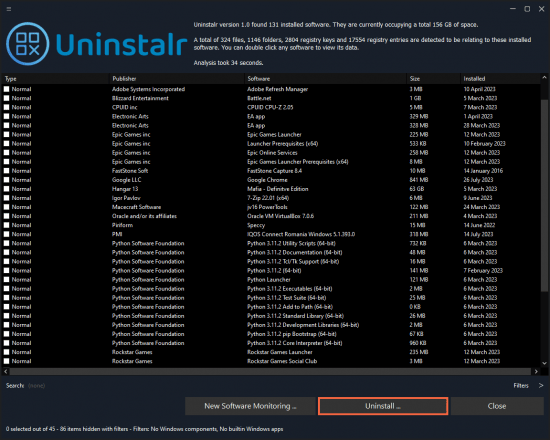
Uninstalr 3.2 | Size: 7.22 MB
Language: English


Uninstalr is an easy to use and very accurate software uninstaller for Windows. It can uninstall multiple apps at the same time and we think it's pretty cool.

Key Features
Batch uninstall many apps at the same time.
Supports unattended uninstallation of apps.
Supports monitoring of new software installations.
Also detects portable apps and previously uninstalled software leftovers.
Shows all the data added to your system by installed software on a file by file basis.
Shows all the data it will remove before starting the uninstallation.
Filter and search the list of installed software.
According to our benchmark, Uninstalr is the most accurate software uninstaller by leaving the least amount of leftovers when uninstalling apps.
Supports detection and uninstallation of Microsoft Store, Steam, Big Fish Game System, Chocolatey, NuGet and Ninite installed software.
Supports Windows Dark Mode.
Supports Windows 11, 10, 8 and 7.
Comes with these translations builtin: Chinese Simplified, Chinese Traditional, Czech, Danish, English, Filipino, Finnish, French, German, Greek, Hindi, Hungarian, Indonesian, Italian, Japanese, Korean, Malay, Norwegian, Polish, Portuguese, Romanian, Slovak, Spanish, Swedish, Thai, Turkish, Ukrainian and Vietnamese.
Has a single executable file portable version and a normal setup version.
Uninstalr is freeware, lightweight and easy to use. No bells and whistles, no nonsense.

System Requirements: Windows 11, Windows 10, 8 , 7


DOWNLOAD LINKS:


Код:
https://rapidgator.net/file/7ff91069beed32dc5fba5f332eaa372a/Uninstalr_3.2.rar.html

Код:
https://nitroflare.com/view/DD2A55FB14D7317/Uninstalr_3.2.rar
 
a86c36c0dc83ded582f345133c0247aa.webp

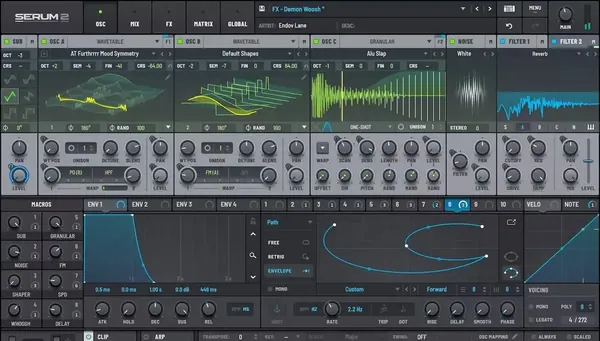
Free Download Xfer Records Serum v2.1.5 Update | 10.1 MB
Xfer Records Serum is an advanced wavetable synthesizer designed for music producers, sound designers, and electronic musicians who need detailed control over sound creation. It combines high-quality audio processing with a visual interface that allows users to create, edit, transform, and manipulate complex sounds in real time.
The synthesizer provides a flexible environment for designing custom instruments, basses, leads, pads, effects, and experimental sounds. Its wavetable workflow allows users to create or import waveforms, modify them in depth, and shape their sonic characteristics through advanced modulation and processing tools.
Serum 2 expands the instrument's capabilities with additional oscillator types, flexible effect routing, sequencing tools, and extensive sound design options, giving producers a complete platform for developing original sounds.


Software Overview
Xfer Records Serum is a wavetable synthesizer focused on detailed sound creation and real-time audio manipulation. The instrument provides tools for building custom wavetables, morphing waveforms, and controlling synthesis parameters through an extensive modulation system.
The software includes multiple synthesis options, advanced effects processing, modulation routing, and performance features designed for modern music production. Users can create sounds from the ground up or customize existing presets using a visual and interactive workflow.
Serum 2 introduces expanded synthesis capabilities, including additional oscillator types, improved routing flexibility, an arpeggiator, and a clip sequencer for more creative control over musical ideas.

Key Features
  • Advanced wavetable synthesis engine.
  • Create, import, edit, and morph custom wavetables.
  • Real-time waveform manipulation during playback.
  • Multiple oscillator types for flexible sound creation.
  • Flexible modulation routing system.
  • Integrated effects rack with advanced signal processing.
  • Built-in arpeggiator and clip sequencer.
  • Visual interface for detailed sound editing.
  • Extensive control over synthesis parameters and expression.

What's New
Version 2.1.5 introduces workflow improvements, new customization options, and multiple stability fixes.
  • Added restore locks when host sets state preference.
  • Added Show in Matrix option to modulation context menu.
  • Added sustain option for limiting same-note polyphony.
  • Added FX rack scroll position memory.
  • Added mono-to-stereo support for Serum 2 effects.
  • Added option to apply tuning to pitch expression.
  • Improved modulation editing and interface customization.
  • Fixed multiple issues related to presets, effects, automation, LFO behavior, and stability.

Why Choose Xfer Records Serum
Xfer Records Serum is designed for producers and sound designers who require deep control over synthesis and sound shaping. Its wavetable workflow, visual editing tools, and extensive modulation capabilities make it suitable for creating detailed and expressive electronic sounds.
The synthesizer is widely used in music production workflows including electronic music, cinematic sound design, game audio, and experimental audio projects.

System Requirements
Windows and macOS compatible

Frequently Asked Questions

What is Xfer Records Serum used for?
Serum is used for creating and designing synthesized sounds through wavetable synthesis, modulation, and effects processing.

Can Serum create custom sounds?
Yes. Users can create, import, edit, and transform wavetables to design original sounds.

Who uses Xfer Records Serum?
It is used by music producers, sound designers, composers, and electronic musicians.

Does Serum support advanced modulation?
Yes. The synthesizer includes a flexible modulation system for controlling synthesis parameters and effects.

Home Page

Код:
https://www.xferrecords.com/products/serum-2

Product Information
  • Software Name: Xfer Records Serum
  • Version: 2.1.5
  • Languages: English
  • License type: Full Version
  • File Size: 10.1 MB
Rapidgator
Код:
https://rapidgator.net/file/0f3dd42bf9eae25e0aa6ec68cceae071/wj3ha.Xfer.Records.Serum.v2.1.5.Update.rar.html

Код:
https://nitroflare.com/view/92F9CD6DDBF8A53/wj3ha.Xfer.Records.Serum.v2.1.5.Update.rar
 
def33b8ea4bad98ce15682c12f44d176.webp

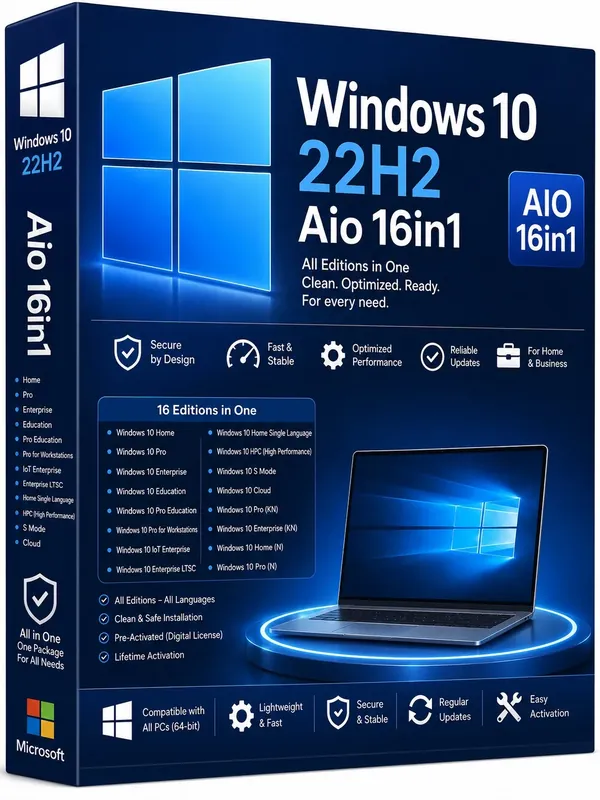
Free Download Windows 10 22H2 build 19045.7548 AIO 16in1 (x64) Preactivated July 2026 | 5.96 GB
Windows 10 22H2 AIO 16in1 is Microsoft's desktop operating system for personal computers, workstations, and business environments. It provides a familiar user experience while supporting a wide range of software, hardware, and enterprise management technologies. The operating system is suitable for everyday computing, professional productivity, software development, gaming, and organizational deployments.
This All-in-One release combines multiple Windows 10 editions into a single installation image, allowing users to install the edition that best matches their requirements. It supports modern hardware, security technologies, and Microsoft management tools while maintaining compatibility with a broad ecosystem of Windows applications.
Windows 10 includes an updated desktop interface, virtual desktops, enhanced multitasking features, Microsoft Edge, DirectX 12 support, and built-in security technologies designed for both home and enterprise users.


Software Overview
Windows 10 delivers a stable operating environment for desktops, laptops, tablets, and workstations. The operating system combines a traditional desktop experience with support for touch-enabled devices, allowing users to work across different hardware platforms.
It supports Universal Windows Platform (UWP) applications, Windows security features, biometric authentication through supported hardware, virtual desktops, and productivity tools designed to improve everyday workflows. Enterprise editions also include additional management and deployment capabilities for organizational environments.

Key Features
  • All-in-One installation containing 16 Windows 10 editions.
  • Support for desktop, laptop, tablet, and workstation devices.
  • Updated Start Menu with desktop-oriented navigation.
  • Virtual Desktop and Task View for multitasking.
  • Microsoft Edge web browser.
  • Universal Windows Platform (UWP) application support.
  • DirectX 12 support for compatible graphics hardware.
  • Support for fingerprint and facial recognition on supported devices.
  • Enterprise management and deployment capabilities.
  • Compatible with a wide range of Windows software and hardware.

Why Choose Windows 10 22H2 AIO 16in1
Windows 10 remains a practical operating system for users who require compatibility with a broad range of desktop applications, enterprise tools, and hardware platforms. The inclusion of multiple editions in a single installation image provides flexibility for home users, professionals, educational institutions, and business environments.

System Requirements
Processor: 1 gigahertz (GHz) or faster.
RAM: 1 gigabyte (GB).
Free space on hard disk: 16 gigabytes (GB).
Graphics card: DirectX 9 graphics device or a newer version.
Additional requirements to use certain features.
To use touch you need a tablet or monitor that supports multitouch.
To access the Windows store to download and run apps, you need an active Internet connection and a screen resolution of at least 1024 x 768 pixels.

Frequently Asked Questions

Which Windows editions are included?
This release includes 16 Windows 10 editions, including Home, Pro, Enterprise, Education, IoT Enterprise, Team, Workstations, and their corresponding N editions where available.

Is this a 64-bit release?
Yes. This package includes the x64 edition only.

Who is this release suitable for?
It is suitable for home users, professionals, educational organizations, and enterprise environments that require different Windows 10 editions.

Home Page

Код:
[code]http://www.microsoft.com
[/code]

4e7eab53215d4c0e1d4c7931616bac80.webp

d26caf3df2c88f951d64b00940daaff1.webp


Product Information
  • Software Name: Windows 10
  • Year of release: July 2026
  • Version: 22H2 build 19045.7548
  • Architecture: x64
  • Languages: English
  • License type: Preactivated
  • File Size: 5.96 GB

Rapidgator
Код:
https://rapidgator.net/file/d39396d333f3b64aea06f690ed9875ef/byul7.Windows.10.22H2.build.19045.7548.Aio.16in1.x64.Preactivated.July.2026.rar.html

Код:
https://nitroflare.com/view/D6C984172CC69E1/byul7.Windows.10.22H2.build.19045.7548.Aio.16in1.x64.Preactivated.July.2026.rar
 
Назад
Сверху Снизу