All mitsumi'1s Applications !! (updated daily)

b646a492b223b5e3d61aa33f920fc149.webp

Free Download MadPeel AI Background Remover 1.0.2 Portable | 1.7 GB
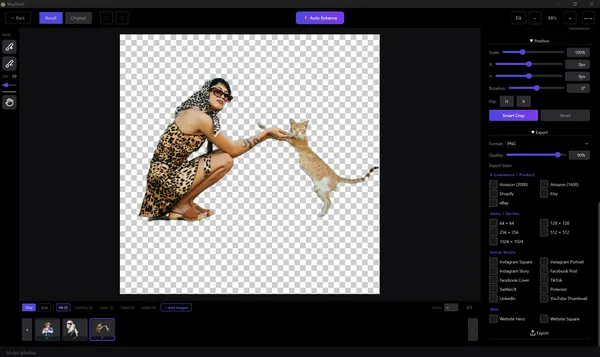
MadPeel AI Background Remover Portable is an AI-powered image editing application designed to remove backgrounds from photos with local processing directly on the computer. The software uses artificial intelligence models to create clean cutouts while keeping images private without requiring cloud uploads.
The application is suitable for product photography, social media content, graphic design, marketing materials, portraits, and other workflows that require accurate background removal. Multiple AI processing modes help users select the appropriate approach for different image types, including objects, people, and detailed edges such as hair or fur.
MadPeel provides additional editing tools for refining selections, adjusting edges, adding backgrounds and shadows, and exporting images in formats optimized for different platforms.


Software Overview
MadPeel AI Background Remover Portable provides an offline AI-based workflow for separating subjects from image backgrounds. All processing is performed locally, allowing users to edit photos without uploading content to external services.
The software includes dedicated AI modes for different types of images, precision editing tools, batch processing features, and export options for common digital platforms. Users can refine automatically generated cutouts using manual adjustment tools for better control over the final result.
The Portable edition is distributed in a portable format that allows the application to be used without a traditional installation process.

Key Features
  • AI-powered background removal with local processing.
  • Three AI modes for different image requirements.
  • Portrait processing with optimized edge handling.
  • Hair and fine detail preservation mode.
  • Manual add and remove brush tools.
  • Edge refinement controls including feathering and defringe adjustments.
  • Multiple background options including transparent, color, gradient, and custom images.
  • Customizable drop shadow effects.
  • Batch processing for multiple images.
  • Export support for PNG, JPEG, and WebP formats.
  • GPU acceleration with NVIDIA and AMD support.

Why Choose MadPeel AI Background Remover
MadPeel AI Background Remover is designed for users who need accurate image background separation while keeping files processed locally. Its combination of AI detection, manual refinement tools, and batch capabilities makes it suitable for professional image preparation workflows.
The software can help photographers, designers, online sellers, and content creators prepare images for marketplaces, websites, advertisements, and social media platforms.

System Requirements
  • Operating System: Windows 10 version 17763.0 or higher
  • Memory: 4 GB (Minimum), 8 GB (Recommended)

Frequently Asked Questions

What is MadPeel AI Background Remover used for?
MadPeel AI Background Remover is used to remove image backgrounds and create clean cutouts for design, commerce, and content creation purposes.

Does MadPeel process images online?
No. The application processes images locally on the computer without uploading photos to cloud services.

Can MadPeel handle multiple images at once?
Yes. The software includes batch processing features for handling folders of images.

Which image formats are supported?
MadPeel supports PNG, JPG, WebP, BMP, TIFF, and GIF image formats.

Home Page

Код:
https://www.madfable.com

Product Information
  • Software Name: MadPeel AI Background Remover
  • Version: 1.0.2
  • Architecture: x64
  • Languages: English
  • License type: Portable
  • File Size: 1.7 GB
Rapidgator
Код:
https://rapidgator.net/file/a6cbaee75170a05187f4456eb0b150a0/wy2xs.MadPeel.AI.Background.Remover.1.0.2.Portable.rar.html

Код:
https://nitroflare.com/view/E8858A854700DE9/wy2xs.MadPeel.AI.Background.Remover.1.0.2.Portable.rar
 
69125be075ed326990cb729a67fc101c.jpg


NetSarang Xmanager Power Suite 8.0.0020 Multilingual | Size: 186.36 MB
Language: English


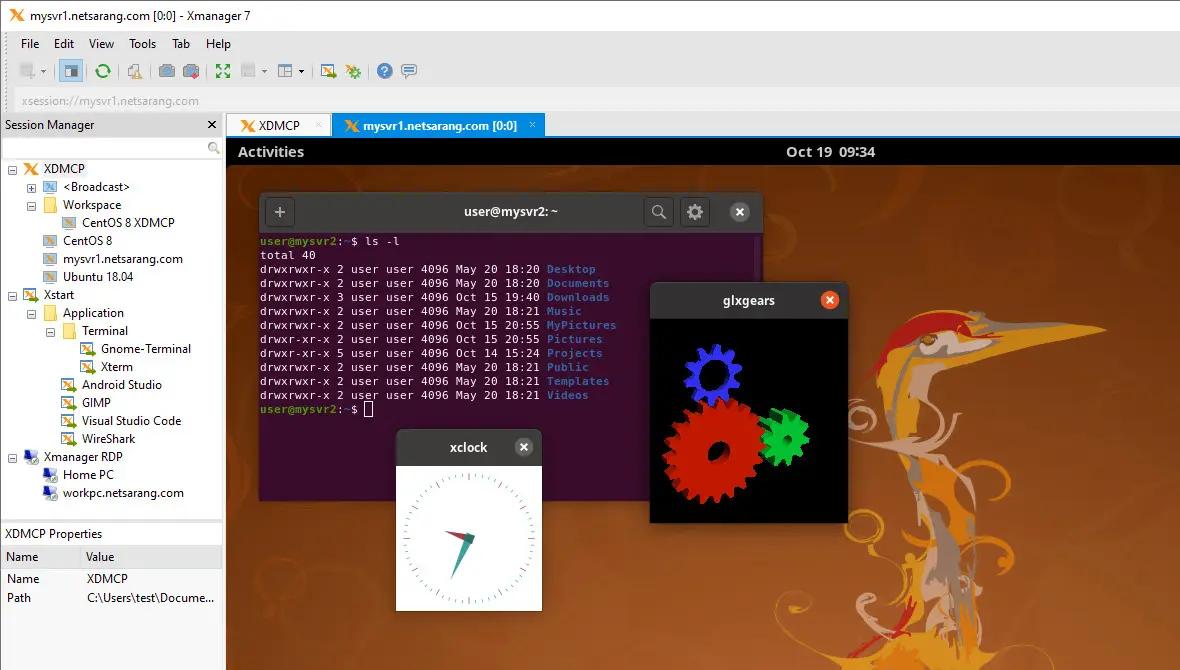
Xmanager Power Suite is an all-in-one solution that includes Xmanager, Xshell, Xftp and Xlpd in a single suite. Xmanager runs X window applications, and Xshell manages remote Unix/Linux servers with a secure terminal. Xftp transfers files between systems securely, and Xlpd runs local printing for remote documents on other systems.

Centralize Scattered System Resources and Reduce TCO
Companies using various operating systems may find their system resources scattered over the network due to multiple X applications and file systems. Xmanager Power Suite 6 solves this issue by allowing users to access all scattered resources directly from their desktop. Having a central location that allows users to access applications remotely, upgrades and maintenance become easily manageable and reduce TCO.

Interoperability for Maximum Productivity
All programs included in this suite share a common SSH (Secure Shell) security module to interoperate with one another conveniently and efficiently. With all the various features integrated into a single suite, customers can experience an easier time with purchase, installation, maintenance, as well as a reduced total cost of ownership.

Session Manager
As a dockable pane in your main Xmanager and Xshell window, you’ll have immediate access to all the essentials required for session management. Easily view, create, edit, and delete sessions on the fly and launch multiple sessions simultaneously. It’s never been easier to manage your sessions!

Dockable UI
Xmanager and Xshell main windows incorporate an all new Dockable UI. Utilize Drag & Drop to choose where to place your Session Manager, Compose Bar, Quick Command sets, etc. The UI provides even more functionality to Xmanager Power Suite’s already customizable configuration.

Enhanced Password Encryption with Master Password
Set a user defined string as your Master Password to add a layer of encryption to your session file passwords. The Master Password encrypts the passphrase used to connect to the server (password), the user key's passphrase (passphrase), and the password string contained within the session file. Safely store your session files in the cloud to share between devices.

SSH PKCS#11 Support
The PKCS#11 protocol enables users to securely store the user's private keys using a hardware token(HSM) for added security. Xmanager Power Suite 6 also supports GSSAPI, Password, Public Key, and the Keyboard Interactive authentication methods.

System Requirements:
Operating System: Windows 10, Windows 8.1, Windows 7, Windows Server 2008 Service Pack 1, Windows Server 2012, Windows Vista Service Pack 1, Microsoft Windows Terminal Server, Citrix MetaFrame from Windows
CPU: Intel® Pentium or faster
Memory: 512 MB
Hard Disk: 200 MB

HOMEPAGE: Code:
Код:
https://www.netsarang.com/


DOWNLOAD LINKS:


Код:
https://rapidgator.net/file/fa6bf9b91a2a59f0b13e586502d061cc/NetSarang_Xmanager_Power_Suite_8.0.0020_Multilingual.rar.html

Код:
https://nitroflare.com/view/9F2900F6AC4A163/NetSarang_Xmanager_Power_Suite_8.0.0020_Multilingual.rar
 
f97eff4004459b22c35c9ba1c4ea2790.webp

Free Download n-Track Studio 10.3.1.10945 (x64) Multilingual | 260 Mb
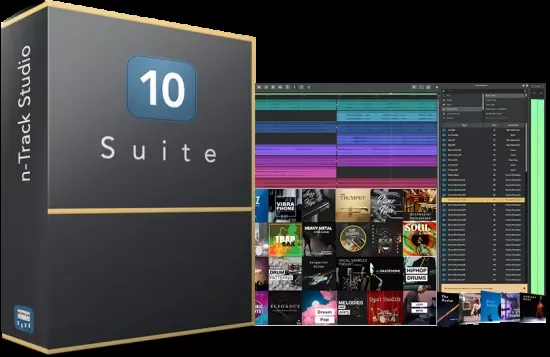
n-Track Studio is a digital audio workstation (DAW) designed for recording, editing, mixing, and producing professional-quality audio and MIDI projects. It provides a complete multitrack production environment suitable for musicians, podcasters, producers, composers, and audio engineers working on music, voice recordings, and multimedia content.
The software combines multitrack recording, non-destructive editing, real-time effects processing, and MIDI sequencing within a single workspace. It supports modern audio interfaces, virtual instruments, and plug-ins, allowing users to build complete music productions from recording through final export.
Whether creating songs, podcasts, soundtracks, or live recordings, n-Track Studio offers flexible tools for audio production while supporting a wide range of industry-standard formats and hardware.


Software Overview
n-Track Studio provides a comprehensive environment for recording unlimited audio and MIDI tracks, applying effects, editing performances, and producing finished audio projects. It supports high-resolution recording, real-time monitoring, automation, and advanced routing for professional production workflows.
The application includes a collection of built-in audio processors such as equalizers, compressors, reverbs, pitch shifting, chorus, spectrum analysis, and dynamic processing. Users can also expand its functionality through VST, DirectX, and ReWire plug-ins and virtual instruments.
The software supports multichannel audio interfaces, surround sound production, synchronized video playback, and flexible import and export capabilities, making it suitable for both music production and multimedia projects.

Key Features
  • Record and play back virtually unlimited audio and MIDI tracks.
  • Record, edit, overdub, mix, and master multitrack projects.
  • Support VST, DirectX, and ReWire plug-ins.
  • Use VST Instruments and DirectX virtual instruments.
  • Apply real-time audio effects during recording and playback.
  • Include built-in reverb, compression, EQ, echo, chorus, pitch shifting, multiband compression, and spectrum analyzer.
  • Support recording up to 24-bit/192 kHz.
  • Provide 64-bit internal audio mixing.
  • Support ASIO, WaveRT, WDM, MME, and DirectSound drivers.
  • Process live audio input while recording.
  • Create surround mixes in 5.1, 6.1, and 7.1 channel formats.
  • Support multiple audio interfaces and multichannel recording.
  • Import and export WAV, MP3, WMA, MIDI, OGG, FLAC, AIFF, CDA, SNG, and SGW files.
  • Synchronize with external devices using SMPTE, MTC, and MIDI Clock.
  • Play video files in sync with audio projects.
  • Automate volume, pan, effects, and auxiliary sends.

Why Choose n-Track Studio 10
n-Track Studio is suitable for users who need a complete recording and music production environment without sacrificing advanced editing and mixing capabilities. Its combination of multitrack recording, MIDI support, plug-in compatibility, and automation tools makes it appropriate for home studios as well as professional production workflows.
The software is well suited for musicians, recording engineers, content creators, composers, educators, and anyone producing audio for music, podcasts, video, or multimedia projects.

System Requirements
Windows 7, 8/8.1, 10, 11

Frequently Asked Questions

What is n-Track Studio used for?
n-Track Studio is used for multitrack audio recording, MIDI sequencing, editing, mixing, mastering, and music production.

Does n-Track Studio support VST plug-ins?
Yes. The software supports VST instruments, VST effects, DirectX plug-ins, and ReWire technology.

Can n-Track Studio record MIDI and audio together?
Yes. It supports simultaneous audio and MIDI recording and editing within the same project.

Does n-Track Studio support surround sound projects?
Yes. The software supports surround mixing for 5.1, 6.1, and 7.1 channel audio projects.

Home Page

Код:
https://ntrack.com/

Product Information
  • Software Name: n-Track Studio
  • Version: 10.3.1.10945
  • Architecture: x64
  • Languages: Multilingual
  • License type: Full Version
  • File Size: 260 Mb
Rapidgator
Код:
https://rapidgator.net/file/529ab356f918d52f416d2fe0576969e5/25sks.nTrack.Studio.10.3.1.10945.x64.Multilingual.rar.html

Код:
https://nitroflare.com/view/E6C1F3D258CC6BE/25sks.nTrack.Studio.10.3.1.10945.x64.Multilingual.rar
 
_56e67b4df16876a369dc646803a04cff.jpeg


Obsidian Ebook Reader Premium 2.1.2 | Size: 141.53 MB
Language: English


Your books, beautifully organized. Obsidian Reader allows you to read s and PDFs with no ads, no online connection, and complete privacy. Manage your library with folder synchronization, editable metadata, and enjoy a modern, customizable interface for the best reading experience.

Everything you need for a great read.
Designed with simplicity and speed in mind, allowing you to focus purely on your content.

Private & Offline
Fully private and 100% offline. Read your and PDF books locally with absolutely no ads to distract you.

Manage Your Library
View all your books in an organized grid or list. Sync your book folders and edit titles, authors, and cover images.

Highly Customizable
Change font, text size, padding, line space, and word spacing. Choose from themes including true black mode.

Sleek Interface
A sleek, modern interface free from distractions, giving you the best environment to focus purely on reading.

Save Bookmarks
Easily save bookmarks in your books so you can always pick right back up exactly where you left off.

Blazing Fast
Built to be lightweight and fast. Massive s and PDFs load instantly so you never have to wait.

HOMEPAGE: Code:
Код:
https://obsidianreader.app


DOWNLOAD LINKS:


Код:
https://rapidgator.net/file/e3afbe53112ea28dac209c8a5b4fb7d5/Obsidian_Ebook_Reader_Premium_2.1.2.rar.html

Код:
https://nitroflare.com/view/4DEC5EC119F0565/Obsidian_Ebook_Reader_Premium_2.1.2.rar
 
81aedf8e2b769ef306d1e3ceed7944b8.webp

Free Download PerfectXL Source Inspector 1.0.2 (x64) | 119.2 Mb
PerfectXL Source Inspector is an Excel analysis tool designed to help users identify and understand the data sources behind formulas, cells, and ranges within Microsoft Excel workbooks. It provides a clear overview of how information flows throughout a spreadsheet, making it easier to verify calculations and investigate dependencies.
The software is intended for financial analysts, auditors, accountants, consultants, and spreadsheet developers who work with complex Excel models. By exposing both internal and external references, it simplifies workbook analysis and reduces the time required to trace linked data.
With visual dependency mapping and reporting capabilities, PerfectXL Source Inspector helps users review workbook structures, validate data origins, and document spreadsheet relationships for auditing and quality assurance.


Software Overview
PerfectXL Source Inspector enables users to inspect every source that contributes to the value of a selected Excel cell or range. It separates internal workbook references from external links, allowing users to quickly determine where information originates.
The application presents data relationships through visual flow diagrams, making complex spreadsheet dependencies easier to understand. Users can also generate source reports that assist with documentation, workbook reviews, and audit processes.

Key Features
  • Identify all internal and external data sources for selected cells or ranges.
  • Separate internal references from external workbook links.
  • Visualize spreadsheet data flows with dependency maps.
  • Trace every input contributing to a calculated value.
  • Analyze workbook relationships across worksheets and linked files.
  • Export comprehensive source reports for documentation and auditing.
  • Improve transparency when reviewing complex Excel models.

Why Choose PerfectXL Source Inspector
PerfectXL Source Inspector is useful for professionals who need greater visibility into complex Excel workbooks. Its visualization tools and dependency analysis help simplify workbook reviews, making it easier to verify calculations, investigate linked data, and document spreadsheet structures.
The software is particularly suitable for auditing, financial modeling, risk assessment, compliance reviews, and spreadsheet maintenance where understanding data origins is essential.

System Requirements
Operating System: Windows (64-bit)
Architecture: x64

Frequently Asked Questions

What is PerfectXL Source Inspector used for?
It is used to analyze Excel workbooks by identifying the internal and external data sources behind formulas, cells, and ranges.

Can the software trace external workbook references?
Yes. It distinguishes between internal worksheet references and external workbook dependencies.

Does PerfectXL Source Inspector generate reports?
Yes. It can export source reports that help document workbook dependencies for auditing and review purposes.

Who can benefit from this software?
It is suitable for auditors, accountants, financial analysts, spreadsheet developers, consultants, and anyone managing complex Excel models.

Home Page

Код:
https://www.perfectxl.com/

Product Information
  • Software Name: PerfectXL Source Inspector
  • Version: 1.0.2
  • Architecture: x64
  • Languages: English
  • License type: Full Version
  • File Size: 119.2 Mb
Rapidgator
Код:
https://rapidgator.net/file/a1450f5fc31223d504891aa1a9c512c2/rcjsz.PerfectXL.Source.Inspector.1.0.2.x64.rar.html

Код:
https://nitroflare.com/view/7BF1F8FEC9A4C6E/rcjsz.PerfectXL.Source.Inspector.1.0.2.x64.rar
 
2d5ce8ece75c52a5058577ff8b81bf78.webp

Free Download QueueExplorer Professional 5.0.90 | 35.4 Mb
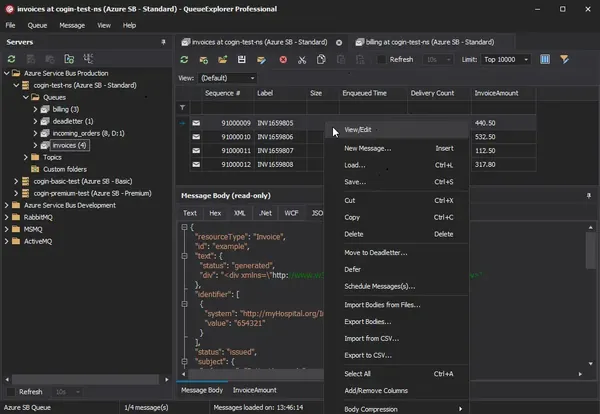
QueueExplorer Professional is a message queue management and troubleshooting tool designed for developers, system administrators, and IT professionals working with enterprise messaging platforms. It provides a centralized environment for inspecting, testing, editing, and managing messages across multiple queuing systems from a single application.
The software simplifies message analysis by offering detailed viewers, queue monitoring tools, and advanced management capabilities. It helps users investigate message delivery issues, validate message content, perform testing, and maintain messaging infrastructure more efficiently.
Supporting several popular message brokers without requiring separate installations, QueueExplorer Professional is suitable for development, testing, migration, monitoring, and production maintenance of distributed messaging environments.


Software Overview
QueueExplorer Professional enables users to connect to multiple queue technologies, inspect message contents, and perform administrative tasks beyond the capabilities of standard management consoles. Messages can be viewed, edited, copied, moved, deleted, backed up, restored, or resent while preserving their properties.
The application includes specialized viewers for XML, JSON, WCF, hexadecimal data, and plain text, making it easier to inspect complex message payloads. Developers can create and send custom test messages, while administrators can monitor queue activity, investigate failed or dead-letter messages, and migrate queue configurations between servers.

Key Features
  • Support MSMQ, Azure Service Bus, RabbitMQ, and ActiveMQ.
  • View, edit, copy, move, delete, save, and reload queue messages.
  • Inspect message bodies using XML, JSON, WCF, Hex, and text viewers.
  • Create and send custom test messages.
  • Perform stress and performance testing with large message batches.
  • Monitor queue status with automatic refresh.
  • Troubleshoot failed, poison, and dead-letter messages.
  • Filter and sort messages for faster analysis.
  • Extract business data using XPath, JSON, or regular expressions.
  • Backup and restore messages.
  • Copy, compare, synchronize, and migrate queues and metadata.
  • Duplicate queues with their configuration settings.
  • Manage multiple messaging platforms from a single interface.

Why Choose QueueExplorer Professional
QueueExplorer Professional is designed for environments where reliable message processing is essential. Its comprehensive inspection, testing, and administrative tools help developers validate messaging workflows while allowing administrators to diagnose issues and maintain queue infrastructure efficiently.
The software is suitable for enterprise messaging environments, integration projects, application testing, production monitoring, and system migration across multiple message broker platforms.

System Requirements
Windows 11, Windows 10, Windows 8, Windows 7
Windows Server 2022, Windows Server 2019, Windows Server 2016, Windows Server 2012, Windows Server 2008, Windows Server 2008 R2
.NET Framework 4.6.2 or higher

Frequently Asked Questions

What is QueueExplorer Professional used for?

It is used to inspect, manage, troubleshoot, and test enterprise message queues across multiple messaging platforms.

Which messaging systems are supported?

The software supports MSMQ, Azure Service Bus, RabbitMQ, and ActiveMQ.

Can QueueExplorer Professional create test messages?

Yes. Users can create, edit, and send individual or batch test messages to validate messaging workflows.

Does the software help troubleshoot failed messages?

Yes. It provides tools for analyzing, correcting, resending, and managing failed, poison, and dead-letter messages.

Home Page

Код:
https://www.cogin.com/

Product Information

  • Software Name: QueueExplorer Professional
  • Version: 5.0.90
  • Languages: English
  • License type: Full Version
  • File Size: 35.4 Mb
Rapidgator
Код:
https://rapidgator.net/file/85dfe4fc4984c12c19548087eb7f8afa/3h9lf.QueueExplorer.Professional.5.0.90.rar.html

Код:
https://nitroflare.com/view/604FB08C229360B/3h9lf.QueueExplorer.Professional.5.0.90.rar
 
94d6a91237bc0dc451748f33e7487233.webp

Free Download RTM Audio Stage v2.0.8 U2B macOS | 13 MB
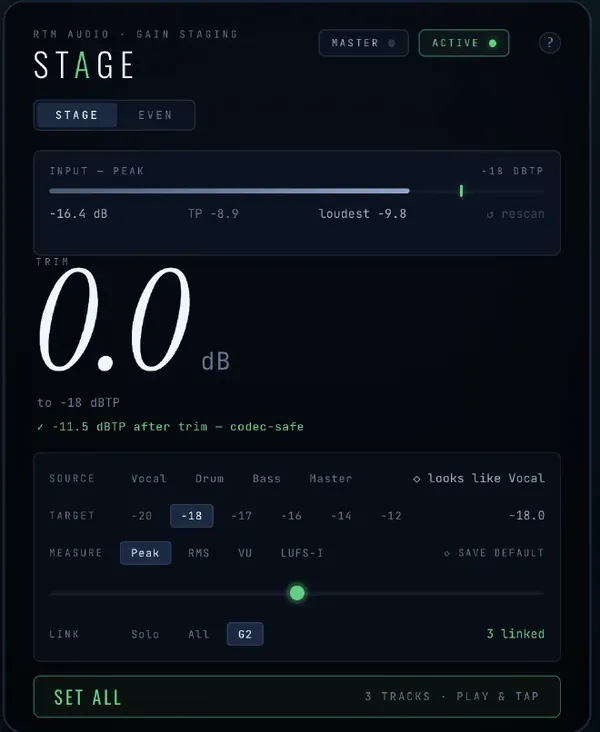
RTM Audio Stage is an audio plug-in designed to simplify gain staging and loudness-matched comparisons during mixing and mastering. It combines level management and A/B comparison tools into a single plug-in, helping audio professionals make more consistent decisions without being influenced by volume differences.
Designed for music producers, mixing engineers, and mastering engineers, the plug-in streamlines workflow by automatically setting signal levels to a chosen target and synchronizing gain adjustments across multiple instances. This allows an entire mix to be managed more efficiently while maintaining consistent loudness.
RTM Audio Stage also provides accurate loudness-matched comparisons between processing chains, making it easier to evaluate EQ, compression, saturation, and other audio effects based on tonal changes rather than perceived volume.


Software Overview
RTM Audio Stage combines two production tools within a single plug-in. The STAGE function automatically trims audio to a selected target level without introducing clicks, while linked instances allow gain staging to be controlled across multiple channels from a single point.
The EVEN function performs precise loudness matching between two processing chains, including blind comparisons, enabling objective evaluation of processing decisions during mixing and mastering sessions.
Its streamlined workflow helps reduce manual gain adjustments while improving consistency throughout audio production projects.

Key Features
  • Automatic gain staging to user-defined target levels.
  • Click-free level adjustment.
  • Link multiple plug-in instances across channels.
  • Control gain staging for an entire mix from one instance.
  • Loudness-matched A/B comparison between processing chains.
  • Support blind listening comparisons.
  • Reduce bias caused by volume differences.
  • Improve consistency during mixing and mastering workflows.

Why Choose RTM Audio Stage
RTM Audio Stage is designed for audio professionals who want reliable gain staging and objective plug-in comparisons. By matching loudness automatically and synchronizing channel levels, it simplifies repetitive mixing tasks while helping users make more accurate tonal decisions.
The plug-in is suitable for music production, audio post-production, mixing, and mastering projects where consistent signal levels are essential.

System Requirements
Operating System: macOS
Platform: Universal 2 (U2B)

Frequently Asked Questions

What is RTM Audio Stage used for?
It is used for gain staging and loudness-matched A/B comparisons during audio mixing and mastering.

What are the STAGE and EVEN functions?
STAGE automatically adjusts signal levels to a target value, while EVEN compares two processing chains at matched loudness levels.

Who is RTM Audio Stage intended for?
It is intended for music producers, mixing engineers, mastering engineers, and other audio professionals.

Does RTM Audio Stage support linked instances?
Yes. Multiple instances can be linked so gain staging can be managed across an entire mix.

Home Page

Код:
https://www.rtmaudio.com/stage/

Product Information
  • Software Name: RTM Audio Stage
  • Version: 2.0.8
  • Languages: English
  • License type: Full Version
  • File Size: 13 MB
Rapidgator
Код:
https://rapidgator.net/file/982ecb393ced8e528136bd2b6dc4e8a3/py9ju.RTM.Audio.Stage.v2.0.8.U2B.macOS.dmg.html

Код:
https://nitroflare.com/view/BF12918B9D45FC5/py9ju.RTM.Audio.Stage.v2.0.8.U2B.macOS.dmg
 
4244215287d1b33821eb17584adc878f.webp

Free Download RTM Audio Throatgoat v1.0.2 U2B macOS | 12 MB
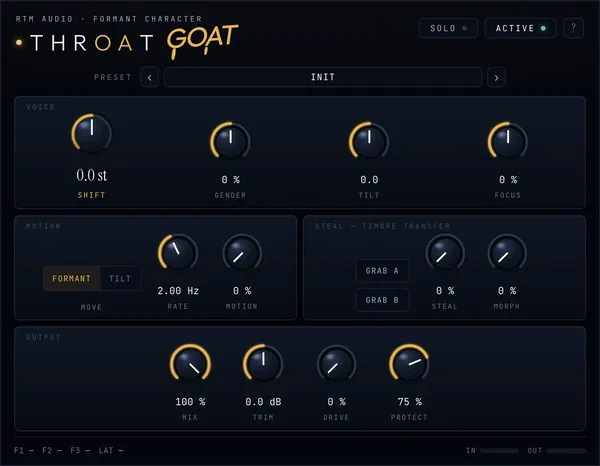
RTM Audio Throatgoat is an audio plug-in designed for advanced vocal processing by modifying vocal characteristics while preserving the original pitch performance. It focuses on reshaping vocal tone through formant, resonance, gender, and tonal adjustments without altering the recorded pitch information.
Designed for singers, producers, sound designers, and audio engineers, the plug-in provides creative control over vocal character and expression while maintaining the natural timing and performance of the original recording.
RTM Audio Throatgoat can be used for vocal production, sound design, character creation, and experimental audio processing where maintaining the original melody while changing vocal identity is required.


Software Overview
RTM Audio Throatgoat processes the vocal tract characteristics of a recording instead of modifying the performed notes. It allows users to adjust formants, resonance, gender characteristics, and tonal balance while keeping the original pitch unchanged.
The plug-in provides a different approach to vocal transformation by focusing on the acoustic properties that define vocal identity. This makes it suitable for creative vocal editing, production workflows, and sound design applications.

Key Features
  • Reshape vocal characteristics without changing the original pitch.
  • Adjust vocal formants for tonal transformation.
  • Modify gender-related vocal characteristics.
  • Control resonance and vocal tract properties.
  • Preserve the original performance and melody.
  • Create unique vocal textures for music production and sound design.

Why Choose RTM Audio Throatgoat
RTM Audio Throatgoat is designed for users who need flexible vocal transformation while keeping the original performance intact. Its formant-based processing approach provides creative possibilities for vocal editing without relying on traditional pitch correction.
The plug-in is suitable for producers, vocal editors, sound designers, and musicians working with modern audio production environments.

System Requirements
Operating System: macOS
Platform: Universal 2 (U2B)

Frequently Asked Questions

What is RTM Audio Throatgoat used for?
It is used to modify vocal characteristics by adjusting formants, resonance, and other vocal tract properties while keeping the original pitch unchanged.

Does RTM Audio Throatgoat change vocal pitch?
No. The plug-in is designed to preserve the original pitch while changing vocal tone and character.

Who can use RTM Audio Throatgoat?
It is suitable for musicians, vocal producers, sound designers, and audio engineers working with vocal recordings.

Home Page

Код:
https://www.rtmaudio.com/throat/

Product Information
  • Software Name: RTM Audio Throatgoat
  • Version: 1.0.2
  • Architecture: U2B
  • Languages: English
  • License type: Full Version
  • File Size: 12 MB
Rapidgator
Код:
https://rapidgator.net/file/567521329bdecaa0811596d31a51d73c/a9n50.RTM.Audio.Throatgoat.v1.0.2.U2B.macOS.dmg.html

Код:
https://nitroflare.com/view/410B7EB946209C2/a9n50.RTM.Audio.Throatgoat.v1.0.2.U2B.macOS.dmg
 
24e3127206799b3999d8db570ea31a1b.png


Sante Dicommander 3.9.1 | Size: 11.03 MB
Language: English


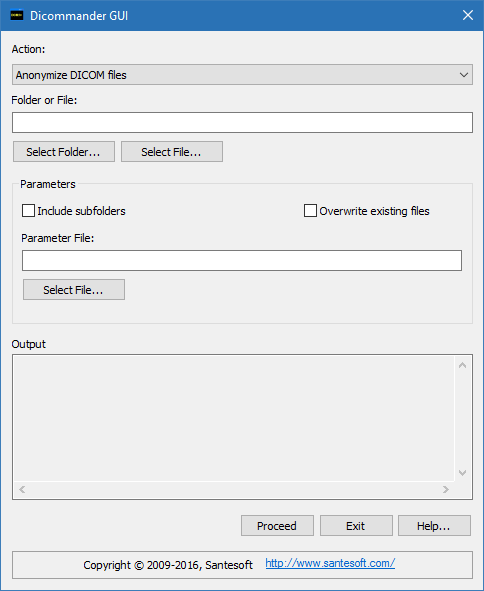
Sante Dicommander is a command-line anonymizer, dicomizer and converter for DICOM 3 and NEMA 2 files. It is compatible with all modalities (CT, MR, NM, US, XA, MG, CR etc.), all manufacturers and all DICOM 3.0 and NEMA 2 file types. Sante Dicommander is Windows 10/8.1/8/7 and Vista compatible.

Features and benefits:
Perpetual license that never expires.
Free updates and free technical support for product's lifetime
Anonymize DICOM files
Modify DICOM files (insert/remove/modify header's tags)
Batch modify study/series/SOP instance UID
Convert plain images to DICOM
Convert videos to DICOM
Export DICOM files to plain images (jpeg, jpeg2000, bmp, tiff, png)
Export DICOM files to video (wmv)
Create DICOMDIR files in folders
Merge many single-frame DICOM files to one multi-frame DICOM file
Split multi-frame DICOM files to many single-frame DICOM files
Convert NEMA2 files to DICOM 3 Part 10
Convert DICOM 3 Part 10 files to NEMA2
Convert Big Endian DICOM files to Little Endian
Convert Little Endian DICOM files to Big Endian
Convert uncompressed DICOM files to jpeg (lossless) compressed
Convert uncompressed DICOM files to jpeg (lossy) compressed
Convert compressed DICOM files to uncompressed
Export the header of DICOM files to text files
Work with single files or with folders (batch mode)
Graphical User Interface that allows the user to work not only in command prompt
but from the desktop as well
There are 32/64 bit versions
It is Windows 10/8.1/8/7 and Windows Server 2019/2016/2012/2008 compatible

Minimum Requirements:
Windows 10/8.1/8/7 or Windows Server 2019/2016/2012/2008
Intel Core i3 1.3GHz or greater
1024 MB memory or more
30MB free space on hard disk

HOMEPAGE: Code:
Код:
https://www.santesoft.com/


DOWNLOAD LINKS:


Код:
https://rapidgator.net/file/3b1db64625c709017d3a0717b397e01f/Sante_Dicommander_3.9.1.rar.html

Код:
https://nitroflare.com/view/026F65B0BD9016F/Sante_Dicommander_3.9.1.rar
 
8ae21b5b3f204f303d2936fb03a700ca.webp

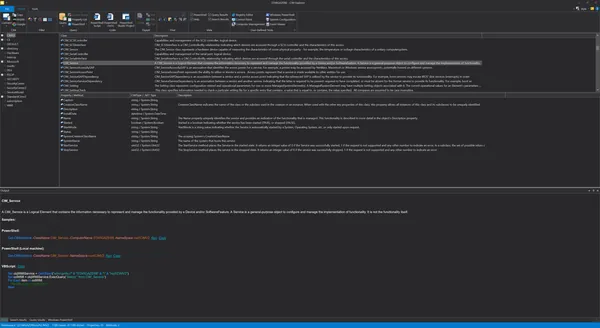
Free Download SAPIEN CIM Explorer 2026 v2.4.120 (x64) | 30 Mb
SAPIEN CIM Explorer is a specialized tool designed for exploring and working with the Windows Management Instrumentation (WMI) and Common Information Model (CIM) databases. It helps system administrators and IT professionals examine system information, query managed resources, and understand the structure of available CIM classes, properties, and methods.
The software provides an interactive environment for creating and testing queries across local and remote Windows machines. Its PowerShell code generation features allow users to quickly create scripts for retrieving CIM data or build graphical applications based on generated commands.
With an integrated PowerShell console supporting both Windows PowerShell and PowerShell Core, CIM Explorer simplifies testing, debugging, and refining administrative scripts. The application is designed for professionals who manage Windows servers, client systems, and automation workflows.


Software Overview
SAPIEN CIM Explorer provides administrators with a visual interface for navigating the extensive information stored within the CIM database. Instead of manually writing complex queries, users can browse available classes, properties, methods, and system data through an organized environment.
The application supports querying both local and remote machines, making it useful for managing distributed Windows environments. Cached data storage improves browsing efficiency and allows users to continue exploring remote machine information when a connection is unavailable.

Key Features
  • Explore Windows Management Instrumentation and CIM databases through an interactive interface.
  • Query local and remote Windows machines.
  • Generate PowerShell code for queries and CIM operations.
  • Create sample PowerShell and VBScript code for automation tasks.
  • Test generated commands using the integrated PowerShell console.
  • Browse CIM classes, properties, methods, and underlying data.
  • Access documentation information for CIM objects.
  • Use filters and search options to locate required information efficiently.
  • Work with cached remote machine data when offline access is needed.

Why Choose SAPIEN CIM Explorer
SAPIEN CIM Explorer is intended for administrators, developers, and IT professionals who need a practical way to investigate Windows system management data. Its visual exploration tools reduce the complexity of working with CIM objects and help users create accurate automation scripts.
The combination of CIM browsing, PowerShell integration, and query generation makes the software suitable for system monitoring, administration, and scripting workflows.

System Requirements
Windows Server 2016 / 2019 or Windows 10, 64-bit versions supported
15MB free disk space
1GB RAM
Visual Studio 2015-2019 Runtime
Windows PowerShell 5.1 and/or PowerShell 7

Frequently Asked Questions

What is SAPIEN CIM Explorer used for?
SAPIEN CIM Explorer is used to explore CIM and WMI information, create queries, inspect system objects, and generate automation code for Windows administration tasks.

Does CIM Explorer support remote machines?
Yes. The software can explore and query both local and remote Windows machines.

Which scripting languages can CIM Explorer generate code for?
The application can generate sample code for PowerShell and VBScript, including CIM method calls.

Home Page

Код:
https://www.sapien.com/software/cimexplorer

Product Information
  • Software Name: SAPIEN CIM Explorer
  • Version: 2026 v2.4.120
  • Architecture: x64
  • Languages: English
  • License type: Full Version
  • File Size: 30 Mb
Rapidgator
Код:
https://rapidgator.net/file/5a44b934fc99c6d0b50a853205763907/s1t3b.SAPIEN.CIM.Explorer.2026.v2.4.120.x64.rar.html

Код:
https://nitroflare.com/view/73677741123EE8F/s1t3b.SAPIEN.CIM.Explorer.2026.v2.4.120.x64.rar
 
1d60d53c109a735a6d93e7bf52accaf2.webp

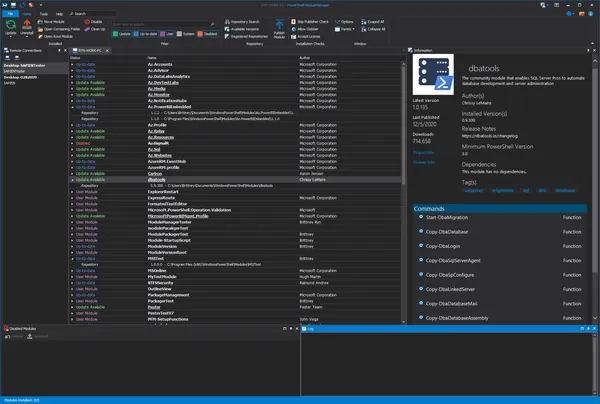
Free Download SAPIEN PowerShell ModuleManager 2026 v2.1.36 (x64) | 138 Mb
SAPIEN PowerShell ModuleManager is a management utility designed to help PowerShell users search, organize, and maintain modules used in script development and automation workflows. It provides a centralized interface for managing modules installed on local and remote Windows systems.
The software simplifies common PowerShell module administration tasks by allowing users to discover available modules, install required packages, remove unnecessary components, and keep existing modules updated. It is suitable for both beginners learning PowerShell and experienced administrators maintaining complex scripting environments.
With support for module repositories, version management, and remote administration, PowerShell ModuleManager helps developers and system administrators maintain a clean and organized PowerShell environment for automation and administration tasks.


Software Overview
SAPIEN PowerShell ModuleManager provides a graphical interface for managing PowerShell modules without requiring users to rely entirely on command-line commands. It allows users to browse available modules, inspect detailed information, and manage module locations from a single workspace.
The application supports searching the PowerShell Gallery and other repositories, making it easier to find and deploy modules required for specific scripts or administrative tasks. Users can also manage modules across remote machines and publish their own modules to repositories.

Key Features
  • Search PowerShell Gallery and other module repositories.
  • Install, remove, and temporarily disable PowerShell modules.
  • Keep installed modules updated with newer versions.
  • Detect and remove duplicate or outdated module versions.
  • Filter and locate modules installed on local systems.
  • View detailed module information and metadata.
  • Move and organize PowerShell module locations.
  • Manage modules on remote machines.
  • Publish modules to supported repositories.

Why Choose SAPIEN PowerShell ModuleManager
SAPIEN PowerShell ModuleManager is useful for users who work regularly with PowerShell scripts and need better control over their module environment. It reduces the complexity of maintaining multiple modules and helps prevent conflicts caused by outdated or duplicate versions.
The software is suitable for PowerShell developers, system administrators, and IT professionals who manage automation scripts across Windows environments.

System Requirements
Windows Server 2016 / 2019 or Windows 10, 64-bit versions supported
Windows PowerShell 5.0 or later
55MB free disk space
2GB RAM (Recommended for Windows PowerShell)
.NET Framework 4.8
NuGet installed via PowerShell

Frequently Asked Questions

What is SAPIEN PowerShell ModuleManager used for?
SAPIEN PowerShell ModuleManager is used to search, install, update, organize, and maintain PowerShell modules on Windows systems.

Can PowerShell ModuleManager manage remote machines?
Yes. The software supports managing PowerShell modules installed on remote machines.

Does the software support PowerShell Gallery?
Yes. It can search the PowerShell Gallery and other supported repositories for available modules.

Home Page

Код:
https://www.sapien.com/

Product Information
  • Software Name: SAPIEN PowerShell ModuleManager
  • Version: 2026 v2.1.36
  • Architecture: x64
  • Languages: English
  • License type: Full Version
  • File Size: 138 Mb
Rapidgator
Код:
https://rapidgator.net/file/309b631ef330633d4ae6f36c9eecd2c2/j5nii.SAPIEN.PowerShell.ModuleManager.2026.v2.1.36.x64.rar.html

Код:
https://nitroflare.com/view/AF76E4473CF8955/j5nii.SAPIEN.PowerShell.ModuleManager.2026.v2.1.36.x64.rar
 
8c52cbe2917ee116bdecc08b2106d68d.webp

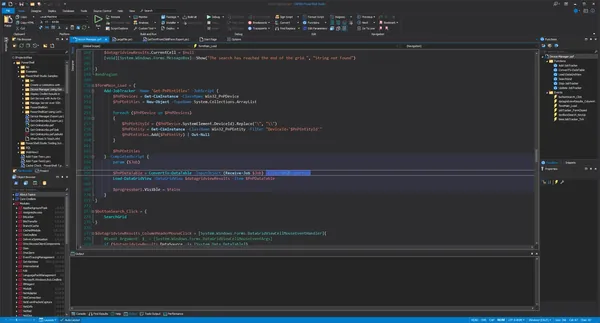
Free Download SAPIEN PowerShell Studio 2026 v5.10.271 (x64) | 537 Mb
SAPIEN PowerShell Studio is a professional development environment designed for creating, editing, debugging, and packaging PowerShell scripts. It combines a full-featured script editor with visual design tools, automation features, and deployment options for Windows PowerShell and PowerShell 7 environments.
The software helps developers and system administrators build PowerShell-based tools more efficiently by providing a graphical interface designer, code assistance features, and reusable templates. Users can create custom GUI applications, script modules, executable files, and installers without managing every component manually.
With integrated debugging, version control support, performance monitoring, and remote scripting capabilities, PowerShell Studio provides a complete workspace for PowerShell development, automation, and administration tasks.


Software Overview
SAPIEN PowerShell Studio provides an integrated environment for developing PowerShell solutions ranging from simple scripts to advanced administrative applications. The built-in editor includes syntax highlighting, reference tracking, code completion, formatting tools, and script management features to improve development efficiency.
The visual GUI designer allows users to create Windows-based PowerShell applications using preconfigured controls and templates. The application also supports creating script modules, converting scripts into executable files, and preparing deployment packages for different environments.

Key Features
  • Full-featured PowerShell editor with syntax coloring and code completion.
  • Create graphical PowerShell tools using a visual GUI designer.
  • Convert PowerShell scripts into executable (.exe) files.
  • Create MSI installers for scripts, modules, and applications.
  • Build PowerShell modules from existing functions or help files.
  • Generate advanced functions using the Function Builder.
  • Create Windows services using PowerShell.
  • Monitor script performance with real-time memory and CPU tracking.
  • Support scripting with remote machine cmdlets.
  • Integrate with Git-based version control workflows.
  • Provide integrated 32-bit and 64-bit PowerShell consoles.
  • Debug scripts locally and remotely.
  • Support multi-file and module debugging.
  • Access built-in PowerShell help resources.
  • Support Windows PowerShell and PowerShell 7.

Why Choose SAPIEN PowerShell Studio
SAPIEN PowerShell Studio is designed for users who develop and maintain PowerShell scripts on a regular basis. Its combination of editing tools, visual development features, and deployment options helps simplify the process of creating reusable automation solutions.
The software is suitable for PowerShell developers, system administrators, and IT professionals who need a structured environment for scripting, debugging, and distributing PowerShell-based applications.

System Requirements
Windows Server 2016/2019/2022 or Windows 10/11, 64-bit versions supported
500MB free disk space
2GB RAM
.NET Framework 4.8
.NET 7 Desktop for PowerShell 7.3
.NET 6 Desktop for PowerShell 7.2
.NET 5 Desktop for PowerShell 7.1
.NET 3.1 Core Desktop for PowerShell 7.0
Visual Studio 2015-2022 Runtime

Frequently Asked Questions

What is SAPIEN PowerShell Studio used for?
SAPIEN PowerShell Studio is used to create, edit, debug, package, and deploy PowerShell scripts and applications.

Does PowerShell Studio support graphical application development?
Yes. The software includes a visual GUI designer for creating graphical tools based on PowerShell.

Can PowerShell Studio create executable files?
Yes. It can package PowerShell scripts into executable (.exe) files and create MSI installers.

Which PowerShell versions are supported?
The software supports Windows PowerShell and PowerShell 7 environments.

Home Page

Код:
https://www.sapien.com/

Product Information
  • Software Name: SAPIEN PowerShell Studio
  • Version: 2026 v5.10.271
  • Architecture: x64
  • Languages: English
  • License type: Full Version
  • File Size: 537 Mb
Rapidgator
Код:
https://rapidgator.net/file/e79bb2c6a2d33e7b111a0f9f9066f354/opnt5.SAPIEN.PowerShell.Studio.2026.v5.10.271.x64.rar.html

Код:
https://nitroflare.com/view/13A04838467DD13/opnt5.SAPIEN.PowerShell.Studio.2026.v5.10.271.x64.rar
 
8933a7773a571a4dd5c357cb118b9361.webp

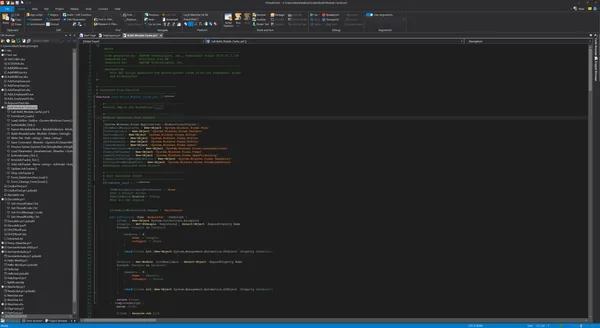
Free Download SAPIEN PrimalScript 2026 v8.1.229 (x64) | 448 Mb
SAPIEN PrimalScript is a professional universal scripting environment designed for administrators, developers, and IT professionals who work with multiple scripting languages, technologies, and file formats. It provides an integrated workspace for creating, editing, debugging, packaging, and deploying scripts across Windows environments.
The software combines advanced scripting tools with support for PowerShell, VBScript, JScript, and other scripting technologies. Its development environment helps users manage complex automation projects by providing code editing features, debugging capabilities, templates, and deployment utilities.
With built-in packaging and installer creation tools, PrimalScript allows users to prepare scripts and applications for distribution across different environments. It is suitable for system administration, network management, database tasks, and application development workflows.


Software Overview
SAPIEN PrimalScript provides a centralized environment for developing and maintaining scripts across various platforms and languages. The interface includes commonly used development functions, customizable script templates, and tools designed to improve productivity during scripting projects.
The application supports both local and remote debugging for PowerShell and other scripting technologies. Users can test scripts, analyze execution behavior, and manage multi-file projects through an organized development environment.
PrimalScript also includes packaging and deployment features that allow administrators to create executable packages, MSI databases, and customized deployment solutions for specific environments.

Key Features
  • Universal scripting environment supporting multiple languages and file formats.
  • Create and manage reusable script templates.
  • Develop scripts for 32-bit and 64-bit platforms.
  • Debug PowerShell scripts locally and remotely.
  • Support Windows PowerShell and PowerShell 7 environments.
  • Debug remote VBScript, JScript, and PowerShell scripts.
  • Use PowerShell variable and function breakpoints.
  • Work with remote machine Installed Module Sets (IMS).
  • Create deployment packages and MSI databases.
  • Support code signing and customized execution options.
  • Provide integrated 32-bit and 64-bit PowerShell consoles.
  • Debug multi-file scripts and modules.
  • Restore development states using restore points.

Why Choose SAPIEN PrimalScript
SAPIEN PrimalScript is designed for users who need a structured environment for managing different scripting technologies in one application. It provides tools for writing, testing, debugging, and deploying scripts used in administration and automation workflows.
The software is suitable for system administrators, network administrators, web developers, and technical users who regularly work with scripts and automation tasks.

System Requirements
Windows Server 2016 / 2019 or Windows 10, 64-bit versions supported
120MB free disk space
2GB RAM recommended for PowerShell
.NET Framework 4.8 or higher
Visual Studio 2015-2019 Runtime
Windows PowerShell V5 or PowerShell 7

Frequently Asked Questions

What is SAPIEN PrimalScript used for?
SAPIEN PrimalScript is used for creating, editing, debugging, packaging, and deploying scripts for system administration and development tasks.

Which scripting languages does PrimalScript support?
PrimalScript supports multiple scripting languages and file formats, including PowerShell, VBScript, and JScript.

Does PrimalScript support remote debugging?
Yes. The software provides remote debugging capabilities for PowerShell and other supported scripting environments.

Can PrimalScript create deployment packages?
Yes. It includes tools for building packages, MSI databases, and deployment solutions.

Home Page

Код:
https://www.sapien.com/

Product Information
  • Software Name: SAPIEN PrimalScript
  • Version: 2026 v8.1.229
  • Architecture: x64
  • Languages: English
  • License type: Full Version
  • File Size: 448 Mb
Rapidgator
Код:
https://rapidgator.net/file/7a40fa5ae8c98156a17d5a999284a2e1/j6rg5.SAPIEN.PrimalScript.2026.v8.1.229.x64.rar.html

Код:
https://nitroflare.com/view/2D248762ED5060C/j6rg5.SAPIEN.PrimalScript.2026.v8.1.229.x64.rar
 
47efaebf9e94ddd3471fb19221942f68.webp

Free Download SAPIEN PrimalXML 2026 v4.7.90 (x64) | 32 Mb
SAPIEN PrimalXML is an XML editing and management tool designed for developers, administrators, and technical users who need to create, inspect, modify, and validate XML documents. It provides a specialized environment for working with XML files through structured views, syntax highlighting, and editing assistance.
The software simplifies XML development by allowing users to view documents as formatted text or through an element-based tree structure. It helps users analyze XML data, modify document structures, apply stylesheets, and verify files against XML schemas.
With features focused on XML navigation, formatting, and validation, PrimalXML provides a practical workspace for managing XML content used in software configuration, data exchange, and development workflows.


Software Overview
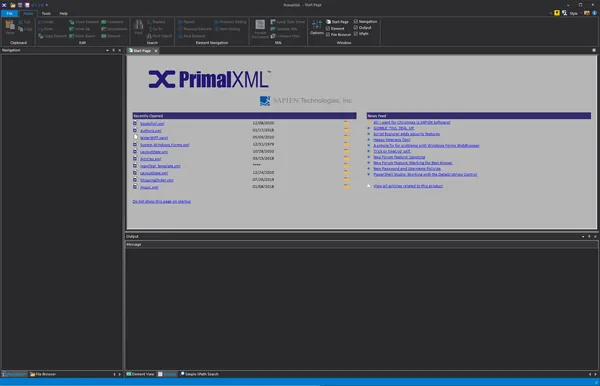
SAPIEN PrimalXML provides tools for editing XML documents with improved readability and control compared to standard text editors. The application highlights XML elements and attributes, making it easier to identify document structures and edit complex files.
Users can explore XML content through the Element Viewer, quickly navigate between elements, and perform modifications using dedicated XML editing functions. The software also supports stylesheet processing, allowing users to preview XML transformations as HTML output.

Key Features
  • Edit and manage XML documents through a dedicated XML environment.
  • View XML files as formatted text or element tree structures.
  • Provide XML syntax coloring for elements and attributes.
  • Validate XML files using schema definitions.
  • Apply stylesheets and preview XML transformation results as HTML.
  • Use XML PrimalSense code completion assistance.
  • Automatically format XML documents for improved readability.
  • Navigate and modify XML elements efficiently.
  • Copy and paste XML objects intelligently.
  • Search and replace XML objects.

Why Choose SAPIEN PrimalXML
SAPIEN PrimalXML is suitable for developers and IT professionals who regularly work with XML-based files and require tools beyond basic text editing. Its structured editing features make it easier to inspect document hierarchy, validate content, and maintain XML files.
The software can be useful in development, administration, and data management environments where accurate XML editing and validation are required.

System Requirements
Windows Server 2016 / 2019 or Windows 10, 64-bit versions supported
13MB free disk space
1GB RAM
Visual Studio 2015-2019 Runtime

Frequently Asked Questions[/h3][/b]

What is SAPIEN PrimalXML used for?
SAPIEN PrimalXML is used to create, edit, format, and validate XML files with specialized XML editing tools.

Can PrimalXML validate XML documents?
Yes. The software can validate XML files using schema files to help verify document structure.

Does PrimalXML support XML code completion?
Yes. It includes XML PrimalSense code completion features to assist during editing.
[h2]Home Page
Код:
https://www.sapien.com/

Product Information
  • Software Name: SAPIEN PrimalXML
  • Version: 2026 v4.7.90
  • Architecture: x64
  • Languages: English
  • License type: Full Version
  • File Size: 32 Mb
Rapidgator
Код:
https://rapidgator.net/file/9f30525051e6c0119050f5524443c049/cp4yd.SAPIEN.PrimalXML.2026.v4.7.90.x64.rar.html

Код:
https://nitroflare.com/view/A3A560207309E85/cp4yd.SAPIEN.PrimalXML.2026.v4.7.90.x64.rar
 
c195d4b1924d9a18b1ce086c05d2d761.webp

Free Download SAPIEN VersionRecall 2026 v1.8.181 (x64) | 33 Mb
SAPIEN VersionRecall is a file version management and backup utility designed to help users save, organize, and restore multiple versions of their files. It provides a simple approach to version tracking by storing files in their original format without requiring database systems or complex development environments.
The software automatically monitors changes and can create new file versions according to user-defined schedules. It is suitable for developers, administrators, and users who need a reliable way to preserve file history, recover previous versions, and maintain backups of important data.
With Windows Explorer integration, file comparison tools, and support for both text and binary files, VersionRecall provides practical version control features without the complexity commonly associated with traditional version management systems.


Software Overview
SAPIEN VersionRecall provides an easy-to-use environment for managing file revisions through automatic version tracking and scheduled backups. Unlike systems that store data in proprietary databases, it keeps versioned files in their original formats for easier access and recovery.
The application copies only modified files to improve efficiency and allows users to restore previous file versions whenever needed. Its automatic operation mode helps maintain file history without requiring constant manual management.
VersionRecall also supports backup creation to various storage locations, including disks, optical media, and removable drives, making it suitable for personal and professional file management workflows.

Key Features
  • Automatically save and manage multiple file versions.
  • Store versioned files in their original formats.
  • Copy only modified files for efficient version tracking.
  • Restore previous versions of files when needed.
  • Create scheduled automatic version submissions.
  • Integrate with Windows Explorer.
  • Compare file versions using the built-in comparison tool.
  • Support both text and binary files.
  • Create ZIP archives quickly.
  • Back up files to disks, CDs, or flash drives.
  • Provide a fully automatic operation mode.
  • Sign PowerShell scripts before submission.

Why Choose SAPIEN VersionRecall
SAPIEN VersionRecall is designed for users who need straightforward file version management without configuring complex version control infrastructure. It provides a practical solution for maintaining file history, testing changes, and recovering earlier versions of documents or scripts.
The software is suitable for developers, system administrators, and users who need additional protection against accidental file changes or data loss.

System Requirements
Windows Server 2016 / 2019 or Windows 10, 64-bit versions supported
25MB free disk space
1GB RAM
Visual Studio 2015-2019 Runtime

Frequently Asked Questions

What is SAPIEN VersionRecall used for?
SAPIEN VersionRecall is used to manage file versions, create backups, and restore previous versions of files.

Does VersionRecall require a database system?
No. The software stores versioned files in their original formats without requiring a database backend.

Can VersionRecall work with binary files?
Yes. The software supports both text files and binary files.

Can VersionRecall create automatic backups?
Yes. It supports scheduled and fully automatic version management modes.

Home Page

Код:
https://www.sapien.com/

Product Information
  • Software Name: SAPIEN VersionRecall
  • Version: 2026 v1.8.181
  • Architecture: x64
  • Languages: English
  • License type: Full Version
  • File Size: 33 Mb
Rapidgator
Код:
https://rapidgator.net/file/6833ff88716e1d3049a677af7adcf42c/y3guo.SAPIEN.VersionRecall.2026.v1.8.181.x64.rar.html

Код:
https://nitroflare.com/view/FFF683874E0FA4F/y3guo.SAPIEN.VersionRecall.2026.v1.8.181.x64.rar
 
a8557711ff5c2d75e4cbb586df0fc415.png


SSD Booster .NET 19.9 | Size: 3.38 MB
Language: English


SSD Booster is our perfect tool to optimize and tweak Windows for SSD drives to boost the efficiency and maintain peak performance of your SSD.

Compact layout
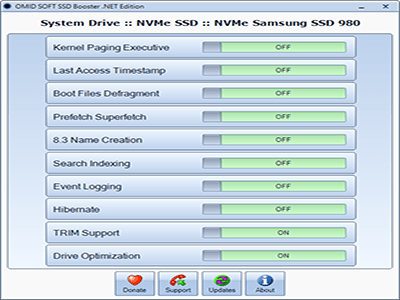
SSD Booster .NET comes with a vintage-looking UI that displays a list of functions and adjacent on/off sliders. Also, it requires no installation, just run the executable each time you wish to make changes.
Provides quick access to a collection of advanced functions
There are a total of then features this app can turn on and off. For some - like Hibernate, Drive Optimization, and Event Logging - guessing their purpose is easy, but for others, that's not that easy. For example, Prefetch Superfetch deals with creating files containing data about launched applications, optimizing future launches.
8.3 Name Creation manages long names and descriptions where nonstandard characters were used, however, some processes may ask you to disable this function.
Time-saving SSD companion
That's where SSD Booster .NET is useful the most. It practically brings some important drive tweaks, which normally takes up time and effort only to locate them. As far as the slider work, that's easy. When a feature is activated the slider will turn green, and red for the opposite state.
In addition, the application comes with a system info tab that reveals your machine's hardware and OS information. To check your specs, go to About and look for the System Information button.
To conclude
SSD Booster .NET looks like an interesting optimizer to have around, especially if you are putting your SSD through hoops that a casual user wouldn't.

System Requirements: Windows 11, Windows 10, 8 , 7


DOWNLOAD LINKS:


Код:
https://rapidgator.net/file/75352a16d7b17aef5bc3926c6cc8eb32/SSD_Booster_.NET_19.9.rar.html

Код:
https://nitroflare.com/view/817EE8F23A72928/SSD_Booster_.NET_19.9.rar
 
fba9e1deb6943a1224e1656e22645eb8.webp

Free Download Syncovery Premium 12.3.5.50 (x64) Multilingual | 91 Mb
Syncovery is a data backup and synchronization application designed to help users protect, transfer, and manage files across computers, servers, notebooks, and different storage locations. The software provides flexible synchronization profiles, automated backup scheduling, and support for various local and online storage environments.
The application is suitable for personal users, IT administrators, and businesses that need reliable file synchronization between multiple systems. Users can configure tasks through a guided wizard interface or use advanced settings for more detailed control over backup and synchronization operations.
Syncovery supports multiple transfer protocols, encryption options, compression, filtering, and automated scheduling, allowing users to create customized workflows for data protection and file management.


Software Overview
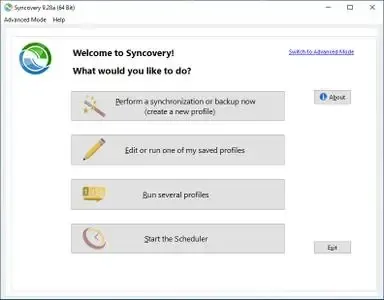
Syncovery provides a flexible solution for synchronizing and backing up files between different locations. Users can create multiple profiles to manage separate backup or synchronization tasks and choose between simplified Wizard Mode or Advanced Mode depending on their requirements.
The software supports local folders, network locations, FTP and secure FTP servers, SSH, WebDAV, Amazon S3, and HTTP-based storage connections. Automated scheduling allows backup tasks to run at specific times, including operation as a service without requiring an active user session.
Syncovery also includes features such as real-time folder monitoring, partial file updating, data encryption, ZIP compression, and support for locked file copying through Volume Shadow Service.

Key Features
  • Backup and synchronize files between computers, servers, and notebooks.
  • Wizard Mode and Advanced Mode interfaces.
  • Profile-based configuration for multiple synchronization tasks.
  • Support for FTP, SFTP, SSH, WebDAV, Amazon S3, and HTTP connections.
  • Automated scheduler for recurring backup operations.
  • Real-time synchronization with folder monitoring.
  • Partial file updating for efficient transfers.
  • ZIP compression and data encryption support.
  • Email notifications and profile organization tools.
  • Support for Unicode filenames and long file paths.

Why Choose Syncovery
Syncovery is designed for users who need detailed control over file backup and synchronization processes. Its combination of scheduling, storage compatibility, filtering options, and automation features makes it suitable for managing data across different environments.
The software can be used for personal backups, server synchronization, workstation management, and business data workflows where consistent file updates are required.

System Requirements
Operating System: Windows 7, 8/8.1, 10

Frequently Asked Questions

What is Syncovery used for?
Syncovery is used for file backup, synchronization, and data transfer between different storage locations and devices.

Does Syncovery support cloud storage?
Yes. Syncovery supports several online storage services and protocols, including Amazon S3, WebDAV, FTP, and SSH-based connections.

Can Syncovery run automatic backups?
Yes. The software includes a scheduler that can automate backup and synchronization tasks.

Does Syncovery support encrypted transfers?
Yes. Syncovery provides data encryption features for protecting transferred files.

Home Page

Код:
https://www.syncovery.com/

Product Information
  • Software Name: Syncovery
  • Version: 12.3.5.50
  • Architecture: x64
  • Languages: Multilingual
  • License type: Full Version
  • File Size: 91 Mb
Rapidgator
Код:
https://rapidgator.net/file/70c408282a3d23efc09890e64cbb9fdf/hypsh.Syncovery.Premium.12.3.5.50.x64.Multilingual.rar.html

Код:
https://nitroflare.com/view/F4ACD22724AC263/hypsh.Syncovery.Premium.12.3.5.50.x64.Multilingual.rar
 
2c6431e77d90845e4262efdd8c2a6a4e.jpg


TapinRadio Pro 2.17.01 Multilingual | Size: 79.56 MB
Language: English


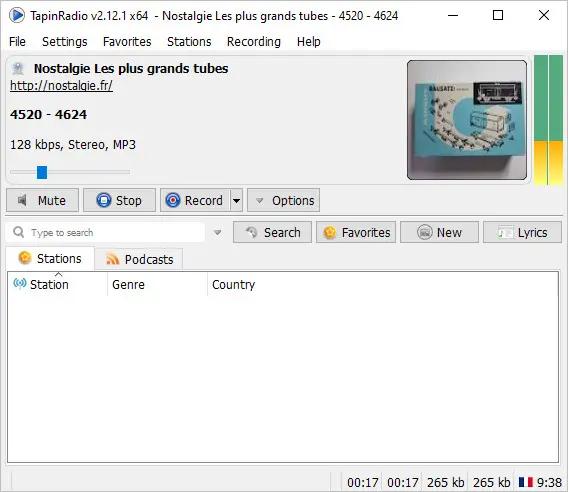
TapinRadio Pro is simple, fairly reliable and works most of the time. Plenty of stations to choose from and continuously updated. Supports most of the internet radio formats - mp3, wma, ogg, aac. Quick search. Graphic Equalizer. Scheduled recordings. Record what you are listening to - as separate tracks or continuously. Automatic checking for software and station listing (only if configured in settings). Show your favorites in groups. Alarm feature. Sleep timer to shutdown TapinRadio or even your computer!

Key features
· Plenty of stations to choose from
· Supports most of the internet radio formats - mp3, wma, ogg vorbis, aac+ and so on
· Quick and reliable search
· Smooth switching between stations
· Record what you are listening to - including separate song files
· Automatic checking for software and radio stations updates
· Show your favorites in groups

Operating System: Windows XP/Vista/7/8/10/11

HOMEPAGE: Code:
Код:
http://www.raimersoft.com


DOWNLOAD LINKS:


Код:
https://rapidgator.net/file/5ed5ea5c63b3d30c1f7a44a883ca9ba0/TapinRadio_Pro_2.17.01_Multilingual.rar.html

Код:
https://nitroflare.com/view/6B85AEBCCB1C4FB/TapinRadio_Pro_2.17.01_Multilingual.rar
 
9d6316d2625eea006ce3afae800bf151.jpg


TunesKit AceMovi Video Editor 6.0.0.39 Multilingual | Size: 168.48 MB
Language: English


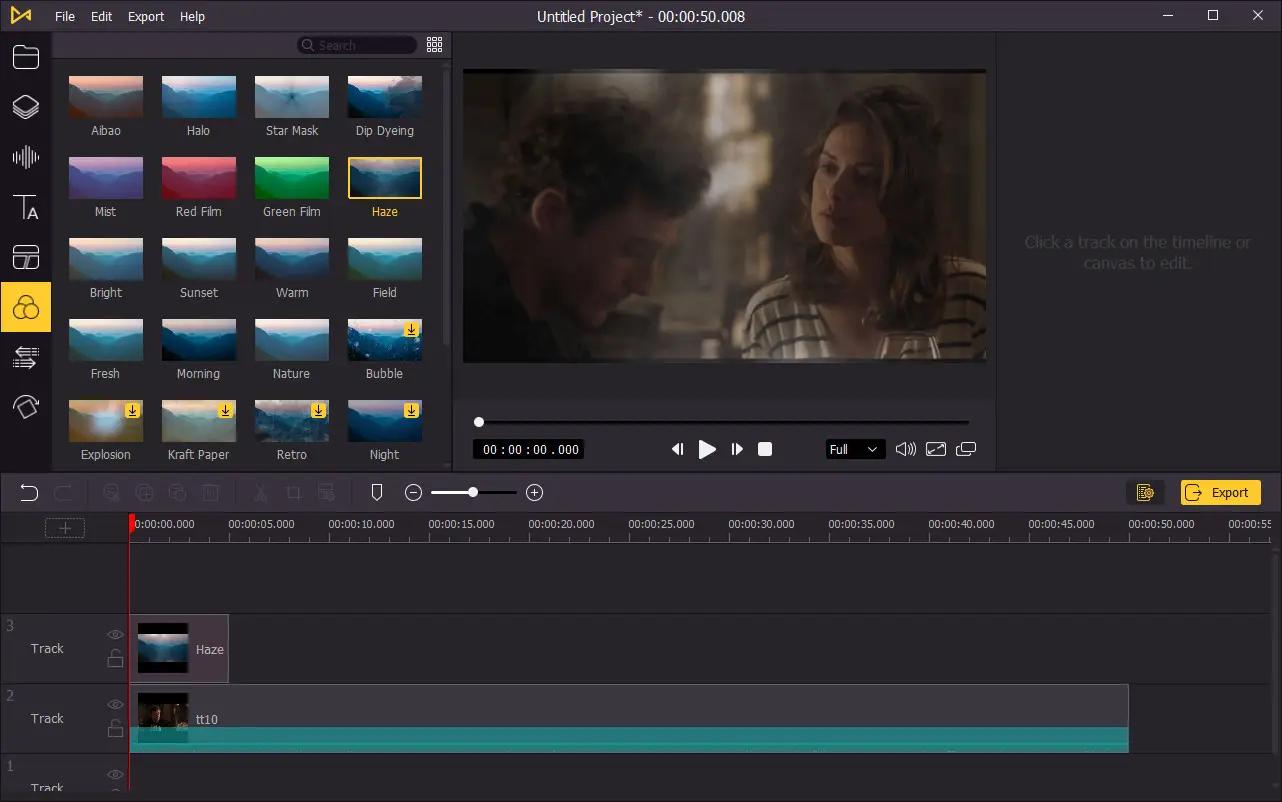
TunesKit AceMovi Video Editor can stand out from numerous similar video editor apps in the market is mainly because of its simple and intuitive interface, as well as a variety of powerful features. With this software, you can easily create high-quality videos on Mac and Windows, no matter you're a pro or just about to video editing field. You can simply record your screen or import your media, drop and drop text, music, transitions, and more effects, and then export and share your video. Done!

What video content can AceMovi help you create?
TunesKit AceMovi Video Editor is an almighty video solution to help you edit any video you want. Generally speaking, you can use AceMovi to make videos for personal entertainment, work, or educational purposes. To be specific, you can use it to capture memories, wedding or romance, hobbies, travel, gameplay, sports, pets, food or cooking; branding or marketing, demos, company events, webinars; learning, training, coaching, tutorials, and how-tos, and many others.

Ease of use, but full of powerful features
As an easy-to-use video editor software, TunesKit AceMovi Video Editor for Windows or Mac is capable of simplifying your video editing with rich features. You can use the basic editing features such as crop, split, rotate, adjust speed, etc., or use the advanced effects to create eye-catching videos like filters, animations, transitions, behaviors, text, audio, and so on.

Discover perfect resources from built-in media library
TunesKit AceMovi Video Editor has a massive stock library for any project, including videos, images, music tracks, and templates, etc. You can choose any asset to create fascinating videos. Currently, it already has thousands of assets and it will keep growing as we curate more resources.

Export and share your polished video to any platform
After everything is well-tailored, you can now save your video to the local computer or share your story online like YouTube, Vimeo, Facebook, etc. It supports various popular video formats and devices including MP4, M4V, MOV, MKV, MPG, 3GP, 3GP-2, OGV, iPhone, iPad, Apple TV, Galaxy series, Huawei, Xbox, PSP, LG TV, etc.

System & Hardware Requirements:
Operating System: Windows XP, Vista, 7, 8, 8.1, 10 (32-bit & 64-bit)
Processor: 1G Hz processor, or above
RAM: 512MB or higher of RAM
Monitor: Monitor with 1024x768 pixels or higher resolution

HOMEPAGE: Code:
Код:
https://www.tuneskit.com/


DOWNLOAD LINKS:


Код:
https://rapidgator.net/file/14e9e33ebf8142506d878bc3cf84fafa/TunesKit_AceMovi_Video_Editor_6.0.0.39_Multilingual.rar.html

Код:
https://nitroflare.com/view/D413A5773D6FEF0/TunesKit_AceMovi_Video_Editor_6.0.0.39_Multilingual.rar
 
d3c7f6e1697b24be1d37dcce346f6cf2.webp

Free Download TweakNow WinSecret Plus 9.8.5 | 61.7 Mb
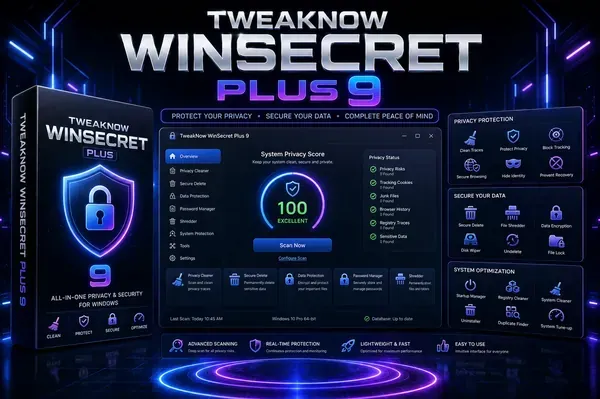
TweakNow WinSecret Plus is a Windows customization and maintenance utility designed to provide users with additional control over system settings, hidden options, and everyday PC management tasks. The software combines multiple tools in one interface for adjusting Windows preferences, managing system information, and performing various utility operations.
The application is suitable for Windows 10 and Windows 11 users who want to customize their desktop environment, access advanced configuration options, and simplify common maintenance tasks. It includes tools for privacy settings, system information, file conversion, performance adjustments, and other practical functions.
TweakNow WinSecret Plus provides a centralized workspace for managing different aspects of Windows without requiring multiple standalone utilities.


Software Overview
TweakNow WinSecret Plus offers a collection of Windows tools focused on customization, optimization, and system management. Users can modify hidden Windows settings, adjust interface preferences, and access additional configuration options that are not always available through standard Windows menus.
The software includes built-in utilities for converting images and PDF files, viewing detailed system information, managing application priorities, creating Wi-Fi QR codes, and handling various desktop-related tasks.
With its integrated toolkit, TweakNow WinSecret Plus helps users manage Windows settings and perform common PC maintenance operations from a single application.

Key Features
  • Customize hidden settings in Windows 10 and Windows 11.
  • Automatically switch between light and dark themes.
  • Convert images into PDF documents.
  • Split and merge PDF files.
  • View detailed system and hardware information.
  • Adjust application priority levels for selected programs.
  • Create Wi-Fi connection QR codes.
  • View and extract icons from Windows libraries.
  • Keep the PC awake by preventing sleep or hibernation.
  • Convert PDF pages into image files.
  • Convert HEIC images to JPG format.

Why Choose TweakNow WinSecret Plus
TweakNow WinSecret Plus is designed for users who want easier access to Windows customization features and practical system utilities. Its all-in-one approach helps reduce the need for multiple separate applications when managing common PC tasks.
The software is suitable for home users, system enthusiasts, and anyone who wants additional control over Windows appearance, settings, and maintenance functions.

System Requirements
Operating System: Windows 10/11

Frequently Asked Questions

What is TweakNow WinSecret Plus used for?
TweakNow WinSecret Plus is used for Windows customization, system management, and accessing additional utility features.

Does TweakNow WinSecret Plus support Windows 11?
Yes. The software supports both Windows 10 and Windows 11.

Can TweakNow WinSecret Plus change Windows themes automatically?
Yes. It includes an Auto Dark Mode feature for automatic theme switching.

Does the software include PDF tools?
Yes. It provides tools for converting, splitting, merging, and processing PDF files.

Home Page

Код:
https://www.tweaknow.com/

Product Information
  • Software Name: TweakNow WinSecret Plus
  • Version: 9.8.5
  • Languages: English
  • License type: Full Version
  • File Size: 61.7 Mb
Rapidgator
Код:
https://rapidgator.net/file/6439cf04c1712e099a2e42cf37660a30/0s3ca.TweakNow.WinSecret.Plus.9.8.5.zip.html

Код:
https://nitroflare.com/view/17196C2E7C3E0BB/0s3ca.TweakNow.WinSecret.Plus.9.8.5.zip
 
Назад
Сверху Снизу