Latest Software Collection (Updated Daily)


9x-Aya-Ee-Shh7FGm-L4b-Sf-KMud-DHqk0p-S04.avif

ThinkAutomation Studio Professional Edition 5.1.1120.2 | Languages: English File Size: 173.83 MB

Automate your business processes with ThinkAutomation. ThinkAutomation powers your business process automation. Automate on-premises and cloud-based business processes to cut costs and save time. Automate incoming communication channels, monitor databases, react to incoming webhooks, web forms and chat bots. Process documents, attachments, local files and other messages sources.

Parse and extract data from incoming messages and perform business process actions, such as outbound communications, updating on-premises and cloud databases, CRM systems and cloud services, document processing, systems integration and much more. With ThinkAutomation, you get an open-ended studio to build your automated workflows without volume limitations, and without paying per process, workflow or 'bot'.
ThinkAutomation is designed to handle any business process - locally and in the cloud. Create simple or complex automations with an easy-to-use, drag-and-drop, low-code workflow designer. You can further extend the capabilities with C# or VB.NET scripting. ThinkAutomation can work in any application, on any scale required. Automate your way to efficiency with ThinkAutomation.

Own your process automation environment end-to-end

On-premises Installation
Run ThinkAutomation in your own environment. Access and update on-premises data.

Connect To The Cloud
Connect Automations to public web forms. Connect to and update cloud services. Provide a secure gateway to on-premises data.

Reduce Costs
Create any number of Automations. Save time & costs by automating business processes. Process unlimited messages without additional costs.

Popular Workflows

Email Parsing
ThinkAutomation is a smart email parsing solution. Monitor your incoming emails, pick up each new message, parse it, pull the relevant data and push to the relevant place. more..

Document Processing
ThinkAutomation is great at document processing. Automations can parse email attachments, convert files, extract and upload data, and eliminate the admin that comes with file management. more..

Database Monitoring
Use ThinkAutomation to create custom database queries and lookups as part of your workflows. Automations can pull data from your databases and run the required follow-up tasks automatically. more..

Data Transformation
ThinkAutomation is a smart data transformation solution. Extract, transform & load data from and to multiple databases, CRM systems and cloud services. more..

Unified Communications
Monitor multiple inbound communication channels. ThinkAutomation can ensure the correct response is sent and team members notified. more..

Web Gateway
Hookup 3rd party API webhooks, send web form data or create your own public API endpoints that connect to your Automations. more..

Benefits Of Automation

Increased Efficiency
ThinkAutomation automates repetitive tasks and workflows, freeing up employees' time to focus on higher-value activities.

Improved Accuracy
Automation reduces the likelihood of errors caused by human input, resulting in more accurate and reliable data.

Cost Savings
Automating business processes can significantly reduce operational costs, as it eliminates the need for manual labor and streamlines workflows.

Enhanced Customer Experience
ThinkAutomation can improve customer service by automating customer communications, ensuring prompt responses to inquiries and issues.

Scalability
ThinkAutomation can handle large volumes of data and processes, allowing businesses to scale their operations without adding staff.

Customization
ThinkAutomation's open-ended studio allows for the creation of custom workflows that meet specific business needs and can integrate with existing systems.

System Requirements
- Windows 10/11/Server 2016 or higher
- 500MB free disk space
- 4GB RAM

HomePage:
Код:
https://www.thinkautomation.com

-:DOWNLOAD FROM LINKS:-​
RapidGator
Код:
https://rapidgator.net/file/f4af8693016bf6fd6ca0eb8f3fac488c/

NitroFlare
Код:
https://nitroflare.com/view/D74E4B49C8CA1DC/
 

th-dsbmm-QC8c-Or2MEcb-CJf-OZp0Yq0FFvdi1.avif

Trados Studio 2024 SR1 Professional 18.1.4.6694 | Languages: Multilingual File Size: 397.86 MB

Trados Studio - Translate faster and smarter with Trados Studio - the most advanced AI-powered translation environment for language professionals who want to create, edit, review, and manage translation projects while in the office or on the move.

Trados Studio
Translate faster and smarter with Trados Studio - the most advanced AI-powered translation environment for language professionals who want to create, edit, review, and manage translation projects while in the office or on the move.

Key benefits
Discover a wealth of innovative features and create high-quality translations, faster.
- Consistent high-quality translations
- Powered by AI
- Extensive support and expertise
- Reduced translation cost
- Easy management of translation projects

Translation memory
Intelligent translation memory (TM) technology allows you to easily reuse previously translated and approved content. This feature can increase your translation productivity by as much as 80% and improve consistency across your projects.

Terminology management
Easily apply approved terminology across all your translations to ensure a consistent tone of voice and enhance overall translation quality. You can also manage and update terminology directly from within Trados Studio, giving you full control and flexibility.

Machine translation
Double your productivity levels with machine translation (MT) from Language Weaver, the perfect solution for translators looking to use the latest in MT to automatically translate content.

Generative Translation
Enhance your translation quality with Generative Translation capabilities through Trados Copilot - AI Assistant. Combine your linguistic resources with the power of any large language model (LLM) to improve translation output. Automatically apply the right terminology, adjust tone, or shorten sentences with ease. Thanks to the LLM's linguistic fluency and the option to create custom prompts, the possibilities for refining your translations are limitless.

Project management
Create and deliver high-volume translation projects quickly and easily in multiple languages with the project management capabilities found in Trados Studio. Combine Studio with our collaboration solutions for high-volume projects and complete control over security.

Cloud capabilities
Trados Studio's cloud capabilities offer flexible options for translation, review and management of projects, whether you prefer to work on your desktop or in a browser. You can also take advantage of Smart Help, our virtual AI chatbot that provides instant, intelligent assistance at the click of a button, helping you to keep projects on track no matter your role.

What are the system requirements for Trados Studio?
Trados Studio runs on the latest build of Windows 10 and Windows 11. We recommend Windows 11 as it is the current and best supported OS from Microsoft.
As a minimum requirement, we recommend an Intel or compatible CPU-based computer with 8 GB RAM and a screen resolution of 1024x768.
For optimum performance, we recommend a 64-bit operating system, 16 GB RAM, an SSD and a recent Intel or compatible CPU. Full support for 4K high-resolution screens is planned and will be implemented incrementally in future releases. Trados Studio uses .Net Framework 4.8.

HomePage:
Код:
https://www.trados.com

-:DOWNLOAD FROM LINKS:-​
RapidGator
Код:
https://rapidgator.net/file/d867a9df1e811ca67c7644635c69088d/

NitroFlare
Код:
https://nitroflare.com/view/D0F0AB2673CE66D/
 

th-Ydf-Bg-Td-AZCHFOZAp9q-Lw-A49Hg-Rf-EJSh-L.avif

VMware Tools 13.1.0 (x64) | File Size : 134 Mb

VMware Tools is a suite of add-ons that make VMWare better, less annoying, and more worth using.

Mouse and Display Integration: No more dragging your cursor and getting stuck in the VM window. With Tools installed, your mouse moves between guest and host like they're part of the same screen. It also supports dynamic screen resizing and multiple monitors. Just resize the VM window, and your guest OS will automatically adjust.
Copy, Paste, and Drag-and-Drop: Move files and text between your physical machine and the virtual one easily. Clipboard sharing works both ways. You can even drag files directly from the desktop to the VM. Super handy for testing, development, or everyday use.
Improved Performance: VMware Tools adds optimized drivers, so your virtual hardware behaves like it should. This includes video acceleration, improved disk and network handling, and smoother graphics overall.
Time Sync Between Host and Guest: Your guest OS automatically syncs its clock with your main system. No more time drift during long-running VMs or snapshots.
Shared Folders: Set up shared folders between host and guest for quick file access without needing cloud sync or FTP. Perfect for working on code, sharing documents, or transferring files without networking headaches.
Faster Shutdown and Reboots: It enables clean shutdown, restart, suspend, and resume actions straight from your host system's interface-there is no need to go inside the VM to hit shutdown manually.
Enhanced Guest Metrics: Running VMs in a server or enterprise environment? Tools feed detailed performance and health data back to vSphere or your hypervisor dashboard. Helps with monitoring, automation, and resource management.
Full Screen Mode with VMware Tools: Once VMware Tools is installed, your Windows guest OS can properly detect and adjust to dynamic screen sizes, including full screen. That means your guest display resolution updates automatically to match when you hit Full Screen (Ctrl+Alt+Enter) or drag your VM window to a new size. No more scrolling around or seeing black borders. Without VMware Tools? You'reYou're stuck with fixed resolutions, limited display scaling, and a VM that refuses to stretch its legs, which sucks.

System Requirements: Windows 11, Windows 10

Whats New
Updates: official site does not provide any info about changes in this version

HomePage:
Код:
https://www.vmware.com/

-:DOWNLOAD FROM LINKS:-​
RapidGator
Код:
https://rapidgator.net/file/99ef32057302fe7dcdbd8398b16de710/

NitroFlare
Код:
https://nitroflare.com/view/337E0185FFFF14C/
 

ffcb6ffc2196ba2c353394ba9cf83b8a.jpg


FiberShop 3.1.0 Studio Perpetual | File Size: 130.8 MB

FiberShop The Most powerful Solution On The Market
The Ultimate Tool for real-Time hair, FiberShop is a standalone tool specially developed for creating high-quality hair and fur for games. Workflow in FiberShop is super fast and easy to learn. All boring and time-consuming tasks will be done automatically and you only work on your design. FiberShop is a mix of powerful procedural modifiers and hand drawing brushes. You can control the hair by changing the parameters or directly drawing the hairs by brush or mixing both.

Super fast workflow
Auto UV Layout
non destructive workflow
easy to integrate into all studio environments
Layer-Based Modifiers
Layer-Based Texturing
Preview All Passes in Real-time
Advanced Export Options

power of procedural
Create any variation of hairs in seconds with the power of procedural modifiers.
Modify each block of hair separately by adding new modifiers and simply repositioning them by clicking and dragging in 2D space.
Both design and coloring processes are Layer-Based. Each block can have unlimited layers of modifiers or color filters.
Texture size and aspect ratio can change at any time without losing any data or quality.

Hand draw brush
Use hand-draw brush to draw hairs in any form and flow. It creates 3D hairs by simply drawing some curve strokes on UV space.
All procedural modifiers can apply on hand draw hairs, density and other parameters of the hair can be changed anytime after drawing the hairs.

Preview All Passes in Real-time
See all changes and modifications in Real-Time in 2D or 3D.
Preview All passes before exporting them directly on the 3D mesh or in the 2D viewport in Real-Time.

Physical Based Ambient Occlusion
FiberShop calculates the ambient occlusion in real-time progressive mode directly from 3D meshes and the result is physical based, opposite of many other solutions that fake the AO from 2D passes.
AO settings can be adjusted in real-time.

What's New
official site does not provide any info about changes in this version.

System Requirements: Windows 11, 10.

HomePage:
Код:
https://cgpal.com/fibershop/

-:DOWNLOAD FROM LINKS:-​
RapidGator
Код:
https://rapidgator.net/file/9346212e3ce2503eb875f4e2172527b8/

NitroFlare
Код:
https://nitroflare.com/view/441377AEDEA244F/
 

e2b4669dc83efd0eb6bf57b5b8b71984.png


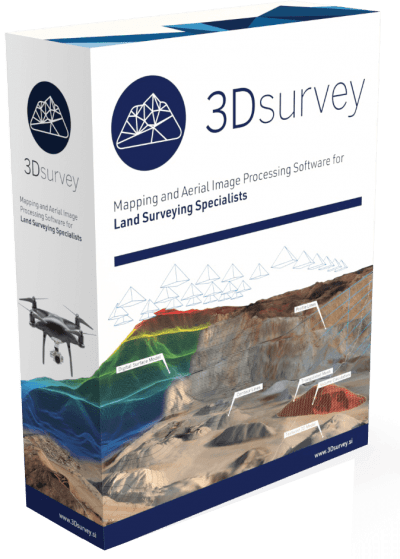
3Dsurvey 4.1.1 (x64) Multilingual | File size: 141.9 MB

3Dsurvey is a software solution for land surveying data processing. Take a photo with any standard digital camera, import images into 3Dsurvey and produce your own orthophoto maps, digital surface models and calculate volumes faster and more easily. Data is processed automatically based on matching algorithms. Use our smart tools to be even more efficient.

Works with any drone and any camera
3Dsurvey software is designed to work with any digital camera, DSLR or GoPro. Use any UAV to capture aerial terrain images or check our PACKAGE SOLUTIONS.

Land surveying tool accuracy
Get the most accurate end results in a fast and elegant manner. Our team of experienced land surveyors and devoted computer vision specialists understands first-hand the importance of your end result accuracy.

No *.log from flight path needed
No need for downloading the flight point file from your drone or paying expensive systems to geo tag your aerial images. Simply import images from your camera and start processing.

Developed based on real projects
Being fast and efficient at land surveying projects every day is the foundation of 3Dsurvey. Our software is developed based on experience from more than 300 end customer drone projects! Check our SHOWCASES.

System Requirements
Minimum: Windows 7, 8, 10; 64 bit, Intel i5 or Ryzen 5, 16 GB RAM, nVidia GTX 1050 or better, SSD 128 GB + HDD 500 GB

HomePage:
Код:
https://www.3dsurvey.si/

-:DOWNLOAD FROM LINKS:-​
RapidGator
Код:
https://rapidgator.net/file/0c18092012311b377eefbaf5542fb747/

NitroFlare
Код:
https://nitroflare.com/view/54E1C8F873B8E2C/
 

ab8650087c896287bd7d4808ce8da3a0.jpg


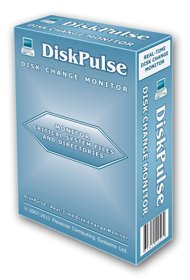
Disk Pulse 18.1.24 | All Editions | File size: 76.2 MB

DiskPulse is a real-time disk change monitoring solution allowing one to monitor one or more disks or directories, save reports and disk change monitoring statistics, export detected changes to a centralized SQL database, execute custom commands and send E-Mail notifications when unauthorized changes are detected in critical system files.

DiskPulse Main GUI Application
The DiskPulse GUI application provides the user with the ability to start/stop disk change monitoring operations, review detected file system changes and export reports.

Disk Change Monitoring Filters
The bottom part of the DiskPulse GUI application includes the 'Categories' pane, which is capable of categorizing detected file system changes by the file type, size, extension, user name, etc. and allows one to filter changes by one or more change categories.

Disk Change Monitoring Statistics
The pie charts dialog is capable of showing numbers of changed files and the amount of changed disk space per extension, change type, file size and file type. In addition, the user is provided with the ability to copy the chart image to the clipboard allowing one to easily integrate DiskPulse charts into presentations and documents.

Disk Change Monitoring Directories
The profile dialog's 'Monitor' tab allows one to specify one or more disks or directories that should be monitored. All the specified directories will be monitored recursively including all subdirectories.

Disk Change Monitoring Events
The profile dialog's 'Events' tab allows one to select one or more file system event types that should be monitored.

Disk Change Monitoring Rules
The profile dialog's 'Rules' tab provides the user with the ability to limit a disk change monitoring operation to one or more specific file types.

Disk Change Monitoring Actions and E-Mail Notifications
The profile dialog's 'Advanced' tab allows one to automatically save reports, submit changes to a database, send E-Mail notifications and/or execute custom commands when a disk change monitoring operation will detect a specified number of changes.

Search File System Changes
The search dialog allows one to search disk changes by the file name, location, modification date, category, file size, file owner, etc. in all disk change monitoring reports stored in an SQL database.

DiskPulse Disk Change Monitor Server
DiskPulse Server is a server-based product version, which runs in the background as a service and allows one to perform multiple, parallel disk change monitoring operations, send E-Mail notifications, save reports, export detected changes to a centralized SQL database, send error messages to the system event log and/or execute custom user commands when a user-specified number of changes detected.

DiskPulse Enterprise
DiskPulse Enterprise can be used as a centralized reports database server capable of receiving disk change monitoring reports from multiple production servers. DiskPulse Enterprise allows one to define a centralized set of report analysis rules, which are automatically applied to disk change monitoring reports received from production servers, detect critical file system changes and send E-Mail notifications.

System Requirements
Windows XP
Windows Vista
Windows 7
Windows 8
Windows 10
Windows 11
Server 2003
Server 2008
Server 2008 R2
Server 2012
Server 2012 R2
Server 2016
Server 2019
Server 2022
Server 2025

Whats New
Код:
https://www.diskpulse.com/news.html

HomePage:
Код:
https://www.diskpulse.com/

-:DOWNLOAD FROM LINKS:-​
RapidGator
Код:
https://rapidgator.net/file/e8295e255c54f5feb5e5c68a56dcaae7/

NitroFlare
Код:
https://nitroflare.com/view/46A4C28D905C846/
 

95446061cde7c48618c61dfcccf72765.jpg


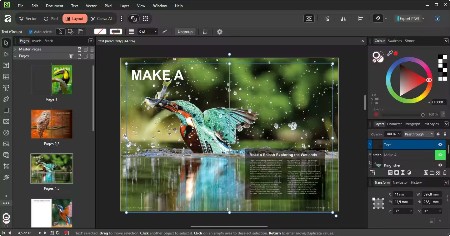
Affinity by Canva 3.2.1.4425 (x64) Multilingual | File size: 617.6 MB

What will you design today? With Canva you can design, generate, print, and work on anything.

Powerful tools. Easy to learn.
Learn by doing with step-by-step lessons, templates, and real-world examples.

Enrich your designs with tailored content
Make your designs stand out with world-class photos, graphics, videos, audio, fonts, charts, and more. Explore our vast content libraries featuring top brands like Disney, Artlist, and pocstock.

Design with others
Canva makes collaboration easy. Tag teammates in comments and assign tasks on Docs, Presentations, Whiteboards, and more. Canva empowers businesses of all sizes to stay organized and reach your goals faster.

Design and print in one place
Turn your memories into photo albums, your designs into T-shirts, and your branding into business cards, flyers or invites. Get all your printing done right here with free delivery to your doorstep.

Plans that get down to business
Empower your whole team or business to design together with one of our workplace plans

AI-powered efficiency
Leverage AI to create on-brand copy, templates and video-editing.

Bring your brand in house
Set up Brand Kits and templates for your team to design with.

Beautiful approval flows
Easily control individual permissions, assign tasks and share your work.

Whats New
Код:
https://www.canva.com/newsroom/news/all-new-affinity/

System Requirements
Hardware
Windows-based PC (64-bit) with mouse or equivalent input device
Intel, AMD or ARM64* processor
Hardware GPU acceleration**
DirectX 10-compatible graphics cards and above
8GB RAM recommended
1GB of available hard drive space; more during installation
1280x768 display size or larger
* For Snapdragon X Elite-powered Windows devices
** Requires: Direct3D level 12.0-capable card

Operating System
Windows 11
Windows 10 May 2020 Update (2004, 20H1, build 19041) or later

HomePage:
Код:
https://www.canva.com/

-:DOWNLOAD FROM LINKS:-​
RapidGator
Код:
https://rapidgator.net/file/f3fdd6658977fc39e7229927136ec8a5/

NitroFlare
Код:
https://nitroflare.com/view/26AADBA3CE625C0/
 

304977657cbc102f1ba2cb0c16732b69.jpg


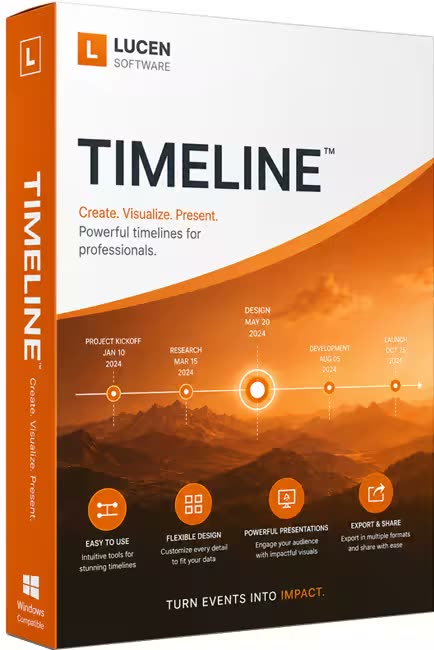
Lucen Timeline Expert 14.11.00.00 | File size: 151.74 MB

Office Timeline is now called Lucen Timeline, part of Lucen Software! The #1 PowerPoint Timeline Maker for Windows and Office. Create PowerPoint timelines or roadmaps as fast as clients and executives need them. Simple but powerful PowerPoint add-in that anyone can use to quickly make and manage impressive timelines.

Beauty trumps complexity.
Build stunning PowerPoint timelines without the effort and cost.

Free yourself from manually building and managing visual project plans.
Office Timeline helps you make timelines, Gantt charts and Swimlanes in PowerPoint almost instantly. Customize them with just a few clicks to create clear, elegant high-level presentations that everyone will understand.

User-friendly PowerPoint timeline generator. Works the way clients and colleagues do.
Office Timeline works with all versions of PowerPoint. Give them stunning PowerPoint slides that can be viewed, edited and shared by anyone who has Microsoft Office.

Manage and change data with ease.
The plugin's powerful Data wizard and drag & drop Visual Editor make timeline management agile and intuitive. Updating timelines when projects and plans change is quick and easy.

PowerPoint timelines made easy.
No complex steps. No learning curve. No hassle!

Start from scratch or pick a template.
The timeline wizard was designed to make it simple. It all starts by selecting the type of timeline you want to make.

Enter your data and click Create.
Once you've selected a timeline template, enter or import your key milestones and tasks. Set their dates, click the Create button, and voilà ! Timeline created.

Arrange and style to impress.
Use Drag & Drop to instantly rearrange or update your visual. Then customize it your way â colors, shapes, date formats, task duration, percent complete⦠change any detail, anyway you want.

Enjoy more freedom with Plus Edition.
While the Free edition is fully functional, Office Timeline Plus brings more! Plus Edition unlocks predesigned templates and gives you the freedom to add as much data as needed, so you can create detailed, unique PowerPoint timelines and Gantt charts.

See the power of Pro Edition.
Office Timeline Pro gives you everything you get with the Plus add-in, but adds powerful extra features. Pro Edition creates impressive Swimlanes and roadmaps, so you can manage complex projects with big-picture visuals that anyone can understand.

What's new
Код:
https://www.lucensoftware.com/products/timeline/updates

System Requirements
- Microsoft Windows 10 (64-bit version; LTSB, CBB and CB), Windows 11
- The following 64-bit versions of Microsoft Office are supported: Microsoft 365, Office 2021, Office 2019
- .NET Framework 4.8.

HomePage:
Код:
https://www.lucensoftware.com/

-:DOWNLOAD FROM LINKS:-​
RapidGator
Код:
https://rapidgator.net/file/e4dc9034483238ccb02c2f9e1385f1ea/

NitroFlare
Код:
https://nitroflare.com/view/A61560929789460/
 

5f1c0c7af21324ebe2f501fb73688863.png


VovSoft Watermark Image 2.1 | File size: 6.0 MB

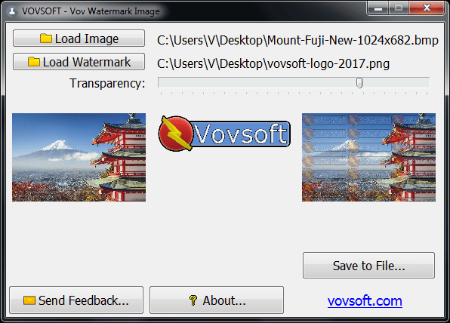
Effortlessly add watermark to images in tiled mode using this tool with support for PNG, JPG, BMP, TIF and other filetypes. If you're looking for a simple solution for applying watermarks to photos in tiled mode, you can use Vov Watermark Image. It's a free tool with straightforward features that offers support for multiple filetypes.

Vov Watermark Image gets installed quickly and without any issues. As far as the interface goes, the utility has a single window that shows all options available. By clicking two buttons, you can separately load the base image and the watermark picture. Both can be previewed in this panel, along with the new photo. Furthermore, you can tweak the level of watermark transparency while keeping an eye on the new photo preview, thanks to the fact that changes are reflected in real time. When you're pleased with the result, you can save the new photo by specifying an output directory, filename and format. Worth noting is that Vov Watermark Image acts as a graphic converter too since it can create photos with different filetypes than the originals. As far as file format is concerned, it works well with PNG (with or without transparency), JPG, BMP, ICO, EMF, WMF, TIF or TIFF.

Whats New
Код:
https://vovsoft.com/version-history/vov-watermark-image/

System Requirements: Windows 11, Windows 10, Windows 8/8.1, Windows 7, Windows Vista, Windows XP (32-bit & 64-bit)

HomePage:
Код:
https://vovsoft.com/

-:DOWNLOAD FROM LINKS:-​
RapidGator
Код:
https://rapidgator.net/file/189a9fc69b63249c8c56ee07a4c8e141/

NitroFlare
Код:
https://nitroflare.com/view/4960697E62412C5/
 
Назад
Сверху Снизу