Latest Software Collection (Updated Daily)


f4ffad9361fb3c7a37c42c7b6e9623cc.jpg


Executor 2.2.12 | File Size : 6.2 Mb

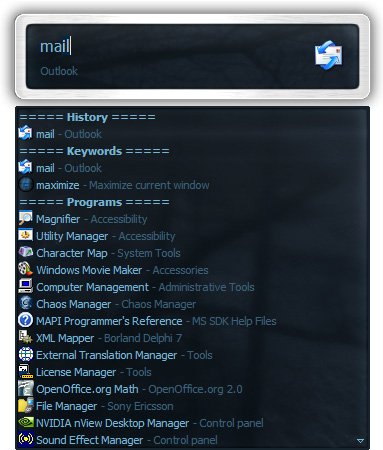
Executor is a multi purpose launcher sporting many optional customizable features and advanced setup. The program originated as I was sick of spending too much time searching for programs through my ever growing windows start-menu, and eye-balling desktop trying to mouse locate what ever I wanted to launch. Also I missed a tool that could ease and optimize my daily workflow. There was of course already programs like this available, but each had it's annoyance or missing features or too(!) geeky.

Features
Keywords have properties like shortcuts, and you can for example drag-drop a shortcut/file/folder/favorite to add it as a keyword.
Auto-completion for keywords, file system and history (can also be configured).
Url detection, Enter URLs directly (like , mail.google.com, google.com orhttps://www.google.com).
Keywords support parameters. Example "google latest executor" "wiki nirvana".
Besides keywords Executor can also optionally and dynamically add matching start-menu items, control panel items and other handy items to the drop-down/list.
Ability to add your own paths to scan for user defined file extensions.
Each keyword can be assigned a hotkey, so Executor can also perform like many popular hotkey managers.
Keyword control, have keyword open program(s) minimized, with admin access, make sure only one instance is running of program and more
Can add keyword integration with popular services like GMail, Twitter, GCal, RTM and many others (see forums for howto's, tutorials and tips).
Optional show icon for current keyword/input.
Optional show drop-down box for current keyword/input (auto-completion).
Optional drop-down box can be set to auto-open (like windows run) displaying auto-completion suggestions.
Optional list displaying matching items.
Layout can be customized. Set colors, font, dimensions, position, transparency and more.
Skinable. Supporting alpha blending effects and free positioning of all elements.
Many settings to customize the program as you like.
Can be launched from an user defined hotkey.
One keyword or text input can start multiple keywords/urls/programs/documents/files etc. Example one keyword opens three websites and/or programs.
Each keyword have properties like optional group (to organize into groups), customizable icon and other properties.
Keyword "find[text]" for using Windows Instant Search feature or Windows Desktop Search.
A number of special commands (like for example pause and replace tag with parameter).
Optional windows context-menu integration (as another way of easily adding new keywords).
Optional show title for the current input.
Can import keywords from windows start-menu.
Can auto import keywords from an url on startup, so you can share keywords between different Executor installations (for example for cooperate use).
Executor has a number settings on how you want it to find desired item(s). Text could "start with" or "contain text" (substring) or short form detection (for example typing ffox for firefox).
All file-paths can be auto-completed (also when file-path is a parameter), and you can use tab and shift-tab to browse filesystem path.
Keywords to manipulate the current active window (center, resize to specific size, maximize width or height etc).
Special keywords to list (and open) running applications, text previously copied to clipboard and recent documents. Can also strip formatting from clipboard text.
Many special keywords like for example lock computer, restart, shutdown, standby, turn off monitor(s), mute sound, show date/time/week number etc.
Shortcut keys for faster navigation.
Integrated calculator.
Integrated Notes, for quick notes etc.
Import/Export keywords (import can also import directly from an url rather than a file).
Option to override windows run hotkey (Win-R).
Optional sounds.
Integrated Windows context-menu (for example when right-clicking list items).
At startup a number of keywords/commands optionally be launched.
Set simple a simple alarm, timer, stop-watch (with optional alert sound).
Pressing enter with no valid input will launch first suggested item (optional).
Be able to grab text from hidden launched console applications and display text in input or in multi-lined text.
Several hidden experimental/minor settings to play with (Example show time/date/other stuff when idle).
Plus more...
Free (freeware for you old timers) MIT-licensed.
Free for commercial use (but feel free to donate if you forced your entire organization to use Executor! I have put a lot of hours in to this :)).

HomePage:
Код:
https://executor.dk/

-:DOWNLOAD FROM LINKS:-​
RapidGator
Код:
https://rapidgator.net/file/bf9a7bbbb6e768b3d6ed6123bfbaf2a9/

NitroFlare
Код:
https://nitroflare.com/view/22D67A36ED1CE64/

 

d101c687fbc63bf656a7d5c178d2ba46.jpg


IsoBuster Pro 5.8 Beta (Build 5.7.9.0) Multilingual | File size: 22.99 MB

IsoBuster Pro - professional version of one of the most powerful software for working with disk imaging and recovery of the optical CD / DVD-media. The program allows you to directly view and extract files, tracks, sectors, and sessions from CD-i, CD-Text, VCD, SVCD, CD-ROM, CD-ROM XA, DVD and DVCD discs. Utility supports ISO9660, Joliet, Romeo, direct (Little Endian) and reverse (Big Endian) byte order, all kinds of UDF (UDF 2.01/UDF 1.02, UDF 1.5), Rock Ridge (Commodore), short and long file names.

IsoBuster lets you rescue lost files from a bad or trashed CD, DVD or a Blu-Ray disc. Also it allows to recover deleted files from a Hard Drive, Memory card or of from flash media that Windows says needs to be formatted!
The program is a highly specialized yet easy to use media data recovery tool. It supports all disc formats and all common file systems. Start up app, Insert a disc, select the drive (if not selected already) and let IsoBuster mount the media.
IsoBuster immediately shows you all the tracks and sessions located on the media, combined with all file-systems that are present. This way you get easy access, just like explorer, to all the files and folders per file-system.
Instead of being limited to one file-system that the OS picks for you, you have access to "the complete picture". Access data from older sessions, access data that your OS does not see or hides from you etc.

Features
"Creating and opening files, images, standard
"Creating and opening files, images, managed
"Scanning for missing files and folders
"Surface scan to CD, DVD, BD and HD DVD discs
"Multi-language support, including the Russian language
"Extract from / to CD, DVD, BD and HD DVD discs
»View sectors on the CD, DVD, BD and HD DVD discs
"Removing the tracks and sessions on CD, DVD, BD and HD DVD discs
"Support of virtual sessions inside a single session of physical
"Extract from the (S) VCD, CD-i, ISO9660, Joliet, Rock Ridge, UDF file systems
"Extract from the HFS (+), IFO / VOB file-systems
"Extraction and examination of related Mac files
"Removing the Mac binaries
"Extract files found based on their signatures
"Removing the FAT (12/16/32) files
and other...

On top of this, IsoBuster interprets image files, such as
*.DAO (Duplicator)*.TAO (Duplicator)*.ISO (Nero, BlindRead, Creator)*.BIN (CDRWin)*.IMG (CloneCD)*.CCD (CloneCD)*.CIF (Creator)*.FCD (Uncompressed)*.NRG (Nero)*.GCD (Prassi)*.P01 (Toast)*.C2D (WinOnCD)*.CUE (CDRWin)*.CDI (DiscJuggler)*.CD (CD-i OptImage)*.GI (Prassi PrimoDVD)*.PXI (PlexTools)*.MDS (Alcohol)*.MDF (Alcohol)*.VC4 (Virtual CD)*.000 (Virtual CD)*.B5T (BlindWrite)*.B5I (BlindWrite)*.B6T (BlindWrite)*.B6I (BlindWrite)*.DMG (Apple Macintosh)*.DC42 (Apple Macintosh)*.IBP (IsoBuster)*.IBQ (IsoBuster)*.IBDAT (IsoBuster)*.IBADR (IsoBuster)*.NCD (NTI)*.FLP (Floppy image)*.E01 (Expert Witness Format)*.Ex01 (Expert Witness Format)*.S01 (Expert Witness Format)*.RMG (Rimage Disk Image)*.DSK (Generic Disk Image)*.IMAGE (Generic Disk Image)*.VMDK (virtual Machine Disk)*.UDF (UDF Image)*.DD*.XISO*.XBX*.VHD (Microsoft)*.VHDX (Microsoft)*.VDI (Oracle VM VirtualBox)*.WBFS (Wii)*.1Kn (Generic Disk Image - IsoBuster)*.2Kn (Generic Disk Image - IsoBuster)*.4Kn (Generic Disk Image - IsoBuster)*.8Kn (Generic Disk Image - IsoBuster)*.16Kn (Generic Disk Image - IsoBuster)*.32Kn (Generic Disk Image - IsoBuster)*.64Kn (Generic Disk Image - IsoBuster)*.512e (Generic Disk Image - IsoBuster)

What's new
Код:
https://www.isobuster.com/news/isobuster_5.8_beta_release_notes

HomePage:
Код:
https://www.isobuster.com/

-:DOWNLOAD FROM LINKS:-​
RapidGator
Код:
https://rapidgator.net/file/134e02368ccd416505d230a4b24e58fa/

NitroFlare
Код:
https://nitroflare.com/view/5277347F9884FF7/
 

7f9b40c3284e58907e2e16e77f12f793.jpg


ProfiCAD 13.5.2 Multilingual | File size: 19.6 MB

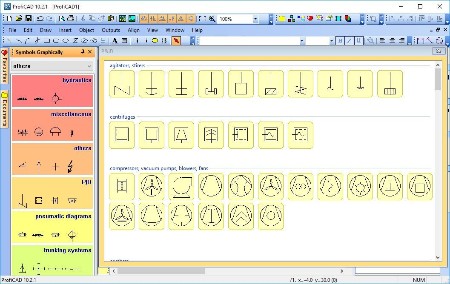
ProfiCAD is designed for drawing of electrical and electronic diagrams, schematics, control circuit diagrams and can also be used for pneumatics, hydraulics and other types of technical diagrams.

Features
The easiest CAD for electrical circuits. Maximum care was paid to ergonomics and ease of use. Just place electrical symbols into the drawing and attach the wires.
Ships with more than one thousand symbols. You can easily create your own symbols in the symbols editor or have them drawn for you for a fee.
Supports automatic numbering of symbols, generation of netlists, lists of wires, bills of material, drawing of striped wires and further advanced features.
The program supports cross references between wires and between symbols belonging to one component (e.g. relay coil + contacts). A linked symbol on a different page can be accessed by clicking on the cross reference.

Whats New
Код:
https://www.proficad.com/news.aspx

HomePage:
Код:
https://www.proficad.com/

-:DOWNLOAD FROM LINKS:-​
RapidGator
Код:
https://rapidgator.net/file/1a7429a38e67478e12aa91c08ed23115/

NitroFlare
Код:
https://nitroflare.com/view/4CD52AB1B22C29E/
 

c65eaeb26a4eb4b557e85e82cbdae039.jpg


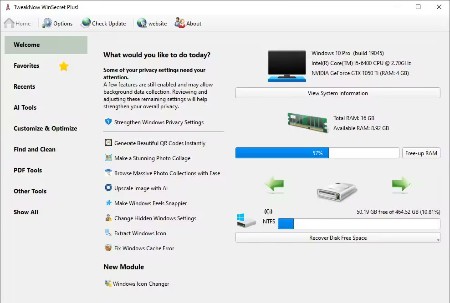
TweakNow WinSecret Plus 9.2.0 | File size: 34.6 MB

The Ultimate All-in-One Toolkit for Windows 11 and 10. Streamline, optimize, and maintain your PC effortlessly with this top-rated utility suite. It includes over 25 powerful tools designed to help you clean, tweak, repair, and enhance your system. Whether you're a casual user or a power tweaker, this toolkit is your ideal companion for achieving a faster and smoother Windows experience.

Auto Dark Mode - Smarter, Seamless Theme Switching
Windows lets you choose between light and dark mode, but it doesn't offer much flexibility when it comes to switching between them automatically.

Convert Images to PDF, Split & Merge Files - All Offline, All in One App
The new PDF Tools section brings powerful, built-in utilities that eliminate the need for separate apps or risky online converters.

Safely Unlock Windows 11 and 10 Hidden Settings
Effortlessly personalize hidden settings in Windows 11 and 10 to customize your taskbar, desktop, privacy preferences, and more.

Powerful and Comprehensive System Information at Your Fingertips
System Information module is designed to quickly and lightweightly provide all the detailed information you need about your PC's performance and components.

Looking to Supercharge Your Apps or Games Performance?
You can increase the priority level of apps or games to allocate more system resources, such as CPU time and RAM, to them.

Effortlessly Connect to Wi-Fi With QRr Codes
Using a QR code to share your Wi-Fi is super convenient and easy. Instead of typing out a long password, your friends can just scan the code with their phone and connect instantly.

View and Extract Icons From Windows Library (imageres.dll, shell32.dll, Etc.)
Windows 11 has a lot of attractive icons that make both the system look good and fun to use. Have you ever wondered where Windows may bury them in the system?

Keep Your PC Awake While You Are Leaving!
There are times when you might need to keep your PC running and prevent it from going into sleep mode or hibernation.

Effortlessly Convert PDF Into Images
At times, you may need to transform PDF documents into image files.

Quickly Convert HEIC to JPG on Windows
HEIC (High Efficiency Image Format) is a file format for images introduced by Apple with the release of iOS 11 in 2017.

Whats New
Код:
https://www.tweaknow.com/WindowsSecretPlus.php

HomePage:
Код:
https://www.tweaknow.com/

-:DOWNLOAD FROM LINKS:-​
RapidGator
Код:
https://rapidgator.net/file/32d76911aaaaf6727797693277063c11/

NitroFlare
Код:
https://nitroflare.com/view/6E7E8F26B236C53/
 

163cef9e99b3598005f095f890e907c3.jpg


Sequence Generator Pro 4.5.0.1636 | File size: 132.8 MB

Our goal is to provide a best-in-class image capture suite for astrophotography. Over the years we have been frustrated by a distinct lack of key features that make life easier under the stars. You have a lot of equipment and sometimes it is difficult to get it all working together. We have written software that is capable of executing complex sequences of capture events which will allow you to spend more time looking up and less time fighting with your rig.

We also feel strongly about providing software at down to earth prices. Let's face it, astrophotography is expensive! You should be able to focus on the purchase of equipment without worrying about investing a fortune in software to control it .

Powerful Sequencing
Take advantage of Sequence Generator Pro's powerful sequencing engine. With it you can coordinate a wide variety of equipment including cameras (CCD and Canon DSLRs), color filters, focus controllers and telescopes. String together any variety of targets and events you can imagine in order to capture "light", "dark", "bias" or "flat" frames (you can even use events to define "pause" or "mount park" events).

Equipment Profiles
Use our profile manager to make your life easier. Have multiple mounts or scopes? Have multiple sets of filters? Do they require different settings when you create sequences? The profile manager can record these settings and allow you create new sequences from existing profiles. This can be a huge time saver and will get you imaging faster every time!

Auto Focus
Stay in focus even when the temperature doesn't want you to! Our powerful focus metrics will be able to determine proper focus for almost any deep space target. No need to slew off target to find suitable focus stars! Simply start your sequence in good focus and auto focus will take care of the rest!

Automated Meridian Flip
Use our powerful automation to flip your mount and continue imaging on the other side of the meridian! Sequence Generator Pro will automatically stop guiding, flip the mount, center the target within pixels, restart guiding and then resume your imaging sequence. No operator assistance is required.1

Flexible Focusing Patterns
Use our flexible rules engine to define a wide variety of focusing patterns. These patterns can be used as part of the "in-sequence" auto focus routine (i.e. when temperature drops by 1 degree) or as a means to pause your sequence to force manual focus (via a focusing mask or other routine). Define patterns using time, frame intervals, temperature or filter changes.

Target Framing Made Easy
Use our powerful auto centering routines to find your target fast and start imaging! Ideal for multi-night imaging or even after meridian flips, we can get you back on track fast. Simply choose an image you want to center on (it can be your own or even something off the internet!) and with the click of a single button ask your mount to center itself and validate!

Center on Any Part of an Existing Image
With virtually any image that Sequence Generator Pro captures you can use the mouse to point to any area of interest and ask your mount to center itself there... with the click of a single button!

Create Complex Mosaic Sequences in Mere Minutes
With this tool you can plan complex mosaics in mere minutes and get to imaging quickly. Simply download the image that has your intended target (via the provided interface), rotate to find your camera angle, draw a square around the area of interest and start imaging (the tool will create a sequence for you). It's really that easy... You can also use this tool for single frame images just to ensure that your camera angle is in the ideal position. The Framing and mosaic wizard is an SGPro add-on module. For more on this add-on, please click here.

Flat Frames Made Easy
Sequence Generator Pro offers a host of tools to make capture of flats calibration data a breeze! Use the calibration wizard to automatically determine the best exposure length for your gear and then, using the flats wizard, you can automatically add flat frames to your sequence.

Other Features
Dither between frames with your choice of three auto guiders (PHD, Astroart and MetaGuide)
Easily perform frame and focus routines (with support for subframes and high speed cameras)
Feel at home with our highly customizable user interface (drag, dock and float small modules for almost any action)
Over a dozen configurable UI modules (PHD graphing, Image Pan and Zoom, TEC control)
User defined TEC cool down and warm up routines (to minimize thermal stress on your camera's sensitive components)
Between-frame temperature compensation
Easily create and run a "flats" sequences from your "lights" sequence
Detailed documentation and instructional videos
Near immediate customer support via email or our forum
Hundreds of other features!

Whats New
Код:
https://www.sequencegeneratorpro.com/download/sequence-generator-pro-464-bit-32/

HomePage:
Код:
https://www.sequencegeneratorpro.com/

-:DOWNLOAD FROM LINKS:-​
RapidGator
Код:
https://rapidgator.net/file/556af45d95cf7ce39351cf90a3e069d3/

NitroFlare
Код:
https://nitroflare.com/view/4A209A462D522F6/
 

90a831f464fff1614396ec850af0eea7.jpg


Text Editor Pro 36.2.0 Multilingual | File Size : 19 Mb

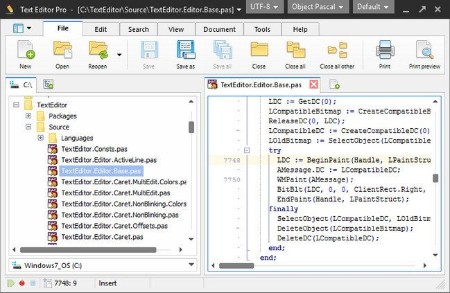
Text Editor Pro is a comprehensive and easy to use text editing tool that offers syntax highlighting for over 50 scripts. What is guaranteed to surprise you and catch your attention is that the application supports over 50 programming languages such as C++, COBOL, DOT Graph Drawing, DSP, DWScript, Fortran, Foxpro, Java, Perl, Python, Ruby SQL and many more. This feature alone makes Text Editor Pro an invaluable tool that can appeal to almost any programmer.

Right off the bat you notice how good the graphic design of the application looks. If focuses on simplicity and ease of access. All the tools you use frequently are displayed in the toolbar at the top of the main window but can also be accessed from the right-click context menu.
You can easily select any of the languages from a drop-down menu, create a new document and start writing. The application can handle multiple opened documents and displays them in separate tabs. Since aspect is important in the layout of the text, you get to increase and decrease indent and sort the text lines.
Working with hundreds of lines of text you're bound to need to locate certain words and commands. To help you out in this matter, the application provides you with a practical and powerful search function. It allows you to toggle case sensitive, whole words only and regular expression search modes. Another means of locating content is to mark it and then return to it when you need to. For this, you get the option of adding multiple bookmarks throughout the document.
When you work on a project and save multiple drafts of it you can can very easily get confused trying to figure out what is different between them. To make it easier for you, the application allows two files to be opened and compared line by line.
With the above to consider and more to discover, Text Editor Pro is by all means a handy and reliable text editing tool that provides you with the means to edit code in a large variety of programming languages.

HomePage:
Код:
https://texteditor.pro

-:DOWNLOAD FROM LINKS:-​
RapidGator
Код:
https://rapidgator.net/file/1a57fdde1ef50037133e480d85348fdc/

NitroFlare
Код:
https://nitroflare.com/view/4C8533BA78793B7/
 
Назад
Сверху Снизу