Latest Software Collection (Updated Daily)


ccc9b16caed43addf6b99b030ebf81e0.jpg


Secure Delete Professional 2026 v218 Multilingual | Windows x64 | File size: 4.19 MB

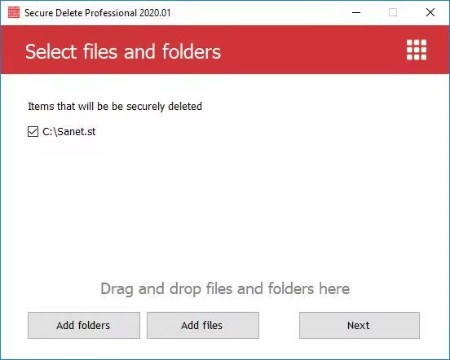
Securely erases files, makes them unrecoverable. This software is an effective tool for securely erasing existing files and folders permanently, if they were not yet deleted. Once this software has been used, the selected files and folders do not go to the Recycle Bin and will be unrecoverable. Users have several security options to allow you to choose the level of security that you need, which will be reflective of the speed of processing.

This application can be used in three ways. (1) Drag and drop the files or folders which you want to be securely deleted to the main window. (2) Select the necessary files by clicking Add Files on the main screen. Or (3) select any file or folder on Windows Explorer and choose the Send To option, then click Secure Deleter.
Just because our interface is simple doesn't mean that it lacks quality. It's quite the opposite in our case. The simple interface was designed to be that way to make it easier for newer users. Within the software, there are many powerful algorithms in play for data destruction. So, even if you are a new user, you can be sure that you'll understand how to get the maximum security possible.

What's new
Код:
https://www.privacyroot.com/software/website/freeware-en-whatsnew-sfdlt.html

HomePage:
Код:
https://www.privacyroot.com/

-:DOWNLOAD FROM LINKS:-​
RapidGator
Код:
https://rapidgator.net/file/4f0708ad5752bdff28a24ac53f979716/

NitroFlare
Код:
https://nitroflare.com/view/1F3E75447103CA3/
 

fa08b40109ff46b25fba57e27394f2d7.jpg


Statistical Discovery JMP Pro 19.0.5 (x64) Multilingual | File size: 622.6 MB

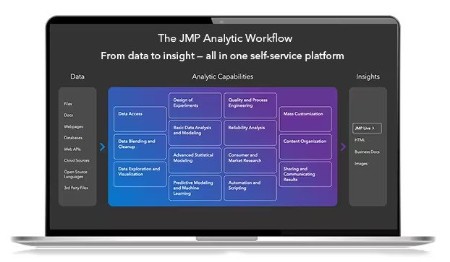
JMP is powerful statistical software designed with scientists and engineers in mind, but ideal for anyone solving problems with data. Packed with tools for data preparation, analysis, graphing, and so much more, JMP has everything you and your organization need to be truly unstoppable with data.

Statistics made visual, powerful, and approachable.
JMP makes it easy to take on the most complex data challenges. Its simple, interactive interface lets you take your productivity further, and with no code required, there are no obstacles between you and any analysis or graph you want to create.

Get insights faster. Get home earlier.
Your time matters. With JMP's extensive suite of capabilities and code-free automation, you can quickly go from raw data to actionable insight-all within one streamlined, self-service platform.

Unlock efficiency gains to accelerate innovation.
Industries with high product and process innovation have complex problems to solve and often require statistics to solve them. With JMP, scientists and engineers in these industries can seamlessly apply statistical techniques that support engineering efficiency and help propel their organizations to the forefront of the market.

Maximize your potential.
Realizing potential requires the right support. With JMP, no matter where you are in your analytic journey, you have a partner in life-long learning. Our user community, support experts and learning resources are purpose-built to empower anyone looking to start, build, advance, or apply their skills with data.

Whats New
Updates: official site does not provide any info about changes in this version

HomePage:
Код:
https://www.jmp.com/en_us/software/why-jmp.html

-:DOWNLOAD FROM LINKS:-​
RapidGator
Код:
https://rapidgator.net/file/76d8fb801045bec79201d047dabe08bb/

NitroFlare
Код:
https://nitroflare.com/view/527AFE36430B889/
 

57aab7009978d21d364d8a7de8f76841.jpg


SysGauge 12.6.24 | File Size: 21 MB

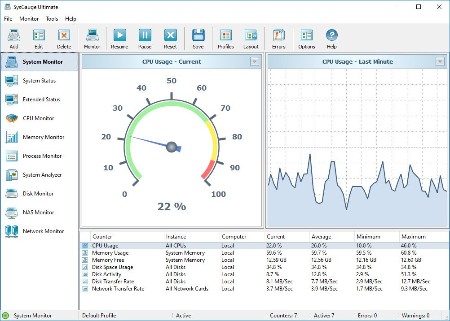
SysGauge is a system and performance monitoring utility allowing one to monitor the CPU usage, memory usage, network transfer rate, operating system performance, the status and resource usage of running processes, file system performance, USB performance, disk space usage, disk read activity, disk write activity, disk read transfer rate, disk write transfer rate, disk read IOPS and disk write IOPS for individual logical disks or all physical disks installed in the computer.

SysGauge System Status Monitor
The SysGauge GUI application provides a single, customizable GUI module and a number of dedicated GUI modules especially designed for each specific monitoring task such as system status monitoring, CPU monitoring, memory monitoring, process monitoring, system status analysis, disk monitoring, NAS server monitoring and network monitoring. The monitor selector, which is located on the left-side of the SysGauge GUI application, allows one to add, edit and delete specific monitoring GUI modules.

SysGauge Customizable System Monitor
The SysGauge system monitoring utility provides a large number of different types of performance monitoring, system resource monitoring and operating system status monitoring counters and allows one to select which counters to monitor. In addition, users are provided with the ability to specify how to display the performance monitoring results for how long to keep the results history.

SysGauge Add Performance Monitoring Counter
In addition to the ability to monitor the local computer, SysGauge allows one to connect to remote computers and monitor the CPU usage, memory usage, network transfer rate, disk space usage and disk activities via the network. The user is provided with the ability to specify the name or an IP address of the remote computer to connect to, select which types of system counters to monitor and specify how to display the system monitoring results.

SysGauge Save System Monitoring Report
One of the most useful capabilities of the SysGauge performance monitoring utility is the ability to save performance monitoring reports into a number of standard formats including HTML, PDF, Excel, text, CSV and XML. In order to save a performance monitoring report, press the 'Save' button located on the main toolbar, select an appropriate report format, enter a report file name and press the 'Save' button.

SysGauge PDF Performance Monitoring Report
For example, a SysGauge PDF performance monitoring report starts with a summary table showing the report date and time, the name of the monitored computer and the name of user saved the performance monitoring report. The summary table is followed by a list of performance counters showing the average, minimum and maximum values for all performance monitoring counters. The list of counters is followed by a list of line charts showing performance monitoring data for all counters. Finally, the list of line charts is followed by a list of tables showing the complete history of monitoring results for all counters.

SysGauge Command Line Utility
In addition to the GUI application, SysGauge Ultimate includes a command line utility allowing one to perform different types of system monitoring operations from batch files and shell scripts. The SysGauge command line utility is located in the product 'bin' directory and it can be used to perform monitoring operations, save system monitoring reports and manage system monitoring profiles.

SysGauge Command Line Utility
In the simplest case, open a command prompt window, go to the SysGauge 'bin' directory and type the following command

sysgauge -monitor -save_html_report The SysGauge command line utility will start the default system monitoring profile and continue the monitoring operation according to the user-specified period of time specified using the '-time ' command line option or until the ECS keyboard key is pressed.

SysGauge System Monitor HTML Report
After the monitoring operation will be completed, the SysGauge command line utility will save a system monitoring report file according to the user-specified report format. In addition to the local monitoring operations, the command line utility allows one to monitor remote servers via the network
using the '-host ' command line option.

Whats New
Код:
https://www.sysgauge.com/news.html

HomePage:
Код:
?https://www.sysgauge.com

-:DOWNLOAD FROM LINKS:-​
RapidGator
Код:
https://rapidgator.net/file/567814fc5d0f33d8361f6a91abfaba84/

NitroFlare
Код:
https://nitroflare.com/view/D68DEDD73239AD7/

 

cb56f70dcd7c8e8ed21c4af3e20c49f8.jpg


The Foundry Katana 8.0v6 (x64) | File Size: 282 MB

With its highly efficient, collaborative approach to look development and lighting, Katana® gives you the creative scope and scalability to meet the needs of today's most demanding CG-rendering projects.

Reduce artist downtime
A studio's most valuable resource is its people. Katana's deferred loading and processing lets you get to work immediately, so you can spend more time being creative and less time twiddling your thumbs.

Share the workload
Katana's flexible node-graph and rule-based workflows lets you naturally build up templates as you work, which you can then easily share with other team members or reuse on other shots.

Keep your assets accessible
Katana's streamlined, artist-friendly approach removes the need to bake assets out into render-ready formats, keeping them easily accessible for last-minute changes.

Work in parallel to finish faster
With Katana's Look Files, material instructions and texture map assignments are packaged as separate assets, so you can separately update look-development and animation data.

Choose your renderer
Use your renderer of choice, with a unified workflow for Renderman, V-Ray, Arnold and 3Delight, or add your own renderer. You can even work with multiple renderers while keeping a consistent artist workflow.

The perfect fit for your pipeline
Integrate, automate or customize Katana to fit your pipeline and processes with extensive C and Python APIs, and support for open standards like Alembic and OpenColorIO.

HomePage:
Код:
https://www.foundry.com

-:DOWNLOAD FROM LINKS:-​
RapidGator
Код:
https://rapidgator.net/file/1c16ed2a70bc2697cf1acf648a585cab/

NitroFlare
Код:
https://nitroflare.com/view/96241F82B0D83EA/
 

40ca5bacf91b70577e89b066f401d619.png


TickTick Premium 8.0.3 Multilingual | File size: 42.1 MB

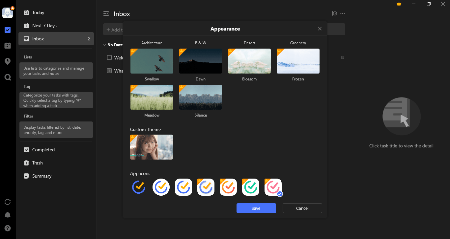
TickTick turns your Windows PC device into an office platform that is flexible, easy to use, and highly efficient. Join millions of people to capture ideas, organize life, and do something creative every day. Practice the Pomodoro Technique in TickTick 64 bit for PC. Stay focused, stay productive. Enjoy!

Organize everything
Stay organized and productive with work-related tasks, personal goals, and more.

Add tasks faster and easier
Use shortcut Ctrl+Shift+A to capture ideas in a second.

Powerful calendar views
View your tasks in a calendar, and manage them simply with draft & drop.

Collaborate with anyone
Share your lists and tasks with anyone - colleagues, friends, or family. Stay productive in any kind of group.

Stay focused
Stay concentrated with the built-in Pomo Timer, which helps you power through distractions to accomplish more.

Manage tasks from the desktop widget
With the desktop widget on Windows, view and complete tasks have never been this easy.

Whats New
Updates: official site does not provide any info about changes in this version.

HomePage:
Код:
https://ticktick.com/about/windows?language=en_us

-:DOWNLOAD FROM LINKS:-​
RapidGator
Код:
https://rapidgator.net/file/b409faaf81db4336db43d11fd6bcec2c/

NitroFlare
Код:
https://nitroflare.com/view/00AF6530209153E/
 

ca215dfe05aa7ea36748d49c33973b3a.jpg


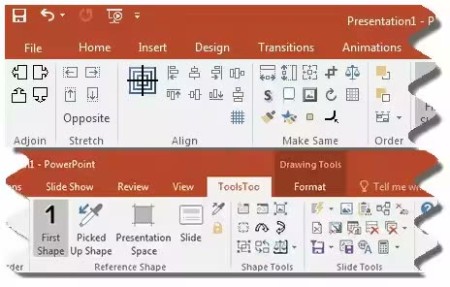
ToolsToo Pro for PowerPoint 12.1.0 | File size: 3.53 MB

Productivity Tools for PowerPoint. ToolsToo Pro for PowerPoint adds more than 115 powerful yet easy-to-use productivity tools to the Microsoft® Office PowerPoint® ribbon.

System Requirements
Microsoft® PowerPoint® for Microsoft 365 (32/64 bit) or
Microsoft® Office PowerPoint® 2013 or later (32/64 bit)
Microsoft® Windows 10/11
Microsoft® .NET Framework V4.8
Microsoft® Visual Studio 2010 Tools for Office Runtime
Some features also require
Microsoft® Outlook for Microsoft 365 (32/64 bit) or
Microsoft® Office Outlook 2013 or later (32/64 bit)
Microsoft® Word for Microsoft 365 (32/64 bit) or
Microsoft® Office Word 2013 or later (32/64 bit)

What's new
Код:
https://www.toolstoo.com/whats-new

HomePage:
Код:
https://www.toolstoo.com/

-:DOWNLOAD FROM LINKS:-​
RapidGator
Код:
https://rapidgator.net/file/7655efbb885cee9d66ec969f1fe9969d/

NitroFlare
Код:
https://nitroflare.com/view/7C0FBD3208C1B71/
 

c6f1ea91df3655f4f77d866afcb993ec.png


Valentina Server 17.1.0 | File size: 69.3 MB

Serve reports from all major databases or with its own advanced, object-relational database system.

Valentina Client ADK for iOS
Build iOS apps with an embedded VCLIENT to Valentina Server

Valentina Forms Server
Register Valentina Forms to Valentina Server to share them with colleagues and clients.

Fast Web Applications
Build high performance server-side web applications with PHP, Python or Ruby on Rails.

Valentina Reports Objects
Build your report visually with drag-and-drop, scriptable report objects in Valentina Studio Pro.

REST & JSON Access Anywhere
Build web applications accessible anywhere using these lightweight protocols.

Notifications
Valentina Server can push notifications through a notification channel which in turn can spread among subscribing applications asynchronously.

Hot Back Up Your Data
Automatically back up your databases to any directory on your network without having to shut down your server.

Valentina SQLite Server
Valentina SQLite Server is a full featured, standards compliant multi-user access SQLite based database server.

Event Scheduler
Automate business and data management processes with Valentina Server support for triggers and event scheduling.

Valentina Reports Server
Server-side business applications with a data-rich reports, charts, graphs, barcodes, export to PDF, HTML and more with all major databases and servers.

Auto Discover on Network
Optionally make Valentina Server automatically and securely discoverable on your network using Bonjour, a form of zero-config.

Valentina DB Server
Blazingly fast object-relational database server based on the Valentina DB core model.

Whats New
Код:
https://valentina-db.com/en/valentina-server-overview

HomePage:
Код:
https://valentina-db.com/

-:DOWNLOAD FROM LINKS:-​
RapidGator
Код:
https://rapidgator.net/file/ea0d2fbe3ff50af06963c3d478523132/

NitroFlare
Код:
https://nitroflare.com/view/63F7C19BFF9D5E6/
 
Назад
Сверху Снизу