Latest Software Collection (Updated Daily)


e1a26be9f47337e86e854e1e7361aefd.jpg


JRiver Media Center 35.0.47 (x64) Multilingual | File size: 40.5 MB

JRiver Media Center - all-in-one media management app turns any Windows PC into an entertainment hub for complete control of your digital media: Audio, Video, Images, and Television. It connects PC to stereo, TV, remote control devices, digital cameras, scanners, and portable MP3 players. It plays all media, rips, burns, and organizes all your music, images, and video. MC encodes and plays all popular media formats. Powerful utilities include Media Server for streaming music and images to remote PCs. Media Center is more than a world class player. It's also a Media Network, a whole house music, movie, TV, and photo solution. The leader in audiophile quality sound. The most powerful media database available; an essential tool for large collections.

Features
Audio
* Native support of DirectShow DSP filters
* Audiophile - WASAPI exclusive output using high-end USB DACs
* Audiophile - Added ability to play files from memory instead of disk
* Audiophile - Support for high end USB DAC's with WASAPI
* Headphone DSP makes listening more natural and comfortable.
* SoundcardSwitch command for the launcher, allows soundcard selection
* 3D album view adjusts text size to display more tracks when necessary
* 3D album view allows playing, adding, shuffling, and adding as next to play

Images
* Image Preview allows zoom from a thumbnail to rotate, delete, compare, edit, and more
* Image thumbnail frames (optional)
* Photoshop PSD file support
* Single command copy / send to an editor like Photoshop, and stack new image with original

Video
* Video tagging using sidecar files
* Chapter Support for MKV and MP4
* Chapters added to On Screen Display
* Info Panel displays metadata

Television
* Added new "watched" column to metadata
* EPG can automatically retrieve XMLTV data
* Automatic correlation of XML channel names and MC channel names
* Info Panel displays metadata, including TV program art
* TV program art from YADB

Theater View
* Watch Hulu and YouTube from Theater View
* Customizable nested views in Theater View
* Customizable File Info panel to display metadata
* Speed and quality enhancements
* Custom backgrounds
* Touch screen support
* On screen clock

Remotes and Servers
* Wiki articles: Remotes and Servers
* Remote Relay using IR transceivers for controlling a set top box or receiver
* Remote Setup Wizard
* Media Center Remote learning and blasting
* Media Center can connect to another Media Center to act as a remote (TRemote)
* New HID remote control plug-in - supports shortcuts with keyboard, mouse, & gamepad
* Remote control with REST based Web Service Interface in Library Server
* Library Server supports read and write to allow for shared, multi-user database access
* DLNA added to the UPnP Server
* Library Server clients can write changes back to server
* Library Server connections allow playback on server as Playing Now zones

Whats New
Код:
https://yabb.jriver.com/interact/index.php/board,90.0.html

HomePage:
Код:
https://www.jriver.com/

-:DOWNLOAD FROM LINKS:-​
RapidGator
Код:
https://rapidgator.net/file/c5a5b2849b8cf9d624dd28d7d5f8611c/

NitroFlare
Код:
https://nitroflare.com/view/FFB1C95574F3A29/


 

7519b27a5de65cb3560ee5d620ffafd5.jpg


MSC CoSim 2025.1 (Window64) | File Size: 355.9 MB

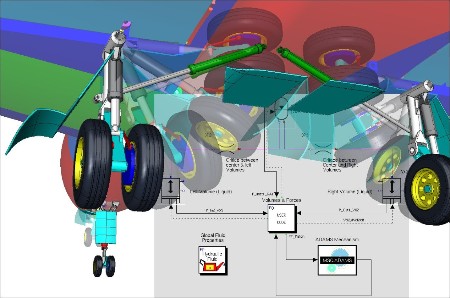
MSC CoSim is specially designed to ensure joint work (co-simulation) of various solvers in a single multidisciplinary working environment.

MSC CoSim is designed to organize the process of interaction between the Adams (MBD - multimass dynamics), Marc (FEA - finite element analysis) and scFLOW (CFD - computational fluid dynamics) systems.

This interaction allows us to solve a wide range of problems, including, for example, such problems as: detailed coupled analysis of the aerodynamic characteristics of a wing with flap extension using Adams and scFLOW; analysis of the interaction of fluid and a propeller taking into account the free surface and cavitation using MSC Nastran and scFLOW; evaluation of the dynamic response of the suspension when a vehicle is moving through a water obstacle using Adams and scFLOW; analysis of the aeroacoustic properties of a vehicle exhaust system and muffler using Actran and scFLOW; analysis of the dynamic effect of fluid on the walls of a moving tank (sloshing) using Adams and scFLOW; coupled modeling of shock waves of a vibrating plate in supersonic flow in MSC Nastran and scFLOW; calculation of thermomechanical stresses in the scSTREAM system when estimating mechanical stresses in soldered joints of electronic
components.

What's New
official site does not provide any info about changes in this version.

HomePage:
Код:
https://hexagon.com/

-:DOWNLOAD FROM LINKS:-​
RapidGator
Код:
https://rapidgator.net/file/132fc9f17b5f56b1b5ca388a823fd7cb/

NitroFlare
Код:
https://nitroflare.com/view/2233391B7F145A9/
 

1bc5391fd6c889eef215200dc80f544f.jpg


Sampleson Things v1.2.1 | File Size: 26.3 MB

THINGS allows you to create hi-quality synth sounds even if you have zero experience in synthesis. We've implemented what we called "Descriptors", which are objects and ideas that will help you understand the effect of a knob and the kind of sound it will produce.

QUICK CINEMATIC EXPERIMENT
We did a quick sketching using only THINGS plugin and Reaper DAW. You can download the project here.

FEATURES
* 4 to 32 steps selector
* Octave range switch
* Note Shift automation
* Note Velocity automation
* Note Length automation
* Arpeggio direction (4 modes)
* Shuffle amount knob
* Ignore key-down option
* Sync to host and manual tempo

DESCRIPTORS LIST AND PARAMETERS
All the parameters can be assigned to a CC contoller (right-click over the desired slider/knob) and automatable via DAW.

Component name: RUBBER BANDS. Real-time parameters: Gum amount, Time, Gain and Character (main knob). Automatable parameters: Real-time parameters: Gum amount, Time, Gain and Character.

Component name: ARCADE. Real-time parameters: Softness, Time, Gain and Color (main knob). Automatable parameters: Softness, Time, Gain and Color.

Component name: CRYSTAL. Real-time parameters: Delay, Worm, Gain and Color (main knob). Automatable parameters: Delay (on/off), Worm (on/off), Gain and Color.

Component name: CLOUDS. Real-time parameters: Softness, Time, Gain and Color (main knob). Automatable parameters: Softness, Time, Gain and Color.

Component name: ALIEN TALK. Real-time parameters: Number of Aliens, Anger, Gain and Speech speed (main knob). Automatable parameters: # of Aliens, Anger, Gain and Speech speed.

Component name: AIR. Real-time parameters: Attack, Release, Gain and Speed (main knob). Automatable parameters: Attack, Release, Gain and Speed.

Component name: HORROR. Real-time parameters: Gain, Attack, Evolve and Evilness (main knob). Automatable parameters: Gain, Attack, Evolve and Evilness.

What's New
official site does not provide any info about changes in this version.

HomePage:
Код:
https://sampleson.com/

-:DOWNLOAD FROM LINKS:-​
RapidGator
Код:
https://rapidgator.net/file/1c52ee7f0cef272225e113a79ee79b53/

NitroFlare
Код:
https://nitroflare.com/view/BFFC06DF9B859E7/
 

f2cdf7bcc0695c8cfc99a0733cf30822.jpg


Inno Setup Compiler 6.7.1 | File Size : 10 Mb

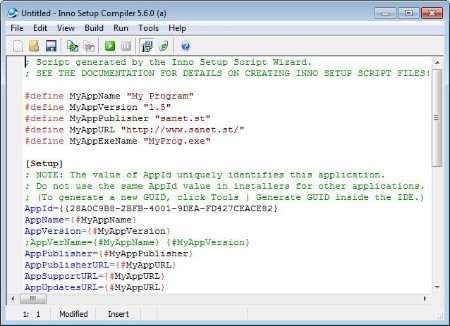
Inno Setup Compiler is a software solution that allows you to create professional Windows installers. Although it all sounds terribly complicated, it's not, thanks to the way this application works. The whole installer generating process can be carried out using a simple wizard, so Inno Setup Compiler will assist you all the time. You are first prompted to choose the application name and version, as well as the publisher and the application website. Just fill in the information and press Next.

Afterwards, you have to choose the application destination base folder which can be either Program Files or any other custom folder you wish to choose. Again, you must write down the folder name and choose whether to give the user the permission to change the application folder or not.
Next you're required to provide the path to your app's main executable file and create a list with all the other files. The next steps come with a few other settings to customize the installer, such as the option to create a desktop or a Quick Launch icon, as well as with the language selection.
And that's basically it. Sure, it will take some time before you will be ready to build your own installer, but if you pay close attention to every single step, everything should go pretty smoothly.
All in all, Inno Setup Compiler is one of the best setup builders out there. Creating scripts using the wizard is a task so simple that it can be carried out by less experienced users while more advanced features await the power users.

Key features
Support for every Windows release since 2000, including: Windows 10, Windows 8.1, Windows 8, Windows Server 2012, Windows 7, Windows Server 2008 R2, Windows Vista, Windows Server 2008, Windows XP, Windows Server 2003, and Windows 2000. (No service packs are required.)
Extensive support for installation of 64-bit applications on the 64-bit editions of Windows. Both the x64 and Itanium architectures are supported. (On the Itanium architecture, Service Pack 1 or later is required on Windows Server 2003 to install in 64-bit mode.)
Supports creation of a single EXE to install your program for easy online distribution. Disk spanning is also supported.
Standard Windows wizard interface.
Customizable setup types, e.g. Full, Minimal, Custom.
Complete uninstall capabilities.
Installation of files
Includes integrated support for "deflate", bzip2, and 7-Zip LZMA/LZMA2 file compression. The installer has the ability to compare file version info, replace in-use files, use shared file counting, register DLL/OCX's and type libraries, and install fonts.
Creation of shortcuts anywhere, including in the Start Menu and on the desktop.
Creation of registry and .INI entries.
Running other programs before, during or after install.
Support for multilingual installs, including right-to-left language support.
Support for passworded and encrypted installs.
Support for digitally signed installs and uninstalls, including dual signing (SHA1 & SHA256).
Silent install and uninstall.
Unicode installs.
Integrated preprocessor option for advanced compile-time customization.
Integrated Pascal scripting engine option for advanced run-time install and uninstall customization.
Full source code is available (Borland Delphi 2.0-5.0 and 2009).

HomePage:
Код:
https://www.jrsoftware.org/isinfo.php

-:DOWNLOAD FROM LINKS:-​
RapidGator
Код:
https://rapidgator.net/file/9832894f8b265032aef3cffd0cf93936/

NitroFlare
Код:
https://nitroflare.com/view/1CB9299D14B820F/
 

8693623eca1904cd8c449917c653ef5c.jpg


Futuremark SystemInfo 5.91.1460 | File size: 3.0 MB

SystemInfo is a component used in many of our benchmarks to identify the hardware in your system. It does not collect any personally identifiable information. SystemInfo updates do not affect benchmark scores but you may need the latest version in order to obtain a valid score.

Monitor your system and find hardware IDs
Futuremark SystemInfo can scan your computer and collect information regarding a series of services, processes and hardware performance.
The tool can easily export the result of the scan to an XML file in which you can view the current values for the system version, user, files, storage, memory and motherboard. You can also view several statistics and information on WMI, Setup APIs, power supplies, DirectX, CPU cores, plus single or multi-threaded activities.

System information and activity logs
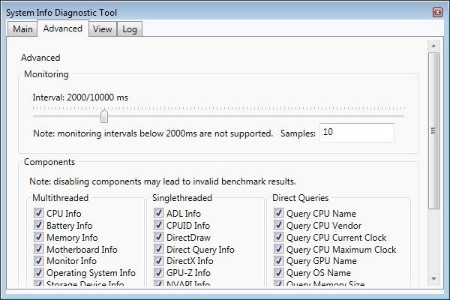
Once installed, Futuremark SystemInfo creates several components that you can use with various benchmarks. The System Diagnostic tool allows you to collect system data, monitoring information of direct queries.

Advanced searching tools
The Advanced tab in Futuremark SystemInfo allows you to filter the categories that you wish to investigate. Thus, you can select any of the parameters in single and multi-threaded activities, which are ADL info, DirectX, CPUID, NVAPI info, respectively CPU, battery, motherboard, monitor, OS or storage data.

Moreover, you can run direct queries on the CPU name, vendor, integrated clock, GPU name, if available, as well as details on each of the CPU cores. You can run standard diagnosis searches or find bottlenecks.

Whats New
Код:
https://benchmarks.ul.com/systeminfo?redirected=true

HomePage:
Код:
https://benchmarks.ul.com/

-:DOWNLOAD FROM LINKS:-​
RapidGator
Код:
https://rapidgator.net/file/1da37a3b1a1a067a220b3ac933b1cb69/

NitroFlare
Код:
https://nitroflare.com/view/D68259589CB3C75/
 

8c170bb878f1f4d9a04de4937079163e.png


FanControl v260 | File Size : 12.2 Mb

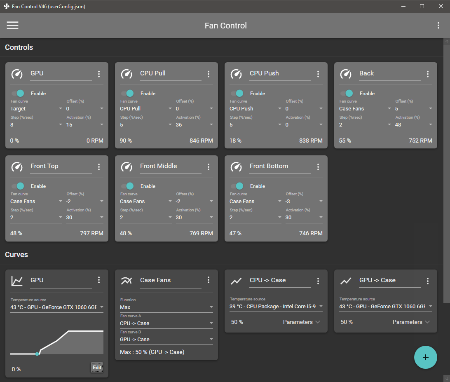
Keep every aspect of your computer's GPU and CPU fans in check with the help of this highly-customizable fan control application.

Features
Save, edit and load multiple profiles
Multiple temperature sources ( CPU, GPU, motherboard, hard drives, ".sensor" file )
Custom fan curves
Fine tune the fan control response with steps, activation %, response time and hysteresis
Mix different curves and sensors together
Modern, dashboard-style UI
Works as a background application with a customizable tray icon
Create custom external temperature sensors with *.sensor files.
And more!

HomePage:
Код:
https://github.com/Rem0o/FanControl.Releases

-:DOWNLOAD FROM LINKS:-​
RapidGator
Код:
https://rapidgator.net/file/b3a44350df51a89645d33cfa5a0733dc/

NitroFlare
Код:
https://nitroflare.com/view/10C6C97E68EC083/
 

6920891c0d88671bfa1d658a0e323f5a.jpg


Bitwig Studio 6.0 Beta 13 | File Size: 322.9 MB

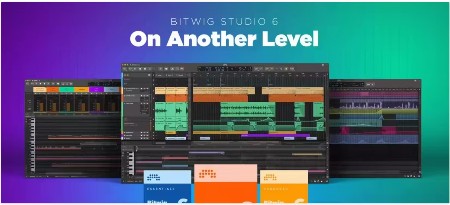
Bitwig Studio 6 takes a big step up, improving and expanding on the core DAW functions that you use every day. This major update brings you fresh and faster ways to work that will feel familiar. You'll notice the difference right away: Bitwig Studio's looks have been improved, and the visual interface is now easier to adjust to your needs. There are also countless changes under the hood, large and small.

It starts with an extensive upgrade to automation editing, which touches everything from smoother editing gestures to new behaviors such as spread and hold. You can also now work with automation in clips, opening up new possibilities that make intuitive sense.

Clip aliases offer a new way to handle repetition and structure in your music, while project-wide key signature helps guide your work with notes. New and improved tools, such as the Spray Can and Audition tool, join enhanced expression editing - for the fine details - and layered editing, for big picture work. All of these changes add up to a big improvement in the way you use Bitwig Studio 6 for fundamental music-making tasks.

What's New
official site does not provide any info about changes in this version.

HomePage:
Код:
https://www.bitwig.com/

-:DOWNLOAD FROM LINKS:-​
RapidGator
Код:
https://rapidgator.net/file/f3d3183aa7c237a36b0613248f22e7d6/

NitroFlare
Код:
https://nitroflare.com/view/A69E7B638CA38C8/
 

0fd11b22fc46fa973e6fc62f3f8e3445.jpg


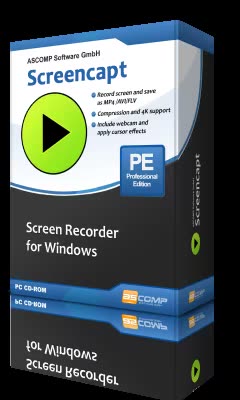
Screencapt Professional 3.002 Multilingual | File size: 16.2 MB

Discover Screencapt, the powerful Windows software for screen recording that allows you to accurately and easily record any activity on your screen. Whether you want to create a tutorial, record a webinar, or simply capture your favorite games, Screencapt provides you with all the tools you need.

With Screencapt, you can record the entire screen, a selected area, or a specific window. This flexibility makes Screencapt the perfect screen recorder for any type of application. Thanks to the integrated audio recording, you can additionally integrate your commentary or system sounds directly into the screen recording, which is especially helpful when creating explanatory videos or presentations.

A special highlight of Screencapt is the ability to include a webcam window in the recording. This way, you can show your reactions and comments live in the video, making your screen recordings even more personal and professional.

Screencapt also offers advanced options for recording the cursor. You can hide the cursor if needed or add special cursor effects to highlight certain actions. This is particularly useful for software demonstrations and tutorials where a clear view of the cursor is essential.

The software uses the H.264 codec to ensure high compression while maintaining excellent image quality. You can choose between different compression levels to achieve the best ratio of file size and image quality. Output formats available are MP4, AVI, and FLV, allowing you to save your recordings in the format that suits you best.

With a maximum frame rate of 120 FPS (frames per second), Screencapt ensures that your screen recordings are smooth and detailed. This high FPS rate is particularly suitable for recording fast-paced game scenes or action-packed applications.

In summary, Screencapt offers all the features you expect from a modern screen recorder. Whether you create screen videos for professional or personal purposes, Screencapt is the ideal solution for your screen capturing needs. Get Screencapt and experience the simplest and most efficient way to record your screen.

Whats New
Код:
https://www.screencapt.org/changelog_en.txt

HomePage:
Код:
https://www.screencapt.org/

-:DOWNLOAD FROM LINKS:-​
RapidGator
Код:
https://rapidgator.net/file/0fe7f3ef431876ce4e5226a2e70ddbd3/

NitroFlare
Код:
https://nitroflare.com/view/AF35D082CF6C983/
 
Назад
Сверху Снизу