All sanddisk Software's Collection [Daily Updated]

ezgif-8ab11a7c82ddcb9b.jpg


Foxit PDF Editor Pro 2026.1.2.36540 (x64) Multilingual

File size: 1.31 GB

Foxit PDF Editor (formerly) Foxit PhantomPDF is a business ready PDF toolkit to create professional looking PDF documents and forms. You can do that for tasks such as developing personal documents, implementing workgroup collaboration, designing company forms. Produce company collateral, finalizing agreements, applying digital signatures, or document archiving.

Award winning Foxit PDF creator allows you to produce great looking PDF document and forms quickly, affordably, and securely. This is the perfect solution for home/home offices, small and medium sized businesses, and large enterprises. Foxit PDF Editor comes in three versions to fit the diverse use cases that different users require.

This Foxit software can combine, split or repackage various PDF files. The documents can be merged or split based on page numbers, page outlines or bookmarks. Plus, this Suite can batch convert existing documents to a single or multiple PDF files.

Foxit PDF Editor Features
Edit PDF like a pro
Quickly and easily update your own PDF documents. Works like a word processor – reflow text across paragraphs, columns, and pages; change document layout, modify text size, font, or line spacing, and add multimedia.

Share and collaborate live
Connect teammates together to increase flexibility and results. Integrate with leading Content Management Systems, utilize popular cloud storage services, and initiate shared reviews to provide and manage feedback

Export to popular file formats
Easily share PDF content by exporting PDF to Word, PowerPoint, Excel, RTF, HTML, text, and image formats. Export the whole document or just a selected area.

Create PDF docs and forms
Create PDF, PDF/A, PDF/X, and PDF/E from virtually any file format or web pages. Make PDF Portfolios to easily share multiple files together and use Form Field Recognition to quickly create interactive PDF Forms to collect data. Render PRC 3D PDF and create 3D PDF from .DWG files.

Organize PDF the simple way
Organize and manipulate PDF pages to support your workflows. Merge and split documents; drag and drop pages within a file or from one document to another; and add stamps, watermarks, headers, footers, and more.

Protect PDF properly
Protect the information in your confidential documents. Permanently redact and remove text and images, secure documents with password encryption or with Microsoft AIP, sanitize documents, and digitally sign PDFs.

Create accessible PDF
Enable PDF document accessibility for people with disabilities who use assistive technology to have access to information. Check accessibility of PDF files to verify if the document complies with Section 508 technology standards.

Scan and OCR paper docs
Scan and convert paper documents or images to PDF. Run text recognition (OCR) to create selectable and searchable text. Make text editable and update hardcopy just like digital documents.

Whats New
Код:
https://www.foxit.com/ru/pdf-editor/version-history.html

System Requirements
Windows 10
Windows 11
Microsoft Office® 2013 or later version (required for some PDF creation features)
Verified as Citrix Ready® with Citrix XenApp® 7.13
1.3 GHz or faster processor (x86 compatible) or ARM processor, Microsoft SQ1 or better
512 MB RAM (Recommended: 1 GB RAM or greater)
2 GB of available hard drive space
1024*768 screen resolution
Supports 4K and other high-resolution displays

Homepage
Код:
https://www.foxit.com/

DOWNLOAD:

Код:
https://rapidgator.net/file/12a463bac43caaecaad34b84ece5b79f/Foxit_PDF_Editor_Pro_2026.1.2.36540.rar.html

https://ddownload.com/3jamparcm7gp/Foxit_PDF_Editor_Pro_2026.1.2.36540.rar
 
ezgif-8024e19bc548dd62.jpg


Boris FX VEGAS Pro 2026.0.0.143

File Size: 551 MB

VEGAS Pro is built different, so you can edit videos bolder. With powerful tools and a lightning-fast timeline, it’s the ultimate creative cheatcode.

Effortless editing
Get started quickly and stay efficient with intuitive, easy-to-use tools.

All-in-one power
Go beyond the basics with built-in tools that deliver the speed, control, and power you need.

Advanced expandability
Push your creativity further with full support for third-party plugins and hardware.

Explore what’s new in VEGAS Pro

VEGAS Core Engine
Fast, powerful, and built for precision. The VEGAS Core Engine supercharges your editing process and delivers reliable color accuracy with smooth playback, even under pressure.

Perfect colors in record time
Work fast, trust your colors, and feel confident that the final look will match exactly what you had in mind.

Fluent preview playback
Accurately review your work with high preview framerates even under the heavy load of high-res media packed with video effects.

A super sleek interface keeps you in the zone
Fully-integrated color grading
Grade directly on the timeline without switching modes or breaking your flow. VEGAS Pro keeps color correction fully integrated, so you stay efficient and creative.

Designed for you
VEGAS Pro gives you a clean, focused workspace with smart UI design that helps you stay in the zone.

Unified Explorer
Quickly access all your media in one familiar, streamlined view.

Export made easy
Access powerful export options in a easy-to-use render interface, built for both pros and beginners.

Whats New
Updates: official site does not provide any info about changes in this version

System Requirements: Windows 11 / 10

Homepage
Код:
https://borisfx.com/

DOWNLOAD:

Код:
https://rapidgator.net/file/c5a034db91ed2598f7955afdc77f954a/Boris_FX_VEGAS_Pro_2026.0.0.143.rar.html

https://ddownload.com/ywlnuxex1kfg/Boris_FX_VEGAS_Pro_2026.0.0.143.rar
 
ezgif-887196ca9e06e593.jpg


CyberLink PowerDirector Ultimate 2026 v24.6.1829.0 Multilingual

Languages: Multilingual
File Size: 723.34 MB

Award-winning video editing software for professional creators. Create. Edit. Share. Video editing, made for everyone. No experience necessary. Do more, faster with customizable templates. Discover and create attention-grabbing video intros alongside our community of creatives.

Kickstart Your Projects
- No experience necessary.
- Do more, faster with customizable templates.

Save Time With Thousands of Shareable Video Intros
Discover and create attention-grabbing video intros alongside our community of creatives.

Mask Designer
Remove unwanted objects, or composite clips together.
- Custom Masks
- Image Masks
- Text Masks

Title Designer
Choose from drag-and-drop presets or get creative with an array of gradient, border, and shadow tools.
- Motion Graphics
- Sound Effects
- Blending Modes
- Special Effects

PiP Designer
Use animated stickers, shapes, and callouts to grab your viewers’ attention.
- In/Out Animations
- Animated Stickers and Graphics
- Custom Shapes and Callouts

AI Motion Tracking
Add text or graphics that automatically follow the motion of any object.

AI Sky Replacement
From blissful blue skies to dramatic sunsets, don’t let bad weather ruin your perfect shot.

AI Object Detection
Instantaneously create masks with automatic object selection for cars, people, pets, and more.

Release Notes
CyberLink PowerDirector - What's New

Код:
https://www.cyberlink.com/products/powerdirector-video-editing-software/whats-new_en_IN.html

Minimum System Requirements

Operating System

Microsoft Windows 11, 10 (64 bit OS only, Windows 11 Arm64 is supported)

Processor (CPU)
- Intel® Core™ i-series (6th generation) and above.
- Intel Haswell (4th generation) processor: Core i7-4770 (only Core and Xeon branded), and above required for AI features.
- AMD Ryzen-series and above
- AMD Phenom® II and above
- AMD A8-7670K and above, AMD Ryzen™ 3 1200 and above required for AI features.
- Qualcomm Snapdragon® 8cx Gen 3
- Qualcomm Snapdragon® X Elite

Graphics Processor (GPU)
- Standard Video: 128 MB VGA VRAM or higher.
- 360-video: DirectX 11 compatible.
- AI Plugin: 2 GB VGA VRAM or higher.
- NVIDIA Audio/Video Denoise and Room Echo Removal: NVIDIA GeForce RTX 2060, NVIDIA Quadro RTX 3000, NVIDIA TITAN RTX, or higher.

Other Requirements
- Memory: 8GB required (16GB or above recommended).
- Hard Disk Space: 7GB
- Burning Device: Burning drive is required for disc burning purpose.
- Sound Card: Windows compatible sound card is required.
- Screen Resolution: 1024 x 768, 16-bit color or above.

Supported Languages
- English
- French
- German
- Italian
- Spanish (European)
- Chinese Simplified
- Chinese Traditional
- Japanese
- Korean
- Dutch
- Portuguese (Brazilian)

Homepage
Код:
https://www.cyberlink.com

DOWNLOAD:

Код:
https://rapidgator.net/file/e6daf9401f9c915800754fd7d9b1dbf2/PowerDirector.24.6.1829.0.rar.html

https://ddownload.com/ky41erxmtiwn/PowerDirector.24.6.1829.0.rar
 
f4H1v-Tjjx-S4BVJXcs-ILl-Kk-Xa-W8WXrns-G.jpg


Total Commander 11.58 Final Multilingual

File size: 11 MB

Total Commander (former Wincmd) is a file manager for Windows similar to the Windows Explorer. But Total Commander uses a different approach: it has two fixed windows side by side like a well-known file manager for DOS.

Features
- Two file windows side by side
- Multiple language and Unicode support
- Enhanced search function
- Compare files (now with editor) / synchronize directories
- Quick View panel with bitmap display
- ZIP, ARJ, LZH, RAR, UC2, TAR, GZ, CAB, ACE archive handling + plugins
- Built-in FTP client with FXP (server to server) and HTTP proxy support
- Parallel port link, multi-rename tool
- Tabbed interface, regular expressions, history+favorites buttons
- Thumbnails view, custom columns, enhanced search
- Compare editor, cursor in lister, separate trees, logging, enhanced overwrite dialog etc.
- Unicode names almost everywhere, long names, password manager for ftp and plugins, synchronize empty dirs, 64 bit context menu, quick file filter (Ctrl+S)
- New: USB port connection via special direct transfer cable, partial branch view (Ctrl+Shift+B), and many imporvements to ftp, synchronizing and other functions
- And many more!

Whats New
Код:
https://www.ghisler.com/history1155.txt

System Requirements: Windows 95 up to Windows 11

Homepage
Код:
https://www.ghisler.com/

DOWNLOAD:

Код:
https://rapidgator.net/file/2343d55e3dd87759df55a36de0a67c0c/Total.Commander.11.rar.html

https://ddownload.com/boyut8p4sh3c/Total.Commander.11.rar
 
ezgif-8eafa5b1dc6bb5d1.jpg


Nero AI Motion Tracker 1.3.5.0 Multilingual

Languages: Multilingual
File Size: 593.79 MB

Nero Motion Tracker is an AI-powered motion tracking solution designed to bring precision and efficiency to your video editing workflow. With advanced tracking technology and intuitive controls, it enables you to create professional-quality results with ease, whether you are producing content, enhancing footage, or analyzing motion.

Segment Tracking
Track and segment objects or people across the video, maintaining accuracy even during occlusions or appearance changes.

Face Tracking
Tracks and follows human faces across the video, maintaining reliability despite changes in orientation, expression, or partial occlusions.

Zone Tracking
Track a predefined area across the video, suitable for general motion detection purpose and more faster than segment tracking.

Track and segment any object
Moving subjects often change angles, get blocked, or disappear behind others. Manually adjusting the tracking box frame-by-frame is tedious and inaccurate. With Nero’s Segment Tracking, you can lock onto people or objects even when they change appearance or face occlusion. Easily pin text, clip art, or effects to the action and let AI handle the heavy lifting.

Auto-detect and protect faces
Interviews and public footage often contain faces that need anonymity. Tracking them as they move, turn, or change expression is a manual nightmare for editors. Use Nero’s Face Tracking to automatically recognize and follow human faces across the video. Apply mosaic or blur effects instantly to hide identities without editing a single frame manually.

Fast zone tracking & export
For general motion detection or covering specific areas like license plates, you need a solution that is fast and doesn't bog down your system. Nero’s Zone Tracking covers predefined areas faster than other modes. It utilizes NVIDIA GPU acceleration to process quickly and export your final MP4 without losing the original video quality.

Release Notes
New feature
Brand new "Magic Mask": Segment tracking mode for accurate subject tracking.

Minimum System Requirements
- Operating System: Windows 10 64-bit (Version 22H2) or Windows 11 64-bit
- Processor (CPU): Intel Core i5 (8th generation) or AMD Ryzen 5 (3000 series) / Minimum 4 physical cores
- Memory (RAM): 16 GB RAM / Virtual memory (page file) enabled and system-managed
- Graphics (GPU): NVIDIA GPU with CUDA support
- Minimum 6 GB VRAM
- Example: GTX 1660, RTX 2060 (6 GB)
- Driver version supporting CUDA 11+
- Storage: 20 GB available disk space / SSD strongly recommended

Homepage
Код:
https://www.nero.com

DOWNLOAD:

Код:
https://rapidgator.net/file/9a02743e3de1d5dc7124f5f4270153df/Nero.AI.Motion.Tracker.1.3.5.0.rar.html

https://ddownload.com/n6s125ho9kat/Nero.AI.Motion.Tracker.1.3.5.0.rar
 
th-z-MYD4e2R6y-Otpd-B3ix-JONPQDFyfb9Ive.jpg


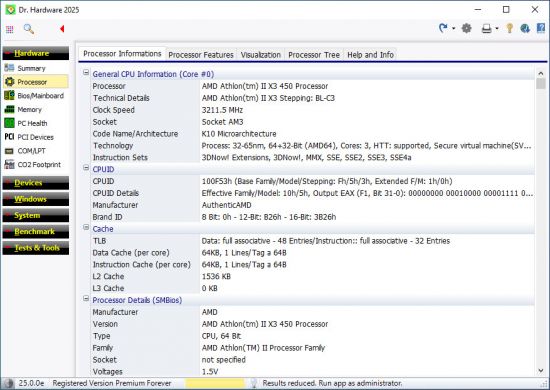
Dr.Hardware 2026 v26.4.1

File size: 4.8 MB

Dr. Hardware has been the tried-and-tested, award-winning PC analysis program for 30 years, impressing users with its wealth of detail, up-to-dateness and innovative features.

Features
- detailed analysis of processor, BIOS, bus, memory, chipset, PCI devices
- Temperature monitoring including acoustic warning option
- Analysis of hard drives, optical drives, USB devices, scanners, printers
- Benchmarks (CPU, graphics, hard drives, DVD, network, internet connection)
- detailed information on Windows and security aspects, Win 11 compatibility check
- Rating test, keyboard test, monitor test image, green test (electrical smog, pollutants)
- High DPI support, help and report function (including autoreport, printer/file output)

Whats New
Bugfix
- Dr. Hardware kernel driver loading issue
- consideration of AMD Ryzen Zen 5 processors for rating test

System Requirements: Windows XP, 7, 8.1, 10, 11

Homepage
Код:
https://www.drhardware.de/

DOWNLOAD:

Код:
https://rapidgator.net/file/8341cf2dc96ca8ee894a035dddc20580/DrHardware2026v26.rar.html

https://ddownload.com/yn66t8a2vrl8/DrHardware2026v26.rar
 
i-PWb-AAvox-FV6Ui-HOByr-Gs-B41X74c6VAq.jpg


Elcomsoft Forensic Disk Decryptor 2.21.1036

File size: 42.6 MB

Elcomsoft Forensic Disk Decryptor offers all available methods for gaining access to information stored in encrypted BitLocker, FileVault 2, PGP, TrueCrypt and VeraCrypt disks and volumes. The toolkit allows using the volume's plain-text password, escrow or recovery keys, as well as the binary keys extracted from the computer’s memory image or hibernation file. FileVault 2 recovery keys can be extracted from iCloud with Elcomsoft Phone Breaker, while BitLocker recovery keys are available in Active Directory or in the user’s Microsoft Account.

If neither the encryption key nor the recovery key can be extracted, EFDD can extract meta data from the encrypted container to let Elcomsoft Distributed Password Recovery do its job.

Full Decryption, Instant Mount or Attack
With fully automatic detection of encrypted volumes and encryption settings, experts will only need to provide path to the encrypted container or disk image. Elcomsoft Forensic Disk Decryptor will automatically search for, identify and display encrypted volumes and details of their corresponding encryption settings.

Access is provided by either decrypting the entire content of an encrypted volume or by mounting the volume as a drive letter in unlocked, unencrypted mode. Both operations can be done with volumes as attached disks (physical or logical) or raw images; for FileVault 2, PGP and BitLocker, decryption and mounting can be performed using recovery key (if available).

Full Decryption
Elcomsoft Forensic Disk Decryptor can automatically decrypt the entire content of the encrypted container, providing investigators with full, unrestricted access to all information stored on encrypted volumes

Real-Time Access to Encrypted Information
In the real-time mode, Elcomsoft Forensic Disk Decryptor mounts the encrypted volume as a new drive letter on the investigator’s PC. In this mode, forensic specialists enjoy fast, real-time access to protected information. Information read from mounted disks and volumes is decrypted on-the-fly in real time.

No Decryption Key and No Recovery Key?
If neither the decryption key nor the recovery key is available, Elcomsoft Forensic Disk Decryptor will extract metadata necessary to brute-force the password with Elcomsoft Distributed Password Recovery.

Elcomsoft Distributed Password Recovery can attack plain-text passwords protecting the encrypted containers with a range of advanced attacks including dictionary, mask and permutation attacks in addition to brute-force.

Sources of Encryption Keys
Elcomsoft Forensic Disk Decryptor needs the original encryption keys in order to access protected information stored in crypto containers. The encryption keys can be extracted from hibernation files or memory dump files acquired while the encrypted volume was mounted. There are three ways available to acquire the original encryption keys
By analyzing the hibernation file (if the PC being analyzed is turned off);
By analyzing a memory dump file. A memory dump of a running PC can be acquired with the built-in memory imaging tool.
By performing a FireWire attack (PC being analyzed must be running with encrypted volumes mounted). A free tool launched on investigator’s PC is required to perform the FireWire attack (e.g. Inception).
By capturing a memory dump with built-in RAM imaging tool
FileVault 2, PGP and BitLocker volumes can be decrypted or mounted by using the escrow key (Recovery Key).

New features
VeraCrypt Encryption
VeraCrypt is the most popular successor to open-source disk encryption tool TrueCrypt. Compared to the original, VeraCrypt supposes a wider range of encryption methods and hash algorithms. In this update, Elcomsoft Forensic Disk Decryptor receives full support for VeraCrypt volumes, enabling experts extracting hash data from VeraCrypt containers to launch brute-force or smart dictionary attacks with Distributed Password Recovery.

Whats New
Updates: official site does not provide any info about changes in this version

System Requirements
Windows 7 or higher
For all supported encrypted disks/containers: memory image or hibernation file that contains disk encryption keys (created when encrypted disk was mounted) pr password itself
For BitLocker and PGP: recovery key
For BitLocker: Active Directory database (ntds.dit)
For FileVault2-encrypted containers: recovery token from iCloud, or locally saved recovery key, or password (for HFS+ partitions only; for APFS, only generation of data for further password recovery is supported)
For VHD and VHDX images: Windows 8.1 or higher

Homepage
Код:
https://www.elcomsoft.co.uk/

DOWNLOAD:

Код:
https://rapidgator.net/file/d84a77e5cd7d43fde92890e7db4c770a/efdd-2.21.1036-full.rar.html

https://ddownload.com/ai0svxbwngfb/efdd-2.21.1036-full.rar
 
e-OSu-B4SUT9Jd5x8t-BKPa-Fw-ZCV9T9jo9y.jpg


pdfFactory Pro 9.30 Multilingual

File size: 27.5 MB

pdfFactory offers award-winning PDF creation features at an affordable price. pdfFactory Pro has all the features of pdfFactory and adds bookmarks, job ordering, letterheads and automated email functions. Only pdfFactory allows printing to paper or PDF without printing twice. Acrobat is not needed for printing. Increases the convenience of document delivery by having a single PDF that contains material from different sources. Just keep printing documents to pdfFactory and they will automatically be combined. Allows quick, accurate previewing of the PDF, including up to 400% zoom, without saving the file first and without opening Acrobat.

Features
- Create PDF or print to paper
- Combines multiple documents into a single PDF
- Preview
- Protect your PDFs
- Font embedding
- Page insertion and deletion
- Send via email
- AutoSave
- Live URL Links
- Easy server deployment
- Create PDFs on letterhead
- Add page numbering, headers, footers, watermarks
- Bookmarks and Table of Contents
- Integrated Jobs Tab
- Custom Drivers
- Set Initial Acrobat Display Properties

Whats New
Код:
https://fineprint.com/pdfp/release-notes/

System Requirements
Windows 11, 10, 8, 7, Vista, ARM
Windows Server 2025, 2022, 2019, 2016, 2012, 2012 R2, Citrix

Homepage
Код:
https://fineprint.com

DOWNLOAD:

Код:
https://rapidgator.net/file/c9a487f04c42db6cb4da2b20c87bbb54/pdfFactoryPro9.rar.html

https://ddownload.com/w97m7g3psp27/pdfFactoryPro9.rar
 
Ti-Ez-X0kk-Jhl-Irq-Pcwu-Vrg2Ig-Fz4GONEH.jpg


FinePrint 12.30 Multilingual

File size: 25.7 MB

FinePrint saves you money on paper and toner, weight in your briefcase, and time and hassle in managing your print jobs. With FinePrint working for you, annoying printing problems disappear. Below are just some examples of printing problems that FinePrint can fix. See also our Enterprise section for benefits of FinePrint in the Enterprise.

Features
- Delete unwanted pages
- Print multiple pages on a sheet
- Combine multiple print jobs into one
- Print on electronic letterhead
- Archive print jobs

Other features
- Mark documents with custom watermarks such as "draft" or "confidential".
- Create custom electronic letterhead and forms. No more buying, storing and manually loading pre-printed letterhead.
- Page numbering over multiple documents including Bates stamping
- Output pages to clipboard
- Save pages in JPEG, TIFF and text formats

Whats New
Код:
https://fineprint.com/fp/release-notes/

System Requirements
Windows 11, 10, 8, 7, Vista, ARM
Windows Server 2025, 2022, 2019, 2016, 2012, 2012 R2, Citrix

Homepage
Код:
https://fineprint.com/

DOWNLOAD:

Код:
https://rapidgator.net/file/24663c8e56e2ac8da0d2b8f717492b08/FinePrint12.rar.html

https://ddownload.com/xj5op8nco1vt/FinePrint12.rar
 
ezgif-2e3908c706c8c098.jpg


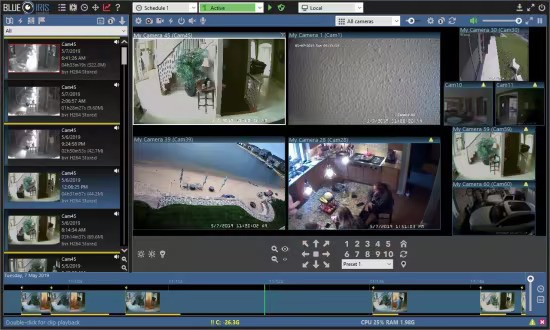
Blue Iris 6.0.8.6 (x64)

File Size: 130.1 MB

Blue Iris Professional Surveillance Software allows you to view and record up to 64 cameras (IP cameras, web cameras, DVR/CCTV based cameras) simultaneously and is compatible with the vast majority of IP camera and DVR brands. In addition. it takes advantage of H.264 video compression allowing you to save hard drive space and reduce bandwidth consumption. Use Amcrest Blue Iris to turn your existing Windows PC into a fully featured professional video surveillance system.

Additional features include continuous loop recording, scheduled recording and advanced motion/audio detection recording with the ability to send alerts via email, instant message and phone call.

Supported brands include: Amcrest, FDT, Foscam, 4XEM, ACTi, Agasio, AirLink101, AIRLive, Allnet, Apexis, Arecont, Astak, AVTech, Aviosys, Axis, Bosh, Canon, Cisco, Coolcam, Dericam, Digi-Lan, DLink, EasyN, Edimax, Evocam, Gadspot, Ganz, Grandstream, Hawking, HIKVision, HooToo, Intellinet, JVC, Linksys, Logitech, Lorex, Microseven, Mobotix, Panasonic, Pelco, Planet, Sanyo, Sharxx, Siemens, Sony, Stardot, Swann, Toshiba, Tenvis, TP-LINK, Trendnet, Vivotek, Wansview, Y-Cam Zavio, Zonet, and many more.

Mobile Access
- View live & recorded videos
- Manage multiple installations
- Control PTZ, IR & more functions
- Listen & talk
- Easily navigate cameras

Video Security
- Use motion or audio sensing to trigger recording, or record continuously or periodically.
- Overlay the current date/time as well as a logo or other information.
- Optionally record audio.
- Use a timer to determine when the system is armed.
- Images may be captured as either JPEG images, MPEG movies or Windows Media movies.
- Receive alerts via loudspeaker, email, instant message, voice phone call (with automatic redial), or external program/script.
- Run Blue Iris as a Windows service so that only you have control over its operation on a shared PC.

Web Server (UI3)
- Built-in web server enables you to bring your Blue Iris with you anywhere!
- Remotely connect to your Blue Iris from anywhere in the world, from any web enabled device.
- Desktop and mobile viewing.
- View live cameras, recorded clips and alerts.
- User authentication with permission based viewing.
- Automatically adjusts if IP changes.
- Detailed log.
- Use Blue Iris’s powerful digital Zoom and Pan functionality remotely!

What's New
official site does not provide any info about changes in this version.

Minimum System Requirements
Newer Intel processor
8GB or more system RAM
Microsoft Windows 10 64-bit OS (or equivalent server)
One or more USB or Network IP cameras, or an analog capture card with DirectShow drivers

Homepage
Код:
https://blueirissoftware.com/

DOWNLOAD:

Код:
https://rapidgator.net/file/a357187df6b4ab43460386eeb272d028/Blue_Iris_6.0.8.6-H_Hayat.rar.html

https://ddownload.com/nr2i88j9kb7u/Blue_Iris_6.0.8.6-H_Hayat.rar
 
Назад
Сверху Снизу