All sanddisk Software's Collection [Daily Updated]

th-6gem-XDPJoj8lx-IMx11Lm-Ohk-JN3VDYad5.jpg


Windows Firewall Control 6.30 Multilingual

File size: 3.0 MB

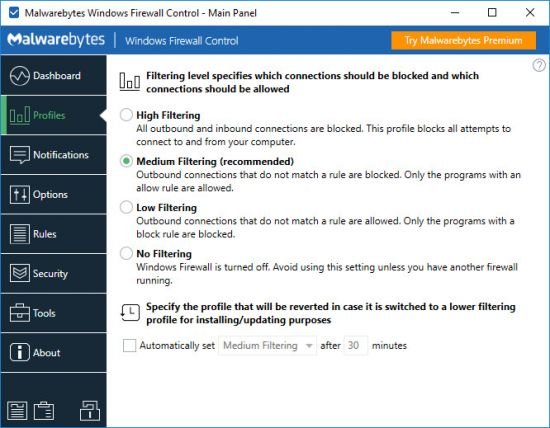
Windows Firewall Control is a powerful software which extends the functionality of Windows Firewall and provides new extra features which makes Windows Firewall even better. It runs in the system tray and allows the user to control the native firewall easily without having to waste time by navigating to the specific part of the firewall. This is the best tool to manage the native firewall from Windows 10, 8.1, 8, 7, Vista, Server 2008, Server 2012.

Quick access from the tray icon
Once initialized, the app creates an icon in the system tray area and allows you to select the security profile, ranging from no filtering (turns off Windows Firewall) to high filtering mode (blocks all inbound and outbound connections).

Thorough management of application connections
When it comes to rules management, you can allow or deny access to any application, disable, delete it from the list or create a duplicate. The list shows names, groups, programs, locations, statuses, actions, directions, locate and remote ports, remote addresses, protocols, and services.

Populate permission lists with custom apps
It is possible to sort items by status or direction (inbound, outbound, all, user-created), use a search function, view recently blocked programs, as well as switch to a simplified viewing mode for enabling and disabling program access, as well as for adding a new app to the list.

Rich settings to work with
Windows Firewall Control features a control panel where you can make additional tweaks. You can integrate the tool into the Explorer context menu, set it to autorun at startup, disable other programs from adding firewall rules, activate global hotkeys for the control panel and rules management area, adjust the frame's hue, import and export rules, as well as access some Windows tools (Firewall with Advanced Security, Command Prompt, Event Viewer, Resource Monitor, Windows Registry).

To end with
All in all, the application has a fair reaction speed and works smoothly, without causing any problems to the OS. It quickly applies rule changes. Windows Firewall Control is an excellent utility for a better control over Windows Firewall options, especially when it comes to setting up rules for each program.

Whats New
Код:
https://www.binisoft.org/changelog.txt

Homepage
Код:
https://www.binisoft.org

DOWNLOAD

Код:
https://rapidgator.net/file/7ccd9e6a91347da3b9b48faad5604b82/wfc6setup.exe.html

https://nitroflare.com/view/40B56A5E18AD88E/wfc6setup.exe
 
4Dfrv9Mtx-U0vv8Qr-OJx-F3u-JKin9Bz-IKy.jpg


Parted Magic 2026.03.20 (x64)

File size: 2.25 GB

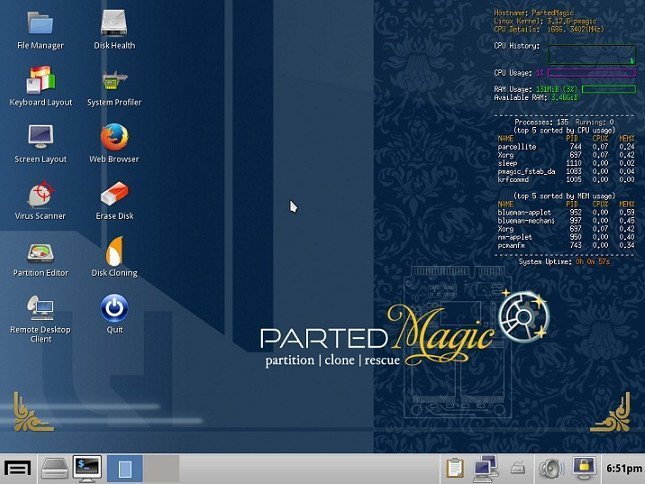
Powerful Tools for Home or Office! Parted Magic is a complete hard disk management solution.

Disk Partitioning
PartedMagic has the tools to get the job done. With the Partition Editor you can re-size, copy, and move partitions. You can grow or shrink your C: drive. Create space for new operating systems. Attempt data rescue from lost partitions.

Disk Cloning
Clone a computer’s entire disk or a single partition. The cloned data could be saved as an image-file or as a duplicated copy of the data. The data could then be saved to a locally attached storage device, an SSH server, a Samba Server, or a Network File System share. The clone file can then be used to restore the original when needed.

Data Rescue
PartedMagic allows you to easily reset or change Windows passwords. Recover lost files. Rescue files from devices with disk read errors.

Disk Erasing
PartedMagic comes with easy to use solutions for conventional overwrite. Internal Secure Erase. Wiping of only Free Space.

Benchmarking
All the benchmarking tools you would ever need! Bonnie++, IOzone, Hard Info, System Stability Tester, mprime, and stress.

Supported File Systems
ext2, ext3, ext4, fat16, fat32, ntfs, and reiserfs
Supported Actions: Create, grow, shrink, move, copy, check, label, and UUID.

Supported Hardware
PartedMagic requires at least a 64-bit processor with 8GB of RAM. 2GB in Live mode. Compatible with Secure Boot Windows machines. Runs well on Intel Macs.

No Installation Required!
PartedMagic is a stand alone Linux operating system. Runs from a CD or USB drive. Nothing installed.

Supported Storage Devices
Hard disk drives (SATA, IDE, and SCSI). Flash memory. USB drives. SSD (Solid State Drives). Devices with sector sizes of 512, 1024, 2048, 4096, etc.

Whats New
Код:
https://partedmagic.com/news/

Homepage
Код:
https://partedmagic.com

DOWNLOAD

Код:
https://rapidgator.net/file/97b0f3d36c644e1062803817cd90a6c5/pmagic_2026_03_20.part1.rar.html
https://rapidgator.net/file/e0cd7656f8b6fefa3a5d447981391e7a/pmagic_2026_03_20..part2.rar.html

Код:
https://nitroflare.com/view/69B54304EC00862/pmagic_2026_03_20..part2.rar
https://nitroflare.com/view/AE37785A95E8C47/pmagic_2026_03_20.part1.rar
 
ptoo-Ryf3Tq-Vc-Xoxjfi9F7zbu-Jr-CXy-Uyj.jpg


MyLanViewer Enterprise 6.7.8 Multilingual

File size: 7.55 MB

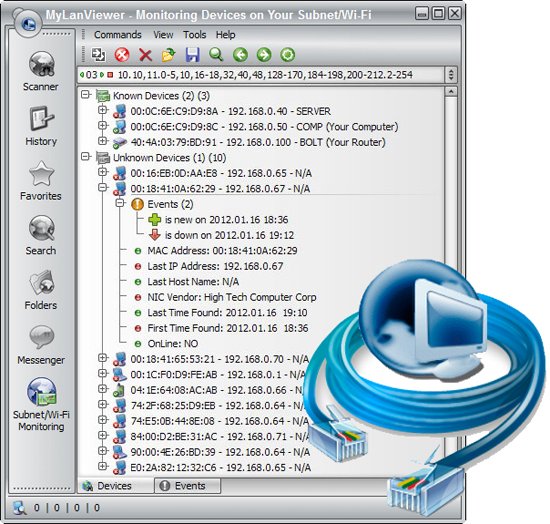
MyLanViewer Network/IP Scanner is a powerful Netbios and LAN/Network IP address scanner for Windows, whois and traceroute tool, remote shutdown and Wake On LAN (WOL) manager, wireless network scanner and monitor. This application will help you find all IP addresses, MAC addresses and shared folders of computers on your wired or wireless (Wi-Fi) network. The program scans network and displays your network computers in an easy to read, buddy-list style window that provides the computer name, IP address, MAC address, NIC vendor, OS version, logged users, shared folders and other technical details for each computer.

MyLanViewer Network/IP Scanner supports remote shutdown, wake-on-lan, lock workstation, log off, sleep, hibernate, reboot and power off. It is able to monitor IP address and show notifications when the states of some computers change. MyLanViewer Network/IP Scanner can also view and access shared folders, terminate user sessions, disable shared folders, show netstat information and detect rogue DHCP servers. The software can monitor all devices (even hidden) on your subnet, and show notifications when the new devices will be found (for example, to know who is connected to your WiFi router or wireless network). The program easy to install and use, and has a user-friendly and beautiful interface.
Enterprise License - A enterprise license grants an organization rights to install and use the software on an unlimited number of computers or servers at an unlimited number of locations used by the organization in many cities or countries. (Order MyLanViewer (Enterprise License) - 999 USD)

What's new
• official site does not provide any info about changes in this version

Homepage
Код:
https://www.mylanviewer.com/

DOWNLOAD

Код:
https://rapidgator.net/file/6b833d4acd9fdc91d4912724db687022/MyLanViewer.6.7.8.rar.html

https://nitroflare.com/view/10FF24825989156/MyLanViewer.6.7.8.rar
 
ezgif-1912cba52f0a66dd.jpg


AOMEI Backupper Technician Plus 8.2.0 WinPE

Englsh | File Size: 1 GB

AOMEI Backupper is a professional-like, easy-to-use backup and recovery software. But is free for home users and commercial use, fully protects your computer from data loss. It lets you securely backup PC and Server, provides one-click backup your system partition or disk and does it in minutes. This software also can explore the created image and restore it to the hard drive if your data gets lost or corrupted. In addition, you can create a bootable rescue disk for recovering your data when the system crashes and the application cannot be accessed from the Windows interface.

AOMEI Backupper lets you clone the partition or disk, too. The software already supports the Microsoft Volume Shadow Copy Service (VSS) that enables the data backup process and does not interfere the running applications. This option of AOMEI Backupper is very efficient because backup data can still be made when you're working.
To prevent data loss, so we need to make data backup, AOMEI Backupper with the following features to ensure the safety of your data.

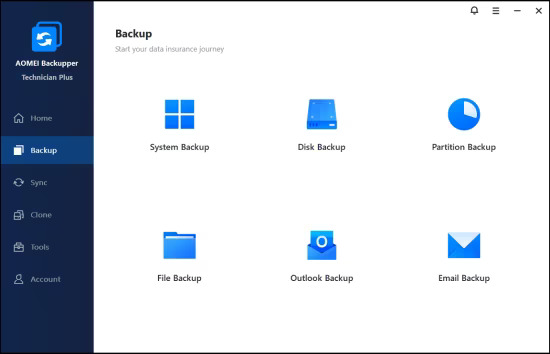
System Backup. One-click back up all data of system drive, including system files and installed applications without interrupting system run.
Disk Backup. Backup your hard disk drives including MBR disk, GPT disk, external hard drive, USB disk, and other storage devices that can be recognized by Windows.
Partition and Volume Backup. If you just want to backup a partition or volume, not the entire disk, the feature will be your best choice. With it, you can backup one or multiple partitions/volumes (including dynamic volumes) to an image file.
When your computer occurs some problems, such as accidentally deleted files, the system can not start, virus damage, by using the created backup before, you can restore system to its previous normal state or retrieve lost data.

System Recovery. Easily and quickly restore system partition and ensure system bootable after completing the recovery process.
Disk and Partition Recovery. Reliably recover the whole hard disk drive, partition or dynamic volume to original state.
Selective file restore. Selectively restore individual files and folders from a backup image file without recovering the entire backup.

In addition to backup and restore functions, AOMEI Backupper supports cloning operations. If you need to upgrade hard drive, or replace old disk, or migrate hard drive to new one, this feature can be more convenient to your work.

Disk Clone: Directly copy one hard drive to another without creating an image file. The program allows you to resize partitions during this cloning process, and supports to clone small disk to larger disk as well as copy traditional hard drive to solid state drive.
Partition and Volume Clone: Directly create an exact duplication of partition or dynamic volume and exactly transfer it to another partition or volume.

AOMEI Backupper Other Features
Incremental and differential backups. Based on a full backup, the software supports to create incremental or differential backups to taking less time and save storage space.
Encryption and Compression. You can set a password for each backups to prevent unauthorized access. When the backup process, specify an industry leading compression algorithm to compress image file in order to take up less disk space.
Image file checker and explorer. Check data integrity of image file to ensure the backups can be restored successfully. Mount image files to a virtual partition so that you can browse the contents of the backups in Windows Explorer.
Comment Backups and Splitting Backups. Add comments to backups so that the backups can be further identified and clarified. Let you know what a backup is for or what it contains. Splitting Backups can split backup an image file into proper sizes to fit storage media.
Create Bootable Rescue Media. You can create a bootable media (e.g. CD or USB media) to restore system drive on the condition that Windows can not boot.

What's new
Код:
https://www.ubackup.com/changelog.html?ab

Homepage
Код:
https://www.ubackup.com/

Homepage
Код:
https://msfree.su/

DOWNLOAD

Код:
https://rapidgator.net/file/a094d01ad509f8b32a7c715e96c1372e/AOMEI_Backupper_Technician_Plus_8.2.0_WinPE.iso.html

https://nitroflare.com/view/41333F32C3425E1/AOMEI_Backupper_Technician_Plus_8.2.0_WinPE.iso
 
th-sd-Fqo-En-Bosd-OZ9QYLj-Fb-W0fq637HVOly.jpg


EdrawMax Ultimate 15.1.6.1498 Multilingual

File size: 163 MB

All-in-One Diagram Software. Get the most powerful, professional diagram software on the market. Compare now to see why Lucidchart is a better diagramming solution. Over 10,000,000+ Users. Dedicated Support. Visio Import & Export.

Visualize, innovate, and collaborate with EdrawMax
Diagramming & Flowcharting
Create powerful flowcharts and visuals to show clear processes that drive the better decision for your business.

Floor Plan Design
Offer a flexible and easy-to-use floor planning solution to maximize your space potential for everyone.

Electrical Engineering
Bring clarity to a complex electrical system by providing a professional visual reference for any audience.

Software & System Planning
Develop strong foundational systems and deliver high software quality to keep your business up and running.

Meeting & Brainstorming
Run productive meetings and capture ideas with brainstorming to align everyone on the vision.

Org Chart Design
Build effective organizational structures and identify roles and responsibilities to achieve better team performance.

P&ID Drawing
Visualize the pipping systems and smooth the process modification to optimize your industrial solution.

Strategy & Project Planning
Help to achieve successful team outcomes with up-to-date strategy and clear visual of project process.

Simplify Your Visual Workflow
Plan, visualize, and present better results — all in EdrawMax. Get started easily with the Microsoft-like interface, drag and drop feature, and professional template resources. With 280 types of diagram solutions, you and your team can use EdrawMax for every stage of your workflow.

Scale Diagrams with Confidence
Everyone, in every industry, enjoys the right to make their ideas visualized and stand out by using EdrawMax. With more than 1500 built-in templates and over 26,000 symbols, the inspiration for diagram creation is unstoppable! Plus, join the template community and get inspired with innovative Edrawers.

Share Your Visuals Anywhere
Your teamwork deserves to be shared! EdrawMax keeps everyone on the same page at all times and in all places. Share your work and collaborate with your team in any file format, on any shareable channel you want, and anywhere. EdrwaMax is what makes a project to be connected and stand out.

Safeguard Your Privacy
Security is EdrawMax’s middle name, your data is private, safe and secure here. With enterprise-scale security, all information and file transfers are safeguarded with the highest level of SSL encryption, no one can access your data without permission. EdrawMax puts data security and customer privacy as top priority.

What's New
Код:
https://www.edrawsoft.com/whats-new/edrawmax.html

Homepage
Код:
https://www.edrawsoft.com/

DOWNLOAD

Код:
https://rapidgator.net/file/6ea0bc5e64b095d944f3d183e7e8f051/EdrawMax15.rar.html

https://nitroflare.com/view/4F032173B49D678/EdrawMax15.rar
 
th-us-Yb44cd-LSx-Fi-Edp-T89e-Xws1Pb-YEC2RF.png


HDD Raw Copy Tool 2.5

File Size : 33.9 Mb

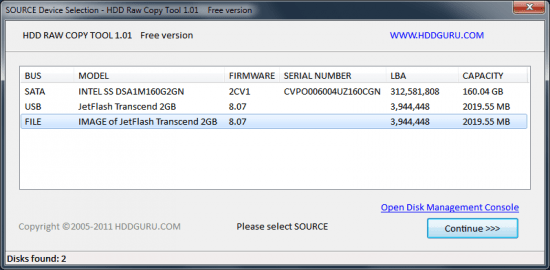
HDD Raw Copy tool makes an exact duplicate of a SATA, IDE, SAS, SCSI or SSD hard disk drive. Will also work with any USB and FIREWIRE external drive enclosures as well as SD, MMC, MemoryStick and CompactFlash media.

The tool creates a sector-by-sector copy of all areas of the hard drive (MBR, boot records, all partitions as well as space in between). HDD Raw Copy does not care about the operating system on the drive - it could be Windows, Linux, Mac, or any other OS with any number of partitions (including hidden ones). Bad sectors are skipped by the tool.
If your media has a supported interface then it can be copied with HDD Raw Copy!
In addition, HDD Raw Copy can create an exact raw (dd) or compressed image of the entire media (including service data such as MBR, Boot records, etc). Again, all filesystems (even hidden) are supported.

Examples of possible uses
Data recovery: make a copy of the damaged drive to attempt recovery on the copy
Data recovery: copy a damaged hard drive and skip bad sectors
Migration: completely migrate from one hard drive to another
Ultimate backup: Make an exact copy of the hard drive for future use
Backup: create an image of a USB flash stick and copy/restore at any moment
Software QA engineers: restore your OS hard drives at any moment from a compressed image
Duplicate/Clone/Save full image of any type of media!

Features
Supported interfaces: S-ATA (SATA), IDE (E-IDE), SCSI, SAS, USB, FIREWIRE.
Big drives (LBA-48) are supported.
Supported HDD/SSD Manufacturers: Intel, OCZ, Samsung, Kingston, Maxtor, Hitachi, Seagate, Samsung, Toshiba, Fujitsu, IBM, Quantum, Western Digital, and almost any other not listed here.
The program also supports low-level duplication of FLASH cards (SD/MMC, MemoryStick, CompactFlash, SmartMedia, XD) using a card-reader.

Whats New
official site does not provide any info about changes in this version

Homepage
Код:
https://hddguru.com/

DOWNLOAD

Код:
https://rapidgator.net/file/7e2558b17089072abd2a61404692a12a/HDDRawCopy2.5Setup.exe.html

https://nitroflare.com/view/94A9747151B5856/HDDRawCopy2.5Setup.exe
 
ezgif-142c4af4850542f7.jpg


Ashampoo Home Design Pro 11.0.0 (x64) Multilingual

File Size: 1.7 GB

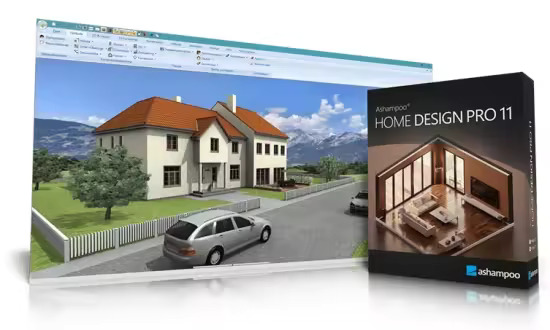
Ashampoo Home Design Pro 11 is a powerful 3D home design software solution for precise planning of buildings, interiors, and roofs. Create floor plans, design rooms, integrate solar systems, and experience your project in a realistic 3D view. Automatic calculations for lengths, areas, angles, and volumes ensure accurate results without complicated math. Pro 11 truly stands out when designs evolve into complete plan documents and technically sophisticated constructions.

Access to multiple new objects through Google Sketchup and Collada model import
Precise 3D previews for every planning step
Plan roof-mounted photovoltaic installations easily
Over 380 new symbols for electrical, gas, water and security appliances
3D preview with furniture, light and surroundings
New numeric edit tools for walls, windows, and doors
Additional window and door parts, shutter boxes, blinds, borders
IFC-2x3 export plugIn for BIM-compatible data exchange
Hidden line optimization in elevation views
Fire Escape Plan plugin
Wizard for scale, frame placement, and plan layout
Export a list of 2D Symbols (PDF, RTF, Excel)
More than 280 new, freely scalable 3D objects
Extended PV objects including current photovoltaic modules and balcony power systems

Extended 2D drawing functions for precise detail work
Home Design Pro 11 includes comprehensive 2D drawing tools for detailed plan development. Create custom line types, use extended fill properties and nuanced hatching—for example, to represent materials or wall structures. You can create your own 2D symbols and save them to the catalog. Existing symbols can be customized—ideal for individual title blocks or project-specific plan information.

Optimized hidden line representation for high-quality plan views
Technical drawings depend on clarity. The new hidden line optimization in elevation views noticeably improves exterior views by automatically filtering out unwanted floor dividing lines. The result is clean, professional façade views with significantly enhanced visual quality. The difference becomes especially clear in presentations, tenders, and permit documentation. Less manual rework, greater precision in output.

More than 280 new 3D objects – flexible and scalable
The 3D object catalog has been substantially expanded. More than 280 new models are now available as fully scalable objects. Materials and textures can be individually customized, providing maximum design flexibility. The update also includes current photovoltaic modules and preconfigured PV assemblies for balcony power systems. The result is greater realism in visualization and increased precision in detailed planning.

What's New
Код:
https://www.ashampoo.com/en-us/home-design-pro-11

Homepage
Код:
https://www.ashampoo.com

DOWNLOAD

Код:
https://rapidgator.net/file/c56eda32ae8e958b40c0fd99d44048d2/Home.Design.Pro.11.rar.html

https://nitroflare.com/view/3B5587AB3D1C665/Home.Design.Pro.11.rar
 
ezgif-127be39b615902f7.jpg


Ashampoo Home Design 11.0.0 (x64) Multilingual

File Size: 1.7 GB

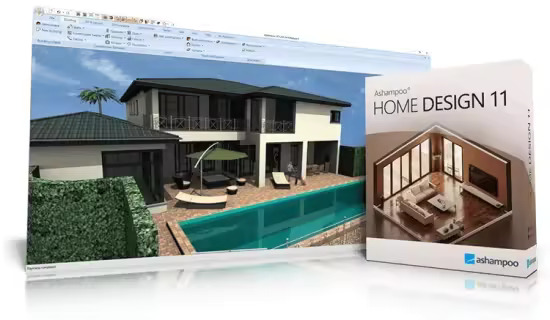
Find out how easy and innovative home design can be with Ashampoo Home Design. Import and edit millions of 3D objects in formats such as SketchUp and Collada and make your visions a reality. Plan roof-mounted photovoltaic systems with intuitive assistants and virtually design rooms with a wide selection of furniture and decorations. Ashampoo Home Design takes the complicated math off your shoulders, so you can fully concentrate on the design. Explore your projects in a realistic 3D preview and use the user-friendly multi-function bar for efficient and precise results. Ashampoo Home Design is the reliable partner for all your home planning needs!

Millions of ready-to-use objects for perfect furnishing results
Ashampoo Home Design supports loading, editing and saving of various new 3D object formats. This gives you access to millions of 3D objects! Simply import them and add them to your designs! With support for SketchUp or Collada models, you can now instantly use numerous generic and brand-specific models.

Plan photovoltaic installations with ease!
Comfortable input aids help you plan sophisticated photovoltaic systems in minutes. For roof-mounted systems, you can already specify their layout, select modules from the object catalog and their placement during the setup phase. The program will automatically determine the settings for the roof as soon as you point at the target side. Once configured, the photovoltaic installation will be added to your plan.

Redecorate and view results instantly
Ashampoo Home Design is also the perfect tool to redecorate your house and garden. Layout furniture and decorations perfectly in advance and take a virtual tour. It's the easiest way to avoid nasty surprises and disappointment. Everything fits in harmonically. Thanks to a large selection of furniture, decorative elements and plants, you can give free reign to your creativity.

Complex calculations? Let the program do it for you!
Whether it's angle, length, area or volume calculations - you focus on the design, Ashampoo Home Design does the math. The program is not a mere drawing application but your ticket to highly accurate realistic models.

Fascinating 3D previews
The phenomenal 3D view allows you to take a virtual tour through your buildings - long before the first stone is laid. With Ashampoo Home Design, you move freely through your future home and take advantage of the realistic light and shadow simulation to find the perfect spots for your furniture. Visualize complex building constructions and get a glimpse of the way your future projects will look like today!

Fast and intuitive
Ashampoo Home Design uses a ribbon toolbar that groups all functions logically and thematically. This means you can quickly access each feature and since the program is optimized to make the best use of your system resources, even complex calculations and animations happen in a matter of seconds. What other home design software is this comfortable and precise?

What's New
Код:
https://www.ashampoo.com/en-us/home-design-11

Homepage
Код:
https://www.ashampoo.com

DOWNLOAD

Код:
https://rapidgator.net/file/ef9b02bffe1248953023c8ae8170bef3/Home.Design.11.rar.html

https://nitroflare.com/view/2F15B33E4ABEECB/Home.Design.11.rar
 
ezgif-141d4be2dc81efd0.jpg


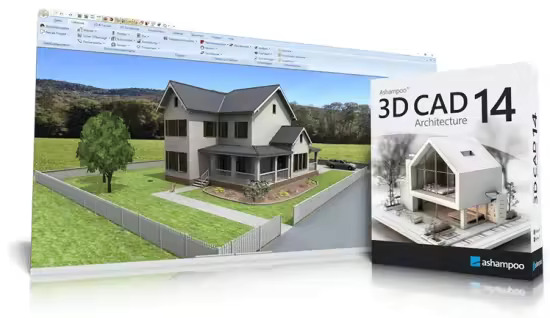
Ashampoo 3D CAD Architecture 14.0.0 (x64) Multilingual

File Size: 1.7 GB

Want to plan your home in peace and comfort on your PC? Ashampoo 3D CAD Architecture is the user-friendly design software for anyone ready to turn their vision into reality! The step-by-step wizard delivers quick and easy results, even for beginners. With 2D, 3D, and cross-section views, you always know exactly where your project stands and can instantly spot what’s missing and where changes are still needed—perfect for identifying weaknesses and avoiding design bottlenecks. New: A powerful electrical planning assistant helps place outlets, switches, and lighting fixtures quickly and accurately. Whether building from scratch, renovating, or just redecorating, find out what your future space will look like today. Get the 3D home planner that truly moves your project forward!

Powerful electrical planning assistant included!
Electrical planning has never been easier: With the new assistant, you can place outlets, switches, and lights exactly where you need them–with just a few clicks. Choose from predefined room types and equipment configurations or create your own templates. The assistant automatically analyzes your rooms and suggests optimal placements–saving you time and helping you avoid mistakes. Whether you're a beginner or a pro, this feature makes electrical planning faster, easier, and more intuitive!

Customization and full control over electrical symbols
In addition to the built-in symbols, you can add and manage your own electrical symbols. Use custom directories to directly integrate personalized elements into your plans. The assistant automatically creates a dedicated layer for electrical symbols, so you can show or hide the entire electrical installation with a single click. You can also manually move, rotate, and adjust all symbols–for maximum flexibility and precision! The assistant even auto-enhances your planning with a parts list of all electrical components used in your project.

New doors and sliding doors–enhancing design flexibility for more realistic drafts
New door models give you even more creative options. Innovative extra: Doors with asymmetrical wall openings. Now you can realistically depict sliding doors with track systems and without awkward overlaps. This added flexibility lets you design your floor plans even more accurately and individually, perfect for modern open concepts and advanced architectural projects!

New feature highlights
Hidden line optimization in elevation views
Fire Escape Plan plugin
Wizard for scale, frame placement, and plan layout
Comprehensive 2D symbol catalog with automatic legends
Exporting a List of 2D Symbols (PDF, RTF, Excel)
More than 280 new, freely scalable 3D objects
Extended PV objects including current solar modules and balcony power systems

Photovoltaic installations - rooftop arrays and flat roofs
No good project design should be without photovoltaic installations. For roof-mounted system, you can already specify their layout, select modules from the object catalog and their placement during the setup phase. For flat roofs, you can simply specify which parts will be or will not be used for photovoltaic elements during the design phase. When you're done, you can place the entire installation in just two clicks and adjust distances between rows of panels or rotate and realign them - it's the perfect approach to preliminary planning!

Powerful area analysis
Due to popular demand, we have added additional area analysis and calculation features plus suitable output templates. Aside from living space you can now also process floor space, walls, ceilings, facades and many other areas. Facade areas can also be easily exported to PDF, RTF or Excel files! Position lists for windows are also no longer a problem.

Mirror objects with ease
Two powerful tools will help you mirror 3D and 2D objects and symbols either across any axis or their center points. This also works with multi-selections of the same element type which can save you a lot of time! CAD software doesn't get any more flexible than this!

Unmatched efficiency
The clean, thematically structured user interface gives you 1-click access to all features. Everything is logically arranged and easily accessible. You decide whether you'll use classic toolbars or the modern ribbons you know from Microsoft Office products.

Input aids and wizards for straightforward handling
From roof designs to terrain modeling - Ashampoo 3D CAD provides useful input aids and wizards for all complex operations. You focus on the contents and the software does the rest - as it should be.

Exterior and interior design elements included
The built-in object catalog gives you access to various building components, textures, materials and symbols. It takes only a single click to place doors, windows, balconies, carports as well as sanitary and electrical installations in your designs. You can import additional objects from SketchUp and Collada. This gives you a detailed view of the finished project already in the planning phase - down to the last details!

Building material hub with "informed" CAD textures
mtextur.com provides architects, designers and planners with details on building materials and their manufacturers for free. Found materials are downloadable as high resolution CAD and BIM textures for immediate use with your planning software of choice. You may also search for specific building materials based on material group, color, use case, manufacturer or product line. Links to additional details, reference examples and PDFs with details on various materials are also available. With over 10k informed materials, mtextur is the biggest hub for real CAD textures (online since 2006) world-wide. This will truly simplify all of your planning in the age of BIM (Building Information Modeling).

What's New
Код:
https://www.ashampoo.com/en-us/3d-cad-architecture-14

Homepage
Код:
https://www.ashampoo.com

DOWNLOAD

Код:
https://rapidgator.net/file/f462cd5e51ad3ad41ab3de0e4421bc56/3D.CAD.Architecture.14.rar.html

https://nitroflare.com/view/8EE7B2CFA8C63FE/3D.CAD.Architecture.14.rar
 
ezgif-15ec33fc10b60529.jpg


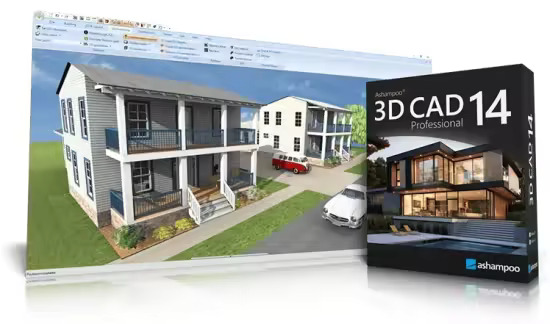
Ashampoo 3D CAD Professional 14.0.0 (x64) Multilingual

File Size: 1.7 GB

Ashampoo 3D CAD Professional 14 is a comprehensive 3D CAD solution for professional architectural and construction planning. From detailed floor plans and sections to fully developed 3D building models, the software supports the complete design process with precision and technical reliability. Advanced construction tools, structured project management, and extensive object catalogs enable efficient planning of residential, commercial, and public building projects. With integrated IFC-2x3 export, optimized elevation views, and powerful tools for creating fire escape plans, Professional 14 goes beyond pure design—providing a CAD environment built for modern BIM workflows and demanding project requirements.

New design and construction tools
Numeric inpPowerful electrical planning assistant included!
Electrical planning has never been easier: With the new assistant, you can place outlets, switches, and lights exactly where you need them–with just a few clicks. Choose from predefined room types and equipment configurations or create your own templates. The assistant automatically analyzes your rooms and suggests optimal placements–saving you time and helping you avoid mistakes. Whether you're a beginner or a pro, this feature makes electrical planning faster, easier, and more intuitive!

Customization and full control over electrical symbols
In addition to the built-in symbols, you can add and manage your own electrical symbols. Use custom directories to directly integrate personalized elements into your plans. The assistant automatically creates a dedicated layer for electrical symbols, so you can show or hide the entire electrical installation with a single click. You can also manually move, rotate, and adjust all symbols–for maximum flexibility and precision! The assistant even auto-enhances your planning with a parts list of all electrical components used in your project.

New doors and sliding doors–enhancing design flexibility for more realistic drafts
New door models give you even more creative options. Innovative extra: Doors with asymmetrical wall openings. Now you can realistically depict sliding doors with track systems and without awkward overlaps. This added flexibility lets you design your floor plans even more accurately and individually, perfect for modern open concepts and advanced architectural projects!

New feature highlights
Plan Layout with multiple views on a single sheet
Scaled plan layouts with PDF output
2D drawing functions for adding drawing details and enhancing floor plans
Insert scanned floor plans (JPG, PNG) as images and use them as a blueprint to trace your 3D building model
Extended 2D drawing functions with custom line types and hatching
Create and edit custom 2D symbols
Combinable roof extensions and roof openings
Extended roof variants including hall roofs
Integrated 3D Converter with material and texture editing

Standards-compliant fire escape plans directly from the project
With the integrated Fire Escape Plan Plugin, standards-compliant safety plans can be created directly based on existing floor plans. A wizard assists with scale, drawing frame placement, and layout, while a comprehensive 2D symbol catalog and automatic legend generation streamline implementation. In addition, a structured export of all used 2D symbols is available—ideal for documentation and coordination. Professional 14 significantly expands its application scope for commercial and public construction projects.

IFC export for professional BIM workflows
With the integrated IFC-2x3 Export PlugIn, Ashampoo 3D CAD Professional 14 becomes fully BIM-compatible. Complete 3D building models can be exported, including structural elements such as walls, ceilings, floors, and roof structures, as well as finishing elements like windows, doors, and stairs. 3D catalog objects and custom 3D constructions are also reliably transferred. This allows planning data to be integrated into architectural, structural engineering, or cost-estimating software, enabling efficient collaboration within connected project environments. Professional here means full control over data and future-proof standards.

Powerful design an construction tools
Numerical input tools are the ultimate solution for precise planning, which is why the program heavily emphasizes this aspect! Dedicated input modes for walls, windows, and doors make your work incredibly easy, while numerical editing tools for the same areas add more precision and flexibility to your projects. Together with custom components for windows and doors, roller shutter boxes, blinds and borders, the design and construction section is a genuine highlight of the software!

Extensive object catalogs
Ashampoo® 3D CAD Professional is popular also because of the vast number of included 3D objects. Select from a variety of suitable 3D objects and over 250 ready-to-use object groups in the object catalog! The catalog includes groups full of pre-designed garages, kitchen lines, garden houses, and saunas, among others. Create your own catalog directories and use them directly in the catalogs, it couldn't be more convenient! Look forward to a program that sets hardly any limits for you and your projects!

Less is more?
Great, then our Ashampoo® 3D CAD Architecture is what you want! You don't need to import/export of 2D DXF/DWG files or export Maxon Cinema 4D files, and you don't want to construct windows yourself? But you still want a comprehensive, fully-fledged CAD application? Then the more affordable Ashampoo® 3D CAD Architecture is the ideal solution for you! After all, why should you pay for high-level professional features you won't be using anyway? Check out the comparison matrix and find the solution that is right for you!

What's New
Код:
https://www.ashampoo.com/en-us/3d-cad-professional-14

Homepage
Код:
https://www.ashampoo.com

DOWNLOAD

Код:
https://rapidgator.net/file/7d1f8aac6378fba38f7387dfc3417284/3D.CAD.Professional.14.rar.html

https://nitroflare.com/view/475D0E723573BFB/3D.CAD.Professional.14.rar

 
ezgif-1fecb03e9c6b24bb.jpg


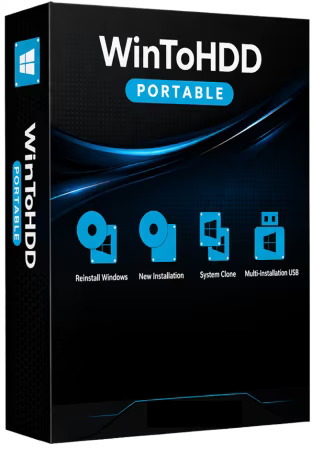
WinToHDD 7.0 Technician Multilingual Portable

Windows x64 | File size: 22.6 MB

WinToHDD is a handy and useful Windows software that allows you to install or reinstall Windows without using a CD/DVD or USB drive. With this All-in-One Windows Setup software, you can easily reinstall Windows, install Windows onto disks other than the one where your Windows operating system is installed, or clone current Windows OS installation (Windows vista or later) to other disk.

Deploying Windows shouldn't be rocket science for users who possess basic computer knowledge, especially with the right tools at hand. Aside from creating a bootable USB drive containing all the setup files of the OS, you can try out an application such as WinToHDD. Its purpose is to help you re-install Windows without using a disc and without going through the hassle of creating a bootable USB drive.
Install, re-install or clone Windows

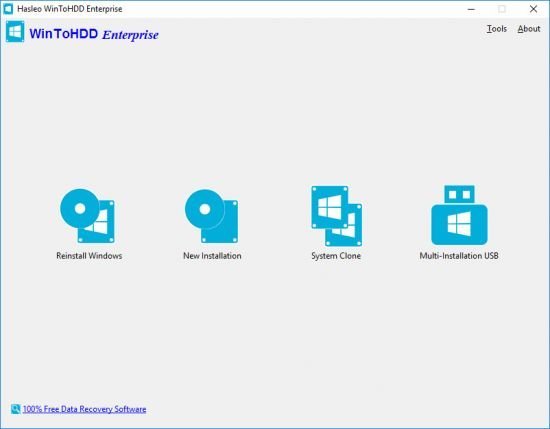
Attempting to make the Windows deployment procedure as simple as possible, WinToHDD comes with a straightforward, clean interface that only comprises three buttons: one for re-installing the OS on the local workstation, one for starting a fresh Windows install on a second storage device (hard drive), and the third for creating an exact copy of the local system.
In other words, not only that you can deploy Windows with WinToHDD, but it is also possible to create a copy of the Windows setup files and save it to another disk.

Go through simple steps to create a WinPE image
No matter what your choice is, getting the job done is only a matter of pressing a few Next buttons from this point on. As expected, you are prompted to select the source ISO file that contains the Windows setup files. WinToHDD automatically reads data from the disk image and retrieves information regarding the operating system and its architecture.

Next, you must select the system partition that Windows will be deployed on and choose the installation mode. There are three available options, namely 'Legacy' (standard mode), 'VHD' or 'VHDX'.
Whether you choose to install, re-install or clone Windows, it will take a while for WinToHDD to create the WinPE image that's needed to proceed.

Deploy Windows without a disc or a bootable drive
Some prefer deploying Windows the old-fashioned way by booting from a disc while others like having a bootable USB drive at hand and thus not keep the Windows disk image on the computer to occupy storage space. WinToHDD offers a method to conveniently install or clone Windows without a disc or a bootable drive. This alternative will surely have its public, especially since it is easy to use and should pose no problems to the average user.

System requirements
Windows XP or later .
Intel Pentium processor.
512MB of available RAM (1G or more recommended).
500MB of free space on your hard drive.
1024x768 graphic device (higher resolution recommended).

Whats New
Код:
https://www.easyuefi.com/wintohdd/change-logs.html

Homepage
Код:
https://www.easyuefi.com/

DOWNLOAD

Код:
https://rapidgator.net/file/1f510442cef01dca87b2d9c029f23f19/WinToHDD7.0.Portable.rar.html

https://nitroflare.com/view/EC21512BEBFFCE8/WinToHDD7.0.Portable.rar
 
ezgif-183cd6c63a4ac8b4.jpg


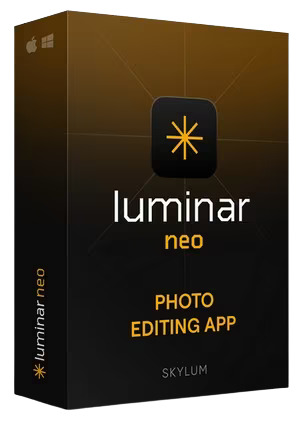
Luminar Neo 1.26.1.16487 Multilingual

File size: 2.08 GB

Luminar Neo is a powerful, next-generation photo editing software designed to inspire creativity and deliver professional results with ease. It features an intuitive interface and a modern toolkit powered by cutting-edge AI technologies. With a flexible, performance-focused engine at its core, Luminar Neo offers faster editing, seamless layer-based workflows, and precise control over every detail. Whether you're enhancing portraits, transforming landscapes, or exploring your artistic vision, Luminar Neo makes the editing experience both efficient and enjoyable.

AI-Powered
Advanced AI features automatically enhance your photos and save you time.

Easy to use
An intuitive interface and smart tools make editing simple for everyone.

Connected Ecosystem
Start editing on your phone or tabled, finish on desktop — your work stays synced.

Use as a plugin
Integrate seamlessly with Lightroom classic and Photoshop for smooth, flexible editing.

Experience Luminar Neo's capabilities
With support for raw files, exporting in all major file formats, layers, masking, and much more, photography editing software Luminar Neo meets all your editing needs.

- AI image enhancement
- Clone tool
- Raw editing
- Dodge & burn
- Layers support
- Color enhancement
- Non-destructive editing
- Crop and resize
- Lens correction
- Batch processing

Release Notes
What's New

Код:
https://skylum.com/whats-new/luminar-neo

System Requirements
- Hardware: Windows PC with a mouse or similar input device
- Processor: Intel® Core™ i5 8 gen or better, AMD Ryzen™ 5 or better
- OS version: Windows 10 version 1909 or higher (only 64-bit OS)
- RAM: 8 GB or more (16+ GB recommended)
- Disk space: 10 GB free space; SSD for best performance
- Display: 1280×768 or higher resolution
- Graphics: Compatible with OpenGL 3.3 or later

Homepage
Код:
https://skylum.com

DOWNLOAD

Код:
https://rapidgator.net/file/22fe4a49a3c5a6c70dfcb10e1456a3bd/Luminar.Neo.1.26.1.part1.rar.html
https://rapidgator.net/file/10b15232277bc819e42d004eaa5551a1/Luminar.Neo.1.26.1.part2.rar.html

Код:
https://nitroflare.com/view/CE3306DFBDF4365/Luminar.Neo.1.26.1.part1.rar
https://nitroflare.com/view/6F0CA7E0ACDF24C/Luminar.Neo.1.26.1.part2.rar
 
th-a-Zf-Rt-UNx-G82lxi-Ng-RWVb3w2f-BWd3Bkm-M.jpg


WinToHDD 7.0 Multilingual

All Editions | File size: 37.3 MB

WinToHDD is a handy and useful software which allows you to install or reinstall Windows (Vista/2008 or later) without using a CD/DVD/USB drive. With this All-in-One Microsoft Windows deployment tool, you can easily reinstall Windows, install Windows onto disks other than the one where your Windows is installed, or clone existing Windows installation to other disk. Furthermore, you can use it to create a Windows installation USB containing all your Windows installation ISO files, then you can install Windows (Vista/2008 or later) from the same USB drive on both BIOS and UEFI computers.

Install, Reinstall, Clone Windows 11/10/8/7/Vista & Windows Server Without CD/DVD/USB Drive!
- Install/reinstall Windows from ISO, WIM, ESD without using CD/DVD/USB.
- Clone Windows to another disk without reinstalling Windows, apps.
- Easily bypass Windows 11 system requirements (TPM 2.0, RAM, internet connection, etc).
- Encrypt Windows partition with BitLocker when installing or cloning.
- Install any version of Windows 11/10/8/7/Vista, Server 2008 or later (64 & 32 bits) from same USB drive on both BIOS and UEFI computers.
- Fully compatible with GPT/UEFI and Windows UEFI CA 2023.

Reinstall Windows Without Using CD/DVD/USB Drive
The reinstall Windows feature allows you to reinstall Windows 11/10/8.1/8/7/Vista & Windows Server 2008 or later directly from an ISO, WIM, ESD, SWM, VHD or VHDX file without using a CD/DVD or USB drive. With this feature, even if you don't know anything about computer technology, you can easily reinstall Windows with just a few clicks, and it can help you bypass Windows 11 system requirements such as TPM 2.0 requirement, RAM requirement, internet connection requirement, etc.

Install Windows Without Using CD/DVD/USB Drive
With this feature, you can easily install Windows 11/10/8.1/8/7/Vista & Windows Server 2008 or later onto disks other than the one where your Microsoft Windows operating system is installed, using an ISO, WIM, ESD, SWM, VHD, VHDX image file or a CD/DVD drive as the source of installation. This feature can help you bypass Windows 11 system requirements such as TPM 2.0 requirement, RAM requirement, internet connection requirement, etc.

Migrate Windows to SSD or New Hard Disk
The system clone feature allows you to clone existing Windows OS installation (Windows 11/10/8.1/8/7/Vista & Windows Server 2008 or later) from the old disk to a new disk (HDD/SSD), with this feature you can generat an exact copy of the existing Windows system to another disk.

Create Multi-Installation USB to Install or Clone Windows
You can create a Windows installation USB flash drive to install any version of Windows (Vista/2008 or later, both 64 & 32 bits) from the same USB drive on both BIOS and UEFI computers. The bootable USB flash drive also contains the system clone feature, so you can use it to clone Windows OS installation from one disk to another.

Whats New
Код:
https://www.easyuefi.com/wintohdd/change-logs.html

Homepage
Код:
https://www.easyuefi.com/

DOWNLOAD

Код:
https://rapidgator.net/file/e372ac62a996c01c995ae19f859fcdae/WinToHDD7.rar.html

https://nitroflare.com/view/2760E66D14D975B/WinToHDD7.rar
 
ezgif-11655d24335290af.jpg


HDD Low Level Format Tool 5.6

File size: 33.83 MB

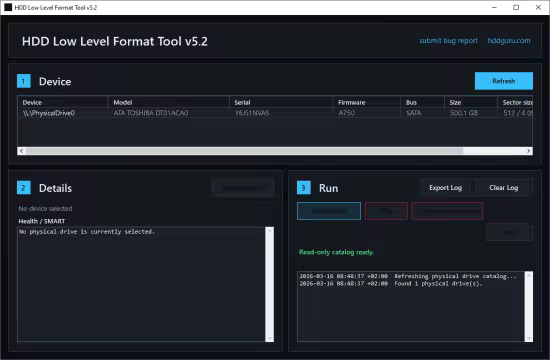
This HDD Low Level Format utility can erase and Low-Level Format a SATA, IDE, SAS, SCSI or SSD hard disk drive. Will also work with any USB and FIREWIRE external drive enclosures as well as SD, MMC, MemoryStick and CompactFlash media.

Common use cases
- Inspect a drive before reuse, fully wipe a USB SSD or flash drive, and confirm that a device is fully readable
- Prepare media for redeployment, run destructive wipe workflows with explicit logs, and export audit-friendly device details
- Collect raw device identity and health details, verify host-readable access, and understand exactly which Windows storage path is in use

What v5 adds
- Physical-drive inspection with Windows identity plus NVMe, ATA/SATA SMART, and USB SAT details where the current Windows path exposes them
- Read Verify: host-side full-device sequential raw reads with progress, elapsed time, ETA, and logging
- Low-Level Format: destructive whole-device zero-write path with explicit double-confirmation, stop support, and post-operation device refresh
- Trim: destructive whole-device discard / TRIM workflow, equivalent in intent to Linux blkdiscard
- Detailed operation logs, exportable inspection details, startup diagnostics

Operations
- Read Verify: read the whole physical device from the host side without writing to it
- Low-Level Format: write zero-filled buffers across the entire selected physical drive
- Trim: send full-device discard / TRIM requests; faster than full LLF but does not guarantee full data destruction

What's new
• official site does not provide any info about changes in this version

Homepage
Код:
https://hddguru.com/

DOWNLOAD

Код:
https://rapidgator.net/file/bacb20938461b5b251f37222a00b7152/HDDLowLevelFormatTool5.6.exe.html

https://nitroflare.com/view/C6E4C43C094A66A/HDDLowLevelFormatTool5.6.exe
 
l-Lpp-Drs-Gwxz7gk20Dpqhio9bm-I1c5tfr.jpg


WinRAR 7.21 Beta 1 (x64)

English | File Size: 3.8 MB

WinRAR is a powerful archive manager for Windows. This is a powerful compression tool with many integrated additional functions to help you organize your compressed archives. It can backup your data and reduce size of email attachments, decompress RAR, ZIP and other files downloaded from Internet and create new archives in RAR and ZIP file format. The archiver puts you ahead of the crowd when it comes to compression. By consistently creating smaller archives, WinRAR is often faster than the competition. This will save you disc space, transmission costs AND valuable working time as well. WinRAR is ideal for multimedia files. It automatically recognizes and selects the best compression method.

The special compression algorithm compresses multimedia files, executables and object libraries particularly well. RAR files can usually compress content by 8 percent to 15 percent more than ZIP files can.

Features
It is a powerful compression tool with many integrated additional functions to help you organize your compressed archives.
It puts you ahead of the crowd when it comes to compression. By consistently creating smaller archives, WinRAR is often faster than the competition. This will save you disk space, transmission costs AND valuable working time as well.
Supports all popular compression formats (RAR, ZIP, CAB, ARJ, LZH, ACE, TAR, GZip, UUE, ISO, BZIP2, Z and 7-Zip).
It is ideal for multimedia files. Automatically recognizes and selects the best compression method. The special compression algorithm compresses multimedia files, executables and object libraries particularly well.
Allows you to split archives into separate volumes easily, making it possible to save them on several disks for example.
Allows you to create selfextracting and multivolume archives.
Recovery record and recovery volumes allow to reconstruct even physically damaged archives.
It is also ideal, if you are sending data through the web. Its 256 bit password encryption and its authenticated signature technology will give you the peace of mind you have been looking for.
It is easier to use than many other archivers with the inclusion of a special "Wizard" mode which allows instant access to the basic archiving functions through a simple question and answer procedure. This avoids confusion in the early stages of use.
It is a trial product, meaning you have the chance to thoroughly test it. The program can be used absolutely free of charge for 40 days!
Licenses are valid for all available language and platform versions. If you have purchased several licenses, you can even mix versions to meet your own personal needs.

Whats New
Код:
https://www.rarlab.com/rarnew.htm

Homepage
Код:
https://www.rarlab.com

DOWNLOAD

Код:
https://rapidgator.net/file/2af3c6de24fced28a44c1f04196fb37e/WinRAR.7.Beta.zip.html

https://nitroflare.com/view/059BDE14936B3A1/WinRAR.7.Beta.zip
 
Назад
Сверху Снизу