All sanddisk Software's Collection [Daily Updated]

ezgif-3ffa56036ebf21ca.jpg


Arcserve StorageCraft ShadowProtect Recovery Environment 2.3.2.3 Multilingual

Languages: Multilingual
File Size: 1.72 GB

ShadowProtect: Scalable, Stress-Free Data Protection and Disaster Recovery. Fast, reliable data backup and recovery across physical, virtual, Windows and Linux locations. "ShadowProtect fits in nearly every backup scenario we service. It’s truly versatile and reduces the amount of time our techs have to train on different solutions."

Fast Recovery
With ShadowProtect, meet or beat your recovery time and recovery point objectives (RTOs and RPOs). Recover files and folders in minutes. Restore failed servers. Use patented VirtualBoot technology to instantly boot a backup image into a virtual machine.

Flexible, Reliable Recovery
ShadowProtect image-based backups arm you with multiple ways to recover. Grab a missing file, restore an entire data volume, or restore a failed server’s system to a new physical or virtual machine with no headaches (P2P, P2V, V2P, V2V). You can rely on ShadowProtect because it provides automated verification of backup images to ensure they’ll work when disaster strikes.

Set It and Forget It
Whether you’re responsible for a dozen backups or a thousand, ShadowProtect provides a scalable, stress-free solution. From mass deployment and configuration to automated verification and alerting, ShadowProtect will continue to protect your systems with minimal intervention required.

How ShadowProtect Supports Data Resilience
Like disasters, IT environments are anything but standard. That’s why organizations need a single cross-platform solution that protects a mixed, hybrid environment.

Cross-Platform System Protection
Protect Windows and Linux systems, whether physical or virtual, with one backup software solution.

Storage-Agnostic
ShadowProtect supports many types of disk-based storage. Use the mix of production and backup storage that best meets needs—now or in the future.

Replication
Having remote copies of backups gives you flexibility and options during a disaster. Replicate backups anywhere: a local device, remote server, co-location facility, third-party cloud, or private cloud.

Testing
Run automated, easy-to-execute tests on backup images to verify backups will work if a disaster strikes.

Broad Hypervisor Support
Align with VMware ESX/ESXi, Microsoft Hyper-V, Red Hat Enterprise Virtualization, and multiple other hypervisors.

Migration
Move a physical or virtual system to a new machine without losing uptime, regardless of hardware choice.

Scheduling
Run backups regularly, even during work hours, delivering excellent RPOs.

Immutable Storage
Add cloud-based immutable storage for flexible, globally available data.

Release Notes
Код:
https://documentation.arcserve.com/Arcserve-Recovery-Environment/Available/ENU/recenvcp_RN/default.htm

Homepage
Код:
https://www.arcserve.com/products/arcserve-shadowprotect

DOWNLOAD

Код:
https://rapidgator.net/file/2b049c82b84fdd09b654fae06010d721/Arcserve_StorageCraft_ShadowProtect_2.3.2.3.rar.html

https://ddownload.com/754ac3w5alyq/Arcserve_StorageCraft_ShadowProtect_2.3.2.3.rar

 
ezgif-373a27521df1fca7.jpg


Art Explosion 500,000 v1.0.3.1

Languages: English
File Size: 3.21 GB

The Art Explosion® brand of clip art is renowned for unparalleled variety and the highest quality graphics available. The new Art Explosion® 500,000 continues this tradition, and the brand’s commitment to the clip artcategory, with a stunning new collection of vector illustrations, photographs and professionally-designed graphics.

Art Explosion 500,000 - #1 Selling Brand of Clip Art
- 500,000+ Royalty-Free Images All Inside the Box
- 124,000+ Color Photos in Every Category Imaginable
- More than 200,000 Scalable Vector Graphics
- On-Screen Image Browser with Full Color Preview
- Photorealistic Scrapbooking Graphics & Embellishments

Best of all, everything you need is inside the box. Unlike other clip art collections, no downloading or subscription memberships are required. It’s all right there, right when you need it. Each image is easy to locate and compatible with virtually every desktop publishing and graphics program. It’s no wonder Art Explosion is the brand computer users and designers everywhere return to again and again.

We’ve Got Style
With so much variety, you’re sure to find the perfect image for every project type. Art Explosion makes it easy to add flair to flyers, greeting cards, newsletters, banners, brochures and more.

Vector Images
More than 200,000 of the finest scalable clip art images are all inside the box. Shrink or grow your chosen image to any size with perfect quality.

Raster Images
Only Art Explosion gives you more than 24,000 spectacular graphics, incorporating many unique designs.

Photographs
Choose from a library of 124,000+ color photographs in categories ranging from Architecture to Water Sports.

Backgrounds & Textures
More than 12,000 marbles, textures, fabrics, beads and woods provide the perfect backdrop for all your projects.

Scrapbooking Graphics
Art Explosion’s photorealistic embellishments, lettering options and more help make projects spectacular!

Clip Art
Art Explosion 500,000 provides you with a large number of premium-quality images, in one easy-to-use package. Here are a handful of examples of the vibrant clip art you get with Art Explosion 500,000. Perfect for Advertisements, Brochures, Business Cards, Certificates, Greeting Cards, Invitations, Newsletters, Posters, Scrapbooks, T-Shirts, Web Pages and more!

750+ Sensational Fonts
Create personal or business projects, like scrapbooks, brochures and more with 750 high-quality fonts. Each font is fully-scalable to any point size and easily integrates with your favorite word processing, desktop publishing and graphics programs. And, each font is compatible with all popular inkjet and laser printers-making print jobs a breeze!

Release Notes
- Release notes were unavailable when this listing was updated.

System Requirements
- Windows® XP, Vista® , 7, 8, 10 or 11
- Compatible with all word processing, desktop publishing and graphic programs

Homepage
Код:
https://www.novadevelopment.com/software/art-explosion-500000-145781

DOWNLOAD

Код:
https://rapidgator.net/file/c8e33de7ac25e7fa557f857fc0ecf2c8/ArtExplosion500K_v1.0.3.1.rar.html

https://ddownload.com/nsty4qafx2gk/ArtExplosion500K_v1.0.3.1.rar
 
th-HHBKcb-Hx-W9Ep-Ba-B4OC80YGTUz-DUb-Ydk-F.jpg


Bandicam 8.3.0.2533 (x64) Multilingual

File Size: 30.3 MB

Bandicam makes it possible to record a certain area on a PC screen, or a program that uses the DirectX/OpenGL graphic technologies. Bandicam will help you carry out a video record with high compression ratio, while keeping the video quality closer to the original work, and provides performance far superior to other programs that provide similar functions.

VIDEO-RECORDING of games and streaming videos
- Recording of WOW, Minecraft, Webcam, and computer screen
- H.264, Xvid, MPEG-1 and MJPEG video codec support
- PCM and MPEG-1 Layer II audio codec support
- AVI video format (.avi) support
- MPEG-1 video codec VBR mode support

Improved the recording performance by using a hardware-accelerated H.264 encoder.
- Bandicam provides hardware accelerated h.264 encoder
- Nvidia CUDA/NVENC H.264 encoder
- Intel Quick Sync video H.264 encoder
- AMD APP H.264 encoder

IMAGE-CAPTURING of games and streaming videos
- BMP, PNG and JPEG image format support
- Continuous image capturing

FRAME RATE control (FPS management)
- FPS overlay (Show FPS) / FPS limit

Key features of Bandicam
- Bandicam can record DirectX/OpenGL programs like Fraps (Fraps Alternative, Better than Fraps)
- The recorded file size is much smaller than other software (Bandicam compresses the video when recording)
- You can upload the recorded file to YouTube without converting (720p/1080p full HD video can be made)
- You can record over 24 hours without stopping (Auto Complete Recording function can be used)
- You can record video at resolutions of up to 2560x1600 in high quality
- You will experience much less lag than with other capture programs (It uses much lower CPU/GPU/HDD

Whats New
Код:
https://www.bandicam.com/downloads/version_history/

Homepage
Код:
https://www.bandicam.com/

DOWNLOAD

Код:
https://rapidgator.net/file/29560477da9e9d74e3a66d9af807882c/Bandicam8.rar.html

https://ddownload.com/auf3ip6fb5qu/Bandicam8.rar
 
th-S5bbzd-WDPbcl-CDrsrz-Ga3z1o7Ft1p6Hm.png


Dashcam Viewer Plus 4.0.8 (x64) Multilingual

Windows x64 | File size: 114.65 MB

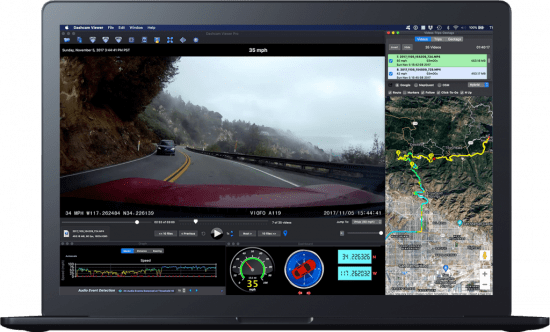
Dashcam Viewer is a software application for viewing movies, GPS data, and shock-sensor data recorded by your dashcam or action cam. Dashcam Viewer supports over 70 camera models. See below for the complete list of supported cameras and features.

Map Displays
Your vehicle’s entire route and current position are displayed in an animated 2D map. The route line is color-coded based on the vehicle’s speed. Click anywhere along the route to jump to that point in the video sequence. Choose between different map providers (Google, MapQuest) and themes (satellite, road, hybrid). Highlight important points in the route with Geotag markers.

Geotags
Geotags are custom markers you can drop at any point along your trip. They appear in the map and in the Geotags list view. Metadata such as the time, date, speed, latitude, longitude, street address, movie name, and movie time are stored with each geotag. Double-click a geotag in the Geotags List and you will jump instantly to that point in the video sequence. Geotags can be exported and imported for easy access.

Export GPS Data
Dashcam Viewer’s Data Browser allows you to preview and export your GPS data in multiple formats, including comma-separated value (CSV), GPX, Google Earth KML, and GeoJSON. Portions of videos can be exported to short clips, with or without sound, at accelerated or decelerated playback rates. Still frames from videos can be exported to JPG, PNG, or BMP images individually or at a specific frequency.

Data Plots
Dashcam Viewer’s Plot Views show a time history of your vehicle’s speed, distance, and compass direction. For dashcams that record additional GPS data, the G-sensor (shock), vehicle altitude, number of GPS satellites in view, and horizontal dilution of precision (HDOP) are also displayed.

Audio Event Detection
Important events in the video series are often characterized by sudden changes in volume. For example, the sound of a collision or the sound of a horn can be heard against the normal driving noise background. Dashcam Viewer’s Audio Event Detection can assist in locating key sound events in a series of videos.

Videos List
Loaded videos are shown in the Videos list. Videos that are uninteresting can be toggled off so they no longer appear in the video sequence and their GPS data is removed. To play a specific video simply double-click on it in the list. Additional information about each video is displayed alongside its filename, including file size, maximum vehicle speed, date, and time, is displayed in the list item.

Trip List
Dashcam Viewer bins videos automatically into trips. A trip is categorized as one or more contiguous videos that have no break between them greater than one minute. Dashcam Viewer then computes statistics for each trip. This includes the start date and time, duration of the trip, amount of time between trips, and the number of videos per trip.

Export & Merge Video
You can export whole videos or parts of videos into short clips or a series of images. Video clips can be exported with or without sound and at an accelerated or decelerated playback rate. Still frames can be exported to JPG, PNG, or BMP images individually or at a specific frequency. You also have the ability to merge multiple videos into a single large file. When merging, Dashcam Viewer will create a GPX file with the GPS data from the selected videos so that you can import that data back into Dashcam Viewer if needed.

Dashboard Display
Dashcam Viewer’s dashboard display shows your vehicle’s current metrics including position, speed, and compass heading. Speed can be shown in mph or km/h. The dashboard also shows the weather conditions at the time and location of the drive. For dashcams that support enhanced GPS data collection, Dashcam Viewer displays the altitude, number of satellites in view, and signal confidence. Choose from one of 19 compass pointer icons in the Pro version.

What's new
Код:
https://dashcamviewer.com/whats-new/

For all Windows 10 and later

Homepage
Код:
https://dashcamviewer.com/

DOWNLOAD

Код:
https://rapidgator.net/file/34177d8e2f56d7a773b29ac5ca51a8a4/Dashcam.Viewer.Plus.4.0.8_x64.rar.html

https://ddownload.com/rnjc94oyid0d/Dashcam.Viewer.Plus.4.0.8_x64.rar
 
ezgif-37f9b3b0c9747cad.jpg


FourClicks Max 2025.3

Languages: English
File Size: 440.62 MB

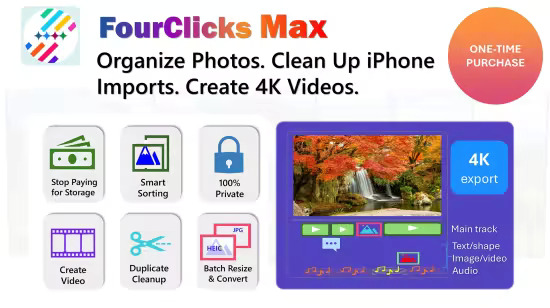
The All-in-One Media Suite: Organize Photos, Fix iPhone Problems, Create and Polish 4K Videos. FourClicks Max combines professional-grade batch file management with a full-featured 4K video editor. It is designed for anyone drowning in digital photos who wants to secure their memories offline—without monthly subscriptions.

Fix iPhone Messes
Flatten nested DCIM folders and remove Live Photo duplicates.

Batch Convert
Change HEIC to JPG and MOV to MP4 in bulk.

Smart Sort
Organize by Year, Location, Resolution, or Orientation.

Face Detection and Recognition by AI
Intelligent sorting photos to separate people from scenery or find a specific face.

100% Offline
Your data never leaves your PC. No accounts, no clouds, no tracking.

We built a dedicated "Prep & Create" workflow for families and travelers
- Automatically batch rename and sequence your photos (e.g., "Trip_001.jpg").
- Instantly turn that sequence into a cinematic 4K Slideshow. No timeline skills required—just click and create.

FourClicks Max lets you compress massive photo folders into single, high-quality 4K video archives.
- Turn 500-1,000 photos into 1 video file.
- Save gigabytes of space while keeping your memories viewable.
- Need a photo back? Use the Editor to extract full 4K still images from your video archives anytime.

Timeline Editing
Trim, cut, split, and merge clips with frame-level precision.

Creative Suite
Add text overlays, shapes, picture-in-picture, and audio tracks.

No Hidden Fees
Export true UHD 4K video without watermarks or "Pro" unlocks.

Release Notes
- Added new AI-based face recognition task to find a specific face in hundreds/thousands of photos

System Requirements
- OS: Windows 10 version 19041.0 or higher
- Memory: 4 GB (Minimum), 8 GB (Recommended)
- Intel Core i5-1335U (Minimum), intel Core i7-1360P (Recommended)

Microsoft Store - Full Version

Homepage
Код:
https://apps.microsoft.com/detail/9pck296lj4q2?hl=en-US&gl=US


DOWNLOAD

Код:
https://rapidgator.net/file/803891c3b86e94bcd811e0e35f6fbfe4/FourClicks_Max_2025.3.rar.html

https://ddownload.com/hkon4za2scsf/FourClicks_Max_2025.3.rar
 
ezgif-4e406b644654f79c.jpg


FourClicks Media 2025.6

Languages: English
File Size: 333.64 MB

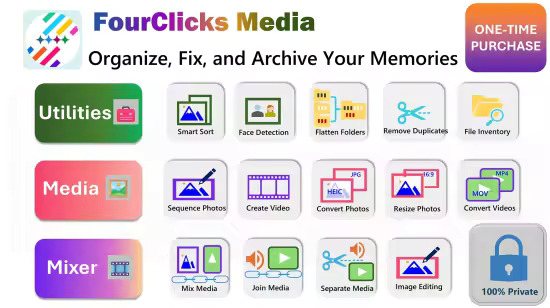
Stop Drowning in Digital Clutter! Is your PC filled with thousands of unorganized photos? Do you have trouble working with files imported from iPhone or other devices? FourClicks Media is the intelligent, offline essential toolkit designed to fix, sort, organize, and archive your digital life without the cloud. It cleans up messy folders and converting incompatible files so they "just work" on Windows; boasts comprehensive sorting options for photos and videos, while allowing you turn huge photo libraries into space‑saving 4K slideshow videos on your local computer.

Fix Messy Imports including from iPhone
Automatically flatten nested DCIM folders and remove junk artifacts (AAE + extra MOV files) to leave you with clean, viewable albums.

Smart Sorting
Instantly organize thousands of files by Media Type, Date (Chronological), Location (GPS), Dimension or Layout.

AI Face Detection & Recognition
Use local AI to separate People from Pets, Objects & Scenery, or find specific faces to build albums of your favorite people.

Fix Compatibility
Batch convert HEIC to JPG and MOV to MP4 so your iPhone photos and videos work perfectly on Windows.

Turn Clutter into Cinema
Don't just store files—watch them, turn a folder of 500-1000 photos into a single, compact 4K video file.

Massive Storage Savings
"Basic Mode" creates compact archives that save disk space while keeping your memories accessible in high quality.

Future Proof
Your slideshows are standard MP4 videos — playable on any TV, phone, or computer forever.

100% Offline
No accounts, no cloud subscriptions, no uploads.

You Own Your Data
Everything runs locally on your PC. Perfect for families securing their digital legacy.

Release Notes

- Added new "Batch Sort Images by a Specific Face" task to enable Face Recognition sorting using offline AI model;
- Expanded 'Sort by Date' and 'Sort by Media Type" in "Batch Sort Media by Type, Date, Location, Resolution, or Orientation" task;
- Expanded Workflow guide in Support tab

System Requirements
- OS: Windows 10 version 19041.0 or higher
- Memory: 4 GB (Minimum), 8 GB (Recommended)
- Processor: Intel Core i3 (7th Gen) or equivalent AMD Ryzen 3 (Minimum), Intel Core i5 or i7 (8th Gen or newer) / AMD Ryzen 5 or 7 (Recommended)

Microsoft Store - Full Version

Homepage
Код:
https://apps.microsoft.com/detail/9nsjz441qk5d?hl=en-US&gl=US

DOWNLOAD

Код:
https://rapidgator.net/file/905d56fa49f89cec20a1dc12b135a402/FourClicks_Media_2025.6.rar.html

https://ddownload.com/jmatmeyiufv0/FourClicks_Media_2025.6.rar
 
ezgif-4b3c21af917d158f.jpg


Glary Utilities Pro 6.36.0.40 Multilingual

File size: 32.5 MB

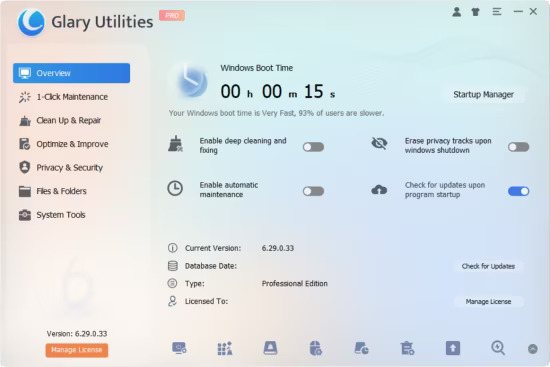
Glary Utilities is the number-one pro and all-in-one utility for cleaning and maintaining your PC. It includes more than 20 tools to maximize your computer's performance.

One-click Maintenance
One-click maintenance Integrates frequently used functions together. One-click to clean up junk files, fix system errors, clear privacy records, and optimize computer performance.

Free Up Drive Space
Disk Cleanup searches for old temporary files, obsolete installation files, log files, internet history and cache, error reports, save offline content and error logs etc. that you can safely delete on your computer.

Prevent errors or crashes
Based on years of experience, Glary Utilities can more safely clean up the errors in your registry to prevent some inexplicable program errors or system crashes. Also it can detect and fix disk corruption.

Make your computer run faster
Is your computer getting slower? Glary Utilities can help you identify and disable unnecessary startup programs that take up resources, or uninstall infrequently used software to free up more hard disk space.

Protect Your Privacy
Your browser will record the URL you have visited, and some software will also save the name of the file you opened last time. Glary Utilities can help you find and delete them. Glary Utilities can also help you completely delete files so that they cannot be recovered.

Keep Your Software Update To Date
The newer version of the software usually has better functions, higher performance, fixes bugs and vulnerabilities, and has better security, Glary Utilities can help you discover and update new versions in time.

Recover Lost or Deleted Files
Did you accidentally delete an important file? Did you also empty the Recycle Bin? Don't worry. Glary Utilities can help you find and restore them quickly.

Analyze Disk Space Usage
Are you running out of hard drive space? And you want to know which files or folders take up the most space? Disk Space Analyzer can quickly scan your hard disk and show you them sorted by size.

Find and Remove Duplicate Files
You may have downloaded the same file twice or backed up the same file twice. Duplicate Files Are Big Disk Space Hogs. Dupliate Finder can help you find and delete them.

What's new

Optimized Disk Cleaner: Optimized the cache cleaning algorithm for the AOL Shield Pro browser.
Optimized Disk Cleaner: Added support for scanning and cleaning user temporary files.
Optimized Tracks Eraser: Optimized the cache cleaning algorithm for the AOL Shield Pro browser.
Optimized Startup Manager: Optimized the scanning algorithm.
Minor GUI improvements.
Minor bug fixes.

Homepage
Код:
https://www.glarysoft.com

DOWNLOAD

Код:
https://rapidgator.net/file/5390505efbcf0b76134a8d0903c79586/Glary_Utilities_Pro_6.36.0.40.rar.html

https://ddownload.com/1qyvecc6snq6/Glary_Utilities_Pro_6.36.0.40.rar
 
ezgif-48dc4170dc861c4f.jpg


Nero Burning ROM 27.0.1.4 Multilingual

Languages: Multilingual
File Size: 116.65 MB

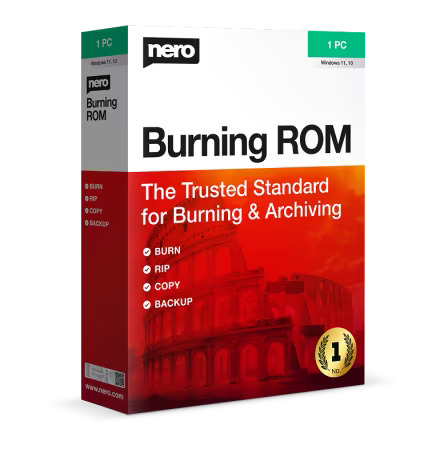
The original for burning, copying and backing up. Create CDs, DVDs and Blu-rays in the highest quality, copy data reliably and protect your projects with state-of-the-art encryption. For maximum security and unlimited flexibility.

Rip
Do it your way: If you need your audio CDs and individual music tracks as files on your PC, smartphone or MP3 player, you can convert them to the exact format you need in no time at all! The Nero Burning ROM software offers everything from MP3 and MP3 PRO to AAC, FLAC and APE - including song titles and album information. Thanks to integrated Gracenote® technology, original album covers are integrated into the audio file. So you can browse your playlists conveniently and play your music completely at your leisure.

Copy
Double your media pleasure!* Would you like to share your movies and play your favorite songs in the car or living room too? Copy CDs, DVDs and Blu-ray Discs™ with quality and sound that are in no way inferior to the original. Audio CDs are also quickly reproduced – including CD text and original album details along with original album art.

Burning
Ignite the multimedia fire: Whether you want to immortalize your favorite memories on CD, DVD, or Blu-ray Disc™, the industry’s top specialist solution for burning software all disc types is the only thing you'll need. Create ISO images or burn your Video Disc structures and disc images to new data mediums. Burned audio CDs achieve a greater richness of sound, thanks to filters and other adjustments, as well as automatic sound improvement that allows you to match the sound to your taste. What’s more, thanks to Gracenote® technology, you can now also have original album art on MP3 CDs and MP3 DVDs for your new car radio. And with the Nero CoverDesigner, you can create genuine visual works of art from your burned works.

Protect
Protect the things that are dear to you! When it comes to security, you’ll be up there with the pros, as with the SecurDisc 4.0 technology your files are in the best of hands. With industry-standard 256-bit encryption, digital signature and password protection, no one but you can access your burned data archive. And since Nero software stands for durability and readability, even scratched discs will still be playable thanks to adjustable data redundancy.

Release Notes
- In this update, we have fixed some issues and improved stability.

System Requirements
- Windows® 7 SP1 Home Premium, Professional or Ultimate (32/64 bit), Windows® 8 (32/64 bit), with April 2014 Update (32/64 bit), Windows® 10 (32/64 bit) , Windows® 11 (32/64 bit)
- 2 GHz AMD or Intel® processor
- 1 GB RAM
- 5 GB hard drive space for a typical installation of all components (including templates, content and temporary disk space)
- Microsoft ® DirectX ® 0 compliant graphics card
- DVD disc drive for installation and playback
- CD, DVD, or Blu-ray Disc recordable or rewritable drive for burning
- Windows Media ® Player 9 or higher
- Internet Explorer 11 and higher

Homepage
Код:
https://www.nero.com


DOWNLOAD
Код:
https://rapidgator.net/file/23ea71e710e195cc3548bcc6c953f68b/Nero_Burning_ROM_27.0.1.4.rar.html

https://ddownload.com/pb647q34eb2k/Nero_Burning_ROM_27.0.1.4.rar
 
c84Tt-NUgqnjbjt-Iizz-Rs-GNn-P2ih-Lv-COH.png


VueScan Pro 9.8.50 (x64) Multilingual

File size: 47 MB

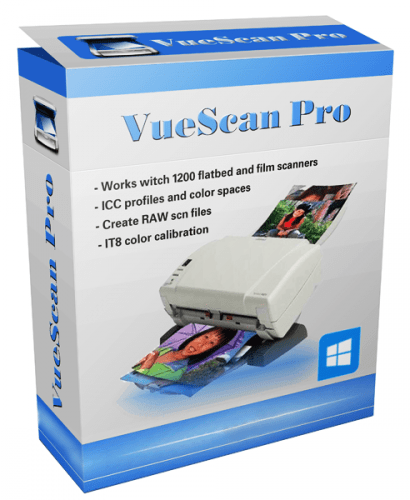
VueScan is a powerful scanning application that allows you to acquire high-quality images using a flatbed or film scanner. If you are not satisfied with the software delivered by the scanner vendor or if you want to improve it with new functions you should try this program.

Scan Documents
Whether you need to scan a single page or a hundred page book, VueScan has the tools to help you.
Scan with Flatbed and Automatic Document Feeders (ADF)
Scan to PDF (Single and Multipage)
Optical Character Recognition (OCR)
Automatic Color Detection
Small document file sizes
Automatic document deskewing

Scan Photos
Do you have a box full of photos in your drawer? Use VueScan to get them on your computer, and off your to-do list.

Scan to JPG or TIFF
Whether you're saving a few snapshots or archiving boxes of prints, VueScan has the tools you need to output your scans at either the highest possible quality or a large number of good quality scans.

Scan with Flatbed and Automatic Document Feeders (ADF)
VueScan supports over 3000+ different scanners from 35 manufacturers, even scanners that don't have drivers from their manufacturers anymore.

Preset photo sizes for faster scans
VueScan improves one of the slowest parts about scanning by scanning only the part of the flatbed where your photo is. So you can spend less time scanning, and more time enjoying your photos.

Scan multiple photos on the flatbed
Scanning multiple photos with VueScan is very simple. Just put them in the corners of the flatbed, do a preview, and manually crop each of the photos without needing to do another scan.

Automatic file naming for faster scans
Don't waste time manually naming every photo, use VueScan's auto naming feature to include dates, numbers, or other prefixes and suffixes in your file names.

Remove fading and correct colors
Stay out of photoshop and save the best version possible of your photos with VueScan's built in features to remove fading, and correct colors.

Scan Film and Slides
VueScan is the ultimate tool for all your film and slide scanning needs.
Works with almost all film/slide scanners
Scan to JPEG/TIFF/RAW
Infrared Dust Removal
Color correction
IT8 Calibration
Photoshop Integration

Whats New
Код:
https://www.hamrick.com/vuescan/vuescan.htm#changes

Homepage
Код:
https://www.hamrick.com/

DOWNLOAD

Код:
https://rapidgator.net/file/9071ee4c7f319d0cf83f5e5b666b0f87/VueScan_Pro_9.8.50.rar.html

https://ddownload.com/dbpjybe2iwd3/VueScan_Pro_9.8.50.rar
 
ezgif-4df340766afd65e5.jpg


Wondershare Filmora 15.1.2.17051 (x64) Multilingual

File Size: 725.2 MB

Empower your imagination - a video editor for all creators. Filter, Overlays, Transitions and Custom Titles. Create Without Limits. Discover infinite ways to express yourself. Achieve a refined look with endless effects.

More for Creators
Meet Filmora 11, the video editor, which makes your editing experience efficient and playful. Now, every creator can tell incredible stories more confidently.

Start Creating Videos with Ease
You can easily make impressive and captivating videos using Filmora, a video editor for Windows. With Filmora's built-in editing features, creating videos only requires a few simple steps. Enjoy the powerful features of Filmora video editor with a free download.

10+ billion Stock Media
Built-in free stock photos, images, stickers, GIFs, and videos

Over 200 Instant Mode and Preset Templates
Make a video without professional editing skills in just a few steps.

Plugins Effects
Make video attractive with Filmstock, AI Portrait, Boris FX, and NewBlue FX

Add text, transitions, stickers, and more
Make your video story stand out by adding text, transitions, and funny elements.

Whats New
Код:
https://filmora.wondershare.com/whats-new-in-filmora-video-editor.html

Homepage
Код:
https://filmora.wondershare.com/video-editor/

DOWNLOAD

Код:
https://rapidgator.net/file/0ebbb6b88e43818875e42b937ba6716a/Wondershare_Filmora_v15.1.2.17051.rar.html

https://ddownload.com/odluv8tknd21/Wondershare_Filmora_v15.1.2.17051.rar
 
th-CPJRs-Jhw-KSXf-L9SQ630PHsn07pd-YMk-Z6.jpg


Yamicsoft Windows Manager 2.3 (x64) Multilingual

File size: 19.2 MB

Windows Manager is an all-in-one utility for Microsoft Windows 10/11 specially, it includes over forty different utilities to optimize, tweak, clean up, speed up and repair your Windows 10/11, helps make your system perform faster, eliminate system fault, increase stability and security, personalize your copy of Windows 10/11, and meet all of your expectations.

Information
Creates the system restore point manually; Gets detailed information about your system and hardware, helps you find out the Microsoft product key such as Microsoft Windows and Microsoft Office; Shows and manages all running processes and threads; Repair Center helps to diagnose and fix the various system problems; Cleans up your system just one clicking; Optimization Wizard is useful to the user who is unfamiliar with computers.

Optimizer
Tweaks your system to improve performance and increase speed; Manages and configures the Windows boot menu to your preference; Startup Manager controls all the started programs with Windows start, checks and repairs the advanced startup items to restore the malicious change by viruses; Manages and optimizes system services and drivers to improve performance; Manages and optimizes the scheduled tasks to speed up your system.

Cleaner
Disk Analyzer can analyze and view the disk space usage of all programs, files and folders find out which engross your disk space and shown with a chart; Cleans up WinSxS folder securely to reduce the component store size; Smart Uninstaller can fully delete programs from your system without residual files and Registry entries; Desktop Cleaner can analyze and move unused shortcuts, files and folders on desktop to specified folders; Searches and deletes junk files to save disk space and improve performance; Searches and deletes the duplicated files to save your disk space; Registry Cleaner searches Registry to find out and delete the invalid items; Registry Defrag rebuilds and re-indexes your Registry to reduce registry access time and therefore improve application responsiveness and eliminate mistakes and corruption in Registry.

Customization
Customizes system parameters according to your preferences by tweaking File Explorer, Desktop, Start, Taskbar and Notification area; Adds files, folders and system items to This PC, and Desktop; Pins the files or folders to your Desktop, Taskbar or Start; Creates the quick startup items for jumplist on Taskbar; Manages the context menu when right click the file, folder, etc; Edits the shortcut menu that right-click Start button (Win + X shortcut); Customizes the look of your system; Edits and adds the shortcuts that executed on Run dialog box; Tweaks the Windows Apps and Microsoft Modern UI settings.

Security
Tweaks system, components, UAC, Sign in settings, adjusts various settings and restricts access to drives and programs to improve system security; Safeguard your sensitive files and folders security, encrypt files, move system folders to safe locations; Privacy Protector ensures privacy and keeps sensitive information secure by eliminating tracks; File Undelete recovers and restores deleted or formatted files on logical disks; Locks some system features to improve security.

Network
Optimizes and tweaks your internet connection and network settings; Manages your URLs and IPs; IP Switcher can switch between different network settings easily; Edits the Hosts file to speed up system surfing internet; Wi-Fi Manager can view and manage all your wireless network; Network tools contains some commonly used network utilities; Network Monitor can display traffic data transmitted by the network.

Misc. Utilities
Creates scheduled tasks or the monitorings that trigger tasks; Shows and run the useful collection of utility that built-in your Windows; Splits a file into several smaller files or merges back to the original file; Super Copy is the powerful tool to copy files or backup automatically; Operates your Registry easily using the Registry Tools.

Features
Information
Optimizer
Cleaner
Customization
Security
Network
Misc. Utilities

Whats New

Perfected the functions in Settings Security and Network Monitor.
There are more cleaning options in 1-Clicking Cleaner.
Perfected other some functions.
Fixed the bug that cannot receive Edge cookies.

Homepage
Код:
https://www.yamicsoft.com/

DOWNLOAD

Код:
https://rapidgator.net/file/5b3cef8d210cbd570e295e5d26138734/YamicsoftWindowsManager2.rar.html

https://ddownload.com/5a9cyf7xhu90/YamicsoftWindowsManager2.rar
 
4Dfrv9Mtx-U0vv8Qr-OJx-F3u-JKin9Bz-IKy.jpg


Parted Magic 2025.12.31 (x64)

File size: 2.25 GB

Powerful Tools for Home or Office! Parted Magic is a complete hard disk management solution.

Disk Partitioning
PartedMagic has the tools to get the job done. With the Partition Editor you can re-size, copy, and move partitions. You can grow or shrink your C: drive. Create space for new operating systems. Attempt data rescue from lost partitions.

Disk Cloning
Clone a computer’s entire disk or a single partition. The cloned data could be saved as an image-file or as a duplicated copy of the data. The data could then be saved to a locally attached storage device, an SSH server, a Samba Server, or a Network File System share. The clone file can then be used to restore the original when needed.

Data Rescue
PartedMagic allows you to easily reset or change Windows passwords. Recover lost files. Rescue files from devices with disk read errors.

Disk Erasing
PartedMagic comes with easy to use solutions for conventional overwrite. Internal Secure Erase. Wiping of only Free Space.

Benchmarking
All the benchmarking tools you would ever need! Bonnie++, IOzone, Hard Info, System Stability Tester, mprime, and stress.

Supported File Systems
ext2, ext3, ext4, fat16, fat32, ntfs, and reiserfs
Supported Actions: Create, grow, shrink, move, copy, check, label, and UUID.

Supported Hardware
PartedMagic requires at least a 64-bit processor with 8GB of RAM. 2GB in Live mode. Compatible with Secure Boot Windows machines. Runs well on Intel Macs.

No Installation Required!
PartedMagic is a stand alone Linux operating system. Runs from a CD or USB drive. Nothing installed.

Supported Storage Devices
Hard disk drives (SATA, IDE, and SCSI). Flash memory. USB drives. SSD (Solid State Drives). Devices with sector sizes of 512, 1024, 2048, 4096, etc.

Whats New
Код:
https://partedmagic.com/news/

Homepage
Код:
https://partedmagic.com

DOWNLOAD

Код:
https://rapidgator.net/file/1feca0926501d516ad17129d93c05db3/Parted_Magic_2025.12.31.part1.rar.html
https://rapidgator.net/file/b68db92a82acbb49a66a3ac98ad3b65f/Parted_Magic_2025.12.31.part2.rar.html
https://rapidgator.net/file/3134b4c6064999dbf9b9118a05a16ed9/Parted_Magic_2025.12.31.part3.rar.html
https://rapidgator.net/file/640474d6c68ba85fcf2d9e18f4466808/Parted_Magic_2025.12.31.part4.rar.html

Код:
https://ddownload.com/g6nc90go7kq9/Parted_Magic_2025.12.31.part1.rar
https://ddownload.com/2f4evfygrp1p/Parted_Magic_2025.12.31.part2.rar
https://ddownload.com/1johnucusuh8/Parted_Magic_2025.12.31.part3.rar
https://ddownload.com/5mcz7qy0q7el/Parted_Magic_2025.12.31.part4.rar
 
ezgif-65471acac12a49f4.jpg


Yuhan Blu-ray DVD Creator 4.8.0 Multilingual

File size: 114.3 MB

Yuhan Blu-ray Creator could burn standard Blu-rays from videos in 200+ formats like AVI, MP4, MKV, MOV, FLV, WMV, etc. You could freely convert and burn MP4 to Blu-ray, MKV to Blu-ray, MOV to Blu-ray, etc. Meanwhile, Yuhan Blu-ray Creator is also a photo to Blu-ray burner software tool that could burn Blu-ray from photos in JPG, BMP, PNG, TIFF, GIF and WEBP, including iPhone HEIC photos. It could automatically generate photos into photo slideshow and then let you burn generated photo slideshow to Blu-ray easily.

Burn 1080P FHD or 720P HD Blu-ray Disc, ISO and/or Folder
With Yuhan Blu-ray Creator, you could convert and burn photos/videos to Blu-ray disc, folder, and/or ISO image file in either 1080P Full-HD or 720P HD. You could burn BD100, BD66, BD50 or BD25 content according to the disc you have or want. The created Blu-ray disc could be played back on any standalone Blu-ray players you have in hand.

Retain Blu-ray PCM, TrueHD(Dolby Atmos), DTS HD Master Audio
If your video contains high-quality audio such as Blu-ray PCM, TrueHD(Dolby Atmos), or DTS HD Master, Yuhan Blu-ray Creator can retain them through Audio Copy or Passthrough mode. There will be no audio quality loss in burning video to Blu-ray. You could get amazing 1080P or 720P HD movie watching experience on your standalone Blu-ray player or computers with original audio effect.

Burn Blu-ray from Video at Any Frame Rate from 23.976FPS to 59.94FPS
Powered by advanced frame rate conversion technology, Yuhan Blu-ray Creator could burn videos of any frame rate from 23.976fps, 24fps, 25fps, 29.97fps, 50fps to 59.94fps to Blu-ray content without frame rate drop. It could even help you convert 50fps videos to 23.976fps Blu-ray video with original frame rate perfectly preserved.

Retain Multiple Subtitles and Audio Tracks
As long as source video files contain multiple subtitles and audio tracks, Yuhan Blu-ray Creator could let you freely select audio tracks and subtitles from source videos, and even add external subtitles, to burn video to Blu-ray with multiple audio tracks and subtitles preserved.The multi-audio tracks and multi-subtitles you add will appear on the disc menu, making it more like a commercial disc.

Whats New
Код:
https://yuhanmedia.com/dvdcreator-update-history

Homepage
Код:
https://yuhanmedia.com/

DOWNLOAD

Код:
https://rapidgator.net/file/4e8673987ef75bde6eaa1cd3e026f818/Yuhan_Blu-ray_DVD_Creator_4.8.0.rar.html

Код:
https://ddownload.com/opgtoeibg3t9/Yuhan_Blu-ray_DVD_Creator_4.8.0.rar
 
yw-Jbg1FAi8rch-HTVp-O3tmg-AGr-L28h-Y0s.png


Total Commander Ultima Prime 9.3 Multilingual

Windows x64 | File size: 1.13 GB

Total Commander Ultima Prime is a collection of the software and customized settings sets gathered in one installation package for enhancing Total Commander (file manager) possibilities. One of the most important aspects of a computer is that you should be able to manage files quickly and easily. Of course, Windows Explorer has always been the default file manager of some people, while others have always preferred Total Commander.

A thorough setup process
Ultima Prime is a very nice improvement of Total Commander, where you have additional features available, that will help you organize your files and folders more efficiently. The installation process comes with several steps in which you can configure some aspects of Total Commander, so take your time.

A friendly interface you are used to
The interface is as user-friendly as Total Commander has always been, only having new features included. On the top of the window you have a lot of buttons, so that you can access a feature by making one single click. Style can be selected from one of the steps you take in the installation process.

Equipped with everything you need
The good thing about Total Commander Ultima Prime is that it comes bundled with all sorts of useful plugins, so that you won't need any other software. For example, you can add/remove programs, access autorun, CD/DVD burning, e-mail, virtual disks, a web browser, Notepad++, TeamViewer, Universal Extractor, uTorrent, Virtual Dub, and many others, but also be able to shut down or restart the computer.

Putting no stress on your computer
The software is great overall, but it doesn't give you the possibility of selecting the exact plugins you want and don't want to install, and most people are not interested in using everything an application (in this case, a file manager) has to offer. Nevertheless, Total Commander continues to use less CPU and memory than Windows Explorer, and that "feature" is always welcome.

Whats New
Version 9.3 _ 2026 01 01
- "TC UP Power" - A new tool has been added to schedule power - related system tasks. It allows for automatic monitor shutdown, hibernation, sleep, locking, logging off, restarting and shutting down the system.
- The process of scheduling system tasks related to power supply, restarting and shutting down the computer directly from TC UP has been optimized.
- "TC UP TaskBar" - added a tool that allows run multiple instances of TC UP using a single icon pinned to the Windows taskbar.
- "TC UP New" - introduced a feature for quickly switching between default naming schemes when creating new files, directories and lists.
- Improved performance of "TC UP Integrator", "TC UP Turbo" and "TC UP Update" tools.
- The feature of minimizing "Total Commander" to the system tray has been disabled (this feature can be restored in the settings).
- Updated "AIMP" application to the newest version (5.40.2703).
- Updated "Audacity" application to the newest version (3.7.7).
- Updated "HomeBank" application to the newest version (5.9.7).
- Updated "HWiNFO" application to the newest version (8.34-5870).
- Updated "Inkscape" application to the newest version (1.4.3).
- Updated "KeePass" application to the newest version (2.60).
- Updated "Krita" application to the newest version (5.2.14).
- Updated "Miranda NG" application to the newest version (0.96.6).
- Updated "MPC-BE" application to the newest version (1.8.8).
- Updated "MyPhoneExplorer" application to the newest version (2.3).
- Updated "Notepad++" application to the newest version (8.9).
- Updated "qBittorrent" application to the newest version (5.1.4).
- Updated "Shutter Encoder" application to the newest version (19.7).
- Updated "Subtitle Edit" application to the newest version (4.0.14).
- Updated "SumatraPDF" application to the newest version (3.5.2).
- Updated "TeamViewer" application to the newest version (15.73.5).
- Updated "Total Commander" application to the newest version (11.56).
- Updated "Vivaldi" application to the newest version (7.7.3851.66).
- Updated "XnView MP" application to the newest version (1.9.8).
- Updated "ADWCleaner" tool to the newest version (8.7.0).p>
- Updated "XnConvert" tool to the newest version (1.106.0).
- Removed "Poweroff" program (replaced by TC UP Power).
- Various plugins have been updated to the newest versions.
- Known bugs have been fixed.
Homepage
Код:
https://tcup.pl/news/?l=en

DOWNLOAD

Код:
https://rapidgator.net/file/92c23d0d282456d04970278c5dab3014/tcup93f.rar.html

https://ddownload.com/zle42grn5cuv/tcup93f.rar
 
ptoo-Ryf3Tq-Vc-Xoxjfi9F7zbu-Jr-CXy-Uyj.jpg


MyLanViewer Enterprise 6.7.3 Multilingual

File size: 7.4 MB

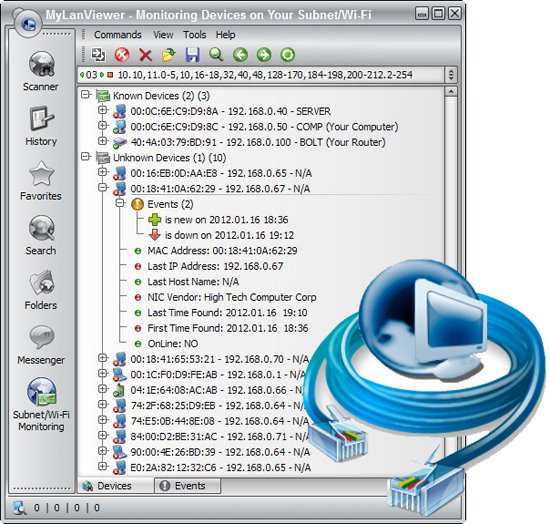
MyLanViewer Network/IP Scanner is a powerful Netbios and LAN/Network IP address scanner for Windows, whois and traceroute tool, remote shutdown and Wake On LAN (WOL) manager, wireless network scanner and monitor. This application will help you find all IP addresses, MAC addresses and shared folders of computers on your wired or wireless (Wi-Fi) network. The program scans network and displays your network computers in an easy to read, buddy-list style window that provides the computer name, IP address, MAC address, NIC vendor, OS version, logged users, shared folders and other technical details for each computer.

MyLanViewer Network/IP Scanner supports remote shutdown, wake-on-lan, lock workstation, log off, sleep, hibernate, reboot and power off. It is able to monitor IP address and show notifications when the states of some computers change. MyLanViewer Network/IP Scanner can also view and access shared folders, terminate user sessions, disable shared folders, show netstat information and detect rogue DHCP servers. The software can monitor all devices (even hidden) on your subnet, and show notifications when the new devices will be found (for example, to know who is connected to your WiFi router or wireless network). The program easy to install and use, and has a user-friendly and beautiful interface.
Enterprise License - A enterprise license grants an organization rights to install and use the software on an unlimited number of computers or servers at an unlimited number of locations used by the organization in many cities or countries. (Order MyLanViewer (Enterprise License) - 999 USD)

What's new
• official site does not provide any info about changes in this version

Homepage
Код:
https://www.mylanviewer.com/

DOWNLOAD

Код:
https://rapidgator.net/file/1d5224cc80feecb7dc5efcae57894283/MyLanViewer.6.7.3.rar.html

https://ddownload.com/j8wr76yzy9f0/MyLanViewer.6.7.3.rar
 
ezgif-1324fdde4f3055d0.jpg


Print Artist Premier 25.0.3.4

Languages: English
File Size: 875.50 MB

Print Artist® Premier 25 is unlike any print software you’ve ever used - its unparalleled quality combined with unprecedented ease of use lets you produce amazing print projects for your home, school or business. Impress friends, family and clients with the creative edge that only Print Artist Premier can offer – 28,000+ professionally-designed templates, 377,000+ sensational graphics, 1,000+ premium fonts and more!

With its powerful, yet easy-to-use design, text and drawing customization tools, advanced photo editor, special text effects gallery and more, you’ll be creating expert, eye-popping print projects with a professional, custom look that truly raises the bar!

The Fast, Easy and Fun Way to Create Spectacular Print Projects
- 28,000+ Professionally-Designed Templates
- 377,000+ Sensational Graphics
- 1,000+ Premium Fonts
- NEW User Interface! Now Even Easier to Use
- Easily Upload Projects to Facebook & YouTube
- Photo Card Projects & Photo Clip Art
- Digital Photo Editor Makes Your Pictures Shine
- Bonus! Create CD Slideshows You Can Watch on TV

Dream It. Create It. Print It!
Print Artist is ideal for creating sensational print projects for virtually any occasion. You’ll love the unique selection of professionally-designed templates and limitless creative tools from the #1 publisher of home graphics software.

Release Notes

- Release notes were unavailable when this listing was updated.

System Requirements
- Windows XP, Vista, 7, 8, 10, or 11
- 512 MB RAM
- 1024 x 768 display or higher
- Recordable or rewriteable CD drive required to burn CD slideshows

What's different in Premier Edition than Platinum and Gold Editions
* Gold and Platinum Editions stream all contents online whereas Premier does have them usable locally.

Homepage
Код:
https://www.novadevelopment.com

DOWNLOAD

Код:
https://rapidgator.net/file/a62ec3a0955310faaaa52543003576ca/Print_Artist_Premier_25.0.3.4.rar.html

https://ddownload.com/uxc43el6s0uy/Print_Artist_Premier_25.0.3.4.rar
 
GURVo-CSVz65u-St-ZAPA3w-Br-Tv-FGWpgb-VW.jpg


R-Studio 9.5 Build 191671 Network / Technician Multilingual

File size: 135 MB

R-Studio is a family of powerful and cost-effective undelete and data recovery software for experienced data recovery professionals. Empowered by the new unique data recovery technologies, R-STUDIO is the most comprehensive data recovery solution for recovery files from NTFS, NTFS5, ReFS, FAT12/16/32, exFAT, HFS/HFS+ (Macintosh), Little and Big Endian variants of UFS1/UFS2 (FreeBSD/OpenBSD/NetBSD/Solaris) and Ext2/Ext3/Ext4 FS (Linux) partitions.

R-Studio also uses raw file recovery (scan for known file types) for heavily damaged or unknown file systems. It functions on local and network disks, even if such partitions are formatted, damaged or deleted. Flexible parameter settings give you absolute control over data recovery.
R-Studio functions on local and network disks, even if such partitions are formatted, damaged or deleted. Flexible parameter settings give you absolute control over data recovery. The R-Studio data recovery software was originally developed for use by data recovery experts, system administrators, IT professionals, and advanced and experienced computer users. Some of R-Studio's features were even designed exclusively for computer forensic experts, and most R-Studio users don't need every single feature of the software.

In addition to being a full-featured data recovery utility, R-Studio also includes
An advanced RAID reconstruction module
A feature-rich text/hexadecimal editor
An entire advanced disk copying/imaging module in one single piece of software, which makes R-Studio your ideal complete solution for creating a data recovery workstation.

R-Studio utilities recover files
Deleted without Recycle Bin, or when Recycle Bin has been emptied;
Removed by virus attack or power failure;
After the partition with the files was reformatted, even for different file system;
When the partition structure on a hard disk was changed or damaged. In this case, R-Studio utilities can scan the hard disk trying to find previously existed partitions and recover files from found partitions.
From hard disk with bad sectors. R-Studio Data Recovery Software can first copy the entire disk or its part into an image file and then process such image file. This is especially useful when new bad sectors are constantly appearing on the hard disk, and remaining information must be immediately saved.

R-Studio Data Recovery Features
Standard Windows Explorer - style interface.
Host OS: Windows 2000, XP, 2003 Server, Vista, 2008 Server, Windows 7, Windows 8, Windows 10, Windows Server 2012.
Data recovery over the Network. Files can be recovered on network computers running Win2000/XP/2003/Vista/2008/Windows 7/Windows 8/Windows Server 2012, Macintosh, Linux, and UNIX.
Supported file systems: FAT12, FAT16, FAT32, exFAT, NTFS, NTFS5, ReFS (a new file system introduced in Windows 2012 Server), HFS/HFS+ (Macintosh), Little and Big Endian variants of UFS1/UFS2 (FreeBSD/OpenBSD/NetBSD/Solaris) and Ext2/Ext3/Ext4 FS (Linux).
Scan for Known File Types (raw file recovery): if the disk file system is heavily damaged or unsupported, R-Studio searches for specific data patterns ("file signatures") typical for certain file types (Microsoft Office documents, jpgs, etc.). Such known file types can be custom-defined.
Recognition and parsing Dynamic (Windows), Basic(MBR) and BSD (UNIX) partitions layout schema and Apple partition map. Dynamic partitions over GPT are supported as well as dynamic partitions over MBR.
Damaged RAID recovery. If the OS cannot recognize your RAID, you can create a virtual RAID from its components. Such virtual RAID can be processed like a real one.
Creates IMAGE FILES for an entire Hard Disk, Partition or its part. Such image files can be compressed and split into several files to put it on CD/DVD/flash or FAT16/FAT32/exFAT. Then the image files can be processed like regular disks.
Data recovery on damaged or deleted partitions, encrypted files (NTFS 5), alternative data streams (NTFS, NTFS 5).
Recovering data if
FDISK or other disk utilities have been run;
VIRUS has invaded; FAT is damaged; MBR is destroyed.
Recognizes localized names.
Recovered files can be saved on any (including network) disks accessible by the host operating system.
File or disk content can be viewed and edited with the advanced hexadecimal editor. The editor supports NTFS file attribute editing.
Integration with DeepSpar Disk Imager, a professional HDD imaging device specifically built for data recovery from hard drives with hardware issues. Such integration provides R-Studio with a low-level fine-tuned access to drives with a certain level of hardware malfunction. Moreover, it allows disk imaging and analyzing be performed simultaneously. That is, any sector R-Studio accesses on the source disk will be immediately cloned to a clone disk and any other data recovery operation will be made from that clone disk avoiding further deterioration of the source disk and great reduction in processing time.

Whats New
Код:
https://forum.r-tt.com/viewtopic.php?t=4853

Homepage
Код:
https://www.r-studio.com/

DOWNLOAD

Код:
https://rapidgator.net/file/00dc548e43b28f0f1bbc02f8be47532e/R-Studio9.rar.html

https://ddownload.com/r23k2wq6ro3r/R-Studio9.rar
 
jxaohu0s-Zia5Ex-SX4O0r-Idoldg3bqqb-J.png


VLC Media Player 3.0.23 Multilingual

File Size: 42.5/43.8 MB

The VideoLAN project targets multimedia streaming of MPEG-1, MPEG-2, MPEG-4 and DivX files, DVDs, digital satellite channels, digital terrestial television channels and live videos on a high-bandwidth IPv4 or IPv6 network in unicast or multicast under many OSes. VideoLAN also features a cross-platform multimedia player, VLC, which can be used to read the stream from the network or display video read locally on the computer under all GNU/Linux flavours, all BSD flavours, Windows, Mac OS X, BeOS, Solaris, QNX, Familiar Linux. VideoLAN is free software, and is released under the GNU General Public License. It started as a student project at the French A‰cole Centrale Paris but is now a worldwide project with developers from 20 countries.

Features
Independant of systems codecs to support most video types
Live recording
Instant pausing and Frame-by-Frame support
Finer speed controls
New HD codecs (AES3, Dolby Digital Plus, TrueHD, Blu-
Ray Linear PCM, Real Video 3.0 and 4.0, ...)
New formats (Raw Dirac, M2TS, ...) and major improvements in many formats...
New Dirac encoder and MP3 fixed-point encoder
Video scaling in fullscreen
RTSP Trickplay support
Zipped file playback
Customizable toolbars
Easier encoding GUI in Qt interface
Better integration in Gtk environments
MTP devices on linux
AirTunes streaming
New skin for the skins2 interface

Whats New
Код:
https://www.videolan.org/vlc/releases/

Homepage
Код:
https://www.videolan.org

DOWNLOAD

Код:
https://rapidgator.net/file/53263bc7728c4da7198ad5d137e070de/vlc-3.0.23-win32.exe.html
https://rapidgator.net/file/45f281ba8a404a8db39a6c25f08bdc43/vlc-3.0.23-win64.exe.html

Код:
https://ddownload.com/b8dxinm6q3ji/vlc-3.0.23-win32.exe
https://ddownload.com/nqnsw52y3mew/vlc-3.0.23-win64.exe
 
th-D5Lnbf-Iqo-ID4l-UTJx-LSPrjz1RLd8Up-Nx.jpg


High-Logic FontCreator Pro 15.0.0.3040

File size: 28.7 MB

With over 4.5 million downloads to date, FontCreator is the world's most popular font editor. An advanced feature set makes it the tool of choice for professionals, and its intuitive interface is straightforward enough for users at any expertise level. Create your own fonts, redesign existing characters, edit the spacing in font sets, and much more.

When you create or open a font, FontCreator displays an overview of all available characters. You can simply add missing characters, or select an existing character, and modify its appearance. You can import (scanned) images of your signature or company logo, or make a font from your own handwriting. With FontCreator you can also fix character codepoints, font names, kerning pairs, and at all times you can preview your typefaces before installing.

Font Overview with Categories
The glyph and character category panel gives you quick and easy access to the glyphs, character subsets and Unicode ranges.

Work with OpenType, TrueType and Web fonts
FontCreator supports Open Type, True Type and Web Open Font Format (WOFF) fonts which can be used on Windows, Mac OS X, Linux, and in all modern web browsers.

Design High Quality Fonts
The standard and professional edition include font validation features which enable you to improve the quality of your fonts by locating and solving common glyph problems.

Optimize Contours
Optimizing glyph outlines will reduce the number of points that make up the contour(s).

Import SVG Images
High quality vector graphics can be easily imported. You can even copy and paste between FontCreator and your favorite vector editing software.

Import Raster (bitmap) Images
Import (scanned) images and convert them into glyphs. Create your own handwriting font by scanning your handwriting and import it into FontCreator.

Scalable Color Fonts
FontCreator is the first font editor to support the new scalable color fonts extension. This new feature allows you to create multi-colored glyphs for systems that support it, while maintaining backwards compatibility for systems that do not. Watch the video above for a quick introduction on how to create color fonts with FontCreator.

Visual OpenType Designer
The intuitive OpenType Designer allows you to easily add and modify OpenType Layout Features for glyph positioning. The build-in anchor manager makes adding and editing Mark to Base and Mark to Mark positioning a breeze!

OpenType Layout Scripts Editor
The Script Editor allows you to quickly add and modify OpenType Glyph Substitutions through an easy to learn scripting language.

OpenType Layout Features Made Easy
Common OpenType layout features are automatically added to your fonts and with the standard and professional editions you can take full control over these features through custom scripts.

Easy Access to Common Glyph Properties
The glyph properties toolwindow gives you easy access to the glyph's name, codepoints and bearings.

Kerning
Manually add kerning to your font or let the Autokerning take care of kerning for you in the standard and professional edition.

Optical Metrics
The Optical metrics feature in the professional edition simplifies one of the most complex and time consuming tasks in font design. It analyzes a set of most common characters to find the best left and right side bearings of each of these glyphs.

Test Your Fonts
At any time during your font development, you can test it in other applications. You can even generate a local webpage to test it as a Web font.

Powerful Transform Wizard
The standard and professional edition come with a powerful transform wizard that allows you to easily transform glyphs with just a few clicks. Transform your font to Italic, Bold, automatically add characters for other languages, small capitals and more.

Easily Rename Fonts
On the font properties dialog you can view and edit the font name, legal and copyright information, embedding rights and more.

Complete Composites
The standard and professional edition allow intelligent generation of outlines for more than 2,200 (mostly accented) composite characters.

Whats New
Код:
https://www.high-logic.com/font-editor/fontcreator/changelog

Homepage
Код:
https://www.high-logic.com/

DOWNLOAD

Код:
https://rapidgator.net/file/6d55204cf7f6bf85481e3d71edeae051/High-Logic_FontCreator_Pro_15.0.0.3040.rar.html

Код:
https://ddownload.com/tle0fji988vb/High-Logic_FontCreator_Pro_15.0.0.3040.rar
 
ezgif-17f0906fd5a371b1.jpg


RealVoice Text to Speech 2.0.0

Languages: English
File Size: 624.36 MB

RealVoice TTS turns your text into natural-sounding speech using Microsoft neural voices. Preview instantly, fine-tune rate and pitch, then export high-quality audio. Add background music, adjust volumes, and optionally fade the music at the end for a clean finish. The app is designed to be simple, fast, and reliable—great for creators, educators, podcasters, and anyone who needs voiceover audio quickly.

No sign-in required. Voice preview and voice-only export work out of the box. If bundled, the app also mixes voice + music into one MP3 without extra installs. Clean, modern UI with a light-blue theme and your choice of voice. Save to MP3 and keep everything local to your PC.

Realistic voices
Uses Microsoft neural voices via secure HTTPS.

Instant preview
Hear changes to text, voice, rate, and pitch immediately.

Music mixing
Add a background track, set levels, and fade-out at the end.

Voice-only or mixed export
Save clean MP3s

No account required
Works locally; you control your files.

Modern UI
Light-blue theme, clear controls, and helpful defaults.

Resilient synthesis
Automatic retry + fallback voice if a network hiccup occurs.

Release Notes
- Release notes were unavailable when this listing was updated.

System Requirements
Windows 10 version 17763.0 or higher

Microsoft Store- Full Version
Homepage
Код:
https://apps.microsoft.com/detail/9nzn9fws7pb1?hl=en-US&gl=US

DOWNLOAD

Код:
https://rapidgator.net/file/5d1a9690e22738a07178c2c7660eb709/RealVoice_Text_to_Speech_2.0.0.rar.html

https://ddownload.com/tu6b3f0vqp57/RealVoice_Text_to_Speech_2.0.0.rar
 
Назад
Сверху Снизу