All sanddisk Software's Collection [Daily Updated]

ezgif-6b666ef7e1092048.jpg]


AI Video FaceSwap 2.0.2 Multilingual

Languages: Multilingual
File Size: 1.42 GB

AI Video FaceSwap brings you fun and enhances your social relationships. This application uses artificial intelligence technology to recognize faces in an video file and automatically exchanges the face of your choice. You can export multiple video formats.

Features
- Face swap for videos
- Automatically change faces and enhance fusion
- No watermark output
- No data collection
- No internet required
- Easy to use
- Support edit

Release Notes

- Supports more languages
- Supports swapping target faces based on different angles
- Default DML (if applicable)
- Improved user interface functionality
- Bug fixes

System Requirements
- OS: Windows 10 version 17763.0 or higher
- Memory: 6 GB (Minimum), 12 GB (Recommended)
- Processor: Intel Core i7 or AMD Ryzen 7 (Minimum), RAM 12GB;CPU: Intel Core i7 or AMD Ryzen 7;HDD: 1TB;GPU CUDA (Recommended)
- Notes: RAM 8GB;CPU: Intel Core i5 or AMD Ryzen 5;HDD: 512GB

Microsoft Store - Full Version
Homepage

Код:
https://apps.microsoft.com/detail/9n2790x9fbhq?amp%3Bgl=US&hl=en-US&gl=KZ


DOWNLOAD

Код:
https://rapidgator.net/file/8294154f10ad8f6ad8774d2f98527bdf/AI_Video_FaceSwap_2.0.2.rar.html

https://ddownload.com/u300pcteh6on/AI_Video_FaceSwap_2.0.2.rar
 
th-9RAPN9SDD8MVKXu-Ed4Fuq-Qbku-SF0degt.jpg


Aiarty Image Enhancer 3.8 (x64)

Windows x64 | File size: 343.58 MB

Aiarty Image Enhancer is Photo & image enhancement software powered by AI to generate more image details and the best quality. Denoise + Deblur + More Details + Upscale.

Optimized for AI-generated Images[SD + MJ]
More Details
Generate more details. Deliver more clarity and sharpness. Better perceptual quality.
Generative Enhancement
Ultra-clarity and abundant details for low-quality and low-resolution images. No artifacts.
Bigger. And Clearer.
3 AI models, up to 8x upscaling, and 32K Hollywood-level quality and resolution.
Better Skin, Hair & Texture

Not only denoise, but also reconstruct
Generative AI Models
Enlarge Al-generated images, restore flawed photographs, and improve low-quality JPEGs, ensuring unparalleled clarity and details.

What's new
• official site does not provide any info about changes in this version

Homepage
Код:
https://www.aiarty.com/

DOWNLOAD

Код:
https://rapidgator.net/file/b766945ff66a78f9aa82f4353b7af7ea/Aiarty.Image.Enhancer.3.8_x64.rar.html

https://ddownload.com/ueavx2x8sfx8/Aiarty.Image.Enhancer.3.8_x64.rar
 
ezgif-6a0e66f3ffc16cf6.jpg


Aiarty Video Enhancer 3.4 (x64)

Windows x64 | File size: 407.37 MB

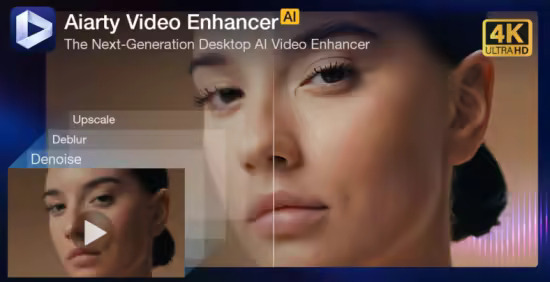
The state-of-the-art AI video enhancer software to generate more details, super denoise, deblur, upscale, and restore flawed videos to 4K clarity. With specialized AI models, it delivers superior visual quality at turbo speed, empowering content creators and video enthusiasts.

Restore to Clear Audio
Audio Denoise module to analyze and refine your audio tracks. 1-click background noise removal and vocal clarity boost.

Enhance to 4K Clarity with Details
Tailored AI Models to transform low quality, stuttering, or grainy videos to 4K. Enjoy cinematic quality and immersive visuals.

Silky Smooth Slow Motion
The frame interpolation module uses AI to generate new, high-quality frames, ready for fluid and smooth 8X/16X slow-motion.

3X Faster. Save You Hours of Waiting
Powered by SOTA-level AI technology, Aiarty's Turbo mode achieves real-time
4K upscaling with superior quality — 3X more efficient than other AI tools.

Optimized for Nvidia/AMD/Intel
AI Models in Aiarty fully leverage the power of supported hardware, with 95% GPU utilization for faster upscaling and detail generation.

Industry-leading Video Upscaling and Enhancement with AI
Leveraging the proprietary video and image training dataset, the tailored AI models in Aiarty Video Enhancer deliver best quality at GPU-optimized processing speed, with dedicated roles to generate more details for visual sharpness, restore flawed and degraded videos, or tackle low-light challenging footage.

AI Frame Interpolation
Silky Smooth Motion. Professional-Grade Fluidity
The AI frame interpolation module in Aiarty readily enhances stuttering videos to 90fps, 120fps or higher, generating new frames for smooth slow motion videos.
With AI-trained flow estimation and motion compensation, the generated frames are natural and consistent, avoiding jello effect, smearing or frame distortion.
It works nicely for live action videos with fast motion scenes, timelapse, slow motion videos, animation restoration, 3D CG rendering, AI films, and beyond, ensuring coherent and smooth visuals.

AI Audio Enhancer for Noise Removal
Crystal-Clear Sound. Distraction-Free Audio
Aiarty employs sophisticated AI algorithms to remove unwanted background noise and enhance vocals. Ideal for easily restoring audio clarity to your vlogs, podcasts, lectures, live performances, family videos, etc.

Whats New
Код:
https://www.aiarty.com/news/

Homepage
Код:
https://www.aiarty.com/ai-video-enhancer/

DOWNLOAD

Код:
https://rapidgator.net/file/e9f3083d066b9cc580d61484dc1c36b1/Aiarty.Video.Enhancer.3.4_x64.rar.html

https://ddownload.com/9sy8tivlh7mw/Aiarty.Video.Enhancer.3.4_x64.rar
 
ezgif-67e99706bb819b23.jpg


Ashampoo WinOptimizer 2026 v28.00.20 Multilingual

File Size: 24.3 MB

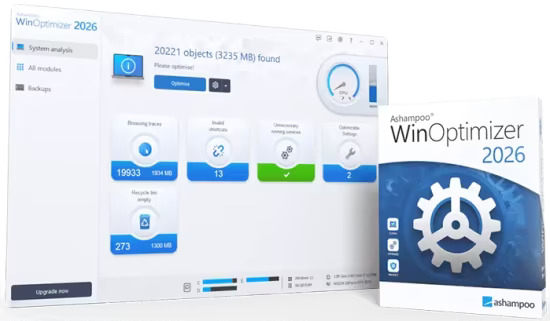
To keep you up to date, we have a special gift for you. The latest Ashampoo WinOptimizer 2026 is technically state-of-the-art and comes with the newest cleaners, benchmarks, and tools included! Experience performance improvement, remove data clutter, and enhance your privacy in minutes. Give your Windows the maximum care and tuning – guaranteed free and unrestricted use!

All modules updated to the level of Ashampoo WinOptimizer 28
Internet Cleaner: 25–50% faster and more efficient
System Information 2: New categories and optimized layout
Privacy Manager: Numerous new tweaks for enhanced control
Improved overall performance and stability in all areas
Modernized interface and optimized usability

Discover the possibilities
Microsoft Windows isn’t perfect and doesn’t offer all the settings demanding users might want. Over time, operating systems become noticeably slower, cluttered with browsing traces, invalid links, and unnecessary programs. Ashampoo WinOptimizer 2026 keeps Windows fast, clean, and reliable with just a few clicks! A total of 19 powerful modules are available to analyze, optimize, and customize Windows. All modules are now built on the new technical foundation of WinOptimizer 28, benefiting from improved performance, higher stability, and state-of-the-art technology. The popular Internet Cleaner now works up to 25–50% faster and more efficiently, displaying detailed cleanup results in a brand-new statistics bar. The completely redesigned System Information 2 delivers even more accurate hardware details in new categories and features a clearer, more structured layout for maximum transparency. Privacy Manager introduces numerous new tweaks, allowing even finer control over what data Windows collects or transmits, restoring full privacy with a single click. Naturally, all powerful optimization, analysis, file, and management tools that speed up, clean, and personalize Windows are still included. Everything is wrapped in a modern, intuitive design that perfectly matches today’s Windows.

General
Enhanced program performance through better memory management on 64-bit systems
Updated start page with CPU speedometer and up-to-date hardware details
Access to Windows license key
Completely intuitive user interface
Interactive start screens with problem analysis
Conserve energy efficiently and preserve battery life
Manage system policies easily with User Rights Manager
Manage system restore points comfortably with System Restore Manager
Save and restore all changes with Backup Manager
System maintenance
Brand new cleaner profiles with support for the latest Windows and browser versions
Cutting-edge cleaner modules–now up to 50% faster
Convenient cookie manager for "safe" cookies
Detect file system and file structure issues
Manage Opera plugins with ease
New filter settings to narrow down search results

File tools
New confirm dialog in File Wiper plus deletion method selection
Render deleted files unrecoverable with File Wiper
Support for ExFat partitions
Recover accidentally deleted files with Undeleter
Safely and securely encrypt and split up file with File Manipulator
Securely delete files with File Wiper
Permanentely delete files from the recycle bin
Find invalid program shortcuts with Link Checker
Wipe and overwrite free disk space to securely delete file remnants
Securely encrypt and decrypt files with File Encrypter and Decrypter
Split up huge files with File Splitter

System analysis
Faster drive analysis in Disk Doctor
Get detailed system information
More details about running services
Innovative hard disk benchmark with detailed results
Manage installed fonts with Font Manager
View disk space usage and find large files with DiskSpace Explorer
Benchmark system with System Benchmark
Compare benchmark results online

Customize Windows
Adjust file associations with File Associator

Improve system performance
UnInstall Manager 2 with new look & feel
Process manager with tree view
Optimize Internet connections with Internet Tuner
Disable unnecessary system services for more performance with Service Manager

What's New
Код:
https://www.ashampoo.com/en-us/winoptimizer

Homepage
Код:
https://www.ashampoo.com

DOWNLOAD

Код:
https://rapidgator.net/file/a6aa14ef9ca2c90e7829a8b7aa2c807f/Ashampoo.WinOptimizer.2026.v28.00.20.rar.html

https://ddownload.com/ug9sixr3qhyp/Ashampoo.WinOptimizer.2026.v28.00.20.rar

 
th-CKNQArjsi-Dc-Nq-Ejqx-M9Yg-Dpn-K1Ov-Zi-TC.jpg


Directory List and Print Pro 4.39

File Size: 17 MB

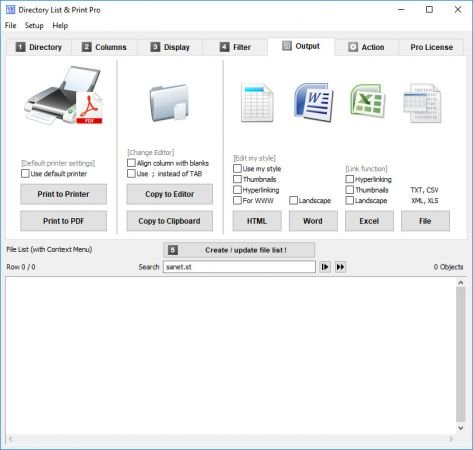
Directory List & Print is a software tool for Windows and enables listing and printing the content of any directory in a simplest way. In addition, the file lists can be formatted, filtered, saved to several file formats and also be further processed (delete/copy/move files). By copying to the clipboard the lists can be exported into other programs or opened directly in Word and Excel. The Free Version (Freeware) has all the basic features included, the Pro Version (Shareware) provides interesting additional features

Features

Pro Version (Shareware) and Free Version (Freeware)

- Selection of directories to be listed by a tree structure.
- Selection of directories by entering the path as a text string.
- Drag & Drop of directories (or a file) from Windows Explorer.
- Integration of "Open in Directory List & Print" in the directory context menu of Windows Explorer.
- Direct selection of important system directories as "My Documents" etc.
- Listing of sub-directories and/or files and looping through sub-directories (recursion).
- Update file list automatically or manually.
- Display of last modification date.
- Display of last modificatione time.
- Display of file size.
- Display of file name with or without directory path.
- Display of file names with or without file extensions.
- Indication of number of entries of files and directories in the list.
- Print directory listing, direct printing of corresponding list.
- Export list into other programs by copying to the clipboard. The corresponding data will be organized in columns and separated by tabs so that the list can be pasted directly into Excel Ö as a table.
- Open the list directly in Microsoft WordÖ and ExcelÖ.
- Support for connecting and disconnecting network drives.
- Automatic saving of display options when exiting the program.
- Start program with a directory path as a parameter.
- Portable Application, no installation necessary.

Pro Version only (Shareware)
- Save own directory favorites.
- Set directory recursion depth for subdirectories.
- Display of file attributes such as Read Only, Hidden, System, etc.
- Calculate CRC32 checksums for files.
- Display format of audio/video and image files.
- Display of dimensions like width, height, bit depth or frames/s.
- Display duration and title of audio and video files.
- Display of sampling and bit rates for audio files.
- Display of a continuous numbering of the objects.
- Display of column titles in the first row.
- Show number and sum of size and length of the displayed objects.
- Display of the date in many different international formats.
- Set filter to include or exclude certain file types.
- Set filter to include or exclude files and directories by certain terms.
- Set filter on length of filenames, eg. to analyze the file system when copying it to a new directory structure
- Output the list directly to the default printer.
- Output the list in comma- or tab-delimited file or CSV file.
- Linking of files and directories in ExcelÖ for direct open by mouse click.

Whats New
Код:
https://www.infonautics-software.com/directorylistprint/changelog/

Homepage
Код:
https://www.infonautics-software.com/directorylistprint/

DOWNLOAD

Код:
https://rapidgator.net/file/05573d40eade82650e7c020f6fccc590/Directory.List.and.Print.Pro.4.rar.html

https://ddownload.com/8073qupo1rv1/Directory.List.and.Print.Pro.4.rar
 
Назад
Сверху Снизу