All Emperor2011's Software in one thread !! (updated daily)

a392844e1cd2e11945961cb4e2275d9e.jpg


Karaosoft Karma 2027.0.45 | Size: 33.65 MB
Language: English
​
Manage your karaoke shows with ease. Clickless search, drag-n-drop functionality, and many other unique features designed to bring you the most simplified management of your karaoke shows. Karma is the culmination of years of research into every known method of running karaoke shows on the PC, to produce a product that is both robust yet simple to use and time saving. Karma eliminates many time wasting tasks to free you up for more enjoyable things like interacting with the crowd or even taking a break!

Features:
- Paperless slips - Let your singers use SingNext.com to send paperless slips right from their phones, without having to leave their seat.
- Triple display support - Optional triple display mode with 3 separate video outputs for KJ, singer, and crowd. Automatically shows lyrics to singer display while showing the crowd a different view with customizable information and displays during performances. For music videos, video automatically switches to crowd display when no singer is assigned.
- Private Messaging - Send private messages to singer screen (like "back off the mic" without embarrassing the singer), or vice versa with the crowd display.

- Superior Audio/Video Quality - Utilizes Karaosoft's custom hybrid audio/video engine for flawless sound and key changes without low end distortion. Post decoding video throughput for the smoothest video playback and synchronization on any hardware!
- Simplified Song Search - No need to take the time to drag your mouse to the search box. Just start typing!
- Drag and Drop songs and singers with ease. Change a singer's position in rotation by a simple drag and drop (mouse or touch), and watch the playlist order automatically change to suite the new rotation order!
- Touch screen scrolling with inertia
- Automatic Playlist sorting on any song add or rotation change. Any queued DJ music automatically stays in place while songs assigned to singers are automatically sorted around them.
- Auto-Play / Auto-Pitch - Set pitch ahead of time for individual songs to automatically be set when the song is played. Set DJ music to Autoplay one after another with automatic crossfade so you can take a break without worry.
- Panel Layout insures no window will ever overlap another during your show and all show related controls are always onscreen. Panels can be arranged in one of 64 different layouts, and then personally sized to fit your custom screen needs.
- On-The-Fly Lyrics timing - Ever have the lyrics ahead or behind the music? AV synch control can be changed on the fly.
- Version Changer - Singer didn't want to sing that version? Click the "Now Playing" bar and view all of the available versions for a quick change.
- Automatic Crossfader, Multiplex routing, and more!

System Requirements:
- Windows 11, 10, or Windows 8.1
- 2 Ghz or faster processor
- 4 GB RAM
- 1280 minimum resolution width for primary display

HOMEPAGE:
Код:
http://www.karaosoft.com/

FREE DOWNLOAD LINKS:​

Код:
https://rapidgator.net/file/90dc6e326e74dae7cd169e092873df70/Karaosoft_Karma_2027.0.45.rar
 

5fc9e52639d4cb2feaaa0bd0f47f170c.png


Mikrotik RouterOS v7.25.1 (VMware) | Size: 103.85 MB
Language: English
​
MicroTik is the name of a company that produces network products. The most important product of this company is the microprocessor operating system. The micro-system routing is built using the Linux kernel, the micro-system operating system can be installed on the home-based computer as well as a hardware-software package.

The microprocessor operating system was founded in 1995 by two US university students by writing a Linux operating system. Along with the formation of the 11/802 standards and the development of the hardware, the operating system also added wireless functionality. The latest version of MikroTik RouterOS is version 7.13.3 This version has a Level 6 license.

Tip 1: To use this virtual machine (VM), first unzip the files and then import the OMA Template for the VM into the virtualization software. VMware virtual machine
Tip 2: In order to address the MAC Address problem, it is recommended to change the MAC Address by setting the MAC Address button in the Settings dialog.
Tip 3: If after running the VM, you are asked if you copied or copied the machine, which says Copy is the answer.

The default username is admin with no password

Whats New
*) dns - fixed DNS service crash when DoH used (introduced in v7.13.1);
*) fetch - fixed fetch when using "src-path" with SFTP mode (introduced in v7.13);
*) fetch - less verbose logging (introduced in v7.13);
*) health - show voltage when powering KNOT R through Micro-USB;
*) lte - fixed Simcom modem support in 0x9001 USB composition;
*) lte - improved SIM PIN unlock event handling for MBIM FG621-EA;
*) poe-out - fixed "power-cycle" for CRS354-48P-4S+2Q+ device (introduced in v7.13);
*) poe-out - improved PoE out reliability on routers with a single PoE out interface;
*) sms - fixed SMS inbox for FG621-EA modem (introduced in v7.13);
*) sms - fixed SMS sending from WinBox and WebFig (introduced in v7.13);
*) sms - improved system stability when working with SMS (introduced in v7.13);
*) system - properly close HTTP/S connections initiated by the router;
*) tftp - improved invalid request processing;
*) wifi-qcom - improved system stability when using FastPath (introduced in v7.13);

System Requirements
Microsoft Windows 10, 11

HOMEPAGE:
Код:
https://mikrotik.com/

FREE DOWNLOAD LINKS:​

Код:
https://rapidgator.net/file/2aaede7d8a25f7aa97fdc1608ec8e07f/Mikrotik_RouterOS_v7.25.1_VMware.rar
 
0337d3b008347a8631328a984928b679.jpg


MusConv Lifetime 4.10.487 | Size: 108.03 MB
Language: English
​
MusConv transfers playlists, albums, followed artists and liked songs across various services - Spotify, Apple Music, Amazon Music, YouTube, YouTube Music, iTunes, Deezer, Tidal, SoundCloud, Pandora and 125+ music services!

Transfer your playlists, albums, followed artists and liked tracks between 125+ music services
Playlist management (Merge, Split, Duplicate.)
Access to DAILY updated music charts on Apple Music, Spotify, Billboard, TikTok, MTV, etc.
Stats: see your most-played songs, artists and albums on Spotify, Apple Music, YouTube Music and other
Keep playlists and albums automatically synchronized between 125+ streaming platforms
Transfer from M3U, WPL, XML, CSV, XSPF, Web URL

System Requirements:
- Windows 11
- Windows 10
- Windows 8
- Windows 7

HOMEPAGE:
Код:
https://musconv.com/

FREE DOWNLOAD LINKS:​

Код:
https://rapidgator.net/file/42337c0b376e29cf33214b18fb29fca0/MusConv_Lifetime_4.10.487.zip
 
5ec119fe2ae0426b732a8b0f473e25fa.jpg


Navicat Premium Enterprise 18.0.8 (x64) | Size: 187.96 MB
Language: English
​
Navicat Premium is a database development tool that allows you to simultaneously connect to MySQL, MariaDB, MongoDB, SQL Server, Oracle, PostgreSQL, and SQLite databases from a single application. Compatible with cloud databases like Amazon RDS, Amazon Aurora, Amazon Redshift, Microsoft Azure, Oracle Cloud, Google Cloud and MongoDB Atlas. You can quickly and easily build, manage and maintain your databases.

Features:

Seamless Data Migration
Data Transfer, Data Synchronization and Structure Synchronization help you migrate your data easier and faster for less overhead. Deliver detailed, step-by-step guidelines for transferring data across various DBMS. Compare and synchronize databases with Data and Structure Synchronization. Set up and deploy the comparisons in seconds, and get the detailed script to specify the changes you want to execute.

Diversified Manipulation Tool
Use Import Wizard to transfer data into a database from diverse formats, or from ODBC after setting up a data source connection. Export data from tables, views, or query results to formats like Excel, Access, CSV and more. Add, modify, and delete records with our spreadsheet-like Grid View together with an array of data editing tools to facilitate your edits. Navicat gives you the tools you need to manage your data efficiently and ensure a smooth process.

Easy SQL Editing
Visual SQL Builder will help you create, edit and run SQL statements without having to worry about syntax and proper usage of commands. Code fast with Code Completion and customizable Code Snippet by getting suggestions for keywords and stripping the repetition from coding. Quickly locate and correct PL/SQL and PL/PGSQL coding errors using our debugging component such as setting breakpoints, stepping through the program, viewing and modifying variable values, and examining the call stack.

Intelligent Database Designer
Create, modify and manage all database objects using our professional object designers. Convert your databases into graphical representations using a sophisticated database design and modeling tool so you can model, create, and understand complex databases with ease.

Increase your Productivity
Our powerful local backup/restore solution and intuitive GUI for Oracle Data Pump/SQL Server Backup Utility guides you through the backup process and reduces the potential for errors. Set an automation for repeatable deployment process like database backup and script execution at a specific time or day. No matter where you are, you can always get the job done.

Make Collaboration Easy
Synchronize your connection settings, models, queries and virtual groups to our Navicat Cloud service so you can get real-time access to them, and share them with your coworkers anytime and anywhere. With Navicat Cloud, you can leverage every minute of your day to maximize your productivity.

Advanced Secure Connection
Establish secure connections through SSH Tunneling and SSL ensure every connection is secure, stable, and reliable. Support different authentication methods of database servers such as PAM authentication for MySQL and MariaDB, and GSSAPI authentication for PostgreSQL. Navicat 12 provides more authentication mechanisms and high-performance environments so you never have to worry about connecting over an insecure network.

Operating System: Microsoft Windows 7, Windows 8, Windows 8.1, Windows 10, Windows 11, Server 2008, Server 2012, Server 2016, Server 2019

HOMEPAGE:
Код:
https://www.navicat.com/

FREE DOWNLOAD LINKS:​

Код:
https://rapidgator.net/file/3ed3f2e0c68e325632488505c663786f/Navicat_Premium_Enterprise_18.0.8_x64.rar
 
c70bdd59ec45d9015f035a42ea72e532.jpg


OBS Studio 33.0.2 (x64) | Size: 185.13 MB
Language: English
​
OBS Studio is an application designed for gamers, artists, developers or amateur users who enjoy creating tutorials and streams that they share over the Internet. Create high quality recording with OpenGL or Direct3D on your desktop and stream them on the Internet via this intuitive software solution. Works with multiple streaming services, including Twitch The setup is quick and uneventful, so it is unlikely that you can encounter any issues at this stage. Upon launch, you are welcomed by a minimalistic, yet clean and intuitive interface that displays all available features and functions.

You should know that the program allows you to connect to the major streaming services, such as Twitch, YouTube or DailyMotion, for instance. Alternatively, you can add your custom streaming service or save the recordings on your local drives in high-quality formats (MOV, FLV, MKV, MP4, TS and M3u8).
As you would expect, the application permits you to configure the stream, so that you can be sure that the audience watching your live recording gets quality. Therefore, you can change the resolution, adjust the FPS, alter the delay and set the maximum bitrate, so that they are suitable for a wider range of devices.
Enables you to add multimedia files into the stream easily

Even though the primary goal of the initial releases was to make the application work on multiple platforms, there are some notable differences between this too and Open Broadcaster Software.
For starters, the program comes with a more dynamic API that enables developers to create their own plugins, so that they can have a more efficient control over the streaming experience. In addition, the Studio version allows you to include more type of files into the streaming, such as Audio Input and Output Capture, Display Captures, Images and Browser, for instance.
Perhaps the most noteworthy difference is the Studio mode that enables you to compare scenes and customize transitions with just a few clicks. It is worth mentioning that both applications allow you to record videos from various sources and integrate text, media, desktop recording, game capture or webcam streams into the content.
A tool that allows you to better manage the streaming process
Irrespective of whether you are creating a tutorial to upload for your gamers friends or you want to exhibit a highlight feature of a product that you want to launch in the near future, OBS Studio enables you to make live recordings that you stream or save locally effortlessly.

System Requirements: Windows 11, Windows 10, 8 , 7

FREE DOWNLOAD LINKS:​

Код:
https://rapidgator.net/file/2fdb9dae28954c6556dbcc9c85bba7c4/OBS_Studio_33.0.2_x64.rar
 
752c4d8b087e4a25a2a11b81bdf8e4b6.jpg


Olympia Graphic Design 1.7.7.80 | Size: 224.34 MB
Language: English
​
Create unlimited illustrations, shapes and graphics that you can use with any of your other publishing software. Olympia Graphic design software enables users to create flyers, backdrops, t-shirts, signs, billboards, tickets, banners, posters and more.

Create your designs with ease!
- More than 2000 ready-to-use templates
- Insert your own photos, images and text
- Import and export in SVG (Scalable Vector Graphics)
- Royalty-free images
- Easy to use

Rich in templates, Olympia Graphic Design is the ideal solution to create your different designs. Easily create your perfect design for your business, brand or event!

Olympia Graphic Design allows you to use
- Full layer support
- Powerful Bezier editing tools
- Boolean operations to create new shapes

- Create artistic text and add text anywhere
- Full support for SVG files, including import and export.
- Knife tool to cut graphics on the canvas
- Eraser tool to remove parts of graphics
- Blending tool to create 3D tunnel effects and unique shapes
- Component library to save and reuse new graphics you create.
- Background and fill textures
- Artistic shapes, text and strokes for added style
- Smoothing tool for smoothing freehand drawings.
- Artistic colour palettes and gradients

CREATE YOUR OWN PROFESSIONAL LOOKING GRAPHICS
Create an unlimited number of illustrations, shapes and graphics that can be used with any other publishing software. Olympia Graphic design allows users to create flyers, backdrops, t-shirts, signs, posters, tickets, banners, posters and much more.

- Create stunning graphics - trust Olympia Graphic to create complex shapes and illustrations at your own pace.
- Use the powerful vector drawing tools to sketch an illustration or import a photo or graphic to edit and add creative details.
- With full layer support, powerful Bezier editing tools, and support for SVG files, Olympia Graphic Design is the ideal tool for creating complex shapes and illustrations.
- Simply choose from over 100 professionally created design ideas and edit them using the flexible and intuitive drawing tools. You can also choose from the 2,000 vector objects that are included.
- Creating stunning graphics and designs is made easier to manage with layers. Need to change the colour of any part of your design? Simply click on the layer icon and make your changes without disturbing other parts of the design. Brighten up your designs with our palette of artistic colours and gradients.

Highlights
- Over 2,000 pre-designed vector graphics
- Royalty-free images
- Creative filters and effects
- Over 65 fonts for commercial use
- Over 100 professionally created design ideas, including
- Posters
- Postcards
- Print banners
- Web banners
- Signs
- Illustrations
- Funny artistic expressions

Wide range of models
Graphic Design includes a large selection of ready-to-use designs that you can use to create your own designs.

You also dispose of a large library of vector objects classified by category such as
- Animals
- Leisure
- Nature
- Transport
- Etc

System Requirements
- Windows 7, Windows 8, Windows 10, Windows 11
- 512 MB RAM
- 300 MB hard disk storage

Supported Languages
English, French, German

HOMEPAGE:
Код:
https://www.avanquest.com/

FREE DOWNLOAD LINKS:​

Код:
https://rapidgator.net/file/aecb609ffdf3df54e479abfec280770d/Olympia_Graphic_Design_1.7.7.80.rar
 
c0a640d72ea1cf9ee2ef3d2d091e4251.jpg


Olympia Logo Creation 1.7.7.80 | Size: 806.85 MB
Language: English
​
The logo Creation software for your business, your brand or your event! A good company logo should be unique, simple and easy to remember. It's a visual representation of your company or your business. It's your identity! Create a connection with your users. You will commit to this logo for a long time, so make it right from the beginning by relying on the advanced tools of Olympia Logo Creation Software. Make it remarkable!

Create your logos with ease!
- Thousands of ready-to-use templates
- Insert your own photos, images and text
- Export to SVG (Scalable Vector Graphics)
- Easy to use

Rich in templates, Olympia Logo Creation is the ideal solution to create one or several logos. Easily create the perfect logo for your company, brand or event!

Olympia Logo Creation is perfect for
- Anyone who needs to make a professional logo
- New businesses, teams, companies, groups & more
- Product Branding - create multipe logos
- Existing logos that need a refresh
- Small businesses who need an updated look
- Start-ups in search of that perfect identity

The perfect tool to create your logo
Create your logo from scratch or modify any of the professionally designed logo templates into your own unique design. Modify colors, fonts, graphics, and more until you are fully satisfied and you've achieved your perfect logo. With Olympia Logo Creation, you own everything you create. Unleash your creative power !

Trust vector graphics
With Olympia Logo Creation, your logo will never look blurry or pixelated when enlarged. The very unique built in vector tools and graphics allow you to scale your logo to any size without losing sharpness or clarity. From web images to signage to full size billboards - your logo will look perfect in any size and in any place !

Export to several types of formats
- Standard format
- PDF
- SVG
- XPF
- EMF

Highlights
- Over 2,000 pre-designed vector graphics
- Royalty-free images
- Creative filters and effects
- Over 65 fonts for commercial use
- Over 100 professionally created design ideas, including
- Posters
- Postcards
- Print banners
- Web banners
- Signs
- Illustrations
- Funny artistic expressions

Wide range of models
Logo Creation includes a large selection of logos that you can use to create your own logo.

You also dispose of a large library of vector objects classified by category such as
- Animals
- Leisure
- Nature
- Transport
- Etc

System Requirements
- Windows 7, Windows 8, Windows 10, Windows 11
- 512 MB RAM
- 1500 MB hard disk storage

Supported Languages
English, French, German

HOMEPAGE:
Код:
https://www.avanquest.com

FREE DOWNLOAD LINKS:​

Код:
https://rapidgator.net/file/aa38a0dbefbdbb508e5a3c9c4e65074c/Olympia_Logo_Creation_1.7.7.80.rar
 

150f64a529c18a3926ba00c23e9c44ec.jpg


PDF24 Creator 11.35 (x64) Multilingual | Size: 389.9 MB
Language: English
​
PDF24 Creator is a program to create PDF files from almost any application. The PDF software is a free PDF creator to create PDF files from any type of document. With the PDF creator you can convert documents into PDF files very easily. The PDF creator acts as a PDF printer.

Advantages of PDF24 PDF Creator
Once installed, create PDF files forever
Free upgrades included
Conversion is simple and possible from all current programs
Create PDF files from almost any application
Easy to use
Multilingual
Several features of PDF24 PDF Creator
Merge and split PDF
Extract pages from a PDF
Copy pages from one PDF to another PDF

Integrated preview for easy PDF editing
Secure a PDF (Prevent from unauthorised opening, printing, etc.)
Set PDF information such as author and title

System Requirements: Windows 11, Windows 10, 8 , 7

HOMEPAGE:
Код:
https://www.pdf24.org/

FREE DOWNLOAD LINKS:​

Код:
https://rapidgator.net/file/1db9ea0144785dbe618fee9b80b19a6b/PDF24_Creator_11.35_x64_Multilingual.rar
 

150f64a529c18a3926ba00c23e9c44ec.jpg


PDF24 Creator v11.35.0 (x86) | Size: 352.6 MB
Language: English
​
PDF24 Creator is a program to create PDF files from almost any application. The PDF software is a free PDF creator to create PDF files from any type of document. With the PDF creator you can convert documents into PDF files very easily. The PDF creator acts as a PDF printer.

Advantages of PDF24 PDF Creator
Once installed, create PDF files forever
Free upgrades included
Conversion is simple and possible from all current programs
Create PDF files from almost any application
Easy to use
Multilingual
Several features of PDF24 PDF Creator
Merge and split PDF
Extract pages from a PDF
Copy pages from one PDF to another PDF

Integrated preview for easy PDF editing
Secure a PDF (Prevent from unauthorised opening, printing, etc.)
Set PDF information such as author and title

System Requirements: Windows 11, Windows 10, 8 , 7

HOMEPAGE:
Код:
https://www.pdf24.org/

FREE DOWNLOAD LINKS:​

Код:
https://rapidgator.net/file/24389347e7f1b73cac54eb2d9d924f32/PDF24_Creator_v11.35.0_x86.rar
 
PDF24 Creator v9.20.0 | Size: 65.45 MB
Language: English
​
N/A

N/A

HOMEPAGE:
Код:
N/A

FREE DOWNLOAD LINKS:​

Код:
https://rapidgator.net/file/e83492fa979f3c950ed0a1f175bd2768/PDF24_Creator_v9.20.0.rar
 
08a1ed485be68192a685946ebed1b2a7.png


Pano2VR Pro 8.0.11 Multilingual | Size: 267.53 MB
Language: English
​
Pano2VR allows you to publish your panoramic images within minutes. No matter what type of project you're working on, whether, a gigapixel panorama or virtual tours with hundreds of nodes, Pano2VR will help you to quickly get your project up and running on the desktop as well as mobile devices.

mprove your images.
Sometimes panoramas are not level and have unwanted tripods.it happens. Straightening the horizon and removing the tripod from the panorama can be accomplished with a few simple clicks.

Build a Virtual Tour.
No matter how large the tour, Pano2VR Pro can help you quickly and easily put it together with automatic linking, filtering, master node editing and a built-in Tour Map.

Enhance the experience.
Add interactive elements like hotspots, directional sound and video to your panoramas. Use the powerful Skin Editor to design custom buttons and controllers - all of which can be made responsive so the design fits to any screen. No coding required. We promise!

Seamlessly change projections.
Easily reproject spherical panoramas during viewing or open a panorama from a little planet view to a rectilinear view on opening or create a standard format video that moves through different projections.

Reveal the highlights.
Guide viewers by creating an animation path through your panoramas or tour to show off the best areas. At any time, the viewer can interact and explore further. You can even export this walk-through as a video file.

Contribute to Google Street View.
Pano2VR offers an easy way to add and edit existing panoramas and tours to Google Street View. Once you've connected your account, you will see all tours and panoramas that you've uploaded to Google Street View. You can continue to add to your gallery or even download the existing images.

Show your work.
Export your panoramas as HTML5, Flash or QuickTime VR formats or use our handy plugins to post them directly to your Wordpress, Joomla or Drupal site. Pano2VR will also help you to transform your images into different projections for printing.

Pano2VR 6.0
Pano2VR 6.0 brings major updates to the Tour Map, Animation Editor and Viewer. You can now add floor plans to your project and correctly geolocate indoor nodes, control and animate skin elements with the Animation Editor, and view and interact with 360 video in the Viewer.

Tour Map
The Tour Map received, perhaps, the biggest update. It can now better assist in general tour building and with Google Street View tours with the addition of being able to add custom floor plans.

Floor plans, are maps of the interior of buildings where it is also likely that location data has not been recorded during a shoot. So, we added the ability to geolocate the floor plan to the tour map so that when a tour node is added to the floor plan, it will be given location data. This is especially helpful for those building tours for Google Street View and need accurate placement of nodes inside of buildings. Floor plans that have been added to the Tour Maps, can also be used in the Skin Editor using the Map element. In addition to the floor plans, map pins can now be moved in bulk.

Animation Editor
The Animation Editor is now a panel and it, too, is more powerful. You can now connect skin elements to the animation. This lets you apply, for example, subtitles or text boxes that can appear and disappear at a defined time in the animation.

Previously, the animation editor only had the ability to create a single series of clips. Now, we can create sequences, which are a group of clips, in the same project. We can then, select a specific sequence to output as an animation or as auto rotation. This makes it much easier to create multiple versions of an animation without having to create multiple projects.

Skin Editor
The Skin Editor got new features, too. The most notable feature would be the changes made to the Maps element. This is how you would add a map or floor plan overlay to your project. Previously, only a map could be added to the map element.

We've also added a way to change skins without having to open the Skin Editor - making it easier to adapt a skin to the current project using the Edit Skin Configuration button. Finally, positioning in the Skin Editor has been completely reworked to better reflect the way positioning works in HTML5. This means that when you open older skins, you may find that the positioning measurements have changed. Don't worry, it's not broken; just, the numbers have changed.

Viewer
The Viewer has been updated to be able to playback 360º video, making it much easier to work with the medium. Once the panoramic video has been added to the Viewer or Tour Browser, a transport control will appear in the Viewer.

More Features:
- Improved gigapixel support with tiled multi-resolution
- Fast loading for tours with more than 10,000 nodes
- Custom Fly-in effect
- Custom map tiles
- Filtered actions
- Flash and QuickTime outputs no longer supported

Requirements: Windows 7 and higher (64-bit).

HOMEPAGE:
Код:
http://ggnome.com

FREE DOWNLOAD LINKS:​

Код:
https://rapidgator.net/file/d2b6901598ebab0ac34cfa095c9fbfac/Pano2VR_Pro_8.0.11_Multilingual.rar
 
85e2e0be6ac1c3a475a78c176b1d581f.png


PlayerFab 7.0.6.7 (x64) Multilingual | Size: 342.5 MB
Language: English
​
Capable of playing local videos, DVD/Blu-ray/UHD disc and streaming videos, Are you still looking for an all-inclusive media player? Armed with PlayerFab, there is no need to worry about compatibility problems. Videos that are available to PlayerFab range from local videos, DVD/Blu-ray/UHD disc to streaming videos. The software is definitely a comprehensive media player.

All-in-one platform of streaming playback
As a convergence platform of streaming playback, PlayerFab supports watching videos of a wide range of popular streaming platforms, like Amazon, Netflix, Tubi, Peacock, etc.
Users won't have to bother to search for their wanted videos on different streaming platforms, PlayerFab is completely enough.

Online playback video in FHD 1080p video quality and EAC3 audio quality
High-quality is a prerequisite and bedrock of PlayerFab. This powerful go-to free software provides an array of built-in functions, to ensure the best watching experience in FHD 1080p video quality and EAC3 5.1 audio quality.
Users gain access to superb theater-like effects with the assistance of PlayerFab.

Auto-skip ADs to save your precise time
Have you been bothered by both long and annoying advertisements at the beginning of a video? If yes, you won't suffer from it any longer.
PlayerFab will automatically skip the initial ads of most popular video websites including Amazon IMDB Free TV, Tubi, Roku, Paramount+ to ensure a smooth and comfortable watching experience.

Playback all kinds of video&audio formats with ease
PlayerFab, as an extremely versatile software, is a powerful and all-inclusive free-cost media player.
It supports all popular formats such as H.264, H.265/HEVC, MP4, MKV, MOV, FLV, VOB, M2TS and so on. As long as you have PlayerFab, there won't be compatibility problems any longer.

Navigation Menu on DVDs, Blu-rays and 4K Ultra HD Blu-rays
The upgraded 4K Media Player now offers all-round supports for navigation menu playback on DVDs, Blu-rays, and 4K Ultra Blu-rays, regardless of what form they are.
Genuine discs, as well as ripped ISO image files or folders are also supported. Equipped with TrueTheater technology, a cinema-like home theater is right at your fingertips.

Hi-Res Audio Output Support, up to Dolby Atmos & DTS:X
If you have an acoustic system at home with edgy technology, apparently this player is just right up your alley.
It is able to output lossless high-resolution audios, such as Dolby Atmos, Dolby TrueHD, DTS-HD Master and DTS:X etc., with up to 7.1 channel surround sound output.

All-Round 3D Playback on All Forms of 3D Contents
To make the most out of your 3D TV at home, player comes with all-round 3D playback support on genuine 3D Blu-ray discs, ISO files and SBS (side-by-side) or top & bottom 3D videos.
Besides, there are four 3D output modes, namely, Anaglyph Red/Cyan, 3D-Ready HDTV (Checkerboard), Micro-polarizer LCD 3D (Row-interleaved) and HDMI 1.4 enabled 3D TV.
With a pair of 3D glasses, watching 3D movies at home theater is just a breeze!

Play high-quality 4K UHD video in HDR10 effect
Nowadays, most 4K Ultra HD Blu-rays and 4K UHD videos come with HDR effect. As a variant of HDR, HDR10 can produce 1000 nits of peak brightness to make the images look more realistic to human eyes.
If your 4K TV or display is compatible with any type of those HDR variations, PlayerFab is able to deliver the best HDR effect, including HDR10, HDR10+, and Dolby Vision as well.

Manage Local Media Library by Poster Wall
Have you ever been beset with tons of movies, TV shows and music videos stored on your local HDD?
Are you searching for the best methods but end up with nothing? PlayerFab has the optimal solution.
Users are able to build and manage their own local media library through clear and plain poster walls.
By clicking on each poster wall, you will be taken to a detailed page, where all the metadata info of the movie or TV show is well displayed.

Build, Organize and Manage Smart Local Music Library
PlayerFab enables you to intelligently create a local music library.
Just add your pre-existing music files from your HDD to the 4K player software, and you will find all the desired songs are well organized according to albums, artists, or genres instantly.

Backup and import DVD/Blu-ray discs to your library
As new movies and TV Shows are constantly being released, you need to add your newly purchased DVD & Blu-ray discs to your local media library incessantly.
In this regard, the Disc Import feature of this all-powerful 4K media player comes in handy.
With only one click, it can import a DVD or Blu-ray disc from an optical drive to your local media library, saved as an ISO file for later playback.
Thus, this multi-functional player acts as a media manager as well.

Hardware Decoding on AMD, IQS, Nvidia
Armed with the latest advanced GPU acceleration technologies, PlayerFab supports hardware decoding of AMD, IQS (Intel Quick Sync) and NVIDIA CUDA.
For there are special chips responsible for decoding, users could enjoy a smoother playback experience with better image quality.

PC and TV Playback Modes Optimized for Small/Huge Screens
The all-inclusive media player features two playback modes with distinctive UI design, of which PC Mode is optimized for a truly immersive media viewing experience on computer screens.
While TV Mode is dedicated to a cinema-like audio-visual experience on large-screen smart TVs, compatible with the remote controls for Windows Media Center.

User-friendly design offers the best viewing experience
PlayerFab always puts the demands of users as a priority. Want to create a player with comprehensive features, PlayerFab promises the clearest and most intuitive experience.

System Requirements:
- Windows 11/10/8.1/8/7
- Intel i3 or above
- 4GB of RAM or above
- 40GB of free hard disk space or above

HOMEPAGE:
Код:
https://www.dvdfab.cn/

FREE DOWNLOAD LINKS:​

Код:
https://rapidgator.net/file/32ca498b95a749340fe6a95ca3c1c3ad/PlayerFab_7.0.6.7_x64_Multilingual.rar

 

60fc06dcdbf3cb40a0e2c6e1acd2b98e.png


Reduce Memory 1.8 | Size: 1.05 MB
Language: English
​
Reduce Memory is an excellent utility that optimizes the RAM usage on your computer if the user has Windows Administrator privileges. The application free the memory from unused applications and operating system services and programs working in the background.

It does not need any installation. Just run the 32-bit or 64-bit executable file. The interface is simple and allows you to optimize the memory on demand and define the application options.
The options you can set up are the automatic run on Windows startup, start with minimized window, hide on the system tray, or keep the application window always on top. Furthermore, you can setup up the interval for automatic memory optimization at every X seconds.

System Requirements: Windows 11, Windows 10, 8 , 7

HOMEPAGE:
Код:
https://www.sordum.org/

FREE DOWNLOAD LINKS:​

Код:
https://rapidgator.net/file/03e26a6cb01d195e033563921aa24acc/Reduce_Memory_1.8.zip
 
4b73b62244a826644abf0f357f3db183.jpg


Room Arranger 11.4.0.820 (x64) Beta Multilingual | Size: 44.09 MB
Language: English
​
Room Arranger is 3D room / apartment / floor planner with simple user interface. Once you get the basics, you can draw whatever you imagine. While having wide library of objects, you can easily create your own piece of furniture.

Features:

Easy to Use
Room Arranger is small and compact piece of software. Still it lets you design nearly anything you imagine. Once you understand the basics it's easy to bring it to next level.

Nearly all functions have keyboard shortcuts, so you can learn to be pretty fast in Room Arranger.

3D Visualization
3D can give you a better impression of your design. Room Arranger will not only let you fly around the scene, but you can also walk through it like in reality.

Wide Object Library
There are nearly 300 objects in the standard object library. Furniture, and other equipment. For each of them, you can modify their dimensions exactly as you need - you are not limited to what we think is the most common.

Additionally you can quickly and easily design all your special objects directly in Room Arranger, there is a set of 3D objects just for such needs. Some users contributed to our On-line object library and shared their work.

Measurement
There is a measurement tool in Room Arranger that helps you to check if there is enough space left for other objects, or just visualize the dimensions in the project.

The software also measures the room areas, wall areas and other useful values. It will let you copy - paste them to Excel for further processing.

Print in Scale
Printing is the integral part of designer's work. We try to make this output precisely and in high quality. Professional architects usually require printouts in exact 1:50 or 1:100 scale, which is possible in Room Arranger.

In case you have only small A4 printer, the software manages to print the project over more pages. You will just glue all sheets of paper together.

Build on Floor Plan Image
Drawing walls can be quite time consuming for apartment or house design. So there is a way to make it easier in case you have an image or photo of the floor plan.

Just load the image of the floor plan into the Wall Editor, calibrate it, and draw walls on top of it.

Operating System: Windows XP, Vista, 7, 8, 10, 11

HOMEPAGE:
Код:
http://www.roomarranger.com/

FREE DOWNLOAD LINKS:​

Код:
https://rapidgator.net/file/627c0ead70b535059ba5ca5273868741/Room_Arranger_11.4.0.820_x64_Beta_Multilingual.rar
 
_3bbbae164b55f37b987dd20b382c3ebe.jpeg


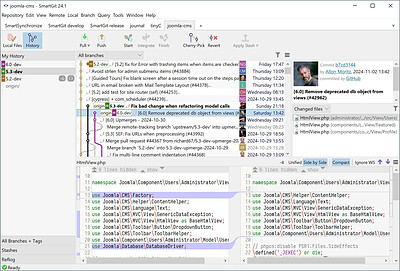
SmartGit 26.1.059 Multilingual | Size: 160.66 MB
Language: English
​
SmartGit is the most popular Git GUI client at slant.co. 100,000+ developers around the world trust in SmartGit. SmartGit supports GitHub, Bitbucket, GitLab and Azure DevOps.

Why prefer SmartGit as Git Client?
One for All.
SmartGit assists Git newbies as well as it makes experienced developers more productive.
SmartGit has the same intuitive user interface on Windows, macOS and Linux:
graphical merge and commit history
drag and drop commit reordering, merging or rebase
fast, even for larger repositories
Use your SmartGit license on as many machines and operating systems you like.

Interacting with popular platforms.
SmartGit comes with special integrations for GitHub, Azure DevOps, BitBucket (as well BitBucket Server) and GitLab to create and resolve Pull Requests and Review Comments.
Of course, you can use SmartGit like any other Git client with your own Git repositories or other hosting providers.

Everything Included.
No need to install and configure additional tools. SmartGit includes all you need:
intuitive File Compare (no plain wrapper around git diff)
powerful File Merge (freely editable "Conflict Solver")
Git-Flow (high-level branch handling)
graphical Merge and Commit History
bundled Git client
SSH-client

Adopt to Your Needs and Workflows.
A perfect Git client should support your workflows. You can customize SmartGit in various ways:
Preferences for Merging, Rebasing
External tools,
External or built-in Compare or Conflict Solver tools,
Syntax coloring,
Keyboard shortcuts,
Layout of certain views,
Toolbars,
Light and dark themes

HOMEPAGE:
Код:
https://www.syntevo.com/smartgit/

FREE DOWNLOAD LINKS:​

Код:
https://rapidgator.net/file/95ea652e58c079e38b76fb14a1fb39d3/SmartGit_26.1.059_Multilingual.rar
 
73ebe46e5562d3c8feaba5cecd4f7669.jpg


TablePlus 27.4 | Size: 120.39 MB
Language: English
​
Modern, native, and friendly GUI tool for relational databases: MySQL, PostgreSQL, SQLite and more.

Native, lightweight and fast
With native build, simple design and powerful features, TablePlus makes database management easier, faster and more efficient for you.

Native, fast and secured
Query, edit and manage your databases easily with a native app that can run fast like a Lambo. It takes only half a second to get up and running.

Multi tabs and code review
Quickly get a snapshot of your database with multi-tab and multi-window view, as well as stay in control of what you have changed on your database with Code Review.

Built-in SSH
You don't need to install any SSH client in order to connect to the server. SSH is a part of TablePlus.

An intuitive GUI client
Browse, query, edit your data and database structure in a simple and clean spreadsheet-like editor.

Operating System: Windows 7, 8/8.1, 10, 11

HOMEPAGE:
Код:
https://tableplus.com/

FREE DOWNLOAD LINKS:​

Код:
https://rapidgator.net/file/756873684a6fd9ac687d5ec172cdb4ce/TablePlus_27.4.zip
 
0fce6ec55ba62ef53cf8cf78db6d8374.jpg


Vehicle Manager 2027 Fleet Network Edition 4.11.2000 | Size: 51.21 MB
Language: English
​
A disciplined approach to service and maintenance is critical to keep your vehicle or equipment in top condition and maintain it's resale value. Maintain your vehicle log book on your computer and get reminders when service is due with Vehicle Manager.

Vehicle Manager Benefits

Introduction.

Track your vehicle's fuel efficiency.
When you fill up your tank, keep your receipt and then enter the usage data into Vehicle Manager. Your fuel efficiency will be calculated, and you can identify long term trends to help spot problems before unplanned critical service becomes due.

Track your vehicle's service schedules and service history.
With Vehicle Manager you can create a unique service schedule for each vehicle you own. Vehicle Manager reminds you as the service due date comes near. Easily track the service status for all of your vehicles and equipment with simple red, yellow, green status indicators. When the service has been finished, just mark the item as complete to automatically add it to your vehicle's service history.

Track your vehicle's drivers, parts, vendors, and contacts.
When replacing parts on your vehicles, add the parts, vendors, and contacts to your Vehicle Manager database. If the part needs to be replaced again, you'll have all the information you need right at your fingertips.

Operating System: Windows 7, 8/8.1, 10, 11

HOMEPAGE:
Код:
http://www.kzsoftware.com/products/vehicle_maintenance/

FREE DOWNLOAD LINKS:​

Код:
https://rapidgator.net/file/67a3ebf41df8b84d52166a2540e27310/Vehicle_Manager_2027_Fleet_Network_Edition_4.11.2000.rar
 

9dafc1131e5d46921fe777c7a29bba0d.png


Vivaldi v8.3.4191.47 + Mail + VPN | Size: 152.68 MB
Language: English
​
Superior Internet/Web Browser plus these features: e-mail, VPN, calendar, contacts, notes, translator.

Vivaldi is Chromium-based. Chromium is the source code of "Google Chrome Browser". But Vivaldi doesn't have any of the negative characteristics of Google Chrome.

You can use the Chrome extensions/add-ons on Vivaldi. Take a look at the extensions available in the 'Chrome Web Store'.

→Vivaldi Mail compared to other e-mail clients. →New:Now Proton VPN, the best VPN service, is integrated into Vivaldi.

We're building the most feature-packed, customizable browser out there.

Built-in features: e-mail client, calendar, contacts, feed reader, webpage translation (108 languages), screen capture (incl. full-page screenshots), ad/tracker blocker, ...

***

Now with Vivaldi Mail
Vivaldi Mail, Calendar, and Feed Reader have arrived, built right into your favorite browser.

Vivaldi Mail makes it easy to manage e-mails from multiple accounts, mailing lists and feeds in a unified inbox.

Stress less, celebrate more! Because your e-mails and schedules are now better organized and in safe hands with Vivaldi Mail.

Vivaldi Mail is our ode to the original, simple, and reliable form of communication. And we hope you will enjoy using it as much as we have enjoyed building it for you.

Enable Vivaldi Mail via "Settings → General → Productivity features → Enable Mail, Calendar and Feeds".

***

Features
• Tab Management
Unique features give you full control of how you group and display browser tabs.

• Customization
Tweak and tune every part of the browser to create your own unique experience.

• User Interface
An adaptive interface lets you adjust the position, size and appearance of the browser's UI elements.

• Navigation
Get to where you're going faster with fully configurable Search options, custom shortcuts and a Bookmark manager fit for power users.

• Privacy and Security
Vivaldi is built with privacy as a priority and gives you full control of settings critical to keeping your data safe.

• Tools
An arsenal of built-in tools like Notes, Image Properties and more give you advanced functionality without sacrificing performance.

• Mouse and Keyboard
Use custom Keyboard Shortcuts, Mouse Gestures or the command line control of Quick Commands. The choice is at your fingertips.

System requirements: Windows 7, 8.1, 10, 11

FREE DOWNLOAD LINKS:​

Код:
https://rapidgator.net/file/866b9c6a514f1518e24dab07548ed5c1/Vivaldi_v8.3.4191.47___Mail___VPN.rar
 
f0b09f9d7335a5a9582f14b714fb6cc1.png


WinScript 2.30 | Size: 5.63 MB
Language: English
​
WinScript is an open-source tool built to help you build custom scripts for Windows. It includes debloat, privacy, performance scripts & more, along with the ability to install all your favourite apps in one click.

Features
Debloat: Remove Windows bloatware, CoPilot, Edge, OneDrive & pre-installed features.
Privacy: Disable Windows and 3rd party telemetry & data collection, tracking, app access & more.
Performance: Set background services to manual to free resources, set your preferred DNS, clean temp files & more.
Install Apps: Install all your favourite apps simultaneously in one click through chocolatey.

Usage
WinScript must be run as Administrator to function properly.

The desktop app may be flagged as a threat by Windows Defender due to its ability to modify system settings. This is a false positive-WinScript is safe, transparent, and open-source.

System Requirements: Windows 10, 11

FREE DOWNLOAD LINKS:​

Код:
https://rapidgator.net/file/7d2cee4c97d40efe50e00a9f053d2369/WinScript_2.30.rar
 
5bce087a13dee2f16f101ac579a93b33.jpg


XRecode 3 v1.194 (x64) Multilingual | Size: 34.61 MB
Language: English
​
XRECODE3 is audio converter, which supports most of the common audio formats, such as mp3, wav, flac, dsd, etc. It also supports extracting audio file from most video files as well as Audio-CD grabbing. Command Line parameters are supported. Please visit Forum and Wiki for more information on how to use the program.

HOMEPAGE:
Код:
https://xrecode.com/

FREE DOWNLOAD LINKS:​

Код:
https://rapidgator.net/file/a6c7f40f282345ef8a68a3db7794e829/XRecode_3_v1.194_x64_Multilingual.rar
 
Назад
Сверху Снизу