All Emperor2011's Software in one thread !! (updated daily)

2ebf0dbbdde30632baf683a3b8ce8954.jpg


SautinSoft Document .Net 2026.11.10 | Size: 160.47 MB
Language: English
​
Document.Net is a .NET assembly that allows developers to programmatically Create, Load, Modify, Merge, Sign digitally, Convert, Rasterize, Mail Merge, Generate Reports, Charts, Combine templates and JSON, Document Properties, Find and Replace, and much more with documents in PDF, DOCX, RTF, HTML, and text formats. It is a standalone library, meaning it does not require any additional software such as Adobe Acrobat or MS Word to function.

Main features:
Document Creation:Create documents from scratch in various formats such as DOCX, PDF, RTF, HTML, and Text.
Load Documents: Load existing documents for reading or modification.
Modify Documents: Edit the content, structure, and properties of documents.
Convert Documents: Convert documents from one format to another, for example, from DOCX to PDF.
Merge Documents: Combine multiple documents into one document.
Digital Signatures: Add digital signatures to documents for security and authenticity.
RTL languages: Adding support for language written in a Right-To-Left (RTL) direction is easy.
Find and Replace: Search for specific text in documents and replace it.

Mail Merge: Create personalized documents by merging templates with data.
Charts and Reports: Create dynamic charts and reports within documents.
Document Properties: Access document properties such as title, author, etc.
Convert Word to PDF Factur-X file: Factur-X, a standard adopted in Germany and across Europe, facilitates hybrid electronic invoices by merging visual PDF elements with structured XML information.

HOMEPAGE:
Код:
https://www.sautinsoft.com/products/document/

FREE DOWNLOAD LINKS:​

Код:
https://rapidgator.net/file/2cbe02714ecff0e65614efdb8d911eac/SautinSoft_Document_.Net_2026.11.10.rar
 
e8fc21a5ac713b93b869a452da01da28.jpg


Scaler Music Scaler 3.4.0 | Size: 90.71 MB
Language: English
​
Scaler 3 makes it easier to take new directions, solve musical puzzles, and improve your works-in-progress in completely new ways.

100s of Chord Sets and Scales categorised by mood, artist and genre. Scaler 3 greatly expands the number of chord sets and makes them easier to work with.
Build Chord Progressions using the sequencer and get suggestions based on your currently selected chords.
Play your favourite instruments with VST/AU Plugin Hosting, including effects too.
With powerful Detection of MIDI and audio, Scaler can determine what key and scale you're in and suggest chords that match your music.
Standalone mode for working on your desktop computer without needing a DAW.
Huge library of Motions lets you play chords as melodies, arpeggios, basslines and strums, and to modify them using the piano roll editor and global Note Properties..
Check the Circle of Fifths to find nearby chord substitutions and their extensions.
Solve your modulation puzzles in five ways: Progression, Secondary Scale, Modal Interchange, Mediants, Neo-Riemannian.

Experiment with Voice Grouping to keep your chords within a certain range or apply drop voicings, guitar voicing and more.
50 Internal Sounds to play your inputs, chords and progressions, or load VST/AU instrument plugins.
Use Bind to Keyboard to control chord playback with notes, for one-finger chords, arpeggios and more.
Discover new chord expressions - chord substitutions, inversions, variations, voicings and extensions - in the Colors page.
Line up seven progressions with different motions to compare in the Sketch Pad page.

HOMEPAGE:
Код:
https://scalermusic.com/products/scaler-3/

FREE DOWNLOAD LINKS:​

Код:
https://rapidgator.net/file/199b96053a0cd094073eaae494f9f2da/Scaler_Music_Scaler_3.4.0.rar
 
3769de2f5e7026db4d9235cf28f8505e.jpg


Screencapt Professional 3.008 Multilingual | Size: 16.21 MB
Language: English
​
Discover Screencapt, the powerful Windows software for screen recording that allows you to accurately and easily record any activity on your screen. Whether you want to create a tutorial, record a webinar, or simply capture your favorite games, Screencapt provides you with all the tools you need.

With Screencapt, you can record the entire screen, a selected area, or a specific window. This flexibility makes Screencapt the perfect screen recorder for any type of application. Thanks to the integrated audio recording, you can additionally integrate your commentary or system sounds directly into the screen recording, which is especially helpful when creating explanatory videos or presentations.

A special highlight of Screencapt is the ability to include a webcam window in the recording. This way, you can show your reactions and comments live in the video, making your screen recordings even more personal and professional.

Screencapt also offers advanced options for recording the cursor. You can hide the cursor if needed or add special cursor effects to highlight certain actions. This is particularly useful for software demonstrations and tutorials where a clear view of the cursor is essential.

The software uses the H.264 codec to ensure high compression while maintaining excellent image quality. You can choose between different compression levels to achieve the best ratio of file size and image quality. Output formats available are MP4, AVI, and FLV, allowing you to save your recordings in the format that suits you best.

With a maximum frame rate of 120 FPS (frames per second), Screencapt ensures that your screen recordings are smooth and detailed. This high FPS rate is particularly suitable for recording fast-paced game scenes or action-packed applications.

In summary, Screencapt offers all the features you expect from a modern screen recorder. Whether you create screen videos for professional or personal purposes, Screencapt is the ideal solution for your screen capturing needs. Get Screencapt and experience the simplest and most efficient way to record your screen.

Supported Operating Systems:
Windows 11
Windows 10 (32-bit & 64-bit)
Windows 8.1 (32-bit & 64-bit)
Windows 8 (32-bit & 64-bit)
Windows 7 (32-bit & 64-bit)

HOMEPAGE:
Код:
https://www.ascompsoftware.com/

FREE DOWNLOAD LINKS:​

Код:
https://rapidgator.net/file/d3518b10a12280766de413b9355537ff/Screencapt_Professional_3.008_Multilingual.rar
 
e08138e4256d9c9e3460fae6da5d652a.png


SecretDNS 4.1.3 | Size: 2.73 MB
Language: English
​
SecretDNS provides a quick means of implementing DNS over HTPS, meaning it allows performing remote DNS (short for Domain Name Server) resolution using the HTTPS protocol to encrypt the data between the client and the DNS resolver. Its purpose is, evidently, related to data security and user privacy, aiming to prevent the unauthorized interception and manipulation of DNS data.

Default DNS settings in SecretDNS use CloudFlare to ensure security. You can make changes to the DNS configuration in the dedicated tab of SecretDNS. With DNS over HTTPS, DNS packets and queries are encrypted and sent via HTTPS, which adds an extra layer of security and prevents data breaches.
Another function of SecretDNS is SNI (short for Server Name Indication) fragmentation, which can only be performed by specified domains. A list of exceptions can be configured, meaning that you can build up a whitelist to reduce access issues.
It is also worth mentioning that SecretDNS features reporting capabilities, allowing you to copy report data to the clipboard with the click of a button.
SecretDNS facilitates DNS over HTTPS and SNI fragmentation of the SNI string. It is designed to enhance security and privacy, preventing SNI eavesdropping, while reducing slowdown and connectivity issues.

Feature
Only specified domains can perform SNI fragmentation.
Secure your DNS with DNS over HTTPS.
The ability to bypass SNI eavesdropping (HTTP/HTTPS) is included.
Fragmentation of only the SNI string to minimize slowdown.
Minimize access problems through whitelisting.
It is used by specifying a DNS server through packet bypass without changing Windows settings.
You can easily check the information of the accessed site.

System Requirements: Windows 11, Windows 10, 8 , 7

FREE DOWNLOAD LINKS:​

Код:
https://rapidgator.net/file/4060fc4ad9604573b640aef5a26f7b7b/SecretDNS_4.1.3.zip
 
eb7b370688c49b5ee6c66246be57b108.jpg


UniGetUI 2026.3.4 | Size: 73.31 MB
Language: English
​
Winget is a package manager that is most likely very familiar to many, but most casual users simply forgo using it due to the command line interface, which may seem daunting to get into. Those who know their way around such interfaces will argue that they're as simple as they come, but most casual users would still prefer a GUI.

Formerly known as WingetUI, UniGetUI, as its name would suggest, provides a graphical interface for all of your software management needs. Whether it is installing or removing software, or updating existing programs on your computer, this solution supports Winget, Scoop, and Chocolatey as its package managers, meaning that you'll have a generous catalog of programs to look into.

UniGetUI makes for an efficient way to quickly install numerous programs on your system, and having a GUI makes that process a whole lot easier for all types of users. As far as user interfaces go, this one is decidedly modern and easy to navigate, so it is quite a successful implementation.
Upon first boot-up, you'll have the ability to choose your preferred package managers. Winget and Chocolatey are automatically selected, but you can also enable Scoop, which is a package manager that contains utilities that serve a more experienced user base.
After all of that, it's time to look through the software catalog. To say it's generous would be underselling it: over 10.000 software packages are available across all three package managers, so feel free to look up the programs you need.
After you've chosen your software, it's time to get to installing. You can choose to have the program handle the installation for you, or you can do it manually via the Interactive Installation option. You're also free to skip the hash check for a faster downloading process.
The tool also features a Software Updates utility, which scans the programs on your computer, and notifies you of any updates. This makes for a good, efficient way to mass-update multiple programs at once.
You can also uninstall some installed programs via the Installed Packages interface. Select the ones you wish to dispose of, and the software will help make the process quicker.
UniGetUI provides an interface that allows users to efficiently take advantage of several package managers, helping them install and manage the software on their computer more effectively.

System Requirements: Windows 11, Windows 10

FREE DOWNLOAD LINKS:​

Код:
https://rapidgator.net/file/7978e1254108f6b76f2ac2b300056170/UniGetUI_2026.3.4.rar
 
_1537eb63f1a2b4463905baf325cbf683.jpeg


WindowTop Pro 5.33 Multilingual | Size: 27.15 MB
Language: English
​
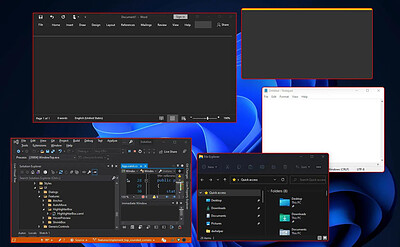
WindowTop enable you to pin any window on top, enable window transparency, even click through transparent window, set window dark/read mode, shrink the window to small size and more.

Always on Top
Easily set window on top and even highlight top-most window with a red frame! You can configure this behavior in settings (frame color, etc).

Anchors
The reason why you may put a window on top is to get back to it faster.

If this is your case, then Anchors is for you! Instead of using Always-on-Top, just use Anchors! They will help you to access the window with a single click! Faster than ALT+TAB, great for touch screens!

And don't worry, the anchors will not disturb you because they automatically move away from any text/image

PiP for any window!
Want to watch some video while working?

No problem! Shrink it! It will enable PiP mode.

In addition, you can even interact with the window while it is in PiP/Shrink mode (See the example!)

PiP Auto-Move!
PiP also come with auto-move option!

It will stay away from text/images for you!

Opacity
Working on something like building a website and want to see your work behind? No problem! Use opacity

Opacity + Click Through
Opacity also includes a feature that allows you to click through a transparent window. This can be useful for designers and graphic artists.

Dark Mode
Working at night? Tired of all the light coming out of the screen and unfortunately, the software does not support dark mode? No problem now!
Note: Unstable in Windows 10 (Stable in Windows 11)

Operating System: Windows 10, 11

HOMEPAGE:
Код:
https://windowtop.info/

FREE DOWNLOAD LINKS:​

Код:
https://rapidgator.net/file/ef4fd04251dc6699f50cda6a503b9818/WindowTop_Pro_5.33_Multilingual.rar
 
b70e6c9ca653bb54b9540b2a9c82cb45.jpg


XL-Connector 3.8.7.0 | Size: 20.61 MB
Language: English
​
XL-Connector is a popular plugin that safely integrates Excel and Salesforce to seamlessly export, import, refresh and transform data with a lightning fast-api connection. It offers Salesforce admins a comprehensive toolbox that easily performs data and metadata management operations in a familiar Excel environment.

Your ideal tool for Salesforce data management in Excel

Export from Salesforce to Excel
Pull data from an existing Salesforce report or build your own SOQL query directly into Excel.

Import data into Salesforce
Manage and transform your data in Excel, and push it back with one click.
- Use all the amazing Excel tools on your Salesforce data: pivot tables, charts, and formulas.
- Perform any data operation with no row limits!
- Ideal Salesforce data cleansing tool
- Access great metadata management tools

Get the most valuable Salesforce plugin for excel
- Saves hours and days of data-loading.
- Image not found
- Private and secure.
- Image not found
- Boosts team productivity.
- Amazing features for data manipulation.
- Image not found
- Improves the quality of your data by keeping it up to date.

Perform and automate any data operation in bulk
Mass create, update and upsert opportunities, accounts, leads, quotes and other SFDC objects with XL-Connector. Become a master of bulk updates and upserts in Salesforce with just a click of a button!

Manage your Salesforce duplicate records
Efficiently merge Salesforce Accounts, Contacts, and Leads in bulk (available in the Enterprise Admin edition).

Delete your Salesforce records in bulk
Mass delete records in Salesforce and keep your data fresh and updated.

Perform your Salesforce Data Migration with the help of XL-Connector
Safely migrate large amounts of data.

XL-Connector: Your Ideal tool for Salesforce metadata management.
XL-Connector is the only Excel to Salesforce connector that provides a complete assortment of metadata management tools that will hugely boost the productivity of Salesforce admins.

These tools enable management of such things as fields, validation rules, processes, picklists, security settings, custom metadata and much more. Tasks that normally take days, like updating the descriptions and help texts of data fields, will take minutes with XL-Connector.

Other XL-Connector great features you will appreciate

Super intuitive user interface
A climax between simplicity and comprehensiveness, The user interface is very friendly and presents a minimal learning curve.

Security by design
XL-Connector is a locally installed app that doesn't send your data anywhere outside of your secure environment. There's no cloud component to it, so the data travels directly between your PC and Salesforce instance over a secure encrypted channel.

HOMEPAGE:
Код:
https://www.xappex.com/

FREE DOWNLOAD LINKS:​

Код:
https://rapidgator.net/file/fd705fca3d5880d5fb51dc425ab11a2a/XL-Connector_3.8.7.0.rar
 
02e18c64f3b3538850ca549807d46454.jpg


ASCOMP Easy Slideshow Professional 2.203 Multilingual | Size: 74.46 MB
Language: English
​
Create Stunning Slideshows with Ease! Easy Slideshow turns your photos into impressive slideshows - with music, effects, and 4K video export.

- Create slideshows with music and transitions
- Over 200 effects for creative transitions
- Export as MPEG in Full HD, 4K, or custom resolution

Select Photos. Create Slideshows. Make an Impression.
Easy Slideshow makes slideshow creation easier than ever.

More than 200 effects and MP3 support
Perfect slideshow with music and transitions
- Select photos via drag and drop
- Set display duration and order
- Add subtitles and captions

Export in Full HD, 4K, or custom resolution
Maximum image quality in compact MPEG format
- Export as MPEG/MP4
- Full HD, 4K, and custom resolutions
- No watermark in the Professional Edition

The Simple Solution for Creative Slideshows

Easy Slideshow - Stunning slideshows with music and transition effects for Windows
Discover Easy Slideshow, the user-friendly Windows software for creating stunning slideshows with music and transition effects. With Easy Slideshow, you can turn your photos into creative slideshows - quickly, intuitively, and without any prior experience. Perfect for memories, presentations, social media, or special occasions.

A special highlight: flexible video export. Create your slideshows with integrated music (MP3) and export them as high-quality videos in MPEG or MP4 format - including 4K and higher. With the Professional Edition, you benefit from ad-free use and can export your slideshows without watermarks.

Create smooth transitions with 200+ effects
A special feature: over 200 built-in effects for impressive transitions between your photos. Whether soft fades, dynamic zooms or creative slide animations - Easy Slideshow offers a wide variety of styles to match any mood or occasion. Designing visually appealing slideshows has never been easier.

Create slideshows quickly and intuitively - without any prior knowledge
Creating a slideshow has never been easier. With Easy Slideshow, simply drag and drop your photos, set the order and display duration. You can also add individual subtitles or captions to make your slideshow even more personal. Whether for personal memories, professional presentations, or creative projects - in just a few steps, you can create a professional-quality slideshow with transitions, effects, and music. Easy Slideshow is the ideal solution for anyone looking to create impressive slideshows on Windows with minimal effort.

Highest image quality thanks to MPEG export in 4K
Easy Slideshow supports exporting your slideshows in Full HD, 4K, and even custom resolutions - tailored to your needs. The final slideshow is saved in the widely used and efficiently compressed MPEG format, ensuring optimal compatibility with almost all devices. Despite the high compression, image quality remains at the highest level - perfect for razor-sharp presentations on monitors, TVs, or projectors.

Private use free of charge - without function limit, with watermark
Easy Slideshow is completely free for private use and offers full functionality. In the free version, a watermark is displayed in the exported video. This watermark is removed in the Professional Edition - for ad-free slideshows without limitations.

HOMEPAGE:
Код:
https://www.ascompsoftware.com/en/products/easyslideshow

FREE DOWNLOAD LINKS:​

Код:
https://rapidgator.net/file/978c5768279d56b40cba20862f8887c1/ASCOMP_Easy_Slideshow_Professional_2.203_Multilingual.rar
 
59bebd62765ce3b9c93857ecdedc4a1e.png


Dehancer Pro 7.5.1 (x64) for Premiere Pro & After Effects | Size: 104.34 MB
Language: English
​
You asked, we listened! Now Premiere Pro and After Effects users can fully enjoy 60+ film profiles and various analog tools of Dehancer. Create cinematic looks and experiment with color grading. Unleash your creativity with Dehancer.

Tools included:
Input camera profiles
Cineon Film Log support
63 Film profiles with print options
Kodak 2383 Print Film
CMY Color Head
Film Grain
Bloom
Halation
Gate Weave
Film Breath
Defringe
Vignette
False Colors
LUT Generator

System Requirements:

Hardware requirements:
PC with Nvidia or AMD GPU
CUDA and OpenCL compatible
External and multi-GPU are supported

GPU memory consumption:
FullHD video - 4GB minimum / 8GB recommended
4K video - 8GB / 12GB
6K video - 12GB / 16GB
8K video - 16GB / 24GB

Software compatibility:
Windows 10 64 bit (genuine licensed installation is required)
DaVinci Resolve 16 and 17

Known issues:
Windows 11 not yet officially supported.

HOMEPAGE:
Код:
https://www.dehancer.com/store/video/aepr

FREE DOWNLOAD LINKS:​

Код:
https://rapidgator.net/file/8e6a02e23dd0958353c8edc8a01de464/Dehancer_Pro_7.5.1_x64_for_Premiere_Pro__After_Effects.rar
 
ef9d7a3b6f096f31e7300e4fe61b8f51.jpg


FolderMatch 5.2.6.0 Multilingual | Size: 21 MB
Language: English
​
FolderMatch is an award-winning Windows software that makes it easy to compare folders & files and find duplicate files. Winner of the prestigious Shareware Industry Award for three consecutive years, FolderMatch is a must-have insurance against data loss.

Compare Folders
FolderMatch is an essential software for anyone who needs to compare two folders. Its intuitive user interface makes it easy to quickly compare two folders and see their differences in a side-by-side layout. With various criteria available to filter the results (Name, Type, Date, Size), you can easily see only the changes that you want to see.

If you want to resolve the differences, FolderMatch allows you to manually copy, move, delete, & rename files and subfolders. If you want, FolderMatch can even synchronize the folders for you! Get FolderMatch today and you'll never have to worry about manually comparing and synchronizing two folders ever again!

Compare Files
FolderMatch is the perfect choice for anyone looking to compare two files quickly and accurately. Whether you need to compare the properties of two files or their text content, we've got you covered. Our program can compare the text content of files and display the differences in a side-by-side layout. We support a variety of formats, including Microsoft Office, OpenDocument, Adobe PDF, RTF, HTML, and XML (both older and newer versions).

With FolderMatch, you have the ability to ignore white space and letter case differences, view differences at the character, word, or line-level, and even configure the output to show line numbers and formatting characters. Plus, you can choose to view all lines or only those that are different, so you can focus on the differences that matter most to you. Try FolderMatch today and take your file comparison to the next level!

Find Duplicates
Are you tired of searching through your files and folders to find and delete duplicates? FolderMatch can help! With one of the fastest duplicate search engines available, our program can quickly locate all your duplicate files, even if the names are different. Simply specify your criteria for what constitutes a duplicate (such as name, size, date, or content), choose which file types to search for (including all types, applications, audio, documents, images, text, and video), and decide which files to include or exclude.

Once the duplicates are found, you can easily select which ones to remove and safely delete them in a variety of ways. And if you ever need to recover a file you've moved, FolderMatch makes it easy to do so. Upgrade your file management with FolderMatch and save time and space on your device.

So much more!
FolderMatch also provides other tools to help manage the contents of your folders. Tools offered include
- A mass file renamer.
- A mass file time stamp editor
- A hex content viewer
- An atomic clock sync utility
- And so much more!

FolderMatch feature list:

Comparison features
- Compares files or folders (including sub-folders) floppy drives, hard drives, CD-ROM drives, zip drives, and network drives (UNC paths supported)
- Supports the following file systems: FAT, VFAT, FAT32, HPFS, NTFS, CDFS, and UDF
- Offers choice of six comparison types: Filename Only, Size Only, Size and Date/Time, Contents, Attributes, Version Stamp
- Supports HUGE files (> 4 GB)
- Supports Unicode folder/file names
- Compares only files and folders that match Include and Exclude filter pattern lists which you define (wildcards supported)
- Include/Exclude System and Hidden Files
- Handles NTFS and FAT timestamp incompatibilities
- Auto-recognizes Daylight Savings Time differences
- Allows for user-specified number of bytes (chunk size) to be read and compared during a Content comparison.
- Remembers the last 20 folder/file pairs compared.
- Shows text differences between two text files, Microsoft Office, Open Document, or PDF documents. (MS Word, MS Excel, and Adobe Reader not required)

Additional features:
- Find duplicate files, even if their names are different
- Safely remove duplicate files
- Rename multiple files and folders
- Sync the dates/times of two files
- Set the date/times of multiple files
- View Hexadecimal binary contents of files (HexDump)
- Sync your PC's system clock with an atomic time server
- Print folder/file comparison results
- Export folder/file comparison results
- Save/Load unlimited Session Settings
- Conforms with Windows Windows 11 32 & 64 standards
- Ridiculously simple to use

HOMEPAGE:
Код:
http://www.foldermatch.com/

FREE DOWNLOAD LINKS:​

Код:
https://rapidgator.net/file/eeb7515227e3c7ba1e56760c1a8d5355/FolderMatch_5.2.6.0_Multilingual.rar

 
8eef2af58286838a88e11c9bbcb21c09.jpg


JAlbum 42.0.5 (x64) Multilingual | Size: 359.05 MB
Language: English
​
Turn your photos into a stunning website in minutes. Drag in your photos, pick a style, press Make. jAlbum generates a complete gallery website you can host anywhere - no coding needed.

Drop your photos
Drag images and videos from your computer straight into jAlbum. Organize into folders, add captions, crop and edit - all in one place.

Choose a skin & press Make
Pick from dozens of professionally designed templates. Customize colors, layout and features to match your style. One click builds your gallery.

Upload to any website
Publish to your own domain via the built-in FTP uploader, or host on jalbum.net. Your gallery works everywhere - no server-side code needed.

HOMEPAGE:
Код:
https://jalbum.net/en/

FREE DOWNLOAD LINKS:​

Код:
https://rapidgator.net/file/87cdee7bd509e05ec6ca93a1d910cdb0/JAlbum_42.0.5_x64_Multilingual.rar
 
a44c4dbbdf30dff41ccc26ec01a47fbf.jpg


KCleaner 4.0.4 | Size: 2.3 MB
Language: English
​
KCleaner is designed to be the most efficient Hard Disk cleaner, tracking every useless byte in order to give you all the ressources you may need for your documents, music, pictures, movies,.

It is the first product of this kind featuring a full automatic mode, which works in background so that you don't have to care about when to launch it.
As a proof of its efficiency, it often finds up to many Gb not even seen by its competitors so. give KCleaner a try ! And if data security is something you are interested in, you'll love the secured file deletion methods proposed by KCleaner, making deleted files unrecoverable by any known mean.

Features
Detects and cleans temporary and useless files (cache, unused setup files.)
Automatic mode working in background
Secured file deletion method
Expert mode : let users control any file deletion done by KCleaner

HOMEPAGE:
Код:
http://www.kcsoftwares.com/

FREE DOWNLOAD LINKS:​

Код:
https://rapidgator.net/file/7565118bd259c1c90c40c4480fa5b8b6/KCleaner_4.0.4.zip
 
e8543cf0ecc355442eca9027a34c7e0c.jpg


LightBurn 2.3.00 Beta 2 Multilingual | Size: 339.7 MB
Language: English
​
LightBurn is layout, editing, and control software for your laser cutter.

With LightBurn you can:
- Import artwork in a variety of common vector graphic and image formats (including AI, PDF, SVG, DXF, PLT, PNG, JPG, GIF, BMP)
- Arrange, edit, and even create new vector shapes within the editor, with powerful features like offsetting, boolean operations, welding, and node editing
- Apply settings like power, speed, number of passes, cut order, brightness & contrast, dithering mode, and much more
- Send the result directly to your laser cutter

Designed to Work With Your Laser
LightBurn talks directly to your laser, without the use of additional software.

We currently support most Ruida, Trocen, TopWisdom, and GCode based controllers. Supported GCode controllers,include Grbl, Smoothieware, Grbl-LPC, and Marlin. Supported Ruida controllers include the RDC6442G/S, RDC6445G, RDC6332G, RDLC-320A, and R5-DSP. Supported Trocen controllers include the AWC708C, AWC608, and TL-3120. More controllers will be added soon, so if you don't see yours listed, send us a message - maybe we're already working on it!

If your controller is GCode, Ruida, Trocen, or TopWisdom based, even if it's not listed it might be supported already - Download the free trial and try it for yourself. If it doesn't work, sometimes it only takes a day or two to make the required changes to support a new board in these existing families.

Please note that LightBurn does not support the stock M2-Nano board in the popular K40 laser. This board does not offer control of power through software - we recommend upgrading the board to take full advantage of LightBurn.

Operating System: Windows 7, 8/8.1, 10, 11 (64-bit only)

HOMEPAGE:
Код:
https://lightburnsoftware.com/

FREE DOWNLOAD LINKS:​

Код:
https://rapidgator.net/file/fa30367bd7f9028bc722901fe8c7da1e/LightBurn_2.3.00_Beta_2_Multilingual.rar
 
9a0898a4d118e01ccd4d81c9683d1e4e.jpg


Line 6 Helix Stadium Native 1.4.1 | Size: 561.77 MB
Language: English
​
Plug Into the Power - Studio and Stage

The Helix® Stadium Native amp and effects plugin brings the supreme sound and immense tone-creation power of Helix Stadium hardware processors to your DAW with seamless integration between the two. It features the same guitar and bass amp, cab, and effects models-including many amps modeled using our highly acclaimed Agoura methodology-and also supports cab IR and Proxy clone loading.

The player-friendly GUI lets you quickly and easily craft, edit, and navigate presets-and the default Hardware Compatibility mode ensures that presets created or edited within Helix Stadium Native are fully compatible with Helix Stadium hardware processors. But Helix Stadium Native isn't just for guitarists and bassists. It also provides powerful tools for producers and engineers, sound designers, film/TV/game composers, electronic musicians, and anyone else seeking to craft new and inspiring sounds. A fully functional 15-day trial license of Helix Stadium Native is available, as is a more streamlined free Helix Stadium Native Intro license.

New Agoura modeling methodology
132 Amplifier models with 152 amplifier channels
260+ Studio-quality effects models
60+ Speaker cabinet models
Seamless integration with Helix Stadium hardware
Cabinet IR and Proxy clone loading
Hype control morphs between ultra-authentic and idealized amp sounds
Focus View with contextual parameter control
Per-preset info and clips
Supports 6 sample rates from 44.1kHz to 192kHz
AAX, AU, and VST3; macOS® and Windows®

HOMEPAGE:
Код:
https://line6.com/helix-stadium-native/

FREE DOWNLOAD LINKS:​

Код:
https://rapidgator.net/file/ba5bf34200d66f5a1d6310e5f58bdcd5/Line_6_Helix_Stadium_Native_1.4.1.rar
 

ea0b97d07e4971283587013a125f4e27.png


Proton VPN v1.3.6/v1.3.7 Web Browser Extension | Size: 2.61 MB
Language: English
​
Security, anonymity and privacy for everyone. Web Browser Extension/Add-on.

Proton VPN is a virtual private network (VPN) service offered by Proton Technologies, the same team behind Proton Mail. It's designed to provide secure, private, and unrestricted internet access.

Features
• No ads
• No logs
• Unlimited data transfer
etc.

The Proton VPN extension is available for these web browsers
Gecko code based: Mozilla Firefox, Waterfox, LibreWolf, Tor, Floorp, Zen, Mullvad
Chromium code based: Google Chrome, Microsoft Edge, Vivaldi, Opera, Brave

Note: Proton VPN is already built into "Vivaldi Browser", therefore you don't need the extra extension.

System requirements: Windows 10 (64-bit), Windows 11

HOMEPAGE:
Код:
https://protonvpn.com/

FREE DOWNLOAD LINKS:​

Код:
https://rapidgator.net/file/15c9c7156221b7eb1ad3ac3009afc101/Proton_VPN_v1.3.6v1.3.7_Web_Browser_Extension.rar
 
63f9b73fcaf02bd9dceef18187582acc.jpg


Rain Cleaner Pro Plus 2.23.0 Multilingual | Size: 65.33 MB
Language: English
​
Rain Cleaner finds what is filling your drive, keeps your drivers current, and frees up resources while you play. Before anything is deleted, it shows you what it found and why it can go.

Why Rain Cleaner?
A cleaner that explains itself first.
Most tools give you one big button and a number. This one gives you a list you can actually read.

You know what is going
Every finding comes with its size and a line saying why it is there. The checkboxes are yours â€" clear any you want to keep.

There is a way back
When a driver is updated, the old one is kept. If something misbehaves, you are back in seconds.

Games feel the difference
Game mode frees memory and silences interruptions, then puts every setting back the moment you finish.

What it does?
Six tools in one program.
Each does one job and tells you what it did.

Cleaning
Frees gigabytes of files that are no longer doing anyone any good.

Drivers
Taken from Microsoft's own catalogue. If the manufacturer has a newer one, it says so.

Game mode
Hands the game the resources the background was quietly holding.

Emergency drivers
Gets a PC with no internet back online, so it can fetch the rest itself.

File protection
Catches the early signs of encryption and stops the program before the damage grows.

Internet
Measures which DNS answers fastest from your connection and offers you that one.

HOMEPAGE:
Код:
https://raincleaner.eu/

FREE DOWNLOAD LINKS:​

Код:
https://rapidgator.net/file/06c151f730b5ff45304dca8674931cbe/Rain_Cleaner_Pro_Plus_2.23.0_Multilingual.rar
 
_c91b28e7e9ddcdf001eb3a2332998536.jpeg


Windows 11. 6H2 Build 26300.9974 (No TPM Required) Aio 16in1 Preactivated Multilingual November 2026 | Size: 7.28 GB
Windows (x64) | Languages: Arabic,English,German,Greek,French,Spanish,Italian,Portuguese-Portuguese,Portuguese-Brazil,Turkish,Dutch,Czech,Norwegian
​
Windows 11 version 26H2 also known as the Windows 11 2026 Update,is built on the same servicing foundation as recent Windows 11 releases. It delivers the latest Windows innovations with a streamlined update experience designed to minimize disruption and help you stay secure, productive, and up to date.

For many eligible devices, moving to version 26H2 is as simple as installing a small enablement package, with a minimal download size, quick installation, and a single restart. Version 26H2 enables most of the features that were introduced in monthly updates for Windows 11, version 25H2.

What's new in Windows 11, version 26H2
Windows 11, version 26H2 is the next annual feature update for Windows 11. It builds on the same servicing foundation as Windows 11, versions 25H2 and 24H2, helping organizations adopt the latest release with minimal disruption. Devices running eligible versions of Windows 11 can move to version 26H2 through a small enablement package rather than a full operating system upgrade.

Because Windows 11, versions 26H2, 25H2, and 24H2 share a common servicing branch, many new features and improvements have already been delivered through monthly servicing updates. Version 26H2 enables selected features and resets the support lifecycle for the new release.

Servicing and deployment
Windows 11, version 26H2 provides a familiar update experience

Delivered as an enablement package for eligible devices running Windows 11, versions 25H2 and 24H2.
Fast installation with a single restart in most scenarios.
Reduced validation effort because supported versions share the same underlying platform.
Consistent management, security, and update experiences across supported releases.
Features enabled by default in version 26H2
For commercial organizations, Windows 11, version 26H2 enables capabilities that were introduced previously but controlled through temporary commercial controls.

Windows settings backup
Windows settings backup is now enabled by default for eligible commercial devices. This helps organizations preserve supported Windows settings and Microsoft Store app lists for recovery and device replacement scenarios. Existing administrator-configured policies continue to be honored.

App-specific actions from the taskbar
Windows 11, version 26H2 enables app-specific taskbar actions by default for commercial devices. Users can thus access common actions directly from taskbar experiences.

File Explorer enhancements
Several File Explorer improvements that were previously under temporary commercial controls are enabled by default in Windows 11, version 26H2. These enhancements focus on improving navigation and usability within File Explorer.

Edition includes
1. "Windows 11 Home"
2. "Windows 11 Home N"
3. "Windows 11 Pro"
4. "Windows 11 Pro N"
5. "Windows 11 Home Single Language"
6. "Windows 11 Enterprise"
7. "Windows 11 IoT Enterprise"
8. "Windows 11 IoT Enterprise Subscription"
9. "Windows 11 Enterprise multi-session"
10. "Windows 11 Education"
11. "Windows 11 Pro Education"
12. "Windows 11 Pro for Workstations"
13. "Windows 11 Enterprise N"
14. "Windows 11 Education N"
15. "Windows 11 Pro Education N"
16. "Windows 11 Pro N for Workstations"

System Requirements
Processor: 2 gigahertz (GHz) or faster.
RAM: 2 gigabyte (GB).
Free space on hard disk: 15 gigabytes (GB).
Graphics card: DirectX 9 graphics device or a newer version.
Additional requirements to use certain features.
To use touch you need a tablet or monitor that supports multitouch.
To access the Windows store to download and run apps, you need an active Internet connection and a screen resolution of at least 1024 x 768 pixels

HOMEPAGE:
Код:
https://microsoft.com

FREE DOWNLOAD LINKS:​

Код:
https://rapidgator.net/file/6f69b3bb698308a378d9f663bddc4d93/Win.11.Aio.26300.9974.Multi..part1.rar
https://rapidgator.net/file/0e7f5524f1e29ab430a104b6688ad671/Win.11.Aio.26300.9974.Multi..part2.rar
https://rapidgator.net/file/1743ad811135c8f739d8f9b9d63f9e4a/Win.11.Aio.26300.9974.Multi..part3.rar
https://rapidgator.net/file/6313670eea63766254c02d86cd984829/Win.11.Aio.26300.9974.Multi..part4.rar
 

4f49357e9cecbd546086d653e838fb8a.png


Windows 11 Pro Ultra Lite 26H2 Build 26300.9725 DeadLine 11 Edition | Size: 1.93 GB
Windows x64 | No TPM | Languages: English
​
This build is a 24H2 LTSC version with an Enablement Package (EP) injected

Windows updates are totally removed.
Plenty weaks have been applied for extreme performance, Responsiveness and much more.
Only English Language.
Hope you enjoy this release.

Build Informations
Windows Updates Integrated
Microsoft account bypassed
Power Plan set to Ultimate Performance with Power Plan applied
Windows Image Viewer is set as default
Tweaks applied for extreme performance, Responsiveness, and Resource Savings
Faster Login
Faster Shutdown
Faster Explorer
Firewall has more district rules
(you can reverse it)
and much more.

Services disabled
Sysmain
Print Spooler
DCHP client is disabled, so no internet, enable it.

Programs
SIB AIO
7zip
OldNewExplorer
Nilesoft Shell

System Requirements For Windows 11
Processor: 2 gigahertz (GHz) or faster.
RAM: 2 gigabyte (GB).
Free space on hard disk: 10 gigabytes (GB).
Graphics card: DirectX 9 graphics device or a newer version.
Additional requirements to use certain features.
To use touch you need a tablet or monitor that supports multitouch.
To access the Windows store to download and run apps, you need an active Internet connection and a screen resolution of at least 1024 x 768 pixels

HOMEPAGE:
Код:
https://www.microsoft.com/

FREE DOWNLOAD LINKS:​

Код:
https://rapidgator.net/file/725d5cd2b7b7893ac683d3886e88bae0/Windows_11_Pro_Ultra_Lite_26H2_Build_26300.9725_DeadLine_11_Edition.rar
 
Назад
Сверху Снизу