








All Emperor2011's Software in one thread !! (updated daily)

e24783d71fba906f82357a9287a66210.jpg


K-Lite Codec Pack 20.1.0 Mega/Full/Standard | Size: 159.88 MB
Language: English
​
The K-Lite Codec Pack is a collection of DirectShow filters, VFW/ACM codecs, and tools. Codecs and DirectShow filters are needed for encoding and decoding audio and video formats. The K-Lite Codec Pack is designed as a user-friendly solution for playing all your audio and movie files. With the K-Lite Codec Pack you should be able to play all the popular audio and video formats and even several less common formats.

Some codec packs are far from being friendly with computers, as they tend to slow down Windows, break down multimedia files and make the whole movie watching experience a nuisance. This is why an efficient software has to be chosen, one that does exactly what it is supposed to without additional and unnecessary features.
Easily deployed on the system
Simply put, this is exactly what K-Lite Codec Pack Full is meant to do. This is one of the most efficient codec packs out there that is not only delivered as a very light package but is also impressively friendly with computer resources.
Installing it is quite easy, unless one is an expert who really enjoys toying around with the advanced settings. K-Lite has numerous advanced customization options but novices are advised not to spend too much time on this section, as they might erroneously modify some options and break the entire process.
View detailed info on what is installed
Furthermore, before going through the step-by-step thorough setup process, one gains access to a list that displays content, along with several details regarding each of the codecs, to give users a glimpse of what they are about to deploy.
If everything goes well and K-Lite Codec Pack Full is successfully installed, users will be able to open any multimedia files stored on their computers, without any quality loss. Furthermore, it works like a breeze from the first run, without major changes to its default settings, which is a clear indication that beginners and those who want a codec that just works have chosen the right package.
Adjust settings with a dedicated tool
Experts have the possibility to configure the audio and video decoders, as well as the DirectVobSub, in an attempt to obtain a top-notch experience when it comes to playing multimedia files. This is easily done with the help of an integrated tweaking tool that, if managed properly it can enhance the overall multimedia experience.
To sum it up
All these considered, K-Lite Codec Pack should be the first on everyone's list when it comes to codec packages. It is light, freeware, easy to use and gets along perfectly even with slower computers. It represents the first brick that needs to be placed in the multimedia entertainment wall.

System Requirements: Windows 11, Windows 10, 8 , 7

HOMEPAGE:
Код:
http://www.free-codecs.com/

FREE DOWNLOAD LINKS:​

Код:
https://rapidgator.net/file/37ccd1d5ae268ac4300cbdf9fdabbe48/K-Lite_Codec_Pack_20.1.0_MegaFullStandard.rar

Код:
https://clicknupload.click/oteylwrx3spq/K-Lite_Codec_Pack_20.1.0_MegaFullStandard.rar
 
_a2784d2a5fd0e153d33a770e1ea1a1c6.jpeg


Managed Switch Port Mapping Tool 2.90.0 | Size: 17.43 MB
Language: English
​
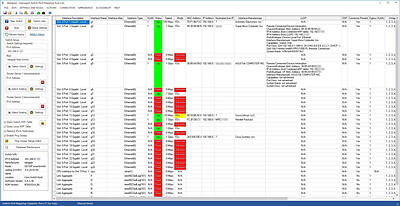
The Managed Switch Port Mapping Tool is software for Windows that discovers devices attached to port connectors on an SNMP managed network switch.

Managed Switch Port Mapping Tool Overview
The Managed Switch Port Mapping Tool is a Windows application designed to 'map' or discover information about a network switch's ports and report on the attached devices. It does this by accessing switch internal information using Simple Network Management Protocol (SNMP) over the network. SNMP access credentials must be provided in order to access the data in the switch. The amount of data retrieved depends on the extent of the switch manufacturer's SNMP implementation.

What information can we get from the switch?
The Managed Switch Port Mapping Tool can retrieve essential information needed by network administrators such as the port identification or naming, status, speed and VLAN assignments. See the MAC addresses of attached devices and optionally IP addresses and device hostnames. Need help with topology? we can display LLDP, CDP, Link Aggregation (LACP/LAG/IEEE802.3ad/PAGP) information recorded by the switch showing connectivity to devices, other switches or servers.

Switches can be manually mapped one at a time or in groups using Switch Lists
Switch mappings can be done manually from the GUI interface or through command line parameters on a scheduled basis using Windows Task Scheduler (the GUI will appear even if started from the command line). The results of every switch mapping are automatically saved into an SQLite database for later retrieval, searching or analysis. Results may be optionally saved to XML text files for independent analysis using spreadsheets.

Product Information
The Managed Switch Port Mapping tool communicates with managed Ethernet network switches using SNMPv1/v2c/v3 and discovers the MAC addresses and other information about devices attached to the physical port jacks on the front of the switches. The app requires Microsoft Windows® and can be also used on Apple MAC OSX if you use Windows inside a virtual machine like VMware Fusion or Parallels.
No switch is too big or too small, but it must be capable of being 'managed' using SNMP (simple network management protocol) and it must support certain MIBs. It's been used on switches as small as the Cisco SF 300-08 series all the way up to core switches like the Cisco 6500 series.
Simple to use: enter the switch IPv4 address and the SNMP v1/v2c/v3 read-only credentials. Then press Map Switch. We do the rest. Watch one of the videos to see it in action.
Results are presented in a spreadsheet-like grid. Print the results or export them to your favorite spreadsheet program as either tab-delimited text or as XML.
Available as an app installed on your hard drive or as a fully portable app that runs from a USB Flash Drive.

Features
Fast - supports SNMP v2c/v3 Bulk Transfer mode. This mode reduces required SNMP bandwidth.
Map Switches Manually one at a time or as a set of switches in a list.
Switch Lists - map a group or set of switches, record the mapping results in the History Database and optionally automatically export the XML results for each switch to files as the switch list is mapped.
History Database - all switch mappings are automatically saved here. Searchable. Review a switch mapping at a later time.
SNMPv1/v2c/v3 - supports USM access model SNMPv3 requests.
Command Line - run the app from the command line using various options. Use Windows Task Scheduler to map a switch or switch list when you need it mapped. (The GUI will appear if started from the command line)
Optional Columns - over 25 optional columns supporting RMON and Cisco packet related counters including overruns etc. Also columns reporting Voice VLAN, Trunking, Port Security (preceding are for Cisco switches only) and Assigned VLANs.
LLDP and CDP neighbor information are reported by the switch. See neighboring devices like other switches and routers connected to a switch port (if they have LLDP or CDP enabled).
Link Aggregation - LACP LAG (IEEE 802.3ad), PAGP and legacy HP Trunk links between switches or switches to servers are shown in the Type column and color coded for easy identification of the aggregation ports and their member ports.

Operating System:
Windows 11, 10 32 or 64 bit editions (requires GUI, this is not a command line tool) - Windows server GUI editions will work too, but be aware that data is saved in separate user locations - different users cannot access the same data.

HOMEPAGE:
Код:
https://www.switchportmapper.com/

FREE DOWNLOAD LINKS:​

Код:
https://rapidgator.net/file/faffdc57273bed628580d5c45dc8df7d/Managed_Switch_Port_Mapping_Tool_2.90.0.rar

Код:
https://clicknupload.click/8ugn870efd7e/Managed_Switch_Port_Mapping_Tool_2.90.0.rar
 
00379b13dcf9137a0358f1cdd2b9114b.jpg


NoteCase Pro 4.9.8 Multilingual | Size: 45.94 MB
Language: English
​
Do you care about your information? NoteCase Pro is designed to quickly capture, organize, protect, access, and recycle your information. NoteCase Pro strikes the right balance between ease of use and raw power.

Multi-platform
Desktop version supports Windows, Macintosh, Linux, FreeBSD, OpenBSD and Solaris. Mobile platforms include Android*, Raspberry Pi, Nokia Maemo and OpenPandora.

Multilanguage
NoteCase Pro's user interface comes in many different languages including English, German, French, Italian and Chinese. You can contribute your language translations if not supported.

Rich import format support
NoteCase Pro can import data from more than 30 different file formats, including Evernote, XMind, TreePad, Tomboy formats. This allows you to quicky move your data over from other programs.

Rich export format support
NoteCase Pro content can be exported into different file formats, making data exchange with other software easy. Standard formats line HTML, RTF, OPML are supported.

Spellchecker
Let NoteCase Pro observe and correct your orthography with dictionaries that are able to learn new words.

Tags
You can assign tags to your notes in order to enable more powerful searching or filtering of content.

Printing
Bring NoteCase Pro content to paper, either an entire document, only one branch or a single note.

Task management
Each note can be a task, reminding you about its due date, supporting repetitions and prioritization.

Plugins
Extend the feature set of NoteCase Pro by using Plugins or even writing your own Plugins using the easy-to-learn Lua scripting language. You can also automate NoteCase Pro very flexibly using simple Lua scripts and the several hundred of NoteCase Pro API commands.

Attachments
Each document note can have an arbitrary number of file attachments. Attached files are saved inside the NoteCase Pro document file, so giving away a complete NoteCase Pro document including attachments is as easy as transfering one file.

Rich text editing
Document text offers rich formatting with hyperlinks and embedded pictures. You can attach files or record audio directly into document notes.

Audio notes
Add audio to your NoteCase Pro notes: Audio protocols of meetings, self-spoken notes that you later transscribe into a text note etc.

HOMEPAGE:
Код:
http://www.notecasepro.com/

FREE DOWNLOAD LINKS:​

Код:
https://rapidgator.net/file/f098e0bb01b6dffd462f03b6576f92be/NoteCase_Pro_4.9.8_Multilingual.rar

Код:
https://clicknupload.click/rd8dopwdt9dp/NoteCase_Pro_4.9.8_Multilingual.rar
 
35b3d40e898fc4915d559a698d737751.jpg


ProductionCrate LaForge Suite 1.6.14 | Size: 154.31 MB
Language: English
​
The LaForge Suite is a collection of powerful plugins that enable you to do even more in After Effects and Premiere Pro.

System Requirements: Windows 10, 11

HOMEPAGE:
Код:
https://www.productioncrate.com/plugins

FREE DOWNLOAD LINKS:​

Код:
https://rapidgator.net/file/ff806aac15778264ac861c2464482a02/ProductionCrate_LaForge_Suite_1.6.14.rar

Код:
https://clicknupload.click/0q2h9dhff4cb/ProductionCrate_LaForge_Suite_1.6.14.rar
 
63d865b4f51c55644506f7f3628eed2c.jpg


R-Studio 9.5 Build 191850 Network / Technician Multilingual | Size: 143.87 MB
Language: English
​
Empowered by the new unique data recovery technologies, R-Studio is the most comprehensive data recovery solution for recovery files from NTFS, NTFS5, ReFS, FAT12/16/32, exFAT, HFS/HFS+ and APFS (Macintosh), Little and Big Endian variants of UFS1/UFS2 (FreeBSD/OpenBSD/NetBSD/Solaris) and Ext2/Ext3/Ext4 FS (Linux) partitions. It also uses raw file recovery (scan for known file types) for heavily damaged or unknown file systems. It functions on local and network disks, even if such partitions are formatted, damaged or deleted. Flexible parameter settings give you absolute control over data recovery.

R-Studio utilities recover files:
Deleted without Recycle Bin, or when Recycle Bin has been emptied;
Removed by virus attack or power failure;
After the partition with the files was reformatted, even for different file system;
Recovering data if: VIRUS has invaded; FAT is damaged; MBR is destroyed; FDISK or other disk utilities have been run;
When the partition structure on a hard disk was changed or damaged;
Data recovery on damaged or deleted partitions;
From hard disk with bad sectors;

Support for:
Basic(MBR), GPT, BSD(UNIX), APM(Apple partition map) partitions layout schemes;
Dynamic volumes, Windows Storage Spaces (Windows 2000-2022/8.1/10/11);
Apple software RAIDs, CoreStorage, File Vault, and Fusion Drive;
Linux Logical Volume Manager (LVM/LVM2) and mdadm RAIDs;
R-Studio can automatically recognize and assemble the components of these disk managers even if their databases are slightly damaged. Their components with severe corrupted databases can be added manually.

Advanced data recovery algorithm:
to increase the quality of file recovery when the file system is not damaged;
to recover files that are not recognized in file system metadata and not found during a disk scanning procedure;
to fast search for lost partitions;
to recover files from devices with unknown file systems, including HD, CD, DVD, floppy disk, Compact-Flash Card, USB drive, ZIP drive, Memory Sticks and other removable media.

Support for specific file system features:
Recognitions of localized names;
NTFS encrypted files, NTFS alternative data streams, NTFS data deduplication, NTFS LogFile, NTFS Symbolic Links & Directory Junctions;
ReFS: symbolic links, directory junctions, deduplication;
HFS+ journal processing, HFS+ extended attributes, HFS+ compressed files;
Advanced APFS recovery: support for encryption;
Ext2/Ext3/Ext4 FS/UFS journal processing and extended attributes;
Recovery of names and paths for files deleted to Recycle Bin and Trash.

In-depth file analysis:
Extended file search and mask capabilities;
Estimation of chances for successful file recovery;
Verbose file information. Even more extensive file information in the Technician version: specific file system info, overlapping files, disk regions, etc;
File recovery lists for mass file recovery. File recovery lists with extensive file information in the Technician version.

System Requirements:
An Intel-compatible platform running Windows 11/10/8.1/8/7/Vista/XP/2000 Windows Server 2022/2019/2016/2012/2008/2003.
At least 256 MB of RAM, a mouse, and enough disk space for recovered files, image files, etc.
The administrative privileges are required to install and run R-Studio utilities.
A network connection for data recovering over network.

HOMEPAGE:
Код:
https://www.r-studio.com/

FREE DOWNLOAD LINKS:​

Код:
https://rapidgator.net/file/4fc3b4b286570779e8c5caa6e4178c7c/R-Studio_9.5_Build_191850_Network__Technician_Multilingual.rar

Код:
https://clicknupload.click/tnv1rzjuikr5/R-Studio_9.5_Build_191850_Network__Technician_Multilingual.rar
 
245c4455f984e62847d4df83fd71a419.jpg


Valentina Server 18.3.0 | Size: 61.8 MB
Language: English
​
Serve reports from all major databases or with its own advanced, object-relational database system.

Valentina Client ADK for iOS
Build iOS apps with an embedded VCLIENT to Valentina Server

Valentina Forms Server
Register Valentina Forms to Valentina Server to share them with colleagues and clients.

Fast Web Applications
Build high performance server-side web applications with PHP, Python or Ruby on Rails.

Valentina Reports Objects
Build your report visually with drag-and-drop, scriptable report objects in Valentina Studio Pro.

REST & JSON Access Anywhere
Build web applications accessible anywhere using these lightweight protocols.

Notifications
Valentina Server can push notifications through a notification channel which in turn can spread among subscribing applications asynchronously.

Hot Back Up Your Data
Automatically back up your databases to any directory on your network without having to shut down your server.

Valentina SQLite Server
Valentina SQLite Server is a full featured, standards compliant multi-user access SQLite based database server.

Event Scheduler
Automate business and data management processes with Valentina Server support for triggers and event scheduling.

Valentina Reports Server
Server-side business applications with a data-rich reports, charts, graphs, barcodes, export to PDF, HTML and more with all major databases and servers.

Auto Discover on Network
Optionally make Valentina Server automatically and securely discoverable on your network using Bonjour, a form of zero-config.

Valentina DB Server
Blazingly fast object-relational database server based on the Valentina DB core model.

HOMEPAGE:
Код:
https://valentina-db.com/en/valentina-server-overview

FREE DOWNLOAD LINKS:​

Код:
https://rapidgator.net/file/2c042b867bd4e1758114f97288b9a2e6/Valentina_Server_18.3.0.rar

Код:
https://clicknupload.click/rujnfq9vdqua/Valentina_Server_18.3.0.rar
 
eb5cf0a50afdbd7e6a906a651fea706d.jpg


Valentina Studio Pro 18.3.0 (x64) Multilingual | Size: 77.19 MB
Language: English
​
Valentina Studio is a powerful database management application for MySQL, MS SQL, SQLite, PostgreSQL, and Valentina. It bundles various tools to help you keep track of connections, servers and local databases from an intuitive dashboard, also featuring a schema editor and an SQL builder, diagnose tools and data transfer capabilities.

Manage connections and generate reports
Its start page is the place where you can see all the servers and databases, set up new connections, and tamper with server settings. New SQLite or Valentina databases can be created without having to go enter commands or go through complex configuration processes.

Additionally, Valentina Studio enables you to create so-called projects, which comprise the results of executed database queries, alongside external resources, so as to help you generate comprehensive reports about the analyzed data. Moreover, you get to design a custom report label using the integrated editor, which delivers basic text formatting options and a generous set of controls, text fields, shapes, and so on.

Integrated schema and SQL editors
Thanks to the built-in schema editor, working with large data sets is much easier. The editor displays detailed information about each database and enables you to edit object properties, tamper with tables, fields and indexes, change constraints, links, procedures, sequences and data types, and perform searches within the database. Furthermore, you can create visual diagrams to get an overview of the database structure.

The SQL editor adds even more value to this suite of tools, providing users with an intuitive query creation tool with syntax highlighting, line numbering, auto-completion, and a function browser that comes with a wide array of commands you can use. To ease your work, Valentina Studio comes with several templates you can start with. Queries can be executed on the spot, and the editor shows all the found errors or warnings.

Smart database management and query execution
Managing databases and executing queries is easier with Valentina Studio, due to the user-friendly working environment and the smart combination of tools it provides. On the downside, the number of supported database types is rather limited.

Valentina Studio can also run connection diagnosis, compress, reindex and clone data, so some might say that the above does not cover its entire feature set. Those who are working with databases on a daily basis will surely want to discover more on their own.

HOMEPAGE:
Код:
https://valentina-db.com/en/

FREE DOWNLOAD LINKS:​

Код:
https://rapidgator.net/file/48c123cdb5d66545d82b7bced0344ef4/Valentina_Studio_Pro_18.3.0_x64_Multilingual.rar

Код:
https://clicknupload.click/46fz4m8bvd92/Valentina_Studio_Pro_18.3.0_x64_Multilingual.rar
 
Назад
Сверху Снизу