All Emperor2011's Software in one thread !! (updated daily)

_dd28bf980c3b258afb24703ec3075edc.jpeg


AlbusBit NTFS Permissions Auditor Pro 26.8.26 | Size: 15.09 MB
Language: English
NTFS permissions are used to manage access to the files and folders in NTFS file systems. NTFS Permissions Auditor allows you to quickly analyze, verify and review any NTFS folder permissions. Our free version provides you with deep and detailed audit results while the Pro version offers additional features such as powerful, customizable filtering, exports to various formats, and more.

Easy to setup and get started
Get up and running with just one installation - no other configuration is needed.

Fast and accurate
Immediate and accurate insights into NTFS permissions for all target folders.

Versatile filters
The filters incorporate lots of factors - use 'And' and 'Or' to manage them and get the information you need. You can even add more factors after you've filtered by department, position or manager if necessary.

The account view
This view allows you to see users and groups, and all the rights and directories for each user.

Optimized caching mechanism
To make results faster and more efficient than with similar tools.

Use filters during or after the audit to get the exact information you need
- Basic permission
- Advanced permission
- Permission access type (Allow/Deny)
- Permission is inherited
- Directory inherits permissions
- Domain name (NetBIOS)
- Domain SID
- Group contains no members
- Permissions are identical to parent directory
- SID cannot be resolved to account name
- Apply to
- Directory full permissions list
- Account state
- Account name
- Account SID
- Account disabled
- Folder owner
- Account manager
- Account department
- Account job title

Export
You can export audit results to a range of file formats including Excel (XLSX), CSV, XML, HTML and PDF. Exports can be performed in two ways - folder view export (categorized by folders) and principal view export (categorized by accounts).

Folder tree view
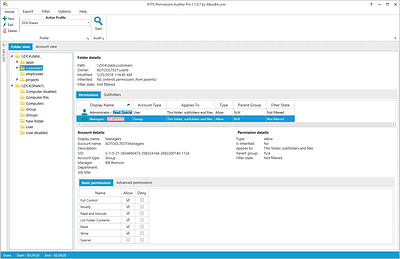
Hierarchical folder view providing all folder details such as path, owner, permissions, etc.

Account view
See all users, groups and computers, and all directories to which they have access.

Account data
See the main information about the account - display name, security identifier (SID), description and additional data such as department, manager, job title, etc. For group accounts, you can display information about direct and nested group members.

Powerful and diverse filters
The filter manager offers a wide range of options to filter audit results and can be applied in two ways - audit time filtering and post audit filtering, which enables you to filter data and change filter conditions without needing to redo the audit.

Exclude directories and accounts
Exclude unnecessary directories by specifying the exact path or just the directory name. You can also exclude system directories and reparse points from your audit results, limit audit depth by specifying directory depth limit and exclude disabled accounts and specific accounts from audit results.

Data storage
All data can be stored in the local, secure database. No additional setup is needed - it's all included in the installation. You can access historical audit data at any time.

Don't overload Your system
Fast and efficient, it uses RAM and CPU efficiently to generate results as quickly as possible without overloading PC resources. It uses various caching mechanisms to reduce Active Directory request counts to the minimum.

Change reports
You can compare two audit results and see what has changed. Change reports will show you which directories, directory permissions and group members have been removed, added or modified.

Software Requirements:
Windows operating system starting from Windows XP SP3 and above (including Windows 10 and Windows Server 2016).
Microsoft .NET Framework 4 Client Profile and above.

HOMEPAGE:
Код:
https://albusbit.com/

FREE DOWNLOAD LINKS:

Код:
https://rapidgator.net/file/47bfe3a0c3404b88d1e74ab341bfef95/AlbusBit_NTFS_Permissions_Auditor_Pro_26.8.26.rar


Код:
https://nitroflare.com/view/F606A27F335F369/AlbusBit_NTFS_Permissions_Auditor_Pro_26.8.26.rar
 
f3c4e8eed963d56f3bc9a6bb5e49af28.jpg


Ashampoo Snap Pro 26.0.4 (x64) Multilingual | Size: 257.41 MB
Language: English
With Ashampoo Snap Pro 26, creating screenshots and videos is easier than ever! Everything that appears on your screen can be captured in seconds. In the image editor, you can edit, annotate, save, and share your captures instantly. New: With Live Edit, you can even mark content directly on your Desktop before the screenshot is taken. Snap Pro 26 also enhances your screenshots with graphical elements such as automatic numbering, comments, stickers, and more. Whether you're working from home, explaining something quickly, or creating detailed tutorials, Snap Pro 26 lets you get the job done faster.

Screenshots and video recordings with scrolling function, sound option and quick access via hotkeys
Direct editing with text, highlighting, numbering, blur tools and a handy screenshot library
Ideal for instructions, tutorials and documentation with flexible export as PNG, JPG, PDF and cloud upload

Live Edit-Mark directly on your desktop
Live Edit places a transparent layer like a sheet of glass over your screen. On this layer, you can draw arrows, add text, or highlight areas directly on top of the content you want to explain. Unlike traditional screenshot tools, your screen does not freeze during this process. You can switch back to your Desktop at any time to move windows, adjust content, or let a video continue playing, and then continue working on your annotations. This way, the final screenshot evolves step by step without having to restart the process.

Prepare and create screenshots faster
With Live Edit, multiple screenshots can be prepared and created within a single workflow. Annotations remain visible while you continue working on your Desktop and can be adjusted at any time. Especially with large workspaces or multi-monitor setups, Live Edit provides plenty of screen estate to organize content clearly. The final screenshot is then created directly from the Live Edit view-What you see is always what you get!

Better performance, stability and resource efficiency
The new Ashampoo Snap is built on a fully modernized technical foundation: The program starts faster, responds more quickly, and operates more smoothly overall. At the same time, memory usage and background process activity has been significantly reduced so Snap remains responsive and stable even during longer sessions. This new foundation improves everyday performance while also preparing Snap for future enhancements and new features.

Enhanced workflow and modernized interface
We have also improved many details for everyday work with Snap. The image editor's toolbar is smarter and supports your workflow even better. The properties bar has been restructured to provide a clearer and more consistent user experience. The updated color scheme improves readability and makes longer working sessions less strainful. With Quick Scroll, you also get a smart thumbnail preview that automatically appears when needed and helps you navigate large captures more easily.

More practical improvements
Many already useful features have been further refined: Cliparts now support drag & drop and image imports are more convenient, tools like the arrow tool offer better precision, and additional output formats are available for emailing images. The print dialog has also been updated and now supports margin settings in centimeters. In addition, video exports now support a quality settings to save storage space or speed up exports.

Smart desktop capturing and sharing
Once active, Snap's magic eye auto-detects elements below your mouse pointer (browser windows, program menus, images, etc.) and offers instant 1-click capturing with pixel precision. But it doesn't stop there: Snap can also capture custom rectangular or freehand regions and even supports scrolling content! Naturally, the program supports all possible kinds of sharing options, including email and Ashampoo Web!

Optical character recognition (OCR) for your screenshots
As of now, Snap no longer recognizes just 7 but over 180 languages! Our new text recognition utilizes Windows' own language packs and produces better results faster. Chances are you won't be needing over 180 languages straight away so, in the interest of simplicity, we've limited the number of initially available languages to the system languages currently installed on your machine. You can easily add additional languages via the "Add language" menu item.

Fast and easy video cutting
Not every video recording is an instant success. Ads, extra steps or pauses are a frequent bother. The same applies to screen captures. Keep the important bits and get rid of the rest with Ashampoo Snap! Remove ads, glitches or superfluous scenes or split your video into individual episodes. It doesn't matter whether you're casually pointing and capturing, creating an extensive webinar or producing a high-quality presentation: With Ashampoo Snap, every video capture comes out a success!

Create videos for any purpose
Creating instructional videos or documentaries is a breeze with Ashampoo Snap. Recordings are live-annotable with texts, drawings and voice narration. Clear things up with visualized mouse clicks and key strokes and add watermarks to protect your intellectual property. Take it to the next level and add live feeds from your webcam in a single click. Here's your ticket to create engaging tutorials, prepare instructive webinars and to point the way to the things that matter most to you-literally!

Perfect for different screen resolutions and multi-display environments
Ashampoo Snap fully supports multi-display setups, even with different resolution and DPI combinations, e.g. mixed Full HD and 4K environments. Each display is captured at its individual resolution for maximum crispness and results are instantly editable. And once you're in the editor, it's smooth sailing for beginners and professionals alike!

Create GIFs from any video
What would the internet be without those charming GIF animations? But GIFs can also be used in tutorials or demonstrations to great effect. Ashampoo Snap can turn any video segment into GIFs. Just set the start and end positions, fire up the built-in converter and you're done!

More than a snipping tool: extensive comfort features
Ashampoo Snap does most of the heavy lifting for you. Automatic numbering or time-delayed captures will help you make the most of your shots. Freely annotate your captures with texts and drawings or use flood fills. Put the spotlight on individual portions, blur sensitive data and use the highlighter to direct attention in style!

Capture desktop contents and save videos or images from the internet
The internet is brimming with fascinating images, texts and videos. Ashampoo Snap makes it easy to capture what you like! Save image and videos and edit them on the fly and to your liking! Anything you see on your screen, or hear through your sound card, Snap can capture!

System requirements: Windows 10-11, Windows 8.1, Windows 8, Windows 7

Language: Multilingual

HOMEPAGE:
Код:
https://www.ashampoo.com

FREE DOWNLOAD LINKS:

Код:
https://rapidgator.net/file/37f7f6c5ce6dcf93585b06527ade91b6/Ashampoo_Snap_Pro_26.0.4_x64_Multilingual.rar


Код:
https://nitroflare.com/view/F96E525468F53FB/Ashampoo_Snap_Pro_26.0.4_x64_Multilingual.rar
 
d479364cdde6a07e5007bf8fd8af3d18.jpg


Automatic Email Processor 4.7.2 | Size: 86.33 MB
Language: English
Automatic Email Processor is the complete solution for Outlook to store and print incoming emails and their attachments automatically. For this, various filters, flexible configuration options, such as individually definable storage folders and the possibility of subsequent processing are available. For example, the path of the location where you want Automatic Email Processor to save certain emails or email attachments, can be assembled dynamically from individual properties of an email.

For storing email messages, among other things, the output format can be specified (e.g. PDF, RTF or HTML). The standard Outlook message format (save email as MSG file) is particularly suitable for archiving important messages. The program supports the creation of an unlimited number of rules in order to be able to make separate settings for different email accounts. In addition, rules can be applied to emails of a certain period of time or to all emails already received in an Outlook folder.

Monitor Outlook folders
Examine incoming emails and apply appropriate rules.

Automatically save emails and attachments
Save emails and email attachments from Outlook automatically into dynamically created folders.

Print emails automatically
Send certain emails and attachments directly to the printer (for example, fax emails).

Optional further processing
Perform subsequent tasks, e.g., run a program with the filename of a saved attachment passed as parameter.

With Automatic Email Processor, you can:
• save emails automatically (as PDF file or in the original format)
• automatically print emails and email attachments (PDF files, Office documents etc.)
• save attachments automatically (save all or certain attachments of an email by using a filter)
• extract or print certain or all files from ZIP files
• monitor an unlimited number of Outlook folders
• create custom rules for different tasks
• filter by subject, sender, recipient, attachment file name .
• receive status reports by email, forward messages or inform the sender
• use command line parameters: only one run, exit, catch-up
• create storage folders dynamically from properties of an email
• perform subsequent actions such as start a program with parameters, mark the message as read, or move the email into another Outlook folder
• re-process all emails (with certain criteria) of an Outlook email folder
• archive emails from any Outlook folder and period (e.g. as MSG files)
• have the email moved to a different Outlook folder after processing and have subfolders generated dynamically from properties of the email
• have an Excel report with an overview and detailed information sent to you on a regular basis
• limit the automatic processing of email messages to certain days and times

Automatically print emails and attachments from Outlook
Automatic Email Processor monitors Outlook and allows you to send emails or attachments that meet pre-defined criteria directly to a printer upon receipt. Different print settings can be defined for each rule, for example to be able to print certain emails in a different quality. The respective printer can be defined individually for each rule as well as separately for printing the email message or attachment. You can also specify that only certain pages of the email should be printed automatically (for example, print only the first or last page of a PDF attachment of the email).

Automatically save incoming emails as PDF files
With Automatic Email Processor, emails received in Outlook can automatically be saved into a specified directory as PDF file, for example, in order to keep a copy of the message for backup purposes. Attachments and the email itself can also be embedded (as MSG file with or without digital signature) in the PDF file. The path as well as the folder and file name of the PDF file to be saved can be composed of various properties of the email, such as the date and, for example, a part of the subject.

Automatically save and optionally detach Outlook email attachments
In addition to archiving the complete email, Automatic Email Processor can also automatically save attachments. The properties of the email and the name of the attachment can become part of the path, i.e. properties such as the sender name can be integrated in the folder and file name. After successfully saving the attachments, they can be detached or, more precisely, replaced by a link file containing only the path of the saved attachment. This can prevent problems caused by too large Outlook PST files and save storage space. The detachment of the attachment can optionally be done with a time delay - for example, two weeks.

Operating System: Windows 11, 10, 8, 7 or Server (32-bit or 64-bit version)

HOMEPAGE:
Код:
https://gillmeister-software.com/

FREE DOWNLOAD LINKS:

Код:
https://rapidgator.net/file/643f22988133752a054e163338fc5368/Automatic_Email_Processor_4.7.2.rar


Код:
https://nitroflare.com/view/4D576C4CAFF4097/Automatic_Email_Processor_4.7.2.rar
 
fd839fb045aa20709fd713bcffede137.jpg


Awesome Miner Ultimate 11.5.9 Multilingual | Size: 104.52 MB
Language: English
Complete solution to manage and monitor mining operations. Powerful for large scale mining. Scalable up to 200,000 ASIC miners and 25,000 GPU/CPU miners. Feature rich and flexible to serve high demanding operations.

Maximize profit - Minimize downtime
Profit switching based on real time revenue and power consumption
Detection of mining issues with automatic recovery

Optimized Antminer firmware
15% higher performance for Antminer S19 and 40% for Antminer S17
Improved power efficiency and more features

Native overclocking
Use the Native overclocking to control the clock speed, voltage, power and fan properties of your GPU's. Awesome Miner provides the unique feature of performing overclocking operations for both AMD and nVidia GPU's without using any external applications.
The overclocking can automatically be applied at a large scale across an entire mining farm based on the current mining algorithm.

Profit switching
The Profit switching feature will optimize the mining for maximum profitability based on statistics from both standard mining pools and multi-coin pools. Access all popular mining pools with just a click to get started with the profit based mining right away.
Use the benchmark to let Awesome Miner test multiple mining algorithms and mining software and measure the hashrate and power usage for each of them to optimize the profit switching decisions.

Power consumption
The current Power consumption is displayed for both AMD and nVidia GPU's, independent of which mining software being used. The mining profit is calculated and displayed in real time based on the current power consumption, hashrate and the current mining pool.

Any crypto currency, Any software
Includes support for over 50 of the most popular mining software. Several hundred crypto currencies are included with statistics and revenue information. Full flexibility to add and deploy any custom mining software, algorithm, crypto currency and mining pool.

Requirements
Supports 32-bit and 64-bit editions of Windows 7, Windows 8, Windows 10 and Windows 11
Requires Microsoft .NET Framework 4.7.2 or later (already included in Windows 10 since April 2018 and Windows 11)
GPU and CPU mining software requires a 64-bit edition of Windows and the following packages to be installed on all GPU mining computers:
Redistributable Packages for Visual Studio 2015 - 2019 from Microsoft

HOMEPAGE:
Код:
https://www.awesomeminer.com/

FREE DOWNLOAD LINKS:

Код:
https://rapidgator.net/file/9d646d8e462579cfbd64a5242dfe5500/Awesome_Miner_Ultimate_11.5.9_Multilingual.rar


Код:
https://nitroflare.com/view/656B69638A54BC2/Awesome_Miner_Ultimate_11.5.9_Multilingual.rar
 
_6945f6271be2d6189d6e100da688869e.jpeg


Bitvaerk File Juggler 3.1.6 | Size: 11.33 MB
Language: English
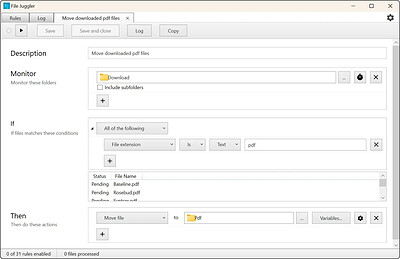
File Juggler makes it easy to create automatic workflows with files.

Watch your files fly magically in place
Create powerful file automation rules, and sit back and watch as your files are renamed, moved, deleted as you want. Instantly and automatically.

Automatic document organizing
Save hours of boring manual document organization. File Juggler reads the contents of your files and puts them in the right spot while you do your real job.

HOMEPAGE:
Код:
https://www.filejuggler.com/

FREE DOWNLOAD LINKS:

Код:
https://rapidgator.net/file/b5206f4fe4095f5003668ce20176f1c4/Bitvaerk_File_Juggler_3.1.6.rar


Код:
https://nitroflare.com/view/4CFE916E002ADBC/Bitvaerk_File_Juggler_3.1.6.rar
 
976511818c4e8a5ef01d765e72f67225.jpg


BootRacer 9.60.0 | Size: 25.2 MB
Language: English
BootRacer is a light-weight, easy to use and convenient tool for monitoring the Windows PC boot time and controlling over startup programs. The main approach of BootRacer is an ability to exclude a user password timeout time from the calculated total.

How does BootRacer save my time and my life?
BootRacer calculates the clear Windows boot-up time (without password timeout).
It monitors your PC's boot time and notifies you about any speed degradation.
BootRacer measures Total Time used by startup programs at every boot.
You will know which programs slow down Windows boot-up.
You can easily disable slow down programs from Windows startup.

System Requirements
A personal computer with Windows 2000/XP/2003/Vista/2008/Seven/Windows 8/8.1(32 or 64 bit)/Windows 10.
The amount of disk space you need to install BootRacer is approximately 20 MB.
The memory requirements for BootRacer are similar to those for your operating system.

HOMEPAGE:
Код:
http://greatis.com/

FREE DOWNLOAD LINKS:

Код:
https://rapidgator.net/file/e5b744bbe18bf29dd36b5a212f8cc8a5/BootRacer_9.60.0.zip


Код:
https://nitroflare.com/view/7CBE6C478334164/BootRacer_9.60.0.zip
 
441f9c5fec0ae9ebad72b635bdc3f328.jpg


Craft Edge Sure Cuts A Lot Pro 6.086 Multilingual | Size: 88.33 MB
Language: English
"Sure Cuts A Lot Pro" is an extremely easy program to allow you to cut virtually any shape with your electronic cutting machines, vinyl cutters and plotters. Great for sign making, vinyl cutting, crafts and so much more. With the combination of using your fonts, importing custom artwork and drawing your own shapes, the possibilities are endless!

What's New in Version 6:
New effects added, including Cast Shadow, Monogram, Rays, Rhinestone Scatter.
More options to customize Rhinestone designs.
Create Data Source Copies, to easily replace text for different variations of the same design.
Set cut lines to be scored.
More options to choose, select and replace colors.
More path options to Divide overlapping shapes.
Convert square corners to rounded corners.
Text is now imported from SVG and PDF files.
Larger workspace area.
Generate bar codes.
Options to control the cut order.
Apple Silicon (M1,M2) Native Mac version.
and more!

Sure Cuts A Lot Pro supports a variety of electronic cutting machines:
Black Cat Cougar/Lynx
BossKut Gazelle
Brother ScanNCut (export as FCM compatible files only) *
Craftwell eCraft
CraftRobo
Cricut Air/Explore/Joy/Maker (export as SVG to upload into Design Space only) *
GCC
Graphtec
Foison
i-Craft
Ioline
Janome Artistic Edge
Jinka
KNK
Liyu
Mimaki
MyDigiDi
Pazzles Inspiration/Pro/Vue
PrismCut
Ramtin
Roland
Saga
Secabo
Seiki
Silhouette SD/CAMEO/Portrait/Curio
Silver Bullet
Siser Juliet/Romeo
SkyCut
StarCraft SOLO
Teneth
USCutter Copam/LaserPoint/MH/PCUT/SC/TC/TITAN
Vicsign
Vinyl Express
Wishblade
and more!

Pro Features
Extended cutting length to cut longer than 72 inches
Weeding options to easily add weeding boxes and lines
Tiling
Duplicate cutting
Cut by color
Color layer alignment
Print & Cut (Contour Cutting)*
3D shadow
Import DXF, PLT
Create bar codes
Assign cut presets to layers
Options to control the cut order

System Requirements:
Pentium processor-based PC or compatible computer
Windows XP SP3/Vista/7/8/10/11
512 MB of RAM or more
At least 50 MB of available hard disk space
USB Port 1.1 or 2.x

HOMEPAGE:
Код:
http://www.craftedge.com/

FREE DOWNLOAD LINKS:

Код:
https://rapidgator.net/file/3450c9b256f0bab5bd2ee2946756ef28/Craft_Edge_Sure_Cuts_A_Lot_Pro_6.086_Multilingual.rar


Код:
https://nitroflare.com/view/F439E97E1EB0E2F/Craft_Edge_Sure_Cuts_A_Lot_Pro_6.086_Multilingual.rar
 
3944a3e6a898680c6a303aa9944f3ce5.png


DBF Converter 7.90 | Size: 3.71 MB
Language: English
DBF Converter is a universal solution to all your DBF format conversion needs. Whenever you need to extract data from a DBF file to CSV, XLS, XLSX, SQL or plain text, the software delivers a straightforward way to do this with minimum efforts.

3-Steps conversion
Working with DBF Converter is easy. You specify a DBF file or a folder with DBF files you want to convert, select fields and filter out records you need. Then it's just a matter of one click for DBF Converter to turn source files into the format of your choice.

Powerful data filtering
Data filtering in DBF Converter is visual. This means the program takes a sample of records in the DBF file and allows you to apply custom filter rules and masks and instantly see the sample changes according to your choice.

Batch conversion for multiple DBF files
When you have dozens of those DBFs, converting them could be tricky. But thanks to DBF Converter there's no difference whether you need to process one file or a hundred. The program accepts a folder containing your source DBF files and converts them all one by one. And thanks to the low-level access to data the conversion remains fast and accurate.

DBF Viewer 2000 runs on all versions of Windows from 95 through XP, Vista, Windows 7/8/10/11 and Server Editions (32/64-bit)

HOMEPAGE:
Код:
http://www.dbf2002.com/

FREE DOWNLOAD LINKS:

Код:
https://rapidgator.net/file/d1fbda0c1325540faba644cf51d22819/DBF_Converter_7.90.rar


Код:
https://nitroflare.com/view/E52B1667D4DBE16/DBF_Converter_7.90.rar
 
37db84b3cf92570273223e942d02d439.jpg


DoYourData Super Eraser Business 8.3 | Size: 19.85 MB
Language: English
DoYourData Super Eraser - powerful data erasure software to permanently erase files/folders, wipe hard drive data, wipe unused disk space or erase data on storage media. DoYourData Super Eraser, easy-to-use yet powerful data erase software, is designed for permanent data erasure. It provides easy and secure solution to permanently wipe hard drive data, erase selected files/folders and wipe unused hard disk space. It also can permanently wipe data on storage media like USB drive, memory card, digital camera, SD card, external hard drive etc.

Three Data Erasure Modes
• Erase Files/Folders - selectively and permanently erase files and folders from hard drive or storage media.
• Wipe Hard Drive Partition - completely wipe entire hard drive partition/device to wipe all existing/lost data and traces on the partition or device.
• Wipe Free Disk Space - securely wipe unused disk space and erase all the lost data or traces on your hard drive without affecting your existing files.

Secure Data Destroy & Wipe Solution
DoYourData Super Eraser Business is fully capable of erasing selected data with fully certified standards (HMG Infosec, DoD, US Army AR, Peter Gutmann) without affecting the service life of the device. We promise that the erased data is lost forever, can't be recovered by any data recovery software or manual service.

Avoid SecurityThreats with Super Eraser Business
If the important data falls into the wrong hands, it could lead to loss of business, privacy, property, reputation or even lead to crime. It is strongly recommended to permanently destroy sensitive data before selling, recycling, donating, lending, throwing away your computer or other device with DoYourData Super Eraser Business.

Operating System: Windows 11/10/8.1/8/7/Vista/XP/2000 and Windows Server 2022/2019/2016/2012/2008/2003

HOMEPAGE:
Код:
https://www.doyourdata.com/

FREE DOWNLOAD LINKS:

Код:
https://rapidgator.net/file/ac441ef2cc7be7ef6b5af30a1174cc47/DoYourData_Super_Eraser_Business_8.3.rar


Код:
https://nitroflare.com/view/8FC818E89D03491/DoYourData_Super_Eraser_Business_8.3.rar
 
cd4c1f0903356d1498c51bccc56779e2.jpg


EJ Technologies JProfiler 16.2.1 (x64) | Size: 184.02 MB
Language: English
JProfiler is a powerful tool that you can use to profile Java based applications in a dynamic way and enables you to analyze them in hopes of optimizing performance.

EXCEPTIONAL EASE OF USE
When you profile, you need the most powerful tool you can get. At the same time, you do not want to spend time learning how to use the tool. JProfiler is just that: simple and powerful at the same time. Configuring sessions is straight-forward, third party integrations make getting started a breeze and profiling data is presented in a natural way. On all levels, JProfiler has been carefully designed to help you get started with solving your problems.

DATABASE PROFILING FOR JDBC, JPA AND NOSQL
Database calls are the top reasons for performance problems in business applications. JProfiler's JDBC and JPA/Hibernate probes as well as the NoSQL probes for MongoDB, Cassandra and HBase show the reasons for slow database access and how slow statements are called by your code. From the JDBC timeline view that shows you all JDBC connections with their activities, through the hot spots view that shows you slow statements to various telemetry views and a list of single events, the database probes are an essential tool for getting insight into your database layer.

EXCELLENT SUPPORT FOR JAVA ENTERPRISE EDITION
Dedicated support for JEE is present in most views in JProfiler. For example, in the JEE aggregation level you see the call tree in terms of the JEE components in your application. In addition, the call tree is split up for each request URI. Also, JProfiler adds a semantic layer on top of the low-level profiling data, like JDBC, JPA/Hibernate, JMS and JNDI calls that are presented in the CPU profiling views. With its JEE support, JProfiler bridges the gap between a code profiler and a high-level JEE monitoring tool.

HIGHER LEVEL PROFILING DATA
JProfiler has a number of probes that show you higher level data from interesting subsystems in the JRE. In addition to the Java EE subsystems like JDBC, JPA/Hibernate, JSP/Servlets, JMS, web services and JNDI, JProfiler also presents high level information about RMI calls, files, sockets and processes. Each of these probes has its own set of useful views that gives you general insight, highlights performance problems and allows you to trace single events. And what's more, all these views are also available for your own custom probes that you can configure on the fly within JProfiler.

System Requirements:
Supported architectures: x64/AMD64
Supported versions: 11/10/8/7, Server 2022/2019/2016/2012

HOMEPAGE:
Код:
https://www.ej-technologies.com/

FREE DOWNLOAD LINKS:

Код:
https://rapidgator.net/file/ad9d73ab741badd167effaf3c39140ea/EJ_Technologies_JProfiler_16.2.1_x64.rar


Код:
https://nitroflare.com/view/6D89328B365A47A/EJ_Technologies_JProfiler_16.2.1_x64.rar
 
429d3111f11068adefc2350c96490bc3.jpg


FabulaTech USB for Remote Desktop 6.4.7.0 | Size: 69.67 MB
Language: English
USB for Remote Desktop. Access local USB devices in remote Windows session. When you work in a remote desktop environment, getting access to your locally plugged USB devices can be quite problematic. In some cases you still can use some workarounds like plugging the USB device into the remote machine directly but in the most cases it's not a solution.

Challenge of USB redirection to Remote Desktop
When you work in a remote desktop environment, getting access to your locally plugged USB devices can be quite problematic. In some cases you still can use some workarounds like plugging the USB device into the remote machine directly but in the most cases it's not a solution.

FabulaTech solution
USB for Remote Desktop is a software allowing redirection of locally plugged USB devices to you remote desktop session. It appears like the USB device is plugged directly to the remote side.

The program consists of Server and Workstation parts. The Workstation part is installed on the local computer or thin client where USB devices are physically plugged. The Server part is installed on the remote side you are connecting to via Microsoft RDP, Teradici PCoIP or Citrix ICA. The Server part makes redirected USB devices available for remotely logged users.
The program supports a wide range of USB hardware and does not require any special configuration.

Supports Windows and Linux as a remote desktop in different configurations
USB for Remote Desktop supports Windows and Linux remote desktops. It does not matter what protocol is used for accessing the remote side - Microsoft RDP, Teradici PCoIP, Citrix ICA. It does not matter what environment is used - Microsoft Azure, Microsoft Terminal Services, Hyper-V, Citrix XenApp, Citrix XenDesktop, VMware View, Amazon Workspaces and others.

Any compatible Windows and Linux Client software can be used for accessing remote Windows and Linux side. And there is no need to change firewall settings.

Works with any USB devices
The program is not limited to some specific models of USB devices. It is compatible with any of them. So, it is really universal solution for USB device redirection. Even the most exotic USB devices can be redirected to your remote desktop environment.

Auto-redirecting of hot-plugged USB devices
Using the Administrative Utility, USB for Remote Desktop can be configured to redirect any newly plugged USB device immediately and automatically. You don't have even to divert your attention away from the working process. The program will redirect the USB devices automatically every time you plug them in.

USB port redirection
In some cases it is really convenient to use some dedicated USB port for redirection. In such case any USB device being plugged to that port will be redirected to remote side. All other devices will be for local use only.

Ready for Enterprise
For large installations, it's possible to configure the program for local and domain users remotely. The configuration can be done via Active Directory allowing to pre-set needed settings or even disable USB redirection for specified users or just for specific types of USB devices.

HOMEPAGE:
Код:
https://www.fabulatech.com/

FREE DOWNLOAD LINKS:

Код:
https://rapidgator.net/file/6d09fda09e9a8411a6cd8d20afa70c7b/FabulaTech_USB_for_Remote_Desktop_6.4.7.0.rar


Код:
https://nitroflare.com/view/D3F1447901FF49C/FabulaTech_USB_for_Remote_Desktop_6.4.7.0.rar
 
077e501af4a90b6ead3e3065b30dd27f.jpg


FileZilla Pro 3.71.1 Multilingual | Size: 29.8 MB
Language: English
FileZilla Pro transfers files seamlessly between your machine and remote servers, using either FTP/S, SFTP, Amazon S3, Backblaze B2, Box, Dropbox, Google Cloud, Google Drive, Microsoft Azure, Microsoft OneDrive, Microsoft OneDrive for Business, Microsoft SharePoint, OpenStack Swift and WebDAV.

FileZilla Pro manages all of your transfers no matter how many files are in your source directory, it is heavily optimized for speed and you can also adjust the pace of your transfers at will.

FileZilla Pro Features:

General UI
FileZilla Pro comes with an intuitive tabbed user interface and is available in more than 50 languages.
You can use the Site Manager to organize your sites and bookmarks.
Your credentials are are stored securely, protected by strong cryptography.
- Intuitive tabbed user interface
- Available in many languages
- Powerful Site Manager
- Bookmarks

Navigating files
Use powerful tools to quickly and easily navigate the server and locate your files: Directory listing filters hide irrelevant files from view.
Compare local and remote directories and highlight the difference.
Change both local and remote directories in lockstep. Or just use the the search dialog to find your files.
- Filename filters
- Directory comparison
- Synchronized directory browsing
- Remote file search

Transferring
The transfer queue lets you manage your transfers, even if you queue millions of files.
The size of your files does not matter, FileZilla Pro knows no size limit.
Use the context menu to queue files or use drag & drop, not just within FileZilla, but also to/from Windows Explorer.
You can also directly transfer and open remote files in your favorite editor.
Configurable speed limits let you throttle FileZilla Pro if you need bandwidth for other purposes.
- Drag & drop support
- Remote file editing
- Configurable transfer speed limits
- Powerful transfer queue
- Supports resume and transfer of large files more 4GB

Technical:
FileZilla Pro runs on Windows and macOS.
Supports FTP, FTP over SSL/TLS (FTPS), SSH File Transfer Protocol (SFTP), Amazon S3, Backblaze B2, Dropbox, Google Cloud Storage, Google Drive, Microsoft Azure, Microsoft OneDrive, Microsoft OneDrive for Business, Microsoft SharePoint, OpenStack Swift and WebDAV.
FileZilla Pro is ready for the Internet of the future with complete IPv6 support.
Compatible with HTTP/1.1, SOCKS5 and FTP proxies.
The network configuration wizard guides you through configuring not just FileZilla Pro but also any firewall or NAT router you are using.
Cross-platform. Runs on Windows, Mac OS X
Supports FTP, FTP over SSL/TLS (FTPS), SSH File Transfer Protocol (SFTP), Amazon S3, Google Cloud Storage, Microsoft Azure, OpenStack Swift and WebDAV.
Network configuration wizard
IPv6 support
Keep-alive
HTTP/1.1, SOCKS5 and FTP-Proxy support
Logging to file

HOMEPAGE:
Код:
https://filezillapro.com/

FREE DOWNLOAD LINKS:

Код:
https://rapidgator.net/file/009c402f303bc105e004b56d108113b3/FileZilla_Pro_3.71.1_Multilingual.rar


Код:
https://nitroflare.com/view/25C8457CAB4EBCD/FileZilla_Pro_3.71.1_Multilingual.rar
 
_01f2caa665f85cf1732924a8203d2bc2.jpeg


Free YouTube Download 4.5.18.825 Premium Multilingual | Size: 140.6 MB
Language: English
Free YouTube Download is the most popular YouTube downloader application now, released in 2006 and updated on a regular basis. It lets you download and convert YouTube videos, so you can watch them whenever you want.

Instructions (step by step)
Download and run the app
Copy YouTube URL and click 'Paste' button
Click the 'Download' button and enjoy!

Download videos in bulk!
Save entire YouTube playlists, user channels, videos from personal playlists (History, Liked, Favorites, Watch later), videos from different categories.

Download videos super fast!
Free YouTube Download is known for its lightning fast multistream downloading.
It allows you to download several videos in original quality in just a few seconds.

Features
get YouTube stream in any format, choose between MP4, MKV up to 8K UHD, WEBM, and MP3
perform conversion to MP4, AVI, and MP3
apply output name format patterns
open lists of links from any text files
transfer videos to iTunes automatically and convert them to iPhone / iPad / iPod
download subtitles

Operating System: Windows XP SP3, Vista, 7, 8/8.1, 10, 11

HOMEPAGE:
Код:
https://www.dvdvideosoft.com/

FREE DOWNLOAD LINKS:

Код:
https://rapidgator.net/file/e958ff8bc44dca48fcae88db007052b3/Free_YouTube_Download_4.5.18.825_Premium_Multilingual.rar


Код:
https://nitroflare.com/view/84213026F564870/Free_YouTube_Download_4.5.18.825_Premium_Multilingual.rar
 
d84849c86a196d7609d848791d32386f.jpg


Free YouTube To MP3 Converter 4.5.18.825 Premium Multilingual | Size: 140.64 MB
Language: English
Free YouTube to MP3 Converter Premium - Convert YouTube to MP3, extract audio from YouTube playlists, show lists, charts, video responses, channels, user favorites. The number of available options and formats is infinite, despite the fact that most of them are available in free version. You may download and convert playlists, channels, original streams, TV series and get them to iTunes at once.

Highlights:
- Convert YouTube to MP3. Fast. Free. The Best!
- Download original quality files without conversion.
- Get Insane and Extreme MP3 hi-fi files, nobody does it, but we!
- Convert to AAC, OGG, M4A, FLAC and WAV lossless audio.
- Convert any YouTube playlist to MP3.
- Available for Mac and PC. 100% clean and safe.

Bulk download
Get the whole world of MP3s. Find playlists and channels to match your mood. Download and convert YouTube Playlist to MP3. This is the unique feature of the program.

Pure sound
Convert to lossless and lossy. Formats available: MP3 (Lame Insane and Extreme Profiles), M4A (AAC), WAV, FLAC and OGG. Download the original stream to get hi-fi sound within the reach of the audiophile.

Functional
Enjoy multithreaded downloading. Download playlists and separate links - all at once. Customize output names easily. Fill MP3 tags and artworks automatically.

Operating System: Windows 11, 10, 8, 7, Vista, XP SP3

HOMEPAGE:
Код:
https://www.dvdvideosoft.com/

FREE DOWNLOAD LINKS:

Код:
https://rapidgator.net/file/bf0a526514b00c221348ea7d704662a2/Free_YouTube_To_MP3_Converter_4.5.18.825_Premium_Multilingual.rar


Код:
https://nitroflare.com/view/F0C68FE53298714/Free_YouTube_To_MP3_Converter_4.5.18.825_Premium_Multilingual.rar
 
9d4cf160d70126100ce15fb3494231d6.jpg


IDimager Photo Supreme 2026.3.2.9521 Multilingual | Size: 167.28 MB
Language: English
Photo Supreme v2026 is a thoughtful and forward-looking release. This update has focused on smarter discovery, faster performance, and modern workflow expectations, especially around large catalogs, mobile integration, searches, and team environments.

Import and Select
One of the standout additions in Photo Supreme v2026 is the new multi-pass Import and Select workflow. This allows users to review and refine image selections in multiple stages instead of making all decisions in one pass. It's especially useful for large shoots, letting photographers cull images more deliberately and with less pressure. In addition, the Import and Select feature now loads images faster than ever. Mac users will also appreciate direct iOS device importing, which makes it possible to bring photos straight from an iPhone or iPad into the catalog without relying on intermediary software. This significantly streamlines mobile-first workflows.

Powerful Searches
Photo Supreme now supports natural language searching, allowing users to find images using plain, conversational phrases rather than rigid metadata queries. This feature is powered by AI services such as OpenAI, Google Gemini, or local models with Ollama. This gives users flexibility in how advanced features are enabled. In addition, a new classification system enhances search accuracy by grouping images into meaningful categories upon import, making it easier to surface relevant results in large or complex catalogs.

Video & Media Handling
For users working with video, Photo Supreme v2026 introduces hover-based video previews. Simply hovering over a video thumbnail now reveals a short animated preview, making it much faster to identify clips without opening them individually. Support for modern formats has also been expanded, ensuring the software keeps pace with current media standards.

Sharing with ZIP
Exporting images is more flexible in v2026 thanks to ZIP output support in transfer profiles. This makes it easy to bundle images into a single archive for delivery, backup, or client sharing, all directly from within Photo Supreme. These enhancements simplify distribution workflows and reduce the need for external tools.

GEO Maps
GEOgraphic-Mapping features can now generate maps using not only Google Maps, but also OpenFreeMap with OpenStreetMaps. This removes the need for API keys while still delivering rich, interactive map displays. This update makes location-based browsing easier to configure and more accessible for all users.

Performance and Refinements
Photo Supreme v2026 delivers notable performance enhancements, resulting in faster browsing and a more responsive overall experience. Response times are improved by up to 10%, with especially noticeable gains for large libraries containing many catalog labels.
Catalogs with numerous stacks also see significant performance improvements, particularly when displayed in stacked views.
v2026 includes a wide range of refinements, such as: "Visually similar" stack detection, numerous stability fixes and workflow enhancements, polished UI behavior in collections, searches, and metadata handling

Wait, there's more, a lot more.
New "RAW Files" and "Video Files" catalog states
Added support for Google Gemini as an AI service
Added support for OpenAI GPT-5.2 as an AI Service
Added support for Ministral3 model with Ollama
Added file management support for ACR sidecar files
Update HTTP Server with Photo Supreme Online (Server Edition)
Faster face recognition
Added "AI-Estimated GEO Location" to the AI Panel
Faster result display in the Collection Viewer
"Cascade Metadata" from image to Stack or Version Set is now a background process
A highlighted stroke has been added to the active tabs, improving navigation
Now you can display metadata charts and graphs across multiple tabs
Added support for Ctrl/Cmd+Z functionality in text and memo fields
Defined the new Affinity v3 .AF and .AVIF file format as a supported "other file format"
Switching the collection viewer's view style is faster (eg from Basic to Grid to Clean to Custom Thumb Info)
Advanced Search now has an option to search by "File Size" and "File Size MB"
Finetuned the check for "need to compact" on PostgreSQL (Server Edition)
Bookmark keyboard shortcuts are now a "toggle", similar to ratings and color labels
Expanding nodes in the Catalog Tree is ~25% faster
When using the "Dump Full to Catalog File" feature, there's now the option to create either a "catalog dump" file, or a "catalog with thumbs" dump files
Added a XMP Storage Location for "original file AND non-standard sidecar file"
In "Stacked View", you can now select a specific item from the stack to show
Support for PostgreSQL 18.
And more.

Highlights for v2026
Multi-Pass "Import and Select": Seamlessly transition through passes with a fast-culling system that optimizes your workflow.
Direct iOS Image Import on macOS: Import images directly from your iOS devices with ease.
Video Thumbnail Preview: Hover over a video thumbnail or open the Quick View to view a live video preview.
Natural Language Search Powered by AI: Search your content using plain language, with smart integration through OpenAI, Google Gemini, or Ollama models.
Transfer Profiles can now create ZIP output files: Copy or send sets of images as a single ZIP file for easier sharing.
Maps with OpenFreeMap: Display images on interactive maps using OpenFreeMap/OpenStreetMaps with no API key needed.
Server Edition Thumbnail Caching: Enjoy faster performance with local thumbnail caching, automatic cleanup, and customizable settings for retention and cache size.
Classifications: Enhance search accuracy with an automatic image classification mechanism on import.

Operating System: Windows 10 or higher

HOMEPAGE:
Код:
https://www.idimager.com/

FREE DOWNLOAD LINKS:

Код:
https://rapidgator.net/file/5f183aade2e785bab18fd4959d6d4324/IDimager_Photo_Supreme_2026.3.2.9521_Multilingual.rar


Код:
https://nitroflare.com/view/1C011445FDF3441/IDimager_Photo_Supreme_2026.3.2.9521_Multilingual.rar
 

039531f7e2365e1c2136de263c17d81b.jpg


MiTeC Task Manager DeLuxe 5.1.0 | Size: 15.32 MB
Language: English

Task Manager DeLuxe (TMX) is based on MiTeC System Information Component Suite and offers powerfull features available in standard Windows Task Manager in lightweight portable package with many more enhancements. It needs no installation and leaves no tracks in system so it can be easily used as portable application everywhere. There is also AutoRefresh feature providing automatic refreshning of current screen in defined interval. Session viewer contains automatic session journal which logs every session login, logout, lock and status change. It is useful especially on terminal servers to watch how users connect and disconnect to their desktops.

TMX offers browsing and administration of following domains
Proceses
Windows
Services
Sessions
Autoruns
Environment
System information and performan

FREE DOWNLOAD LINKS:

Код:
https://rapidgator.net/file/bdb438082fe02509f4dcd4ce5ad846be/MiTeC_Task_Manager_DeLuxe_5.1.0.zip


Код:
https://nitroflare.com/view/650C9905D29AB33/MiTeC_Task_Manager_DeLuxe_5.1.0.zip
 

1f2d1e55a442c4c7d5622f36b4b4a0f2.jpg


Mp3tag 3.36 Multilingual | Size: 10.98 MB
Language: English

Mp3tag is a powerful and yet easy-to-use tool to edit metadata of common audio formats where it supports ID3v1, ID3v2.3, ID3v2.4, iTunes MP4, WMA, Vorbis Comments and APE Tags. It can rename files based on the tag information, replace characters or words in tags and filenames, import/export tag information, create playlists and more. Mp3tag supports online database lookups from, e.g., Amazon, discogs, or freedb, allowing you to automatically gather proper tags and cover art for your music library.

Mp3tag supports the following audio formats
* Advanced Audio Coding (aac)
* Free Lossless Audio Codec (flac)
* Monkey's Audio (ape)
* Mpeg Layer 3 (mp3)
* MPEG-4 (mp4 / m4a / m4b / iTunes compatible)
* Musepack (mpc)
* Ogg Vorbis (ogg)
* OptimFROG (ofr)
* OptimFROG DualStream (ofs)
* Speex (spx)
* Tom's Audio Kompressor (tak)
* True Audio (tta)
* Windows Media Audio (wma)
* WavPack (wv) System Requirements: Windows 11, Windows 10, 8 , 7

FREE DOWNLOAD LINKS:

Код:
https://rapidgator.net/file/7f9d658e7f9eec853ed26a939c43cf09/Mp3tag_3.36_Multilingual.rar


Код:
https://nitroflare.com/view/6D093C14D0950A6/Mp3tag_3.36_Multilingual.rar
 
a250aad03f5fde850fbde4b464f217ff.jpg


OCCT 17.0.18 (x64) Multilingual | Size: 207.31 MB
Language: English
MAJOR FEATURES

* OCCT's main UI has been completely revamped
* Graphs now shows a 2nd line showing the CPU usage / FPS during the test.
* CPU usage is now instantaneous instead of an average since the start of the test
* OCCT now has 5 different tests. The descriptions are at the end of the changelog

MAJOR FEATURES

* OCCT's main UI has been completely revamped
* Graphs now shows a 2nd line showing the CPU usage / FPS during the test.
* CPU usage is now instantaneous instead of an average since the start of the test
* OCCT now has 5 different tests. The descriptions are at the end of the changelog

USER INTERFACE

* Entirely revamped - now based on tabs, and completely modular
* Now has a small help module - just move your mouse around OCCT's window, you'll see

MONITORING

* The built-in engine has been updated - lots of new hardware are now supported
* Alot of bugs are fixed, included the famous "3 cores out of 4 detected"

GRAPHS

* Graphs now shows a second line showing the CPU usage/FPS during the test
* A legend explains everything
* The test configuration is now entirely present in the graph's subtitles

TESTS DESCRIPTION

CPU:OCCT

* The original, inherited from previous versions of OCCT
* Now Core i7 compatible
* Optimized

CPU:LINPACK

* The very same as IntelBurnTest, based on a test provided by Intel
* It will make your CPU hotter than never !
* 32 and 64 bits support

GPU:3D

* Home-made test written in Direct3d that will make your GPU really hot - this test is similar to ATITool and Furmark (thanks to Furmark and JegX for his support and for the aborted partnership ;) )
* Will make your graphic card real hot - especially the GPU
* Has an error detection mode similar to ATITool
* SLI and Crossfire support (Just enable Fullscreen mode !)

GPU:Memtest

* Again, Home-made test written in CUDA that'll launch a MemTest86 or MemTest86+ like test on your Graphic card memory and report any error found
* Requires a Nvidia Graphic Card, and a GeForce 8 or Higher !

Power Supply

* Dedicated to power supplies - it'll launch GPU:3D and CPU:LINPACK at the same time to load your power supply. BEWARE, THIS TEST IS REALLY DEMANDING !
* WARNING, DO NOT USE THIS TEST WITH NO-NAME POWER SUPPLY, AS A FEW DEATHS HAVE ALREADY BEEN REPORTED !
* This tests demands 30 to 40% more power than crysis on a quad-core system with an SLI graphic system installed.

HOMEPAGE:
Код:
http://www.ocbase.com/perestroika_en/

FREE DOWNLOAD LINKS:

Код:
https://rapidgator.net/file/8ee5c36cbf0d0fda8ac1f70448a0a9bf/OCCT_17.0.18_x64_Multilingual.rar


Код:
https://nitroflare.com/view/98ED506453269ED/OCCT_17.0.18_x64_Multilingual.rar
 

96e3cdc41442d4cb1a2ee49d51aa61ed.jpg


Personal Backup 6.4.13.0 | Size: 47.76 MB
Language: English

Personal Backup is a useful application designed to help you save your important data. You can use this program to perform backup jobs for your files and folders.The backup folder can be on a local or removable drive, as well as on a network or a FTP server. The application allows you to perform multiple backups at the same time.Also, you will be able to schedule backup jobs. For example, you can set the program to perform a backup job at every system startup, logout or shutdown or at any given time.

key Features
· Restore of single files or zip files
· Selection dialog for files on restore or cleanup with folder tree and find function
· File preview on selecting or deselecting subfolders
· Wizard for the creation of new backup tasks
· Unlimited number of configurable backup tasks
· Backup of complete directory structures
· Start backup on demand or run automatically
· Backup via FTP
· Backup into single or ZIP files
· Internal backup scheduler
· Create and configure alternate backups using Windows Task Scheduler
· Verification of backed up files

System Requirements: Windows 11, Windows 10, 8 , 7

FREE DOWNLOAD LINKS:

Код:
https://rapidgator.net/file/c47ec44d721e258d26299626956a6b56/Personal_Backup_6.4.13.0.rar


Код:
https://nitroflare.com/view/03A33AE8C11F12D/Personal_Backup_6.4.13.0.rar
 
abcacfe9498d61d2dead7244d4e2ae35.jpg


QueueExplorer Professional 5.0.91 | Size: 36.22 MB
Language: English
The indispensable tool for working with queues and messages: understand and manage your system, figure out what went wrong, fix it.

Works with multiple queuing systems
QueueExplorer supports multiple systems from the same installation, without need for additional licensing: MSMQ, Azure Service Bus, RabbitMQ, and ActiveMQ.

With QueueExplorer you can do much more than with built-in management console - copy, move or delete messages, save and load, stress test, view and edit full message bodies (with support for XML, JSON, .Net objects.), and much more. QueueExplorer is a fast, native Windows application.

Benefits for Developers

Find out all about your messages
With QueueExplorer you can dig into your queues and see which message went where, whether they were correctly formatted, with correct headers and settings, etc.

Multiple viewers are at your disposal: JSON, XML, WCF, Hex, text with different encodings.

Develop and test producers and consumers separately
With QueueExplorer you can test individual pieces of your solution, or even simulate third party messages going in or out. You can create and edit test messages, send one by one or bunch of them together.

Test performance and load handling of your app
Send thousands of messages for performance testing to see how system handles that load.

Benefits for Admins

Troubleshoot, fix, and resend problematic messages
If something is wrong, QueueExplorer is the fastest and easiest way to investigate and fix incorrect, poison, or failed/deadletter messages.

See status of your system at glance
Check if some of queues are growing too large, if there are messages in deadletter queues, etc. With autorefresh functionality see how entire system works in near real time.

Filter and sort messages to quickly find important data
QueueExplorer allows you to quickly find messages you're interested in. Professional edition allows you to even extract your business data from within messages using XPath, JSON, or Regex, and to immediately see e.g. invoice totals, etc.

Backup and restore messages
Backup messages to files, or move/copy them to another queue.

Copy, compare and sync queues, topics and other schema (metadata) objects
This can be used to migrate queues (and other objects) to another server, e.g. to propagate from development to production. Or just to compare and see which changes were made. Or to backup schema before changes are made. You can also duplicate queues with all their settings on the same server (Professional).

Multi system support
QueueExplorer supports multiple messaging system in one program. You don't need to purchase new licenses if you decide to migrate to another system or already manage different message brokers.

This not only protects your investment, but also reduces learning curve in that process for all team members.

System requirements:
Windows 11, Windows 10, Windows 8, Windows 7
Windows Server 2022, Windows Server 2019,
Windows Server 2016, Windows Server 2012,
Windows Server 2008, Windows Server 2008 R2
.Net Framework 4.6.2 or higher

HOMEPAGE:
Код:
https://www.cogin.com/

FREE DOWNLOAD LINKS:

Код:
https://rapidgator.net/file/bb4197f933e386611f7e9a58da7c0e39/QueueExplorer_Professional_5.0.91.rar


Код:
https://nitroflare.com/view/74657D28EE18DFF/QueueExplorer_Professional_5.0.91.rar
 
Назад
Сверху Снизу