All Emperor2011's Software in one thread !! (updated daily)

c4e1d9cb940d387350810e0cf76ccc0a.jpg


LumaBooth 8.1.12.0 Multilingual | Size: 243.35 MB
Language: English


The long-loved dslrBooth has been renamed to LumaBooth for Windows. It's the same powerful features and rock-solid reliability that photo booth professionals have relied on for years. LumaBooth for Windows is now part of the LumaBooth platform, which brings the added ability to create and edit events using a web-based dashboard, including hundreds of pre-made layouts and overlays to make it even easier to set up your events.

The easiest photo booth software
Running a photo booth shouldn't be complicated or expensive. Run LumaBooth for Windows PC photo booth software on your pc, hook up your Canon, Nikon, Sony, GoPro, or Webcam and you have a professional photo, 360, video, and GIF booth.

More than just a photo booth app
360 Booth
Capture your guests from all angles for a unique customized video experience.

Green Screen & Chroma Key
Transport your guests anywhere! Send your guests to outer space or anywhere in the world.

Glam Booth
Give your guests beautiful flawless skin and our black and white filter takes your photos and videos to the next level.

Mirror Booth
Guide your guests through the photo or video experience using pre-made videos and audio prompts.

Video Guestbook
Capture your guests warm wishes and loving messages as a keepsake to remember your special day.

Cashless Payments
Transform your photo booth into a profit-generating vending machine with no extra hardware or hassle.

Add your own touch
Customize every aspect for the best photo booth experience.

Customize all screens
- Customize all screens that your guests see.
- Set the theme to suit your event. Choose a font, the colors of your theme, and add your own background.
- Play a looped video to attract your guests.

Create + Capture
- In addition to photo booth mode, choose any of: video, GIF, boomerang & 360 booth modes.
- Use any of the built-in filters or create your own LUTs and import to your booth.
- Add overlays, soundtracks, and more!

Print Layout
- Use the built-in template editor to create a custom designed print for each event or save time and shop our affordable templates.
- Choose the number of photos per print.
- Add your own text and images.
- Include guest signatures and survey responses.
- Print to 4x6, 2x6 strips, and any other paper size on any printer.

HOMEPAGE:
Код:
https://dslrbooth.com/

FREE DOWNLOAD LINKS:

Код:
https://rapidgator.net/file/b55df8ea01c5c76aa55be1d85316f6db/LumaBooth_8.1.12.0_Multilingual.rar

Код:
https://nitroflare.com/view/D042C5C363DC579/LumaBooth_8.1.12.0_Multilingual.rar
 
3371fa38dd361eb7cb1ccf8ca5a213e4.jpg


Muni Animation MotionMuse 1.1.9 (x64) | Size: 71.83 MB
Language: English


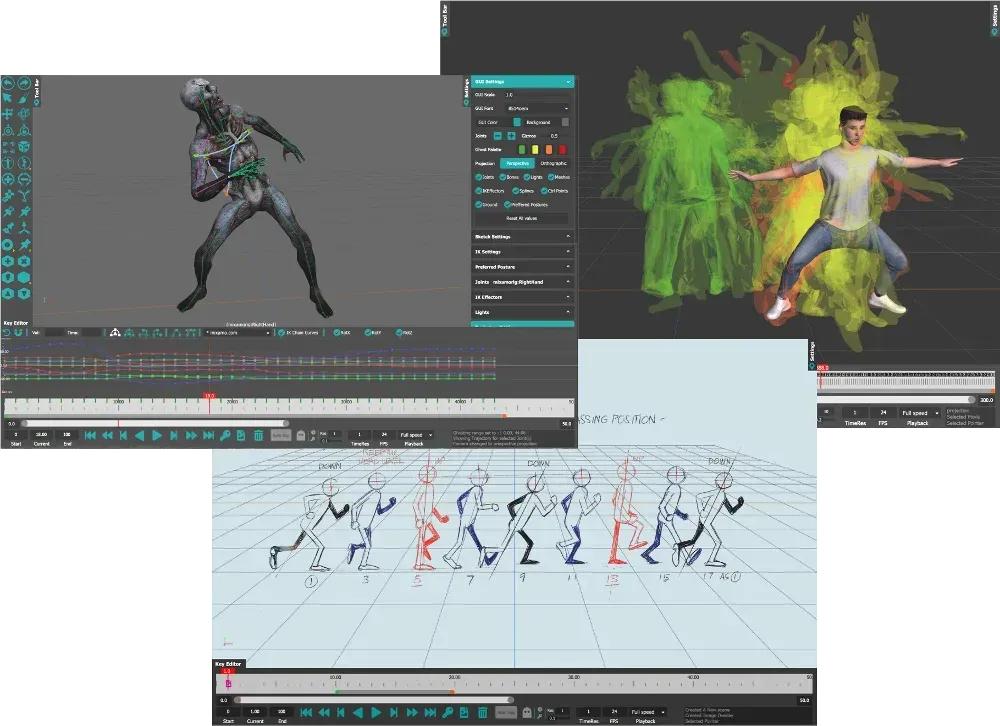
An easy to use toolset for 3D Character Animation. The goal of MotionMuse is to unclutter the Animation process, to bring in new artists to 3D animation without requiring a steep learning curve. To this end we employ powerful tools with an easy to use interface. Anyone, without any knowledge of 3D character animation can pick up MotionMuse and start animating complex characters.

Character Rigging
MotionMuse provides simple and easy to use rigging/skinning tools to quickly bind character to existing or generated skeletons. Simply select the mesh and the skeleton to automatically assign weights for each joint for each vertex. Auto rigging supports rigging of multiple meshes to quickly skin multiple parts of the character. Joint creation tools along with weight painting and bind matrix adjustments further allows our rigging system to quickly set up the character as per your precise requirements.

Retargeting - Animation Transfer
Retargeting in MotionMuse is a simple way to transfer animation across to another character within a few clicks. The character skeletons do not need to be of the same size or even of the same topology for retargeting to work. Simply select the source and target skeletons and MotionMuse will automatically compute a mapping between them. The user can also modify the mapping manually if required. Once satisfied, simply start the animation transfer. The targeted skeleton can then be exported to a new FBX file to be used in the desired workflow.

Full Body Motion Editing System
Motion Editing in MotionMuse is the easiest way to edit existing Character animations. By simply displaying a trajectory of a Joint and modifying either the trajectory or its control points and/or tangents, one can quickly alter character animations. Existing keys of all participating joints will be adjusted automatically by the Motion Editing system. Our Motion Editing system makes use of parallel hardware by utilizing GPUs and multicore CPUs for interactive updates.

Full Body Inverse Kinematics
MotionMuse gives you full control of the character by implementing the state of the art Inverse Kinematics solver. No further rigging of the character is required as the bone hierarchy itself is used to articulate complex character movements. The user can quickly move the entire or part of the body, with on the fly control of which body parts to affect. Multi-Character IK enables artists to articulate a large number of characters on the fly for easy inter-character interactions.

Spline Based Sketching for Posing
Spline based Sketching is an easy way to pose a chain of joints quickly by simply drawing on top of them. The Sketch can be adjusted on the fly to precisely pose the underlying joints and bones. Tangents and control points can be adjusted for exact positioning. Our Sketching supports stylus and tablet devices to get the most out of your vision.

Curve Editor for Motion Control
A fully featured Curve Editor allows the user to accurately control the interpolation between multiple key frames. With support for multiple types of interpolation curves and different types of tangents, you can be assured to get the exact repeatability and reliability needed for precise motion control. Easy copy / pasting of keys and free control of each independent key makes this one of the easiest curve editor to use.

Media Overlays
Diminishing the gap between 2D and 3D animation is inline with our vision of uncluttering the Animation process. We achieve this by implementing a Media Overlay system. The artist can create image overlays at multiple time frames and draw on top of them using mouse / pen tablet devices, or can load existing images or videos. By matching the underlying character to multiple image overlays or video overlays the artist can quickly achieve his / her animated vision.

Recommended Specs:
Windows 10 / 11, requires 64-bit OS
16 GB RAM (minimum 8 GB)
4 Core Processor (minimum 2 Cores)
OpenGL 4.3 or above
OpenCL 1.2 or above
500 MB of disk space

HOMEPAGE:
Код:
https://www.munianim.com/

FREE DOWNLOAD LINKS:

Код:
https://rapidgator.net/file/5a99f65a5e04fbeb311b6e1123bdaf0d/Muni_Animation_MotionMuse_1.1.9_x64.rar

Код:
https://nitroflare.com/view/FC345676554CBC1/Muni_Animation_MotionMuse_1.1.9_x64.rar
 

th_Witcm2NfTw2u3QiL50AbakpnE4cGHDn4.png


Ventoy 1.1.11 Multilingual + LiveCD | Size: 202.88 MB
Language: English


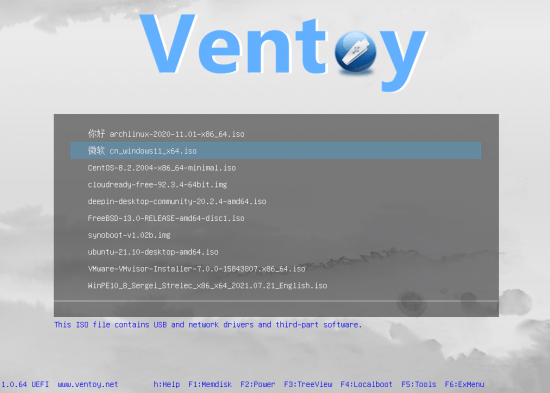
Ventoy is a lightweight tool that provides a quick way to make bootable USB drives from ISO files. Reinstalling your operating system via a bootable USB comes with the advantage that you do not need to spend time formatting the disk. Instead, you simply insert the USB in the dedicated port and reboot your PC.

While there are numerous tools that create bootable USB, most of them rely on the OS's kernel which needs to access the hardware storage media for the source. The idea behind the program is different and entails that the information is saved to runtime memory before booting. Therefore, the OS can determine that the data is booted from a virtual disk, find the source medium needed for the operation and continue to boot without having to create the standard hook, as with the classic booting.

It is worth mentioning that the tool allows you to add as many ISO files as you want, case in which, you are welcomed by a menu following the boot. The program supports ISO files over 4 GB as well native UEFI and Legacy BIOS and it works with dozens of operating systems, as the developer states there have been more than 160 files tested.

Features
Fast (limited only by the speed of copying iso file)
Directly boot from iso file, no extraction needed
Legacy + UEFI supported in the same way
UEFI Secure Boot supported (since 1.0.07+) Notes
ISO files larger than 4GB supported
Native boot menu style for Legacy & UEFI
Most type of OS supported, 200+ iso files tested
Not only boot but also complete installation process
"Ventoy Compatible" concept
Plugin Framework
Readonly to USB drive during boot
USB normal use unafftected
Data nondestructive during version upgrade
No need to update Ventoy when a new distro is released

FREE DOWNLOAD LINKS:

Код:
https://rapidgator.net/file/dcf612053094b50bdb6255f28c145818/Ventoy_1.1.11_Multilingual___LiveCD.rar

Код:
https://nitroflare.com/view/23B4AB93C315B84/Ventoy_1.1.11_Multilingual_%2B_LiveCD.rar
 
_23f2fc09335cf8fd1e0f34bea56d06f4.jpeg


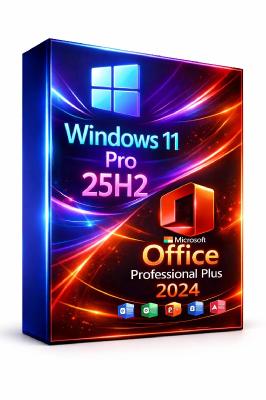
Windows 11 Pro 25H2 Build 26200.8117 (No TPM Required) With Office 2024 Pro Plus Multilingual Pre | Size: 9.65 GB

Windows (x64) | Languages:Arabic,English,German,Greek,French,Spanish,Italian,Portuguese-Portuguese,Portuguese-Brazil,Turkish,Dutch,Czech,Norwegian


Windows 11, version 25H2 is an enablement update that builds on the features of 24H2 by enabling new, "continuous innovation" features, rather than introducing entirely new features itself. Key updates include a Braille Viewer for the Narrator, improvements to Click-to-Do (including a new "Convert to Table" feature), support for plug-in credential managers for passkeys, and enhancements to the mobile device companion experience. Microsoft is also implementing IT admin-focused features like the ability to remove pre-installed Store apps and a new Quick Machine Recovery system to reduce downtime.

For Users
Accessibility
The Narrator now includes a Braille Viewer, allowing users to see the braille equivalent of on-screen text on a refreshable braille display.
Passkeys
Users can now utilize plug-in credential managers for setting up and using passkeys, offering improved security and management.
Time & Language
Ported settings from the Control Panel to the Settings app, including configuring additional clocks and changing the NTP time server.
Mobile Experience
The mobile device companion has a new, more accessible layout to view calls, messages, photos, and more from your phone.
Click-to-Do
New AI features for Click-to-Do are included, such as a new "Convert to Table" capability for converting text to an Excel table and more flexible selection methods.
For IT Administrators
Quick Machine Recovery
This new feature in the recovery system aims to reduce downtime and simplifies the process for recovering a system, according to PCMag.
Removable Apps
IT admins can now remove certain pre-installed Microsoft Store apps via Group Policy or MDM CSP on Enterprise/EDU devices.
Feature Removals
25H2 removes older components like PowerShell 2.0 and WMIC for greater security and efficiency.

Update windows to 25H2 Build 26200.8117
Update Office to v2603 Build 19822.20142

System Requirements
Processor: 2 gigahertz (GHz) or faster.
RAM: 2 gigabyte (GB).
Free space on hard disk: 40 gigabytes (GB).
Graphics card: DirectX 9 graphics device or a newer version.
Additional requirements to use certain features.
To use touch you need a tablet or monitor that supports multitouch.
To access the Windows store to download and run apps, you need an active Internet connection and a screen resolution of at least 1024 x 768 pixels

HOMEPAGE:
Код:
https://www.microsoft.com

FREE DOWNLOAD LINKS:

Код:
https://rapidgator.net/file/47d6de5a1481b4a0f246dd5e3957ea76/Win.11.Pro.26200.8117.Office.part1.rar
https://rapidgator.net/file/cf97b2aa4b13ea2fd9fc1d3999ac6b35/Win.11.Pro.26200.8117.Office.part2.rar
https://rapidgator.net/file/1d81d0801cad1872ee3c2cdbe34ec085/Win.11.Pro.26200.8117.Office.part3.rar
https://rapidgator.net/file/d071c9ccd16d58540bfac029b65b746e/Win.11.Pro.26200.8117.Office.part4.rar
https://rapidgator.net/file/9b75d5e4c2fc9f134b74e38514f99255/Win.11.Pro.26200.8117.Office.part5.rar

Код:
https://nitroflare.com/view/C997E3E450EED62/Win.11.Pro.26200.8117.Office.part1.rar
https://nitroflare.com/view/FD7B55F1110DAA9/Win.11.Pro.26200.8117.Office.part2.rar
https://nitroflare.com/view/934C3E34FC334F2/Win.11.Pro.26200.8117.Office.part3.rar
https://nitroflare.com/view/01FDECD50F77F09/Win.11.Pro.26200.8117.Office.part4.rar
https://nitroflare.com/view/5BC71E3FFFAA301/Win.11.Pro.26200.8117.Office.part5.rar
 
Назад
Сверху Снизу