All Emperor2011's Software in one thread !! (updated daily)

1e53356cb8a73d853bce14460fa446bb.jpg


Neural DSP Parallax X v1.0.0 | Size: 25 MB
Language: English


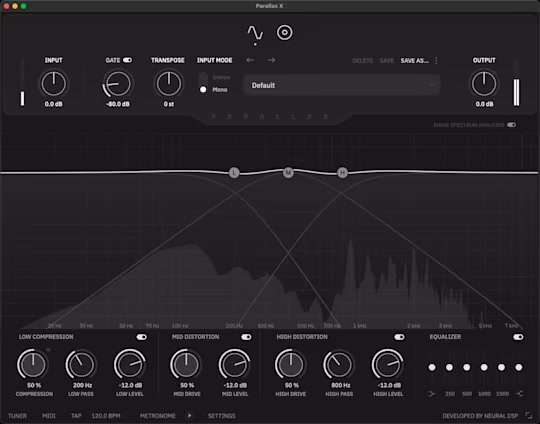
Everything you need to design the ultimate bass tone. For decades, parallel bass processing has been a cornerstone of powerful bass tones. Traditionally, this involves configuring dual rigs or multiple plugins to distort the treble for clarity and aggression while compressing the lows for a massive foundation.

Parallax X revolutionizes this process by offering comprehensive parallel processing within a single plugin. It provides everything you need to craft the ultimate bass tone, combining precision, flexibility, and power in one intuitive interface.

Low Compression
Dialing in a high-gain sound with presence, definition, and clarity requires that a certain amount of low end is removed from the spectrum to be distorted. Dedicated processing for the low-end of the spectrum, precisely controlled by our bus compressor algorithm, provides a seemingly infinite amount of size on tap.

Distortion
The mid and treble bands are processed separately using our proprietary tube modeling technology, resulting in rich harmonics and a natural response

Mid Distortion: Distorts the midrange of the spectrum to add a throatier color and enhance note articulation.
High Distortion: Distorts the high end of the spectrum, allowing you to add the perfect amount of fuzz or tightness.

Equalizer
The six-band graphic equalizer provides an additional control layer for fine-tuning the frequency response to perfection.

Cabsim
Parallax X includes a comprehensive cabinet simulation section with six virtual microphones that can be moved around the speaker for maximum flexibility. When distorted, the higher end of the register truly benefits from well-captured speaker impulses, as the inherent frequency response shapes the distortion in a very musical manner. The cabsim module only affects the Mid and High bands to avoid issues with the low end.

Transpose
Pitch your bass up or down by a constant interval (+12/-12 semitones). Use this feature to easily change the tuning of your instrument.

Tuner
Now features an additional live tuner displayed at the bottom of the UI.

Metronome
To perfectly supplement your practice, the metronome allows you to control the time signature, accent sounds, and note values (the metronome is only available on the Standalone App).

Standalone
The Standalone feature in Parallax X allows you to quickly install, plug in, and play this versatile plugin. Standalone is perfect for practice on the go and live use.

Whats New
Updates: official site does not provide any info about changes in this version

HOMEPAGE:
Код:
https://neuraldsp.com/plugins/parallax

FREE DOWNLOAD LINKS:

Код:
https://rapidgator.net/file/0ddda44deb8845e08d0f42fba4fbac4a/Neural_DSP_Parallax_X_v1.0.0.rar

Код:
https://nitroflare.com/view/A5A5D3F674C41BF/Neural_DSP_Parallax_X_v1.0.0.rar
 
0d85bc6c61941bb9b15fd6820288ffa4.jpg


Password Security Scanner 1.65 | Size: 618.91 KB
Language: English


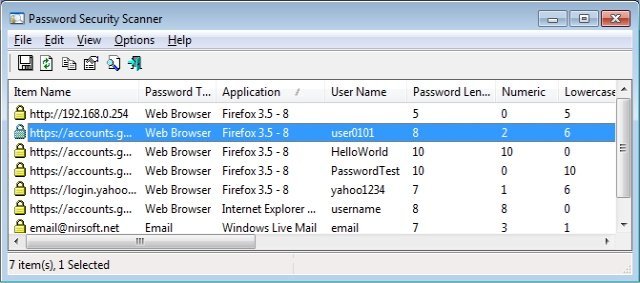
This utility scans the passwords stored by popular Windows applications (Microsoft Outlook, Internet Explorer, Mozilla Firefox, and more...) and displays security information about all these passwords. The security information of every stored password includes the total number of characters, number of numeric characters, number of lowercase/uppercase characters, number of repeating characters, and password strength. You can use this tool to determine whether the passwords used by other users are secured enough, without watching the passwords themselves.

Currently, Password Security Scanner scans the passwords of the following applications
Internet Explorer 4.0 - 6.0
Internet Explorer 7.0 - 11.0
Mozilla Firefox (All Versions)
Google Chrome
Dialup/VPN passwords of Windows
MSN/Windows Messenger
Microsoft Outlook
Windows Live Mail
SeaMonkey Web browser.
Opera (Version 15 or greater)

Whats New
Updated to decrypt the passwords for the encryption change of Firefox 144 and Thunderbird 146.
Updated to decrypt the passwords encrypted with app-bound encryption on new versions of Chrome (Third version of the app-bound encryption key).

HOMEPAGE:
Код:
https://www.nirsoft.net

FREE DOWNLOAD LINKS:

Код:
https://rapidgator.net/file/4804d6604f55e882ab51cc2e09fb6bda/Password_Security_Scanner_1.65.rar

Код:
https://nitroflare.com/view/880DBEE1BA5004A/Password_Security_Scanner_1.65.rar
 
de25b69a99a9b19c652fc0965f19498e.jpg


Password Tech 3.5.10 | Size: 8.53 MB
Language: English


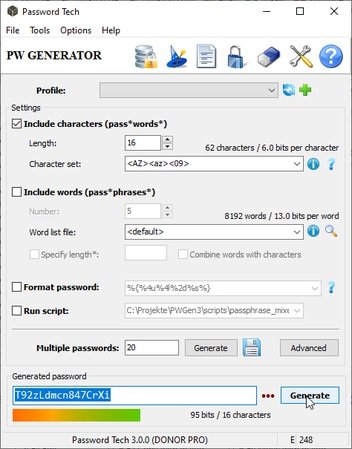
Password Tech ( PWGen) is a powerful password generator capable of generating large amounts of cryptographically-secure passwords, pronounceable passwords, pattern-based passwords, passphrases composed of words, and scripted passwords. Passwords can be stored in encrypted databases along with user names, URLs, notes, etc. Password Tech provides lots of options to customize passwords to the users' various needs, and individual scripting with Lua gives full control over the process of password generation. Text encryption is also supported.

Features
Full Unicode support
Cryptographically-secure
Passphrases
Pronounceable passwords
Pattern-based passwords
Password scripting with Lua
Fully customizable
Password manager/safe
Text encryption

HOMEPAGE:
Код:
https://pwgen-win.sourceforge.io/

FREE DOWNLOAD LINKS:

Код:
https://rapidgator.net/file/74bd45f945cde0891ffd1094a599410d/Password_Tech_3.5.10.rar

Код:
https://nitroflare.com/view/EA1A14B54CD377F/Password_Tech_3.5.10.rar
 
af03275c4a58ab230be4b05bc1f00e7e.jpg


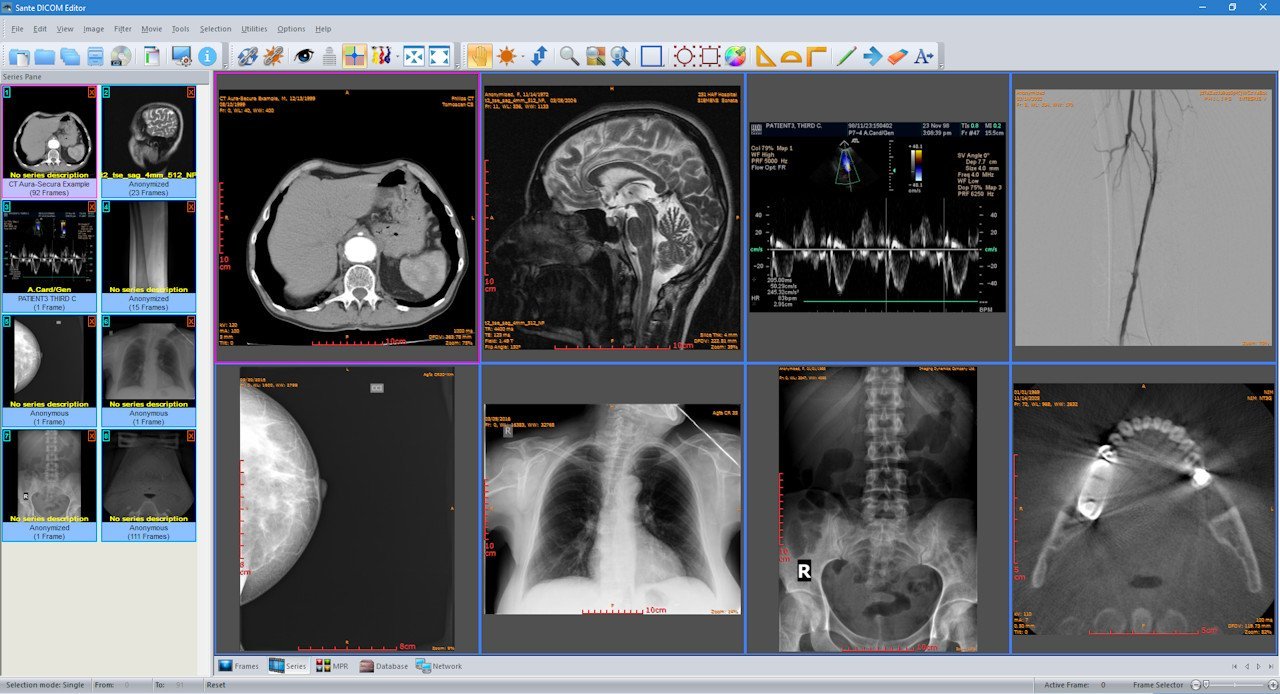
Sante DICOM Editor 10.3.1 | Size: 145.75 MB
Language: English


Sante DICOM Editor is a professional DICOM editor, viewer, anonymizer, converter, dicomizer, PACS client, mini PACS server, patient CD/DVD burner (with viewer) and much more.

The unique viewer
Sante DICOM Editor is not a "yet another DICOM viewer" constructed with freely available libraries such as dcmtk, itk and vtk, like hundreds of other DICOM viewers which differ from each other only in the appearance, menus, panels and dialog boxes. It is a unique program with unique capabilities, designed and developed in-house by us, from the ground up, with the most advanced programming tools and it is the result of research and development on DICOM imaging of the last two decades.

The powerful editor
Sante DICOM Editor is the industry-leading post processing application for DICOM file editing, conversion and handling, it is used by almost all the large corporations and medical equipment manufacturers, and it is the DICOM editor of choice of the greatest universities and hospitals of the world. Among others, it lets the user to edit and modify DICOM files, to add and remove attributes, and even edit and modify sequence attributes.

Features and benefits
Powerful DICOM workstation, viewer and editor
Perpetual license that never expires.
Free updates and free technical support for product's lifetime
PACS client that supports all the DICOM network services (C-FIND SCU/SCP, C-MOVE SCU/SCP, C-STORE SCU/SCP, C-GET SCU/SCP, C-ECHO SCU/SCP)
It can be used as a mini PACS server as well
(the number of stored patients/studies depends on disk size only)
Command line switches for integration with PACS servers (learn more.)
Support of all charsets (latin, chinese, japanese, korean, cyrillic, arabic, greek, turkish, etc.)
Compatible with all modalities (CT, MR, NM, US, XA, MG, CR etc.), all manufacturers and all DICOM 3.0 and NEMA 2 file types.
Editing and modification of DICOM files (even of sequence attributes)
Simultaneous editing of all DICOM files of a series/study
DICOMDIR editor
Dual monitor support (new in version 6, learn more.)
Structured Report support (new in version 6.3)
Presentation State file editor
Structured Report file editor
Printing to DICOM printers and Windows printers
DICOM to DICOM conversion, DICOM file modification (transfer syntax, image width and height, color depth, frame insertion, removal, sorting, etc.)
Built-in Anonymizer, burned-in annotations removal (Patient data de-identification, suitable as well for avoiding issues with the GDPR regulation 2016/679 of EU)
Built-in Dicomizer: DICOM file creation from video files (avi, wmv) and plain image formats (jpeg, jpeg2000, tiff, bmp, and png)
Ultrasound region calibration module support (calibrated Ultrasound measurements)
Merging of DICOM files
Creation of DICOM CD/DVD disks with viewer
Support of Epson and Primera CD/DVD Disk Publishers (robots)
Contrast Agent Probe


HOMEPAGE:
Код:
https://www.santesoft.com/

FREE DOWNLOAD LINKS:

Код:
https://rapidgator.net/file/3bb8cb74e92635e4524f73f51d5bb3f8/Sante_DICOM_Editor_10.3.1.rar

Код:
https://nitroflare.com/view/11160B40675E798/Sante_DICOM_Editor_10.3.1.rar
 
5476528a20d46539ddd0e99fddcffe60.png


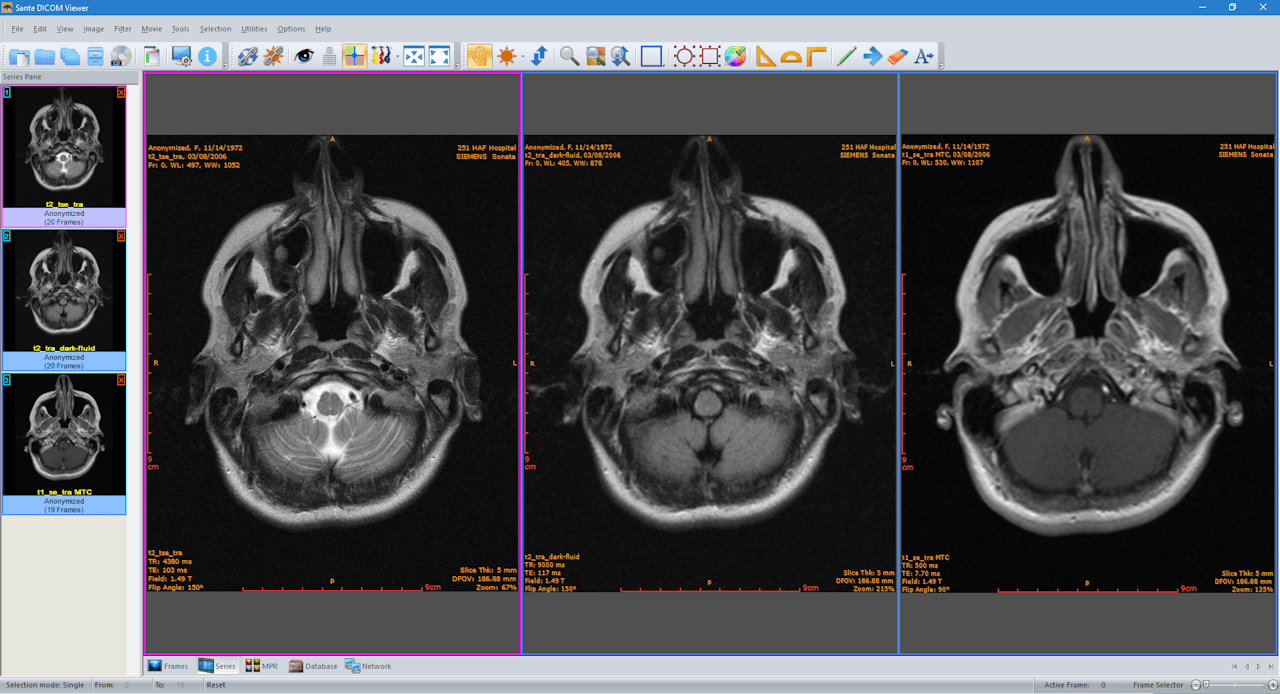
Sante DICOM Viewer Pro 14.3.1 | Size: 142.92 MB
Language: English


Sante DICOM Viewer Pro is a professional DICOM viewer, anonymizer, converter, PACS client, mini PACS server, patient CD/DVD burner (with viewer) and much more.

The unique viewer
Sante DICOM Viewer Pro is not a "yet another DICOM viewer" constructed with freely available libraries such as dcmtk, itk and vtk, like hundreds of other DICOM viewers which differ from each other only in the appearance, menus, panels and dialog boxes. It is a unique program with unique capabilities, designed and developed in-house by us, from the ground up, with the most advanced programming tools and it is the result of research and development on DICOM imaging of the last two decades. Sante DICOM Viewer Pro has been developed since 1999 and it is one of the most popular professional DICOM viewers worldwide.

Features and benefits
Powerful DICOM workstation and viewer
Perpetual license that never expires.
Free updates and free technical support for product's lifetime
PACS client that supports all the DICOM network services (C-FIND SCU/SCP, C-MOVE SCU/SCP, C-STORE SCU/SCP, C-GET SCU/SCP, C-ECHO SCU/SCP)
It can be used as a mini PACS server as well
(the number of stored patients/studies depends on disk size only)
Command line switches for integration with PACS servers (learn more...)
Easy to use with native Windows "look and feel"
Support of all charsets (latin, chinese, japanese, korean, cyrillic, arabic, greek, turkish, etc.)
On-line, case sensitive help
Compatible with all modalities (CT, MR, NM, US, XA, MG, CR etc.), all manufacturers and all DICOM 3.0 and NEMA 2 file types.
Supports also jpeg, jpeg2000, tiff, png, and bitmap image formats
Dual monitor support (new in version 10, learn more...)
Structured Report support (new in version 10.3)
Built-in DICOM File Editor
Built-in DICOM Multi-File Editor
Full support of DICOMDIRs (view, open, create, edit, image/series selection for viewing or/and for transferring in another folder)
Built-in Anonymizer (Patient data de-identification, suitable as well for avoiding issues with the GDPR regulation 2016/679 of EU)
Scout image/localizer support
Support for Overlays
Study comparison side-by-side
Printing to DICOM printers and Windows printers
Creation of DICOM CD/DVD disks with viewer
Support of Epson and Primera CD/DVD Disk Publishers (robots)
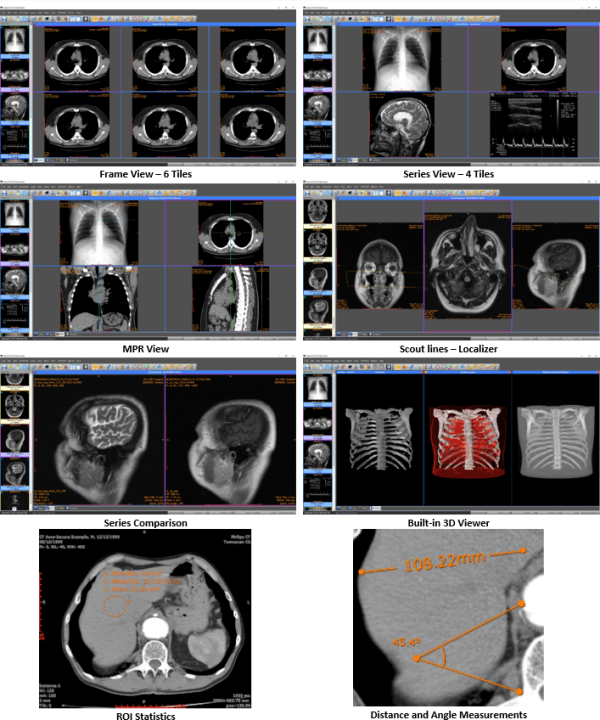
Advanced ROI selection tools (free hand, magic wand, eye-dropper, rectangle, circle, ellipse, polygon)
Statistical analysis of ROIs (pixel count, min value, max value, mean value, standard deviation, area, volume)
Synchronized frame view between the series
Synchronized level-window between the series
Synchronized field of view between the series
Measurement tools (distance, angle, cobb angle, polyline, area, volume)
Ultrasound region calibration module support (calibrated Ultrasound measurements)
Annotation texts and arrows
Interpolated (smooth) zoom and advanced zoom tools (e.g. zoom dynamic, zoom window)
Comparison of DICOM files tag by tag
Built-in Hexadecimal File Editor
Built-in Hexadecimal DICOM Viewer
File searching with criteria (patient name, study ID etc.), within hard disk's or CD's folders
File searching by tag's existence and/or tag's value, within hard disk's or CD's folders
External DICOM dictionary support
Image orientation (flip, rotate)
Image and canvas resizing
Image processing filters (blur, sharpening, convolution masks, min mask, max mask, median mask etc.)
Subtraction filter for DSA
Video (wmv) creation with or without annotations
Batch convert to image formats (JPEG, TIFF, BMP, PNG, etc.)
Batch anonymizing, with ability of burned-in annotations removal
Export DICOM Headers to text files
Orthogonal Multi-planar Reconstruction (MPR)
Easy to use with native Windows "look and feel"
Windows 11/10/8.1/8/7/ and Vista compatible


HOMEPAGE:
Код:
https://www.santesoft.com/

FREE DOWNLOAD LINKS:

Код:
https://rapidgator.net/file/acfe28f1fc314ec0a4e70b99322d7791/Sante_DICOM_Viewer_Pro_14.3.1.rar

Код:
https://nitroflare.com/view/B0AE270B31A061B/Sante_DICOM_Viewer_Pro_14.3.1.rar
 
e3f9e47975f4e813bbbadb919b2399ed.png


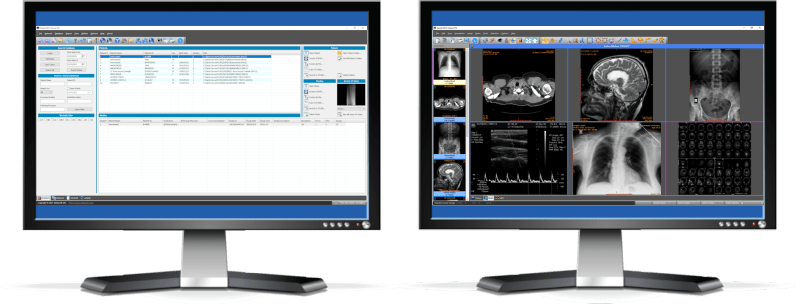
Sante PACS Server 4.4.3 | Size: 219.47 MB
Language: English


Sante PACS Server is a DICOM 3.0 compliant PACS server, a Modality Worklist server, an HTTP (web) server for DICOM files and a CD/DVD Burning and Printing server that offers high performance and reliability at an affordable price. It provides connectivity to all DICOM modalities (CT, MR, US, CR, NM, XA, MG, DX etc.). Reviewing the DICOM images can be done using the Sante PACS Viewer (the Built-in full-featured DICOM viewer of the system). The built-in web server can be used as a free cloud server for DICOM files!

The program tools, utilities and procedures
Sante PACS Server offers 5 very useful tools, utilities and procedures

The Migration tool
The Migration tool simplifies the procedure of migration from an old PACS system to Sante PACS Server. It is an external program and works independently from Sante PACS Server without burden it with unnecessary load. It can be used not only for migration tasks, but it is useful to insert into database any folder with DICOM files any time, e.g. from a USB memory stick or from an external hard disk drive.

The Forwarder module
This module is useful to send studies/series from Sante PACS Server to a destination server in a regular (scheduled) basis without user action.

The Receiver module
This module is useful to receive studies/series from one or more source servers in a regular (scheduled) basis without user action.

The Routing Rules
With the Routing Rules the user can configure the server to send automatically series/studies that receives from scanners or other servers to diagnostic workstations or to backup PACS servers.

Automatic CD/DVD disk burning and label printing
Sante PACS Server when receives studies, except of storing them on the disk it can also send them automatically for CD/DVD burning and label printing to robotic disk publisher devices of EPSON and PRIMERA. Simple CD/DVD disk writers and manual burning and printing are supported as well.

Whats New
Updates: official site does not provide any info about changes in this version.

HOMEPAGE:
Код:
https://www.santesoft.com/

FREE DOWNLOAD LINKS:

Код:
https://rapidgator.net/file/33c60768def1dc7279cf886843c9de09/Sante_PACS_Server_4.4.3.rar

Код:
https://nitroflare.com/view/95EB8DFE1A2B095/Sante_PACS_Server_4.4.3.rar
 
bdd961ffe36b54410cb5f8a81ec31f7f.png


Sante PACS Server PG 4.4.3 | Size: 529.58 MB
Language: English


Sante PACS Server PG is a DICOM 3.0 compliant PACS server, a Modality Worklist server, an HTTP (web) server for DICOM files and a CD/DVD Burning and Printing server that offers high performance and reliability at an affordable price. It provides connectivity to all DICOM modalities (CT, MR, US, CR, NM, XA, MG, DX etc.). Reviewing the DICOM images can be done using the Sante PACS Viewer (the Built-in full-featured DICOM viewer of the system). The built-in web server can be used as a free cloud server for DICOM files!

The program modules
Sante PACS Server PG consists of 4 modules

The Database module
The program uses the Postgres SQL server for database management and offers storage of unlimited number of patients/studies/series/images (it depends only on hard disk size).

The DICOM Server module
The built-in DICOM server supports all the DICOM network services (C-FIND SCU/SCP, C-MOVE SCU/SCP, C-STORE SCU/SCP, C-GET SCU/SCP, C-ECHO SCU/SCP), it is compatible with all the modalities (CT, MR, NM, US, XA, MG, CR, DX etc.), all manufacturers and all DICOM 3.0 and NEMA 2 file types. Moreover, it supports unlimited number of connections with unlimited number of DICOM nodes and DICOM clients.

The Worklist Server module
The built-in Worklist server module can receive via HL7 communication messages the patients demographics and scheduling information of exams that are stored in a HIS/RIS system (Hospital Information System / Radiology Information System) and transfer them to any modality/medical scanner via DICOM communication protocols (C-FIND).

The Web Server module
The Web Server module lets remote users of the system to connect with it, query and retrieve studies that have been stored in the database of the DICOM Server. The Web Server module, for these connections, uses the HTTP ot HTTPS protocol of the internet and the remote user must use a web browser like Edge, Chrome or Mozilla to query and retrieve studies. The web server supports SSL secure connections. This module lets the user to connect, query, retrieve and review DICOM studies stored in the system from anywhere in the world and it can be used as a free cloud server!

The remote user, from the initial web page of the system can download and install two free applications for use with this web server, Sante Web Downloader and Sante DICOM Web Viewer.

Sante Web Downloader lets the user to inspect the downloading procedure. In the end of receiving Sante Web Downloader saves the received studies in a zip file. The user can configure Sante Web Downloader to open the saved zip file with a DICOM Viewer of his/her choice like Sante DICOM Viewer Pro or Sante DICOM Editor. The DICOM Viewer must support opening zip files from command line. For more information please read the User Guide of Sante Web Downloader. This application is useful when a user wishes to use a DICOM Viewer other than Sante DICOM Web Viewer.

Sante DICOM Web Viewer lets the user to inspect the downloading procedure as Sante Web Downloader does, but it is also a high quality, full featured, completely free 2D/3D DICOM Viewer, with all the necessary tools like measurements, roi statistics, MPR and study/series comparison. It allows the user to work smoothly in a multi-modality, multi-manufacturer environment because it has all the features of Sante DICOM Viewer Pro and Sante DICOM Viewer 3D Pro except the post-processing functions like anonymizing (de-identification).

Whats New
Updates: official site does not provide any info about changes in this version.

HOMEPAGE:
Код:
https://www.santesoft.com/

FREE DOWNLOAD LINKS:

Код:
https://rapidgator.net/file/f0f0cf260f8bc2ce3a028c09165ad946/Sante_PACS_Server_PG_4.4.3.rar

Код:
https://nitroflare.com/view/4580161FB6EF57E/Sante_PACS_Server_PG_4.4.3.rar
 
d278a360777883398377d2603cb89466.jpg


TweakNow WinSecret Plus 7.6.1 | Size: 28.17 MB
Language: English


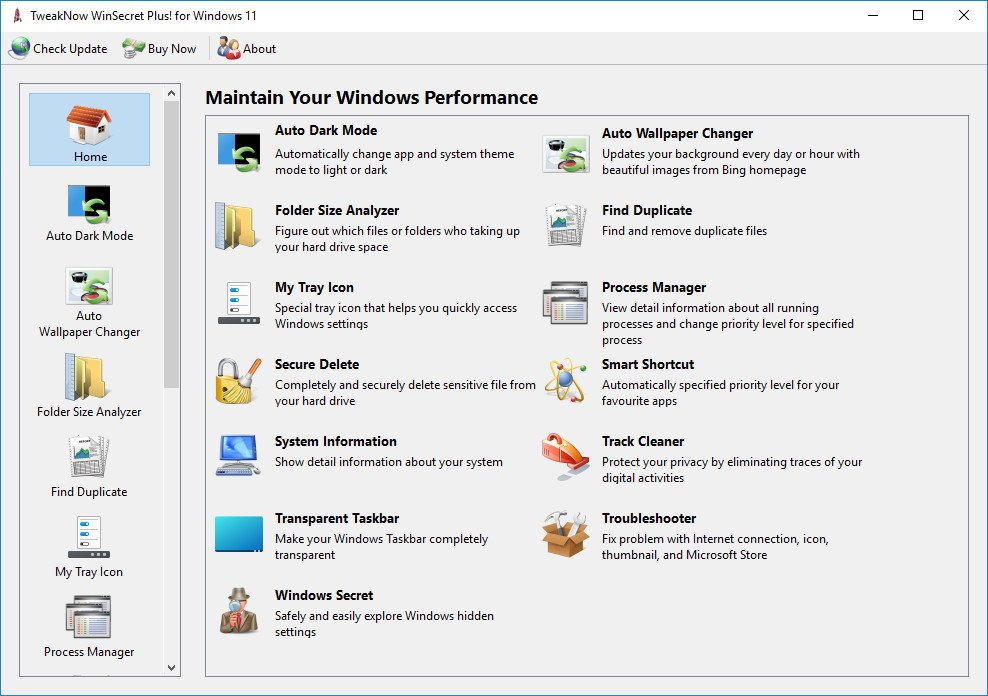
TweakNow WinSecret for Windows 10 and 11 allows users to explore the hidden settings in Windows.

This app is specifically geared for Windows, grouping numerous registry settings and delivering them from an easy and safe user interface.

With TweakNow WinSecret for Windows, you can move the Windows taskbar to the top and change the taskbar size by editing the registry value. With any app modifying the registry, it is strongly advised to have a backup to restore from in the advent of an issue.

TweakNow WinSecret for Windows makes the process easier than directly doing it via Regedit, potentially creating critical problems for a novice user. TweakNow WinSecret for Windows gives you a smooth platform to perform these tweaks in a more controlled environment.

TweakNow WinSecret for Windows is a solid option for those that want to improve their overall experience while on Windows through a simple and easy-to-navigate app.

Plus Features
Auto Dark
Automatically change app and system theme mode to light or dark
Auto Wallpaper Changer
Updates your background every day or hour with beautiful images from Bing homepage
Folder Size Analyzer
Figure out which files or folders who taking up your hard drive space
Find Duplicate
Find and remove duplicate files
Process Manager
View detail information about all running processes and change priority level for specified process
Secure Delete
Completely and securely delete sensitive file from your hard drive
Smart Shortcut
Automatically specified priority level for your favourite apps
System Information
Show detail information about your system
Track Cleaner
Protect your privacy by eliminating traces of your digital activities
Transparent Taskbar
Make your Windows Taskbar completely transparent
Troubleshooter
Fix problem with Internet connection, icon, thumbnail, and Microsoft Store
Windows Secret
Safely and easily explore Windows hidden settings

OS: Windows 10/11


HOMEPAGE:
Код:
https://www.tweaknow.com/

FREE DOWNLOAD LINKS:

Код:
https://rapidgator.net/file/ea31a05d6b8454fb52d39f92598e70d9/TweakNow_WinSecret_Plus_7.6.1.rar

Код:
https://nitroflare.com/view/8A83EBC245586CF/TweakNow_WinSecret_Plus_7.6.1.rar
 
26992b74808c1f32f19e5d030dbbc9bd.jpg


VectorStyler 1.3.005 | Size: 79 MB
Language: English


VectorStyler brings every advanced vector and illustration tool together - in one complete, independent package, with no subscriptions and no compromises. Packed with powerful, unique tools you won't find anywhere else - VectorStyler redefines what's possible in vector illustration.

Customizable User Experience
Customize all aspects of the user interface and workflow, including shortcuts, menus, toolboxes and toolbars. Create and save your own workspace profiles.

Native Illustrator Import
Open, import or paste artwork from Adobe Illustrator using the native Illustrator file format support, retaining all high-level editable attributes.

Extended Compatibility
Import artwork and export to various common file formats like AI, PDF, SVG, DWG, DXF, PSD, PNG and TIFF. Import and export PSD files while retaining layer hierarchy and keeping editable vectors.

Powerful Snapping Options
Use advanced snapping options for precision, including rotated grids and guidelines, collision and tangent to shape snapping. Turn any object shape into a guideline.

Real Vector Brushes
Paint with and use real vector brushes on any shape or outline. Brushes can be of artistic, pattern, scatter or bristle type. Create new brush styles or presets from any group or layer.

Select Objects by Attribute
Select objects by style or other attributes. Select objects with a similar style or attribute as the selected objects.

Magic Wand Tool
Use the magic wand selection mode and the Magic Wand panel to select objects similar to the pointed object. Select similar shapes by area or length.

Color Palettes
Work with document and global color palettes easily. Open multiple color palettes from external formats. Manage palettes seamlessly.

Advanced Halftones
Create complex vector halftones on layers or images. Work multiple halftones on one object using the Appearance panel

Align Object on Path
Create non-destructive object alignment on path. Align and distribute multiple objects on a path

Vector Drop Shadow
Create vector drop shadow effects on objects or groups. Adjust the drop shadow options using the Drop Shadow panel.

Parametric Shapes
Draw with a large collection of parametric shapes. Adjust shape properties using the Shape panel. Use the Node tool to edit parametric shapes.

System Requirements
- VectorStyler is (also) a native Windows (Intel) application, and requires a PC with Windows 10 installed to run. A minimum of 8GB of system memory is recommended. More memory helps when creating complex designs or illustrations.
- Only Windows 10 or newer versions are supported. An Intel Core i5 or i7 processor with 4 cores and hyper-threading is recommended as VectorStyler makes extensive use of multiple threads. GPU acceleration can be enabled in the Settings / Performance by selecting OpenCL (any GPU supported by Windows), or the NVIDIA mode for Nvidia GPUs.

HOMEPAGE:
Код:
https://www.vectorstyler.com

FREE DOWNLOAD LINKS:

Код:
https://rapidgator.net/file/190511202afd780a4be5d946bcfb90d7/VectorStyler_1.3.005.rar

Код:
https://nitroflare.com/view/CCDA5FCF3E30261/VectorStyler_1.3.005.rar
 
f4509169dc4e21abc79363e401037d61.jpg


Wondershare PDFelement Professional 12.1.5.3940 Multilingual | Size: 272.92 MB
Language: English


The PDF Experience, Simplified. The easiest way to create, edit, convert and sign PDF documents. Get control over PDFs like never before. The most Powerful and Simple PDF solution that changes the way you work with your important documents forever.

Edit PDF Like Word
Wondershare PDFelement enables you to edit PDF documents just as easily as you would in Word documents.

Edit PDF Text
Add, edit, remove text, link, watermark, header&footer, or bates numbers on your PDF easily. You can also edit the size, font, and color of the added content.
When you need to change the background of the PDF file, you can also add or change the file's background with any color, PDF or image.

Edit PDF Image
Click on an image, then move, rotate, crop (resize), extract, replace, overturn or delete images in PDF. Even you can set the Z-Order of the image.
Export each image in a PDF to a separate image file with "Convert" feature of Batch Process tool.

Move and Align Objects
It is easy to move an item forward or back just one level, or send it to the front or back of the stacking order of elements on the page.
The Align properties options (in the right-hand panel on Windows version, or right-click to call up the Align properties) let you precisely align multiple objects on a sidleft, right, top, bottom vertical center, and horizontal center.

Edit PDF Pages
Organizing pages in PDFelement is intuitively simple and fast. It is easy to sort, add, rotate, move, split, crop and delete PDF pages with PDFelement in a second, from anywhere.

Edit PDF Forms
PDFelement can help you create, edit PDF forms easily, also turn PDFs into fillable forms with "Recognize Form" tool or just add, delete, and drag and drop form fields or enable fields for e-signatures.
You can even add calculations and data validation rules to your form. It is simple!

Edit Scanned PDF
When you open a scanned document for editing, you need to perform OCR feature(optical character recognition) on PDFelement.
It can recognize text and characters from PDF scanned documents (including multipage files), photographs or digital camera captured images, so to make the PDF documents editable and searchable.

Edit Password Protected PDF
Unlock the PDF by entering the correct password so to access the file. Then you can edit, print, copy, comment, sign, organize the PDF file.
You can also remove security from a PDF if you have the document password.

Your Complete PDF Convert Solution
Convert PDFs into secure file formats, like Microsoft Office, image, text etc. in high-quality and minimum effort.

PDF to Word
Batch-convert PDF files to Word documents without losing fonts and formats. It supports .docx, .doc.

PDF to Excel
Convert PDFs to Microsoft Excel files: xlsx, xls, XML.

PDF to PPT
Convert PDFs to Microsoft PowerPoint files: .pptx, .ppt.

PDF to Image
Convert PDFs as separate images or into one single image with any image quality you want. It supports JPG, PNG, BMP, GIF, and TIFF.


HOMEPAGE:
Код:
https://pdf.wondershare.com/

FREE DOWNLOAD LINKS:

Код:
https://rapidgator.net/file/f2dd7fc7e517a027ebe4c063a24c06d8/Wondershare_PDFelement_Professional_12.1.5.3940_Multilingual.rar

Код:
https://nitroflare.com/view/30DAB28796CB053/Wondershare_PDFelement_Professional_12.1.5.3940_Multilingual.rar
 
9cdad083d1808a4071ce5049302617ef.jpg


Wondershare Repairit 6.6.1.7 Multilingual | Size: 277.58 MB
Language: English


Trusted by billions of users, Wondershare Recoverit can completely recover your lost videos, photos, files, audio, emails, etc., from hard drives, crashed computers, NAS & Linux systems. It will also repair corrupted videos, photos, and other files for you!

Feature Highlights
- Repairs all kinds of inaccessible corrupt, broken or damaged videos
- Video Repair for all popular cameras, including GoPro, DJI Drones, Dashcam and so on
- Repair Standard Definition, Full HD as well as 4K resolution Video files
- Display preview of repaired Video files before saving
- No limitations on size of Video files for repair
- No limitations on number of corrupt Video files
- Software compatibility with all Windows and Mac Operating System versions

Repair corrupt videos due to the following causes

Memory Card Error
- The powered off DJI quadcopter (Phantom, Mavic, Spark, or Inspire)
- stopping video recording
- drone Crashed and your video is unreadable
- dashcam is unreadable after a car accident

File Transfer Error
- Video compression issues
- Change in video format
- File read and write errors
- Playing videos on unreliable third party media players

Support the following video corruption symptoms
- Video file header corruption
- Video file system corruption
- Corruption on the sound section of the video files - have videos only
- Corruption on the video section of the video - have audios only
- "Video not playing" or "error loading media file could not be played
- Errors in movement of the video
- Grainy videos
- Frozen videos

Storage Device Supported

Computer/laptop
Recover lost data on a computer or laptop, regardless of the computer operating systems and brands, like Dell, IBM, HP, Toshiba, Sony and so on.

Internal hard disk
Retrieve data from hard disk drive (HDD), solid state drive (SSD), floppy disk, Zip drive and many more, even though it's uninitiated, unallocated or crashed.

External hard drive
Get data back deleted from all brands of external disk or lost on an external drive that is corrupted, damaged, formatted, or undetected.

USB flash drive
Bring data back from USB flash drive, pen drive, thumb drive and flash memory stick, regardless of the file systems (FAT16, FAT32, exFAT, NTFS, HFS, APFS, etc).

Camera
Lost photos and videos can be recovered from various brands of digital cameras, DJI/GoPro Drone cameras, action cameras, camcorder, etc.

Memory card
Support data recovery from all kinds of memory cards, like CF card, SD card, MMC, SmartMedia, xD-Picture card, MiniSD card, MicroSD card, etc.

SD card
Recover photos, videos & files from SD/SDHC/SDXC card or the device with SD card, like Android phone, audio recorder, music/video player, etc.

Other Storage media
Recover over 1000 types and formats of data from a wide range of data storage devices, including the mentioned ones, iPod (Nano, Classic & Shuffle), cell phone, and many more.

What's new
• official site does not provide any info about changes in this version

HOMEPAGE:
Код:
https://recoverit.wondershare.com/

FREE DOWNLOAD LINKS:

Код:
https://rapidgator.net/file/84898f3aea903029a4a63ddc2c788c09/Wondershare_Repairit_6.6.1.7_Multilingual.rar

Код:
https://nitroflare.com/view/1E92D03CEC339D8/Wondershare_Repairit_6.6.1.7_Multilingual.rar
 
0a9b04a53908eb0a3da2327dd7905f40.jpg


Wondershare UniConverter 17.1.2.459 (x64) Multilingual | Size: 277.66 MB
Language: English


UniConverteBest Video Converter Ultimate. Convert, Download, Compress, Edit, Burn Videos in 1000 formats and do more.

Full Quality, High Speed
Video Conversion To Any Format
Wondershare UniConverter (originally Wondershare Video Converter Ultimate) accomplishes your conversion tasks with handy features.

Easy-to-Use Video Editor, Makes Your Video Stand Out
You can customize home movies through advanced editing features and get professional-looking works in minutes.

Save Videos From Over 10,000 Sites With One Click
Download or record your favorite 4K/HD videos from popular video sharing sites for enjoyment without Internet connection; Or convert them to compatible formats for playback on TV, smartphone, or other devices.

A Flawless DVD & Blu-ray Experience Anywhere
Powerful DVD toolkit of UniConverter (originally Wondershare Video Converter Ultimate) helps you to create and edit DVD files in an easy way.

Burn Videos to DVD and Blu-ray discs
Convert Any Format to DVD
Provide Free DVD Templates
Edit DVD Files with Built-in Editor

Download Videos from Hot Online UGC Sites.
Download Online Video to MP3 in One Click.
Download online video playlist in batch
Download Entire Online Video Playlist at One Go.
Record Videos from Streaming Sites.
Note: You're only entilted to download the videos with authorized copyrights.

Transfer Videos to Devices & External Hard Drives
Transfer media files to Apple devices, Android devices, USB flash drives or external hard drivers easily. More importantly, all unsupported formats will be intelligently converted to compatible ones during the transfer.

All-Purpose Video Toolbox
Wondershare UniConverter (originally Wondershare Video Converter Ultimate) also offers a full set of optimized video tools which will come in handy sometime.

Compress Video to Smaller Size
Video Compressor
Compress video without quality loss.

Fix Video Metadata
Fix metadata info for videos.
VR Converter (Only for Windows)
Convert any video to VR format.
GIF Maker
Convert a video or photos to a GIF picture.
Screen Recorder
Record all desktop activities with voice.

Whats New
Updates: official site does not provide any info about changes in this version

HOMEPAGE:
Код:
https://www.wondershare.com/

FREE DOWNLOAD LINKS:

Код:
https://rapidgator.net/file/22b2fdc1d7c5abefc35eacc7ee4a875c/Wondershare_UniConverter_17.1.2.459_x64_Multilingual.rar

Код:
https://nitroflare.com/view/EDC94890EDCD08C/Wondershare_UniConverter_17.1.2.459_x64_Multilingual.rar
 
e58e12f9125d71bf0ef4e4700ff316f3.jpg


XL-Connector 3.6.37.0 | Size: 625.02 MB
Language: English


XL-Connector is a popular plugin that safely integrates Excel and Salesforce to seamlessly export, import, refresh and transform data with a lightning fast-api connection. It offers Salesforce admins a comprehensive toolbox that easily performs data and metadata management operations in a familiar Excel environment.

Your ideal tool for Salesforce data management in Excel
Export from Salesforce to Excel
Pull data from an existing Salesforce report or build your own SOQL query directly into Excel.
Import data into Salesforce
Manage and transform your data in Excel, and push it back with one click.
- Use all the amazing Excel tools on your Salesforce data: pivot tables, charts, and formulas.
- Perform any data operation with no row limits!
- Ideal Salesforce data cleansing tool
- Access great metadata management tools
Get the most valuable Salesforce plugin for excel
- Saves hours and days of data-loading.
- Image not found
- Private and secure.
- Image not found
- Boosts team productivity.
- Amazing features for data manipulation.
- Image not found
- Improves the quality of your data by keeping it up to date.
Perform and automate any data operation in bulk
Mass create, update and upsert opportunities, accounts, leads, quotes and other SFDC objects with XL-Connector. Become a master of bulk updates and upserts in Salesforce with just a click of a button!
Manage your Salesforce duplicate records
Efficiently merge Salesforce Accounts, Contacts, and Leads in bulk (available in the Enterprise Admin edition).
Delete your Salesforce records in bulk
Mass delete records in Salesforce and keep your data fresh and updated.
Perform your Salesforce Data Migration with the help of XL-Connector
Safely migrate large amounts of data.
XL-Connector: Your Ideal tool for Salesforce metadata management.
XL-Connector is the only Excel to Salesforce connector that provides a complete assortment of metadata management tools that will hugely boost the productivity of Salesforce admins.
These tools enable management of such things as fields, validation rules, processes, picklists, security settings, custom metadata and much more. Tasks that normally take days, like updating the descriptions and help texts of data fields, will take minutes with XL-Connector.
Other XL-Connector great features you will appreciate
Super intuitive user interface
A climax between simplicity and comprehensiveness, The user interface is very friendly and presents a minimal learning curve.
Security by design
XL-Connector is a locally installed app that doesn't send your data anywhere outside of your secure environment. There's no cloud component to it, so the data travels directly between your PC and Salesforce instance over a secure encrypted channel.

What's new
• official site does not provide any info about changes in this version

HOMEPAGE:
Код:
https://www.xappex.com/

FREE DOWNLOAD LINKS:

Код:
https://rapidgator.net/file/76d23f41e1e9395886f1adac6c5f62aa/XL-Connector_3.6.37.0.rar

Код:
https://nitroflare.com/view/A506C4CF73A5F17/XL-Connector_3.6.37.0.rar
 
ff10235eac9bab5d7e0eaf7a2fdcd270.jpg


XenoDream Jux 4.803 | Size: 12.87 MB
Language: English


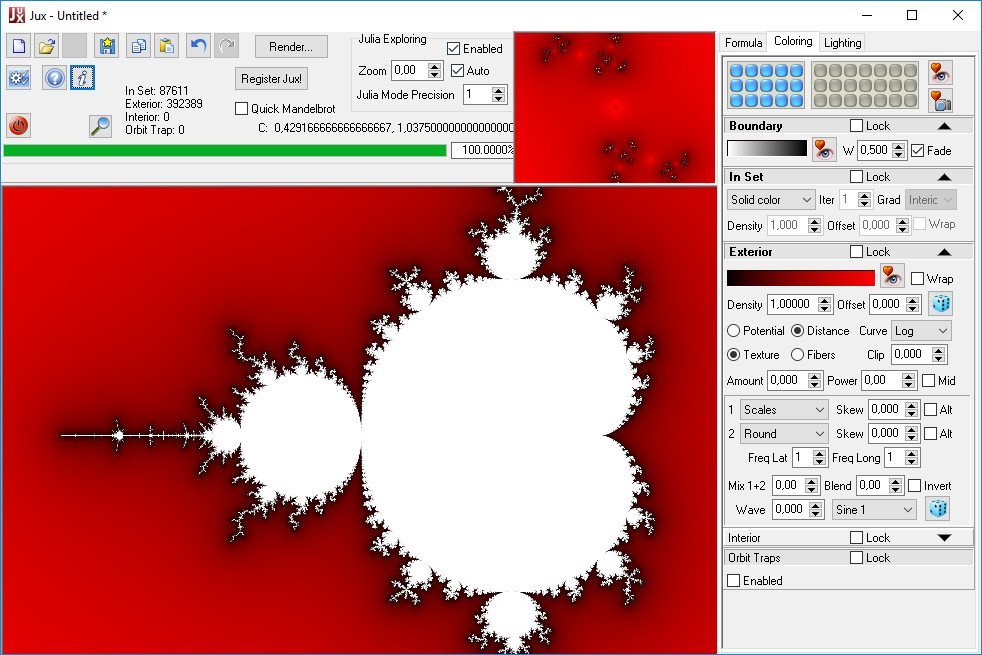
Jux is a fractal explorer for 2D Julia and Mandelbrot sets. It includes a variety of formulas. It has beautiful coloring and lighting effects. It is easy to use. There is no formula editor or scripting.

Features
Easy switching between Mandelbrot and Julia sets
Julia explorer shows Julia set thumbnail corresponding to mouse position in preview
A selection of formulas, mostly generic with parameters
Fully multi-core for preview, explorer and rendering
Render large pictures with full anti-aliasing (when registered; max about 20kx15k pixels)
Batch rendering (when registered)
Render 8 bit depth map for post processing options
Numeric controls can be dragged like sliders
12 steps of undo/redo
Easily share parameters in social media, with copy/paste to the clipboard
Memory spots for temporary storage of formulas, coloring or lighting
Save your favorite settings as presets (formulas, coloring, orbit traps, lighting, gradients)
Hundreds of system presets included
One-click switching between 15 default color schemes
Gradient editor that includes tools to capture linear or randomized gradients
Coloring based on potential, distance estimate, mean z, basins, orbit traps, textures, fibers, field lines
Adjust color and lighting controls with realtime preview
Powerful heightfield lighting effects
Materials that can include reflection, refraction, angular filtering and displacement mapping
Use panoramic or ordinary images as environment maps for reflection and refraction.


HOMEPAGE:
Код:
https://www.xenodream.com/

FREE DOWNLOAD LINKS:

Код:
https://rapidgator.net/file/931e2ddd6f5843ebcde9f713d37aef1a/XenoDream_Jux_4.803.rar

Код:
https://nitroflare.com/view/5524343A3C59E7B/XenoDream_Jux_4.803.rar
 
bfce155eba28f61a5119c1bb2ff5e73e.jpg


ACDSee Photo Studio Home 2026 v29.0.1.3351 (x64) | Size: 308.56 MB
Language: English


Conquer Your Digital Clutter. Master your photo collection with confidence. ACDSee Photo Studio Home 2026 matches smart, locally powered Artificial Intelligence (AI) with trusted editing and organizational tools to give you full control over your images - making photo management intuitive, powerful, and yours.

Reveal Your Vision
Transform a dull, muted image into one that feels sharp, dimensional, and alive with the Dehaze tool. Applying Dehaze restores depth and vibrancy by cutting through the haze, fog, or smoke to show richer contrast, clearer details, and more accurate colors. It's especially useful for landscape photography where distant mountains, city skylines, or natural vistas lose impact due to haze, but it's equally powerful for everyday shots that need clarity and punch.

Be Unstoppable
No more waiting for tasks to complete-thanks to the updated Activity Manager, background processing lets you continue working while operations run. With multi-threading, multiple activities run simultaneously, so you can import, convert and resize batches of photos, and detect faces, all without ever slowing down. Track progress in real-time and experience a faster, more efficient workflow designed for high-volume demands.

FACE DETECTION & PEOPLE MODE
Narrower face labels in View Mode ensure no one is missed while using AI Face Detection on group photos. Find your people faster with new grouping options in People Mode, ACDSee Photo Studio's AI-driven mode for identifying and managing people in your portfolio. Change modes without skipping a beat, your selection will remain right where you left it as you switch between modes.

ACDSEE TABS
Pick up right where you left off. ACDSee Tabs can now retain your open tabs between sessions, making it easy to resume previous searches and folder views without starting over.

VIDEO METADATA SUPPORT
Your video files are now a seamless part of your workflow. View GPS details and standard metadata fields in the Properties pane's default view, or dive deeper into the video and audio streams with the new All Video Metadata view. With Advanced Search supporting video-specific fields, and many new Auto Categories to search your video files, you have everything you need to organize and manage your videos - on your terms.

IMPROVED FILE SUPPORT
Broaden your editing and metadata options with added IPTC metadata support for JPEG XL (JXL), and AVIF formats.

It's Not Magic, it's ACDSee
Artificial Intelligence (AI) in ACDSee Photo Studio Home 2026 doesn't take over - you remain in full control while the AI-driven tools amplify your impact. There is no limit to your potential thanks to zero-effort features like AI Super-Resolution for instant smart photo enhancement and AI Facial Recognition for easy organization and searching. The software never relies on remote servers to process your images, unlike some competitors. That means real-time results and complete privacy when using AI features. Create without limits and keep your head - not your files - in the clouds.

What's New in ACDSee Photo Studio 2026?
Discover new and improved tools designed to simplify your editing and management workflow. AI Denoise removes unwanted noise while preserving detail, and AI Hair Masking makes selecting hair for adjustments quick and accurate. Apply intelligent adjustments across multiple images with AI Develop Presets, and take advantage of updates to AI Face Edit and People Mode for easier portrait work and organization. The new Home Page and enhanced tab system provide faster access to your projects, while the updated Activity Manager uses multi-threading to handle imports, batch exports, and other large operations in the background-so you can keep working without interruption. Additional improvements to video metadata and file format support give you greater flexibility throughout your workflow. ACDSee Photo Studio 2026 is packed with time-saving power to help you work smarter, complete tasks faster, and feel unstoppable.

Remove Noise, Not Detail
AI Denoise uses advanced machine learning to automatically detect where to reduce pixelated noise in your photos, so the important details stay sharp. Instantly clean up high-ISO shoots or grainy snaps to keep your images natural, sharp, and ready to shine. Run AI Denoise on an entire batch and cut down on editing time, while your photos emerge clean, detailed, and true to life.

Intricate Hair Selection in an Instant
Save even more time while editing your photos by letting ACDSee's intuitive AI Hair Masking make one-click hair selections for you. This allows you to adjust the color and lighting of one of the trickiest elements in portrait photography - hair - without affecting the rest of the image.

Untapped Non-Destructive Editing Prowess
Intelligent, non-destructive style at your fingertips. AI Develop Presets are an absolute game-changer for hobby and commercial photographers alike. When applied to a batch of photos, the AI analyzes each individual photo and applies gorgeous adjustments, significantly reducing the time you spend editing. Make your subject pop, correct background lighting, or imprint your authentic style on an entire catalogue of images with just a few clicks.

New Portrait Possibilities
Effortlessly make retouching portraits feel intentional, not artificial. Enhance natural beauty or completely alter facial parameters using the tools in AI Face Edit that you already know and love - like skin smoothing, eye and eyebrow adjustments, nose contouring, teeth whitening, and more. Extend your capabilities with new additions for 2026
AI Hair: Control individual hair color and clarity with adjustments for Temperature, Tint, Saturation, and more in the new Hair Group. Options for natural and unnatural hair colors give you full creative freedom to remain organic or push past societal norms. You do you!
Splotch Removal: Easily blend out blemishes, not texture, with the Splotch Removal tool added to the Skin Group.


HOMEPAGE:
Код:
https://www.acdsee.com/

FREE DOWNLOAD LINKS:

Код:
https://rapidgator.net/file/3f68a58e9db651a049170903fe0acd1b/ACDSee_Photo_Studio_Home_2026_v29.0.1.3351_x64.rar

Код:
https://nitroflare.com/view/7412B1471945117/ACDSee_Photo_Studio_Home_2026_v29.0.1.3351_x64.rar
 
69848344b47045ceeef2d294766e7a59.jpg


ACDSee Photo Studio Professional 2026 v19.0.1.3450 (x64) | Size: 575.84 MB
Language: English


Build photo albums you'll be proud to share with ACDSee Photo Studio Professional 2024. The sophisticated RAW image editing and digital asset management toolset is fortified with industry-leading, local Artificial Intelligence (AI) powered features to significantly enhance your photography workflow.

What's New in Photo Studio 2024?
Accomplish more while doing less, with ACDSee Photo Studio Professional 2024. This year's release is packed with new and improved locally supported Artificial Intelligence features to make your life easier. Use AI Keywords to search and find photos faster than ever, cutting out the tedium of manually assigning keywords, or hunting through thousands of photos for the perfect one. With the new Develop Mode Masking panel, making complicated masks on your images is now a one-click task with new AI Subject, AI Background, and AI Sky. Create the perfect selections in Edit Mode with the newly added AI Select Subject, Background, and Sky tools. All this, plus overall performance and workflow improvements, take your photo collection from, "that's nice," to "wow, how did you get that shot!?!"

Highly Selective Artificial Intelligence
Save countless hours editing your images, including RAW files, using the new AI masking tools in Develop Mode. The redesigned Masking panel gives you new options to automatically mask the subject, background, or sky in your photos. The new panel also houses the classic brush, linear gradient, and radial gradient tools for efficient mask management. These masks allow you to easily edit specific parts of your photos, while preserving the original file, to truly bring out the best in your photos non-destructively.

Zero-Effort Searching with AI Keywords
Have you ever been looking for that certain photo, one you know you have, but just can't find? Say goodbye to the hunt with zero-effort AI Keywords. Search and find photos faster than ever, cutting out the tedium of manually assigning keywords or hunting through thousands of photos for the perfect one. Make finding your latest trip to the beach as simple as searching "Beach", effortlessly find all of your pet photos, or bring together your culinary creations to share in an instant. Make every photo discoverable and give them the love they deserve with AI Keywords.

Edit Brush
New options for Flow, Opacity, and Jitter will give you even greater control over your brushing. Flow sets the amount of effect on the brush per stroke, while Opacity sets the maximum amount of effect that will be visible. Jitter adds a touch of randomness to your brush, to produce a more organic result.

Two-Way Metadata Embedding
Simplify the process of migrating and sharing category and keyword metadata by seamlessly integrating your ACDSee metadata with IPTC and vice versa. Embed ACDSee Category and ACDSee Keyword metadata to your photos to share with friends and family. Import IPTC Keyword and Category data from received photos into ACDSee, ensuring seamless photo organization, regardless of their source.

Develop Mode Masking Panel
Keep all your non-destructive selection masks in one convenient panel! Added options for duplicating, converting selections, and copying & pasting masks will make organizing your masks easier to do than say.

Simplified Photo Merging
Utilize the Photomerge tools to effortlessly combine multiple images into one. Use the Panorama Stitching tool to create wide panoramic shots, run High-Dynamic Range (HDR) to produce highly detailed photos, or apply Focus Stack to create an image with unparalleled depth of field.

RAW Photo Editing
Intuitive and non-destructive RAW photo editing at your command. Making and managing selections is fast and efficient thanks to the new Masking panel in Develop Mode. Here you will find the familiar selection tools you know and love - Develop Brush, Linear Gradient, and Radial Gradient - plus new one-click, AI-driven selection tools - AI Subject, AI Background, and AI Sky - to make the complex selections you need. Tweak your selection masks at any time and use them to apply a variety of adjustments on select parts of your image. Tools such as Color and Tone Wheels, Light EQ™, Noise Reduction, and more give you the power to correct color, fix lighting, repair, and restore image quality, all without permanently altering the original image.

Digital Asset Management
Organizing, sorting, searching, and sharing-everything you need for complete mastery over your photography workflow is right here, at your fingertips. No need to upload or import your images - the folders and files you see in ACDSee are the actual folders and files on your hard drive. Let the new AI Keywords feature use Artificial Intelligence to scan your photos and automatically add Keywords based on their contents, so you can skip the laborious task of searching and manually assigning Keywords yourself. AI-driven Facial Recognition will find the faces in your photographs so you can name them, and then the software will immediately learn which names to put to which faces, saving you hours of tedious manual skimming. Photographers from all walks of life will enjoy the ease of merging, renaming, or deleting faces in People Mode; plus, quickly accept or deny batch labelling suggestions from the AI assistant for speedy naming of similar unnamed faces. Add ratings, tags, categories, keywords, location data, customizable color labels, and other metadata to further organize your photos. Streamline your collection by detecting duplicates and batch renaming and more. Powerful search features like Advanced AND/OR Search, Quick Search, and dynamic Category & Keyword List filtering help you find exactly what you are looking for while exerting the least possible effort.

ACDSee Mobile Sync
ACDSee Mobile Sync is bar-none the easiest way to transfer photos and videos from an iPhone to a PC/Windows-based computer. With ACDSee Mobile Sync, you can wirelessly and instantly send photos and videos directly to ACDSee Photo Studio from your mobile device! Simply scan the QR code on your screen with your phone to easily sync with your computer. Available on iPhone and Android, the ACDSee Mobile Sync app keeps track of which photos have been sent, so you don't have to.

Migrate from Photoshop™ & Lightroom™
If you are feeling trapped and burdened with an Adobe® subscription but think switching will be a colossal pain in the camera case, rest easy, migration from Photoshop™ and Lightroom™ to ACDSee Photo Studio is a breeze. Unlike the Adobe® products, ACDSee Photo Studio does not require you to laboriously import photo collections. Simply install ACDSee on your hard-drive and point it to your photos - no juggling or running batches - it's just install and create awesomeness.


HOMEPAGE:
Код:
https://www.acdsee.com/

FREE DOWNLOAD LINKS:

Код:
https://rapidgator.net/file/cf661679c6408a99baf9695d1b2c7996/ACDSee_Photo_Studio_Professional_2026_v19.0.1.3450_x64.rar

Код:
https://nitroflare.com/view/61B830B2F595A51/ACDSee_Photo_Studio_Professional_2026_v19.0.1.3450_x64.rar
 
ea628626cdf77b96e4bbe99dad250d61.jpg


ACDSee Photo Studio Ultimate 2026 v19.0.1.4391 (x64) | Size: 579.98 MB
Language: English


ACDSee Photo Studio Ultimate 2024 is the complete solution for photographers and creatives of all levels. The software comes fully loaded with new and improved features boosted by timesaving, local Artificial Intelligence (AI) to help you organize, search, and edit your photos with minimal effort and maximum control.

What's New in Photo Studio 2024?
Accomplish more while doing less, with ACDSee Photo Studio Ultimate 2024. This year's release is packed with new and improved Artificial Intelligence features to make your life easier. Use AI Keywords to search and find photos faster than ever, cutting out the tedium of manually assigning keywords, or hunting through thousands of photos for the perfect one. Making complicated selections on your images is now a one-click task with AI Select Subject, AI Select Background, and AI Select Sky added to Develop Mode. Use the new AI Sky Replacement to quickly create a stunning scene or sit back and let the new AI Object Selection Tool make intricate selections in Edit Mode. Portrait retouching has also been enriched with more control over eye direction and an added group of adjustments for skin in AI Face Edit. All this, plus overall performance improvements to Photo Studio Ultimate's locally supported AI, make your photography workflow picture perfect.

Go Beyond the Horizon with AI Sky Replacement
The sky is no longer the limit with AI Sky Replacement. Easily define and replace the sky in any photo, resulting in a natural-looking composition thanks to foreground and reflection options for water. You can also use one of the many pre-installed skies, like Sunset, Storm, and Night Sky, to transform your wildest dreams into your horizon realities.

AI Keywords
Search and find photos faster than ever with zero-effort AI Keywords. Cut out the tedium of assigning keywords, or hunting for the perfect photo. Make finding your latest trip to the beach as simple as searching "Beach", or bring together all of your culinary creations, ready to share in an instant.

AI Object Selection Tool
With the AI Object Selection Tool, roughly outline multiple objects you would like to select and let AI do the rest. The tool will automatically create precise selections around the objects that were outlined, saving you both time and the need to manually cut-out objects.

Edit Brush
New options for Flow, Opacity, and Jitter will give you even greater control over your brushing. Flow sets the amount of effect on the brush per stroke, while Opacity sets the maximum amount of effect that will be visible. Jitter adds a touch of randomness to your brush, to produce a more organic result.

AI Face Edit is Your Portrait Retouching Assistant
Take your portraits from near perfect, to perfect, no matter what "perfect" is to you! With the power of AI, detect faces and enhance facial features using highlight and contour, remove blemishes, whiten eyes and teeth, and much more. With new features added for adjusting eye directions, skin smoothing, and glow, the latest improvements to AI Face Edit make retouching portraits with Ultimate 2024 more powerful - and more fun!

Non-Destructive AI Masking
Save countless hours editing your images, including RAW files, using the new AI masking tools in Develop Mode. The redesigned Masking panel gives you new options to automatically mask the subject, background, or sky in your photos. The new panel also houses the classic brush, linear gradient, and radial gradient tools for efficient mask management. These masks allow you to easily edit specific parts of your photos, while preserving the original file, to truly bring out the best in your photos non-destructively.

Layered Image Editing
Let your creativity soar with layers! Use images, text, shapes, AI-powered editing tools, layer masks, blend modes, and more to subtly enhance or drastically alter your photos, build artistic compositions, or create whatever layered magic you can imagine. Designed to isolate the subject or background in a single click, AI Actions allow immediate editing that rapidly takes your photos from uninteresting to unbelievable.

RAW Photo Editing
Intuitive and non-destructive RAW photo editing at your command. Making and managing selections is fast and efficient thanks to the new Masking panel in Develop Mode. Here you will find the familiar selection tools you know and love - Develop Brush, Linear Gradient, and Radial Gradient - plus new one-click, AI-driven selection tools - AI Subject, AI Background, and AI Sky - to make the complex selections you need. Tweak your selection masks at any time and use them to apply a variety of adjustments on select parts of your image. Tools such as Color and Tone Wheels, Light EQ™, Noise Reduction, and more give you the power to correct color, fix lighting, repair, and restore image quality, all without permanently altering the original image.

Digital Asset Management
Organizing, sorting, searching, and sharing-everything you need for complete mastery over your photography workflow is right here, at your fingertips. No need to upload or import your images - the folders and files you see in ACDSee are the actual folders and files on your hard drive. Let the new AI Keywords feature use Artificial Intelligence to scan your photos and automatically add Keywords based on their contents, so you can skip the laborious task of searching and manually assigning Keywords yourself. AI-driven Facial Recognition will find the faces in your photographs so you can name them, and then the software will immediately learn which names to put to which faces, saving you hours of tedious manual skimming. Photographers from all walks of life will enjoy the ease of merging, renaming, or deleting faces in People Mode; plus, quickly accept or deny batch labelling suggestions from the AI assistant for speedy naming of similar unnamed faces. Add ratings, tags, categories, keywords, location data, customizable color labels, and other metadata to further organize your photos. Streamline your collection by detecting duplicates and batch renaming and more. Powerful search features like Advanced AND/OR Search, Quick Search, and dynamic Category & Keyword List filtering help you find exactly what you are looking for while exerting the least possible effort.

ACDSee Mobile Sync
ACDSee Mobile Sync is bar-none the easiest way to transfer photos and videos from an iPhone to a PC/Windows-based computer. With ACDSee Mobile Sync, you can wirelessly and instantly send photos and videos directly to ACDSee Photo Studio from your mobile device! Simply scan the QR code on your screen with your phone to easily sync with your computer. Available on iPhone and Android, the ACDSee Mobile Sync app keeps track of which photos have been sent, so you don't have to.

Migrate from Photoshop™ & Lightroom™
If you are feeling trapped and burdened with an Adobe® subscription but think switching will be a colossal pain in the camera case, rest easy, migration from Photoshop™ and Lightroom™ to ACDSee Photo Studio is a breeze. Unlike the Adobe® products, ACDSee Photo Studio does not require you to laboriously import photo collections. Simply install ACDSee on your hard-drive and point it to your photos - no juggling or running batches - it's just install and create awesomeness.


HOMEPAGE:
Код:
https://www.acdsee.com/

FREE DOWNLOAD LINKS:

Код:
https://rapidgator.net/file/6ff6a14e01082e2d68b912db0dad86d7/ACDSee_Photo_Studio_Ultimate_2026_v19.0.1.4391_x64.rar

Код:
https://nitroflare.com/view/3568A6F776053EB/ACDSee_Photo_Studio_Ultimate_2026_v19.0.1.4391_x64.rar
 
bc7cd13ceb094c8191e4f5e1a9d7c9c9.jpg


Art Explosion 500,000 v1.0.3.1 | Size: 20.83 GB
Language: English


The Art Explosion® brand of clip art is renowned for unparalleled variety and the highest quality graphics available. The new Art Explosion® 500,000 continues this tradition, and the brand's commitment to the clip artcategory, with a stunning new collection of vector illustrations, photographs and professionally-designed graphics.

Art Explosion 500,000 - #1 Selling Brand of Clip Art
- 500,000+ Royalty-Free Images All Inside the Box
- 124,000+ Color Photos in Every Category Imaginable
- More than 200,000 Scalable Vector Graphics
- On-Screen Image Browser with Full Color Preview
- Photorealistic Scrapbooking Graphics & Embellishments

Best of all, everything you need is inside the box. Unlike other clip art collections, no downloading or subscription memberships are required. It's all right there, right when you need it. Each image is easy to locate and compatible with virtually every desktop publishing and graphics program. It's no wonder Art Explosion is the brand computer users and designers everywhere return to again and again.

We've Got Style
With so much variety, you're sure to find the perfect image for every project type. Art Explosion makes it easy to add flair to flyers, greeting cards, newsletters, banners, brochures and more.

Vector Images
More than 200,000 of the finest scalable clip art images are all inside the box. Shrink or grow your chosen image to any size with perfect quality.

Raster Images
Only Art Explosion gives you more than 24,000 spectacular graphics, incorporating many unique designs.

Photographs
Choose from a library of 124,000+ color photographs in categories ranging from Architecture to Water Sports.

Backgrounds & Textures
More than 12,000 marbles, textures, fabrics, beads and woods provide the perfect backdrop for all your projects.

Scrapbooking Graphics
Art Explosion's photorealistic embellishments, lettering options and more help make projects spectacular!

Clip Art
Art Explosion 500,000 provides you with a large number of premium-quality images, in one easy-to-use package. Here are a handful of examples of the vibrant clip art you get with Art Explosion 500,000. Perfect for Advertisements, Brochures, Business Cards, Certificates, Greeting Cards, Invitations, Newsletters, Posters, Scrapbooks, T-Shirts, Web Pages and more!

750+ Sensational Fonts
Create personal or business projects, like scrapbooks, brochures and more with 750 high-quality fonts. Each font is fully-scalable to any point size and easily integrates with your favorite word processing, desktop publishing and graphics programs. And, each font is compatible with all popular inkjet and laser printers-making print jobs a breeze!

System Requirements
- Windows® XP, Vista® , 7, 8, 10 or 11
- Compatible with all word processing, desktop publishing and graphic programs

FREE DOWNLOAD LINKS:

Код:
https://rapidgator.net/file/1fcfc821055d248cb1c737eb9d2e5c52/AE_DVD_2_.part1.rar
https://rapidgator.net/file/12df4a0c5f76d620ab63bf9211ce388b/AE_DVD_2_.part2.rar
https://rapidgator.net/file/9be6a3cc90ca2adc22ac594f3c803060/AE_DVD_3_.part1.rar
https://rapidgator.net/file/0cd89753997512c9423a498b82fa4bde/AE_DVD_3_.part2.rar
https://rapidgator.net/file/41d4a17f42a27dba98c1038d34d2e487/AE_DVD_4_.part1.rar
https://rapidgator.net/file/04e3cfdeaabcd2d1d2c924392b072a49/AE_DVD_4_.part2.rar
https://rapidgator.net/file/cc84e5681d47f1fe227177d961a688ad/ArtExplosion500K_v1.0.3.1_.rar

Код:
https://nitroflare.com/view/2F9C47149BF4B83/AE_DVD_2_.part1.rar
https://nitroflare.com/view/512ABA69E0A2A94/AE_DVD_2_.part2.rar
https://nitroflare.com/view/8FE723B03D74577/AE_DVD_3_.part1.rar
https://nitroflare.com/view/1A0ED3985569F7B/AE_DVD_3_.part2.rar
https://nitroflare.com/view/4AD2D7AD3A65E5C/AE_DVD_4_.part1.rar
https://nitroflare.com/view/32B225A9893DFB0/AE_DVD_4_.part2.rar
https://nitroflare.com/view/B24F610CE5D0255/ArtExplosion500K_v1.0.3.1_.rar
 
cc073ae0e2fdb8ad5bc63fda8a04a517.jpg


Photo Date Changer 1.20 | Size: 17.34 MB
Language: English


Photo Date Changer for Windows is an easy to use utility that allows you to correct problems with JPEG shooting dates (called EXIF timestamps). The shooting dates of digital photos ensure correct chronological sorting in third party applications (photo management applications, slide shows, online photo websites, etc. and once taken there is no easy way of changing these embedded dates. This leads to endless problems should you ever forget to change time zones when traveling or simply have an incorrectly set camera clock.

Change EXIF Digital Photo Shooting Timestamps at Will
Photo Date Changer allows you to manipulate JPEG EXIF timestamps at will by setting them to specific times or batch adjusting them by adding and removing time (essential for correcting the timestamps of images taken with a digital camera with a incorrectly set clock and to compensate for timezone changes).

Copy Photo Shooting Dates to File Modification & Creation Dates
Photo Date Changer for Windows also allows you to synchronize the file creation and modification dates with the shooting dates of JPEG EXIF files, so that files are sorted correctly by applications and services that are not EXIF aware.

Other Noteworthy Features
batch operation
drag & drop into the file list or onto the application icon
select files in the Windows Explorer and activate Photo Date Changer via the right click menu
separate processing for files and folders, batch processing of sub-folders


HOMEPAGE:
Код:
https://www.publicspace.net/

FREE DOWNLOAD LINKS:

Код:
https://rapidgator.net/file/5da389a356040e67256da53d796c9fbe/Photo_Date_Changer_1.20.rar

Код:
https://nitroflare.com/view/334BEAF8D84AD62/Photo_Date_Changer_1.20.rar
 
5a77d3bfaed04aec31bf67195599e27f.jpg


3DEqualizer4 Release 8.1 | Size: 66.77 MB
Language: English


3DEqualizer4 stands as the premier 3D tracking solution in the VFX industry, seamlessly merging live-action footage with digital visual effects at the highest quality. It is a cornerstone of modern post-production, trusted by virtually all major players globally. Many of these companies have relied on 3DEqualizer since its inception over 25 years ago-some even exclusively.

But that's just the beginning. 3DEqualizer is extensively used across the entire VFX industry. So, when you head to the box office to enjoy the latest visual effects-driven blockbuster, chances are you're experiencing the magic made possible by our technology.

3DEqualizer is not just software!
The best product is only as good as its support, especially for professional clients. To ensure top-notch service, every support request is handled directly by the developer responsible for that specific part of 3DEqualizer. Additionally, support requests are given the highest priority, typically receiving a response within a few hours. This approach allows our developers to learn firsthand about any issues and stay in constant communication with users, discussing new feature requests and overall improvements to 3DEqualizer.
Moreover, some of our developers periodically visit clients for several weeks to work on large-scale productions. This hands-on experience under real production conditions helps us better understand our clients' needs, often leading to the development of entirely new features.

Our development philosophy is built on a foundation of independent research. Nearly every piece of technology that emerges from our lab is a unique, proprietary solution unavailable in any other product. These innovations range from 3D calculation cores and 2D tracking engines to real-time image decompression and manipulation routines, to name just a few. Conducting our own research is time-consuming and costly, but it enables us to fully understand the technology we create. As a result, we are able to provide our clients with the highest quality toolsets.

Unique Solver
3DE4's calculation core applies a unique technique which automatically computes individual weighting curves for each point on a frame-by-frame basis. It allows to identify and get rid of so-called outliers on-the-fly (points of inconsistent or totally wrong 2D tracking). This new technology and a few other, up to now unseen, methods cause 3DE4's calculation core to be very robust and extraordinary precise.

High Speed Optimization
Parameter optimization is mandatory for a modern matchmoving application and 3DEqualizer4 provides countless options for doing just that. To increase productivity dramatically however, 3DE4 distributes optimization jobs over the network which results in up to 1000 times faster response times and thus essentially leads to better solves in the end.

Deep Python Integration
Integrating 3DEqualizer4 into any existing production pipeline, is made easy through its Python scripting interface. More than 800 individual commands provide access to 3DE4's internal data structures. In addition, complex and feature rich user interface extensions can be scripted which makes 3DE4 even more flexible.

Whats New
added a new script for computing a main camera out of an attached piggyback camera
added a new script for importing footage from movie files
added a new attribute editor plugin for referencing 3D models out of USD files
added a new feature to image controls (high pass filter)
introduced a new script for exporting project data to Blender (v2.0)
added a new python method for converting OpenCV style distortion to 3DE
added a new python scripting tag for defining the position of attribute editor plugins
added a new "start frame" feature to script "Export Project->USD"
added a new "start frame" feature to script "Export Project->Alembic"
added a feature to "decimate 3d model" for handling UV coordinates correctly now
added a new python method for clearing image buffers
added a "prefs" feature to script "Export Project->Maya"
added a new option to script "filter curves" (selected CVs only, better handling of edge cases)
added a new feature for displaying file sizes in "human format" (file requester)
added a new feature to script "object pgroup z distance tool" (transfer motion path from point)
added a new python method for better session management
streamlined function "add distance constraint" (allow create with not calculated points)
updated runtime environment to python 3.11
"export 2d tracks to flame", fixed a bug in situations where tracks were valid in the last frame
fixed a bug which caused 3DE to crash python method "saveRenderCacheFrame" ("no GUI" mode)
"script db installer", fixed a bug which could cause ssl related errors or warnings
"reel in points", fixed some minor bugs
fixed a display bug in curve editor (rotational curve values as length units)
fixed a bug with 3DE's long-lat conversion engine which could cause crashes and reduced performance
"import 2D tracks", fixed some minor problems
"image warp", fixed a bug when exporting in "apply rolling shutter" mode

HOMEPAGE:
Код:
https://www.3dequalizer.com/

FREE DOWNLOAD LINKS:

Код:
https://rapidgator.net/file/2af322c8630ae54b6eb9cedb8e4f612a/3DEqualizer4_Release_8.1.rar

Код:
https://nitroflare.com/view/518A2B53BDDD59F/3DEqualizer4_Release_8.1.rar
 
Назад
Сверху Снизу