







All Emperor2011's Software in one thread !! (updated daily)

b3364e5a748752a66a1e29c6eeacf973.jpg


HDAT2.7.7 | Size: 13.27 MB
Language: English
​
HDAT2 (ALL-IN-ONE BOOT version) is program for test or diagnostics of ATA/ATAPI/SATA, SSD and SCSI/USB devices.It will not execute in a DOS session under Windows. You should make a DOS boot floppy disk or CD/DVD and boot your system for it and execute this program from that floppy disk or CD-ROM.

HDAT2 program has 2 levels
Device testing
- main function is testing and repair (to regenerate) bad sectors for detected devices
- you get much information about detected devices
File system testing
- read/find/check items (MBR, boot, directories, etc.) of file system FAT12/16/32
- check/remove (regenerates) bad sectors records, flags in FAT table

Features
fully implemented commands: SET MAX, SET SECURITY, Device Configuration Overlay (DCO)
device access with interrupt 13h, direct via ATA ports, with ASPI drivers
detects ATA/ATAPI/SATA devices with on-board and add-on controllers
detects devices on AHCI/RAID controllers (just only on ports 0-3)
detects USB devices via USB ASPI driver or BIOS (if supported)
detects SCSI hard drives via BIOS interrupt 13h or ASPI drivers
other SCSI devices are detected via ASPI drivers only (must be loaded before);

with ASPI drivers you will get more information about SCSI devices
test and repair device for bad sectors (so far version 4.5.3 only)
many different test-functions for hard drives
resize hard drives which supports SET MAX ADDRESS/EXT
(supports 28/48-bits LBA addressing modes)
drive lock detection via security feature (Security Menu)
S.M.A.R.T. functions for ATA/SATA and SCSI drives only
information about devices (ATA/ATAPI, BIOS interrupt 13h, ASPI, EDD)
sector viewer for devices (also for USB, ZIP, CD-data discs)
to access ATA/SATA CD/DVD drive you don't need any driver or MSCDEX
enable/disable some features for direct-access devices
Device Configuration Overlay (DCO) feature set
(you can restore a full capacity or allow/disallow some feature sets of hard drive)
Known limitations
change SATA controller in BIOS from AHCI to IDE/ATA/legacy mode
devices SATA/AHCI/RAID detect on ports 0-3 only

System Requirements : Windows 10, 8 , 7

HOMEPAGE:
Код:
https://www.hdat2.com/

FREE DOWNLOAD LINKS:​

Код:
https://rapidgator.net/file/2d4aa0cd1027741ccabe226bb6093316/HDAT2_7.7.rar
 
1789ed65d9713c040d38b1f2b36371d7.jpg


MyLanViewer Enterprise 6.8.0 Multilingual | Size: 11.06 MB
Language: English
​
MyLanViewer Network/IP Scanner is a powerful Netbios and LAN/Network IP address scanner for Windows, whois and traceroute tool, remote shutdown and Wake On LAN (WOL) manager, wireless network scanner and monitor. This application will help you find all IP addresses, MAC addresses and shared folders of computers on your wired or wireless (Wi-Fi) network.

The program scans network and displays your network computers in an easy to read, buddy-list style window that provides the computer name, IP address, MAC address, NIC vendor, OS version, logged users, shared folders and other technical details for each computer. MyLanViewer Network/IP Scanner supports remote shutdown, wake-on-lan, lock workstation, log off, sleep, hibernate, reboot and power off. It is able to monitor IP address and show notifications when the states of some computers change.

MyLanViewer Network/IP Scanner can also view and access shared folders, terminate user sessions, disable shared folders, show netstat information and detect rogue DHCP servers. The software can monitor all devices (even hidden) on your subnet, and show notifications when the new devices will be found (for example, to know who is connected to your WiFi router or wireless network). The program easy to install and use, and has a user-friendly and beautiful interface

System requirements:
Windows 2000, XP, 2003, Vista, 7, 2008, 8, 10. 32-bit or 64-bit. Net Framework is not required.

HOMEPAGE:
Код:
http://www.mylanviewer.com/

FREE DOWNLOAD LINKS:​

Код:
https://rapidgator.net/file/63f366cf9be29ffaf5f1455ba7f6324f/MyLanViewer_Enterprise_6.8.0_Multilingual.rar
 
c212c9eaafdaebe4f020bb49f7248c03.jpg


MyPhoneExplorer 2.4 Multilingual | Size: 16.58 MB
Language: English
​
Connect your phone via cable, bluetooth or infrared and you'll be surprised how easy and efficient it will be to manage your phone with our software. Since it's first release MyPhoneExplorer evolved into the most popular freeware tool for SE-phones. The software is constantly updated with new features. Since version 1.8 MyPhoneExplorer supports also Android-based phones (connected via WiFi, USB cable or Bluetooth)

Features
Adressbook - with direct sync to Outlook, GMail, Windows contacts, Thunderbird, SeaMonkey, Lotus Notes and Tobit David
Organizer with calendarview and direct sync to Outlook, Google, Sunbird, Thunderbird, SeaMonkey, Windows calendar(Vista), Rainlendar, Lotus Notes, Tobit David and net shared calendars (WebDAV, FTP, local)
SMS - archive, export, import, excessive messages,...
Filebrowser with cachesystem to minimize datatransfer, automatic photosync...
Set phoneclock based on atomtime
and much more. f.e.: calllists, edit profiles, control phone, memorystatus, phonemonitor,...
Symbian-Phone users from SE (f.e. P1i, M600i, W950i, W960i, G700, G900) please note: You need to install the PC-Suite first and the connection with MyPhoneExplorer is only possible through an USB-Cable.

There are a few Low-Cost-Phones (f.e. T200i) which does not have a PC-Interface.
System Requirements: Windows 11, Windows 10, 8 , 7

HOMEPAGE:
Код:
https://www.fjsoft.at/

FREE DOWNLOAD LINKS:​

Код:
https://rapidgator.net/file/d3dc2ef0b6ab1ec302adbeb870229eda/MyPhoneExplorer_2.4_Multilingual.rar
 

150f64a529c18a3926ba00c23e9c44ec.jpg


PDF24 Creator 11.36 (x64) Multilingual | Size: 392.34 MB
Language: English
​
PDF24 Creator is a program to create PDF files from almost any application. The PDF software is a free PDF creator to create PDF files from any type of document. With the PDF creator you can convert documents into PDF files very easily. The PDF creator acts as a PDF printer.

Advantages of PDF24 PDF Creator
Once installed, create PDF files forever
Free upgrades included
Conversion is simple and possible from all current programs
Create PDF files from almost any application
Easy to use
Multilingual
Several features of PDF24 PDF Creator
Merge and split PDF
Extract pages from a PDF
Copy pages from one PDF to another PDF

Integrated preview for easy PDF editing
Secure a PDF (Prevent from unauthorised opening, printing, etc.)
Set PDF information such as author and title

System Requirements: Windows 11, Windows 10, 8 , 7

HOMEPAGE:
Код:
https://www.pdf24.org/

FREE DOWNLOAD LINKS:​

Код:
https://rapidgator.net/file/1242f3778c69b41b3f4f4f87264c8dac/PDF24_Creator_11.36_x64_Multilingual.rar
 
bf57b6a2e6cfa250b8fa40370eba8917.jpg


Pazu StreamGet 3.3.1 Multilingual | Size: 268.79 MB
Language: English
​
Download movies and shows from various streaming platforms to MP4/MKV on your Windows device and enjoy them anywhere you want.

Download videos from the most popular streaming services including Netflix, Prime Video, Disney Plus, Max, Hulu, Apple TV Plus, and more.
Download movies and shows to MP4/MKV
High-quality downloads up to 1080p.
Freely choose to keep any or all audio and subtitles.
8x fast downloading speed
Multiple downloads at a time
Select how subtitles are saved (hardcoded, softcoded, or external files).
Multilingual interface: English, Deutsch, Espanol, Francais

Download All, Download Now
StreamGet All-In-One Video Downloader is the ultimate download solution for you. It supports downloading any movies and shows from the most popular streaming websites including Netflix, Prime Video, Disney Plus, Max, Hulu, and Apple TV Plus. The downloader is continuously updated to support more platforms in the future.
Support downloading from various streaming platforms
Download as many movies and shows as you want
Watch on any supported device

Download movies in up to 1080P
Continuously updated

User-friendly Interface and built-in browser
StreamGet All-In-One Video Downloader simplifies your download process by offering a built-in browser. This allows you to directly search for movies or TV shows within the application. Simply select your preferred streaming service from the homepage, enter a title or keywords, and let StreamGet present the search results for you.
One-stop browsing experience with the built-in browser
Simple and clear user interface
Multilingual Support
Search the movie/show title or copy&paste the link

Download videos in high quality at a fast speed
StreamGet All-In-One Video Downloader delivers the perfect combination of speed and quality. You can download high-quality videos starting from 720p(HD) and up to 1080p (FHD). Moreover, it uses multi-threading to increase download speed. Experience downloads 8x faster than standard speeds.
8x fast downloading speed
One click to download all seasons and epidodes
Choose the format, audio track, and subtitle you want
Download videos in H.265(High-Efficiency Video Coding, HEVC) or H.264(Advanced Video Coding, AVC).

Audio and subtitle customization
StreamGet All-In-One Video Downloader offers comprehensive multi-language support for downloaded videos. You can choose to download audio tracks and subtitles in any language available on the original streaming service. This flexibility ensures you can enjoy your content in your preferred language.
Freely choose to keep any audio and subtitles available.
Save subtitles as Soft subtitles, External subtitles or Hard subtitles.
Support preserving all available audio track and subtitle languages.
Keep Audio description and Audio surround sound

Ultimate offline playback experiences
With StreamGet All-In-One Video Downloader, you can download videos from Netflix, Amazon Prime Video, Disney+, Max, Hulu, and Apple TV+ even with an ad-supported subscription. These downloaded videos can be transferred to various compatible devices and applications for offline playback, offering greater flexibility in how you enjoy your favorite content.
Download videos even with an ad-supported account
Watch streaming videos offline on any devices you want
No video streaming app is required
Downloaded videos are stored locally and will never expire.

HOMEPAGE:
Код:
https://www.pazu-video.com/streamget-all-in-one-for-windows.html

FREE DOWNLOAD LINKS:​

Код:
https://rapidgator.net/file/7d8093d406aacff9a2ecb629f4269e4c/Pazu_StreamGet_3.3.1_Multilingual.rar
 
2e36dbd4b5fe8eacc66f28c5360c9461.jpg


QueueExplorer Professional 5.1.3 | Size: 35.27 MB
Language: English
​
The indispensable tool for working with queues and messages: understand and manage your system, figure out what went wrong, fix it.

Works with multiple queuing systems
QueueExplorer supports multiple systems from the same installation, without need for additional licensing: MSMQ, Azure Service Bus, RabbitMQ, and ActiveMQ.

With QueueExplorer you can do much more than with built-in management console - copy, move or delete messages, save and load, stress test, view and edit full message bodies (with support for XML, JSON, .Net objects.), and much more. QueueExplorer is a fast, native Windows application.

Benefits for Developers

Find out all about your messages
With QueueExplorer you can dig into your queues and see which message went where, whether they were correctly formatted, with correct headers and settings, etc.

Multiple viewers are at your disposal: JSON, XML, WCF, Hex, text with different encodings.

Develop and test producers and consumers separately
With QueueExplorer you can test individual pieces of your solution, or even simulate third party messages going in or out. You can create and edit test messages, send one by one or bunch of them together.

Test performance and load handling of your app
Send thousands of messages for performance testing to see how system handles that load.

Benefits for Admins

Troubleshoot, fix, and resend problematic messages
If something is wrong, QueueExplorer is the fastest and easiest way to investigate and fix incorrect, poison, or failed/deadletter messages.

See status of your system at glance
Check if some of queues are growing too large, if there are messages in deadletter queues, etc. With autorefresh functionality see how entire system works in near real time.

Filter and sort messages to quickly find important data
QueueExplorer allows you to quickly find messages you're interested in. Professional edition allows you to even extract your business data from within messages using XPath, JSON, or Regex, and to immediately see e.g. invoice totals, etc.

Backup and restore messages
Backup messages to files, or move/copy them to another queue.

Copy, compare and sync queues, topics and other schema (metadata) objects
This can be used to migrate queues (and other objects) to another server, e.g. to propagate from development to production. Or just to compare and see which changes were made. Or to backup schema before changes are made. You can also duplicate queues with all their settings on the same server (Professional).

Multi system support
QueueExplorer supports multiple messaging system in one program. You don't need to purchase new licenses if you decide to migrate to another system or already manage different message brokers.

This not only protects your investment, but also reduces learning curve in that process for all team members.

System requirements:
Windows 11, Windows 10, Windows 8, Windows 7
Windows Server 2022, Windows Server 2019,
Windows Server 2016, Windows Server 2012,
Windows Server 2008, Windows Server 2008 R2
.Net Framework 4.6.2 or higher

HOMEPAGE:
Код:
https://www.cogin.com/

FREE DOWNLOAD LINKS:​

Код:
https://rapidgator.net/file/e9203f5972ecf9b4c43f0d1a9eb21303/QueueExplorer_Professional_5.1.3.rar
 

e188c325c474b97175fb5dac4d9ce2bb.png


Rakun Audio Converter v1.0 | Size: 65.75 MB
Language: English
​
Rakun Audio Converter is a audio converter, designed to make converting audio files simple and enjoyable.

Convert your audio files in a clean, modern interface without unnecessary complications.
No advertisements, no nag screens, no paid upgrades and no requests to buy a licence.
Just a straightforward tool that does what it is supposed to do.

System requirements: Windows 10 (64-bit), Windows 11

HOMEPAGE:
Код:
https://rakunaudioconverter.com/

FREE DOWNLOAD LINKS:​

Код:
https://rapidgator.net/file/ad451cb069c02ff17d27d0b1bdbf4059/Rakun_Audio_Converter_v1.0.rar
 

9c0473103128356825709b376930be5f.png


Simple Firefox Backup 1.3 | Size: 975.7 KB
Language: English
​
Every browser comes a new user profile where all of your favorites, page/search histories, addons, cookies, preferences and other settings are stored.Any computer user always runs the risk of losing his data due to program or computer crash. If you use Firefox as your Primary Browser, you may prefer to back up regularly to guard against the possibility that their profile gets corrupted or wiped after installing a new extension or a new version of Firefox.

There are some ways to back up
1. Use a backup utility
2. Do it yourself manually
3. Use Firefox Sync function

Backing up Firefox manually is as simple as copying their respective profile folders to another location. For example;
Key4.db : contains a key used to encrypt and decrypt saved passwords
logins.json : stores the encrypted names and passwords
Places.sqlite : stores the annotations, bookmarks, favorite icons, input history, keywords, and browsing history
Cookies.sqlite : is used to store cookies between sessions

If you do that, you'll have a full backup with all your setting and personal data saved. Syncing is NOT as good as backing up because it is usually not Long-Term , syncing will not ensure that your files are safe and You can't trust your vital computer data to syncing; you must back it up. When you back something up to a hard drive or external HDD/USB flash drive , they stay there until you decide to delete them. If you need a file from last week, last month or last year, it will be there exactly the way you backed it up.

Backup and restore Your Firefox Bookmarks , Passwords and settings
Backing up of important data is always a smart thing to do. "Simple Firefox Backup" is a portable Freeware Tool that will help you easily create back-up copies of your Mozilla Firefox data . The software is an automated version of the manual method it does not read your passwords, and doesn't change any files. Be very careful with the software that reads the passwords

System Requirements: Windows 11, Windows 10, 8 , 7

Whats New
1.[ FIXED ] - The location of the default profile folder is being detected incorrectly.

There are some ways to back up

1. Use a backup utility
2. Do it yourself manually
3. Use Firefox Sync function

Backing up Firefox manually is as simple as copying their respective profile folders to another location. For example;

Key4.db : contains a key used to encrypt and decrypt saved passwords
logins.json : stores the encrypted names and passwords
Places.sqlite : stores the annotations, bookmarks, favorite icons, input history, keywords, and browsing history
Cookies.sqlite : is used to store cookies between sessions

HOMEPAGE:
Код:
https://www.sordum.org/

FREE DOWNLOAD LINKS:​

Код:
https://rapidgator.net/file/e7be60a706e70987c5c9a60189cb7d1b/Simple_Firefox_Backup_1.3.zip
 
9d90803ca561e940c077bd983edaa25b.png


SpeedyFox 3.0.4.205 | Size: 9.79 MB
Language: English
​
SpeedyFox is a brand new small utility that allows you to boost Firefox, Skype, Chrome, Thunderbird in a single click absolutely for free! Firefox (and sometimes it's add-ons) uses SQLITE databases to store lots of its settings. By the time the databases grow and Firefox starts working slowly. It will take a lot of time to load during startup, the overall speed will be effected, and browsing Histories will be too slow. This is very common problem and it occurs largely because of fragmentation of databases. SpeedyFox compacts those databases without loosing any data. Databases are optimized to operate faster and are decreased in size. After you optimize your Firefox, Skype, Chrome, Thunderbird with this tool, you will get a fresh newly-installed feel because the speed indeed gets considerably faster.

You will get up 3 times faster startup speed, browsing history will become faster, and performing operations with cookies will be quicker than before.

Once installed, SpeedyFox automatically detects your Firefox's default profile. If you have more than one profile, you can select the one you want to optimize from the drop-down menu. If you have portable version of Firefox, choose your profile path manually by selecting "Custom." profile. All you have to do is hit the Speed Up Firefox button.

The optimization process can take anywhere from 5 minutes to an hour depending on how large your databases are. The whole optimization process is safe as it does not effect your history, bookmarks, passwords, etc.

System Requirements: Windows 11, Windows 10, 8 , 7

HOMEPAGE:
Код:
https://crystalidea.com/

FREE DOWNLOAD LINKS:​

Код:
https://rapidgator.net/file/37e220d5c5b7dac38eb6421b70858db9/SpeedyFox_3.0.4.205.rar
 
2e34620c0b7f4f0e9b5319d1c7cdb9e1.jpg


Valentina Server 18.5.0 | Size: 61.82 MB
Language: English
​
Serve reports from all major databases or with its own advanced, object-relational database system.

Valentina Client ADK for iOS
Build iOS apps with an embedded VCLIENT to Valentina Server

Valentina Forms Server
Register Valentina Forms to Valentina Server to share them with colleagues and clients.

Fast Web Applications
Build high performance server-side web applications with PHP, Python or Ruby on Rails.

Valentina Reports Objects
Build your report visually with drag-and-drop, scriptable report objects in Valentina Studio Pro.

REST & JSON Access Anywhere
Build web applications accessible anywhere using these lightweight protocols.

Notifications
Valentina Server can push notifications through a notification channel which in turn can spread among subscribing applications asynchronously.

Hot Back Up Your Data
Automatically back up your databases to any directory on your network without having to shut down your server.

Valentina SQLite Server
Valentina SQLite Server is a full featured, standards compliant multi-user access SQLite based database server.

Event Scheduler
Automate business and data management processes with Valentina Server support for triggers and event scheduling.

Valentina Reports Server
Server-side business applications with a data-rich reports, charts, graphs, barcodes, export to PDF, HTML and more with all major databases and servers.

Auto Discover on Network
Optionally make Valentina Server automatically and securely discoverable on your network using Bonjour, a form of zero-config.

Valentina DB Server
Blazingly fast object-relational database server based on the Valentina DB core model.

HOMEPAGE:
Код:
https://valentina-db.com/en/valentina-server-overview

FREE DOWNLOAD LINKS:​

Код:
https://rapidgator.net/file/b941e5fe8b2ee57c25d1bab17b9210d4/Valentina_Server_18.5.0.rar
 
4a84dc30b67c89e11757cbb2fa548665.jpg


Valentina Studio Pro 18.5.0 (x64) Multilingual | Size: 77.26 MB
Language: English
​
Valentina Studio is a powerful database management application for MySQL, MS SQL, SQLite, PostgreSQL, and Valentina. It bundles various tools to help you keep track of connections, servers and local databases from an intuitive dashboard, also featuring a schema editor and an SQL builder, diagnose tools and data transfer capabilities.

Manage connections and generate reports
Its start page is the place where you can see all the servers and databases, set up new connections, and tamper with server settings. New SQLite or Valentina databases can be created without having to go enter commands or go through complex configuration processes.

Additionally, Valentina Studio enables you to create so-called projects, which comprise the results of executed database queries, alongside external resources, so as to help you generate comprehensive reports about the analyzed data. Moreover, you get to design a custom report label using the integrated editor, which delivers basic text formatting options and a generous set of controls, text fields, shapes, and so on.

Integrated schema and SQL editors
Thanks to the built-in schema editor, working with large data sets is much easier. The editor displays detailed information about each database and enables you to edit object properties, tamper with tables, fields and indexes, change constraints, links, procedures, sequences and data types, and perform searches within the database. Furthermore, you can create visual diagrams to get an overview of the database structure.

The SQL editor adds even more value to this suite of tools, providing users with an intuitive query creation tool with syntax highlighting, line numbering, auto-completion, and a function browser that comes with a wide array of commands you can use. To ease your work, Valentina Studio comes with several templates you can start with. Queries can be executed on the spot, and the editor shows all the found errors or warnings.

Smart database management and query execution
Managing databases and executing queries is easier with Valentina Studio, due to the user-friendly working environment and the smart combination of tools it provides. On the downside, the number of supported database types is rather limited.

Valentina Studio can also run connection diagnosis, compress, reindex and clone data, so some might say that the above does not cover its entire feature set. Those who are working with databases on a daily basis will surely want to discover more on their own.

HOMEPAGE:
Код:
https://valentina-db.com/en/

FREE DOWNLOAD LINKS:​

Код:
https://rapidgator.net/file/b2f9d48fc2d859e8c29da5b403281310/Valentina_Studio_Pro_18.5.0_x64_Multilingual.rar
 
c4c261d051bb57aa72ebbf3d6b349a9f.png


Wise Care 365 Pro 8.0.8.736 Multilingual | Size: 36.25 MB
Language: English
​
Clean registry and junk files from your PCs. Protect your privacy and make your PCs more secure. Provide a better option for optimizing and accelerating your computer!

Protect Your System in Real Time
Take prompt action once some applications attempt to make modification without your permission. This protector will identify and stop any processes that try to secretly change Windows registry.
Prevent programs from changing your Internet Explorer homepage
Prevent any unwanted new application from adding into the windows startup
Prevent changes to the default browser

A Comprehensive PC Cleaner
Wise Care 365 is definitely the preferred option for billions of Windows users who want to keep their Windows PC at peak performance. Speed up a slow computer and free up more valuable hard disk space in seconds.
Remove invalid Windows registry entries, easily back up and restore Windows registry.
Clean Windows temporary files, clean browsers (IE, Edge - including the chromium-based version, Google Chrome, Mozilla Firefox, Opera, Safari, etc.) caches, download history, browsing history, Cookies, passwords. Wise Care 365 can also clean invalid shortcuts, recent use traces, useless files created by other applications.
Scan whole system to clean files with specific extensions.

World's Fastest System Optimization Tool
Wise Care 365 adopts world's top technology. It optimizes PC's performance, defrags disks and the Windows registry, and manages the startup process as well as services.
Over time, your computer's hard disk drive and registry will become cluttered. Wise Care 365 can defrag the drive and registry to make them organized, thus making your computer run faster and more stable. You are going to be amazed by its blazing defrag speed.
Many programs run silently in the background when you start up your computer. Wise Care 365 helps you disable unneeded programs that consume your precious system resources and improves PC startup speed.

Your Ultimate Computer Privacy Protector
Wise Care 365 protects your computer privacy from prying eyes.
Privacy Eraser erases all traces of any computer operation like browsing history and accessed files, so any computer operation you do stays confidential.
Disk Eraser prevents deleted data from being retrieved by third parties.
Disk Shredder can delete files thoroughly so that they can never be recovered.

A Powerful System and Hardware Monitoring Utility
System Monitor displays all the essential information of your computer.
Process Monitor gives users a clear and neat list of all the processes run by user and system, users can shut down any process they don't need to make the PC run more smoothly.
Hardware Overview offers users both brief and detailed information of all the crucial hardware components, letting users know about their computers at a glance.
Operating system is a newly added tab that displays a summary of Windows system, such as Windows specifications (edition, version, installation date, build), date format, etc.

System Requirements:
OS: OS: Windows 11/10/8/7, XP, Vista (both 32-bit and 64-bit)
CPU: Pentium 233 MHz or above
RAM: 128 MB or above
Disk Space: the minimum of the space for installing Wise Care 365 is 50 MB

HOMEPAGE:
Код:
https://www.wisecleaner.com/

FREE DOWNLOAD LINKS:​

Код:
https://rapidgator.net/file/a32447906fc4dba632335a04ff38149a/Wise_Care_365_Pro_8.0.8.736_Multilingual.zip
 
62fc1926d10f174ea8fab543e85f2a73.jpg


Wondershare PDFelement Professional 13.0.13.4598 Multilingual | Size: 310.57 MB
Language: English
​
The PDF Experience, Simplified. The easiest way to create, edit, convert and sign PDF documents. Get control over PDFs like never before. The most Powerful and Simple PDF solution that changes the way you work with your important documents forever.

Edit PDF Like Word
Wondershare PDFelement enables you to edit PDF documents just as easily as you would in Word documents.

Edit PDF Text
Add, edit, remove text, link, watermark, header&footer, or bates numbers on your PDF easily. You can also edit the size, font, and color of the added content.
When you need to change the background of the PDF file, you can also add or change the file's background with any color, PDF or image.

Edit PDF Image
Click on an image, then move, rotate, crop (resize), extract, replace, overturn or delete images in PDF. Even you can set the Z-Order of the image.
Export each image in a PDF to a separate image file with "Convert" feature of Batch Process tool.

Move and Align Objects
It is easy to move an item forward or back just one level, or send it to the front or back of the stacking order of elements on the page.
The Align properties options (in the right-hand panel on Windows version, or right-click to call up the Align properties) let you precisely align multiple objects on a side - left, right, top, bottom vertical center, and horizontal center.

Edit PDF Pages
Organizing pages in PDFelement is intuitively simple and fast. It is easy to sort, add, rotate, move, split, crop and delete PDF pages with PDFelement in a second, from anywhere.

Edit PDF Forms
PDFelement can help you create, edit PDF forms easily, also turn PDFs into fillable forms with "Recognize Form" tool or just add, delete, and drag and drop form fields or enable fields for e-signatures.
You can even add calculations and data validation rules to your form. It is simple!

Edit Scanned PDF
When you open a scanned document for editing, you need to perform OCR feature(optical character recognition) on PDFelement.
It can recognize text and characters from PDF scanned documents (including multipage files), photographs or digital camera captured images, so to make the PDF documents editable and searchable.

Edit Password Protected PDF
Unlock the PDF by entering the correct password so to access the file. Then you can edit, print, copy, comment, sign, organize the PDF file.
You can also remove security from a PDF if you have the document password.

Your Complete PDF Convert Solution
Convert PDFs into secure file formats, like Microsoft Office, image, text etc. in high-quality and minimum effort.

PDF to Word
Batch-convert PDF files to Word documents without losing fonts and formats. It supports .docx, .doc.

PDF to Excel
Convert PDFs to Microsoft Excel files: xlsx, xls, XML.

PDF to PPT
Convert PDFs to Microsoft PowerPoint files: .pptx, .ppt.

PDF to Image
Convert PDFs as separate images or into one single image with any image quality you want. It supports JPG, PNG, BMP, GIF, and TIFF.

System Requirements:
Operating System: Windows 11/10/8.1/8/7/Vista/XP
Processor: 1Ghz Processor or above
RAM: 512MB RAM or above
Available Hard Drive Space: 500 MB or above

HOMEPAGE:
Код:
https://pdf.wondershare.com/

FREE DOWNLOAD LINKS:​

Код:
https://rapidgator.net/file/e395f5ed9a9eda71f7aeb8b9d711014b/Wondershare_PDFelement_Professional_13.0.13.4598_Multilingual.rar
 
52f394ddae4d12ed4648119a64114987.jpg


Wondershare Recoverit 15.0.5.6 Multilingual | Size: 239.14 MB
Language: English
​
Get started with Recoverit to restore your lost, deleted, formatted or even corrupted files on Windows computer.

All-in-One Data Recovery Software
Work as a powerful data recovery tool to get back accidentally deleted or lost files from damaged or formatted devices.

Recover More Than 1000 Types of File Formats
Recoverit is able to recover all file types and formats such as lost or deleted music files, documents, photos, videos, emails, and other files, with "no data, no charge" commitment. Moreover, you can preview the found files to facilitate precise recovery.

Recover Your Data from 2000+ Storage Devices
Recover files from hard drive, USB flash drive, SSD, external hard disk, pen drive, floppy disk, digital cameras, action camera, drone camera, dashcam, camcorder, video player, music player, DSLR, SD card, PC, HDD, etc.

Restore Your Data in 500+ Scenarios
Recover lost data due to accidental deletion, formatting, device corruption, virus attack, etc. Save your data and save your time.

Incredible Features to Save Your Data
Recoverit data recovery tool offers much more than you notice at first sight. There are advanced features that would help you distinguish Recoverit data recovery software better from its rivals, and recover data professionally.

Advanced Video Recovery,Restore Ultra HD, 4K, 8K Videos
- Recover your lost, deleted or deeply hidden videos
- Recover your Ultra HD, 4K, 8K videos and keep them intact
- Restore videos from DSLR, Digital cameras, Drones, etc.
- Retrieve unlimited video files without any corruption

Quick & Advanced Video Repair
The Recoverit Advanced version is capable of aiding you in corrupted, truncated, and broken video repair. It provides you with two repair modes - quick and advanced repair, meeting different needs and improving the repair quality.

Crashed Computer Recovery, Rescue Your Data from Crashed PC
Recoverit Advanced is able to help you access your crashed computer data by creating a bootale USB drive. Save your data and save your time. Easy, Quick and Secure.

Operating System: Windows 11/10/8/7/Vista/XP

HOMEPAGE:
Код:
https://recoverit.wondershare.com/data-recovery.html

FREE DOWNLOAD LINKS:​

Код:
https://rapidgator.net/file/51d92eea13400d554b854d24a1ee8e30/Wondershare_Recoverit_15.0.5.6_Multilingual.rar
 

97b7c0993e623d9616274a09ce280f1a.png


YUMI Py 1.1.14 | Size: 34.42 MB
Language: English
​
YUMI Py is a standalone Python build of YUMI that runs natively on both Windows and Linux from the same underlying codebase. It supports exFAT formatting, files larger than 4GB, multiboot menu generation, ISO/IMG/WIM/EFI/VHD(x) drag-and-drop support, and persistence for compatible Arch, Debian, Fedora, and Ubuntu based live systems - everything YUMI exFAT does, with one platform-specific exception: on Linux, YUMI Py can't run the guided Windows-On-VHD install (that needs diskpart/DISM, which are Windows-only tools). You can still drag and drop an existing VHD/VHDX file onto a Linux-prepared drive and boot it - you just can't build a brand new one from Linux. See the FAQ below for more detail.

Beyond matching YUMI exFAT's core feature set, YUMI Py adds several capabilities that go further than the original exFAT build
Test Boot without rebooting your PC - boot your prepared drive directly in a throwaway VirtualBox VM (using VirtualBox's raw-disk support so it exercises your drive's actual partition table and bootloader), or boot a single ISO directly in QEMU for a quick live preview, with automatic WHPX (Windows) or KVM (Linux) hardware acceleration.

Install to VM - install a distro into a persistent virtual disk (.vm.qcow2) stored right on the USB drive next to the ISO. Unlike Test Boot's throwaway preview, this disk keeps your changes between sessions, so you get a real installed VM that travels with the drive.
Backup, Restore & Clone - back up an entire prepared drive to a single image file, restore from that image later, or clone one physical drive directly onto another, with an optional verify pass.

System Requirements: Windows 11, Windows 10, 8 , 7

FREE DOWNLOAD LINKS:​

Код:
https://rapidgator.net/file/26e2638449a2717d77e6cad5ef6efc85/YUMI_Py_1.1.14.rar
 
098bb9ad6277b4e18ae18520011c385e.jpg


Yamicsoft Windows Manager 2.4.6 (x64) Multilingual | Size: 38.46 MB
Language: English
​
Windows Manager is an all-in-one utility for Microsoft Windows 10/11 specially, it includes over forty different utilities to optimize, tweak, clean up, speed up and repair your Windows 10/11, helps make your system perform faster, eliminate system fault, increase stability and security, personalize your copy of Windows 10/11, and meet all of your expectations.

Information
Creates the system restore point manually; Gets detailed information about your system and hardware, helps you find out the Microsoft product key such as Microsoft Windows and Microsoft Office; Shows and manages all running processes and threads; Repair Center helps to diagnose and fix the various system problems; Cleans up your system just one clicking; Optimization Wizard is useful to the user who is unfamiliar with computers.

Optimizer
Tweaks your system to improve performance and increase speed; Manages and configures the Windows boot menu to your preference; Startup Manager controls all the started programs with Windows start, checks and repairs the advanced startup items to restore the malicious change by viruses; Manages and optimizes system services and drivers to improve performance; Manages and optimizes the scheduled tasks to speed up your system.

Cleaner
Disk Analyzer can analyze and view the disk space usage of all programs, files and folders find out which engross your disk space and shown with a chart; Cleans up WinSxS folder securely to reduce the component store size; Smart Uninstaller can fully delete programs from your system without residual files and Registry entries; Desktop Cleaner can analyze and move unused shortcuts, files and folders on desktop to specified folders; Searches and deletes junk files to save disk space and improve performance; Searches and deletes the duplicated files to save your disk space; Registry Cleaner searches Registry to find out and delete the invalid items; Registry Defrag rebuilds and re-indexes your Registry to reduce registry access time and therefore improve application responsiveness and eliminate mistakes and corruption in Registry.

Customization
Customizes system parameters according to your preferences by tweaking File Explorer, Desktop, Start, Taskbar and Notification area; Adds files, folders and system items to This PC, and Desktop; Pins the files or folders to your Desktop, Taskbar or Start; Creates the quick startup items for jumplist on Taskbar; Manages the context menu when right click the file, folder, etc; Edits the shortcut menu that right-click Start button (Win + X shortcut); Customizes the look of your system; Edits and adds the shortcuts that executed on Run dialog box; Tweaks the Windows Apps and Microsoft Modern UI settings.

Security
Tweaks system, components, UAC, Sign in settings, adjusts various settings and restricts access to drives and programs to improve system security; Safeguard your sensitive files and folders security, encrypt files, move system folders to safe locations; Privacy Protector ensures privacy and keeps sensitive information secure by eliminating tracks; File Undelete recovers and restores deleted or formatted files on logical disks; Locks some system features to improve security.

Network
Optimizes and tweaks your internet connection and network settings; Manages your URLs and IPs; IP Switcher can switch between different network settings easily; Edits the Hosts file to speed up system surfing internet; Wi-Fi Manager can view and manage all your wireless network; Network tools contains some commonly used network utilities; Network Monitor can display traffic data transmitted by the network.

Misc. Utilities
Creates scheduled tasks or the monitorings that trigger tasks; Shows and run the useful collection of utility that built-in your Windows; Splits a file into several smaller files or merges back to the original file; Super Copy is the powerful tool to copy files or backup automatically; Operates your Registry easily using the Registry Tools.

Features:
Information
Optimizer
Cleaner
Customization
Security
Network
Misc. Utilities

Operating System: Windows 10/11

HOMEPAGE:
Код:
http://www.yamicsoft.com/

FREE DOWNLOAD LINKS:​

Код:
https://rapidgator.net/file/32ab5b04425deb74dd894b090044a720/Yamicsoft_Windows_Manager_2.4.6_x64_Multilingual.zip
 
64820b7216ad187084fba78d8b328f25.png


addLEDs 2.0.0.8 | Size: 648.57 KB
Language: English
​
Conventional computers provide some basic information with the help of LEDs. Modern computers often lack these LEDs or they are not in a clearly visible place. AddLEDs replaces or supplements them by means of software. AddLEDs displays the state of the Caps Lock, Num Lock and Scroll Lock keys and provides information on network and disc activity with the help of icons. Each of these information has its own tray icon ("Virtual LED") which indicates the given state in an informative way.

These icons can be grouped in any way and their display can be enabled or disabled. The state of the given key can be changed by clicking on the icons displaying the keyboard's operating mode. The state of the keyboard can also be queried and switched in the menu. State change from any source results in a short sound signal if it is enabled.
AddLEDs can also be set up to start with the operating system (Autostart). The sensitivity of network activity can be chosen from five levels. The display of the program can be customized by selecting icon profiles.
he "Reset All" menu restarts the program with default settings. Options are designed in a way that leaves at least one icon enabled. Therefore, the program's menu and settings are always available. If, as the result of an error, no icons are displayed upon starting the program, a default window makes it possible to carry out appropriate settings.

Advantages of addLEDs
Replaces or supplements information LEDs which are missing or not clearly visible in an informative way
Provides a software option for the state change of the "Lock" keys
Short sound signal when there is a state change of "Lock"
Autostart operating mode
Several display modes

Doesn't require installation

System Requirements: Windows 11, Windows 10, 8 , 7

HOMEPAGE:
Код:
https://www.wintools.info/

FREE DOWNLOAD LINKS:​

Код:
https://rapidgator.net/file/be5da311895c6bb4b3325dedb4a6d66f/addLEDs_2.0.0.8.exe
 
af875c0acf1c6246ce2ecc2a559162eb.jpg


pmaSoft DeskCalc 11.3.1 | Size: 16.35 MB
Language: English
​
DeskCalc is a feature rich "paper tape calculator" with all of the functions you expect from a mechanical adding machine plus capabilities associated with a Windows environment. Features include: a check-strip with ergonomic text input options; data correction features (update, add and delete values); built-in formula interpreter; sales tax functions; memory function; percentage calculations; currency-conversion; floating point & fixed point calculations, thousands separators; fast correction key; display of the results in task strip and window title line; printing with heading and date/time; and export to Excel.

Supported Operating Systems:
Windows 10, Windows Server 2008-12, Windows XP, Windows 7, Windows 8.1

HOMEPAGE:
Код:
http://www.deskcalc.com/

FREE DOWNLOAD LINKS:​

Код:
https://rapidgator.net/file/6d44bc3dca48e62e079cb9c67fef9b8e/pmaSoft_DeskCalc_11.3.1.rar
 
b7ad98e489f709123068a1b5e014d411.jpg


3Dsurvey 4.2.2 (x64) Multilingual | Size: 330.9 MB
Language: English
​
3Dsurvey is a software solution for land surveying data processing. Take a photo with any standard digital camera, import images into 3Dsurvey and produce your own orthophoto maps, digital surface models and calculate volumes faster and more easily. Data is processed automatically based on matching algorithms. Use our smart tools to be even more efficient.

Works with any drone and any camera
3Dsurvey software is designed to work with any digital camera, DSLR or GoPro. Use any UAV to capture aerial terrain images or check our PACKAGE SOLUTIONS.

Land surveying tool accuracy
Get the most accurate end results in a fast and elegant manner. Our team of experienced land surveyors and devoted computer vision specialists understands first-hand the importance of your end result accuracy.

No *.log from flight path needed
No need for downloading the flight point file from your drone or paying expensive systems to geo tag your aerial images. Simply import images from your camera and start processing.

Developed based on real projects
Being fast and efficient at land surveying projects every day is the foundation of 3Dsurvey. Our software is developed based on experience from more than 300 end customer drone projects! Check our SHOWCASES.

Operating System: Windows 7, 8/8.1, 10, 11 (64-bit only)

HOMEPAGE:
Код:
https://www.3dsurvey.si/

FREE DOWNLOAD LINKS:​

Код:
https://rapidgator.net/file/f55e7725da39e7dfe27850d2069ed2ac/3Dsurvey_4.2.2_x64_Multilingual.rar
 
_9743c81c260cb379671e09ff129476fe.jpeg


AI DICOM Reader 1.1.0 | Size: 431.8 MB
Language: English
​
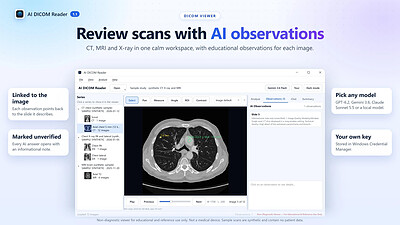
AI DICOM Reader - View DICOM medical imaging files and analyze them with Vision AI - for education and research only. The measurement toolkit - covering region-of-interest drawing, distance measurement, angle calculation, and Hounsfield Unit density analysis - provides the hands-on tools that imaging students and researchers need to engage meaningfully with the data rather than simply viewing it passively. Combined with Multi-Planar Reconstruction for navigating volumetric CT and MRI data in three dimensions, AI DICOM Reader offers a depth of technical capability that is unusual for a desktop application at this price point.

Key Features

Advanced DICOM Viewer
Window/Level adjustments (Bone, Lung, Brain presets), pan, zoom, and MPR for 3D volume slicing.

Multi-Model AI Analysis
Connect OpenAI (GPT-4o), Claude, Gemini, OpenRouter, or Ollama for local offline AI analysis.

Measurement Tools
Draw ROI regions, measure distances, angles, and calculate pixel densities (HU/SI).

Privacy Controlled
No telemetry, no cloud sync. You control exactly what data goes to AI APIs.

Report Export
Export AI-generated educational summaries to PDF, DOCX, HTML, or TXT.

DICOM Metadata
Extract and parse hidden DICOM metadata and acquisition tags automatically.

Who Is It For?

Medical Students
Learn to interpret imaging data by testing how AI models read DICOM scans.

AI Researchers
Benchmark vision models against medical imaging formats.

Tech Enthusiasts
Explore DICOM format parsing and AI integration in a desktop app.

Educators
Use as a teaching tool to demonstrate medical imaging concepts.

System Requirements
- Platform: Windows 10 version 17763.0 or higher
- Memory: 4 GB (min), 6 GB (rec)

HOMEPAGE:
Код:
https://bytesweavers.tech

FREE DOWNLOAD LINKS:​

Код:
https://rapidgator.net/file/a52c5d2ec6aa4597f16c9d2185a7455b/AI_DICOM_Reader_1.1.0.rar
 
Назад
Сверху Снизу