All Emperor2011's Software in one thread !! (updated daily)

57489fc7d7cd9c9b5018d568189e7ecd.jpg


LibreOffice 26.8.3 | Size: 696.74 MB
Language: English
​
LibreOffice - a powerful office suite. Translated into more than 30 languages. LibreOffice is free and is open source, so you can free to download, use and learn LibreOffice. LibreOffice free for private and for educational or commercial use. It can be used without any licensing fees to your family, friends, colleagues, students, employees, and so on.

LibreOffice office suite consists of several components that are integrated into a common core, in particular
Text Editor Writer;
Table Editor Calc;
A tool for presentations and demonstrations Impress;
Vector editor Draw;
Formula editor Math;
Database Management System Base.

Features
As the name implies, LibreOffice - one of the largest free office products. Freedom is manifested in
The absence of any license fees for the purchase and use the product.
The absence of a language barrier. If your language is not included in LibreOffice, it is certain that this will soon change.

Open access to the source code under a license agreement OSI.
- LibreOffice cares about the quality
LibreOffice have a rich heritage. The development has its roots in the past. The community has more than 20 years of experience on which to rely.
Thousands of users around the world are taking part in the beta testing the new version.
The process of creating LibreOffice is completely open. Everyone has the opportunity to participate in the improvement of LibreOffice.
- LibreOffice convenient
Easy to use and can be used without special training by all who had once worked with any office software.
Switching from another office suite on LibreOffice simple, since LibreOffice supports most existing formats "office" files.
LibreOffice has the technical support that is provided by volunteers around the world to help find answers to questions both novices and experienced users.

System Requirements: Windows 11, Windows 10, 8 , 7

FREE DOWNLOAD LINKS:​

Код:
https://rapidgator.net/file/a4ef1b818b1da85c7a7c88d154c259ef/LibreOffice_26.8.3.rar

Код:
https://clicknupload.click/vbchog3h50gq/LibreOffice_26.8.3.rar
 
5207f12d832e6412df15e386e3976230.jpg


Markdown Monster 4.7.1 | Size: 23.42 MB
Language: English
​
Markdown Monster is a powerful, yet easy to use Markdown editor with syntax highlighting and sophisticated and fast edit features. A collapsible, synced, live preview lets you see your output as you type and scroll. Easily embed or paste images, links, tables and code using raw markup or our smart UI helpers to simplify many operations with a few keystrokes or a click or two. Paste images from the clipboard or drag and drop from Explorer or our built-in file browser. Inline spell-checking and word counts keep your content streamlined.

You can export Markdown to PDF or HTML on disk or copy Markdown selections as HTML to the clipboard. The HTML preview can display syntax colored code snippets for most coding languages. Choose from light or dark app themes, and individual and fully customizable preview themes. Use the built-in folder browser to open, manage and drag files into content, use the document outline to quickly jump through content, or use our shell integration to shell out to Explorer, Terminal, Image Editor, Diff tool or your favorite Git client. Git support is built to see local Git status and sync to your repositories.

Everything is at your finger tips, but out of your way until you need it.

Weblog Publishing
Markdown Monster can also publish your Markdown directly to your Weblog Service. If your blog supports WordPress, MetaWeblog, Jekyll or Medium, you can publish your documents with one click. You can also edit and rlish, or download existing posts and even convert existing posts from HTML to Markdown.

Extensible via .NET
We also wanted to make sure the editor is highly extensible, so you can add custom features of your own. Markdown Monster includes an addin model that makes it easy to build extensions that let you hook into the UI, the editor behavior and the publishing process. We also provide useful Scripting and Text Templating addins that let you automate many tasks without creating an addin. Find out more about creating an addin with .NET.

Features:
Easy and fast Markdown editing
Syntax colored Markdown text
Live Preview while you type
Inline spell checking
Easy image and link embedding
Paste images from Clipboard
Gentle toolbar support
File and Folder Browser
Favorites Manager
Document Outline
Git Integration
Built in screen capture
Two-way Table Editor
Import Html to Markdown
Export Markdown to Html
Dark and Light UI Themes
Customizable Preview Themes
High DPI Support
Weblog Publishing and Editing
Yaml Meta Data Support
Snippet Expansion Templates
Swappable Markdown Parsers
Extensible with .NET Add-ins

System Requirements:
Microsoft Windows 10 or later
.NET 7.0 (pre-installed)
WebView2 Runtime (pre-installed)

HOMEPAGE:
Код:
https://markdownmonster.west-wind.com/

FREE DOWNLOAD LINKS:​

Код:
https://rapidgator.net/file/9fe4413747a86f83fa179825910cb7a5/Markdown_Monster_4.7.1.zip

Код:
https://clicknupload.click/zyyrboe6cpmr/Markdown_Monster_4.7.1.zip
 
4f2548a8b363c891485a37967c3d95d3.jpg


Nevercenter Silo 2027.0 Professional | Size: 44.58 MB
Language: English
​
Silo is a lightweight and lightning-fast 3D polygonal modeler and UV mapper, offering a deep, industry-grade toolset and easy-to-master workflow at an insanely affordable price. Its lightweight, focused, and portable nature have made it THE go-to pure modeler for over a decade, either used standalone or as the perfect modeling upgrade for all-in-one tools like Maya or Blender. It's ideal for creating base meshes for Mudbox or ZBrush (including GoZ support), and works seamlessly with Unity and Unreal game engines for creating all kinds of 3D game assets.

Game Dev with Unreal/Unity
Robust support for game engines like Unreal and Unity via .fbx, including blend shapes.

ArchViz
Milo is the easiest way to make beautiful architectural renders and interactive walkthroughs.

Intuitive UV Workflow
Silo makes UVs a breeze with features like live LSCM unwrapping.

Off-Model Selection Highlighting
Make tricky selections incredibly fast and accurately with Silo's off-model selection highlighting.

Complete Poly/SubD Toolset
Silo has streamlined versions of all the industry-standard modeling tools you need.

Instant Turntable Renders
Create animated gifs with one-click turntable render export.

Model With Blend Shapes
Blend shapes are great for auto-generating random variations of a model.

Silo-Milo Link
Edit your file in Silo and hit save, and it will auto-reload in Milo with your changes.

VR Support
Plug in your headset and hit Milo's VR button. Use VR or game controllers for movement.

Fully Customizable
Customize colors, hotkeys, interface buttons, and even every mouse function, matching any workflow.

The Perfect ZBrush Companion
With GoZ support, Silo is ideal for modeling base meshes for ZBrush.

Transportation/Product Design
Iterate incredibly quickly modeling in Silo and using Milo for renders.

Operating System: Windows 10 or newer 64-bit

HOMEPAGE:
Код:
https://nevercenter.com/silo/

FREE DOWNLOAD LINKS:​

Код:
https://rapidgator.net/file/fb30d929eca96a9e9f92d1be5e0e156b/Nevercenter_Silo_2027.0_Professional.rar

Код:
https://clicknupload.click/5fxd8bztguet/Nevercenter_Silo_2027.0_Professional.rar
 
_7b40236954d3d5997b0e5a8edbf19096.jpeg


Nisse Sec Team DocRedactNow 2.0 | Size: 13.51 MB
Language: English
​
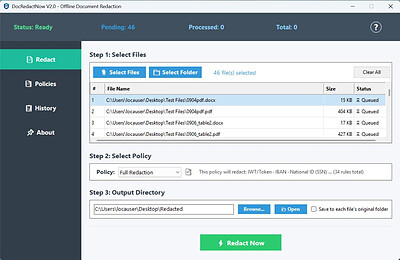
Offline Document Redaction. Remove sensitive data from documents. Permanently strip personal data from TXT, CSV, DOCX, XLSX, and PPTX files - emails, phone numbers, addresses, credit cards, and more. For PDFs, use our secure visual masking engine to safely flatten sensitive areas. One click, batch process hundreds of files. 100% offline, no cloud, no uploads.

All Your Documents Covered
Permanent removal for WORD, EXCEL, PPT & Text. Secure masking for PDF.

Process Hundreds at Once
Add files or entire folders. Redact dozens of documents in a single click.

Find What Matters, Redact It
Automatically detect emails, phone numbers, credit cards - 34 patterns built in.

Know What Was Redacted
Every change is logged. Export reports for compliance or your own records.

Redact the Right Way
Use pre-built policies or create your own. Consistent redaction, every time.

Your Files Never Leave Your PC
No uploads, no cloud, no third-party servers. Your data stays yours.

HOMEPAGE:
Код:
https://www.nisse-sec.com/docredactnow

FREE DOWNLOAD LINKS:​

Код:
https://rapidgator.net/file/0a1212250c7b966161d89c6e8b56f2b0/Nisse_Sec_Team_DocRedactNow_2.0.rar

Код:
https://clicknupload.click/d02tz9xysj02/Nisse_Sec_Team_DocRedactNow_2.0.rar
 
_963637ebf64a13e80147e39559fc34b4.jpeg


Nisse Sec Team WinRansomProtect 2.1 | Size: 6.08 MB
Language: English
​
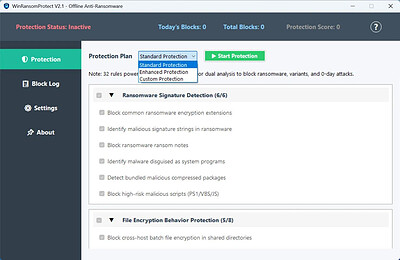
Offline Anti-Ransomware. Stop ransomware before it encrypts your files. WinRansomProtect watches your files and stops ransomware before it can encrypt them. 32 rules cover the common attack paths - file encryption, malicious scripts, suspicious processes. It runs offline, uses under 5% CPU, and doesn't touch the network.

Ransomware Blocking
Watches what files actually do, not what they're called. When something starts encrypting your documents, it gets stopped fast.

32 Protection Rules
32 rules cover the common attack paths - encryption, malicious scripts, process abuse. Each rule can be toggled on or off in Custom mode.

Instant Response (200ms)
Commands like vssadmin delete shadows are caught within 200 milliseconds. Backup deletion never gets a chance to start.

Process Blocking
Blocks PowerShell and CMD scripts that try to do things they shouldn't. Also stops code injection into other running processes.

Smart File Monitoring
Keeps an eye on Documents, Desktop, and Downloads. Bulk renames or deletes get flagged before too many files are touched.

Machine-Bound License
Activation works offline. Your license is tied to your hardware, so it can't be copied to another PC or shared with a friend.

File Quarantine
Suspicious files are moved to quarantine and removed from their original location. You can open the quarantine folder from Settings.

Zero Data Collection
No telemetry. No cloud scan. No account. Your files and system details stay on your machine, and update checks are optional.

Low Resource Usage
Runs quietly in the background - under 5% CPU and under 100 MB memory. It won't slow down your work or get in your way.

HOMEPAGE:
Код:
https://www.nisse-sec.com/winransomprotect

FREE DOWNLOAD LINKS:​

Код:
https://rapidgator.net/file/89a6d8367d411cb4dc0abfb07b9e1baf/Nisse_Sec_Team_WinRansomProtect_2.1.rar

Код:
https://clicknupload.click/k3rgw96uybgl/Nisse_Sec_Team_WinRansomProtect_2.1.rar
 
03ae713ee2ef85990ea11b158b03362a.jpg


Notepad++ 8.9.9.1 Multilingual | Size: 13.3 MB
Language: English
​
Notepad++ has all the same great features of Notepad++ including support for multiple languages and an extensive plugin system, but there's nothing to install.

Syntax Highlighting and Syntax Folding
Supported languages
C C++ Java C# XML HTML
PHP CSS makefile ASCII art (.nfo) doxygen ini file
batch file Javascript ASP VB/VBS SQL Objective-C
RC resource file Pascal Perl Python Lua TeX
TCL Assembler Ruby Lisp Scheme Properties
Diff Smalltalk Postscript VHDL Ada Caml
AutoIt KiXtart Matlab Verilog Haskell InnoSetup
CMake YAML WYSIWYG
If you have a colour printer, print your source code (or whatever you want) in colour.
User Defined Syntax Highlighting
It allows user to define his own language : not only the syntax highlighting keywords, but also the syntax folding keywords, comment keywords and the operators. ( screenshot1, screenshot2, screenshot3, screenshot4 ).
Auto-completion

For most supported languages, user can make his/her own API list (or download the api files from dowload section). Once the api file is ready, type Ctrl+Space to launch this action (see screenshot). For more information about Auto-completion, please see Auto-completion HOWTO.
Multi-Document
You can edit several documents at the same time.
Multi-View
You have two views at same time. That means you can visualize (edit) 2 different documents at the same time (screenshot). You can visualize (edit) in the 2 views one document at 2 different positions as well. The modification of document in one view will carry out in another view (i.e. you modify the SAME document when you are in clone mode).
Regular Expression Search/Replace supported
You can search and replace one string in the document by using the regular expression.
Full Drag 'N' Drop supported
You can open a document by drag & drop. You can also move your document from a position (or even a view) to another by drag & drop.
Dynamic position of Views
The user can set the position of the views dynamically (only in 2 views mode : the splitter can be set in horizontal or in vertical), see screenshot.
File Status Auto-detection
If you modify or delete a file which opened in Notepad++, you will be notified to update your document (reload the file or remove the file).
Zoom in and zoom out
That's another fantastic function of Scintilla component. Just see screenshot.
Multi-Language environment supported
The Chinese, Japanese, Korean, Arabic and Hebrew Windows environments are supported. See Notepad++ under the Chinese Windows , under the Arabic Windows and under the Hebrew Windows in action screenshot.
Bookmark
User can just click on the bookmark margin (located right side of line number margin) or type Ctrl+F2 to toggle a book mark. To reach the bookmark, type just F2 (Next bookmark) or Shift+F2 (Previous bookmark). To clear all bookmarks, click the Menu Search->Clear All bookmarks. See screenshot.
Brace and Indent guideline Highlighting
When the caret stay beside of one of those symbol { }[ ] ( ) , the symbol beside of caret and its symmetric opposite symbol will be highlighted, as well as the indent guideline (if any) in order to locate the block more easily. See screenshot1, screenshot2 .
Macro recording and playback
You can save several macros and edit their keyboard shorcuts for the next use.

System Requirements: Windows 11, Windows 10, 8 , 7

HOMEPAGE:
Код:
https://notepad-plus-plus.org/

FREE DOWNLOAD LINKS:​

Код:
https://rapidgator.net/file/6a5d755712d7d4cc64c00a062db1386a/Notepad___8.9.9.1_Multilingual.rar

Код:
https://clicknupload.click/2qye8kf291au/Notepad%2B%2B_8.9.9.1_Multilingual.rar
 
2c56cf2a62bf58b4d8587b1b6ad87be6.jpg


O&O BlueCon v25.0.27026 Technician Edition - WinPE | Size: 1.67 GB
Language: English
​
A blue screen usually means a lot of work for administrators. When things get really bad, there's no other choice but to configure a new system setup. And this is where O&O BlueCon comes in. O&O BlueCon is at an administrator's side during the course of a daily routine as well as whenever disaster strikes. Based on Windows PE, it offers a wide range of programs for, among other things, repairing systems, searching and correcting errors, restoring lost data, resetting passwords, and the list goes on. O&O BlueCon is an administrator's IT first aid kit for day to day use.

O&O BlueCon starts all programs directly from a bootable medium (USB or CD/DVD) and can so avoid the risk of data loss caused by overwriting data on the computer, which might be the case with a new installation. Seamless integration of all O&O BlueCon components saves the user the time-consuming job of collecting individual programs.

The most important innovation in O&O BlueCon 21 is the integration of O&O Check & Repair, a tool to search for why a system no longer starts. In the first step "Check", the system files and components are checked for missing or damaged files and/or registration key. "Repair" then tries to automatically correct these errors. If this step is not successful, the current version 21 of O&O BlueCon offers further information, including the log files.

The creation of the bootable rescue medium was completely revised in O&O BlueCon 21 and simplified again. With just a few clicks, the start medium is created and ready for use. New is the integration into a separate rescue environment, so that the primary recovery environment can continue to exist without changes. Any integrated drivers can also be utilized.

NEW: WLAN support in O&O BlueCon
The latest O&O BlueCon takes the flexibility and connectivity of system recovery and maintenance tasks to a new level. Recognizing that many modern mobile devices - from laptops to tablets - now only have WiFi connectivity, O&O BlueCon now offers expanded support for wireless networks. This development makes it possible to seamlessly operate devices without a physical network connection.
The WLAN functionality in O&O BlueCon is not just limited to access to the Internet. Rather, it significantly expands the possibilities for network use within your company. Whether it's saving backups to network locations, backing up important files, or accessing company resources, it's all now possible over a Wi-Fi connection.

NEW: Simplified creation of the boot medium
The latest O&O BlueCon revolutionizes the process of creating boot media by making it much more user-friendly. In the past, preparing a boot medium for O&O BlueCon involved downloading and installing a comprehensive, 5 GB package from Microsoft - the Assessment and Deployment Kit (ADK). This step could be very time consuming depending on your internet connection.
With the latest version of O&O BlueCon, this cumbersome process is a thing of the past. Users no longer need to install Microsoft's additional ADK to create boot media. This improvement not only eliminates the need to download and install large files, but also reduces the complexity and potential sources of error that came with the previous method.
This optimization makes creating a boot media faster and more accessible for all users, regardless of their technical background. The result is a streamlined and efficient process that makes it possible to begin restoring and maintaining systems right away without much preparation or waiting. With the new O&O BlueCon, users can now create boot media easier than ever to effectively manage and repair their systems.

Simplified operation through new ShellConfig
With the introduction of the new ShellConfig, O&O BlueCon 21 sets new standards in terms of user-friendliness and efficiency. This innovative configuration level was specifically developed to optimize and simplify the start process of O&O BlueCon and the O&O ExclusiveMode. As soon as O&O BlueCon is activated or the O&O ExclusiveMode starts, ShellConfig comes into play and contributes significantly to increased user-friendliness.
The main function of ShellConfig is to automatically reload drivers and unlock BitLocker drives when necessary. This process, which previously required manual intervention and technical expertise, is significantly simplified by ShellConfig. Users benefit from a seamless and largely automated experience that makes it easier to access the powerful functions of O&O BlueCon and ExclusiveMode products.
Thanks to this innovation, users no longer have to manually intervene in the process to solve driver problems or make encrypted drives accessible. ShellConfig handles these tasks automatically, speeding up the entire process and reducing the likelihood of operator errors.

Benefits for your company:
Restoring accidentally deleted data
Backing up and restoring data
Driver problems and service issues
Secure deletion of data volumes
Resetting passwords
Partitioning hard disks
Combat errors in the registry database
Advanced error detection - EventViewer and CheckDisk
Locating and removing data
Downloading additional tools: Integrated web browser
Creation of a PXE Boot Medium direct from the Boot Assistant
Bitlocker drives can be unlocked and accessed
Scripting over Windows networks
Support too for Hyper-V

System requirements:
The current version supports Windows 11, Windows 10, and Windows Server 2022, 2019, 2016 and all integrated programs start directly from USB stick or from a network environment via PXE boot. O&O BlueCon can be started directly from the Windows boot menu or directly from the USB stick or CD without prior installation.

HOMEPAGE:
Код:
https://www.oo-software.com/

FREE DOWNLOAD LINKS:​

Код:
https://rapidgator.net/file/4e47d037b0b51572d88adbdac965f53c/OO-BlueCon-v25.0.27026-WinPE_.part1.rar
https://rapidgator.net/file/4a58b700556477ba08d7ffd97529e7e1/OO-BlueCon-v25.0.27026-WinPE_.part2.rar

Код:
https://clicknupload.click/rvdky77fknsh/OO-BlueCon-v25.0.27026-WinPE_.part1.rar
https://clicknupload.click/ndupv0slfb3u/OO-BlueCon-v25.0.27026-WinPE_.part2.rar
 
_c70661370c52fba9329d52d9d72536de.jpeg


PC Repair Suite 2.3.0 | Size: 144.23 MB
Language: English
​
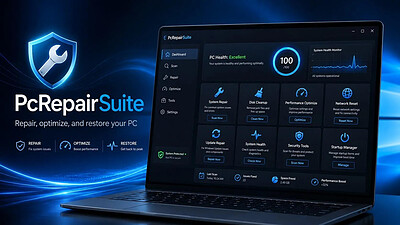
Whether you're facing corrupted system files, broken Windows updates, or network issues, this modern utility empowers you to take control and fix it fast. No bulky installations. No background bloat. Windows Repair Suite is optimized for speed, minimal resource usage, and zero learning curve.

It provides guided access to built-in PC diagnostics and configuration options, helping users check system integrity, troubleshoot network issues, and manage startup and privacy settings - without requiring command-line knowledge.

Access Built-in Windows Diagnostics
- Run system checks from one dashboard
- Clean, modern interface
- No command-line required

System Integrity & Diagnostics
- Launch SFC, DISM, and CHKDSK
- Uses official Windows commands
- Helps diagnose common system issues
- Administrator permission supported

Network Troubleshooting Utilities
- Reset Winsock and IP settings
- Flush DNS cache
- Diagnose common connectivity issues
- Local-only execution

Startup Program Control
- View startup apps from Registry & folders
- Enable or disable startup entries
- Open file locations in Explorer
- No deletion of system files

Windows Privacy Settings Manager
- Manage 20+ Windows privacy options
- Organized by category
- Uses existing Windows settings
- Changes are fully reversible

Designed with Transparency
- Runs entirely on your device
- No data collection
- No drivers or background services
- Built on Windows-native tools

System Requirements
PC Repair Suite runs on both Windows 10 and Windows 11, in 32-bit and 64-bit editions.

HOMEPAGE:
Код:
https://spaqitech.com

FREE DOWNLOAD LINKS:​

Код:
https://rapidgator.net/file/dc8755e4618ff07de85041d39c71c259/PC_Repair_Suite_2.3.0.rar

Код:
https://clicknupload.click/eaei9vdsmxg3/PC_Repair_Suite_2.3.0.rar
 

150f64a529c18a3926ba00c23e9c44ec.jpg


PDF24 Creator 11.34 Multilingual | Size: 388.39 MB
Language: English
​
PDF24 Creator is a program to create PDF files from almost any application. The PDF software is a free PDF creator to create PDF files from any type of document. With the PDF creator you can convert documents into PDF files very easily. The PDF creator acts as a PDF printer.

Advantages of PDF24 PDF Creator
Once installed, create PDF files forever
Free upgrades included
Conversion is simple and possible from all current programs
Create PDF files from almost any application
Easy to use
Multilingual
Several features of PDF24 PDF Creator
Merge and split PDF
Extract pages from a PDF
Copy pages from one PDF to another PDF

Integrated preview for easy PDF editing
Secure a PDF (Prevent from unauthorised opening, printing, etc.)
Set PDF information such as author and title

System Requirements: Windows 11, Windows 10, 8 , 7

HOMEPAGE:
Код:
https://www.pdf24.org/

FREE DOWNLOAD LINKS:​

Код:
https://rapidgator.net/file/923ce8396c1ad52ae868301ead4ec655/PDF24_Creator_11.34_Multilingual.rar

Код:
https://clicknupload.click/fnt0ko9kwa4s/PDF24_Creator_11.34_Multilingual.rar
 
b34b945904375e7ec755f4e4d352b1a1.jpg


PDQ Deploy 20.2.31 Enterprise | Size: 102.57 MB
Language: English
​
PDQ Deploy is a software deployment tool used to keep Windows PCs up-to-date without leaving your chair or bothering end users.

Deploy Almost Anything
Silently deploy almost any Windows patch or application (.exe, .msi) to multiple Windows PCs simultaneously. Deployments can install, uninstall, execute scripts, reboot, copy files, sleep, send messages, etc. Instructions and files are sent to the target computer, executed, monitored, and reported.

Set it 'n Forget it
Never miss a critical patch again! Common applications (including Windows Monthly rollups) can download automatically and deploy on your schedule or even when offline targets come online when integrated with PDQ Inventory. Rest assured your patch updates are going out even when you are not in the office. Isn't it time for that much-needed vacation?

Easily Execute Scripts
Run and deploy common scripts like .vbs, .reg, .bat, and .ps1. Execute from a file, or write them on the fly. The possibilities are almost endless. PDQ also has many resources for PowerShell, too. Start honing those scripting skills.

Ready-to-Deploy Applications
We maintain a library of over 175 ready-to-deploy popular applications so you don't have to. When a new version of an application is released, PDQ updates and tests them and makes them available as soon as possible. You'll wonder how you ever lived without it.

Email Notifications
Wouldn't it be nice to glance at the inbox on your phone and see that deployment or schedule was successful? You won't even have to put down that drink or game controller. PDQ Deploy is the assistance you always wanted!

Multi-Admin Access With a Shared Database
Share deployments, schedules, lists, and even preferences between PDQ Deploy consoles by creating a server/client relationship. Processes are initiated via either the console or Command Line Interface (CLI) but use the Server's database. Why do all the work twice?

System requirements:

Console Machines
- Windows 11, 10, 8x, Server 2012x or higher
- Microsoft .NET Framework 4.6.2 or higher
- 4 GB RAM, 8 GB recommended
- Installing on a Domain Controller or Microsoft Exchange Server is not recommended

Target Machines
- Windows 11, 10, 8x, Server 2012x or higher
- .NET Framework 4.6.2 or higher (can be remotely installed via PDQ Inventory)
- 1 GB RAM, 2 GB recommended
- PowerShell 3+ is recommended for PDQ Deploy

HOMEPAGE:
Код:
https://www.pdq.com/

FREE DOWNLOAD LINKS:​

Код:
https://rapidgator.net/file/41dd3c014ce46ca367a6254503d2a594/PDQ_Deploy_20.2.31_Enterprise.rar

Код:
https://clicknupload.click/o07zjbkbdr5t/PDQ_Deploy_20.2.31_Enterprise.rar
 
c602230b502db261a75c372a82d3ca9c.jpg


PDQ Inventory 20.2.31 Enterprise | Size: 110.23 MB
Language: English
​
PDQ Inventory is a systems management tool that scans Windows computers to collect hardware, software, and Windows configuration data.

Intelligent Data Tracking
Out of the box, computers are automatically grouped based on common data. View computers that have the same installed applications, hardware, operating systems, and even Windows updates. Additionally, create groups based on your own criteria.

Utilities
Easily launch remote desktop, remote command, reboot/shutdown, WOL, event viewer, and more. Incorporate and run your own scripts and favorite utilities with ease.

Reports
Report on the exact data you need by using the built-in reports or create your own. Reports are created using our filters or even SQL. Run reports on any or all computers in the database then print, export and even save and email on a regular schedule to all your bosses.

Integration with PDQ Deploy
Easily identify which computers are out-of-date and use PDQ Deploy to deploy to those particular PCs. Automatically update PDQ Inventory directly following the deployment. However, best of all is automatically deploying when a computer goes from offline to online in PDQ Inventory.

Insanely Detailed Data Tracking
The Collection Library makes it easy to see which computers have out-of-date popular applications or run times. These groupings are updated as new versions of these apps, updates, and runtimes are released and serve as great templates for creating your own.

Multi-Admin Access With a Shared Database
Share your reports and collections with other admins by creating a server/client relationship. Maybe they'll buy you a drink for all of the work you saved them.

System requirements:

Console Machines
- Windows 11, 10, 8x, Server 2012x or higher
- Microsoft .NET Framework 4.6.2 or higher
- 4 GB RAM, 8 GB recommended
- Installing on a Domain Controller or Microsoft Exchange Server is not recommended

Target Machines
- Windows 11, 10, 8x, Server 2012x or higher
- .NET Framework 4.6.2 or higher (can be remotely installed via PDQ Inventory)
- 1 GB RAM, 2 GB recommended
- PowerShell 3+ is recommended for PDQ Deploy

HOMEPAGE:
Код:
https://www.pdq.com/

FREE DOWNLOAD LINKS:​

Код:
https://rapidgator.net/file/3e218a553468995090fea700e5c17de0/PDQ_Inventory_20.2.31_Enterprise.rar

Код:
https://clicknupload.click/avwuy1ygq8u9/PDQ_Inventory_20.2.31_Enterprise.rar
 
3a7fef5acabf37488adef49f409ca5dd.jpg


Pazu StreamGet 3.2.9 Multilingual | Size: 268.78 MB
Language: English
​
Download movies and shows from various streaming platforms to MP4/MKV on your Windows device and enjoy them anywhere you want.

Download videos from the most popular streaming services including Netflix, Prime Video, Disney Plus, Max, Hulu, Apple TV Plus, and more.
Download movies and shows to MP4/MKV
High-quality downloads up to 1080p.
Freely choose to keep any or all audio and subtitles.
8x fast downloading speed
Multiple downloads at a time
Select how subtitles are saved (hardcoded, softcoded, or external files).
Multilingual interface: English, Deutsch, Espanol, Francais

Download All, Download Now
StreamGet All-In-One Video Downloader is the ultimate download solution for you. It supports downloading any movies and shows from the most popular streaming websites including Netflix, Prime Video, Disney Plus, Max, Hulu, and Apple TV Plus. The downloader is continuously updated to support more platforms in the future.

Support downloading from various streaming platforms
Download as many movies and shows as you want
Watch on any supported device
Download movies in up to 1080P
Continuously updated

User-friendly Interface and built-in browser
StreamGet All-In-One Video Downloader simplifies your download process by offering a built-in browser. This allows you to directly search for movies or TV shows within the application. Simply select your preferred streaming service from the homepage, enter a title or keywords, and let StreamGet present the search results for you.
One-stop browsing experience with the built-in browser
Simple and clear user interface
Multilingual Support
Search the movie/show title or copy&paste the link

Download videos in high quality at a fast speed
StreamGet All-In-One Video Downloader delivers the perfect combination of speed and quality. You can download high-quality videos starting from 720p(HD) and up to 1080p (FHD). Moreover, it uses multi-threading to increase download speed. Experience downloads 8x faster than standard speeds.
8x fast downloading speed
One click to download all seasons and epidodes
Choose the format, audio track, and subtitle you want
Download videos in H.265(High-Efficiency Video Coding, HEVC) or H.264(Advanced Video Coding, AVC).

Audio and subtitle customization
StreamGet All-In-One Video Downloader offers comprehensive multi-language support for downloaded videos. You can choose to download audio tracks and subtitles in any language available on the original streaming service. This flexibility ensures you can enjoy your content in your preferred language.
Freely choose to keep any audio and subtitles available.
Save subtitles as Soft subtitles, External subtitles or Hard subtitles.
Support preserving all available audio track and subtitle languages.
Keep Audio description and Audio surround sound

Ultimate offline playback experiences
With StreamGet All-In-One Video Downloader, you can download videos from Netflix, Amazon Prime Video, Disney+, Max, Hulu, and Apple TV+ even with an ad-supported subscription. These downloaded videos can be transferred to various compatible devices and applications for offline playback, offering greater flexibility in how you enjoy your favorite content.
Download videos even with an ad-supported account
Watch streaming videos offline on any devices you want
No video streaming app is required
Downloaded videos are stored locally and will never expire.

HOMEPAGE:
Код:
https://www.pazu-video.com/streamget-all-in-one-for-windows.html

FREE DOWNLOAD LINKS:​

Код:
https://rapidgator.net/file/345c522424b04d18ea739933947f8f4b/Pazu_StreamGet_3.2.9_Multilingual.rar

Код:
https://clicknupload.click/oj9ezssgyzic/Pazu_StreamGet_3.2.9_Multilingual.rar
 
_2a33d648835745e29f9f03de4b65cb3b.jpeg


PhraseExpress 18.0.86 | Size: 57.55 MB
Language: English
​
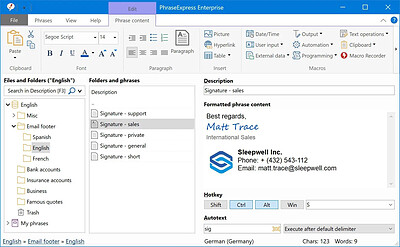
No more typing the same phrase again! PhraseExpress is a text expander software, that manages frequently used text templates for insertion into any program. Phrases can be triggered from the snippet menu, by hotkey or with autotext shortcuts. The template manager can switch your boilerpate templates between multiple languages or customizable categories. The autotext software is available for Microsoft Windows, Apple Mac and iPhone/iPad. Phrases are customizable with user input before insertion and be shared in the cloud or in the local network by a Microsoft SQL or PhraseExpress Server.

Universal Text Snippet Manager
Speed up your typing in any program, such text editors, email programs, web browsers, database applications, EMR, etc.
Organize text snippets in customizable categories for instant access.
PhraseExpress can save hours of typing in technical support, customer care, help desk, call center and medical transcription.

Share Phrases with your Team
Share phrases with other users in the local network or in the cloud - On-premise or over the internet.
Each phrase can be set private or made public to selected users.
The client-/server architecture prevents edit collisions.
PhraseExpress supports Microsoft SQL server and Citrix/TerminalServer.

Cloud Support
The cloud synchronisation feature allows you to share phrases with others over the internet.
PhraseExpress supports any popular cloud service, such as Dropbox, Microsoft OneDrive, Google Drive and on-premise cloud solutions like OwnCloud and Synology CloudStation.
You can even use any NAS or network-shared folder to sync your phrases between multiple Windows and Mac computers.

Cross-Platform Support
Work faster everywhere!
PhraseExpress is available for Windows and the TextExpander alternative saves typing on your Mac, too. The Text Expander App for iPhone and iPad provides the productivity benefits on tablet or smartphone devices.
* Features advertised on our website refer to the Windows version, unless specified otherwise.

Multi Language Phrases
Take your templates to the next level - Literally!
PhraseExpress can organize phrases not only in a tree structure but also in multiple dimensions.
The same phrase library can be switched instantly into different languages, making it an ideal solution for multi-language call centers!
PhraseExpress can even translate your phrases into another language.

Macro Automation
Takes out the tedious from your tasks
PhraseExpress integrates a powerful Macro Recorder to record and playback repetitive tasks.
Macro Recorder records your actions like a tape recorder for infinite playback.

Document Generator
The Document Generator can generate an entire document based on a custom selection of your templates:
Lawyers create custom contracts in no time: Just select the terms to be included and PhraseExpress saves the custom contract as a Microsoft Word document on your desktop.
Medical doctors can select applicable items from the list of common procedures to create a customized medical report.

Universal Autotext
PhraseExpress expands text abbreviations into long phrases. This Autotext feature works in any Windows program.

Customizable Templates
Fill-in forms collect manual input, that is processed and embedded into your templates.

Dynamic Templates
External data can be embedded into phrases to create dynamic templates.

System-wide Spelling Correction
The system-wide spelling correction corrects typing mistakes in multiple languages as you type.

Email Signature Manager
PhraseExpress centrally manages email signature templates for use with any mail program, such as Outlook, Lotus Notes or Thunderbird.

MS Outlook Integration
The Outlook Add-In auto-inserts email salutations and suggests answering templates based on the email context.

HOMEPAGE:
Код:
https://www.phraseexpress.com/

FREE DOWNLOAD LINKS:​

Код:
https://rapidgator.net/file/8c97ff5668ef30c013c5686dd63da02e/PhraseExpress_18.0.86.rar

Код:
https://clicknupload.click/xl03f6wa906v/PhraseExpress_18.0.86.rar
 
_b511fc100d8dfb99aba911685b9c0ec2.jpeg


Richardson Software RazorSQL 11.0.4 | Size: 193.94 MB
Language: English
​
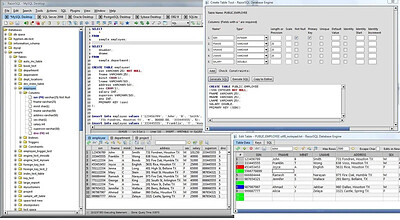
RazorSQL is an SQL query tool, database browser, SQL editor, and database administration tool for Windows, macOS, Mac OS X, Linux, and Solaris.

Features:
A Database Navigator for browsing database objects.
An SQL Editor for creating SQL queries.
Visual tools for creating, editing, dropping, describing, altering, and viewing tables, views, indexes, and sequences
Database Management Tools
Visual Tools for creating, editing, dropping, and executing stored procedures, functions, and triggers
A robust programming editor that embeds the powerful EditRocket code editor that supports 20 programming languages including SQL, PL/SQL, TransactSQL, SQL PL, HTML, XML, and more.
Export Tool - Export data in various formats
Import Tool - Import data from delimited files, Excel files, or fixed width files into tables
Ships with a built-in relational database engine (HSQLDB) that is up and running out of the box and requires no end-user administration

A Generate DDL Tool for generating table, view, and index DDL.
Table / SQL Query Compare tool for comparing tables or queries across multiple connections
Database Data Search tool for searching single or multiple database table and view data.
Database Object Search tool for searching for database objects.
Backup tools such as the Database Backup Tool and Table Backup Tool
Database conversion tools for many popular databases such as MySQL, Oracle, DB2, PostgreSQL, SQLite, MS SQL Server, and MS Access.
Auto column and auto table lookup
SQL Formatter
SQL Query builder tool
SQL Query Scheduler tool
Command Line Interface
PHP Bridges for connecting to MySQL, PostgreSQL, and SQL Server databases remotely via PHP enabled web servers
An ASP bridge for connecting to MS SQL Server databases remotely via ASP enabled web servers
SQL GUI Tools for generating SQL for various operations
Edit, delete, and insert database data with the Database Editor
Works with all major operating systems including Windows, macOS, Mac OS X, Linux, Solaris, and any other Java enabled OS
Tested with Apache Cassandra, Apache Derby / JavaDB, Apache Hive, Daffodil DB, DB2, DBASE, Druid, DynamoDB, Firebird, FrontBase, H2, HSQLDB / HyperSQL, Informix, Ingres, Interbase, Mckoi, Microsoft Access, Microsoft SQL Server, Mimer SQL, MongoDB, MySQL, Netezza, OpenBase, Oracle, Pervasive, Pointbase, PostgreSQL, Redshift, Salesforce, SimpleDB, Solid, SQLite, Sybase Adaptive Server Enterprise, Sybase SQL Anywhere, Teradata, and VoltDB

Database Browser
Browse database objects such as schemas, tables, columns, primary and foreign keys, views, indexes, procedures, functions, and more.

SQL Editor
Edit SQL scripts. Run SQL queries. Auto column and auto table lookup. Uses the powerful EditRocket code editor that supports over 20 programming languages including SQL, PL/SQL, TransactSQL, SQL PL, HTML, Java, XML, and more.

Database Tools
Visual tools to create, alter, describe, execute, and drop database objects such as tables, views, indexes, stored procedures, functions, triggers, and more.

Database Query Tool
Includes multi-tabular display of queries with options for filtering, sorting, searching, and much more.

Installation Instructions and Requirements
Windows (Native Installer)
For best results, use of one of the following operating systems is recommended: Windows 11, Windows 10, Windows 8, Windows 7, Windows Vista, or Windows Server 2003 or later. The 32-bit version of RazorSQL runs on both 32-bit and 64-bit versions of Windows. The 64-bit version only runs on 64-bit versions of Windows.

HOMEPAGE:
Код:
https://www.razorsql.com/

FREE DOWNLOAD LINKS:​

Код:
https://rapidgator.net/file/f46f6623115235039d20c9665cb101c9/Richardson_Software_RazorSQL_11.0.4.rar

Код:
https://clicknupload.click/j9fpcez00wti/Richardson_Software_RazorSQL_11.0.4.rar

 
16d21cb2c734a88f577c9c28d430d481.png


RightClickTools v2.0.6 | Size: 8.07 MB
Language: English
​
Add a set of powerful tools to the Windows Explorer context menu.

RightClickTools is a Windows Explorer context‑menu extension that adds a large collection of powerful utilities directly to the right‑click menu. It is designed to streamline file, folder, system, and administrative tasks.

Its purpose is to give users quick access to advanced actions without opening separate tools or command windows.

System requirements: Windows 7, 8.1, 10, 11

HOMEPAGE:
Код:
https://github.com/LesFerch/RightClickTools

FREE DOWNLOAD LINKS:​

Код:
https://rapidgator.net/file/b4393c020fabc11da71dabf9fd48eec7/RightClickTools_v2.0.6.rar

Код:
https://clicknupload.click/96rq4x5sw60g/RightClickTools_v2.0.6.rar
 
56287c75fa125142e1d912e8351f06e5.pngpg


Rufus 4.16.2442 Beta2 Multilingual | Size: 1.89 MB
Language: English
​
Rufus is a USB formatting utility which also can create a bootable USB drive using a bootable ISO image. This app requires admin rights.

Rufus is a small utility that helps format and create bootable USB flash drives, such as USB keys/pendrives, memory sticks, etc.

It can be be especially useful for cases where
you need to create USB installation media from bootable ISOs (Windows, Linux, etc.)
you need to work on a system that doesn´t have an OS installed
you need to flash a BIOS or other firmware from DOS
you want to run a low-level utility

Features
Format USB, flash card and virtual drives to FAT/FAT32/NTFS/UDF/exFAT/ReFS
Create DOS bootable USB drives, using FreeDOS or MS-DOS
Create BIOS or UEFI bootable drives, including UEFI bootable NTFS
Create bootable drives from bootable ISOs (Windows, Linux, etc.)
Create bootable drives from bootable disk images, including compressed ones
Create Windows To Go drives

Twice as fast as Microsoft's USB/DVD tool or UNetbootin, on ISO -> USB creation (1)
Perform bad blocks checks, including detection of "fake" flash drives
Compute MD5, SHA-1 and SHA-256 checksums of the selected image
Modern and familiar UI, with more than 35 languages natively supported
Small footprint. No installation required.

System Requirements: Windows 11, Windows 10, 8 , 7

HOMEPAGE:
Код:
https://rufus.ie

FREE DOWNLOAD LINKS:​

Код:
https://rapidgator.net/file/b7d99e1840f0aa95581d0b4be5f18e99/Rufus_4.16.2442_Beta2_Multilingual.rar

Код:
https://clicknupload.click/tapj08et0wiz/Rufus_4.16.2442_Beta2_Multilingual.rar
 
af009323c62ef29e1fd401e405150e78.jpg


Steinberg Dorico Pro 6.2.40 (x64) Multilingual | Size: 633.79 MB
Language: English
​
Dorico helps you to write music notation, automatically producing printed results of exceptional quality - and plays it back with breathtaking realism. It is easy enough for anyone to learn, yet has hundreds of advanced notations, features, options and sounds to satisfy even the most demanding professionals.

What you can do with Dorico?

Compose
Composing, arranging - or just writing and printing out music - is made much quicker and more efficient with Dorico. Thanks to its intelligent design, it automatically adjusts the notation as you write. With nearly 1,500 sounds included, arrangements can be played back with exceptional realism and, with no workarounds needed for advanced notation, Dorico produces excellent results much more quickly than has been possible before.

Learn
With its streamlined, natural user interface, students and those with less experience in scoring can compose and arrange straight into Dorico, making learning the language of music notation much faster and more intuitive. Editing and making changes - such as instrument, time signature or key - are straightforward, with the notation instantly and correctly adapting to include them, reinforcing the learning outcome. For teachers, producing teaching materials and hand-outs that mix music and text is easy, and it's never been quicker to adapt arrangements for your band, orchestra or other school ensemble.

Publish
Dorico is the perfect tool for music engraving, publishing and copying. It automatically lays out pages of balance and beauty, with comprehensive collision avoidance and advanced algorithms that handle almost any musical context with ease. Music made with Dorico has the look of the finest traditionally engraved music, and the software provides tweaking tools to satisfy the most demanding professional. Producing high-quality, crystal-clear scores for selling or performance has never been faster or easier.

Benefits
Best automatic engraving of any software
Easy note input
Intelligently adjusts notation as you write
Any number of movements or pieces in a single project
Automatic layout of instrumental parts, including unique linked cues
Stunning playback - nearly 1,500 sounds included
Supports VST 3 virtual instruments and effects processors (30 included)
Sequencer-style piano roll MIDI editor
DTP page layout
Sophisticated chord symbols, unpitched percussion and drum set notation
Unbarred music, tuplets across barlines, microtonality, etc. all handled correctly - no workarounds
Transfer to and from other programs via MusicXML, MIDI, PDF, etc.

System Requirements: Windows 10, 11

HOMEPAGE:
Код:
https://www.steinberg.net/en/products/dorico/

FREE DOWNLOAD LINKS:​

Код:
https://rapidgator.net/file/1db9109a30a88b21b1d6b4a2f52f37dc/Steinberg_Dorico_Pro_6.2.40_x64_Multilingual.rar

Код:
https://clicknupload.click/89y3o93s3ynn/Steinberg_Dorico_Pro_6.2.40_x64_Multilingual.rar
 
_e4ad96e49d7bb378f818ea5419d4fffd.jpeg


Steinberg VST Live Pro 3.0.70 (x64) | Size: 464.99 MB
Language: English
​
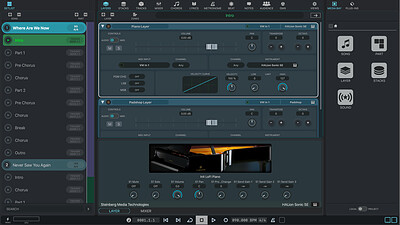
Make your live easier with VST Live, the ultimate live performance system. A unique, stable software solution, it is designed for musicians who want to put on a great show, including sound, lights and video, wherever you are. VST Live comes with a vast array of virtual instruments, sync features for your music, text and chord symbol displaying on other devices, video, Cubase import, MIDI tracks for direct DMX light control and much more.

HOMEPAGE:
Код:
https://www.steinberg.net/vst-live/

FREE DOWNLOAD LINKS:​

Код:
https://rapidgator.net/file/ed393faf68890257c72d2eb8dd14ceb0/Steinberg_VST_Live_Pro_3.0.70_x64.rar

Код:
https://clicknupload.click/ovk0jnucwpce/Steinberg_VST_Live_Pro_3.0.70_x64.rar
 
96b17da1c1ce5c26215b614d2e0ee70f.jpg


Syncovery Premium 12.9.8.101 (x64) Multilingual | Size: 92.36 MB
Language: English
​
Create your first sync or backup job step by step, with explanations of the main settings you need to make. Each job (or profile) works with two paths - source and destination, or just the left and right path (since profiles can be 2-way copy tasks also).

Extremely Fast Scanning
Syncovery's multi-threaded folder listing algorithm provides an unparalleled speed, and easily handles millions of files and huge numbers of folders. Even more speed can be gained with our Destination File List Cache and Remote Service features.

Block Level Copying
This will help you save bandwidth as well as backup space. Syncovery can detect changed blocks in large files, and copy only these. The detection works by keeping checksums in a database, or with the help of the Syncovery Remote Service, or by using our revolutionary File System Monitoring Service (the File Sytem Monitoring Service is Windows only).

Real-Time Synchronization
Real-Time Synchronization will make sure that changes are synced quickly. Syncovery listens to file system events and quickly performs the appropriate actions. For cloud servers, it can use polling to detect changes. These features are available on Windows and macOS only.

SmartTracking
The SmartTracking sync mode is frequently used in two-way sync jobs. It can detect moved files, deleted files, and conflicts (files changed on both sides).

Versioning
Syncovery allows you to keep multiple versions of modified files, allowing you to restore your files from an earlier date. The restore date can be chosen for individual files or multiple files, in our Restore Wizard.

File Server Migration
Syncovery's advanced NTFS copying features, high speed, and scaleability enable you to perform large-scale migrations. Read our new, comprehensive Server Migration Guide.

Advanced Mode
Keep Everything Under Control
Advanced Mode allows you to unleash Syncovery's full potential. The Profile Overview shows your jobs (or profiles), their last and next run times, and the last result or current progress. You can easily create, edit, and run profiles. Syncovery offers various ways to start profiles. These are available when right-clicking a profile:

Attended Mode
This mode has detailed progress dialogs, and shows the Sync Preview for you to confirm before proceding to the copying phase. It may also show additional confirmation dialogs according to your settings.

Unattended Mode
Unattended Mode also shows detailed progress dialogs, but does not show a Sync Preview and won't ask any further questions. Some confirmations must be given beforehand, in the profile settings (for example, to delete files).

Run in Background
Running a job in the background is the most unobtrusive way to run a profile. You will see basic progress information in the Profile Overview, but no extra dialogs. This is how the scheduler runs profiles. You can still see detailed progress info by right-clicking the job that's already running and choosing "Show Detailed Progress".

Background With Preview
This new feature in Syncovery 9 has proven to be extremely useful. You won't see detailed progress dialog, and the job doesn't block the Syncovery GUI. You can run multiple jobs simultaneously, and check the Sync Preview for each profile when it's ready. After confirming the preview dialog, the job goes into the background again.

System Requirements:
All versions of Windows since Windows Vista and Windows Server 2008 are fully supported, including Windows 10/11 and Server 2019-2025 and all other versions and editions of Windows that have a graphical user interface.

HOMEPAGE:
Код:
https://www.syncovery.com/

FREE DOWNLOAD LINKS:​

Код:
https://rapidgator.net/file/c417acc05490b52cc0228f3c0f67ee9e/Syncovery_Premium_12.9.8.101_x64_Multilingual.rar

Код:
https://clicknupload.click/0ce959ez4ox6/Syncovery_Premium_12.9.8.101_x64_Multilingual.rar
 
_a0ffa9663321deb15d67650a19b8fa45.jpeg


TechSmith Snagit 27.0.0.13131 (x64) Multilingual | Size: 423.98 MB
Language: English
​
Screen capture loved by over 40 million people. Snagit is the ultimate screen capture and recording software for anyone who wants to look good, work smarter, and communicate clearly.

Easy to use, but full of advanced features
Don't let clumsy built-in tools hold you back. Snagit's comprehensive feature set makes it the top screen capture software for professionals.

Scrolling capture
Quickly capture images of anything and everything on your computer screen, even scrolling areas.

Simplify UI
Transform screenshots into simplified user interface (SUI) graphics in a single click.

Library
Say goodbye to the chaos and let Snagit keep your content effortlessly organized and synced across devices.
Filter and sort by date, file type, and application
Sync to Google Drive, OneDrive, and more
Tag images and videos

Smart move
Snagit automatically recognizes elements in your screenshot, granting you the magical ability to rearrange or remove UI elements.

Text recognition
Magically edit the text within an image, screenshot, or scanned document. You can even adjust the font, text size, and color.

Capture anything, exactly how you want it
This is the capture window where you can effortlessly customize and save your capture settings.

Image capture
Capture your full screen, a specific region, fixed image size, or scrolling area.

Video recording
Record video of all or part of your screen, plus your camera.

Audio recording
Record microphone and system audio.

Custom presets
Create custom presets and keyboard shortcuts for your go-to captures.

Unleash your creativity with the ultimate built-in editor
Effortlessly transform your captures into polished, professional-quality images with easy-to-use templates and mark-up tools.

System Requirements:
Microsoft Windows 11, Windows 10, Windows Server 2016, or Windows 2019
Windows N requires the Media Foundation Pack
.NET 4.7.2 or later
WebView2 Runtime (included with.exe)
64-bit 2.4 GHz single core processor (minimum)
4 GB of RAM
1.5 GB of hard-disk space for program installation

HOMEPAGE:
Код:
https://www.techsmith.com/

FREE DOWNLOAD LINKS:​

Код:
https://rapidgator.net/file/a57177353edc995cb2683bf66ef06965/TechSmith_Snagit_27.0.0.13131_x64_Multilingual.rar

Код:
https://clicknupload.click/z5wm1a0dy8q0/TechSmith_Snagit_27.0.0.13131_x64_Multilingual.rar
 
Назад
Сверху Снизу