All Emperor2011's Software in one thread !! (updated daily)

2a72b86ef9a9b1d9767923d60a2b9c67.png


OpenVPN 2.7.8-I002 | Size: 10.72 MB
Language: English
​

The OpenVPN application was designed to be a full-featured SSL VPN solution which can accomodate a wide range of configurations, including remote access, site-to-site VPNs, WiFi security, and enterprise-scale remote access solutions with load balancing. OpenVPN implements OSI layer 2 or 3 secure network extension using the industry standard SSL/TLS protocol, supports flexible client authentication methods based on certificates, smart cards, and/or 2-factor authentication, and allows user or group-specific access control policies using firewall rules applied to the VPN virtual interface. OpenVPN is not a web application proxy and does not operate through a web browser.

Features
Tunnel any IP subnetwork or virtual ethernet adapter over a single UDP or TCP port,
Configure a scalable, load-balanced VPN server farm using one or more machines which can handle thousands of dynamic connections from incoming VPN clients,
Use all of the encryption, authentication, and certification features of the OpenSSL library to protect your private network traffic as it transits the internet,
Use any cipher, key size, or HMAC digest (for datagram integrity checking) supported by the OpenSSL library,
Choose between static-key based conventional encryption or certificate-based public key encryption,
Use static, pre-shared keys or TLS-based dynamic key exchange,
Use real-time adaptive link compression and traffic-shaping to manage link bandwidth utilization,
Tunnel networks whose public endpoints are dynamic such as DHCP or dial-in clients,
Tunnel networks through connection-oriented stateful firewalls without having to use explicit firewall rules,
Tunnel networks over NAT,
Create secure ethernet bridges using virtual tap devices, and
control OpenVPN using a GUI on Windows or Mac OS X

System Requirements: Windows 11, Windows 10, 8 , 7

FREE DOWNLOAD LINKS:​

Код:
https://rapidgator.net/file/84616807e3330cea1847c0b1ce497c0f/OpenVPN_2.7.8-I002.rar

Код:
https://clicknupload.click/ogoi8c2lmqls/OpenVPN_2.7.8-I002.rar
 
66be7cd45334ef67e9f3f2ab7865ec42.jpg


PC/DJ DEX 4.1 (x64) | Size: 444.73 MB
Language: English
​
PCDJ DEX 3 is professional DJ Software for Windows that allows you to seamlessly mix music, music videos and host karaoke shows. DEX 3 gives you full control over your media, allowing for more creative freedom while mixing than ever before. With our beat-grid based automatic beat mixing its easy to blend tracks, allowing you to focus on the other aspects of your mix.

Since DEX 3 offers no-latency playback; loops, hot cues, and all playback features are ultra-responsive. Use DEX 2 with a keyboard or mouse, or use one of the 65+ supported DJ controllers for tactile hands-on control. So download DEX 3, import you tunes, and cue up your imagination DEX 3 is the complete DJ mixing software solution.

Operating System: Windows 8.1, 10

HOMEPAGE:
Код:
http://www.pcdj.com/

FREE DOWNLOAD LINKS:​

Код:
https://rapidgator.net/file/8fe59be7db68a769d2ec71296321f572/PCDJ_DEX_4.1_x64.rar

Код:
https://clicknupload.click/zrmhchzi25ph/PCDJ_DEX_4.1_x64.rar
 
44d79f16d6d459899edff84f6f69338a.jpg


QueueExplorer Professional 5.1.1 | Size: 35.27 MB
Language: English
​
The indispensable tool for working with queues and messages: understand and manage your system, figure out what went wrong, fix it.

Works with multiple queuing systems
QueueExplorer supports multiple systems from the same installation, without need for additional licensing: MSMQ, Azure Service Bus, RabbitMQ, and ActiveMQ.

With QueueExplorer you can do much more than with built-in management console - copy, move or delete messages, save and load, stress test, view and edit full message bodies (with support for XML, JSON, .Net objects.), and much more. QueueExplorer is a fast, native Windows application.

Benefits for Developers

Find out all about your messages
With QueueExplorer you can dig into your queues and see which message went where, whether they were correctly formatted, with correct headers and settings, etc.

Multiple viewers are at your disposal: JSON, XML, WCF, Hex, text with different encodings.

Develop and test producers and consumers separately
With QueueExplorer you can test individual pieces of your solution, or even simulate third party messages going in or out. You can create and edit test messages, send one by one or bunch of them together.

Test performance and load handling of your app
Send thousands of messages for performance testing to see how system handles that load.

Benefits for Admins

Troubleshoot, fix, and resend problematic messages
If something is wrong, QueueExplorer is the fastest and easiest way to investigate and fix incorrect, poison, or failed/deadletter messages.

See status of your system at glance
Check if some of queues are growing too large, if there are messages in deadletter queues, etc. With autorefresh functionality see how entire system works in near real time.

Filter and sort messages to quickly find important data
QueueExplorer allows you to quickly find messages you're interested in. Professional edition allows you to even extract your business data from within messages using XPath, JSON, or Regex, and to immediately see e.g. invoice totals, etc.

Backup and restore messages
Backup messages to files, or move/copy them to another queue.

Copy, compare and sync queues, topics and other schema (metadata) objects
This can be used to migrate queues (and other objects) to another server, e.g. to propagate from development to production. Or just to compare and see which changes were made. Or to backup schema before changes are made. You can also duplicate queues with all their settings on the same server (Professional).

Multi system support
QueueExplorer supports multiple messaging system in one program. You don't need to purchase new licenses if you decide to migrate to another system or already manage different message brokers.

This not only protects your investment, but also reduces learning curve in that process for all team members.

System requirements:
Windows 11, Windows 10, Windows 8, Windows 7
Windows Server 2022, Windows Server 2019,
Windows Server 2016, Windows Server 2012,
Windows Server 2008, Windows Server 2008 R2
.Net Framework 4.6.2 or higher

HOMEPAGE:
Код:
https://www.cogin.com/

FREE DOWNLOAD LINKS:​

Код:
https://rapidgator.net/file/30195b178e778bd7425cb6589aaf1fd0/QueueExplorer_Professional_5.1.1.rar

Код:
https://clicknupload.click/9cadwomny3ts/QueueExplorer_Professional_5.1.1.rar
 
c2561f0509a2a9628226147c29dd9b1c.jpg


ReviverSoft PC Reviver 4.1.0.12 Multilingual | Size: 51.49 MB
Language: English
​
PC Reviver is a multi-purpose utility that will diagnose issues on your PC, safely repair them, and provide other maintenance and optimization recommendations. PC Reviver is the trusted and recommended way to restore optimum performance and stability to your PC.

Improve and Optimize
PC Reviver includes advanced diagnostic tools that will perform a comprehensive and complete scan to find issues with your PC. PC Reviver will safely fix these issues and perform other optimizations to restore optimum performance and stability to your PC.

Manage and Maintain
Safely and securely delete old, unused and junk items to free up space and memory to give your PC a boost. Set reminders and schedule tasks to perform automatically to ensure that your PC continues to perform at its best.

Learn and Understand
Direct access to our ever growing library of informative articles and instructional videos will help you get the most from your PC and hardware, and learn more about how to Love Your Computer Again.

Operating System: Windows 11, 10, 8, 7, & Vista

HOMEPAGE:
Код:
https://www.reviversoft.com/

FREE DOWNLOAD LINKS:​

Код:
https://rapidgator.net/file/3ceb02ae9cbfbb6a3b8dae5a6609ec3f/ReviverSoft_PC_Reviver_4.1.0.12_Multilingual.rar

Код:
https://clicknupload.click/lmj4jszi8rn4/ReviverSoft_PC_Reviver_4.1.0.12_Multilingual.rar
 
e280d7b3c3f16a5180222649eb11f364.jpg


Robin YouTube Video Downloader Pro 7.5.29 (x64) | Size: 89.49 MB
Language: English
​
YouTube Video Downloader Pro is a professional Windows app for downloading and converting videos from YouTube, Facebook, Dailymotion, and thousands of other video sharing sites. It accelerates your downloads by up to 5 times. YouTube Video Downloader Pro allows you to download multiple videos at a time. It also allows you to pause, resume, and cancel downloads at anytime.

Easy-to-use
Just copy and paste video URL to start download. You can also directly drag and drop video link/URL from your browser to the Drop Box to add a download. YouTube Video Downloader Pro can download UHD 4K, QHD 2K, FHD 1080p, HD 720p, and 3D videos from YouTube if they are available. YouTube Video Downloader Pro allows you to download only audio stream from YouTube, without downloading the entire video file.

Playlist download
Just enter a YouTube playlist ID, YouTube Video Downloader Pro will download all or selected videos in the playlist from YouTube for you.

Speed up your downloads
YouTube Video Downloader Pro features an advanced download acceleration engine that lets you download videos up to 5 times faster than normal speed.
YouTube Video Downloader Pro allows you to download multiple videos at a time. It also allows you to pause, resume, and cancel downloads at anytime.
While downloading, you can click "Preview" button to play incomplete video and make sure it is really the video of your choice.

Convert to any format for any device
YouTube Video Downloader Pro can automatically convert downloaded file to any format for any device. It supports MP4, FLV, WMV, MOV, AVI, MPG, VOB, WEBM, DVD, VCD, and many other formats.
YouTube Video Downloader Pro can also extract audio stream from video, and save it as MP3, WAV, WMA, AC3, AAC, OGG, FLAC, MP2, or any other audio format.

iTunes compatible
Optionally, YouTube Video Downloader Pro can automatically add downloaded video/music files to your iTunes library, so you can easily synchronize your videos and music to your iPhone, iPad, iPod, etc.

Operating System: Windows 11/10/8/7/Vista/XP/2000

HOMEPAGE:
Код:
http://www.youtubevideodownloaderpro.com/

FREE DOWNLOAD LINKS:​

Код:
https://rapidgator.net/file/d69fc0368b0b6982357b39a7558d6591/Robin_YouTube_Video_Downloader_Pro_7.5.29_x64.rar

Код:
https://clicknupload.click/u7pb11za69rj/Robin_YouTube_Video_Downloader_Pro_7.5.29_x64.rar
 
73aab4279de5587c2a07388fa27942dd.jpg


Sublime Merge 2 Build 2134 Dev (x64) | Size: 34.66 MB
Language: English
​
Git Client, done Sublime. Meet a new Git Client, from the makers of Sublime Text. A snappy UI, three-way merge tool, side-by-side diffs, syntax highlighting, and more. Stage Files, Hunks and Lines with no waiting - Sublime Merge is really, really fast.

Integrated Merge Tool
- The Integrated Merge Tool allows you to resolve any merge conflicts directly in Sublime Merge, rather than having to open up your editor of choice.
- Conflicts are presented with a 3-pane view. On the left are your changes and on the right are theirs. In the center pane is the resolved text, with buttons to choose between your changes or theirs. The same text editing functionality as Sublime Text is also available for more complicated merges.
- Clicking on the header in the middle pane will switch between the editable merge results and the base file.

Unmatched Performance
- Sublime Merge is built on the same custom platform as Sublime Text, providing unmatched responsiveness. With a powerful, cross-platform UI toolkit, an unmatched syntax highlighting engine, and a custom high-performance Git reading library, Sublime Merge sets the bar for performance.

Advanced Diffs
- Where it makes sense we will show you exactly which individual characters have been changed for a commit.
- This includes when you rename or move a file, when you're resolving conflicts or just viewing commit history.

Command Palette and Key Bindings
- Keyboard usage is important to us. Use Tab to navigate through parts of the application, Space to toggle expansion, and Enter to stage/unstage hunks. When writing a commit message, use Ctrl+Enter to commit.
- The Command Palette is triggered by Ctrl+P and allows quick access to a large set of Git commands as well as other Sublime Merge functionality.

Extensibility
- Just like Sublime Text, just about everything in Sublime Merge is extensible. Key bindings, menus, theming, and the command palette are all customizable with simple JSON files.

Command Line Integration
- Sublime Merge is designed to work hand in hand with the command line. All changes to the repository are updated live and everything works the same way whether it's triggered from the command line or the UI. Use the terminal where it makes sense and use the GUI where it works best.
- Use the smerge tool that comes with Sublime Merge to interact with it from the command line: open repositories, blame files or search for commits.

Powerful Search
- Use find-as-you-type search to dig up the exact commit you're looking for.

Blame
- Open the Blame of a file through the Command Palette or when viewing a commit to see exactly which lines of the file were added by which commits.
- Easily view the age, author, and commit hash of every line of code and see which lines come from the same commit with our commit color coding. Click a line in the gutter to highlight all other lines from the same commit.
- The blame tool will also detect when a piece of code was moved from another place in your repository, so you can truly follow the history of your code.

File and Hunk History
- From any file or hunk in the history use .File History or the Hunk History button to view the full history of that source code. This will also follow any file moves or renames throughout the repository.

Syntax Highlighting
- Sublime Merge performs full syntax highlighting identically to Sublime Text for every line of code you see.
- We'll even use any extra syntax definitions that we find in your Sublime Text installation for syntax highlighting!

Real Git
- Sublime Merge uses the same terminology as Git, and doesn't make use of any state beyond Git itself. When you're working with Sublime Merge, you're working with Real Git, not a simplified version
- You can also hover over most buttons to see which git command it will run.

Operating System: Windows 7, 8/8.1, 10, 11 (64-bit only)

HOMEPAGE:
Код:
https://www.sublimemerge.com/

FREE DOWNLOAD LINKS:​

Код:
https://rapidgator.net/file/b5cb6182a5b4b4625182faffb9caba9c/Sublime_Merge_2_Build_2134_Dev_x64.rar

Код:
https://clicknupload.click/n5fxre8wt8g5/Sublime_Merge_2_Build_2134_Dev_x64.rar
 
f1b3f48e5cecb7a7d437f4a44e652d46.jpg


Symless Synergy Business 3.8.4 | Size: 194.19 MB
Language: English
​
Control other computers on your local network with a single mouse and keyboard. Use the keyboard and mouse of one computer to control nearby computers. Copy and paste between all of your computers with shared clipboard.

Used by millions of hobbyists, freelancers, and more
However you use multiple computers, Synergy lets you focus on doing what you do best.

Stay in your creative flow
Many artists use a Mac for creative work and a Windows PC for specific tools or older software. Synergy lets one keyboard and mouse control both computers as if they were one, so you stay focused on creating instead of switching devices.

For serious home labs
If you run several computers at once, Synergy lets one keyboard and mouse move between them instantly. No extra keyboards on the desk, no KVM switches, no remote desktop windows. Just slide across and keep working.

Coding across multiple systems
Tinkerers and freelance developers often juggle projects across Linux, Windows, and macOS. With Synergy, one keyboard and mouse control every machine, making it easy to test, learn, and ship without the hassle of switching setups. More coding, less clutter.

No more desk chaos
Running two PCs for gaming or streaming? Synergy lets one keyboard and mouse control both, so you can control your streaming PC and get back in seconds, without breaking gameplay or dealing with clunky KVM switches or desk clutter.

Breathe new life into old devices
Have an old laptop or desktop sitting unused? Synergy turns it into a second computer for chat, music, or research, controlled from your main keyboard and mouse. No new hardware. Just better use of the machines you already have.

HOMEPAGE:
Код:
https://symless.com/synergy

FREE DOWNLOAD LINKS:​

Код:
https://rapidgator.net/file/410130af62826d9badc4f56274044070/Symless_Synergy_Business_3.8.4.rar

Код:
https://clicknupload.click/7giybdxgbmwl/Symless_Synergy_Business_3.8.4.rar
 
43696f55c62ffd5b5d17b9b6d8bc9f8a.jpg


Syncovery Premium 12.9.6.99 (x64) Multilingual | Size: 92.62 MB
Language: English
​
Create your first sync or backup job step by step, with explanations of the main settings you need to make. Each job (or profile) works with two paths - source and destination, or just the left and right path (since profiles can be 2-way copy tasks also).

Extremely Fast Scanning
Syncovery's multi-threaded folder listing algorithm provides an unparalleled speed, and easily handles millions of files and huge numbers of folders. Even more speed can be gained with our Destination File List Cache and Remote Service features.

Block Level Copying
This will help you save bandwidth as well as backup space. Syncovery can detect changed blocks in large files, and copy only these. The detection works by keeping checksums in a database, or with the help of the Syncovery Remote Service, or by using our revolutionary File System Monitoring Service (the File Sytem Monitoring Service is Windows only).

Real-Time Synchronization
Real-Time Synchronization will make sure that changes are synced quickly. Syncovery listens to file system events and quickly performs the appropriate actions. For cloud servers, it can use polling to detect changes. These features are available on Windows and macOS only.

SmartTracking
The SmartTracking sync mode is frequently used in two-way sync jobs. It can detect moved files, deleted files, and conflicts (files changed on both sides).

Versioning
Syncovery allows you to keep multiple versions of modified files, allowing you to restore your files from an earlier date. The restore date can be chosen for individual files or multiple files, in our Restore Wizard.

File Server Migration
Syncovery's advanced NTFS copying features, high speed, and scaleability enable you to perform large-scale migrations. Read our new, comprehensive Server Migration Guide.

Advanced Mode
Keep Everything Under Control
Advanced Mode allows you to unleash Syncovery's full potential. The Profile Overview shows your jobs (or profiles), their last and next run times, and the last result or current progress. You can easily create, edit, and run profiles. Syncovery offers various ways to start profiles. These are available when right-clicking a profile:

Attended Mode
This mode has detailed progress dialogs, and shows the Sync Preview for you to confirm before proceding to the copying phase. It may also show additional confirmation dialogs according to your settings.

Unattended Mode
Unattended Mode also shows detailed progress dialogs, but does not show a Sync Preview and won't ask any further questions. Some confirmations must be given beforehand, in the profile settings (for example, to delete files).

Run in Background
Running a job in the background is the most unobtrusive way to run a profile. You will see basic progress information in the Profile Overview, but no extra dialogs. This is how the scheduler runs profiles. You can still see detailed progress info by right-clicking the job that's already running and choosing "Show Detailed Progress".

Background With Preview
This new feature in Syncovery 9 has proven to be extremely useful. You won't see detailed progress dialog, and the job doesn't block the Syncovery GUI. You can run multiple jobs simultaneously, and check the Sync Preview for each profile when it's ready. After confirming the preview dialog, the job goes into the background again.

System Requirements:
All versions of Windows since Windows Vista and Windows Server 2008 are fully supported, including Windows 10/11 and Server 2019-2025 and all other versions and editions of Windows that have a graphical user interface.

HOMEPAGE:
Код:
https://www.syncovery.com/

FREE DOWNLOAD LINKS:​

Код:
https://rapidgator.net/file/dd9a32056fbabe7b024f9eb2f5f186ad/Syncovery_Premium_12.9.6.99_x64_Multilingual.rar

Код:
https://clicknupload.click/z6wrojchay3y/Syncovery_Premium_12.9.6.99_x64_Multilingual.rar
 
79d5b09aa06ebd129ea3933f7957128e.jpg


Tails 7.15.1 (x64) Multilingual | Size: 3.51 GB
Language: English
​
Tails is a live system that aims to preserve your privacy and anonymity. It helps you to use the Internet anonymously and circumvent censorship almost anywhere you go and on any computer but leaving no trace unless you ask it to explicitly.

It is a complete operating system designed to be used from a DVD, USB stick, or SD card independently of the computer's original operating system. It is Free Software and based on Debian GNU/Linux.
Tails comes with several built-in applications pre-configured with security in mind: web browser, instant messaging client, email client, office suite, image and sound editor, etc.
Tails is a live operating system, that you can start on almost any computer from a DVD, USB stick, or SD card. It aims at preserving your privacy and anonymity, and helps you to
• use the Internet anonymously and circumvent censorship;
• all connections to the Internet are forced to go through the Tor network;
• leave no trace on the computer you are using unless you ask it explicitly;
• use state-of-the-art cryptographic tools to encrypt your files, emails and instant messaging.

System Requirements: Windows 11, Windows 10, 8 , 7

FREE DOWNLOAD LINKS:​

Код:
https://rapidgator.net/file/c50503b85c38157e56ec7475794d7ab3/Tails_7.15.1_x64_Multilingual.rar

Код:
https://clicknupload.click/jvptvvx8hbs0/Tails_7.15.1_x64_Multilingual.rar
 
5f3095f33c92a6f66669ab444f07b738.jpg


The KMPlayer 4.2.3.38 Multilingual | Size: 53.97 MB
Language: English
​
KMPLAYER is a korean movie and audio player that supports a wide range of codecs and file formats. It has full VCD/DVD playback functionality.

Supported Files or Devices:

- HTTP Streaming(AVI etc including none-streaming media)
- Directshow playback (avi, mkv etc)
- Real Engine + Directshow (needs Real Player or Alternative)
- QuickTime Engine + Directshow (needs QuickTime player or Alternative)
- Mplayer Engine Support
- Winamp Input Plugin(decoder) Support
- Compressed Audio Album Support(zip, rar)
- Audio CD(2000, XP only / Win9x-Support by winamp plugin)
- Video CD/SVCD/XCD : CDXA Format (2000, XP only)
- DVD playback
- DTS Wave and AC3 files
- WDM device support like TV or Camera
- CD Image File (BIN/ISO/IMG/NRG) ; NRG needs mplayer.dll
- Shoutcast (Including NSV)
- AAC, OGG parser/decoder

- Shockwave Flash/FLC/FLI
- Ape/MPC/Flac/Module etc
- Various Image files like png, gif etc
- Incomplete/Damaged AVI file (Skip Damaged Frames)
- Locked Media Files while downloading or sharing

Built-in Codec/Filters:

Video Codec:


- MPEG4 (Divx/Xvid : ffmpeg/xvid)
- MPEG1/2 (ffmpeg/libmpeg)
- etc (ffmpeg)
- AC3/DTS/LPCM/MPG/MP3/OGG/AAC/WMA
- 2Ch to Multi Channel expansion

External Codec:

- Media Priority to Connect among Directshow, Real, QT, Winamp and Mplayer

- Custom Filter Manager
- System Filter Manger

Plugins:

- Winamp Input Plugins
- Winamp DSP Plugins (Can Stack)
- Winamp Visual Plugins (Can Stack)
- Winamp General Plugins (Media Library etc Support)
- KMP Video Plugins by SDK (Can Stack)
- DScaler Filter Support (Can Stack)

HOMEPAGE:
Код:
http://www.kmplayer.com/

FREE DOWNLOAD LINKS:​

Код:
https://rapidgator.net/file/9795b376f616c11e442ba9dbb8bffcd2/The_KMPlayer_4.2.3.38_Multilingual.rar

Код:
https://clicknupload.click/n2sgn4hu6osb/The_KMPlayer_4.2.3.38_Multilingual.rar
 
50087495330bd1a2b4953cba253ecd46.jpg


TickTick Premium 8.2.4 Multilingual | Size: 45.77 MB
Language: English
​
TickTick turns your Windows device into an office platform that is flexible, easy-to-use and highly efficient.

Organize everything
Stay organized and productive with work-related tasks, personal goals, and more.

Add task faster and easier
Use shortcut Ctrl+Shift+A to capture ideas in a second.

Powerful calendar views
View your tasks in a calendar, and manage them simply with draft & drop.

Collaborate with anyone
Share your lists and tasks with anyone - colleagues, friends or family. Stay productive in any kinds of groups.

Stay focused
Stay concentrated with the built-in Pomo Timer, which helps you power through distractions to accomplish more.

Manage tasks from the desktop widget
With the desktop widget on Windows, view and complete tasks have never been this easy.

Operating System: Windows 7, 8/8.1, 10, 11

HOMEPAGE:
Код:
https://ticktick.com/

FREE DOWNLOAD LINKS:​

Код:
https://rapidgator.net/file/9985d526a947b4969f3f8343738a4c78/TickTick_Premium_8.2.4_Multilingual.rar

Код:
https://clicknupload.click/f5ijwdx30fxe/TickTick_Premium_8.2.4_Multilingual.rar
 
_450df99c39e3c2c594c15292ae276df0.jpeg


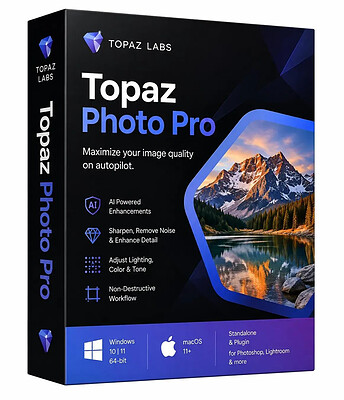
Topaz Photo Pro 1.7.1 (x64) | Size: 1.37 GB
Language: English
​
Each tool gets it closer to perfect. The ultimate finishing step for every image. Fix issues. Restore focus. Remove noise. Enhance details. Crop in. Prepare for print. Topaz Photo is the magical last step before "done." All using AI trained on millions of images.

Wildlife & Astro Photography
Zoom in with lossless crop, sharpen details, and denoise high ISO shots captured in unpredictable conditions.

Sports Photography
Sharpen motion blur and denoise indoor shots with poor lighting.

Events & Weddings
Never miss the important moment to low lighting or soft focus. Topaz Photo lets you fix the details without reshooting.

Archival Images
Remove dust and scratches, adjust lighting and color, and restore images to their original sharpness.

HOMEPAGE:
Код:
https://topazlabs.com/

FREE DOWNLOAD LINKS:​

Код:
https://rapidgator.net/file/f2230682fa7d8c62fa40ca467962a032/Topaz_Photo_Pro_1.7.1_x64.rar

Код:
https://clicknupload.click/6l8bc638l580/Topaz_Photo_Pro_1.7.1_x64.rar
 

24f72e217ff4caa8df9b044b484644d2.jpg


USB Device Tree Viewer 4.8.0 | Size: 1 MB
Language: English
​
USB Device Tree Viewer is designed to provide you with fast access to information concerning the USB host controllers and devices connected to your computer.

Based on the USBView sample application provided by Microsoft within the Windows Driver Kit, this application offers end users an intuitive GUI that allows the easy management of USB devices and ports.
Although the interface is simple and easy to accustom with, USB Device Tree Viewer is intended mostly for tech savvy users, who know how to interpret and use the displayed information.
USB Device Tree Viewer analyzes you system configuration and displays details about the connected host controllers, such as the manufacturer, the drivers, bus type, enumerators, location, child devices, drive letters, COM and debug ports, bus statistics, power state and bandwidth info.
Aside from this, you can view the configuration of each connected USB drive and port. The device keyname, description and address, the connection status, the service and enumerator, the location ID, additional capabilities (for instance, if the device is removable), the power state, the descriptors are just some of the available details that this application can read.
The total number of the connected hubs and devices is displayed in the status bar, while the 'Options' menu enables you to optionally read the descriptor hex dump and disable automatic device refresh. In addition to this, the application features automatic retries for previously failed USB requests.

For computers that have a large number of devices connected using USB ports, the treeview can become rather complex, but this application can handle such situations as well, providing you with jump-lists that can be used for quick navigation.
USB Device Tree Viewer is capable of querying the registry and enumerating host controllers, root hubs, as well as the attached devices to each port. It displays extended information regarding the USB ports and devices, providing a user-friendly management tool for all the controllers

System Requirements: Windows 11, Windows 10, 8 , 7

HOMEPAGE:
Код:
https://www.uwe-sieber.de/

FREE DOWNLOAD LINKS:​

Код:
https://rapidgator.net/file/add620991e492a616e18daeb93b34cfa/USB_Device_Tree_Viewer_4.8.0.rar

Код:
https://clicknupload.click/8zs9nfic28sx/USB_Device_Tree_Viewer_4.8.0.rar
 
33371d6b6881b4f65b217aee1aa1faec.jpg


WinCam 4.3 Multilingual | Size: 8.72 MB
Language: English
​
WinCam is a powerful and extremely easy-to-use screen recorder for Windows. It can deal with a given application, a region or the entire screen - and record everything that goes on in there. With the ability to capture up to 60 frames per second, WinCam makes sure your recording doesn't miss a tiny thing, while hardware acceleration renders and encodes video in real time and truly effortless.

Designed as simple as possible, WinCam is packed with functions that allow for almost any use: recording video tutorials, saving Skype calls, capturing various media in real time and creating visual content in a hit of a button.

Choose the desired video source and effects, click the Record button and proceed as usual: work in any application, watch video or play games. When you're done, click WinCam icon or press a hotkey, and the video of your activity is ready for sharing.

Live Preview
WinCam incorporates the same design philosophy as WinSnap (our screenshot creator). On the right pane, you can adjust the video source, the frame rate and post-processing effects, and preview these changes immediately without starting recording.

Cursor Zoom, Highlight and Click Animation
Creating a tutorial, you can make your cursor pop by adjusting its size, adding the highlight effect and mouse click animations. Alternatively, when recording a live-stream video, you might want to hide the disturbing cursor at all.

System Audio and Microphone
With WinCam, you can record system audio, microphone or both simultaneously. The selected audio signals are automatically resampled to achieve the best possible quality, mixed together and encoded in real time alongside the video.

Basic Video Editing
When recording is done, you can preview it and do some basic editing directly in WinCam. Double-click the timeline or use the corresponding toolbar buttons to set the start and end times of the video. Then click the Save button to save your clip as a copy or overwrite the original video.

WinCam is Super Easy!!!
Stripped from anything beyond screen recording, WinCam brings this one function to perfection. Less talk, more action: hit the hotkey and start recording the screen the next minute after you download WinCam. No other software is THAT easy!

WinCam runs only on Windows 10 and 8, older versions of Windows are not supported. Native 64-bit executables are included in the setup package and installed automatically.

Operating System: Windows 8/8.1, 10, 11

HOMEPAGE:
Код:
http://www.ntwind.com/

FREE DOWNLOAD LINKS:​

Код:
https://rapidgator.net/file/46b38ae89645bedd8a4d44d74e1efb0f/WinCam_4.3_Multilingual.rar

Код:
https://clicknupload.click/eejhrq81lah3/WinCam_4.3_Multilingual.rar
 
9ab885eab77cd068b2d9209baf6a6703.jpg


WinPaletter 1.1.0.0 | Size: 12.95 MB
Language: English
​

WinPaletter enables you to colorize Windows 10 and 11 accents without restrictions from an easy-to-use interface.

Personalization of your Windows machine is made easy with WinPaletter; it provides you with the ability to change almost every aspect of the way your desktop appears. The interface is modern and lists the options for color changes for title bars, accents, and more. Preview the changes before committing to avoid clashes in color schemes.
Accent colors are stored in the Windows registry; one is stored as an array, and the others are stored singly in keys' values. WinPaletter makes changing Windows elements' colors as straightforward as possible. You can also save your combo to a theme file. You can have multiple theme files for different actions if you want to suit the task at hand better.
WinPaletter will also help provide more contrast for those with vision problems.
WinPaletter is an excellent resource for changing the appearance of your Windows machine, and usage will be comfortable for any type of user.

System Requirements: Windows 11, Windows 10

HOMEPAGE:
Код:
https://github.com/Abdelrhman-AK/WinPaletter

FREE DOWNLOAD LINKS:​

Код:
https://rapidgator.net/file/d3f20bd9bf8b014dff49ba6b93e119a2/WinPaletter_1.1.0.0.rar

Код:
https://clicknupload.click/4lk6do409288/WinPaletter_1.1.0.0.rar
 
f935b15ffaccbcab74abd8fab9de11c1.jpg


Windows PowerShell 7.6.8 | Size: 217.35 MB
Language: English
​

Windows PowerShell is a cross-platform automation and configuration tool/framework that works well with your existing tools and is optimized for dealing with structured data (i.e., JSON, CSV, XML, etc.), REST APIs, and object models.

Input commands and use the built-in API
The software has more than 130 commandlets (cmdlets), dedicated commands designed to utilize specific functions, which are able to carry out numerous type of jobs, from service or process administration to registry or object manipulation tasks.
Local or remote management is possible since Windows PowerShell provides access to Windows Management Instrumentation (WMI) and Component Object Model (COM) as well. Also, the Windows PowerShell runtime can be integrated by developers in the applications they create, thanks to the hosting API included in the package.

Use debugging capabilities and create automation scripts
Creating, editing and running automation scripts can be easily done inside Windows PowerShell, especially since it offers a clean interface, that is equipped for all these tasks. Debugging is also possible and it includes breakpoint management.

All the cmdlets share the same syntax and this means that they can share information, naming conventions and more. Using Windows PowerShell you can directly handle objects of various types, or, if it is the case, send them to other databases or utilities that are meant to work with them.
Creating automation scripts and running command-line utilities for specific tasks is the main strong point of Windows PowerShell. Besides the comprehensive commandlets library, it is accompanied by the needed documentation that can help anyone understand how some functions work.

System Requirements: Windows 11, Windows 10

FREE DOWNLOAD LINKS:​

Код:
https://rapidgator.net/file/22d1145603e7b04ce21a6b551936b15d/Windows_PowerShell_7.6.8.rar

Код:
https://clicknupload.click/1dcqr186ftjw/Windows_PowerShell_7.6.8.rar
 
375c38e146c852a05d525f83f1f75ad5.jpg


YouTubeGet 7.3.2.0 | Size: 53.6 MB
Language: English
​
YoutubeGet is an all-in-one software designed to make quick and easy work to download Youtube videos and convert them. Offering a multitude of methods to acquire the video, this application has all the power you need while still remaining small and easy to use. After downloading videos it will auto convert FLV files to MP4, 3GP, AVI, WMV, MOV etc. Soon, you can see youtube videos on your MP4 or Cell phone.

YoutubeGet Benefits & Features:
• Download Youtube Videos to Cell Phone
• YoutubeGet will auto convert Youtube Videos to 3GP Cell Phone Format, then you can see all youtube videos on your Cell Phone!
• Download Youtube Videos to iPod
• You can download youtube videos and save them as iPod MOV or MP4 format, and play them anywhere!
• Download Youtube Videos to PSP
• After playing games on your PSP, would you like to see some cool videos? YoutubeGet will download youtube videos and save them as PSP format!
• Download Youtube Videos and Burn to a CD/DVD
• Download youtube videos and save as AVI or WMV. It is much easier to burn these funny videos to a CD/DVD by this two formats.

• Clipboard Monitor Helps You to Download Youtube Videos Much Easier
• YoutubeGet monitors your Clipboard all the time. when you are copying a Youtube Video URL, immediately the Add New Download window will auto pop up.
• FLV Converter (Free in YoutubeGet V4 Suite)
• You can convert your local FLV files to AVI, WMV, MOV, 3GP, MP4 etc by YoutubeGet FLV Converter for FREE! You Save $29.95 !
• Youtube Browser
• Search Youtube Videos and Preview them before downloading.

Operating System: Win XP/Vista/7/8/10

HOMEPAGE:
Код:
https://www.youtubeget.com/

FREE DOWNLOAD LINKS:​

Код:
https://rapidgator.net/file/15c9fe6fd390caf368bae5d871844155/YouTubeGet_7.3.2.0.rar

Код:
https://clicknupload.click/nnp9bkhggp9u/YouTubeGet_7.3.2.0.rar
 
dc3180df0fa44b73fbbfb6c7fc8df534.jpg


balenaEtcher 2.1.9 | Size: 261.55 MB
Language: English
​
Creating installation media for the operating system of choice should be a quick and straightforward task, especially if you are burning the image on bootable Flash drive or SD card. Etcher is an application that allows you to burn OS images to SDcards and removable drives as directly as possible and hence, helps you avoid having to deal with sophisticated procedures.

Sleek and user-friendly interface
The program comes with a modern and stylish interface that consists of a single window where you can specify the image you want to burn and the drive. You should know that the application supports only a handful of images, namely ISO, IMG or ZIP file formats.
You will be happy to learn that the app does most of the operations automatically and that your only assignments entail selecting the OS image and the card. In case you have multiple cards connected to your computer, then the tool allows you to pick the one you prefer for processing.

Once it is done burning, the app offers you the possibility to load a new image or burn the same one on another drive. As a side note, the app does not display the local drives, a feature that can help first-time users avoid a lot of inconveniences and confusion. Most importantly, you can avert very unpleasant situations, such as wiping your hard disk, for example.
Allows you to create a bootable image in 3 easy steps
The advantage of the program comes from the way it simplified an operation that is not recommended for beginners. Simply put, creating installation media can be summarized to choosing the image and the device.
Unfortunately, the application does not come with too many configuration options. Then again, you can set the utility to auto-unmount on success and toggle the error reporting tool, a feature that can aid you to analyze potential issues that prevented the process.
An efficient image burning tool
If you are looking for a hassle-free solution that allows you to burn the operating system of choice to an SDcard or other removable drives fast and without any complications, then perhaps Etcher might come in handy.

System Requirements: Windows 10 and later; Intel 64-bit.

HOMEPAGE:
Код:
https://etcher.balena.io/

FREE DOWNLOAD LINKS:​

Код:
https://rapidgator.net/file/dcfdb444e0ccb21571c425a46d988f32/balenaEtcher_2.1.9.rar

Код:
https://clicknupload.click/3di6a0z713yo/balenaEtcher_2.1.9.rar
 
d12af05045a0142173a57667f3ec3cac.jpg


nTopology 6.2.2 (x64) | Size: 1.47 GB
Language: English
​
nTop has released nTop 6.2.2 is a computational design software platform that enables engineers to create, analyze, and optimize complex geometry using implicit modeling and field-driven design methodologies.

This release introduces externally defined Custom Blocks and Custom Block Libraries, along with new Geometry blocks for filleting, ramping, and sweeping.

nTop 6.2 - What's New
Externally Defined Custom Blocks and Custom Block Libraries
- Starting in nTop 6.2, Custom Blocks can be defined externally to the notebook. Instead of being embedded inside your notebook upon import, a Custom Block can live in its own .ntop file on disk, and your notebook holds a reference to that file, much like how a function in code references a definition stored elsewhere.
- This resolves a longstanding limitation: previously, after importing a Custom Block, any changes made to the source .ntop file required a manual re-import to take effect. Now, every notebook referencing that file reflects the change upon the next restart of nTop.
- As a result, a single Custom Block definition can be shared across many notebooks, and Custom Block files can be version-controlled, shared via Git, and organized into libraries.
- You can also define Custom Block Libraries as a folder of .ntop files, sharing the same external-reference behavior as an individual Custom Block.
- Embedding is still the default behavior. Opt into external definitions in the user settings under "Import blocks as external references."
Fillet Curves
- The Fillet Curves block creates an arc connection between two coplanar curves sharing an endpoint and trims the inputs. The fillet is applied at the interior of the vertex.
- Location: Create > Curves
. Curve 1: First curve to fillet.
. Curve 2: Second curve to fillet.
. Radius: Radius of the fillet arc.
. Output: Polycurve

Fillet Polycurve Vertices
- The Fillet Polycurve Vertices block creates a fillet arc at each vertex of a polycurve. Fillets are applied to the interior angle at each vertex, and neighboring segments must be coplanar.
- Location: Create > Curves
. Polycurve: Polycurve whose vertices will be filleted. Neighboring segments must be coplanar.
. Radii: Fillet radius at each vertex. The number of values must match the number of vertices.
. Output: Polycurve

Ramp
- We have added a new overload of the Ramp block with more Easing Functions and parameters, giving you finer control over how a value transitions between an input range and an output range.
- Location: Math > Utilities
. Scalar Field: Field to ramp.
. In Min: Input range min value.
. In Max: Input range max value.
. Out Min: Output range min clamp value.
. Out Max: Output range max clamp value.
. Easing Function: Function used to shape the transition. Geometric (G0) leaves it linear. Tangent (G1) and Curvature (G2) meet the clamped region with matching tangent and matching curvature, reproducing the Continuity option of the other Ramp overloads when Easing Direction is Ease In and Out. Power flattens the eased end the more the larger Function Parameter is, where 2 is quadratic and 3 is cubic. Sinusoidal is a quarter cosine and falls between G1 and G2. Circular follows a quarter circle and arrives vertically at the opposite end. Exponential is the only option that does not leave the eased end perfectly flat, and its Function Parameter sets how sharply it accelerates.
. Easing Direction: Which end of the transition the easing function shapes. Ease In smooths the start and leaves the end sharp, Ease Out does the reverse, and Ease In and Out smooths both.
. Function Parameter: Shapes the selected Easing Function: the exponent for Power and the rate for Exponential. Required by those four functions, ignored by the others, and must be greater than zero.
. Output: Scalar Field

Sweep Along One Rail
- The Sweep Along One Rail block sweeps a section of an implicit body along a rail curve while a vector field drives its orientation.
- Location: Modeling > Operations
. Body: Implicit body to sweep. The cross section of the body within the Start Plane will be swept along the rail.
. Plane: Plane used to define the cross-section of the body at the start of the sweep.
. Rail: Rail curve to sweep along.
. Alignment: Vector Field driving the orientation of the section along the rail. The section's local X direction follows it as closely as the Plane perpendicular to the rail allows.
. Caps: If checked, closes the swept body with planar caps at the start and end of the sweep.
. Spine: Optional spine Curve to define section Plane orientation.
. Scale: Optional Scalar Field that uniformly scales the section within the moving plane. If not provided, the section is not scaled.
. Output: Implicit Body

Mesh from Implicit by AT
- The Mesh from Implicit by AT block has a new Sharpen option that improves meshing at sharp edges and corners. When Remesh is also on, the sharpened edges are kept through remeshing. Sharpen is off by default, and turning it on increases the time it takes to run the block.
- This makes it possible to mesh implicit geometry with crisp edges and corners, such as prismatic or machined features, without having to lower the tolerance.
- Location: Beta > Utilities (also under Utilities > Conversion)
. Body: Implicit body to convert.
. Tolerance: The maximum allowable deviation of the tessellation from the implicit geometry. Smaller values give a more precise mesh but take longer to compute.
. Sharpen (new): Option to preserve sharp edges, corners, and walls thinner than the meshing tolerance. Enabling this option increases compute time.
. Remesh: Remesh the adapted tessellation for better triangle quality. Note that there is a risk of producing self-intersections.
. Output: Mesh

Usage Improvements
- We have updated the custom color selector to instantly update the viewport as you adjust it, instead of waiting until you close the picker.
- You can now right-click a block, or a Custom Block in the imports panel, and select "Find Uses" to see every place in the notebook where that block is referenced, listed in the outline. Use F3 and Shift+F3 to navigate between the results.

nTop introduced the concept of implicit modeling for mechanical design, which is an innovative, modern, and scalable way define parts and products. It has many benefits to end-users and companies, such as the elimination of model failures, speed of changes or iterations, and scalability to name a few. But implicit modeling enables so much more. In this informational session, we'll explore a topic that is redefining product development - field-driven design. In short, field-driven design is a way for design, analysis, and manufacturing teams to overlay information into one engineering model. This approach enables orders of magnitude increase in design iteration speed and greatly improves collaboration between teams.

How Field-Driven Design Allows Engineers to Design for Additive Manufacturing

Watch this information session where we'll define field-driven design, show examples of how it enables better knowledge sharing, and show how it promotes the development of more sophisticated, highly engineered products. You'll also better understand how nTopology is addressing today's engineering problems through its nTop Platform product.
nTop, formerly known as nTopology, is a leading computational design software company founded in 2015. The company specializes in empowering engineers across industries to innovate without the limitations of traditional CAD tools. Built on proprietary technologies, nTop enables the creation of complex geometries, instantaneous optimization, and automated workflows, making it ideal for applications such as additive manufacturing and advanced product development.

Сopyright holder \ Distributor: nTop
Product Name: nTop
Version: 6.2.2
Supported Architectures: x64 Languages Supported: english
System Requirements: Windows *
Size in archive: 1.5 Gb

HOMEPAGE:
Код:
http://www.ntop.com

FREE DOWNLOAD LINKS:​

Код:
https://rapidgator.net/file/d07ad7479f552d8006652e9dc3c2dc46/nTopology_6.2.2_x64.rar

Код:
https://clicknupload.click/aq6q4qpwcgr5/nTopology_6.2.2_x64.rar

 
b2f2187a02969361b8e767368fbdbc1e.jpg


priPrinter Professional 7.1.1.2631 Beta Multilingual | Size: 6.58 MB
Language: English
​
priPrinter is a printer driver that allows you to manipulate printer output before it is printed. priPrinter is installed and selected in the same way as other printer drivers. After printing it automatically displays print preview where you can preview your printings, change layout, reposition pages, crop them and many more. After that you print it to the real printer or save your document for later using. With priPrinter you always will be sure how your printings will look. You may measure items on the paper, define margins and pages layout. There is no need to print again and again trying to achieve desired placement.

Features:
• Provides every feature you need to make your print easy and simple.
• Preview your printing in many ways. Explore content of your jobs.
• Print to images. You may save your prints to various image formats.
• Booklet and posters.
• Duplex printing.
• Measurements.
• Print themes
• Loupe tool.
• Margins and gutters. Change margins and gutters with mouse click and drag.
• Crop and Cut. Remove blank space and redundant information.
• Undo/Redo

• Small and fast.
• Save jobs to file.
• Tray control

HOMEPAGE:
Код:
http://www.priprinter.com/

FREE DOWNLOAD LINKS:​

Код:
https://rapidgator.net/file/df3744642a3c0e916decb38df4025511/priPrinter_Professional_7.1.1.2631_Beta_Multilingual.rar

Код:
https://clicknupload.click/7hrmos38ryyi/priPrinter_Professional_7.1.1.2631_Beta_Multilingual.rar
 
Назад
Сверху Снизу