All Emperor2011's Software in one thread !! (updated daily)


a1b0c427998160f637aabf81540f3530.jpg


Java SE Runtime Environment 8.0 Update 501 | Size: 311.53 MB
Language: English

Java allows you to play online games, chat with people around the world, calculate your mortgage interest, and view images in 3D. These applications, written in the Java programming language and access from your browse, are called applets. Corporations also use Java applets for intranet applications and other e-business solutions. Java is used by companies in all major industries. Whether deployed on cell phones, embedded devices, game consoles, laptops, or in datacenters, Java offers the rich user interface, performance, versatility, portability, and security that today's networked applications require. Java Platform Standard Edition software is the premier platform for rapidly developing and deploying secure, portable applications that run on server and desktop systems spanning most operating systems.

Java Runtime Environment contains the Java virtual machine, runtime class libraries, and Java application launcher that are necessary to run programs written in the Java programming language.
Java technology is an object-oriented, platform-independent, multithreaded programming environment. Whether developing applications for consumers or mission-critical deployments, you can depend on a consistent programming environment.
• Enables you to efficiently deploy exciting new applications and services
• Enables applications to securely access key system resources while protecting your data
• Allows you to do more with your applications, from real-time capabilities to high-performance multitasking virtual machines to broad access to system capabilities
• Runs across more than seven billion devices including mobile, desktop, television, and countless embedded devices
Java is everywhere - and for good reason. As the foundation for virtually every type of networked application, Java is the global standard for developing and delivering mobile applications, games, Web-based content, and enterprise software. For nearly 20 years, Java has helped businesses provide end users with leading-edge functionality in consumer gaming, Web, and enterprise applications.
Java technology was created as a computer programming tool in a small, secret effort called "the Green Project" at Sun Microsystems in 1991. As it turns out, the Internet was ready for Java technology, and just in time for its initial public introduction in 1995, the team was able to announce that the Netscape Navigator Internet browser would incorporate Java technology.
Now, the Java platform has attracted over 5 million software developers, worldwide use in every major industry segment, and a presence in a wide range of devices, computers, and networks of any programming technology. Today, you can find Java technology in networks and devices that range from the Internet and scientific supercomputers to laptops and cell phones, from Wall Street market simulators to home game players and credit cards - just about everywhere. The best way to preview these applications is to explore java.com, the ultimate marketplace, showcase, and central information resource for businesses, consumers, and software developers who use Java technology.
Key features
• Write software on one platform and run it on practically any other platform
• Create programs to run within a web browser and web services
• Develop server-side applications for online forums, stores, polls, HTML forms processing, and more
• Combine Java technology-based applications or services to create highly customized applications or services
• Write powerful and efficient applications for mobile phones, remote processors, low-cost consumer products, and practically any device with a digital heartbeat
Java is one of the most popular application platforms on the planet. Which version of Java is right for you?
• Java Platform, Standard Edition (Java SE) is the best platform for development of desktop, server and high-end embedded devices, and it is the most versatile runtime for Java as well as many other languages.
• Java Platform, Micro Edition (Java ME) is the best software for resource-constrained embedded devices and has seen widespread deployment across mobile handsets and digital television devices.
• Java Platform, Enterprise Edition (Java EE) is the standard for delivering secure, robust, scalable, multi-platform applications and services across the enterprise, from server and desktop applications to wireless and wireline applications. System Requirements: Windows 11, Windows 10, 8 , 7

Код:
https://rapidgator.net/file/c3b0342b74e8b1a63c019c32f08ab098/Java_SE_Runtime_Environment_8.0_Update_501.rar

Код:
https://nitroflare.com/view/4EAA1055F3FBC25/Java_SE_Runtime_Environment_8.0_Update_501.rar

 
8fa255e5a2c362e0de156cf83feffaca.jpg


Maxon Red Giant 2026.5.0 (x64) | Size: 3.16 GB
Language: English

Red Giant is a comprehensive toolkit designed for video post-production, motion graphics, and visual effects. It offers rich color grading, smooth transitions, realistic visual effects, motion design templates and tools to create and edit your visuals.

What's New
Red Giant offers the most powerful set of tools for editors and compositors to easily add everything from titles to visual effects directly in the host apps they love, like Adobe After Effects, Adobe Premiere Pro, and Resolve. This release delivers a powerful new After Effects tool for generating depth passes from your footage to achieve various effects: swirl particles around a character, simulate depth of field blur, send scanlines down a corridor, and more.

Depth Generator
Generate depth passes for your footage and use them to create depth-based effects like swirling particles around a character, energy pulses shooting through a canyon, or applying Colorista based on depth.

Sports Capsules
These templates - from bold titles and lower thirds to animated scoreboards, split screens and dynamic transitions - will let you edit faster, animate smarter, and deliver professional sports content at any scale.

Maxon Studio Asset Support
Save and reuse your Capsules across projects. Build once, drag anywhere. Reusable assets let you work faster, stay consistent, and scale your style.

Effects Capsules in Maxon Studio
Create a new type of Capsule, built for modular, click-and-apply visual effects. Create stunning looks in seconds without touching the timeline.

DaVinci Resolve & Fusion Gizmo
Enjoy a revved up boost to your workflow with all new on-screen position controls across the Red Giant toolset. This update greases the wheels of productivity.

HOMEPAGE:
Код:
https://www.maxon.net/

FREE DOWNLOAD LINKS:

Код:
https://rapidgator.net/file/9bcc962b6a6f0a305361468e5084b4ab/Maxon_Red_Giant_2026.5.0..part1.rar
https://rapidgator.net/file/d8e9d886e67c7080628e522664b54b58/Maxon_Red_Giant_2026.5.0..part2.rar

Код:
https://nitroflare.com/view/7D9EC66FE28F0C5/Maxon_Red_Giant_2026.5.0..part1.rar
https://nitroflare.com/view/1042C7253F562E3/Maxon_Red_Giant_2026.5.0..part2.rar
 
9146b1f7e3bfea1ede320c7ac6c5cf5c.jpg


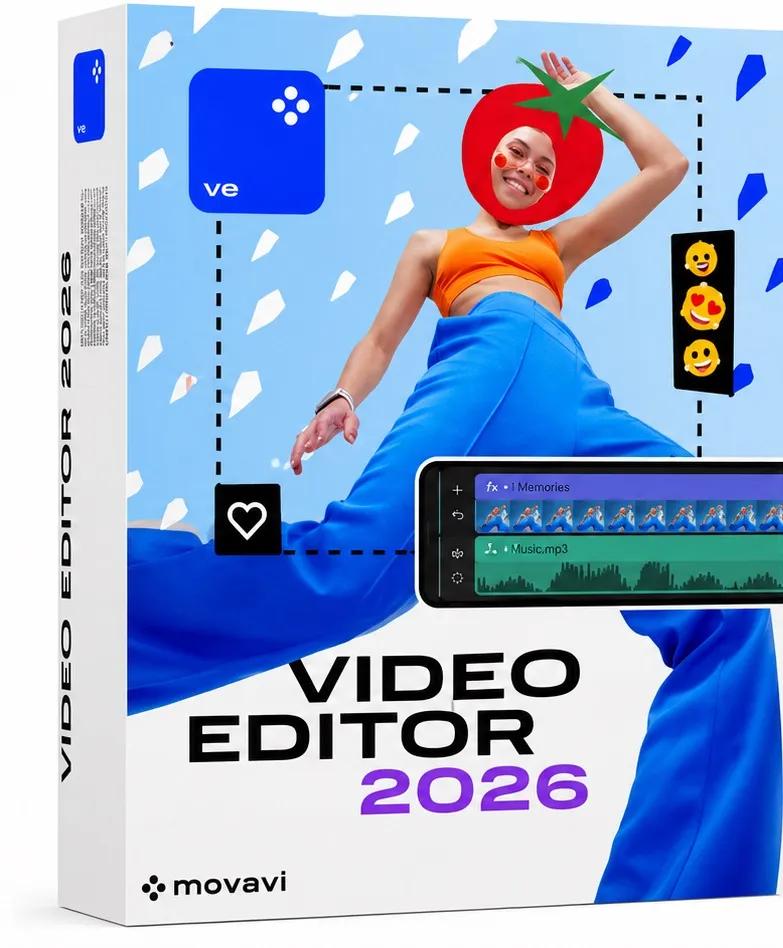
Movavi Video Editor 26.20.0 (x64) Multilingual | Size: 117.41 MB
Language: English

Movavi Video Editor is a friendly video editing software designed to create professional-looking videos with an easy-to-use interface. It is suitable for YouTubers, students, teachers, marketers, and anyone who wants to edit videos without advanced technical skills.

Main Features

1. Video Editing
Trim, cut, and split video clips.
Merge multiple videos into one.
Rotate and crop videos.
Adjust playback speed.
Reverse video clips.

2. Audio Editing
Add background music.
Record voiceovers.
Remove unwanted noise.
Synchronize audio with video.
Adjust volume and apply fade-in/fade-out effects.

3. Visual Effects
Hundreds of filters and transitions.
Motion tracking.
Chroma Key (Green Screen).
Picture-in-Picture (PiP).
Animated stickers and overlays.

4. Text and Titles
Add animated titles.
Create subtitles.
Customize fonts, colors, and animations.

5. AI Tools
AI Background Removal.
AI Noise Reduction.
AI Motion Tracking.
AI Upscaling (in supported versions).

6. Color Correction
Brightness adjustment.
Contrast enhancement.
Saturation control.
White balance correction.
LUT support.

7. Export Options
Export videos in:
MP4
AVI
MOV
MKV
WMV
Upload directly to YouTube.

Advantages
Simple interface.
Fast rendering.
Large collection of effects.
Ideal for beginners.
Supports 4K videos.

HOMEPAGE:
Код:
https://www.movavi.com/

FREE DOWNLOAD LINKS:

Код:
https://rapidgator.net/file/08ed267b47e0200a2742009d1fe6676a/Movavi_Video_Editor_26.20.0_x64_Multilingual.rar

Код:
https://nitroflare.com/view/C0D6A4BA682B7A2/Movavi_Video_Editor_26.20.0_x64_Multilingual.rar
 
c69176c9df67c24f194d9feab8684f69.jpg


OBS Studio 32.2.0 (x64) | Size: 152.44 MB
Language: English

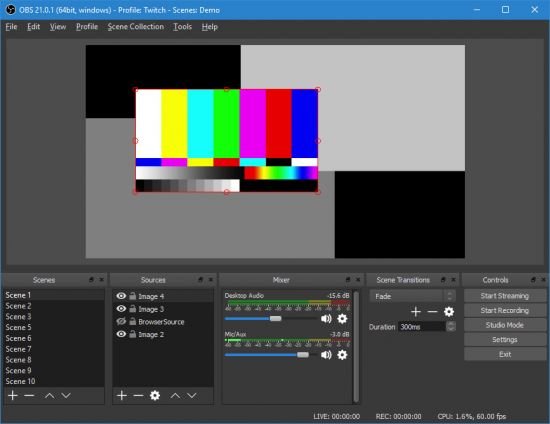
OBS Studio is an application designed for gamers, artists, developers or amateur users who enjoy creating tutorials and streams that they share over the Internet. Create high quality recording with OpenGL or Direct3D on your desktop and stream them on the Internet via this intuitive software solution. Works with multiple streaming services, including Twitch The setup is quick and uneventful, so it is unlikely that you can encounter any issues at this stage. Upon launch, you are welcomed by a minimalistic, yet clean and intuitive interface that displays all available features and functions.

You should know that the program allows you to connect to the major streaming services, such as Twitch, YouTube or DailyMotion, for instance. Alternatively, you can add your custom streaming service or save the recordings on your local drives in high-quality formats (MOV, FLV, MKV, MP4, TS and M3u8).
As you would expect, the application permits you to configure the stream, so that you can be sure that the audience watching your live recording gets quality. Therefore, you can change the resolution, adjust the FPS, alter the delay and set the maximum bitrate, so that they are suitable for a wider range of devices.
Enables you to add multimedia files into the stream easily
Even though the primary goal of the initial releases was to make the application work on multiple platforms, there are some notable differences between this too and Open Broadcaster Software.
For starters, the program comes with a more dynamic API that enables developers to create their own plugins, so that they can have a more efficient control over the streaming experience. In addition, the Studio version allows you to include more type of files into the streaming, such as Audio Input and Output Capture, Display Captures, Images and Browser, for instance.
Perhaps the most noteworthy difference is the Studio mode that enables you to compare scenes and customize transitions with just a few clicks. It is worth mentioning that both applications allow you to record videos from various sources and integrate text, media, desktop recording, game capture or webcam streams into the content.
A tool that allows you to better manage the streaming process
Irrespective of whether you are creating a tutorial to upload for your gamers friends or you want to exhibit a highlight feature of a product that you want to launch in the near future, OBS Studio enables you to make live recordings that you stream or save locally effortlessly.

System Requirements: Windows 11, Windows 10, 8 , 7

FREE DOWNLOAD LINKS:

Код:
https://rapidgator.net/file/480711d4d94e8dfbb42a67e6b816b142/OBS_Studio_32.2.0_x64.rar

Код:
https://nitroflare.com/view/A08DF5CD46AF2B6/OBS_Studio_32.2.0_x64.rar
 
fb20f1d660a708c766d90c23b7ac3a19.jpg


Royal TS 7.4.50721 (x64) Multilingual | Size: 292.62 MB
Language: English

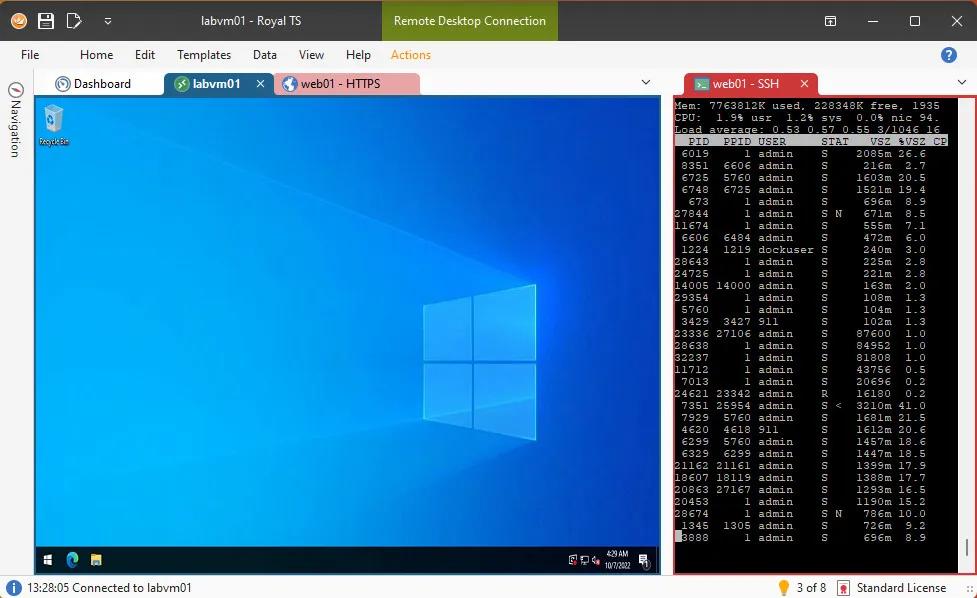
Royal TS is an ideal tool for system engineers and other IT professionals who need remote access to systems with different protocols.

Optimize workflow and increase productivity! Royal TS makes it possible with our flexible user interface and outstanding team collaboration features. Not only easy to use, it enables secure multi-user document sharing.

Powerful Connection Management
Compatible with a variety of connection types
Using RDP, VNC, SSH based terminals, S/FTP or web-based interfaces?
No worries, Royal TS got you covered!
Built-in credential management. Safe team-sharing features.
Share a list of connections, without sharing your personal credentials.
Command Tasks and Key Sequence Tasks make it easy to quickly automate repetitive tasks.
SSH-based tunneling (Secure Gateway) support is tightly integrated in Royal TS.
Dynamic Folders allow you to dynamically import data from external sources.

Credential Management
Assign, reuse and link credential objects to connections and folders.
Connections can inherit credentials from the parent folder.
Access credentials from other documents and external sources.

Protected through Encryption
Sensitive data in your document is encrypted and can also be password protected. Lock down shared documents and keep passwords confidential.

Sharing Connections Securely
The ability to assign credentials to connections by name allows you to share the document containing the connections without compromising your credentials.

Automate repetitive Tasks
Streamline your workflow with Tasks. Use replacement tokens to access connection properties or credential information. Execute tasks in context of one or more connections.

Command Tasks
Create your own tasks to open and close VPN connections automatically. Common and useful tasks, like ping and traceroute are built-in and can be executed as needed.

Key Sequence Tasks
Key sequence tasks are used to invoke keyboard input in one or more connections. Automate long, complex and repetitive tasks and execute them in one or more active connections.

HOMEPAGE:
Код:
https://royalapps.com/

FREE DOWNLOAD LINKS:

Код:
https://rapidgator.net/file/93e7bfc160d081dfa776790bc7da9ef3/Royal_TS_7.4.50721_x64_Multilingual.rar

Код:
https://nitroflare.com/view/5C16AA28FF389C7/Royal_TS_7.4.50721_x64_Multilingual.rar
 

60c19ec39342630912c32271c01466c3.jpg


Window Inspector 3.9.2 | Size: 24.06 MB
Language: English

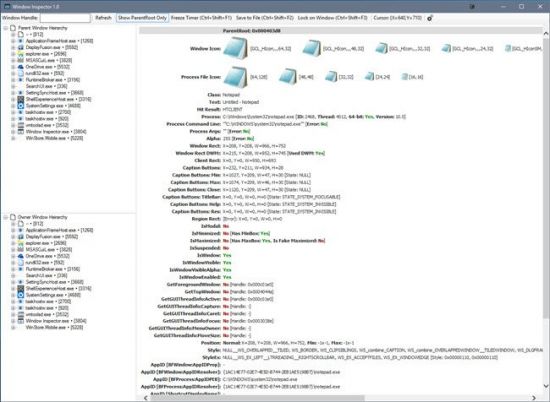
Window Inspector is an amazing application that can view the window class, text, properties and more, simply by moving your mouse cursor over a target window! Use Window Inspector's built-in hotkeys to freeze the info, save to a file or lock on a window so you can see its properties changing in realtime. Browse through the parent/child or owner/child window hierarchies per-process and see all the windows associated with an application. Double-click any window in the tree-view to see its detailed properties, icons and more.

Using Window Inspector
We didn´t need to make any advanced configurations when installing Window Inspector. All we needed to do was follow the simple on-screen instructions to complete the process.
Moving the cursor over a window was enough to display information about it. From the program itself, we could see a tree view of the windows on the desktop. We got more information about a window by expanding it, which displayed names in full. The program displayed all details on its main interface. We could choose to display everything or only the parent root.
The program featured built-in hotkeys that we used to perform various functions. For example, we locked the program to a specific window whose properties we wanted to view in real time. We could also freeze the details displayed or save them to a file.
We used the program to view the processes running on our system instead of resorting to the Task Manager. It also included features that were not available from the Task Manager.

System Requirements: Windows 11, Windows 10, 8 , 7

FREE DOWNLOAD LINKS:

Код:
https://rapidgator.net/file/b35955b065fc0586a2838ad9cfa0cf73/Window_Inspector_3.9.2.rar

Код:
https://nitroflare.com/view/61565BCD4FA81E0/Window_Inspector_3.9.2.rar
 
1b61cdf942d34c5fe38226c402720a88.jpg


Wolfram Mathematica 15.0.1 Multilingual | Size: 9.15 GB
Language: English

For three decades, Mathematica has defined the state of the art in technical computing-and provided the principal computation environment for millions of innovators, educators, students, and others around the world. Widely admired for both its technical prowess and elegant ease of use, Mathematica provides a single integrated, continually expanding system that covers the breadth and depth of technical computing-and seamlessly available in the cloud through any web browser, as well as natively on all modern desktop systems.

For Modern Technical Computing, There's No Other Choice
With energetic development and consistent vision for three decades, Mathematica stands alone in a huge range of dimensions, unique in its support for today's technical computing environments and workflows.

A Vast System, All Integrated
Mathematica has nearly 5,000 built-in functions covering all areas of technical computing-all carefully integrated so they work perfectly together, and all included in the fully integrated Mathematica system.

Not Just Numbers, Not Just Math-But Everything
Building on three decades of development, Mathematica excels across all areas of technical computing-including neural networks, machine learning, image processing, geometry, data science, visualizations, and much more.

Unimaginable Algorithm Power
Mathematica builds in unprecedentedly powerful algorithms across all areas-many of them created at Wolfram using unique development methodologies and the unique capabilities of the Wolfram Language.

Higher Level Than Ever Before
Superfunctions, meta-algorithms. Mathematica provides a progressively higher-level environment in which as much as possible is automated-so you can work as efficiently as possible.

Everything Is Industrial Strength
Mathematica is built to provide industrial-strength capabilities-with robust, efficient algorithms across all areas, capable of handling large-scale problems, with parallelism, GPU computing, and more.

Powerful Ease of Use
Mathematica draws on its algorithmic power-as well as the careful design of the Wolfram Language-to create a system that's uniquely easy to use, with predictive suggestions, natural language input, and more.

Documents As Well As Code
Mathematica uses the Wolfram Notebook Interface, which allows you to organize everything you do in rich documents that include text, runnable code, dynamic graphics, user interfaces, and more.

The Code Makes Sense
With its intuitive English-like function names and coherent design, the Wolfram Language is uniquely easy to read, write, and learn.

Make Your Results Look Their Best
With sophisticated computational aesthetics and award-winning design, Mathematica presents your results beautifully-instantly creating top-of-the-line interactive visualizations and publication-quality documents.

150,000+ Examples
Get started with almost any project with help from 150,000+ examples in the Documentation Center, over 10,000 open-code Demonstrations in the Wolfram Demonstrations Project-and a host of other resources.

Instant Real-World Data
Mathematica has access to the vast Wolfram Knowledgebase, which includes up-to-the-minute real-world data across thousands of domains.

Seamless Cloud Integration
Mathematica is now seamlessly integrated with the cloud-allowing sharing, cloud computing, and more in a unique and powerful hybrid cloud/desktop environment

Connected to Everything
Mathematica is built to be connected to everything: file formats (180+), other languages, Wolfram Data Drop, APIs, databases, programs, the Internet of Things, devices-and even distributed instances of itself.

System Requirements:
- Windows 10, 11
- Processor: Intel Pentium Dual-Core or equivalent
- Disk Space: 14 GB
- System Memory (RAM): 2 GB+ recommended

HOMEPAGE:
Код:
https://www.wolfram.com/

FREE DOWNLOAD LINKS:

Код:
https://rapidgator.net/file/c2095dafb4286a7e823544ba3ea88bf7/Mathematica.15.0.1..part1.rar
https://rapidgator.net/file/414f2c1a92a3fa8bbaf35ba3bbd18eba/Mathematica.15.0.1..part2.rar
https://rapidgator.net/file/4a4a2310ae4824a8f31888afedc4ea0c/Mathematica.15.0.1..part3.rar
https://rapidgator.net/file/941f73ebde14201e28b416c1e658c81c/Mathematica.15.0.1..part4.rar
https://rapidgator.net/file/669f73c9e7b4391f886c65bc114fa559/Mathematica.15.0.1..part5.rar

Код:
https://nitroflare.com/view/3339F3FFF11BDBA/Mathematica.15.0.1..part1.rar
https://nitroflare.com/view/0F46FA34CFBF1B6/Mathematica.15.0.1..part2.rar
https://nitroflare.com/view/936265B378C8D24/Mathematica.15.0.1..part3.rar
https://nitroflare.com/view/0B030B87E6E740A/Mathematica.15.0.1..part4.rar
https://nitroflare.com/view/6847E2138D06E1E/Mathematica.15.0.1..part5.rar
 
_f3f64464e40416eab1472ae305246cb4.jpeg


Windows 11 Pro 25H2 Build 26200.8894 (No TPM Required) Preactivated Multilingual July 2026 | Size: 6.74 GB

Windows (x64) | Languages:Arabic,English,German,Greek,French,Spanish,Italian,Portuguese-Portuguese,Portuguese-Brazil,Turkish,Dutch,Czech,Norwegian

Windows 11, version 25H2 is an enablement update that builds on the features of 24H2 by enabling new, "continuous innovation" features, rather than introducing entirely new features itself. Key updates include a Braille Viewer for the Narrator, improvements to Click-to-Do (including a new "Convert to Table" feature), support for plug-in credential managers for passkeys, and enhancements to the mobile device companion experience. Microsoft is also implementing IT admin-focused features like the ability to remove pre-installed Store apps and a new Quick Machine Recovery system to reduce downtime.

For Users

Accessibility
The Narrator now includes a Braille Viewer, allowing users to see the braille equivalent of on-screen text on a refreshable braille display.

Passkeys
Users can now utilize plug-in credential managers for setting up and using passkeys, offering improved security and management.

Time & Language
Ported settings from the Control Panel to the Settings app, including configuring additional clocks and changing the NTP time server.

Mobile Experience
The mobile device companion has a new, more accessible layout to view calls, messages, photos, and more from your phone.

Click-to-Do
New AI features for Click-to-Do are included, such as a new "Convert to Table" capability for converting text to an Excel table and more flexible selection methods.

For IT Administrators
Quick Machine Recovery
This new feature in the recovery system aims to reduce downtime and simplifies the process for recovering a system, according to PCMag.

Removable Apps
IT admins can now remove certain pre-installed Microsoft Store apps via Group Policy or MDM CSP on Enterprise/EDU devices.

Feature Removals
25H2 removes older components like PowerShell 2.0 and WMIC for greater security and efficiency.

System Requirements
Processor: 2 gigahertz (GHz) or faster.
RAM: 2 gigabyte (GB).
Free space on hard disk: 40 gigabytes (GB).
Graphics card: DirectX 9 graphics device or a newer version.
Additional requirements to use certain features.
To use touch you need a tablet or monitor that supports multitouch.
To access the Windows store to download and run apps, you need an active Internet connection and a screen resolution of at least 1024 x 768 pixels

HOMEPAGE:
Код:
https://microsoft.com

FREE DOWNLOAD LINKS:

Код:
https://rapidgator.net/file/701a7619678d87c48e8fd923c5080836/Win.11.Pro.26200.8894..part1.rar
https://rapidgator.net/file/f17bb6038b03c159469a1a804d9f7683/Win.11.Pro.26200.8894..part2.rar
https://rapidgator.net/file/b075677f94789adf1f100db3dc4543a5/Win.11.Pro.26200.8894..part3.rar
https://rapidgator.net/file/4dc34e2e9848b2b965a6f74d9507e064/Win.11.Pro.26200.8894..part4.rar
https://rapidgator.net/file/262ee12ee0037d93eb61cc0f88ead0ca/Win.11.Pro.26200.8894..part5.rar
https://rapidgator.net/file/3fdf69aa1031c73fa0edd0744c90d74d/Win.11.Pro.26200.8894..part6.rar
https://rapidgator.net/file/28dac40ad2803d1f8b78ac51ee790ee7/Win.11.Pro.26200.8894..part7.rar

Код:
https://nitroflare.com/view/7CE6F745BF72079/Win.11.Pro.26200.8894..part1.rar
https://nitroflare.com/view/0C84B6807480ECA/Win.11.Pro.26200.8894..part2.rar
https://nitroflare.com/view/CA71DD064A87803/Win.11.Pro.26200.8894..part3.rar
https://nitroflare.com/view/82DD56DDEC0CB2A/Win.11.Pro.26200.8894..part4.rar
https://nitroflare.com/view/B2D5F4A24D8ADC9/Win.11.Pro.26200.8894..part5.rar
https://nitroflare.com/view/3BBACA688E06DA2/Win.11.Pro.26200.8894..part6.rar
https://nitroflare.com/view/2962FB9F4E8AB29/Win.11.Pro.26200.8894..part7.rar
 
_ad43f464da0196d1327d0f373d9d3c23.jpeg


Windows 11 Pro 25H2 Build 26200.8894 (No TPM Required) With Office 2024 Pro Plus Multilingual Preactivated July 2026 | Size: 9.75 GB

Windows (x64) | Languages:Arabic,English,German,Greek,French,Spanish,Italian,Portuguese-Portuguese,Portuguese-Brazil,Turkish,Dutch,Czech,Norwegian

Windows 11, version 25H2 is an enablement update that builds on the features of 24H2 by enabling new, "continuous innovation" features, rather than introducing entirely new features itself. Key updates include a Braille Viewer for the Narrator, improvements to Click-to-Do (including a new "Convert to Table" feature), support for plug-in credential managers for passkeys, and enhancements to the mobile device companion experience. Microsoft is also implementing IT admin-focused features like the ability to remove pre-installed Store apps and a new Quick Machine Recovery system to reduce downtime.

For Users
Accessibility
The Narrator now includes a Braille Viewer, allowing users to see the braille equivalent of on-screen text on a refreshable braille display.
Passkeys
Users can now utilize plug-in credential managers for setting up and using passkeys, offering improved security and management.
Time & Language
Ported settings from the Control Panel to the Settings app, including configuring additional clocks and changing the NTP time server.
Mobile Experience
The mobile device companion has a new, more accessible layout to view calls, messages, photos, and more from your phone.
Click-to-Do
New AI features for Click-to-Do are included, such as a new "Convert to Table" capability for converting text to an Excel table and more flexible selection methods.
For IT Administrators
Quick Machine Recovery
This new feature in the recovery system aims to reduce downtime and simplifies the process for recovering a system, according to PCMag.
Removable Apps
IT admins can now remove certain pre-installed Microsoft Store apps via Group Policy or MDM CSP on Enterprise/EDU devices.
Feature Removals
25H2 removes older components like PowerShell 2.0 and WMIC for greater security and efficiency.

Update windows to 25H2 Build 26200.8894
Update Office to v2606 Build 20131.20154


System Requirements
Processor: 2 gigahertz (GHz) or faster.
RAM: 2 gigabyte (GB).
Free space on hard disk: 40 gigabytes (GB).
Graphics card: DirectX 9 graphics device or a newer version.
Additional requirements to use certain features.
To use touch you need a tablet or monitor that supports multitouch.
To access the Windows store to download and run apps, you need an active Internet connection and a screen resolution of at least 1024 x 768 pixels

HOMEPAGE:
Код:
https://www.microsoft.com

FREE DOWNLOAD LINKS:

Код:
https://rapidgator.net/file/541c01bfb77e403bd1f64d6b3aca9348/Win.11.Pro.26200.8894.Office..part1.rar
https://rapidgator.net/file/c252a854d5884580c780faad4d9a2414/Win.11.Pro.26200.8894.Office..part2.rar
https://rapidgator.net/file/bbfa4a5d31ed78cf5fa0a83c82a839b0/Win.11.Pro.26200.8894.Office..part3.rar
https://rapidgator.net/file/446a0d2cf0f1801728393d11a6430638/Win.11.Pro.26200.8894.Office..part4.rar
https://rapidgator.net/file/b738d485cb8c208c13b93978af57356d/Win.11.Pro.26200.8894.Office..part5.rar

Код:
https://nitroflare.com/view/DB36C831F46F08D/Win.11.Pro.26200.8894.Office..part1.rar
https://nitroflare.com/view/F1C6283613D936B/Win.11.Pro.26200.8894.Office..part2.rar
https://nitroflare.com/view/02BCD6927F20042/Win.11.Pro.26200.8894.Office..part3.rar
https://nitroflare.com/view/97BD58D96409105/Win.11.Pro.26200.8894.Office..part4.rar
https://nitroflare.com/view/79A138481A4F01F/Win.11.Pro.26200.8894.Office..part5.rar
 
Назад
Сверху Снизу