







All mitsumi'1s Applications !! (updated daily)

dbe015285ccf9bb2b4450bdfbffe5026.jpg


OpenShot Video Editor 4.1.0 Multilingual | Size: 212.28 MB
Language: English


OpenShot Video Editor is an excellent video editor that allows you to easily create your own videos and clips. Here you can merge and cut video, overlay sound, add images and text, use a variety of transition effects and much more. At the same time, it is possible to overlay elements in unlimited quantities - any fragment can be inserted into the project in any place, which gives really wide opportunities for obtaining high-quality videos.

The application has an interface familiar to other editors, which can be easily mastered. The program is great for both home use when processing amateur video, and as a professional tool for creating promotional videos, training videos.
Feature-rich, yet user-friendly interface
The program comes wrapped in a sleek and stylish UI designed with tones of black and grey. The main window consists of three panels, namely the area where you can preview the files, transitions or effects, the timeline and the player where you can preview your projects.
While the app includes a simple toolbar, the vast majority of the editing features can be found via the context menu. It is worth mentioning that you can seamlessly add more files, markers, zoom in or out as well as enable snapping from the bar just above the timeline.

Even though it may sound like a cluttered interface, the functions are neatly arranged and intuitive enough, so the chances of having troubles navigating through the UI are close to zero.
Enables you to manage and access frames at any time
The trump card of the application consists of its animation tools using keyframes. You should know that the utility offers you the possibility to use a preset animation for your clip, a feature that can come in handy for first-time users until they learn the ins and outs.
If you have more experience with video editing, then there is a good chance that you might want to create the keyframes manually. Since it was developed as a non-linear application, it means that you can access any frame and edit it further until you get the desired animation effect at any given time.
Comes with a plethora of functions
As you would expect from a program in this category, you can manipulate a variety of video properties, including, but not limited to volume, size, position, speed, length, aspect ratio, effect and transition. You will be happy to learn that the application includes a wide variety of HD formats, such as Apple TV, Blu-Ray, YouTube-HD and Vimeo-HD to name a few.
Once you are done editing, you can export the video to standard file formats, like AVI, FLV, MOV, MP4, OGG, MPEG and FLV. On a side note, if you want to save the current progress, then you can save the file in an OST format.
An excellent app for creating HD-quality videos
Bolstering an impressive editing capability for video as well as images, OpenShot Video Editor might be the tool you need to create and tweak your clips and slideshows to professional quality.

Main Features
Support for the most popular video, audio and image formats.
Work with several elements of different types in one project.
Complete editing of the project - resizing, trimming unnecessary elements, breaking down, merging, etc.
A huge number of video transitions.
Ability to add watermarks.
Creating titles, incl. and 3D.
Scaling of the rollers.
Change the speed of video playback and much more.

System Requirements: Windows 11, Windows 10, 8 , 7

HOMEPAGE: Code:
Код:
https://www.openshot.org/


DOWNLOAD LINKS:


Код:
https://rapidgator.net/file/b74090e7451e89b46c7d43fcd8f5f9a4/OpenShot_Video_Editor_4.1.0_Multilingual.rar.html

Код:
https://clicknupload.click/1u1mxjodtfzi/OpenShot_Video_Editor_4.1.0_Multilingual.rar
 
6e6c5c911fa0c92d2e26f81933987217.webp

Free Download Oryx Digital Easy Data Transform Advanced 2.15.1 (x64) | 73.8 Mb
Easy Data Transform Advanced is a data preparation and transformation application for working with spreadsheet and tabular information without writing code. It provides tools to clean, reformat, merge, split, filter, deduplicate, and analyze data from Excel and CSV files.


The application uses an interactive, step-by-step workflow built around 36 included transformations. It is designed to handle large tables and lists while keeping sensitive data on the user's computer rather than requiring it to be uploaded to a third-party server.

Software Overview

Easy Data Transform Advanced helps users turn raw spreadsheet data into structured information through a sequence of visual operations. Instead of writing scripts for routine data preparation, users can apply transformations interactively and inspect the process as they work.
Its tools cover common tasks such as combining datasets, removing duplicate records, splitting information, changing formats, filtering rows, and analyzing table or list data. The source describes support for Excel and CSV workflows and includes 36 built-in transforms.

Key Features

  • Transform Excel and CSV data without programming.
  • Clean and reformat tables and lists.
  • Merge and split datasets.
  • Remove duplicate records from data.
  • Filter and analyze tabular information.
  • Apply transformations interactively, step by step.
  • Includes 36 built-in data transformations.
  • Process thousands of rows in a single workflow.
  • Keep sensitive data local without uploading it to a third-party server.

Why Choose Easy Data Transform Advanced

Easy Data Transform Advanced is useful when routine spreadsheet preparation involves several repetitive operations. Its visual transformation workflow allows users to combine, clean, and reorganize datasets without developing custom code.
The included transformations cover common data-cleaning tasks, while local processing helps users keep sensitive information under their own control.

System Requirements

- Platform: Mac, as identified in the supplied feature description. The source does not provide a minimum macOS version or hardware requirements.

Home Page

Код:
https://www.easydatatransform.com/

Product Information
  • Software Name: Easy Data Transform Advanced
  • Version: 2.15.1
  • Architecture: x64
  • Languages: English
  • License type: Full Version
  • File Size: 73.8 Mb
Rapidgator
Код:
https://rapidgator.net/file/0afaa0eeb5c3f68da04c16e2c342944f/iawty.Oryx.Digital.Easy.Data.Transform.Advanced.2.15.1.x64.rar.html

Код:
https://clicknupload.click/di7uyv0rdtdu/iawty.Oryx.Digital.Easy.Data.Transform.Advanced.2.15.1.x64.rar
 
cceffd6a8553d718464ce44544de1550.webp

Free Download Oryx Digital Hyper Plan Professional 2.10.7 | 33.1 Mb
Hyper Plan Professional is a visual planning application for Windows that helps organize tasks, schedules, and other information using movable cards and customizable views. It offers a lightweight alternative to paper-based planning for users who need more flexibility without adopting a full project management system.


Plans can be organized around properties such as tasks, people, priorities, and budgets. Users can categorize and color-code items, switch between views, display timelines, and calculate totals for numerical properties such as budget or effort.

Software Overview

Hyper Plan presents work and personal plans in a visual layout made up of separate items that can be arranged and grouped. Its approach is similar to organizing notes on a wall, while adding configurable properties, multiple views, and the ability to retrieve older plans.
Users can tailor each plan to the information they need to track. Categories, colors, groups, timelines, and numerical summaries help provide an overview of upcoming work and the status of different activities.

Key Features

  • Create visual plans for tasks, schedules, and tracking activities.
  • Arrange plan items in a layout inspired by movable notes.
  • Customize properties such as people, priorities, and budgets.
  • Switch between different views of a plan.
  • Categorize, color-code, and group plan items.
  • Display a timeline for planning activities.
  • Show totals for budgets, effort, and other numerical properties.
  • Retrieve and review plans created months or years earlier.
  • Organize plans without the physical size and color limitations of a wall or paper notes.

Why Choose Hyper Plan Professional

Hyper Plan Professional suits users who need a clear visual overview of work but do not require the complexity of a comprehensive project management platform. Its flexible properties and views let each plan reflect the way a person or team organizes information.
The ability to group, color, summarize, and revisit plan items makes it practical for ongoing scheduling and tracking as well as personal organization.

System Requirements

- Operating System: Windows. The supplied description does not identify specific supported Windows versions.

Home Page

Код:
https://www.hyperplan.com/

Product Information
  • Software Name: Hyper Plan Professional
  • Version: 2.10.7
  • Languages: English
  • License type: Full Version
  • File Size: 33.1 Mb
Rapidgator
Код:
https://rapidgator.net/file/592471db59bf90140e1b16721d351ce9/6c7oc.Oryx.Digital.Hyper.Plan.Professional.2.10.7.rar.html

Код:
https://clicknupload.click/yadbiwx6vizh/6c7oc.Oryx.Digital.Hyper.Plan.Professional.2.10.7.rar
 
9809c775ba37ec6bd753bd804bbbecd0.png


PaintFE v1.4.22 | Size: 41.72 MB
Language: English


This image editor employs a series of native raster editing features, offering GPU-accelerated processing, scripting, and local AI background removal.

A fast, lightweight raster image editor. Features layers, blend modes, GPU-accelerated filters, gradients, mesh warp, brushes, selection tools, adjustments, animated GIF/APNG/WebP support.

24 tools · 25 blend modes · RAW camera support · GIF/APNG/WebP animation.

AI background removal is also available, via ONNX, which ensures entirely local processing: Edit > Preferences > AI
and select an ONNX Runtime library and model file.

Features
24 tools: Brush, Pencil, Eraser, Lasso, Magic Wand, Gradient, Mesh Warp, Liquify, Clone Stamp, Text, and more
25 layer blend modes with per-layer opacity and locking
Live adjustment previews for Curves, HSL, Levels, Exposure, and Color Temperature
AI background removal with your own ONNX model (BiRefNet, U2-Net, IS-Net)
Animated GIF, APNG and WebP import/export with per-frame layer support
RAW camera file support (CR2, NEF, ARW, DNG)

Content-Aware Fill, Perspective Crop, and Perspective Distort
Drop Shadow, Outline, Glow, Halftone, Oil Painting, Glitch, and 20+ other effects
Color Range selection by hue and saturation

System requirements: Windows 10 (64-bit), Windows 11

HOMEPAGE: Code:
Код:
https://paintfe.com/


DOWNLOAD LINKS:


Код:
https://rapidgator.net/file/c60d64300d68ed5de8096ab8bb8a1627/PaintFE_v1.4.22.rar.html

Код:
https://clicknupload.click/8bxdewcsj0go/PaintFE_v1.4.22.rar
 
0db3b43780d24f554765b42cfd5accd0.jpg


Pazu StreamGet 3.2.8 Multilingual | Size: 268.77 MB
Language: English


Download movies and shows from various streaming platforms to MP4/MKV on your Windows device and enjoy them anywhere you want.

Download videos from the most popular streaming services including Netflix, Prime Video, Disney Plus, Max, Hulu, Apple TV Plus, and more.
Download movies and shows to MP4/MKV
High-quality downloads up to 1080p.
Freely choose to keep any or all audio and subtitles.
8x fast downloading speed
Multiple downloads at a time
Select how subtitles are saved (hardcoded, softcoded, or external files).
Multilingual interface: English, Deutsch, Espanol, Francais

Download All, Download Now
StreamGet All-In-One Video Downloader is the ultimate download solution for you. It supports downloading any movies and shows from the most popular streaming websites including Netflix, Prime Video, Disney Plus, Max, Hulu, and Apple TV Plus. The downloader is continuously updated to support more platforms in the future.
Support downloading from various streaming platforms
Download as many movies and shows as you want
Watch on any supported device
Download movies in up to 1080P
Continuously updated

User-friendly Interface and built-in browser
StreamGet All-In-One Video Downloader simplifies your download process by offering a built-in browser. This allows you to directly search for movies or TV shows within the application. Simply select your preferred streaming service from the homepage, enter a title or keywords, and let StreamGet present the search results for you.
One-stop browsing experience with the built-in browser
Simple and clear user interface
Multilingual Support
Search the movie/show title or copy&paste the link

Download videos in high quality at a fast speed
StreamGet All-In-One Video Downloader delivers the perfect combination of speed and quality. You can download high-quality videos starting from 720p(HD) and up to 1080p (FHD). Moreover, it uses multi-threading to increase download speed. Experience downloads 8x faster than standard speeds.
8x fast downloading speed
One click to download all seasons and epidodes
Choose the format, audio track, and subtitle you want
Download videos in H.265(High-Efficiency Video Coding, HEVC) or H.264(Advanced Video Coding, AVC).

Audio and subtitle customization
StreamGet All-In-One Video Downloader offers comprehensive multi-language support for downloaded videos. You can choose to download audio tracks and subtitles in any language available on the original streaming service. This flexibility ensures you can enjoy your content in your preferred language.
Freely choose to keep any audio and subtitles available.
Save subtitles as Soft subtitles, External subtitles or Hard subtitles.
Support preserving all available audio track and subtitle languages.
Keep Audio description and Audio surround sound

Ultimate offline playback experiences
With StreamGet All-In-One Video Downloader, you can download videos from Netflix, Amazon Prime Video, Disney+, Max, Hulu, and Apple TV+ even with an ad-supported subscription. These downloaded videos can be transferred to various compatible devices and applications for offline playback, offering greater flexibility in how you enjoy your favorite content.
Download videos even with an ad-supported account
Watch streaming videos offline on any devices you want
No video streaming app is required
Downloaded videos are stored locally and will never expire.

HOMEPAGE: Code:
Код:
https://www.pazu-video.com/streamget-all-in-one-for-windows.html


DOWNLOAD LINKS:


Код:
https://rapidgator.net/file/79ffcf21ec195e814e71d2032f11e4f7/Pazu_StreamGet_3.2.8_Multilingual.rar.html

Код:
https://clicknupload.click/p6mroal9d7nk/Pazu_StreamGet_3.2.8_Multilingual.rar
 
18617f24ae1162bc385d9c351f3546f7.jpg


PDF Architect Pro+OCR 10.0.42.25012 | Size: 446.83 MB
Language: English


Edit PDF files with PDF Architect 10. Go beyond PDF creation and edit your PDF files according to your requirements. Our PDF editor helps you to stay up-to-date with future-oriented features. Take full control over your PDF files with our PDF editor. Modify text, images and pages and convert PDFs to Word and Excel and much more.

The easy way to edit PDF documents
- PDF Architect is a PDF viewer and editor that lets you create, view and modify PDF files.
- It gives you full control over your PDFs and allows you to adjust them to your requirements.
- This powerful PDF editing tool grows with your demands.

Create
With the Create feature, you can create PDFs from documents containing important or private information, and use its security features to keep your files safe as well as control access to them. By choosing to use a PDF document, you are assured that your file will always look the same and will be compatible with any PDF software no matter what system or software it was created with.

Edit PDF
As PDF documents become an essential part of your work, you may find that you sometimes need to edit their content. PDF Architect's powerful Edit feature allows you to make modifications directly within your PDF file without the need to export it or copy the content to another format.

Page
Working with multiple documents, particularly if they are all different formats, can be a headache. With PDF Architect's Page feature, you can merge all the files you are working with into one PDF document making it easier to manage and share. Organize and categorize your PDFs by inserting and customizing page elements as well as other such details into your document.

Convert
Although PDF is one of the most convenient and portable file formats, it is sometimes necessary to convert existing PDF documents into other types of files or back to their original format without loss of information. Use our powerful Convert feature to instantly convert your PDFs into several popular file formats.

Convert your PDF files to
- MS Word (.doc, .docx)
- MS Excel (.xls, .xlsx)
- HTML viewable in a web browser
- Text files (.txt)
- Images (.png / .jpeg / .gif / .tif)

Review/Comment
PDFs are known for their tight format locking abilities, but you can now also review and add notes to work on a document with your peers. The Review/Comment feature is specifically designed to help you collaborate on your documents using the review tools to annotate your PDFs as well as compare two documents.

Forms
PDF Architect's Forms feature lets you create beautiful, fillable forms from scratch or fill in pre-designed ones as well. Create invoices, survey forms and custom PDF form documents for any need.

Secure
With the vast number of files being e-mailed and shared every day, document security is more important now than ever. Protect and secure your documents digitally with passwords and permission levels with the Secure feature. You can also sign your documents with a digital signature.

OCR Advanced
Optical Character Recognition (OCR) is the finishing touch that makes PDF Architect the complete PDF solution. Use our OCR feature to unlock the text in a single document or increase your productivity and use the Batch Recognition feature to simultaneously recognize multiple files.

System Requirements
- Operating System: Windows 11, 10, 8/8.1, 7 (64-bit)
- Processor: Pentium III or above
- RAM: 1GB
- Disk Space: 100 MB or more
- Microsoft Office is required for plug-in use & conversion to Word

Supported Languages
English, French, German, Italian, Spanish, Portuguese, Russian, Japanese

HOMEPAGE: Code:
Код:
https://www.pdfforge.org/pdfarchitect


DOWNLOAD LINKS:


Код:
https://rapidgator.net/file/aa277ea1335fda886a86cf9319bfe10f/PDF_Architect_Pro_OCR_10.0.42.25012.rar.html

Код:
https://clicknupload.click/y2vlkguq5oz6/PDF_Architect_Pro_OCR_10.0.42.25012.rar
 
f0ff79d3487ce04e5e56719cc0feb747.webp

Free Download PDFSlideshow 1.0.1.0 Multilingual | 7 Mb
PDFSlideshow is a Windows presentation utility designed to display PDF documents in full-screen mode, providing an alternative to presenting slide-based content with PowerPoint. It allows users to turn PDF files created from presentation software into slideshow sessions suitable for meetings, reports, lectures, and other large-screen presentations.
The application provides both manual and automatic presentation controls. Users can navigate pages with a mouse, operate a laser pointer, configure playback intervals, and enable continuous looping. Additional options allow presenters to customize the background, transition effects, animation speed, and cursor appearance to suit different presentation environments.


Software Overview
PDFSlideshow focuses on presenting PDF documents as full-screen slides rather than limiting them to conventional document viewing. It supports both portrait and landscape PDF pages, making it suitable for documents with different page orientations. Presentations can begin from a selected page, while unwanted pages can be hidden to create a more focused sequence.
For unattended presentations, the software includes automatic playback, configurable page-turning intervals, and loop playback. These options allow a PDF slideshow to run continuously without requiring manual interaction. During live presentations, mouse controls and laser pointer operations provide additional ways to navigate and highlight information.
The display can be adjusted through customizable background colors, page transition animations, and animation speed settings. Users can also change the mouse cursor's shape and color. In addition to presentation features, PDFSlideshow can export PDF pages as image files.

Key Features
  • Full-screen presentation mode for PDF documents.
  • Support for both portrait and landscape PDF pages.
  • Mouse-operated presentation controls.
  • Laser pointer support for highlighting presentation content.
  • Automatic slideshow startup and playback.
  • Continuous loop playback for unattended presentations.
  • Configurable intervals between page transitions.
  • Start a presentation from any selected PDF page.
  • Hide individual pages that should not appear in the slideshow.
  • Customize the presentation background color.
  • Choose page transition animations.
  • Adjust animation speed.
  • Change the mouse cursor's shape and color.
  • Export PDF pages as images.
  • Portable edition available in ZIP format.

Why Choose PDFSlideshow
PDFSlideshow is useful for users who receive or create presentation materials in PDF format and need to display them without converting the documents back into PowerPoint files. Its full-screen mode, manual navigation, and laser pointer support make it suitable for interactive presentations, while automatic and loop playback are practical for unattended displays.
The customization options also provide control over how PDF pages appear on screen. Users can adjust transitions, background colors, and cursor settings, as well as hide pages that are not relevant to a particular presentation.

System Requirements
  • Operating System: Windows

Frequently Asked Questions

Can PDFSlideshow present PDF files in full-screen mode?
Yes. It displays PDF pages as full-screen slides, allowing users to present documents in a format similar to a PowerPoint slideshow.

Does the software support automatic playback?
Yes. It provides automatic playback, configurable page-turning intervals, and loop playback for continuous presentations.

Can I start a presentation from a specific page?
Yes. You can begin the slideshow from a selected PDF page and hide pages that you do not want to display.

Can PDFSlideshow export PDF pages as images?
Yes. The application includes an option to export pages from PDF documents as image files.

Is a Portable edition available?
Yes. A Portable version is available in ZIP format, with a reported size of 9 MB.

Home Page

Код:
https://www.pdfzilla.com/pdfslideshow.html

Product Information
  • Software Name: PDFSlideshow
  • Version: 1.0.1.0
  • Languages: English, French, German, Dutch, Japanese, Korean, Chinese, Italian, Greek, Spanish, Portuguese, Polish, Arabic, Czech, Danish, Hungarian, Finnish.
  • License type: Full Version
  • File Size: 7 Mb
Rapidgator
Код:
https://rapidgator.net/file/1bd2af73ac7e6d7f3b35108736859a97/pvqke.PDFSlideshow.1.0.1.0.Multilingual.rar.html

Код:
https://clicknupload.click/in5hfywb4g5w/pvqke.PDFSlideshow.1.0.1.0.Multilingual.rar
 
2b7df3e93bac4e6646c7974beb1c0300.jpg


QR-Code Creator 7.8.1.3 | Size: 34.2 MB
Language: English


Create QR codes in no time on your PC. The best part is that the codes are generated without an internet connection. The software calculates the codes directly on your local computer, so you don't have to worry about your data being read by third parties.

You can easily paste the generated QR codes into almost any application using the clipboard.

The software is constantly being developed and now includes a built-in prompt generator in addition to numerous canvases for visual enhancement.

HOMEPAGE: Code:
Код:
https://www.svo-nrw.de/


DOWNLOAD LINKS:


Код:
https://rapidgator.net/file/70533af34ebd0c5fbf87059b51027d87/QR-Code_Creator_7.8.1.3.rar.html

Код:
https://clicknupload.click/4ei2liyswmpo/QR-Code_Creator_7.8.1.3.rar
 
d8d4d9a60d914dc49ff132c52345ea6a.jpg


QueueExplorer Professional 5.1.2 | Size: 35.26 MB
Language: English


The indispensable tool for working with queues and messages: understand and manage your system, figure out what went wrong, fix it.

Works with multiple queuing systems
QueueExplorer supports multiple systems from the same installation, without need for additional licensing: MSMQ, Azure Service Bus, RabbitMQ, and ActiveMQ.

With QueueExplorer you can do much more than with built-in management console - copy, move or delete messages, save and load, stress test, view and edit full message bodies (with support for XML, JSON, .Net objects.), and much more. QueueExplorer is a fast, native Windows application.

Benefits for Developers

Find out all about your messages
With QueueExplorer you can dig into your queues and see which message went where, whether they were correctly formatted, with correct headers and settings, etc.

Multiple viewers are at your disposal: JSON, XML, WCF, Hex, text with different encodings.

Develop and test producers and consumers separately
With QueueExplorer you can test individual pieces of your solution, or even simulate third party messages going in or out. You can create and edit test messages, send one by one or bunch of them together.

Test performance and load handling of your app
Send thousands of messages for performance testing to see how system handles that load.

Benefits for Admins

Troubleshoot, fix, and resend problematic messages
If something is wrong, QueueExplorer is the fastest and easiest way to investigate and fix incorrect, poison, or failed/deadletter messages.

See status of your system at glance
Check if some of queues are growing too large, if there are messages in deadletter queues, etc. With autorefresh functionality see how entire system works in near real time.

Filter and sort messages to quickly find important data
QueueExplorer allows you to quickly find messages you're interested in. Professional edition allows you to even extract your business data from within messages using XPath, JSON, or Regex, and to immediately see e.g. invoice totals, etc.

Backup and restore messages
Backup messages to files, or move/copy them to another queue.

Copy, compare and sync queues, topics and other schema (metadata) objects
This can be used to migrate queues (and other objects) to another server, e.g. to propagate from development to production. Or just to compare and see which changes were made. Or to backup schema before changes are made. You can also duplicate queues with all their settings on the same server (Professional).

Multi system support
QueueExplorer supports multiple messaging system in one program. You don't need to purchase new licenses if you decide to migrate to another system or already manage different message brokers.

This not only protects your investment, but also reduces learning curve in that process for all team members.

System requirements:
Windows 11, Windows 10, Windows 8, Windows 7
Windows Server 2022, Windows Server 2019,
Windows Server 2016, Windows Server 2012,
Windows Server 2008, Windows Server 2008 R2
.Net Framework 4.6.2 or higher

HOMEPAGE: Code:
Код:
https://www.cogin.com/


DOWNLOAD LINKS:


Код:
https://rapidgator.net/file/1a1c4ccd80e7deeb421fb15a535cd64e/QueueExplorer_Professional_5.1.2.rar.html

Код:
https://clicknupload.click/s7olwqewrln3/QueueExplorer_Professional_5.1.2.rar
 
10d922541a75a743302172831187fbf0.jpg


Rain Cleaner Pro 2.16.1 Multilingual | Size: 64.22 MB
Language: English


Rain Cleaner finds what is filling your drive, keeps your drivers current, and frees up resources while you play. Before anything is deleted, it shows you what it found and why it can go.

Why Rain Cleaner?
A cleaner that explains itself first.
Most tools give you one big button and a number. This one gives you a list you can actually read.

You know what is going
Every finding comes with its size and a line saying why it is there. The checkboxes are yours â€" clear any you want to keep.

There is a way back
When a driver is updated, the old one is kept. If something misbehaves, you are back in seconds.

Games feel the difference
Game mode frees memory and silences interruptions, then puts every setting back the moment you finish.

What it does?
Six tools in one program.
Each does one job and tells you what it did.

Cleaning
Frees gigabytes of files that are no longer doing anyone any good.

Drivers
Taken from Microsoft's own catalogue. If the manufacturer has a newer one, it says so.

Game mode
Hands the game the resources the background was quietly holding.

Emergency drivers
Gets a PC with no internet back online, so it can fetch the rest itself.

File protection
Catches the early signs of encryption and stops the program before the damage grows.

Internet
Measures which DNS answers fastest from your connection and offers you that one.

HOMEPAGE: Code:
Код:
https://raincleaner.eu/


DOWNLOAD LINKS:


Код:
https://rapidgator.net/file/9eef571327de1e8f25ea2f7c4db95340/Rain_Cleaner_Pro_2.16.1_Multilingual.rar.html

Код:
https://clicknupload.click/zm6q8s84egba/Rain_Cleaner_Pro_2.16.1_Multilingual.rar
 
afb6a7c15460219e185b99cb7e967947.jpg


reaConverter Pro 8.0.257 Multilingual | Size: 298.29 MB
Language: English


Easily process full batches of files and folders. reaConverter combines powerful automation with intuitive tools to streamline image conversion and eliminate repetitive editing.

700+ File Formats
reaConverter delivers high-efficiency batch conversion for an extensive range of file formats.

Efficient Conversion
A powerful file conversion toolkit with advanced processing features - giving you precise, granular control over every output.

Image Editing
reaConverter simplifies batch image editing - apply touch-ups, transformations, and effects to unlimited images simultaneously.

Automation
Professional-grade automation features for high-volume file conversion and batch processing.

Development
Integrate reaConverter's functionality into scripts, applications, or websites using its command-line tool or DLL.

HOMEPAGE: Code:
Код:
https://www.reaconverter.com/


DOWNLOAD LINKS:


Код:
https://rapidgator.net/file/393a218fe4276539c3f3f4e1a0f611b7/reaConverter_Pro_8.0.257_Multilingual.rar.html

Код:
https://clicknupload.click/1fotrk2oys95/reaConverter_Pro_8.0.257_Multilingual.rar
 
_c6f4929cf99b94d447c2efb64e87f9c2.jpeg


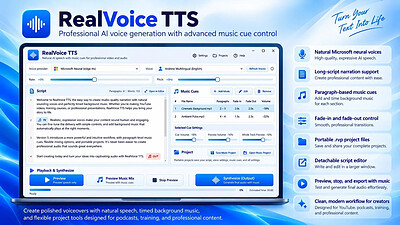
RealVoice Text to Speech 5.5.3 | Size: 757.21 MB
Language: English


RealVoice TTS turns your text into natural-sounding speech using Microsoft neural voices. Preview instantly, fine-tune rate and pitch, then export high-quality audio. Add background music, adjust volumes, and optionally fade the music at the end for a clean finish. The app is designed to be simple, fast, and reliable-great for creators, educators, podcasters, and anyone who needs voiceover audio quickly.

No sign-in required. Voice preview and voice-only export work out of the box. If bundled, the app also mixes voice + music into one MP3 without extra installs. Clean, modern UI with a light-blue theme and your choice of voice. Save to MP3 and keep everything local to your PC.

Realistic voices
Uses Microsoft neural voices via secure HTTPS.

Instant preview
Hear changes to text, voice, rate, and pitch immediately.

Music mixing
Add a background track, set levels, and fade-out at the end.

Voice-only or mixed export
Save clean MP3s

No account required
Works locally; you control your files.

Modern UI
Light-blue theme, clear controls, and helpful defaults.

Resilient synthesis
Automatic retry + fallback voice if a network hiccup occurs.

System Requirements
Windows 10 version 17763.0 or higher

HOMEPAGE: Code:
Код:
https://apps.microsoft.com/detail/9nzn9fws7pb1


DOWNLOAD LINKS:


Код:
https://rapidgator.net/file/c2d29b4545b81d717a092ed15a2f0232/RealVoice_Text_to_Speech_5.5.3.rar.html

Код:
https://clicknupload.click/k84f0ltvc81u/RealVoice_Text_to_Speech_5.5.3.rar
 
4460f9a660d4019dda8d70781f2efc23.jpg


Remo Recover Windows 6.1.0.12 | Size: 115.2 MB
Language: English


All new Remo Recover for Windows helps you recover deleted or lost data under any severe data loss scenarios from hard drives, SSD, USB, SD card or any storage devices without any hassle. Built to make your data recovery experience effortless and engaging, recover more than any usual data recovery software - make Remo Recover your data recovery software now.

Data Recovery from 1000 + Storage Devices
Remo Recover Windows can recover data from various storage devices like Hard Drive, SSD, SD card, USB flash drive, memory cards, digital camera, desktop, DSLR camera, CCTV camera footage and many more.
Be it from any storage device under any severe data loss scenario, with Remo Recover you can be sure of recovering data without any hassle and that's a promise.

Supported File Formats
All new Remo Recover can assist you in recovering any file type of your choice. The software recognizes and recovers close to 500 plus file formats easily.

The tool can recover all the popular file formats like photo (JPEG, PNG, GIF), video (MOV, MP4, AVI), document (DOCX, XSLX, PPT) and many more from almost all popular file systems like NTFS, FAT, FAT32, FAT16, EXFAT etc.
With an Advanced Signature Search, the software allows you to specify the file you are looking for and recover it with ease.

Tested Under 100+ Scenarios
Remo Recover is rigorously tried and tested under more than 100 complex data loss scenarios to help you achieve a better data recovery experience.
The software can seamlessly recover data from simple data loss scenarios like recovering deleted or lost files to complex data loss scenarios like recovering formatted or corrupt hard drives.

Reviewed by Industry Experts & Trusted by Millions of Users
With more than 15 million users across the globe, Remo Recover has gained trust of users in its process of helping people recover data.
The software has been highly rated by industry experts for its ease of use and performance under complex data loss scenarios.

Recover from Where You Lost it with Preferred Location Recovery Support
Specify from where you want to recover your data, be it from an external storage device or from any specific location like Recycle Bin or any folder of your choice, with Remo Recover you can recover data from anywhere. With Preferred location recovery support you will be able to easily restore the data you are looking for without having to search everywhere.
Whether you are novice user or a tech geek, data recovery experience with Remo Recover remains simple and engaging.

Recover as you Scan with Dynamic Data Recovery
No more waiting hours for the scanning process to complete! With Dynamic data recovery, you can start recovering your files as soon as you start the scanning process. With the help of Dynamic data recovery view you can look for the files you want to recover while the scan is in progress and even save it without interrupting the process.
Be it formatted partiton recovery or simple deleted file recovery, data recovery process is quick and engaging as the user can actively recover data without waiting for the scan to complete.

Accurately Locate Files with Smart A-I
Built with smart AI filters, you can find the file you are looking for quickly and smartly. Either you can simply use the search bar and type the file you are looking for and right click and locate the file which is buried deep inside or you can smartly use the folders created according to file type or property to find your way to the file.
For example, You can locate an MP3 file not only from its name but also with the help of its other file properties like name, genre, singer, etc. and this applies to any file type.

System Requirements:
Operating System Supported:
Windows 11/10/8/7
Windows Server 2019/2016/2012

Files System Supported:
FAT16, FAT32, exFAT, NTFS and NTFS5

Hardware Requirements:
Processor: Intel or AMD class processor with minimum 1.2 Ghz or higher
RAM - 2 GB (4GB recommended)
Free disk space - Minimum 100 MB recommended for software installation and enough free disk space to save recovered files
Screen Resolution: Minimum of 1024 x 786 screen resolution for better usability

HOMEPAGE: Code:
Код:
https://www.remosoftware.com/


DOWNLOAD LINKS:


Код:
https://rapidgator.net/file/97b4f0e2a619c2a5967584bf8f735a6e/Remo_Recover_Windows_6.1.0.12.zip.html

Код:
https://clicknupload.click/uxqh7nmnemse/Remo_Recover_Windows_6.1.0.12.zip
 
a62c604ebfdab1caba8f52a1c6746374.jpg


Robin YouTube Video Downloader Pro 7.5.32 (x64) | Size: 89.53 MB
Language: English


YouTube Video Downloader Pro is a professional Windows app for downloading and converting videos from YouTube, Facebook, Dailymotion, and thousands of other video sharing sites. It accelerates your downloads by up to 5 times. YouTube Video Downloader Pro allows you to download multiple videos at a time. It also allows you to pause, resume, and cancel downloads at anytime.

Easy-to-use
Just copy and paste video URL to start download. You can also directly drag and drop video link/URL from your browser to the Drop Box to add a download. YouTube Video Downloader Pro can download UHD 4K, QHD 2K, FHD 1080p, HD 720p, and 3D videos from YouTube if they are available. YouTube Video Downloader Pro allows you to download only audio stream from YouTube, without downloading the entire video file.

Playlist download
Just enter a YouTube playlist ID, YouTube Video Downloader Pro will download all or selected videos in the playlist from YouTube for you.

Speed up your downloads
YouTube Video Downloader Pro features an advanced download acceleration engine that lets you download videos up to 5 times faster than normal speed.
YouTube Video Downloader Pro allows you to download multiple videos at a time. It also allows you to pause, resume, and cancel downloads at anytime.
While downloading, you can click "Preview" button to play incomplete video and make sure it is really the video of your choice.

Convert to any format for any device
YouTube Video Downloader Pro can automatically convert downloaded file to any format for any device. It supports MP4, FLV, WMV, MOV, AVI, MPG, VOB, WEBM, DVD, VCD, and many other formats.
YouTube Video Downloader Pro can also extract audio stream from video, and save it as MP3, WAV, WMA, AC3, AAC, OGG, FLAC, MP2, or any other audio format.

iTunes compatible
Optionally, YouTube Video Downloader Pro can automatically add downloaded video/music files to your iTunes library, so you can easily synchronize your videos and music to your iPhone, iPad, iPod, etc.

Operating System: Windows 11/10/8/7/Vista/XP/2000

HOMEPAGE: Code:
Код:
http://www.youtubevideodownloaderpro.com/


DOWNLOAD LINKS:


Код:
https://rapidgator.net/file/cdfbea82f558d0a1d1152aa8d53ffd40/Robin_YouTube_Video_Downloader_Pro_7.5.32_x64.rar.html

Код:
https://clicknupload.click/jr36396xlpg4/Robin_YouTube_Video_Downloader_Pro_7.5.32_x64.rar
 
952a5300497a1c79467ce932bb0c1ff9.jpg


Room Arranger 11.3.0.811 (x64) Multilingual | Size: 44.1 MB
Language: English


Room Arranger is 3D room / apartment / floor planner with simple user interface. Once you get the basics, you can draw whatever you imagine. While having wide library of objects, you can easily create your own piece of furniture.

Features

Easy to Use
Room Arranger is small and compact piece of software. Still it lets you design nearly anything you imagine. Once you understand the basics it's easy to bring it to next level.

Nearly all functions have keyboard shortcuts, so you can learn to be pretty fast in Room Arranger.

3D Visualization
3D can give you a better impression of your design. Room Arranger will not only let you fly around the scene, but you can also walk through it like in reality.

Wide Object Library
There are nearly 300 objects in the standard object library. Furniture, and other equipment. For each of them, you can modify their dimensions exactly as you need - you are not limited to what we think is the most common.

Additionally you can quickly and easily design all your special objects directly in Room Arranger, there is a set of 3D objects just for such needs. Some users contributed to our On-line object library and shared their work.

Measurement
There is a measurement tool in Room Arranger that helps you to check if there is enough space left for other objects, or just visualize the dimensions in the project.

The software also measures the room areas, wall areas and other useful values. It will let you copy - paste them to Excel for further processing.

Print in Scale
Printing is the integral part of designer's work. We try to make this output precisely and in high quality. Professional architects usually require printouts in exact 1:50 or 1:100 scale, which is possible in Room Arranger.

In case you have only small A4 printer, the software manages to print the project over more pages. You will just glue all sheets of paper together.

Build on Floor Plan Image
Drawing walls can be quite time consuming for apartment or house design. So there is a way to make it easier in case you have an image or photo of the floor plan.

Just load the image of the floor plan into the Wall Editor, calibrate it, and draw walls on top of it.

Operating System: Windows 10 (1809) or later

HOMEPAGE: Code:
Код:
http://www.roomarranger.com/


DOWNLOAD LINKS:


Код:
https://rapidgator.net/file/a56a80212e7b4e1de3128f72b5caa64e/Room_Arranger_11.3.0.811_x64_Multilingual.zip.html

Код:
https://clicknupload.click/m0neb0r2ggyv/Room_Arranger_11.3.0.811_x64_Multilingual.zip
 
5fd4e3431add2bdc409e37d79499a526.jpg


R-Studio 9.5 Build 191861 Network / Technician Multilingual | Size: 144.64 MB
Language: English


Empowered by the new unique data recovery technologies, R-Studio is the most comprehensive data recovery solution for recovery files from NTFS, NTFS5, ReFS, FAT12/16/32, exFAT, HFS/HFS+ and APFS (Macintosh), Little and Big Endian variants of UFS1/UFS2 (FreeBSD/OpenBSD/NetBSD/Solaris) and Ext2/Ext3/Ext4 FS (Linux) partitions. It also uses raw file recovery (scan for known file types) for heavily damaged or unknown file systems. It functions on local and network disks, even if such partitions are formatted, damaged or deleted. Flexible parameter settings give you absolute control over data recovery.

R-Studio utilities recover files:
Deleted without Recycle Bin, or when Recycle Bin has been emptied;
Removed by virus attack or power failure;
After the partition with the files was reformatted, even for different file system;
Recovering data if: VIRUS has invaded; FAT is damaged; MBR is destroyed; FDISK or other disk utilities have been run;
When the partition structure on a hard disk was changed or damaged;
Data recovery on damaged or deleted partitions;
From hard disk with bad sectors;

Support for:
Basic(MBR), GPT, BSD(UNIX), APM(Apple partition map) partitions layout schemes;
Dynamic volumes, Windows Storage Spaces (Windows 2000-2022/8.1/10/11);
Apple software RAIDs, CoreStorage, File Vault, and Fusion Drive;
Linux Logical Volume Manager (LVM/LVM2) and mdadm RAIDs;
R-Studio can automatically recognize and assemble the components of these disk managers even if their databases are slightly damaged. Their components with severe corrupted databases can be added manually.

Advanced data recovery algorithm:
to increase the quality of file recovery when the file system is not damaged;
to recover files that are not recognized in file system metadata and not found during a disk scanning procedure;
to fast search for lost partitions;
to recover files from devices with unknown file systems, including HD, CD, DVD, floppy disk, Compact-Flash Card, USB drive, ZIP drive, Memory Sticks and other removable media.

Support for specific file system features:
Recognitions of localized names;
NTFS encrypted files, NTFS alternative data streams, NTFS data deduplication, NTFS LogFile, NTFS Symbolic Links & Directory Junctions;
ReFS: symbolic links, directory junctions, deduplication;
HFS+ journal processing, HFS+ extended attributes, HFS+ compressed files;
Advanced APFS recovery: support for encryption;
Ext2/Ext3/Ext4 FS/UFS journal processing and extended attributes;
Recovery of names and paths for files deleted to Recycle Bin and Trash.

In-depth file analysis:
Extended file search and mask capabilities;
Estimation of chances for successful file recovery;
Verbose file information. Even more extensive file information in the Technician version: specific file system info, overlapping files, disk regions, etc;
File recovery lists for mass file recovery. File recovery lists with extensive file information in the Technician version.

System Requirements:
An Intel-compatible platform running Windows 11/10/8.1/8/7/Vista/XP/2000 Windows Server 2022/2019/2016/2012/2008/2003.
At least 256 MB of RAM, a mouse, and enough disk space for recovered files, image files, etc.
The administrative privileges are required to install and run R-Studio utilities.
A network connection for data recovering over network.

HOMEPAGE: Code:
Код:
https://www.r-studio.com/


DOWNLOAD LINKS:


Код:
https://rapidgator.net/file/234735e296ee83c3dbeddcdd71c2e3e5/R-Studio_9.5_Build_191861_Network_Technician_Multilingual.rar.html

Код:
https://clicknupload.click/4ddml881mqf4/R-Studio_9.5_Build_191861_Network_Technician_Multilingual.rar
 
bca166ac331c5bf28a0236598ba48d01.png


R-Studio v9.5.191861 Technician Edition - WinPE | Size: 427.7 MB
Language: English


Disk Recovery Software and Hard Drive Recovery tool.

Empowered by the new unique data recovery technologies, R-Studio is the most comprehensive data recovery solution for recovery files from NTFS, NTFS5, ReFS, FAT12/16/32, exFAT, HFS/HFS+ and APFS (Mac), XFS, Little and Big Endian variants of UFS1/UFS2 (FreeBSD/OpenBSD/NetBSD/Solaris) and Ext2/Ext3/Ext4 FS (Linux) partitions. It also uses raw file recovery (scan for known file types) for heavily damaged or unknown file systems. It functions on local and network disks, even if such partitions are formatted, damaged or deleted. Flexible parameter settings give you absolute control over data recovery.

System requirements: Windows 7, 8.1, 10, 11 and Windows Server editions

HOMEPAGE: Code:
Код:
https://www.r-studio.com/


DOWNLOAD LINKS:


Код:
https://rapidgator.net/file/976f596c26f3d535a0c68a05eaf2e914/R-Studio_v9.5.191861_Technician_Edition_-_WinPE.rar.html

Код:
https://clicknupload.click/1lo2r2f83a70/R-Studio_v9.5.191861_Technician_Edition_-_WinPE.rar
 
56287c75fa125142e1d912e8351f06e5.pngpg


Rufus 4.16.2434 Beta Multilingual | Size: 1.89 MB
Language: English


Rufus is a USB formatting utility which also can create a bootable USB drive using a bootable ISO image. This app requires admin rights.

Rufus is a small utility that helps format and create bootable USB flash drives, such as USB keys/pendrives, memory sticks, etc.

It can be be especially useful for cases where
you need to create USB installation media from bootable ISOs (Windows, Linux, etc.)
you need to work on a system that doesn´t have an OS installed
you need to flash a BIOS or other firmware from DOS
you want to run a low-level utility

Features
Format USB, flash card and virtual drives to FAT/FAT32/NTFS/UDF/exFAT/ReFS
Create DOS bootable USB drives, using FreeDOS or MS-DOS
Create BIOS or UEFI bootable drives, including UEFI bootable NTFS
Create bootable drives from bootable ISOs (Windows, Linux, etc.)
Create bootable drives from bootable disk images, including compressed ones
Create Windows To Go drives
Twice as fast as Microsoft's USB/DVD tool or UNetbootin, on ISO -> USB creation (1)
Perform bad blocks checks, including detection of "fake" flash drives
Compute MD5, SHA-1 and SHA-256 checksums of the selected image
Modern and familiar UI, with more than 35 languages natively supported
Small footprint. No installation required.

System Requirements: Windows 11, Windows 10, 8 , 7

HOMEPAGE: Code:
Код:
https://rufus.ie


DOWNLOAD LINKS:


Код:
https://rapidgator.net/file/ebf3a478ce96e075c2c5981d62d9b5b4/Rufus_4.16.2434_Beta_Multilingual.rar.html

Код:
https://clicknupload.click/0xvydzu4hqte/Rufus_4.16.2434_Beta_Multilingual.rar
 
d85c7f2b9f202c33715e704b56af60f0.jpg


R-Wipe & Clean 20.0.2583 | Size: 26.51 MB
Language: English


R-Wipe and Clean is a complete R-Tools solution to remove useless files, free up your disk space, and clean various privacy-compromising information on your online and offline activity. This includes internet history and cookies, lists of downloaded files and opened documents, various data caches, temporary files, and many more items, created by the operating system, most contemporary internet browsers and communication programs, and by hundreds of third-party applications.

It is also possible to create specific lists of traces to be cleaned for unsupported applications. All small computer cleaning and file erasing jobs can be combined into large computer cleaning tasks that can be started immediately, or at scheduled time/events.

Computer Cleaning
Traces Selection helper: a tool to quickly select some of the most common traces to clean.
Cleaning Internet activity: removing traces from most contemporary browsers and communication programs.
Cleaning personal traces: removing various lists, logs, caches, temporary files, and other traces of your activity
Cleaning system traces: removing registry traces, temp files, system history, and various log files.
Cleaning traces from various third-party programs: removing various caches, logs, temporary files, recent file lists, and other traces left by applications.
Cleaning can be performed as a background task and computer can be turn off upon its completion.

Wiping
Support for SSD devices: R-Wipe and Clean correctly recognizes SSD devices and by default wipes only necessary data on the disk preventing them from additional wear.
Strong or fast erase algorithms, including DoD-approved, for wiping files and free disk space.
Support for FAT/exFAT and NTFS file systems.
Wiping files' alternate data streams and cluster "tips", or free parts of file clusters.
Wiping files directly from File Explorer.
Wiping free space on a single disk directly from its shortcut menu.
Wiping unused space of several disks through one single wipe task.
Wipe records of small files stored directly in the NTFS Master File Table.
Predefined wipe lists of files, folders, and Registry keys to be wiped through a single task. Files or folders can be added to a current wipe list directly from File Explorer.

Advanced Features
All separate cleaning and wiping actions can be combined into large wipe and clean tasks to launch them manually or at scheduled times or events (user log-on/log-off, system start-up/shutdown, closing any or all browsers, etc.)
Detailed representation of all trace items on your computer.
Detailed logging of all wipe and clean operations.
Customization: R-Wipe and Clean can hide those items you will never want to clean.
Full system integration: Most wipe and clean operations can be performed directly from Windows.
Password protection.
R-Wipe and Clean Smart: an advanced tool to create and manage very complex wipe lists.
Cleaning and wiping task can be started from a command line.
Boss Key to close a web-browser in emergency.
Stealth mode to hide computer cleaning.
Standby/hibernate control: Your computer will not hibernate until R-Wipe and Clean finishes its long job.
Startup Renaming for files/folders locked by Windows and other programs. They will be renamed and cleaned during the next start-up.

System Requirements
An Intel-compatible platform running Windows 7/8/8.1/10/11 or Windows Server 2008 R2/2012/2012 R2/2016/2019/2022.
The administrative privileges are required during installation to install R-Wipe & Clean's Windows Explorer shell extensions.

HOMEPAGE: Code:
Код:
https://www.r-wipe.com/


DOWNLOAD LINKS:


Код:
https://rapidgator.net/file/6009f8fc9eb59fddc6e00d5212b11528/R-Wipe__Clean_20.0.2583.rar.html

Код:
https://clicknupload.click/6y6w88e2v8fb/R-Wipe__Clean_20.0.2583.rar
 
f797c1c424364258824135770a71e8ed.webp

Free Download Scrapbook Factory Deluxe 5.0.3.7 | 5.31 Gb
Scrapbook Factory Deluxe is a digital scrapbooking application designed to help users turn personal photographs and creative ideas into personalized memory books, photo calendars, and other printable projects. It provides a large collection of templates, decorative graphics, embellishments, and fonts, allowing users to create customized layouts for family occasions, celebrations, holidays, and personal collections.
The software combines page design tools with a built-in photo editor, making it possible to arrange images, apply visual effects, correct common photo issues, and add decorative elements within the same application. Its project templates and drag-and-drop gallery provide a straightforward starting point for users who want to create scrapbook pages without designing every element from scratch.


Software Overview
Scrapbook Factory Deluxe includes more than 6,500 templates and customizable projects, along with a library of over 75,000 graphics and thousands of photorealistic embellishments. The included creative resources make it possible to build themed scrapbook pages using decorative objects, backgrounds, and visual elements suited to different occasions.
The Scraps Gallery provides access to the embellishment collection through drag-and-drop editing. Users can select individual elements and position them directly on their scrapbook pages, adjusting the composition to match their photographs and preferred design.
A built-in photo editor provides tools for modifying pictures before incorporating them into a project. Available functions include cropping images into different shapes, applying special effects, and correcting red-eye. These editing options help users prepare photographs and customize their appearance without relying on a separate photo editor.
In addition to traditional scrapbook layouts, the application supports the creation of CD Photo Scrapbooks that can be viewed on a television. Users can also design personalized photo calendars and print their finished projects using supported inkjet and laser printers.

Key Features
  • More than 6,500 customizable templates and creative projects.
  • Over 75,000 included graphics for scrapbook page design.
  • Thousands of photorealistic embellishments in the Scraps Gallery.
  • Drag-and-drop placement of decorative elements.
  • More than 1,500 creative fonts.
  • Built-in photo editor for preparing and customizing pictures.
  • Photo cropping with different shapes.
  • Red-eye correction for digital photographs.
  • Special effects for enhancing image appearance.
  • Creation of CD Photo Scrapbooks for television viewing.
  • Tools for designing personalized photo calendars.
  • Printing support for popular inkjet and laser printers.

Why Choose Scrapbook Factory Deluxe
Scrapbook Factory Deluxe is suitable for users who want to create personalized photo projects using ready-made templates and a substantial collection of decorative resources. Its combination of scrapbook layouts, graphics, embellishments, and fonts provides flexibility for producing memory books and themed photo pages.
The integrated photo editor and drag-and-drop gallery also simplify the creative process by keeping image adjustments and page decoration within one application. Support for photo calendars and CD-based presentations extends its use beyond conventional printed scrapbooks.

System Requirements
  • Operating System: Windows XP, Vista, 7, 8, 10, or 11
  • RAM: 512 MB
  • Processor: Pentium III 800 MHz or faster
  • DVD drive
  • Recordable or rewritable CD drive required to burn CD photo scrapbooks
  • Printer: Compatible with popular inkjet and laser printers, including Lexmark, HP, Epson, and Canon

Home Page

Код:
https://www.novadevelopment.com/software/scrapbook-factory-deluxe-129016

Product Information
  • Software Name: Scrapbook Factory Deluxe
  • Version: 5.0.3.7
  • Languages: English
  • License type: Full Version
  • File Size: 5.31 Gb
Rapidgator
Код:
https://rapidgator.net/file/2e684da8ee5fee6636c312b799e016ba/aqvdj.Scrapbook.Factory.Deluxe.5.0.3.7.Download.part1.rar.html
https://rapidgator.net/file/9e4645ad62362a8232b427ea74903c7d/aqvdj.Scrapbook.Factory.Deluxe.5.0.3.7.Download.part2.rar.html
https://rapidgator.net/file/a5d0970bec7412417de96ac7f4d4b216/aqvdj.Scrapbook.Factory.Deluxe.5.0.3.7.Download.part3.rar.html

Код:
https://clicknupload.click/ky23xnqz5qmi/aqvdj.Scrapbook.Factory.Deluxe.5.0.3.7.Download.part1.rar
https://clicknupload.click/s4gn2m96r9gm/aqvdj.Scrapbook.Factory.Deluxe.5.0.3.7.Download.part2.rar
https://clicknupload.click/14hsn2tmt6h1/aqvdj.Scrapbook.Factory.Deluxe.5.0.3.7.Download.part3.rar
 
Назад
Сверху Снизу