







All mitsumi'1s Applications !! (updated daily)

57a9e2cb1ce3518f5254f2180cee684d.webp

Free Download Firetask 4.8.7 Multilingual macOS | 12.7 Mb
Firetask is a task management application for macOS that combines the Getting Things Done (GTD) methodology with Kanban-based organization. It helps users capture ideas, organize personal tasks, coordinate projects, and maintain a clear overview of their priorities. The application provides a structured workflow for managing responsibilities from initial collection through planning, execution, and review.
Designed for individual productivity and project organization, Firetask offers dedicated views for daily tasks, delegated work, project lists, and scheduled activities. Its combination of task lists, visual boards, categories, and calendar views allows users to organize work according to different planning styles while keeping related information accessible.


Software Overview
Firetask integrates GTD principles with Kanban task management to provide a consistent way to handle personal and project-related work. Its workflow follows four main phases: Collect, Focus, Manage, and Review. This structure helps users capture incoming tasks, identify current priorities, organize ongoing responsibilities, and review their progress.
The Today view brings together tasks that are due, scheduled, or currently in focus. Users can also configure it to display tasks that are in progress or have been completed during the day. For visual task organization, multiple Kanban views support drag-and-drop management based on status, dates, priorities, and categories.
Project management features include task lists, progress visualization, and optional portfolio organization. The application also provides dedicated tools for tracking delegated responsibilities, breaking complex tasks into smaller actions, and reusing checklists for recurring activities.

Key Features
  • GTD-based workflow organized around collecting, focusing, managing, and reviewing tasks.
  • Today view combining due, scheduled, and prioritized tasks in one overview.
  • Configurable Pomodoro support with task estimates, an in-focus Pomodoro count, and a timer.
  • Waiting For list for tracking delegated tasks, grouped by assignee.
  • Drag-and-drop Kanban boards organized by status, due date, start date, priority, or category.
  • Monthly calendar visualization with separate due-date and scheduled-date modes.
  • Project task lists with progress indicators and optional portfolio organization.
  • Color-coded and icon-based categories for organizing tasks and projects by context.
  • Action management for dividing larger tasks into smaller steps.
  • Reusable checklists for frequently repeated tasks.
  • Quick Create function with a configurable global keyboard shortcut.
  • Integration with Apple's built-in Calendar and Reminders applications.
  • URL scheme-based API for connecting supported workflows.
  • iCloud synchronization without requiring a separate account.
  • Privacy-focused storage that keeps task data on user devices and within their iCloud account.

Why Choose Firetask
Firetask is suitable for users who prefer combining structured GTD planning with visual Kanban boards. Its different task views make it possible to manage daily responsibilities, scheduled activities, delegated work, and larger projects within one application.
Features such as reusable checklists, project progress visualization, Pomodoro support, and iCloud synchronization provide practical options for organizing individual workflows. The integration with Apple's Calendar and Reminders applications also helps users work with their existing macOS productivity environment.

System Requirements
  • Operating System: macOS 10.15 or later

Home Page

Код:
https://elemental-tools.com

Product Information
  • Software Name: Firetask
  • Version: 4.8.7
  • Languages: Multilingual
  • License type: Full Version
  • File Size: 12.7 Mb

    Rapidgator
    Код:
    https://rapidgator.net/file/3aec2bf1e5e52ed15afcbb2121d2337c/cors6.Firetask.4.8.7.zip.html

    Код:
    https://clicknupload.click/r9t81th0ox9m/cors6.Firetask.4.8.7.zip
 
57a9e2cb1ce3518f5254f2180cee684d.webp

Free Download Firetask 4.8.7 Multilingual macOS | 12.7 Mb
Firetask is a task management application for macOS that combines the Getting Things Done (GTD) methodology with Kanban-based organization. It helps users capture ideas, organize personal tasks, coordinate projects, and maintain a clear overview of their priorities. The application provides a structured workflow for managing responsibilities from initial collection through planning, execution, and review.
Designed for individual productivity and project organization, Firetask offers dedicated views for daily tasks, delegated work, project lists, and scheduled activities. Its combination of task lists, visual boards, categories, and calendar views allows users to organize work according to different planning styles while keeping related information accessible.


Software Overview
Firetask integrates GTD principles with Kanban task management to provide a consistent way to handle personal and project-related work. Its workflow follows four main phases: Collect, Focus, Manage, and Review. This structure helps users capture incoming tasks, identify current priorities, organize ongoing responsibilities, and review their progress.
The Today view brings together tasks that are due, scheduled, or currently in focus. Users can also configure it to display tasks that are in progress or have been completed during the day. For visual task organization, multiple Kanban views support drag-and-drop management based on status, dates, priorities, and categories.
Project management features include task lists, progress visualization, and optional portfolio organization. The application also provides dedicated tools for tracking delegated responsibilities, breaking complex tasks into smaller actions, and reusing checklists for recurring activities.

Key Features
  • GTD-based workflow organized around collecting, focusing, managing, and reviewing tasks.
  • Today view combining due, scheduled, and prioritized tasks in one overview.
  • Configurable Pomodoro support with task estimates, an in-focus Pomodoro count, and a timer.
  • Waiting For list for tracking delegated tasks, grouped by assignee.
  • Drag-and-drop Kanban boards organized by status, due date, start date, priority, or category.
  • Monthly calendar visualization with separate due-date and scheduled-date modes.
  • Project task lists with progress indicators and optional portfolio organization.
  • Color-coded and icon-based categories for organizing tasks and projects by context.
  • Action management for dividing larger tasks into smaller steps.
  • Reusable checklists for frequently repeated tasks.
  • Quick Create function with a configurable global keyboard shortcut.
  • Integration with Apple's built-in Calendar and Reminders applications.
  • URL scheme-based API for connecting supported workflows.
  • iCloud synchronization without requiring a separate account.
  • Privacy-focused storage that keeps task data on user devices and within their iCloud account.

Why Choose Firetask
Firetask is suitable for users who prefer combining structured GTD planning with visual Kanban boards. Its different task views make it possible to manage daily responsibilities, scheduled activities, delegated work, and larger projects within one application.
Features such as reusable checklists, project progress visualization, Pomodoro support, and iCloud synchronization provide practical options for organizing individual workflows. The integration with Apple's Calendar and Reminders applications also helps users work with their existing macOS productivity environment.

System Requirements
  • Operating System: macOS 10.15 or later

Home Page

Код:
https://elemental-tools.com

Product Information
  • Software Name: Firetask
  • Version: 4.8.7
  • Languages: Multilingual
  • License type: Full Version
  • File Size: 12.7 Mb

    Rapidgator
    Код:
    https://rapidgator.net/file/3aec2bf1e5e52ed15afcbb2121d2337c/cors6.Firetask.4.8.7.zip.html

    Код:
    https://clicknupload.click/r9t81th0ox9m/cors6.Firetask.4.8.7.zip
 
bfd7fbd7bae543ec962ccd33b327c683.png


foobar2000 v2.26.2 | Size: 14.21 MB
Language: English


foobar2000 is an advanced freeware audio player for the Windows platform.

Features
- Supported audio formats: MP3, MP4, AAC, CD Audio, WMA, Vorbis, Opus, FLAC, WavPack, WAV, AIFF, Musepack, Speex, AU, SND... and more with additional components.
- Gapless playback.
- Easily customizable user interface layout.
- Advanced tagging capabilities.
- Support for ripping Audio CDs as well as transcoding all supported audio formats using the Converter component.
- Full ReplayGain support.
- Customizable keyboard shortcuts.
- Open component architecture allowing third-party developers to extend functionality of the player.

System Requirements: Windows 7 or newer

HOMEPAGE: Code:
Код:
https://www.foobar2000.org//code]

[b][i]DOWNLOAD LINKS[/i]:[/b]

[code]
[url]https://rapidgator.net/file/20aa51f7ec7b00cff047632c3bd04d2d/foobar2000_v2.26.2.rar.html[/url]

Код:
https://clicknupload.click/u6sffidy380f/foobar2000_v2.26.2.rar
[/code]
 
681a3042b1e3b7cd433c9015eba34353.jpg


FotoSketcher 4.70 (x64) Multilingual | Size: 40.57 MB
Language: English


FotoSketcher is a freeware Windows software that allows you to transform your digital photos in wonderful cartoons, drawings or paintings. It has many features, others are constantly added to new versions. You can use over 20 different styles such as pencil sketches, watercolor, oil paintings and many others. If you need to improve your images use one of his easy tools (example: contrast, simplify image, increase luminosity, saturation of colors). You can also add simple frames and text to existing images. The program is 100% clean and has no toolbars/installers or anything else that can be identified as adware/spyware.

FotoSketcher Review
FotoSketcher is a free graphic application designed to be easy to use for newbies and advanced enough for people that worked before with other graphic software. I tested this software on a computer running Windows 7 using both versions (installer and portable).
About the software.I can only think at something easy to use. I would like to say that all you have to do is to open an image, apply needed actions using one or more program features, save the image and there you go - enjoy wonderful results.

When I tested the program for the first time I modified one of my existing photos, used a "cartoon" style and sent it to my girlfriend. Immediately, she uploaded that image on Facebook and it received several "likes" from friends. One of her friends was so impressed saying that "Wow! What Photoshop can do!". I must say that I am not an Adobe Photoshop expert but this software will make you look like you're using an advanced program such as Adobe Photoshop, Corel PaintShop Pro or GIMP.
Obviously, it's not meant to be in the same league but there is no learning curve required. The truth is that everyone can achieve a similar result, you just need a couple of minutes or even seconds to convert your photos into art. You are allowed to do whatever you want with photos that you own. You can even sell created photos without having to buy a license or ask for author permission but don't forget that this is a free software and the author's work should be rewarded with a DONATION whenever is possible.

System Requirements: Windows 11, Windows 10, 8 , 7

HOMEPAGE: Code:
Код:
https://fotosketcher.com/


DOWNLOAD LINKS:


Код:
https://rapidgator.net/file/185c29f3e5ec3841dd06e7a3b14f8952/FotoSketcher_4.70_x64_Multilingual.rar.html

Код:
https://clicknupload.click/32wuf9r7q8hx/FotoSketcher_4.70_x64_Multilingual.rar
 
e2cb8c0a9978ff0cb2188284078d413a.webp

Free Download Gammadyne Centurion Setup 52.0 Multilingual | 43.9 Mb
Gammadyne Centurion Setup is a Windows installer-authoring utility for packaging applications into self-contained installation executables. Developers can configure installation behavior, customize the setup interface, include required files, and provide uninstall support.


Software Overview
Centurion Setup creates compressed installers distributed as a single executable. Its configuration options include language and interface customization, DLL deployment, shared files, file associations, patching, and password protection.

Key Features
  • Build self-contained executable installers in a single file.
  • Compress installation files for distribution.
  • Provide optional uninstall entries through Control Panel and Start Menu or desktop shortcuts.
  • Customize displayed interface text and support multiple installer languages.
  • Install operating-system DLLs and shared files with version and date checks.
  • Create file associations and context-menu options; support patching and password protection.

Why Choose Gammadyne Centurion Setup
It is intended for developers who need to package Windows applications and configure the installation experience.

System Requirements
Windows XP, Vista, 7, 8/8.1, 10, 11

Home Page

Код:
https://www.gammadyne.com/centurion.htm[/code

Product Information
  • Software Name: Gammadyne Centurion Setup
  • Version: 52.0
  • Languages: Multilingual
  • License type: Full Version
  • File Size: 43.9 Mb
Rapidgator
Код:
https://rapidgator.net/file/59255598df8fb9881ca5b819f30724c6/tf648.Gammadyne.Centurion.Setup.52.0.Multilingual.rar.html

Код:
https://clicknupload.click/lnk2ziavqxik/tf648.Gammadyne.Centurion.Setup.52.0.Multilingual.rar
 
13346e86a8f3f0ad589ccf96d472a5ac.webp

Free Download Geometric Glovius Prime 6.7.0 Build 448 | 142.9 mb
Glovius is a professional 3D CAD viewer designed for opening, inspecting, and analyzing engineering models from a wide range of computer-aided design applications. It provides engineers, designers, manufacturers, and other technical professionals with access to 3D parts and assemblies without requiring them to work directly within the original CAD authoring software.
The application supports numerous industry-standard CAD formats, including CATIA, Siemens NX, Creo, SolidWorks, Inventor, Solid Edge, Pro/ENGINEER, STEP, IGES, and JT. Users can examine model geometry, take measurements, create sectional views, compare design revisions, and prepare reports for technical communication and collaboration.
In addition to 3D model inspection, Glovius includes 2D viewing capabilities for DWG, DXF, and CATDrawing files. Its export functions also allow supported CAD models to be converted into formats such as STEP, 3DPDF, and STL for sharing and further use.


Software Overview

Glovius provides a centralized environment for viewing and evaluating CAD models from different engineering platforms. Instead of opening each design in its original application, users can access supported 3D files through a dedicated viewer and inspect individual components or complete assemblies.
The measurement tools help examine dimensions and geometric relationships, while sectioning functions make it easier to investigate internal model structures. Revision comparison capabilities are useful when reviewing different design iterations and identifying changes between engineering models.
For collaboration, the software can generate reports containing relevant model information. Its export capabilities support the preparation of CAD data in alternative formats, including STEP, 3DPDF, and STL. These functions make it useful for design reviews, manufacturing discussions, engineering documentation, and technical presentations.
The included 2D viewer extends file inspection to DWG, DXF, and CATDrawing documents, providing access to common engineering drawings alongside 3D models.

Key Features

  • View 3D CAD parts and assemblies from multiple engineering platforms.
  • Support for CATIA, NX, Creo, SolidWorks, Inventor, Solid Edge, Pro/ENGINEER, STEP, IGES, and JT files.
  • Inspect individual components and complete assemblies.
  • Measure dimensions and geometric properties of CAD models.
  • Create sectional views to examine internal model geometry.
  • Compare different CAD revisions to identify design changes.
  • Generate reports for engineering collaboration.
  • Export supported models to STEP, 3DPDF, STL, and other formats.
  • View 2D DWG, DXF, and CATDrawing files using the included viewer.

Why Choose Glovius

Glovius is suitable for professionals who regularly receive CAD files from different engineering departments, customers, suppliers, or manufacturing partners. Its multi-format viewing capabilities make it easier to inspect designs without relying on the original CAD authoring application.
The combination of measurement, sectioning, revision comparison, reporting, and export tools supports practical engineering review tasks. Designers, mechanical engineers, manufacturing teams, and technical professionals can use these functions to examine models and communicate design information more effectively.

System Requirements
Windows *

Home Page

Код:
www.glovius.com

Product Information
  • Software Name: Glovius
  • Version: 6.7.0 Build 448 Prime
  • Architecture: x64
  • Languages: multilanguage
  • License type: Full Version
  • File Size: 142.9 mb

558e68cb3b3b152f173c81ab1389a1d8.webp

4c56d08d6a6283cc579d53bdc8f2b464.webp


Rapidgator
Код:
https://rapidgator.net/file/18950157931707c1d8aa720f43180841/q1uu5.Geometric_Glovius_Prime_6_7_0_448.rar.html

Код:
https://clicknupload.click/kbl63qtr6h88/q1uu5.Geometric_Glovius_Prime_6_7_0_448.rar
 
994d311a1d508bfe9af1808f641e4326.webp

Free Download GibbsCAM 2027 v27.0.42.0 | 2.56 Gb
GibbsCAM is a computer-aided manufacturing (CAM) solution for programming CNC machine tools, supporting production workflows ranging from basic 2-axis operations to complex multi-task machining. It provides tools for generating CNC toolpaths and post-processors designed to improve machining efficiency and production workflows.
The software integrates with major CAD systems and supports 2 to 5-axis milling, turning, Swiss machining, multi-task machining (MTM), and wire EDM. Its development focuses on improving programming visibility, machining control, simulation, and validation, helping manufacturers manage increasingly complex CNC operations.


Software Overview

GibbsCAM provides an integrated environment for CNC programming across a variety of machining processes. Its toolpath and post-processing capabilities help production machine shops prepare machining operations and optimize how CNC equipment is used. Support for multiple machining methods allows users to work with different manufacturing requirements within one CAM solution.
The software also emphasizes visualization and validation of machining operations. Its development includes improvements to workspace visibility, simulation capabilities, multiaxis machining strategies, and Copilot functionality. Integration with major CAD systems further supports workflows between product design and CNC manufacturing.

Key Features

  • CNC programming solution for operations ranging from 2-axis machining to complex multi-task machining.
  • Supports 2 to 5-axis milling.
  • Turning and Swiss machining capabilities.
  • Multi-Task Machining (MTM) support.
  • Wire EDM programming.
  • CNC toolpaths and post-processors designed to optimize machining efficiency.
  • Integration with all major CAD systems.
  • Tools for improving visibility into programming and machining environments.
  • Simulation and validation capabilities for machining workflows.
  • Expanded multiaxis machining strategies.
  • Copilot functionality for supporting programming workflows.
  • Improvements to manufacturing processes and CNC programming control.

Why Choose GibbsCAM

GibbsCAM combines programming tools for multiple CNC machining processes in a single CAM environment. Its support for milling, turning, Swiss machining, MTM, and wire EDM makes it suitable for production shops handling different types of manufacturing work.
With CAD integration, machining toolpaths, post-processors, and simulation capabilities, the software supports the transition from part design to CNC production. Its continued development also focuses on improving programming visibility and simplifying the validation of complex machining operations.

What's New

GibbsCAM 2027 Build 27.0.42.0 introduces the following bug fixes and enhancements.
Bug Fixes
  • Resolved a Shrink Wrap issue when using Lathe MDD. (65750)(67049)/(776466)
  • Fixed a missing Rotate button in the Operation Data dialog for Double Rotary Head configurations (AC configuration). (67073)(67080)(67081)/(794647)
  • Fixed an issue where the Rotate button was unavailable in Op Data for eccentric parts using Double Rotary Table configurations (BC configuration). (67074)(67083)(67084)/(794647)
  • Resolved a KeyNotFoundException crash in Document Control when switching the machine (MDD). (67085)(67086)(67087)
  • Fixed the Mill feature's Retract Z setting when using "Same as Approach," which previously used a stored retract value instead of the current approach value. (67054)(67066)/(795036)
  • Resolved a 5-Axis regression from V24 that caused multiple C-Axis overtravel errors in 5-Axis Operations. (67034)(67041)/(793727)
  • Fixed a custom drilling macro that used an incorrect turning plane orientation. (66582)(67062)/(789995)
  • Resolved an issue where Copilot response content could overflow the chat window boundaries. (66972)(67063)
  • Fixed a crash that occurred when deleting grouped solids in certain files. (67060)(67064)/(795045)
  • Resolved an issue where part images were missing from generated reports when the Start Maximized option was enabled. (67059)(67065)/(795086)

Enhancements
  • Added LTHREAD_LAST_CUT_VAL, allowing macros to set this value. (67104)(67105)(67106)
  • Improved Tools United flute-count handling. GibbsCAM now checks the first supported flute field and accepts either a numeric value or a string that can be parsed as a number. The first valid value found is used as the number of flutes. (67042)(67043)(67044)

System Requirements

- Operating System: Windows. The source does not specify a particular Windows version.
- Architecture: x64.
4be43c932d582599ef82ef0b6c9a9037.webp


Frequently Asked Questions

What is GibbsCAM used for?

GibbsCAM is used to program CNC machine tools and generate machining toolpaths for manufacturing operations, including milling, turning, Swiss machining, multi-task machining, and wire EDM.

Which machining operations does GibbsCAM support?

The software supports 2 to 5-axis milling, turning, Swiss machining, Multi-Task Machining (MTM), and wire EDM.

Can GibbsCAM work with CAD software?

Yes. GibbsCAM integrates with all major CAD systems to support workflows between product design and CNC programming.

What are the main changes in GibbsCAM 2027?

The supplied release notes include fixes for machining operations, rotary configurations, Copilot, Document Control, reporting, and other functions. They also introduce macro support for LTHREAD_LAST_CUT_VAL and improved handling of flute-count values from Tools United.

Home Page

Код:
www.gibbscam.com

Product Information
  • Software Name: GibbsCAM
  • Year of release: 2027
  • Version: 2027 v27.0.42.0
  • Architecture: x64
  • Languages: English, Chinese (China)
  • License type: Full Version
  • File Size: 2.56 GB
Rapidgator
Код:
https://rapidgator.net/file/315785c46ab5cd443873a952370de62d/d8rc4.GibbsCAM_x64_v27.0.42.0_Chinese.rar.html
https://rapidgator.net/file/2eba2f2b4706cc629ec8505a09f3bba1/d8rc4.GibbsCAM_x64_v27.0.42.0_English.rar.html

Код:
https://clicknupload.click/6bwu30yb8k86/d8rc4.GibbsCAM_x64_v27.0.42.0_Chinese.rar
https://clicknupload.click/timlhqetadke/d8rc4.GibbsCAM_x64_v27.0.42.0_English.rar
 
674f103bce438013f484f6e56b79541d.webp

Free Download GiliSoft Audio Recorder Pro 15.2 (x64) Multilingual | 554 Mb
GiliSoft Audio Recorder Pro records audio from a computer's sound output and microphone, either separately or together. Recordings can be saved in a broad range of audio formats, making the application suitable for capturing desktop playback, voice input, online broadcasts, and conversations conducted through supported VoIP software.


The recorder includes configurable quality presets, device selection, silence detection, and timer-based scheduling. Users can preview the selected recording source before starting and adjust format parameters when the default settings do not meet their needs.

Software Overview
GiliSoft Audio Recorder Pro provides a focused workspace for the tasks described above. The available functions are organized around selecting a target, configuring the relevant operation, and reviewing or exporting the resulting material where supported.

Key Features
  • Record computer audio, microphone input, or both sources at the same time.
  • Save recordings in AAC, AC3, AIFF, AMR, AU, FLAC, M4A, M4B, M4R, MKA, MP2, MP3, OGG, RA, VOC, WAV, and WMA formats.
  • Choose recording quality presets and adjust format settings.
  • Schedule recordings to start and stop at specified times.
  • Set one-time, daily, or weekly recording schedules.
  • Use silence detection to pause recording when no audio is present.
  • Preview the selected recording device or source before recording.
  • Work with multiple sound cards, including USB sound cards.
  • Capture playback from desktop applications and supported internet audio sources.
  • Record voice conversations from supported VoIP applications in automatic or manual mode.

Why Choose GiliSoft Audio Recorder Pro
GiliSoft Audio Recorder Pro is designed for users who need to capture sound produced by desktop applications as well as audio from a microphone. It can be used for voice notes, online broadcasts, application playback, and supported internet calls.
Its scheduling and silence-detection options are useful for recordings that do not require constant manual supervision. Selecting the correct input and output sources before recording helps ensure that the intended audio is captured.

System Requirements
Operating System: Windows 2000/2003/XP/Vista/7/8/10/11

Home Page

Код:
https://gilisoft.com/

Product Information
  • Software Name: GiliSoft Audio Recorder Pro
  • Architecture: x64
  • Version: 15.2
  • Languages: Multilingual
  • License type: Full Version
  • File Size: 554 Mb
Rapidgator
Код:
https://rapidgator.net/file/ba48a2415b8f07594cc15ac07687b2dd/a136v.GiliSoft.Audio.Recorder.Pro.15.2.x64.Multilingual.rar.html

Код:
https://clicknupload.click/lp3gl8nwz0x9/a136v.GiliSoft.Audio.Recorder.Pro.15.2.x64.Multilingual.rar
 
1e7cf681fd6d32ce0737439992d62750.png


Gilisoft Screen Recorder 13.6 (x64) Multilingual | Size: 83.16 MB
Language: English


Screen recording can be useful when you need to record a how-to video to help someone learn how to use a program, record a game walkthrough, or prepare for a presentation. Record here means you can create a video of whatever you are doing on your desktop, save the recording as a video file and send it to a friend or upload it on YouTube.

GiliSoft Screen Recorder is a screen recording software for Windows, it captures what you see on screen and what you hear/say simultaneously, and saves them as compressed video file in real-time. It is usually used to create software demos, capture streaming videos and record game plays.

Exclusive Features of Screen Recorder:

Powerful Capture Function
-Record from webcam, external devices, computer screen (records the entire screen, a single window or any selected portion), streaming video with high quality.

Good Video Audio Simultaneously
-Record video alone or video and audio (both computer sounds and microphone) simultaneously.

Support Recording Video Conferences
-Record audio from your microphone and speakers simultaneously, ideal for recording video conferences

Highlight with HotSpot Function
-Magnify the area of cursor during recording (Maximum 4X), and it also allows you to adjust the recording area during screen recording.

H264 Encoder with GPU Acceleration
-Provides hardware accelerated h.264 encoder and Nvidia® CUDA/NVENC H.264 encoder.

Many Output Formats
-MP4, AVI, WMV, FLV, H264, Virtual Camera(Coming soon), Rtmp Server(Coming soon).

Add Watermarks to video
-Recording video with text watermark or image watermark (JPG/PNG/GIF).

Capture Snapshots
-Create photo snapshots with png, jpg and bmp format at any time when recording video.

Hot keys
-Easily use hotkeys to start, pause ,stop recording video , capture screenshot and use hotshot function.

Cursor and Click Effect
-Embed mouse cursor in recording, mouse click sound effect, and mouse click effect.

Operating System: Windows 2000/XP/7/10/11

HOMEPAGE: Code:
Код:
http://www.gilisoft.com/


DOWNLOAD LINKS:


Код:
https://rapidgator.net/file/ad3a30ef76005d494a8de2d80944936b/Gilisoft_Screen_Recorder_13.6_x64_Multilingual.rar.html

Код:
https://clicknupload.click/ltizg1c17wqm/Gilisoft_Screen_Recorder_13.6_x64_Multilingual.rar
 
93f49117a8db66e4bad9b8f6fd1629b6.jpg


Fast Video Cataloger 10.5.1.0 | Size: 832.06 MB
Language: English


New way to get your video clips organized without wasting days Search, browse, find and play all your digital video files. Picture yourself searching your media clip collection for beach shots of places you visited. The search capabilities of Fast Video Cataloger let you be done in seconds instead of hours.

With Fast Video Cataloger you will:
Index all your videos automatically and save hours
Always find scenes and videos you are looking for
Jump to the right scene by video thumbnails
Browse your archived video files visually
Enrich your videos and scenes with metadata, images and keywords

Operating System: Windows 7, 8/8.1, 10 (64-bit only)

HOMEPAGE: Code:
Код:
https://videocataloger.com/


DOWNLOAD LINKS:


Код:
https://rapidgator.net/file/49f0f371bc01d8bdf9f7aaff1b4f02d3/Fast_Video_Cataloger_10.5.1.0.rar.html

Код:
https://clicknupload.click/adckf2llvjkx/Fast_Video_Cataloger_10.5.1.0.rar
 
5818ac7a878f7ffb120e408c1f99a115.webp

Free Download GiliSoft Screen Recorder Pro 15.2 (x64) Multilingual | 1.27 Gb
GiliSoft Screen Recorder Pro captures desktop activity and audio for creating tutorials, demonstrations, presentations, and other instructional recordings. It can record the full display, an individual window, or a user-selected region, with an option to include webcam footage in the capture.


The application also includes video editing tools for trimming and joining clips, applying effects and filters, and adding elements such as a logo, music, or titles. Audio can be recorded from system playback, a microphone, or both sources together.

Software Overview
GiliSoft Screen Recorder Pro provides a focused workspace for the tasks described above. The available functions are organized around selecting a target, configuring the relevant operation, and reviewing or exporting the resulting material where supported.

Key Features
  • Record the entire screen, a selected window, or a defined screen region.
  • Capture webcam video and external-device input.
  • Record screen activity with system audio, microphone audio, or both.
  • Capture the screen and webcam simultaneously.
  • Magnify the cursor area by up to 4x while recording.
  • Adjust the recording region during an active capture.
  • Trim and join video clips.
  • Apply video effects and filters.
  • Add logos, music, and titles to edited videos.
  • Record audio from microphone and speakers for video conferences.

Why Choose GiliSoft Screen Recorder Pro
GiliSoft Screen Recorder Pro combines screen capture with basic video assembly tools, making it suitable for producing demonstrations and instructional material without moving immediately to a separate editor. The choice of capture region and audio source helps adapt a recording to different tasks, from software walkthroughs to conference documentation.
The built-in editing functions can be used to prepare captured clips by removing unwanted sections, joining segments, and adding supporting visual or audio elements.

System Requirements
Operating System: Windows 2000/2003/XP/Vista/7/8/10/11

Home Page

Код:
http://www.gilisoft.com/

Product Information
  • Software Name: GiliSoft Screen Recorder Pro
  • Architecture: x64
  • Version: 15.2
  • Languages: Multilingual
  • License type: Full Version
  • File Size: 1.27 Gb
Rapidgator
Код:
https://rapidgator.net/file/886d8dfb0ba9d7027e29a43ffde353c8/66b1y.GiliSoft.Screen.Recorder.Pro.15.2.x64.Multilingual.rar.html

Код:
https://clicknupload.click/5c3sqsl2aygn/66b1y.GiliSoft.Screen.Recorder.Pro.15.2.x64.Multilingual.rar
 
60d341ec630ee599cc979193b727959d.webp

Free Download goScreen Corporate 22.0.0.1126 Multilingual | 4.9 Mb
goScreen Corporate is a virtual desktop utility that expands the usable workspace by creating multiple virtual screen pages on a single monitor. Each page acts as a separate desktop surface, allowing users to keep groups of application windows organized without closing or minimizing them.


When a program is launched, it remains on the currently active page. Switching to another page changes the visible workspace while leaving the applications on their original pages. Windows can also be moved between pages as work requirements change.

Software Overview

goScreen organizes a desktop into multiple virtual pages, each matching the size of the monitor. Only one page is visible at a time, while applications remain assigned to the page where they were opened.
This approach makes it possible to separate different activities into distinct workspaces, such as communication, documents, browsing, or administration. Users can switch between pages and move windows when they need to reorganize their desktop.

Key Features

  • Create multiple virtual desktop pages on a single monitor.
  • Keep applications on the page where they were launched.
  • Switch between virtual pages while keeping other workspaces intact.
  • Move application windows from one page to another.
  • Use screen-sized virtual workspaces to organize separate activities.

Why Choose goScreen Corporate

goScreen Corporate provides a simple way to separate open applications into different desktop workspaces without requiring additional monitors. Its page-based approach can help reduce window clutter and keep unrelated tasks apart.
The ability to move windows between pages gives users flexibility to adjust their workspace as projects and priorities change.

System Requirements

- Operating System: Windows 7, Windows 8, Windows 8.1, or Windows 10.

Home Page

Код:
http://www.goscreen.info/

Product Information
  • Software Name: goScreen Corporate
  • Version: 22.0.0.1126
  • Languages: Multilingual
  • License type: Full Version
  • File Size: 4.9 Mb
Rapidgator
Код:
https://rapidgator.net/file/e1920720ed3c19e3c81050270b54499a/yxqu0.goScreen.Corporate.22.0.0.1126.Multilingual.rar.html

Код:
https://clicknupload.click/jv09h7pmqfka/yxqu0.goScreen.Corporate.22.0.0.1126.Multilingual.rar
 
0ebbe0e5584f4e084a6770725896583d.jpg


GstarCAD 2027 SP2 Professional (x64) | Size: 496.97 MB
Language: English


GstarCAD is well-known alternative CAD (computer-aided design) software of high compatibility with ACAD. With over 20 years of continuous improvement and lean innovation, today GstarCAD is far ahead in performance, stability and other key indicators and becomes leading CAD software in the world.

Features:

Familiar and easy switch
We develop extremely high ACAD compatible solution. If you were an ACAD users, you will be impressed by the high level of compatibility. Just 15 minutes you will find you are familiar with GstarCAD.

Native DWG/DXF support
Completely compatible with AutoCAD ® in data format.
Familiar interface and command
Support both Classic and Ribbon interface.
Get started with familiar command structure and shortcut.
Easy to import
Import your printers, templates, blocks, Lisp programs or sheet set layouts with just several clicks.

Powerful Performance
With our advanced technology and optimized algorithms, GstarCAD guarantees faster processing speeds. Our efficient multi-core processing ensures smoother handling of complex drawings, reducing lag and enhancing user experience. Additionally, Hardware Acceleration boosts your computer's graphics capabilities, providing better performance and smoother visuals.

Innovative Tools
GstarCAD offers over 100 unique and innovation tools like "Collaboration", "Area Table", "Auto Layer", "Viewport to Layout", "Autoxlstable". They are adopted to significantly speed up your drafting speed.

Better than ever
GstarCAD 2025 elevates performance to a new level with Hardware Acceleration and other improvements, significantly enhancing the design experience. Exciting new features include Parametric Constraints, BIM Data Editing, and Voice Annotation, etc. Moreover, compatibility has been expanded with the addition of Python support, empowering more robust customization and automation!

Hardware Acceleration
GstarCAD 2025 now includes Hardware Acceleration, which uses the powerful graphics processing capabilities of the GPU to help the CPU handle tasks more efficiently. This update greatly improves the quality of graphic display and speeds up your work, enhancing the overall performance of the software.

Parametric Constraints
GstarCAD 2025 introduces Parametric Constraints, focusing exclusively on geometric constraints this year. Geometric constraints manage how objects relate to others, enabling automatic adjustments to other objects when changes are made, ensuring design precision and efficiency.

API (Python)
In addition to the continuous improvement of integrity and compatibility of GRX, .NET and LISP interfaces, GstarCAD 2025 now supports Python, offering over 790 commonly-used python interfaces, thus empowering more robust customization and automation.


System Requirement:
Operating System: Windows 7,8,10, 11 (64-bit)
CPU: 1GHZ or faster, 32-bit(x86) or 64-bit (x64) processor
RAM: 2GB(4GB recommended or higher)
Display: 1024 * 768 VGA with True Color (minimum)
Hard Disk : 1GB free hard disk available or higher (3GB recommended or higher)

HOMEPAGE: Code:
Код:
https://www.gstarcad.net/


DOWNLOAD LINKS:


Код:
https://rapidgator.net/file/03c07c453152ab89673d747ec01262b4/GstarCAD_2027_SP2_Professional_x64.rar.html

Код:
https://clicknupload.click/jzt9hn8roe65/GstarCAD_2027_SP2_Professional_x64.rar
 
7bfc0293400cfbaf63468f79b7da8dc0.jpg


IDimager Photo Supreme 2026.4.3.9732 Multilingual | Size: 184.76 MB
Language: English


Photo Supreme v2026 is a thoughtful and forward-looking release. This update has focused on smarter discovery, faster performance, and modern workflow expectations, especially around large catalogs, mobile integration, searches, and team environments.

Import and Select
One of the standout additions in Photo Supreme v2026 is the new multi-pass Import and Select workflow. This allows users to review and refine image selections in multiple stages instead of making all decisions in one pass. It's especially useful for large shoots, letting photographers cull images more deliberately and with less pressure. In addition, the Import and Select feature now loads images faster than ever. Mac users will also appreciate direct iOS device importing, which makes it possible to bring photos straight from an iPhone or iPad into the catalog without relying on intermediary software. This significantly streamlines mobile-first workflows.

Powerful Searches
Photo Supreme now supports natural language searching, allowing users to find images using plain, conversational phrases rather than rigid metadata queries. This feature is powered by AI services such as OpenAI, Google Gemini, or local models with Ollama. This gives users flexibility in how advanced features are enabled. In addition, a new classification system enhances search accuracy by grouping images into meaningful categories upon import, making it easier to surface relevant results in large or complex catalogs.

Video & Media Handling
For users working with video, Photo Supreme v2026 introduces hover-based video previews. Simply hovering over a video thumbnail now reveals a short animated preview, making it much faster to identify clips without opening them individually. Support for modern formats has also been expanded, ensuring the software keeps pace with current media standards.

Sharing with ZIP
Exporting images is more flexible in v2026 thanks to ZIP output support in transfer profiles. This makes it easy to bundle images into a single archive for delivery, backup, or client sharing, all directly from within Photo Supreme. These enhancements simplify distribution workflows and reduce the need for external tools.

GEO Maps
GEOgraphic-Mapping features can now generate maps using not only Google Maps, but also OpenFreeMap with OpenStreetMaps. This removes the need for API keys while still delivering rich, interactive map displays. This update makes location-based browsing easier to configure and more accessible for all users.

Performance and Refinements
Photo Supreme v2026 delivers notable performance enhancements, resulting in faster browsing and a more responsive overall experience. Response times are improved by up to 10%, with especially noticeable gains for large libraries containing many catalog labels.
Catalogs with numerous stacks also see significant performance improvements, particularly when displayed in stacked views.
v2026 includes a wide range of refinements, such as: "Visually similar" stack detection, numerous stability fixes and workflow enhancements, polished UI behavior in collections, searches, and metadata handling

Wait, there's more, a lot more.
New "RAW Files" and "Video Files" catalog states
Added support for Google Gemini as an AI service
Added support for OpenAI GPT-5.2 as an AI Service
Added support for Ministral3 model with Ollama
Added file management support for ACR sidecar files
Update HTTP Server with Photo Supreme Online (Server Edition)
Faster face recognition
Added "AI-Estimated GEO Location" to the AI Panel
Faster result display in the Collection Viewer
"Cascade Metadata" from image to Stack or Version Set is now a background process
A highlighted stroke has been added to the active tabs, improving navigation
Now you can display metadata charts and graphs across multiple tabs
Added support for Ctrl/Cmd+Z functionality in text and memo fields
Defined the new Affinity v3 .AF and .AVIF file format as a supported "other file format"
Switching the collection viewer's view style is faster (eg from Basic to Grid to Clean to Custom Thumb Info)
Advanced Search now has an option to search by "File Size" and "File Size MB"
Finetuned the check for "need to compact" on PostgreSQL (Server Edition)
Bookmark keyboard shortcuts are now a "toggle", similar to ratings and color labels
Expanding nodes in the Catalog Tree is ~25% faster
When using the "Dump Full to Catalog File" feature, there's now the option to create either a "catalog dump" file, or a "catalog with thumbs" dump files
Added a XMP Storage Location for "original file AND non-standard sidecar file"
In "Stacked View", you can now select a specific item from the stack to show
Support for PostgreSQL 18.
And more.

Highlights for v2026
Multi-Pass "Import and Select": Seamlessly transition through passes with a fast-culling system that optimizes your workflow.
Direct iOS Image Import on macOS: Import images directly from your iOS devices with ease.
Video Thumbnail Preview: Hover over a video thumbnail or open the Quick View to view a live video preview.
Natural Language Search Powered by AI: Search your content using plain language, with smart integration through OpenAI, Google Gemini, or Ollama models.
Transfer Profiles can now create ZIP output files: Copy or send sets of images as a single ZIP file for easier sharing.
Maps with OpenFreeMap: Display images on interactive maps using OpenFreeMap/OpenStreetMaps with no API key needed.
Server Edition Thumbnail Caching: Enjoy faster performance with local thumbnail caching, automatic cleanup, and customizable settings for retention and cache size.
Classifications: Enhance search accuracy with an automatic image classification mechanism on import.

Operating System: Windows 10 or higher

HOMEPAGE: Code:
Код:
https://www.idimager.com/


DOWNLOAD LINKS:


Код:
https://rapidgator.net/file/fdb2bdb3f2fc3a29f61cdfcdfe3b329c/IDimager_Photo_Supreme_2026.4.3.9732_Multilingual.rar.html

Код:
https://clicknupload.click/c5btzn24gi3c/IDimager_Photo_Supreme_2026.4.3.9732_Multilingual.rar
 
3292d596ec3c5351d9910e61ed4d457b.jpg


IDM UEStudio 26.1.0.27 (x64) | Size: 499.02 MB
Language: English


UEStudio is built upon the world's best text editor, UltraEdit, and delivers additional features for teams and developers - like deep Git integration. You can clone, checkout, update, commit, push / pull, and more directly from within UEStudio to manage your Git repositories.

Git editor
Why use an editor and a separate Git management tool? As a Git editor, UEStudio combines the world's best text editor and the power of Git all within a single application. Edit and update your source files, then commit them with the stroke of a hotkey or the click of a mouse.

Preview Git markdown
Markdown is an essential ingredient of many Git repos. UEStudio features live preview for Markdown (and HTML) so you can update your repo's README.md file and double-check formatting without ever opening your browser.

Merge branches, resolve conflicts
You can easily merge branches in UEStudio's Git branch manager (or in the Git shell if that's your style). Merge conflicts? No problem! Quickly review and resolve them with UltraCompare's mergetool support so you can be on your way.

Review Git changes
Want to see what specifically you've changed in your repository's working directory since your last commit? Open up your repository in UltraCompare and click on the different files for a quick text compare of the working copy and the indexed version.

Compare versions of files
Ever wanted to compare a file from a repo to a previous version of itself, or perhaps its state in a different branch? Or perhaps you want to compare your uncommitted changes to the HEAD version? UltraCompare's Git version compare makes it this possible.

Native difftool / mergetool integration
Prefer doing your Git work on the command line? UltraCompare natively integrates as Git difftool and mergetool so you can fire it up the GUI only when you need it.

Write code faster
UEStudio parses your project and source files to provide you with intelligent, automatic source code completion. See function tips, class data members, function parameters and more via helpful contextual code hints. Write code more efficiently with smart templates.

Operating System: Windows 7, 8/8.1, 10, 11

HOMEPAGE: Code:
Код:
https://www.ultraedit.com/


DOWNLOAD LINKS:


Код:
https://rapidgator.net/file/b5870ac063e0e1f44da7da757bd6e204/IDM_UEStudio_26.1.0.27_x64.rar.html

Код:
https://clicknupload.click/2fhr7n1qqzoz/IDM_UEStudio_26.1.0.27_x64.rar
 
7009f8de9fbc05c49f672e2e96021cdd.jpg


IDM UltraEdit 33.1.0.27 (x64) | Size: 439.02 MB
Language: English


UltraEdit is a powerful disk-based text editor, programmer's editor, and hex editor that is used to edit HTML, PHP, JavaScript, Perl, C/C++, Python, and virtually any other coding/programming language. UltraEdit can handle and edit files in excess of 4 gigabytes.

Features:
Disk based text editing - supports editing of large 4GB+ files, minimum RAM used
Configurable tab options (multiple tab stop values, use spaces instead of tabs, etc.)
Tab/word wrap options based on file type/extension
Insert/overstrike mode with caret and status bar indication
Paragraph alignment
Left, center, right, fill (for fixed pitch fonts)
Reformat paragraph (cleans up and beautifies text)
Line spacing support for single, 1.5 and double spacing
Drag-and-drop editing
Join line(s) (with optional consolidation of whitespace)
Double click (optional Shift modifier) to highlight all occurrences of selected word
Line Change Indicator (optional) in margin

Saved changes indicated in green
Unsaved changes indicated in red
Configurable colors (set in editor theme)
Auto-indent wrapped lines
Support for extremely long lines (up to 20,000 characters before wrap is added)
Home key positions at first non-space, then first character
IntelliMouse scrolling support
Native Unicode / UTF-8 editing support
and more.

Operating System:
UltraEdit supports 64-bit file handling on both 32-bit and 64-bit Windows platforms (Windows 7 and later).

HOMEPAGE: Code:
Код:
https://www.ultraedit.com/


DOWNLOAD LINKS:


Код:
https://rapidgator.net/file/93a3d18d825f3a5f99f8fdc047f80e2a/IDM_UltraEdit_33.1.0.27_x64.rar.html

Код:
https://clicknupload.click/oi4qzjpu85xj/IDM_UltraEdit_33.1.0.27_x64.rar
 
_636f990f6981394f470471ce17f96e46.jpeg


IDM UltraFinder 26.0.0.9 (x64) | Size: 44.6 MB
Language: English


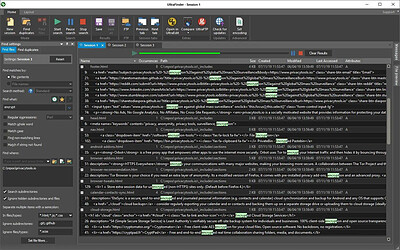
Find any file, word, text string, pattern, duplicate and everything else you need in seconds.on your hard drive, on your shared and network volumes, on your removable drives, or even on a remote FTP/SFTP server! UltraFinder is a quick and lightweight Windows search program designed to find text in files anywhere. UltraFinder also allows you to find duplicates and eliminate or delete duplicates, keeping your computer clean and uncluttered while conserving hard drive space. Search your way with a variety of settings to tweak your search to perfection.

Your Windows operating system offers limited find options - UltraFinder includes two powerful but quick and easy to use modes for finding what you need when you need it: Find Files and Find Duplicates.

Features:
Master File Table (MFT) search methods for lightning fast results
Search for files by content or by name (partial or full)
Search file contents or file names with regular expressions (Perl, Unix, and UltraEdit native)
Search network or FTP locations
Specify specific folders, entire drives, or even specific files as search targets
Filter subdirectories, file names, and file extensions to exclude from the search
Search based on whole or partial word match
Search for case sensitive matches
Negative search (find files that DON'T match)

Search for text in PDF files
Search for text in Word documents (.doc/.docx)
FIND DUPLICATES
Search folders or entire drives
Search duplicates by a variety of criteria:
- Content
- Name
- Dates
- Size
Tweak duplicate searches with a variety of criteria settings (file dates, file sizes, etc.)
Ignore special case files like 0-byte, system/hidden files, Recycle Bin files, etc.
Set include/exclude filters for files and folders
Powerful searches using regular expressions (Perl, Unix, or native)
Resolve found duplicates (rename, delete, move, open)

Operating System: Windows 7, 8/8.1, 10, 11

HOMEPAGE: Code:
Код:
https://www.ultraedit.com/


DOWNLOAD LINKS:


Код:
https://rapidgator.net/file/a343cb8b1eee90f9982e93a8ea3b73fd/IDM_UltraFinder_26.0.0.9_x64.rar.html

Код:
https://clicknupload.click/h0fd4q17vyy5/IDM_UltraFinder_26.0.0.9_x64.rar
 
bb45198a4fefa827f6998a9db0b30312.jpg


IM-Magic Partition Resizer 7.9.6 Multilingual | Size: 29.02 MB
Language: English


Extend any partition without data loss? Download IM-Magic Partition Resizer, the free partition magic software to help expand, move, shrink, and merge partitions without destroying the data. It only requires a few clicks from you to command the program move the fences to rearrange the disk partition territory and keep your files untouched.

Extend Windows Server Partition
• Resize, shrink, move, extend partitions without data loss
• Enjoys all features of Pro and Server Editions
• Unlimited install on PCs and Servers within company
• No down time for Servers
• 100% safe without losing data
• Premium support within 12 hours
• Free upgrade to future releases
• Save IT cost and maximize the use of computers

Features
• Support ALL Windows Servers 32&64bits
• Support All levels of hardware RAID
• Activate demo with code
• Support FAT&NTFS partitions
• Support MBR&GPT disk

Supported File System and Disk
• NTFS (v1.2, v3.0, v3.1)
• FAT16
• FAT32
• Support GPT and MBR disks
• Support 2TB disk
• Full support SSD

Operating System: Windows 2000/XP/Vista/7/8/10/11

HOMEPAGE: Code:
Код:
https://www.resize-c.com/unlimited/


DOWNLOAD LINKS:


Код:
https://rapidgator.net/file/e99d79e61cd9c258eb8114dd0e2a3fb7/IM-Magic_Partition_Resizer_7.9.6_Multilingual.rar.html

Код:
https://clicknupload.click/zarm7s9y285w/IM-Magic_Partition_Resizer_7.9.6_Multilingual.rar
 
e1dc75befe13de95675c159d184318bc.webp

Free Download InnoExtractor 2027 v12.2.0.187 Ultra Multilingual | 4 Mb
InnoExtractor is a Windows utility for inspecting and unpacking installers created with Inno Setup. Using InnoUnp technology, it lets users examine an installer's internal structure and extract embedded files without launching the setup program.


The interface supports drag-and-drop loading, file searches, installer properties, and access to internal content. Advanced users can also decompile the installer's CompiledCode.bin file to inspect the assembly code corresponding to its Code script section. Encrypted installers can be handled by entering a valid extraction password.

Software Overview
InnoExtractor provides a focused workspace for the tasks described above. The available functions are organized around selecting a target, configuring the relevant operation, and reviewing or exporting the resulting material where supported.

Key Features
  • Open Inno Setup installers by dragging executable files into the application.
  • Browse the files and other content stored inside an installer.
  • Extract embedded files and scripts to a local folder.
  • Create ZIP packages or self-extracting modules from extracted content.
  • Decompile CompiledCode.bin to view the corresponding assembly code for the Code script section.
  • Open internal installer files within the application.
  • Search installer contents by keyword.
  • Enter a password when extracting password-protected installers.
  • Review advanced installer properties and recently opened files.
  • Support multiple languages and full Unicode.
  • Work with a range of Inno Setup and InnoUnp versions.

Why Choose InnoExtractor
InnoExtractor is useful for examining the contents of an Inno Setup package before deciding whether to run it. It can help users inspect included files, retrieve individual components, and review installer metadata. The ability to search package contents and handle password-protected installers also supports more targeted inspection.
The decompilation feature is intended for advanced users who need to examine the installer's compiled code section.

System Requirements
Designed for Windows 11, Windows 10; Windows 8.1; Windows 8; Windows 7; Windows Vista; Windows XP; Windows 2000.

Home Page

Код:
http://www.havysoft.cl/innoextractor.html

Product Information
  • Software Name: InnoExtractor
  • Version: 12.2.0.187
  • Languages: Multilingual
  • License type: Full Version
  • File Size: 4 Mb
Rapidgator
Код:
https://rapidgator.net/file/88ee597b4fb72f2a48772fc51c9b957a/0u2zb.InnoExtractor.2027.v12.2.0.187.Ultra.Multilingual.zip.html

Код:
https://clicknupload.click/10xu8t4s3lhh/0u2zb.InnoExtractor.2027.v12.2.0.187.Ultra.Multilingual.zip
 
f0034796e12f1b03674cfcbcafca2252.jpg


Inno Setup Compiler 7.1.1 (x64) | Size: 13.67 MB
Language: English


Inno Setup Compiler is a software solution that allows you to create professional Windows installers. Although it all sounds terribly complicated, it's not, thanks to the way this application works. The whole installer generating process can be carried out using a simple wizard, so Inno Setup Compiler will assist you all the time. You are first prompted to choose the application name and version, as well as the publisher and the application website. Just fill in the information and press Next.

Afterwards, you have to choose the application destination base folder which can be either Program Files or any other custom folder you wish to choose. Again, you must write down the folder name and choose whether to give the user the permission to change the application folder or not.
Next you're required to provide the path to your app's main executable file and create a list with all the other files. The next steps come with a few other settings to customize the installer, such as the option to create a desktop or a Quick Launch icon, as well as with the language selection.
And that's basically it. Sure, it will take some time before you will be ready to build your own installer, but if you pay close attention to every single step, everything should go pretty smoothly.
All in all, Inno Setup Compiler is one of the best setup builders out there. Creating scripts using the wizard is a task so simple that it can be carried out by less experienced users while more advanced features await the power users.

Key features
Support for every Windows release since 2000, including: Windows 10, Windows 8.1, Windows 8, Windows Server 2012, Windows 7, Windows Server 2008 R2, Windows Vista, Windows Server 2008, Windows XP, Windows Server 2003, and Windows 2000. (No service packs are required.)
Extensive support for installation of 64-bit applications on the 64-bit editions of Windows. Both the x64 and Itanium architectures are supported. (On the Itanium architecture, Service Pack 1 or later is required on Windows Server 2003 to install in 64-bit mode.)
Supports creation of a single EXE to install your program for easy online distribution. Disk spanning is also supported.
Standard Windows wizard interface.
Customizable setup types, e.g. Full, Minimal, Custom.
Complete uninstall capabilities.
Installation of files
Includes integrated support for "deflate", bzip2, and 7-Zip LZMA/LZMA2 file compression. The installer has the ability to compare file version info, replace in-use files, use shared file counting, register DLL/OCX's and type libraries, and install fonts.
Creation of shortcuts anywhere, including in the Start Menu and on the desktop.
Creation of registry and .INI entries.
Running other programs before, during or after install.
Support for multilingual installs, including right-to-left language support.
Support for passworded and encrypted installs.
Support for digitally signed installs and uninstalls, including dual signing (SHA1 & SHA256).
Silent install and uninstall.
Unicode installs.
Integrated preprocessor option for advanced compile-time customization.
Integrated Pascal scripting engine option for advanced run-time install and uninstall customization.
Full source code is available (Borland Delphi 2.0-5.0 and 2009).

System Requirements: Windows 11, Windows 10, 8 , 7


DOWNLOAD LINKS:


Код:
https://rapidgator.net/file/c309d7a51ce0a9c6a62b3d3762f17e14/Inno_Setup_Compiler_7.1.1_x64.rar.html

Код:
https://clicknupload.click/fjee0e8pobqq/Inno_Setup_Compiler_7.1.1_x64.rar
 
Назад
Сверху Снизу