All mitsumi'1s Applications !! (updated daily)

4deebf71febce998738f5d98cc4556eb.webp

Chaos Corona 15 Hotfix 1 | 2.0 Gb
Chaos Corona is a professional photorealistic rendering solution developed for architectural visualization, product design, and high-quality portfolio creation in 3ds Max and Cinema 4D. Designed to simplify physically accurate rendering, it combines intuitive workflows with advanced rendering technologies to help artists produce realistic images and animations efficiently.
Version 15 expands the creative workflow by integrating AI-assisted ideation with Veras directly into Corona, allowing artists to rapidly explore concepts while maintaining complete artistic control. The release also introduces workflow enhancements, rendering optimizations, and improved collaboration tools, making it easier to move from concept development to final delivery.


Hotfix 1 is a recommended maintenance update that focuses exclusively on stability improvements and bug fixes for both 3ds Max and Cinema 4D users.
Key Features:
  • Photorealistic rendering for 3ds Max and Cinema 4D.
  • Integrated AI ideation powered by Veras.
  • Advanced rendering for architectural visualization.
  • New Glints layer for enhanced material detail.
  • Improved Gaussian Splats environment blending.
  • Per-camera resolution settings.
  • AI-powered semantic search tools.
  • Smarter animation rendering workflow.
  • Curated Chaos Cosmos Sets.
  • Virtual 3D streaming for project collaboration.
  • Full artistic control throughout the rendering process.
  • High-performance rendering engine with intuitive workflow.

What's New:
  • Integrated Veras AI ideation into all Corona plans.
  • Added Glints layer for richer material highlights.
  • Improved Gaussian Splats environment blending.
  • Introduced per-camera resolution settings.
  • Added AI-powered semantic search.
  • Enhanced animation rendering workflow.
  • Expanded Chaos Cosmos Sets.
  • Improved collaboration through virtual 3D streaming.

Hotfix 1 Fixes (Both Versions):
  • Resolved NVIDIA AI denoising issues in CoronaImageCmd.
  • Fixed translucent shadow export issues in Vantage.

Hotfix 1 Fixes for 3ds Max:
  • Fixed Scatter export to Vantage.
  • Resolved Corona Proxy loading issues in older 3ds Max versions.
  • Fixed gamma handling for Veras uploads.
  • Corrected CXR render element saving behavior.
  • Fixed Render Masks Only render element export.
  • Corrected color transforms when saving images.
  • Resolved Compact Material Editor reset crashes.
  • Fixed Spline IK animation update issues.
  • Limited resolution override to supported 3ds Max maximum.

Hotfix 1 Fixes for Cinema 4D:
  • Fixed Glints node ports in Physical Materials.
  • Corrected macOS vrscene export and Cloud upload.
  • Improved UVW viewport preview behavior.
  • Fixed Cosmos material export to Vantage.
  • Corrected Bitmap UVW export issues.
  • Fixed Resolution Override aspect ratio updates.
  • Resolved Veras image saving on macOS.
  • Fixed flipped Normal maps from Cosmos.
  • Resolved AutoAdjustment crashes.
  • Fixed Veras window sizing.
  • Improved Layered shader viewport preview.
  • Enhanced Veras file saving error handling.
  • Improved Node Material Editor undo operations.
  • Updated Unified Login, Licensing, Cosmos, and Cloud components.

```
Сopyright holder \ Distributor:Chaos Czech a.s.
Product Name:Corona
Version:15 hotfix 1
Supported Architectures:x64
Website Home Page :
Код:
https://corona-renderer.com/

Languages Supported:english
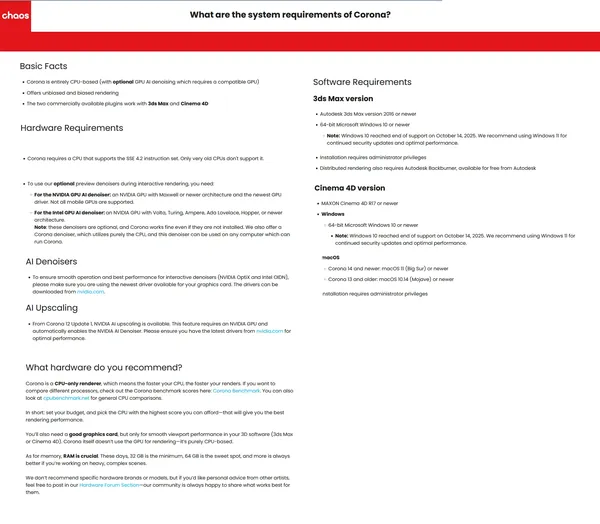
System Requirements:Windows *
Software Prerequisites:Autodesk 3ds Max or Maxon Cinema4D
Size in archive:2.0 Gb
62782df56326e6d3734018b890fc44f3.webp


Rapidgator
Код:
https://rapidgator.net/file/f5796534584306aaccdf3b06fa53023d/k3jb4.Chaos-Corona-15-Hotfix-1.rar.html

Код:
https://nitroflare.com/view/14CB0EA32A43CEE/k3jb4.Chaos-Corona-15-Hotfix-1.rar

 
1b46038dd87b8c66377568f9ba37772f.avif


ChessBase 26.8 ChessBase is a personal, stand-alone chess database that has become the standard throughout the world. Everyone uses ChessBase, from the World Champion to the amateur next door. It is the program of choice for anyone who loves the game and wants to know more about it. Start your personal success story with ChessBase and enjoy the game even more.

Whether it is preparation for an individual opponent or tournament, administration and analysis of one's own games, development of training material for self-study or for training groups, or publication of games on the web or in print: ChessBase o.ers an incredible wealth of functions for all areas of study and playing levels. Anyone who is seriously involved in chess, plays tournaments or simply wants to understand chess, needs ChessBase: youth players, amateurs, tournament players, coaches, grandmasters, professional players etc.

New in ChessBase´26

Languages: Multilingual
File Size: 581.33 MB


More targeted preparation
Club players need different statistics than top grandmasters. Prepare for your level, not for the World Champion. The ChessBase'26 opening books reflect mainstream theory and often suggest lines that are not easy for the opponent you are preparing for to play.

New tools and improved functions
- Top players immediately recognize the latest trends and the statistics for different move orders. With ChessBase'26, you too can understand the typical variations along with their strategic themes and common plans.
- Train by reviewing selected instructive games.
- Solve the typical tactical motifs - this is revolutionary for opening training and great fun.
- New reference filters
- Instant preparation: simply enter the name.
- Filter out blitz and rapid games with one click.
- New detection of duplicate games.
- Ten times faster and much more precise. Database maintenance has never been so easy.
- Monte-Carlo analysis
- AI description of plans
- Explains a position to you like a good personal trainer.
- (Valuable insights, but be aware that hallucinations are still possible.)
- Real-time ray tracing
- The ray-traced 3D boards have become ultra-fast and reach high resolution within seconds.

Release Notes
Minimum Requirements
Desktop PC or Notebook, 4 Threads, 8 GB RAM, Windows 10 64bit, DirectX 10 graphics card with 1 GB RAM

Recommended Requirements
Intel core i7 or AMD Ryzen Processor with 8 Threads, 16 GB RAM, Windows 10/11 64bit, DirectX 11 graphics card (or compatible) with 1 GB RAM or more, full HD Monitor

Supported Languages
German, English, Spanish, French, Italian


HOMEPAGE


Код:
https://shop.chessbase.com/de/cat_root


DOWNLOAD

Код:
https://rapidgator.net/file/97a86370d8191142ea600c7d5de9189d/ChessBase.26.8.rar.html

Код:
https://nitroflare.com/view/0D0EF4A9D33F287/ChessBase.26.8.rar
 
4c34b41f46a17a680e1c5047f4cf0e13.webp


ChessBase 26.8 (x64) Multilingual Fast Links | 581 MB

ChessBase is a professional chess database application designed for storing, managing, and analyzing chess games at a high level. It is widely used by players ranging from casual enthusiasts to professional competitors, offering a structured environment for studying openings, reviewing historical matches, and building personal game collections.

The software provides a comprehensive toolkit for exploring chess data through powerful search and analysis features. Users can retrieve games by openings, players, or tournaments, as well as generate statistical overviews and cross tables. Its database-driven approach makes it suitable for serious chess preparation, training, and research.

Beyond simple game storage, ChessBase supports advanced analytical tools that help users understand positions more deeply. From pattern recognition and tactical analysis to cloud-based engine evaluations, it is designed to enhance study efficiency and provide detailed insights into gameplay structures and strategies.


What Can You Do with ChessBase:

  • Retrieve games by openings, players, and tournaments.
  • Generate tournament cross tables and graphical player/opening statistics.
  • Use similarity search to find games with comparable pawn structures or tactical themes.
  • Access a large database of in-depth analysis with millions of positions.
  • Perform assisted analysis with real-time evaluation of possible moves.
  • Run tactical analysis with annotations, variations, and diagram generation.
  • Use cloud analysis with multiple engines running on different systems.
  • Perform deep analysis with dynamic variation pruning and automatic evaluation updates.
  • Identify theoretical novelties and integrate games into opening trees.
  • Generate detailed dossiers on players and comprehensive opening reports.
  • Publish games directly online and print annotated games with diagrams.

What's New in ChessBase 15:

  • Instant analysis of unannotated games with automatic detection of blunders and tactical motifs.
  • Replay training mode with hidden notation and interactive move-based questions.
  • Improved search tools with tactical motif recognition such as forks, skewers, and discovered attacks.
  • Enhanced opening reference search with popularity trends and endgame patterns.
  • Upgraded search booster for more accurate position and material-based results.
  • Advanced game analysis with integrated tactical recognition.
  • Improved 3D boards with raytracing-based rendering.

System Requirements:

Minimum: Dual-Core, 4 GB RAM, Windows 7, DirectX11 graphics card with 256 MB RAM, DVD-ROM drive, Windows Media Player 9 and Internet access to activate the program, ChessBase Cloud and updates. Recommended: PC Intel Core i7, 2.8 GHz, 16 GB RAM, Windows 10, DirectX11 graphics card (or compatible) with 512 MB RAM or more, 512 GB SSD, Windows Media Player, Adobe Flash Player (Live coverage), DVD ROM drive, Full HD Monitor.

Home Page

Код:
https://shop.chessbase.com/en/products/chessbase15


Rapidgator
Код:
https://rapidgator.net/file/809fd5421d9ccc92b7073bf3292e3e96/j916c.ChessBase.26.8.rar.html

Код:
https://nitroflare.com/view/9EC45CA73C038EC/j916c.ChessBase.26.8.rar
 
1a47e8a4fdd31ad67a34c9b14f68fea5.webp


Cockos REAPER 7.76 (x64) | 15.6 Mb

Cockos REAPER is a professional digital audio workstation (DAW) designed for recording, editing, mixing, and rendering multi-track audio projects. Despite its compact installation size, it provides a comprehensive set of production tools suitable for musicians, audio engineers, podcasters, and content creators working with everything from simple recordings to complex studio sessions.

The application supports flexible project layouts with virtually unlimited tracks and offers a customizable workflow that adapts to different production styles. Its efficient audio engine delivers low-latency performance while supporting a wide range of audio hardware, recording formats, and industry-standard plug-ins for music production and sound design.

REAPER combines powerful editing capabilities with advanced routing, automation, and format compatibility, making it an effective solution for recording, mixing, mastering, and MIDI production without requiring extensive system resources.


Key Features:

  • Record, edit, arrange, mix, and render multi-track audio projects.
  • Lightweight application with a compact installer.
  • 64-bit audio engine for professional audio processing.
  • Low-latency performance with multiprocessor support.
  • Supports ASIO, Kernel Streaming, WaveOut, and DirectSound.
  • Record and export WAV/BWF/W64, AIFF, WavPack, FLAC, OGG, and MIDI formats.
  • Import WAV, OGG, and MP3 audio files.
  • Flexible track routing for complex recording and mixing workflows.
  • Compatible with VST, VSTi, DX, and DXi plug-ins.
  • Includes the ReaPlugs 64-bit effects suite.
  • Portable mode for running from USB drives or other removable media.
  • Unlimited tracks and project items.
  • Per-track automation envelopes for volume, pan, and other parameters.
  • Multi-level undo and redo functionality.
  • Customizable color themes and interface appearance.

Editing Features:

  • Mouse-driven editing without dedicated editing tools.
  • Drag-and-drop media import.
  • Mix different file formats, sample rates, and bit depths within the same project.
  • Split, move, resize, and group media items.
  • Per-item volume adjustment and fade controls.
  • Tab-to-transient editing support.
  • Automatic configurable crossfades for overlapping items.
  • Per-item pitch shifting and time stretching.
  • Ripple editing for timeline-aware editing operations.
  • Support multiple tempos and time signatures within a project.
  • Project organization using regions and markers.
  • Automation envelope editing.

Operating System:
Windows XP/Vista/7/8/10/11

Home Page

Код:
http://www.reaper.fm/


Rapidgator
Код:
https://rapidgator.net/file/d076b7cf4bac7e09154bfa762244a8f8/9rboo.Reaper7.rar.html

Код:
https://nitroflare.com/view/687A90947A4A569/9rboo.Reaper7.rar
 
cf799171e9d719e2f8206b125c7ef5de.webp


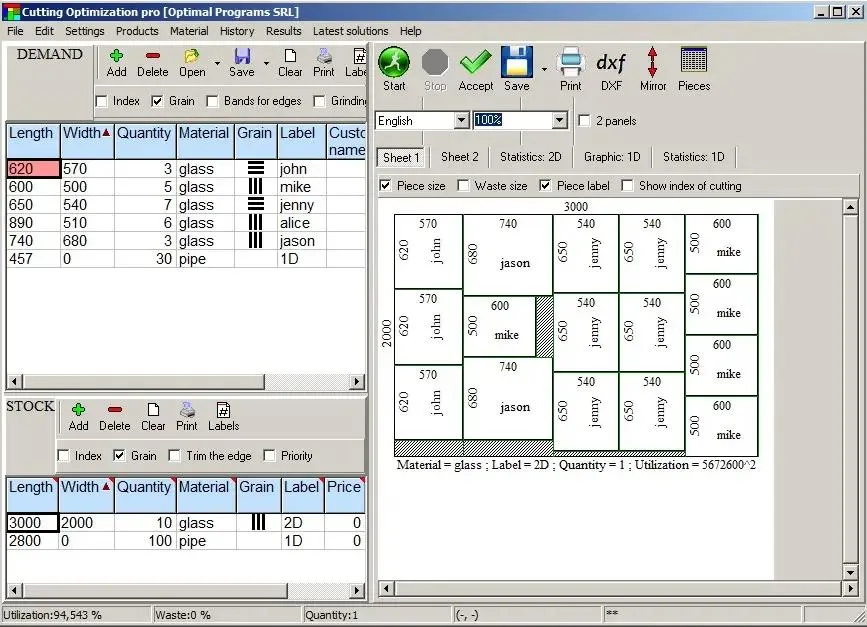
Cutting Optimization Pro 5.18.26.3 Multilingual | Size: 2.25 MB
Language: English


Cutting Optimization Pro is a cutting software used for obtaining optimal cutting layouts for one (1D) and two (2D) dimensional pieces. The software also lets you to define and handle complex products, such as table, desk, cupboard, locker, book shelf.

Cutting Optimization Pro can be used for cutting rectangular sheets made of glass, wood, metal, plastic, or any other material used by industrial applications.

Cutting Optimization Pro can also be used as cutting software for linear pieces such as bars, pipes, tubes, steel bars, metal profiles, extrusions, tubes, lineal wood boards, etc and other materials.

Features:
1D and 2D optimization in the same cutting program - you may use the program for both 2D and 1D optimization.
Guillotine optimization - The cuts are performed from one side to the other of the material. This feature is very useful for glass, wood, thermoglass.
Non-guillotine (nested) optimization - The cutting machine can follow the shape of the material. In this case you need to have a complex machine based on laser or flame blade.
Multi-stage guillotine - all cuts in a stage are perpendicular to the cuts on the previous stage. The user may specify the number of stages and the direction of cuts for the first stage.
Any number of pieces in the INVENTORY and DEMAND - virtually no limit for the number of pieces that you want to optimize.
Any measurement metric- The way in which you introduce the data is a general one. You don't have to specify a metric. Just choose a metric in your mind and enter all data using that metric only.
Fractional input. Pieces can be introduced either as 100.5 or 100 1/2. More info about fractional input can be read here.
Adjustable cutting blade thickness- For glass cutting with diamond the cutting blade thickness is 0, but for wood, metal handling you need a saw with a greater thickness.
Adjustable optimization level- One may specify how many layouts to be generated before the solution is outputted. If you don't have too much time and you don't have a good computer you may set the Optimization Level to a low level. This feature helps you to run your program on any kind of computer (from 486 to the best processors available today).
Maximal cut length limit - You may specify how long a cut can be. This is useful when you perform the cuttings manually.
Adjustable useful waste - all wastes smaller than this size are garbage (will not be added to repository).
It is used in order to avoid the breaking of too small material. Useful in glass industry.
Reduces panel waste and costs - using the latest achievements in the field of Artificial Intelligence to reduce the waste.
Grain direction control - useful for wood cutting optimisation. A parameter let the user to specify if the piece can be rotated or it should be kept fixed.
Automatic offcuts handling - the useful waste is automatically added to the Inventory of materials.
Vertical printing of the labels and edge bands - this will optimise and simplify your layout.
Graphical display black-white or colourful images and text mode of the obtained results - the results are displayed as images (black and white or colourful) or as text-tables.
Save images automatically - all the obtained 2D sheets can be saved as jpeg images with 1 click. The programs automatically appends a number to an image.
Copy-paste from Excel. Just select some columns from Excel and paste them in Demand or Inventory grids.
Grouping similar layouts - this will reduce the number of printed sheets of paper. The number of repetitions for each sheet will be displayed.
Sketchup exporter - We offer a free plugin for Sketchup which helps exporting the size of components from a Sketchup model to a file loaded by Cutting Optimization pro. Read more: here.
Magnifying a sheet. This is useful if you have a long roll which you can visualize it by magnifying it.
Printing the obtained layouts - on any printer.
Printing multiple layouts on the same page - You may print 1, 2, 4 or 6 layouts on the same sheet of paper.
Printing the REPOSITORY and the DEMAND of the customer - you may print the pieces that you want to optimize.
The cuts are shown in text format in order to use them with a CNC machine.
Edge banding handling - the quantity and the type of material attached to the edges of the wood sheets is manipulated by the program.
Computes / Prints the total cutting length.
Displays diagrams - a table which contain the pieces cut for each sheet.
Possibility to define complex products such as table, desk, cupboard, locker, book shelf .
Possibility to define types of materials (glass, wood, band) - for each material the user has a special table where it can introduce more information about the material.
Automatic tool for computing the size of the pieces based on the external sizes of the product.
Statistics related to the current cut / layout- At the end of the optimisation process you will have access to the: number of cuts, cuts definition (starting and ending point), number of waste rectangles, the waste rectangles (the coordinates of the top-left and bottom-right corners), number of utilized pieces, the placement of the utilized pieces, used surface, .
Saves/loads results - All results can saved in txt files and loaded later.
Generates and prints adhesive labels -
Load data from .xml, .dbt (specific files to version 4), .xls (Excel files) and .csv (comma separated) files).
Automatically computing of the order price -
Maximises productivity, saves time and money ..
Data can be exported into very popular formats: Word, Excel, HTML, CSV (comma separated) and XML files.
All panels and table's columns are resizable - You may customize the workspace. The new positions are automatically stored.
Very fast running time - Solutions are obtained within seconds.
Win32 native application. No dependencies required.
Single file application. You can move a single file to a new computer and it will run without installation.
Very efficient written. .exe has about 6 MB and the installation kit just over 1MB.
Desktop application. You are in control of your data. You do not risk loosing data if some distant server fails. You can run the application without problems even if the internet is not working.
Interface in multiple languages.

Operating System: Windows 7, 8/8.1, 10

HOMEPAGE:
Код:
https://www.optimalprograms.com/cutting-optimization/


DOWNLOAD LINKS:


Код:
https://rapidgator.net/file/cf3f51ef1632306c1e0499d6743ffcdb/Cutting_Optimization_Pro_5.18.26.3_Multilingual.rar.html

Код:
https://nitroflare.com/view/C2446A2F8BD0587/Cutting_Optimization_Pro_5.18.26.3_Multilingual.rar
 
6c9698e5bbbdccf361e2ef7e5840969b.webp


Daum PotPlayer 1.7.22979 Multilingual | Size: 115.95 MB
Language: English


PotPlayer is a Multimedia player. Supports almost every available video formats out there. Player contains internal codecs and there is no need to install codecs manually. Other key features include WebCam/Analog/Digital TV devices support, gapless video Playback, DXVA, live broadcasting. Currently only Korean versions are available not no more.

PotPlayer is a network of Daum's players have their own independent copyright, not by the original Mr. Jiang Longxi, KMPlayer by the original author of the independent development of the follow-up. Current (1428 or later) KMPlayer by the team responsible for the collective Pandora.TV Because the development of the same developers PotPlayer into the natural KMPlayer part of the essence.

HOMEPAGE:
Код:
http://potplayer.software.informer.com/


DOWNLOAD LINKS:


Код:
https://rapidgator.net/file/049487694980ca844d7ba40387501454/Daum_PotPlayer_1.7.22979_Multilingual.rar.html

Код:
https://nitroflare.com/view/EFB570FA3F73E74/Daum_PotPlayer_1.7.22979_Multilingual.rar
 
b7896aa6b0824d77e70a4297937fda79.webp


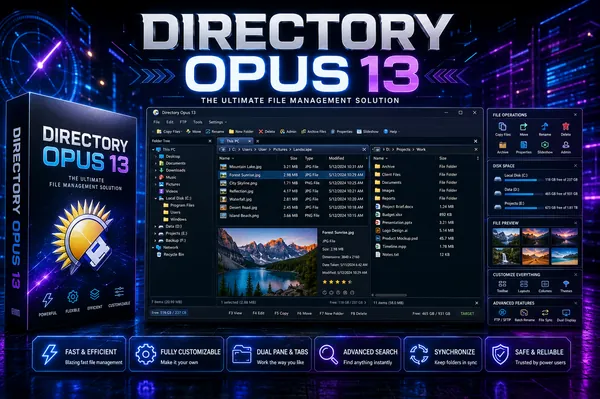
Directory Opus 13.24 (x64) Multilingual Fast Links | 28.4 Mb

Directory Opus is an advanced file management application designed as a powerful alternative to Windows Explorer. It offers a highly customizable environment for organizing, browsing, transferring, and managing files, making it suitable for both everyday users and professionals who work with large amounts of data.

The software combines an intuitive interface with extensive file management capabilities, allowing users to navigate folders more efficiently and perform complex operations with fewer steps. Whether managing local storage, network locations, archives, or FTP servers, Directory Opus provides the tools needed to streamline daily workflows while maintaining complete control over file organization.

Built with performance and flexibility in mind, the application supports modern hardware and allows every aspect of the interface to be tailored to individual preferences. From customizable toolbars and keyboard shortcuts to scripting support and advanced search tools, it adapts to a wide variety of personal and professional file management tasks.


Key Features:

  • Replace Windows Explorer with a feature-rich file management environment.
  • Single or dual-pane file display with integrated folder trees.
  • Tabbed browsing for working with multiple folders simultaneously.
  • Advanced filtering, sorting, grouping, and search capabilities.
  • Assign colors, status icons, star ratings, tags, and descriptions to files.
  • Integrated viewer for images, documents, and other supported file types.
  • Image marking tools for organizing photo collections.
  • Batch file renaming with customizable keyboard macros.
  • View and edit supported file metadata.
  • Support for FTP connections and archive formats including ZIP, 7Zip, and RAR.
  • Built-in synchronization and duplicate file finder utilities.
  • Calculate folder sizes and print or export directory listings.
  • Queue multiple file copy operations to improve transfer efficiency.
  • Extensive interface customization, including colors, fonts, toolbars, menus, and keyboard shortcuts.
  • Comprehensive scripting interface for workflow automation and extension.
  • Native multi-threaded architecture optimized for modern 64-bit processors.
  • Support for high-resolution 4K displays.
  • Works with indexed search engines such as Windows Search and Everything.

Home Page

Код:
https://www.gpsoft.com.au/

Rapidgator
Код:
https://rapidgator.net/file/784cc7d347e41a44fdc1ea24e13fb210/97jkn.DirectoryOpusPro_13.24.rar.html

Код:
https://nitroflare.com/view/1E1D012E740CD1A/97jkn.DirectoryOpusPro_13.24.rar
 
e6d34aa94558453d43c9e448e48e87f2.webp


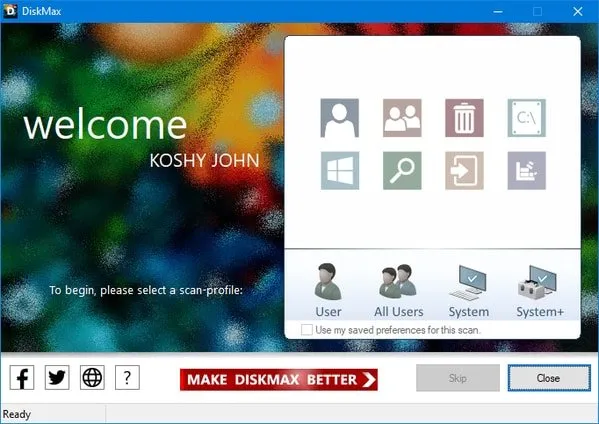
DiskMax 7.33 Use DiskMax to periodically perform powerful disk cleanups and performance optimizations to keep your PC healthy.After using DiskMax, you will notice that your system will be peppier, applications should launch faster, files will open quicker, and games will run better. Simply run DiskMax from time to time to keep your system in shape.

Even if you are an advanced user, DiskMax will be useful to you since it automates all the tasks required to keep your system clean and fast, leaving you to enjoy a whole new computing experience.
File Size : 2.2 Mb


DiskMax Features
Automates the emptying of your recycle bin (if specified), cleaning up of installation remnants, and debugging information
Cleans up every user's History, Temp, Temporary Internet Files, Cookies (if specified), Recently opened documents list, explorer thumbnail cache, and windows error reporting logs
Clears out Windows cache, unused legacy cursors (on Vista, if specified), debugging info, internet logs, help center caches, repair information, DLL caches, Logs, temporary files, and windows update roll-back files
Removes registry entries for multiple Most Recently Used lists
Clears out Windows event logs (no other application out there does this)
Gives you the option to deep scan your hard-disk to remove all files of type log, old, prv, chk, swp, bak, gid, wbk, tmp, and dmp. This utility is only intended for advanced users
Rearranges files so that they can be accessed faster System Requirements: Windows 11, Windows 10, 8 , 7


HOMEPAGE


Код:
https://www.koshyjohn.com/software/diskmax/


DOWNLOAD

Код:
https://rapidgator.net/file/2fe7d0163861b05312f058f1ed0704f6/DiskMax..exe.html

Код:
https://nitroflare.com/view/CE5B2EF714512B9/DiskMax..exe
 
1b5c47ec507a970faf07b55a61582b4c.webp


Display Driver Uninstaller 18.1.5.5 Multilingual | Size: 1.68 MB
Language: English


Display Driver Uninstaller is a driver removal utility that can help you completely uninstall AMD/NVIDIA graphics card drivers and packages from your system, without leaving leftovers behind (including registry keys, folders and files, driver store). The AMD/NVIDIA video drivers can normally be uninstalled from the Windows Control panel, this driver uninstaller program was designed to be used in cases where the standard driver uninstall fails, or anyway when you need to thoroughly delete NVIDIA and ATI video card drivers.

System Requirements: Windows 11, Windows 10, 8 , 7


DOWNLOAD LINKS:


Код:
https://rapidgator.net/file/2df476855b5e2c588097edf8f12461fc/Display_Driver_Uninstaller_18.1.5.5_Multilingual.rar.html

Код:
https://nitroflare.com/view/60BC306991A0580/Display_Driver_Uninstaller_18.1.5.5_Multilingual.rar
 
5c5c270e749537d441e6f773731569e9.webp


Emurasoft EmEditor Professional 26.2.0 (x64) Multilingual | Size: 75.24 MB
Language: English


EmEditor Professional - professional version of the powerful text editor for programmers, Web developers and ordinary users with the illumination of syntax and Unicode support. Editor features such as search and replace in files using regular expressions, auto-detection coding, highlighting the links and email addresses, block selection mode, configure the button bar, menu, font and color elements. For each language, you can create a separate configuration. The program also has the support of powerful macros written in jаvascript or VBScript, allowing you to capture virtually any action, used often or occasionally.

This editor is an ideal tool for editing HTML, PHP, JSP and XML files. When you specify a web browser as an external application, you will be able to view HTML files during editing.
Supports syntax highlighting ASP, C, CSS, HTML, Java, jаvascript, JSP, Pascal (Delphi), Perl, Python, PHP, SQL, VBScript and other programming languages, function Drag and Drop, opening files size up to 248 GB the possibility of connecting additional external applications and plug-ins. In addition, the program allows to work with macros written in jаvascript or VBScript, and based on the Windows Scripting Host (WSH) engine, allows you to automate virtually any action. Adjustable backlight HTML and scripting languages makes it easy to detect spelling errors and typos.

Features:
- Support for file sizes up to 248 GB
- Edit binary files
- Optimized search and relocation
- Improved design plug-ins
- Ability to display panel functions
- Optimized speed when each row has a greater length
- Auto-panning by clicking the mouse wheel
- Supports Drag and drop
- Specify the temporary folder in the program settings
- Import INI files in the registry
- Unicode
- Syntax highlighting for ASP, C, CSS, HTML, jаvascript, JSP, Pascal, Perl, Python, PHP, SQL, VBScript and other
- User-friendly interface with customizable toolbar

EmEditor Professional Features List:
- Large File Support
- Unicode Support
- Macros
- Vertical Selection Editing
- Tabbed Windows, Drag and Drop
- Lightweight Design
- Regular Expressions
- Binary Editing
- Crash Recovery
- Grab Text

Supported OS: Windows 11/10/8.1/7 SP1/Server 2008 R2 or later

HOMEPAGE:
Код:
https://www.emeditor.com/


DOWNLOAD LINKS:


Код:
https://rapidgator.net/file/e5654f50793dda0cea9d1129a15c1709/Emurasoft_EmEditor_Professional_26.2.0_x64_Multilingual.rar.html

Код:
https://nitroflare.com/view/5F088BD15C38032/Emurasoft_EmEditor_Professional_26.2.0_x64_Multilingual.rar
 
966c908b3f9778e665b2353011e1da31.webp


Epic Pen 3.12.182 Pro Multilingual | Size: 73.23 MB
Language: English


Epic Pen allows you to draw over any application on Windows. Epic Pen never interrupts your work, allowing you to continue using your applications seamlessly even with drawings on the screen.

User Friendly
Epic Pen has been carefully designed to be easy and intuitive to use. The clean and beautifully polished interface always works just the way you expect.

Great for Education and Training
A terrific communication aid. Works with all your Windows and Mac applications including Word, PowerPoint, Google Chrome, Safari, Internet Explorer, YouTube and more. Trusted by hundreds of thousands of schools and universities around the world.

Bring Teamwork to Another Level
Improve communication within your business and strengthen teamwork. Explain new products, annotate your graphs and charts, give feedback to team members and more. Epic Pen makes team communication a breeze.

Perfect for Remote Learning and Working
Unable to meet in person? Epic Pen works great with popular apps like Zoom, Microsoft Teams, Google Hangouts and Hopin.

Operating System: Windows 7, 8/8.1, 10, 11

HOMEPAGE:
Код:
https://epicpen.com/


DOWNLOAD LINKS:


Код:
https://rapidgator.net/file/694117a4a6b7c360106156f18f34d0a2/Epic_Pen_3.12.182_Pro_Multilingual.rar.html

Код:
https://nitroflare.com/view/32C857BF40A4042/Epic_Pen_3.12.182_Pro_Multilingual.rar
 
8497c7f21db09a2b0b1ce5ee80989edf.webp

FinalMesh Professional 6.5.0.714 (x64) | 16.7 Mb
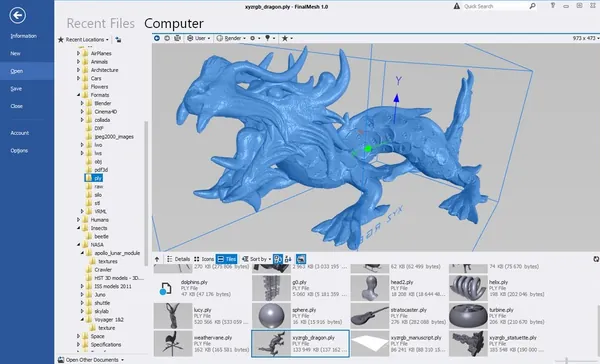
FinalMesh Professional is a 3D model viewer, converter, and publishing application designed for inspecting, converting, and sharing three-dimensional content. It enables users to open a wide variety of 3D file formats, examine model structures, perform format conversions, and publish interactive models for viewing in web browsers or PDF documents.
The software combines visualization and conversion tools within a modern interface, making it suitable for designers, engineers, developers, and anyone working with 3D assets. Users can inspect object hierarchies, materials, and textures while rendering models using different display modes to evaluate their appearance and structure.


In addition to viewing and converting models, FinalMesh Professional allows interactive 3D content to be exported as standalone WebGL applications or embedded into 3D PDF documents. These publishing options make it easy to distribute models to clients, colleagues, or project stakeholders without requiring specialized 3D software.
Key Features:
  • View and inspect 3D models, textures, and object hierarchies.
  • Modern user interface designed for fast navigation and rendering.
  • Per-pixel lighting for enhanced model visualization.
  • Multiple rendering modes for examining model geometry.
  • Open individual nodes in separate viewing windows.
  • Browse object hierarchy trees and material lists.
  • Convert 3D models between supported file formats.
  • Export models for applications such as game engines or 3D printing.
  • Generate interactive 3D PDF documents from supported models.
  • Publish 3D models as standalone WebGL HTML applications.
  • Create shareable interactive 3D content with only a few steps.

System Requirements
OpenGL video card
Windows XP, Vista, 7, 8, 8.1,10 or 11 (64-bit only)
Additional components and modules are not required
Home Page

Код:
http://www.finalmesh.com/

Rapidgator
Код:
https://rapidgator.net/file/775a3ebc09a598b9964f03350cc37af3/ak1vj.FinalMesh.Professional.6.5.0.714.x64.zip.html

Код:
https://nitroflare.com/view/39E2DA951F368B6/ak1vj.FinalMesh.Professional.6.5.0.714.x64.zip
 
a0ec3230faa3d91577ad6ab6d39322b1.webp

FreeCommander XE 2026 Build 950 (x64) Multilingual Fast Links | 22.3 Mb
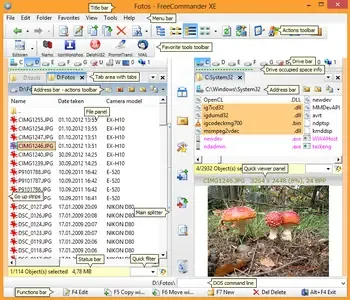
FreeCommander XE is a feature-rich file management application for Windows that serves as an alternative to the default Windows File Explorer. It provides an efficient dual-pane interface, advanced file handling capabilities, and numerous productivity tools to simplify everyday file and folder management.
Designed for both casual users and power users, the application supports portable use, allowing you to run it directly from a USB drive or other removable media without requiring installation on every computer. With integrated archive support, file comparison, synchronization, FTP/SFTP connectivity, and customizable layouts, FreeCommander XE helps streamline file operations while offering greater flexibility than the standard Windows file manager.


Key Features:
  • Dual-pane interface with horizontal or vertical layout.
  • Optional single-panel working mode.
  • Tabbed browsing for convenient file management.
  • Optional folder tree for each panel.
  • Direct access to Desktop and system folders.
  • Built-in viewer for text, binary, hex, and image files.
  • Preview files and thumbnails inside supported archives.
  • Built-in ZIP archive creation and extraction.
  • Support additional archive formats through plugins.
  • Browse nested archives without manual extraction.
  • Plain view for simplified folder structures.
  • Linked browsing between panels.
  • Copy, move, rename, and delete files and folders.
  • Drag-and-drop support.
  • Search files, including contents within archives.
  • Duplicate file finder.
  • Generate and verify MD5 and SHA checksums.
  • Secure file wiping.
  • Advanced multi-file renaming tool.
  • Support for file paths longer than 255 characters.
  • View and edit file properties.
  • Calculate folder sizes.
  • Compare and synchronize folders.
  • Modify file timestamps and attributes.
  • Favorites for folders and applications.
  • Advanced file filters with regular expression support.
  • Customizable detailed view columns.
  • Automatic folder view settings.
  • Built-in FTP/SFTP client (SFTP available in 64-bit edition).
  • Access connected mobile devices.
  • Integrated DOS command line.
  • Quick Viewer, Quick Search, and Quick Filter.
  • Quick Starter and Desktop Snapshots.
  • Customizable keyboard shortcuts.
  • Flexible configuration options.
  • Multiple color schemes.
  • Multilingual user interface.

Home Page

Код:
https://freecommander.com/en/

Rapidgator
Код:
https://rapidgator.net/file/3b8d64bfa05e994a93c95d3310231799/yn7tr.FreeCommander.XE.2026.Build.950.x64.Multilingual.rar.html

Код:
https://nitroflare.com/view/EB4830990725264/yn7tr.FreeCommander.XE.2026.Build.950.x64.Multilingual.rar
 
Назад
Сверху Снизу