All mitsumi'1s Applications !! (updated daily)

980ec3fb181421efe984af1b96dee99f.webp


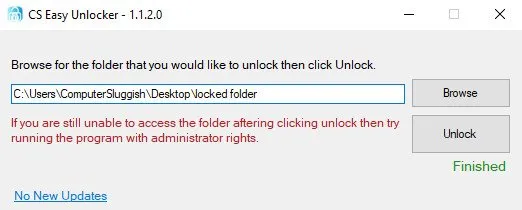
CS Easy Unlocker 1.1.6 | Size: 615.4 KB
Language: English


CS Easy Unlocker, a lightweight program that is designed to effortlessly unlock folders in Windows that are giving the frustrating "access denied" errors.

So if you are encountering a frustrating scenario where you're unable to access important files or folders due to permission restrictions or unknown ownership issues? With CS Easy Unlocker, those problems become a thing of the past.
CS Easy Unlocker tool utilizes advanced algorithms to bypass access limitations, granting you full control over your files and folders. Allowing you to say goodbye to the hassle of dealing with locked folders and regain access to your valuable data.
Also, did I mention you can use CS Easy Unlocker for free giving you the ultimate solution for unlocking folders in Windows 10/11.

Features
Simple and easy to use interface
One-click button to unlock a locked folder in Windows
No install required
Small file size making it lightweight

System Requirements: Windows 11, Windows 10


DOWNLOAD LINKS:


Код:
https://rapidgator.net/file/2262aef03a71bac64266c4a378354395/CS_Easy_Unlocker_1.1.6.exe.html

Код:
https://nitroflare.com/view/EE68CD1B9EDF6F6/CS_Easy_Unlocker_1.1.6.exe
 
7194e2225fb0fe33b9a06caee14497a7.webp


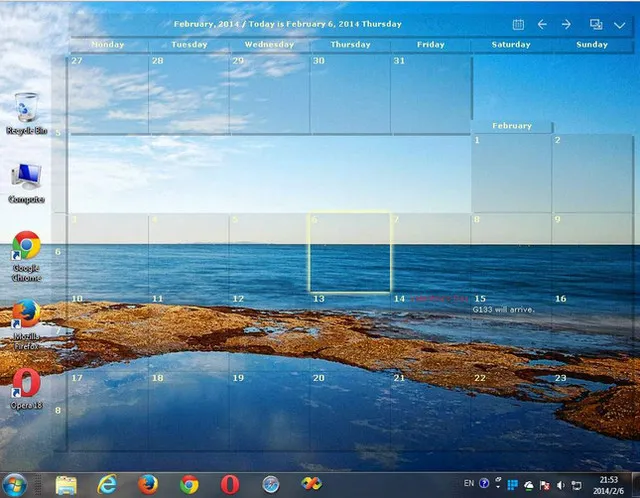
Desktop Calendar 3.30.289.9075 Multilingual | Size: 7.07 MB
Language: English


DesktopCal is a very useful piece of software that helps change your normal desktop into a calendar, so that time management can be done with more ease.The interface of the application is pretty straightforward, thus allowing any type of person to easily work with it. Moreover, the interface is highly customizable, enabling users to change the background colors, level of transparency, font of all the text, and gaps between the cells.

The utility can also control the entire desktop and what it looks like. For example, you can leave the wallpaper existent, delete it altogether or loop certain pictures of your choosing. The latter option enables you to add entire folders with hundreds of files and program them to change every 5, 10, 20, 30 minutes or even more. The position of the images can be modified, from "Fill" to "Stretch," "Center," "Fit" or "Tile".

All of the features aforementioned make this software tool highly efficient and should suit any person's taste.

The interface supports multiple languages such as English, French, Vietnamese, Chinese and Spanish.

In order to make annotations to a certain date in the calendar, all you have to do is double click on the corresponding panel and write. You should also know that each and every cell can be colored in a different way, so as to help you color-code specific events according to importance.

All in all, DesktopCal is a very useful piece of software, if you like being organized. You are able to input important occasions and meetings to the calendar with just two clicks, use a color-coded system, while also being able to manipulate the desktop.

Key features
- Record anything by double clicking on the windows desktop.
- Offers a variety of common festivals, anniversaries and other information.
- Move your data from one deveice to another with powerful tools.
- Print any page of calendar with wallpaper as you work.
- Set background color for any day you want. So, the days are colorful.
- Powerful and easy-to-use settings allows you to easily customize your own calendar.

System Requirements: Windows XP, Vista, Windows 7, 8, 10, 11


DOWNLOAD LINKS:


Код:
https://rapidgator.net/file/f947895b97dc637529a3e789406eef39/Desktop_Calendar_3.30.289.9075_Multilingual_.rar.html

Код:
https://nitroflare.com/view/09E314EBC49D2A7/Desktop_Calendar_3.30.289.9075_Multilingual_.rar
 
d37438beb3b494bccbc4fb2765a0dcbc.webp


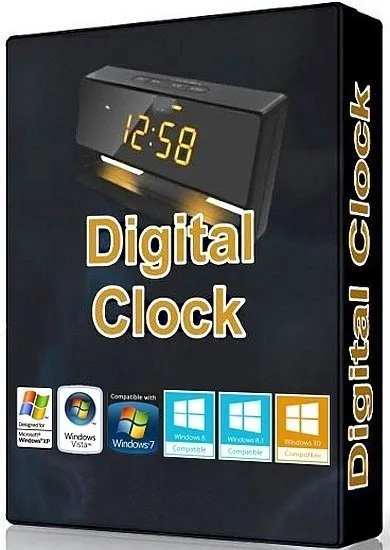
Digital Clock 5.2.2 (x64) | Size: 20.15 MB
Language: English


Digital Clock is a lightweight desktop enhancement utility built specifically for helping you place a digital clock on your screen. This unobtrusive tool runs quietly in the system tray until called upon when it reveals several configuration settings to tinker with. The digital clock can be moved to any area of the desktop, and you can make the clock remain on top of other windows, adjust the opacity and size, as well as change the layout of the clock by selecting from different skins, such as Vintage Digits, Binary Clock, Origami Style, Floral Digits, and others.

What's more, you can customize the text in terms of font, font style, and size, tweak the texture of the clock by selecting from various color or uploading an image from the computer (BMP, JPG, PNG, TIFF, XBM, XPM), and opt for a tile or stretch mode.
Digital Clock gives you the possibility to pick the time format, automatically check for updates at a preset time, as well as work with different plugins which help you set up alarms by adding MP3 files from the computer or specifying URLs, and displaying a user-defined message, show the date, turn off the computer at a certain time, and other options as well.
Since it doesn't require much computer knowledge to set up the dedicated parameters, even rookies can master the entire process with minimum effort.

During our testing we have noticed that Digital Clock carries out a task very quickly, and no errors showed up throughout the entire process. It leaves a minimal footprint on system resources, so the overall performance of the computer is not affected.
All in all, Digital Clock proves to be an efficient clock and time management application that provides a handy suite of tools.

System Requirements: Windows 11, Windows 10, 8 , 7


DOWNLOAD LINKS:


Код:
https://rapidgator.net/file/afae452be8b5aa48276a3c64ea8b77fc/Digital_Clock_5.2.2_x64.rar.html

Код:
https://nitroflare.com/view/537E3B3DC9FEBF5/Digital_Clock_5.2.2_x64.rar
 
4dc7aea21808c68950ad7c0cebf49f7d.webp


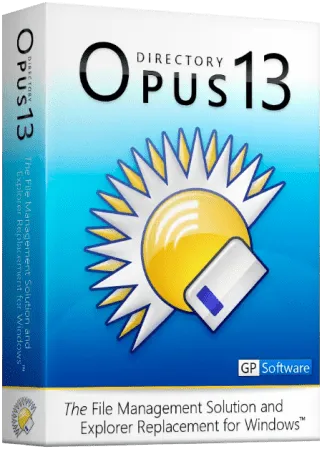
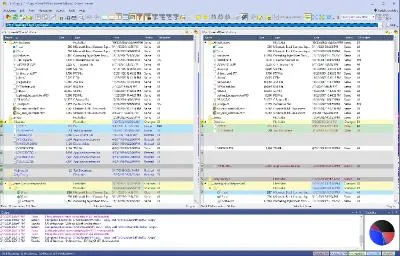
Directory Opus 13.23.10 Beta (x64) Multilingual Are you frustrated by the limitations of Windows Explorer? Directory Opus provides a complete Explorer Replacement with far more power and functionality than any other file manager available today.

Just some of the features include
- Single or dual pane file display and folder trees
- Tabbed interface let you keep multiple folders open and switch quickly between them
- Unique Explorer Replacement mode provides a full replacement for Windows Explorer
- Quickly filter, sort, group and search your folders
- Color-code your files, assign status icons, star ratings, tags and descriptions
- View images, documents and more. Image marking lets you sort your photos quickly and easily
- Batch renaming including easy-to-use keyboard macros
- View and edit file metadata

File size: 29.6 MB


- Support for FTP and archive formats like Zip, 7Zip and RAR
- Built-in tools including synchronize and duplicate file finder
- Calculate folder sizes and print or export folder listings
- Queue multiple file copies for improved performance
- Fully configurable user interface - colors, fonts, toolbars, keyboard hotkeys, and a full scripting interface let you tailor Opus exactly to suit your needs
- Efficient, multi-threaded, modern design. Supports the latest 4K monitors. Available in both 32 and 64 bit versions.

What makes Opus unique?

Built for speed
Opus is written in native C++ multi-threaded code; compiled for the latest 64 bit CPUs, with high performance our number one design principle.

Fully configurable
Change the colors. Change the fonts. Change the toolbars and menus. Set up hotkeys. Opus adapts to how you want to use it.

Makes file management a breeze
Powerful searching, sorting, grouping, labelling and tagging features let you take control of your files like never before.

Endlessly extensible
Work with third-party tools as easily as with the built-in features. A full scripting interface, including scriptable dialogs, means your imagination is really the only limit.

Replace Windows Explorer and don't look back
Our unique Explorer Replacement mode provides a full replacement for Windows Explorer.
Single or dual pane file display and folder trees
Tabbed interface let you keep multiple folders open and switch quickly between them
Integrated viewer, metadata editor and utility panel
Built-in tools including synchronize and duplicate file finder
Leverage indexed search engines like Windows Search and Everything

Whats New

System Requirements
Supported on x64 versions of Windows 7, 8, 10 and 11.
Please note: ARM is not currently supported.


HOMEPAGE


Код:
https://www.gpsoft.com.au/


DOWNLOAD

Код:
https://rapidgator.net/file/b448fce30eb11dc54294a40b9289e4a1/DirectoryOpusPro13..rar.html

Код:
https://nitroflare.com/view/455C655F757B90E/DirectoryOpusPro13..rar
 
767f088b0d791719f6b4a9c165606eca.webp


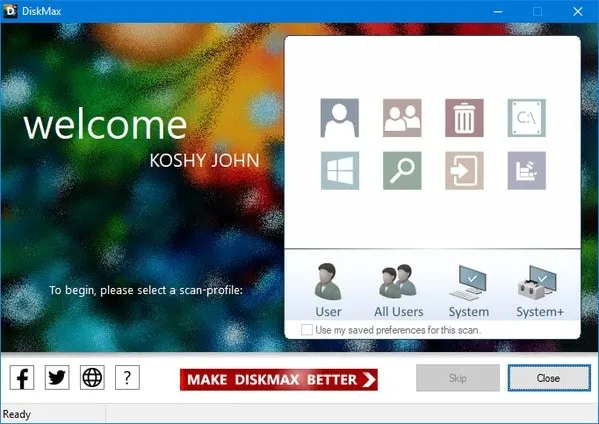
DiskMax 7.32 Use DiskMax to periodically perform powerful disk cleanups and performance optimizations to keep your PC healthy.After using DiskMax, you will notice that your system will be peppier, applications should launch faster, files will open quicker, and games will run better. Simply run DiskMax from time to time to keep your system in shape.

Even if you are an advanced user, DiskMax will be useful to you since it automates all the tasks required to keep your system clean and fast, leaving you to enjoy a whole new computing experience.
File Size : 2.2 Mb


DiskMax Features
Automates the emptying of your recycle bin (if specified), cleaning up of installation remnants, and debugging information
Cleans up every user's History, Temp, Temporary Internet Files, Cookies (if specified), Recently opened documents list, explorer thumbnail cache, and windows error reporting logs
Clears out Windows cache, unused legacy cursors (on Vista, if specified), debugging info, internet logs, help center caches, repair information, DLL caches, Logs, temporary files, and windows update roll-back files
Removes registry entries for multiple Most Recently Used lists
Clears out Windows event logs (no other application out there does this)
Gives you the option to deep scan your hard-disk to remove all files of type log, old, prv, chk, swp, bak, gid, wbk, tmp, and dmp. This utility is only intended for advanced users
Rearranges files so that they can be accessed faster

System Requirements: Windows 11, Windows 10, 8 , 7


HOMEPAGE


Код:
https://www.koshyjohn.com/software/diskmax/


DOWNLOAD

Код:
https://rapidgator.net/file/383b39f31d0d91b9992e81406ab5b8f4/DiskMax..exe.html

Код:
https://nitroflare.com/view/643AA8C46EEC403/DiskMax..exe
 
fbf4519853450162365a0f59afc90f01.webp


DISMTools 0.8.260621 Pre-release | Size: 75.72 MB
Language: English


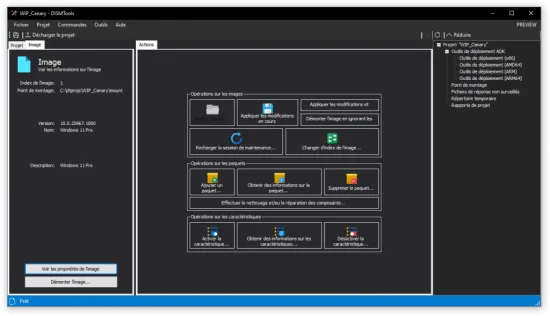
DISMTools is a front-end for DISM that lets you manage your Windows Imaging (WIM) files and a whole lot more.

Key features
DISMTools is the first project-based GUI. Projects store the mounted image and unattended answer files you want to apply (using the command line at this time), while also providing a scratch directory for temporary operations
DISMTools is also smart, checking first if an action can be performed before doing it

Supported actions
The following actions are supported by DISMTools
This program is in beta stages, so not every possible action is implemented. Check the "Unsupported actions" section for more details
Image management

WIM/SWM/ESD file application
Image capture
Image commits
Volume image removal (removal of unnecessary Windows editions)
Image mounting and unmounting
Image servicing session reloads
Image index switches
WIM -> ESD and viceversa conversion
SWM file merger
Component cleanup
Image splitting
OS packages and features
Package addition and removal
Feature enablement and disablement
AppX package servicing
Application addition and removal
Capabilities
Capability addition and removal
Drivers
Driver addition and removal
Provisioning packages
Add provisioning packages to an image
Other
Get complete information of an image
Using the project's or program's scratch directory
Get information of packages, features, AppX packages, capabilities, and drivers
Configure Windows PE settings
Basic automation

System Requirements: Windows 11, Windows 10, 8 , 7


DOWNLOAD LINKS:


Код:
https://rapidgator.net/file/79cd86d519e5a1fafedf3e5b9dfa8faa/DISMTools_0.8.260621_Pre-release.zip.html

Код:
https://nitroflare.com/view/1156CF20E43898F/DISMTools_0.8.260621_Pre-release.zip
 
ba498ff0787842e0bca63fba50001f2e.webp


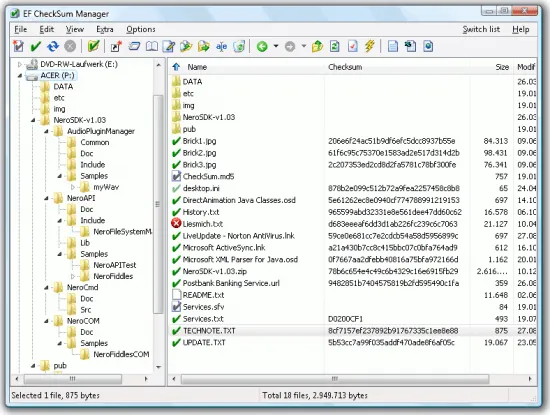
EF CheckSum Manager 26.05 Multilingual EF CheckSum Manager is a program designed for the integrity examination of files on the standard formats SFV, MD5 and SHAx. (CRC32 (SFV), MD5, SHA1, SHA224, SHA256, SHA384, SHA512, SHA-3 224, SHA-3 256, SHA-3 384, SHA-3 512) They can verify existing checksums or create new checksum for your important data. The EF CheckSum Manager is easy to use and much fast, supports the recursive processing of file structures, works up to whole drives. You have the choice to let only one checksum file for all files, one per folder or to produce for each file separate checksums.

File size: 5.3 MB


Perhaps you know the problem: They burned important data on CD, the burning program means all OK but are you sure that your data is real to 100% with the originals? The EF CheckSum Manager helps to eliminate you such doubts fast. Provide in addition simply before archiving the volume of data to burn with checksums and test you directly after the burning process the integrity of the data. The checksum files are small and only little storage location need. You can burn these also additionally to the actual data also on the CD. So you can examine the integrity of the data also later still at any time.

A further important application field for checksums is the transmission of data over the Internet. If you send files by E-Mail to friends, nobody can guarantee to 100% that the arrived files are unchanged, also correctly. If you send also a checksum file additionally, the receiver can determine on the basis the checksum whether the received files are OK or not.

Also many files in the Internet are offered for the Download, e.g. Linux distributions in form of whole CD images, frequently with additional checksum files, often in the MD5 format. The EF CheckSum Manager makes possible to verify in a simple manner the integrity of the downloaded data. Save online costs, download only the bad, corrupt, incorrect size or missing files.

The following languages are included in the package: English, German, Arabic, Catalan, Chinese, Dutch, French, Hebrew, Hungarian, Italian, Japanese, Korean, Polish, Romanian, Russian, Spanish, Swedish, Taiwan, Ukrainian.

Whats New
Updates: official site does not provide any info about changes in this version

System Requirements
Windows 11
Windows 10
Windows 8 / 8.1
Windows 7
Windows Vista
Windows XP
Windows Server (all versions)
Windows Media Center Edition
Windows 2000
Windows NT 4
Windows ME
Windows 98
Windows 95


HOMEPAGE


Код:
https://www.efsoftware.com/


DOWNLOAD

Код:
https://rapidgator.net/file/361136d6345e6e0907d6d4a49b5f0002/EFSoftware.EF.CheckSum.Manager.v26.05..rar.html

Код:
https://nitroflare.com/view/226EC994146211F/EFSoftware.EF.CheckSum.Manager.v26.05..rar
 
8e0e8da9e4302c2eb12c6f65201beb92.avif


EF Duplicate Files Manager 26.05 Multilingual The EF Duplicate Files Manager is a useful program that help you to find out and remove duplicate files with same name, same size, same content on specify paths, files that occupy so unnecessarily storage place on your computer or your server.

You can let the program work in several ways. In the simplest case you let the program look for all files of same name. Or you give that only such files are to be specified in the result list, which exhibit additionally the same file size. If necessary, the EF Duplicate Files Manager can analyze even the file content. It indicates then only dupes, which are absolutely identical.

File size: 7.3 MB


The EF Duplicate Files Manager looks if desired in multiple drives or multiple paths for dupes. Beyond that it is able to analyze the contents of archive files. The most usual formats (7-Zip, ACE, ARC, ARJ, BZIP2, CAB, CPIO, GZIP, LHA, RAR, RPM, SFX, SQX, TAR, TAR.7Z, TAR.BZ, TAR.GZ, TAR.XZ, WIM, XZ, Z, ZIP, Zip64, ZOO) are supported as well as in image files (IMG, ISO, UDF).

Further different filters are available, with whose assistance you can limit the search to certain file types or the date or size of the files.

A exclude folder list does not make possible to be searched in this folders include their subfolders. This function can be used to accelerate the search procedure. Also important system folders can be excluded from the search, so that system files are not even handled, i.e. Windows backups.

After the EF Duplicate Files Manager locked the search, he presents the dupes in a clear, polychrome supported list, found in accordance with the criteria selected before. The coloured representation makes a simple and intuitive recognizing possible of similar files. They can now decide, what you would like to do with the found files. The EF Duplicate Files Manager supports you here among other things with functions for the deletion, copying, moving or renaming the entries. Or you can save the list of the dupes found for later processing. The formats HTML, CSV or as plain text are supported.

The following languages are included in the package: English, German, Arabic, Bulgarian, Catalan, Chinese, Dutch, French, Hebrew, Hungarian, Italian, Japanese, Korean, Romanian, Russian, Spanish, Swedish, Ukrainian.

Whats New
Updates: official site does not provide any info about changes in this version

System Requirements
Windows 11
Windows 10
Windows 8 / 8.1
Windows 7
Windows Vista
Windows XP
Windows Server (all versions)
Windows Media Center Edition
Windows 2000
Windows NT 4
Windows ME
Windows 98
Windows 95


HOMEPAGE


Код:
https://www.efsoftware.com/


DOWNLOAD

Код:
https://rapidgator.net/file/c1cdbc03d6c744614c1a00e8fd23122f/EFSoftware.EF.Duplicate.Files.Manager.v26.05..rar.html

Код:
https://nitroflare.com/view/5D912ACDBC7C5B2/EFSoftware.EF.Duplicate.Files.Manager.v26.05..rar
 
aa994eee38f6aa258014f0df13857ec1.avif


EF Duplicate MP3 Finder 26.05 Multilingual The EF Duplicate MP3 Finder is a useful program that help you to find out and remove duplicate audio files with same or similar properties, files that occupy so unnecessarily storage place on your computer or your server.

In addition the program analyzes the artist and title information from the ID tags contained in the audio files and compares these with the appropriate entries in other files. If this informations are not present, it try to interpret it from the file names if possible. You can adjust individually if search for exact dupes or for similar files. In this way it is possible to identify similarly titles with smaller differences.

File size: 5.1 MB


EF Duplicate MP3 Finder support the audio formats MP3, iTunes, Ogg/Vorbis, WMA and FLAC.

Expandable with external plugins with the AAC, APE, CDA. IT, M4A, M4B, MOD, MP4, MPC, MPC, MTM, OFR, OFS, S3M, SPX, TTA, UMX. VQF, WV, XM audio formats

The EF Duplicate MP3 Finder looks if desired in multiple drives or multiple paths for dupes and recurse in subfolders. Folders can be excluded from the search and various filter makes possible to limit the number of results e.g. according to the file date or the file size purposefully. Frequently used search options can be stored and been available as presetting then later at any time again. This function can be used to accelerate the search procedure. Also important system folders can be excluded from the search, so that system files are not even handled, i.e. Windows backups.

After the EF Duplicate MP3 Finder locked the search, he presents the dupes in a clear, polychrome list, found in accordance with the criteria selected before. The colored representation makes a simple and intuitive recognizing possible of similar files. They can now decide, what you would like to do with the found files. The EF Duplicate MP3 Finder supports you here among other things with functions for the deletion, copying, moving or renaming the entries. Or you can save the list of the dupes found for later processing. The formats HTML, CSV or as plain text are supported.

The following languages are included in the package: English, German, Catalan, Chinese, French, Hebrew, Hungarian, Italian, Japanese, Korean, Romanian, Russian, Swedish, Ukrainian.

Whats New
Updates: official site does not provide any info about changes in this version

System Requirements
Windows 11
Windows 10
Windows 8 / 8.1
Windows 7
Windows Vista
Windows XP
Windows Server (all versions)
Windows Media Center Edition
Windows 2000
Windows NT 4
Windows ME
Windows 98
Windows 95


HOMEPAGE


Код:
https://www.efsoftware.com/d3/e.htm


DOWNLOAD

Код:
https://rapidgator.net/file/58753166df9d9fff9cf5986c0c5539c9/EFSoftware.EF.Duplicate.MP3.Finder.v26.05.rar.html

Код:
https://nitroflare.com/view/28D575CFFC3E0B9/EFSoftware.EF.Duplicate.MP3.Finder.v26.05.rar
 
ee68c678ec11b91e8fc38319034de939.webp


EF File Catalog 26.05 Multilingual Catalog whole disks or only single directories with familiar Explorer-like user interface and makes it available for offline browsing and searching.

Here are some key features of EF File Catalog
Internal support for all usual compressed file formats: 7-Zip, ACE, ARC, ARJ, BZIP2, CAB, CPIO, GZIP, IMG, ISO, LHA, RAR, RPM, SFX, SQX, TAR, TAR.7Z, TAR.BZ, TAR.GZ, TAR.XZ, UDF, WIM, XZ, Z, ZIP, Zip64, ZOO.
Unlimited external packer plugging support
Automatic description importing

File size: 7.4 MB


Unlimited external description plugging support
Extract CD information from CDDB (freedb.org and local)
Fast search/search for dupes functions with wildcards, filtering support
Detailed informations
User interface with multi language support
Exports to text, CSV, HTML

The following languages are included in the package: English, German, Arabic, Bulgarian, Catalan, Chinese, Dutch, French, Hebrew, Hungarian, Italian, Japanese, Korean, Lithuanian, Macedonian, Portuguese, Romanian, Russian, Slovak, Spanish, Swedish, Turkish, Ukrainian.

Whats New
Updates: official site does not provide any info about changes in this version

System Requirements
Windows 11
Windows 10
Windows 8 / 8.1
Windows 7
Windows Vista
Windows XP
Windows Server (all versions)
Windows Media Center Edition
Windows 2000
Windows NT 4
Windows ME
Windows 98
Windows 95


HOMEPAGE


Код:
https://www.efsoftware.com/fc/e.htm


DOWNLOAD

Код:
https://rapidgator.net/file/9b2b7f24b61318685f16a3840d93f15c/EFSoftware.EF.File.Catalog.v26.05..rar.html

Код:
https://nitroflare.com/view/63A39EEEB381D44/EFSoftware.EF.File.Catalog.v26.05..rar
 
b4f665405d9b01297964a7ebc1389fa9.webp


EF Mailbox Manager 26.05 Multilingual EF Mailbox Manager can manage as many POP3 Accounts as you like. For periodical checking, polling time can be set individually for each account. You may check for new messages on a server and/ or delete messages on the server or download messages to a local computer for further use.

Downloaded E-Mails will be saved in ascii text files and stored in mail boxes. Should you use Outlook Express or any other E-Mail program which open attachments automatically, you are strongly advised to open the message first in a text editor such as Notepad or the integrated Viewer of EF Commander.

File size: 5.2 MB


With EF Mailbox Manager you may remove annoying Spam E-Mails on the server without downloading them first. Save connecting costs!

If the mail server supports it, EF Mailbox Manager can be configured to use safe connection (APOP). Thus passwords will not be transfered through the Internet while logging in.

Several functions of EF Mailbox Manager make use of the installed standard E-Mail client to create or answer messages.

Whats New
Updates: official site does not provide any info about changes in this version

System Requirements
Windows 11
Windows 10
Windows 8 / 8.1
Windows 7
Windows Vista
Windows XP
Windows Server (all versions)
Windows Media Center Edition
Windows 2000
Windows NT 4
Windows ME
Windows 98
Windows 95


HOMEPAGE


Код:
https://www.efsoftware.com/


DOWNLOAD

Код:
https://rapidgator.net/file/d8aa6b9170a4f25d2930d7181ab12a3d/EFSoftware.EF.Mailbox.Manager.v26.05..rar.html

Код:
https://nitroflare.com/view/77219C8CA438D3A/EFSoftware.EF.Mailbox.Manager.v26.05..rar
 
9eae63ba4b42dcdc395015abef350817.webp


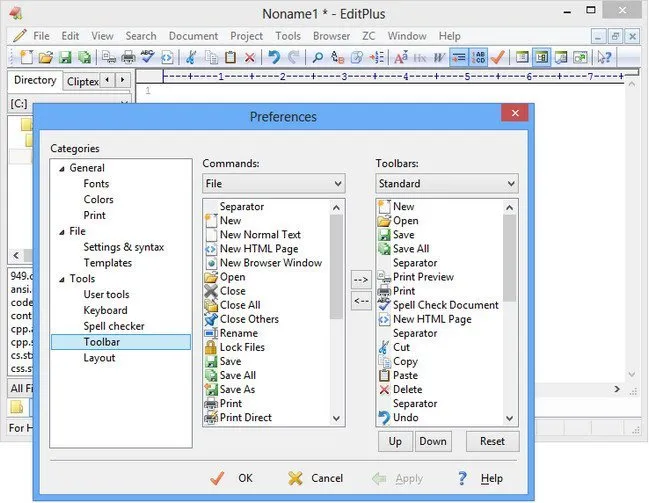
ES-Computing EditPlus 6.1.899 (x64) EditPlus is a text editor, HTML editor and programmers editor for Windows. While it can serve as a good Notepad replacement, it also offers many powerful features for Web page authors and programmers. EditPlus supports powerful and customizable syntax highlighting for HTML, CSS, PHP, ASP, Perl, C/C++, Java, jаvascript and VBScript by default. Also, you can create your own syntax file to support other programming languages. So, it supports user-defined tools, help files and keystroke recording files. The output of tool execution can be captured in the Output Window, so that you can double-click the error line to automatically load the file and locate the cursor to that line.

File size: 3 MB


Features
* Multiple document interface
* Overlappable windows
* Tabbed document interface
* Window splitting
* Spell checking
* Regex-based find & replace
* Encoding conversion
* Newline conversion
* Syntax highlighting
* Multiple undo/redo
* Rectangular block selection
* Bracket matching
* Auto indentation
* Auto completion
* Code folding (Text folding)
* Compiler integration
* Shell integration
* Macro (Keystroke recording)
* Multi-line regex support
* Integrated web browser
* Dynamically customizable key bindings
* FTP
* sftp (SSH)
* ASCII
* UTF-8
* UTF-16 (Unicode, little/big endian)
* Any encoding supported by the OS
* DOS (CR/LF)
* Unix (LF)
* Mac (CR)

Whats New

System Requirements: Windows 10, 11


HOMEPAGE


Код:
https://www.editplus.com/


DOWNLOAD

Код:
https://rapidgator.net/file/24c6564ada7bd3ef5aac260ce35f9381/ES-Computing_EditPlus_6.1.899..rar.html

Код:
https://nitroflare.com/view/B40178AB8983E5C/ES-Computing_EditPlus_6.1.899..rar
 
dd73328185ff76968d8e8afd66ec5442.webp


ExamDiff Pro Master Edition 17.0.1.4 | Size: 46.56 MB
Language: English


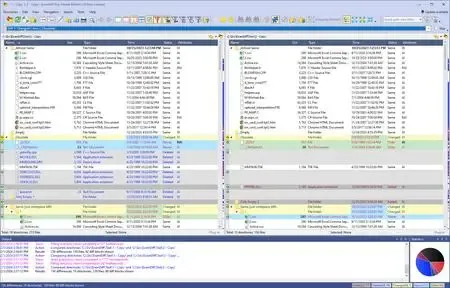
ExamDiff Pro is a powerful and easy-to-use file and directory comparison tool for Windows. It includes numerous helpful features for comparing and merging many kinds of files and folders - from source code to Office documents to Zip archives to files on remote computers. If you've been frustrated with other comparison utilities, you will find that ExamDiff Pro offers a much more user-friendly and customizable experience.

For developers
track changes in files and folders
perform code reviews
easily merge different versions of files using two- and three-way diff and merge.
share HTML and printed difference reports with your colleagues
compare a local website to an FTP server (using the FTP plug-in)
ignore programming language comments to focus only on the most important aspects of your source code
visualize different aspects of code through syntax highlighting
compare executable files (DLLs, EXEs, etc.) using built-in binary comparison

For regular computer users
quickly navigate through differences
synchronize files and directories between your PC and external media
create directory snapshots for future comparison and archiving
quickly find and undo mistakes by comparing files with previous versions
easily drag and drop files and directories
compare from Windows Explorer using the built-in Shell extension

For testers
validate test results by comparing them with a baseline
save test comparison results into reports

For writers
edit your documents within the comparison window using the built-in text editor
use synchronized word wrap to compare document paragraphs
compare Word, Excel, and PDF documents using plug-ins

Operating System: Windows XP, 2003, Vista, 7, 2008, 8, 2012, 8.1, 2012 R2, 10, 2016, 2019, 11, 2022

HOMEPAGE:
Код:
https://www.prestosoft.com/


DOWNLOAD LINKS:


Код:
https://rapidgator.net/file/7d5a72102ee7630950e12f19c53f99ee/ExamDiff_Pro_Master_Edition_17.0.1.4.rar.html

Код:
https://nitroflare.com/view/51CE4D0DA226531/ExamDiff_Pro_Master_Edition_17.0.1.4.rar
 
5d0b34306890a97f448d87a1f633e40b.webp

ExamDiff Pro Master Edition 17.0.1.4 (x64) | 40.3 Mb
ExamDiff Pro Master Edition is a professional file and directory comparison tool for Windows designed to help developers, testers, writers, and advanced users identify differences between files and folders with speed and accuracy. The application provides a highly configurable environment for comparing, analyzing, and merging data across local systems, archives, and remote locations.
The software supports a wide range of comparison scenarios, including source code reviews, document revisions, directory synchronization, and version tracking. With advanced two-way and three-way diff and merge capabilities, users can efficiently combine changes from multiple file versions while maintaining full visibility of modifications.


ExamDiff Pro also includes specialized features such as syntax highlighting, binary file comparison, report generation, and support for comparing Office documents, PDFs, ZIP archives, and FTP-based content through plug-ins. Its intuitive interface, drag-and-drop functionality, and Windows Explorer integration make file comparison tasks faster and more accessible.
Whether you are reviewing source code, validating test results, synchronizing folders, or tracking document changes, ExamDiff Pro provides detailed comparison tools designed for both technical and non-technical users.
Key Features:
  • Compare files and directories with precision
  • Advanced two-way and three-way diff and merge
  • Track changes across files and folders
  • Perform source code reviews efficiently
  • Generate HTML comparison reports
  • Create printable difference reports
  • Compare local and FTP content via plug-ins
  • Ignore programming language comments
  • Syntax highlighting for source code analysis
  • Built-in binary comparison for EXE and DLL files
  • Synchronize files and directories
  • Create directory snapshots for archiving
  • Compare previous file versions
  • Drag-and-drop file and folder support
  • Windows Explorer shell integration
  • Validate test results against baselines
  • Export comparison results to reports
  • Built-in text editor for document editing
  • Synchronized word wrap for text comparisons
  • Compare Word, Excel, and PDF documents via plug-ins

System Requirements
Operating System: Windows XP, 2003, Vista, 7, 2008, 8, 2012, 8.1, 2012 R2, 10, 2016, 2019, 11, 2022
Home Page

Код:
https://www.prestosoft.com/

Rapidgator
Код:
https://rapidgator.net/file/c3809de84ca62f94e59bd0e834634bc2/aasuj.ExamDiff.Pro.Master.Edition.17.0.1.4.x64.rar.html

Код:
https://nitroflare.com/view/CFFF2D64EBD7FD9/aasuj.ExamDiff.Pro.Master.Edition.17.0.1.4.x64.rar
 
3805378d762f7a77ba5ec319bfea7e4c.webp


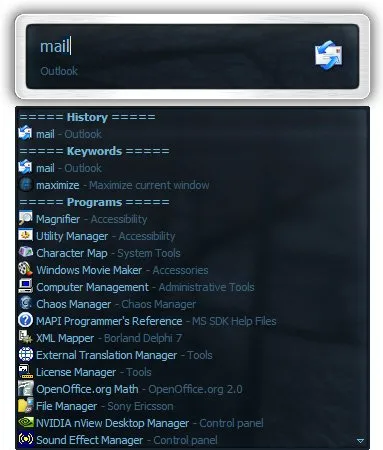
Executor 2.3.8 Executor is a multi purpose launcher sporting many optional customizable features and advanced setup. The program originated as I was sick of spending too much time searching for programs through my ever growing windows start-menu, and eye-balling desktop trying to mouse locate what ever I wanted to launch. Also I missed a tool that could ease and optimize my daily workflow. There was of course already programs like this available, but each had it's annoyance or missing features or too(!) geeky.

File Size : 6.9 Mb


Features
Keywords have properties like shortcuts, and you can for example drag-drop a shortcut/file/folder/favorite to add it as a keyword.
Auto-completion for keywords, file system and history (can also be configured).
Url detection, Enter URLs directly (like , mail.google.com, google.com or
).
Keywords support parameters. Example "google latest executor" "wiki nirvana".
Besides keywords Executor can also optionally and dynamically add matching start-menu items, control panel items and other handy items to the drop-down/list.
Ability to add your own paths to scan for user defined file extensions.
Each keyword can be assigned a hotkey, so Executor can also perform like many popular hotkey managers.
Keyword control, have keyword open program(s) minimized, with admin access, make sure only one instance is running of program and more
Can add keyword integration with popular services like GMail, Twitter, GCal, RTM and many others (see forums for howto's, tutorials and tips).
Optional show icon for current keyword/input.
Optional show drop-down box for current keyword/input (auto-completion).
Optional drop-down box can be set to auto-open (like windows run) displaying auto-completion suggestions.
Optional list displaying matching items.
Layout can be customized. Set colors, font, dimensions, position, transparency and more.
Skinable. Supporting alpha blending effects and free positioning of all elements.
Many settings to customize the program as you like.
Can be launched from an user defined hotkey.
One keyword or text input can start multiple keywords/urls/programs/documents/files etc. Example one keyword opens three websites and/or programs.
Each keyword have properties like optional group (to organize into groups), customizable icon and other properties.
Keyword "find[text]" for using Windows Instant Search feature or Windows Desktop Search.
A number of special commands (like for example pause and replace tag with parameter).
Optional windows context-menu integration (as another way of easily adding new keywords).
Optional show title for the current input.
Can import keywords from windows start-menu.
Can auto import keywords from an url on startup, so you can share keywords between different Executor installations (for example for cooperate use).
Executor has a number settings on how you want it to find desired item(s). Text could "start with" or "contain text" (substring) or short form detection (for example typing ffox for firefox).
All file-paths can be auto-completed (also when file-path is a parameter), and you can use tab and shift-tab to browse filesystem path.
Keywords to manipulate the current active window (center, resize to specific size, maximize width or height etc).
Special keywords to list (and open) running applications, text previously copied to clipboard and recent documents. Can also strip formatting from clipboard text.
Many special keywords like for example lock computer, restart, shutdown, standby, turn off monitor(s), mute sound, show date/time/week number etc.
Shortcut keys for faster navigation.
Integrated calculator.
Integrated Notes, for quick notes etc.
Import/Export keywords (import can also import directly from an url rather than a file).
Option to override windows run hotkey (Win-R).
Optional sounds.
Integrated Windows context-menu (for example when right-clicking list items).
At startup a number of keywords/commands optionally be launched.
Set simple a simple alarm, timer, stop-watch (with optional alert sound).
Pressing enter with no valid input will launch first suggested item (optional).
Be able to grab text from hidden launched console applications and display text in input or in multi-lined text.
Several hidden experimental/minor settings to play with (Example show time/date/other stuff when idle).
Plus more...
Free (freeware for you old timers) MIT-licensed.
Free for commercial use (but feel free to donate if you forced your entire organization to use Executor! I have put a lot of hours in to this :)). System Requirements: Windows 11, Windows 10, 8 , 7


HOMEPAGE


Код:
https://executor.dk/


DOWNLOAD

Код:
https://rapidgator.net/file/3c8dfc2efec05048180b860d0b2f4406/ExecutorSetup..exe.html

Код:
https://nitroflare.com/view/F754D50AF30FDCA/ExecutorSetup..exe

 
94c703832e78c22e54342351da02aa02.webp


ExplorerPatcher 26100.8457.70.3 Pre-release | Size: 11.67 MB
Language: English


Restore the functionality of Windows 10 on Windows 11, including most menus and taskbar, using this simple and straightforward patcher.

Without trying to undermine the many great features of Windows 11, working with it sometimes just doesn't feel right. Blame it on the course of habit, but the Taskbar and menus seem counterintuitive at times and you may feel that you need to take extra steps just to do an action you could do with a click of a button in previous Windows versions.
Explorer Patcher for Windows 11 is not exactly an application, but rather a DLL file that aims to restore the classic functionality of the new operating system. The patcher has been tested for the latest stable version of Windows 11, but it may work on other builds as well.
Place it in the C:\Windows folder to enable the old functionality

As the name suggests, this is not an application, but rather a patcher that you need to place in the main Windows 11 folder. According to the developer, the role of the DLL file is to enable extra functionality in the new operating system including, but not limited to the classic taskbar of Windows 10, option to hide the search bar, showing the 'All apps' list, restoring the classic power user menu, so on and so forth.
To complete the setup, you need to make sure that your Internet connection is active and restart the Explorer. At this point, the OS will start grabbing additional files from Microsoft and once the download is complete, restart the Explorer again for the changes to apply.
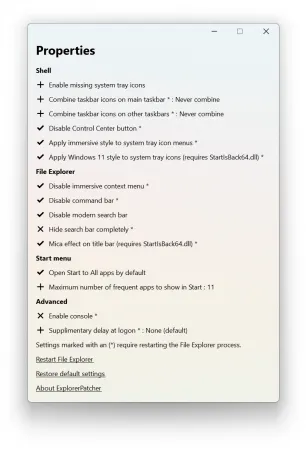
It comes with a configuration interface that is worth exploring
The developer added a GUI configuration option that enables you to customize the classic functionality based on your needs and preferences. To access it, access Properties available when right clicking on the Start button. The developer provides numerous details about the customization of the configuration GUI, so do not hesitate to check it out.
In the eventuality that you upgraded to Windows 11, but prefer to use the classic commands, menus and the old Taskbar, then perhaps you can consider giving Explorer Patcher for Windows 11 a try.

System Requirements: Windows 11, Windows 10


DOWNLOAD LINKS:


Код:
https://rapidgator.net/file/2038a4d4ca944a0b12b2d2f36a326b03/ExplorerPatcher_26100.8457.70.3_Pre-release.rar.html

Код:
https://nitroflare.com/view/FE6FAF96BC40F5F/ExplorerPatcher_26100.8457.70.3_Pre-release.rar
 
2cf5d7b7de72b6bc4e9afb0b28e71371.webp


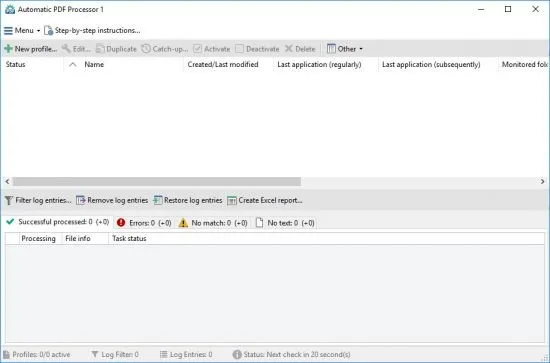
Gillmeister Automatic PDF Processor 2.4.1 With Automatic PDF Processor, PDF files can be processed automatically. Any number of folders can be monitored in order to automatically print, rename or move incoming PDF files to dynamically named folders. Numerous metadata of the PDF document can be used in addition to the content, for example to include invoice information in the file path. The PDF files to be processed can be narrowed down with various profile-specific filters - the document text, PDF metadata and general file information are available as filters.

File size: 226.4 MB


Extraction of data from the text of PDF files is optional. An unlimited number of extraction rules can be created within a profile. The extracted data can be used (after optional validation and formatting) for naming folders or the file name, and can be saved as an extract in a CSV file. Another task that can be automated with the Automatic PDF Processor is the extraction of attachments from PDF files, for example to save ZUGFeRD XML files, XRechnung attachments or similar as part of a PDF invoice in the same folder.

Monitor any number of folders
Examine incoming PDF files and apply individual rules

Store PDF files in a structured manner
Automatically rename PDF files and save them in dynamically created folders

Print PDF files automatically
Send certain PDF documents directly to the printer (e.g., invoices or quotations)

Optional further processing
Perform subsequent tasks, e.g., run a program with the filename of the PDF file passed as parameter

Whats New

System Requirements: Windows 11, 10, 8, 7 or Server (32-bit or 64-bit version)


HOMEPAGE


Код:
https://www.gillmeister-software.com/


DOWNLOAD

Код:
https://rapidgator.net/file/99136183ec6c7b5b62c57678eb2aa816/Gillmeister_Automatic_PDF_Processor_2.4.1.rar.html

Код:
https://nitroflare.com/view/F2571C505BD208C/Gillmeister_Automatic_PDF_Processor_2.4.1.rar
 
54a7b40d2b71fa2e776a6007e4df4e12.webp


Graitec Advance PowerPack 2027.0 For Autodesk Revit (x64) | Size: 2.44 GB
Language: English


GRAITEC PowerPack for Autodesk® Revit® is an add-on packed with tools that deliver more functionality, better control, and more automation for Revit users across all industries.

With more than 80 tools available, the PowerPack increases the productivity of both engineers and designers, helping to ensure data reliability, whilst automating documentation and improving BIM coordination.

Three Packages are available, Standard, Professional, and Premium. Premium dedicated to the creation of Structural Reinforcement detailed description of the packages here.

Languages are available on installation: English, French, Czech, German, Italian, Polish, Romanian, and Spanish.

Numbering Tool:
Elements' numbering in Revit requires a manual selection of objects, one after the other, within the project. Locating or renumbering several hundred objects can thus become a tedious, time-consuming and error-prone task. Numbering using the GRAITEC PowerPack saves time and eliminates the risk of errors such as duplicates or omissions, also preventing inherent information inconsistencies.

Link To Excel:
Exporting BIM information from Revit to Excel can be a long manual operation. The "Dynamic Link to Excel" function in the PowerPack allows users to transfer data directly into Excel (BOMs) either dynamically or by a simple click. Similarly, integrating Excel data into Revit is carried out just as easily.

Family Manager:
By default, Revit offers a basic families library depending on the localization country. The PowerPack "Family Manager" is the necessary step-up to optimize the BIM model creation and facilitate collaborative work! In order to guarantee effective collaboration and ensure coherence between project elements within an agency or a design office, the library is accessible to the entire team. Easy to use, this tool has a visual graphical interface that allows for very intuitive handling.

Element Lookup:
Currently, certain Revit parameters are difficult to access and thus cannot be effectively exploited when Revit filters are activated. The PowerPack for Revit provides advanced searching features that offer the flexibility needed to allow easy object selection based on their characteristics, for batch-processing purposes.

Batch Exporter:
Exporting Drawings and views to different file formats is time-consuming, Batch Exporter gives you the ability to export Views and Sheets from your Revit project to various file formats simultaneously. Batch exporter has over 10 different file formats available to the user, including DWG, PDF, DGN FBX, SAT, NWC. The export naming convention can also be customized to the user's needs.

Main Bars:
The Main Bars tool is an intelligent interface that will automatically change depending on the type of element you wish to reinforce. The user is presented with an intuitive interface where all aspects of reinforcement related to that type of element are listed. Supported elements include Footings, Columns, Beams and Walls. A key feature in both Beams and Columns is the ability to easily create "Packages" that allow for varying distribution of Transversal bars such as stirrups.

Visibility:
Setting rebar visibility in Revit can be a time-consuming job, newly created reinforcement will not automatically inherit the existing view settings. Graitec has created several tools to optimize and control the visibility of reinforcement. The Browse Reinforcement command enables users to browse all reinforcement through filters based on rebar parameters ( type, partition, mark, shape, diameter.) and highlights all corresponding instances in the view.

Bending Details:
PowerPack for Revit comes with the ability to create intelligent Bar bending details based on the modeled reinforcement. It can create a 2D fully dimensioned bar bending detail, that will update as the design changes. Both the placement and scale of these details can be controlled to help increase the speed of the documentation process.

Recommended System Requirements
In addition to the minimal configuration, here is the hardware and software recommended by GRAITEC
- PC with Intel® Core™ i5 or i7 latest generation Processor
- 16 GB RAM - According to the project size and complexity, additional RAM might be required
- SSD with 50 GB free space or more
- 22" display or higher with 1920x 1080 resolution
- Graphics card with DirectX 12 or higher and OpenGL 3.0 compliancy
- Installed operating system: Windows 10 64-bit version
- Windows and AutoCAD® compatible printer or plotter.
-Supprort Autodesk Revit:2024

HOMEPAGE:
Код:
https://graitec.com/


DOWNLOAD LINKS:


Код:
https://rapidgator.net/file/1199b5323ee9ca3e88f64d209bed9d7f/_GRAITEC_PowerPack_2027_Revit.part1.rar.html
https://rapidgator.net/file/a2859d8e4a5bb022b3a50508fb32d00f/_GRAITEC_PowerPack_2027_Revit.part2.rar.html
https://rapidgator.net/file/41612f7afb95655aa1fd00ed35e2d21d/_GRAITEC_PowerPack_2027_Revit.part3.rar.html

Код:
https://nitroflare.com/view/EE2C82CF39279E9/_GRAITEC_PowerPack_2027_Revit.part1.rar
https://nitroflare.com/view/79A570AD2E2EA7F/_GRAITEC_PowerPack_2027_Revit.part2.rar
https://nitroflare.com/view/A541FA4DCD8F86A/_GRAITEC_PowerPack_2027_Revit.part3.rar
 
1b84fec996d0c38cfc2bdd5bb4d7530d.webp

Graitec Advance PowerPack For Autodesk Revit 2027 (x64) | 2.9 GB
Graitec Advance PowerPack For Autodesk Revit is an advanced productivity add-on developed to extend the capabilities of Autodesk Revit with a comprehensive collection of automation, modeling, documentation, and BIM coordination tools. Designed for architects, structural engineers, BIM managers, and design professionals, the PowerPack helps streamline repetitive tasks, improve project consistency, and increase overall modeling efficiency.
With more than 80 specialized tools available across multiple package levels, the solution enhances everyday Revit workflows by providing better control over project data, automated documentation processes, and improved collaboration. The software is suitable for a wide range of BIM projects and includes dedicated functionality for structural reinforcement detailing in the Premium edition.


The add-on introduces powerful utilities for object numbering, Excel integration, family management, advanced element searching, batch exporting, reinforcement management, visibility control, and automated bending detail generation. These tools reduce manual work, minimize errors, and help maintain consistent project standards throughout the design process.
Key Features:
  • More than 80 productivity tools for Revit
  • Improved BIM coordination and workflow automation
  • Advanced object numbering and renumbering
  • Automatic prevention of duplicate numbering
  • Dynamic link between Revit and Excel
  • Import and export BIM data directly with Excel
  • Centralized Family Manager for team collaboration
  • Visual interface for family library management
  • Advanced element search and selection tools
  • Batch processing of Revit objects
  • Simultaneous export to multiple file formats
  • Customizable export naming conventions
  • Support for DWG, PDF, DGN, FBX, SAT, and NWC exports
  • Intelligent reinforcement design tools
  • Dedicated reinforcement workflows for beams and columns
  • Advanced rebar visibility management
  • Browse reinforcement using parameter-based filters
  • Automatic creation of bar bending details
  • Dynamic update of reinforcement documentation
  • Enhanced control over project data consistency

System Requirements
Recommended System Requirements
- PC with Intel® Core™ i5 or i7 latest generation Processor
- 16 GB RAM - According to the project size and complexity, additional RAM might be required
- SSD with 50 GB free space or more
- 22" display or higher with 1920x 1080 resolution
- Graphics card with DirectX 12 or higher and OpenGL 3.0 compliancy
- Installed operating system: Windows 10 64-bit version
- Windows and AutoCAD® compatible printer or plotter.
-Supprort Autodesk Revit:2024
Home Page

Код:
https://graitec.com/

Rapidgator
Код:
https://rapidgator.net/file/0f720e815b242a2ab4b9a73a34e65998/8d6qf.Graitec.Advance.PowerPack.For.Autodesk.Revit.2027.x64.rar.html

Код:
https://nitroflare.com/view/BAAA1D79705C9B9/8d6qf.Graitec.Advance.PowerPack.For.Autodesk.Revit.2027.x64.rar
 
3684c1367c0fdbfcc0d09b7ec62bb8c6.webp


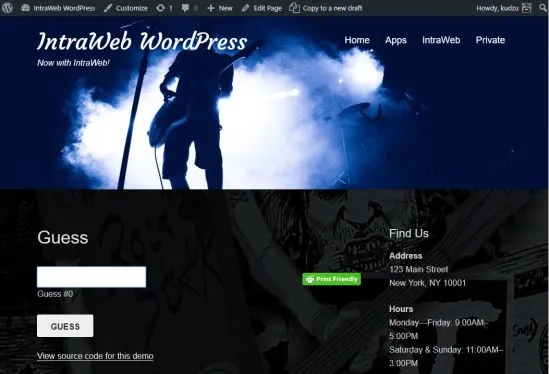
IntraWEB Ultimate 16.2.2 Atozed Software is a corporate sponsor to open source projects and provides web space, server resources, and significant development resources in support of these projects. AD web application development framework for Delphi and C++. Develop like a VCL Forms application, but deploy to the web as standard HTML and jаvascript.

RAD web application development framework for Delphi and C++. Develop like a VCL Forms application, but deploy to the web as standard HTML and jаvascript.

File size: 324 MB


Whats New

System Requirements: Windows 7, 8.1, 10, and 11


HOMEPAGE


Код:
https://www.atozed.com/


DOWNLOAD

Код:
https://rapidgator.net/file/fdb6fc031d20a012fe189813ff2abc09/IntraWEBUltimate16..rar.html

Код:
https://nitroflare.com/view/44BA000AD62CE05/IntraWEBUltimate16..rar
 
Назад
Сверху Снизу