All mitsumi'1s Applications !! (updated daily)

a1a31d8b0db7f533fcbb7f84a9d619b1.webp

Lucion FileCenter Suite 12.5.36 | 288.1 Mb
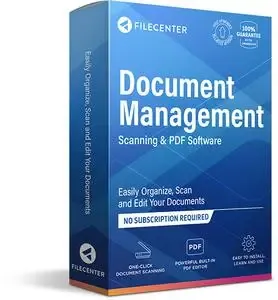
FileCenter DMS is the most fully-featured and inexpensive document management software for small offices. It combines easy scanning and file organization with powerful PDF creation and editing. It also includes OCR, search, and integration with cloud services like Google Drive, OneDrive and Dropbox. Feature-for-feature, FileCenter DMS delivers at a price the competition can't touch.


Document management for small businesses
Professional offices and small businesses have been largely ignored in the document management and DMS arena. This includes financial planners, lawyers, accountants, insurance brokers, manufacturing facilities, warehouses - any small industry that has to process and organize high volumes of paper. Whether it's invoices or receipts, contracts or quality control documents, financial statements or medical records and estate plans... these industries have been forced to struggle under the weight and cost of full enterprise systems, or choose to go without.
FileCenter DMS fills this void with a fully-featured, highly-affordable DMS specifically designed for small businesses.
You can bring every one of your existing files into FileCenter DMS for organizing, without messy imports or conversions - then begin to enjoy FileCenter's powerful document management features, like naming options, folder templates, and easy document searching.
Manage & organize files from a single, unified interface
Powerful document management software need not be complex. Organize your files, scan your paper documents, edit your PDFs, and search your archives from one clean, simple interface in a way that makes sense: electronic filing cabinets. These cabinets use a familiar Cabinet/Drawer/Folder layout, in an easy left-to-right flow. Cabinets "overlay" regular Windows directories automatically, so you can view your existing files in cabinets without importing them. You can also store any kind of Windows file in a cabinet. (If you prefer a traditional Explorer layout, FileCenter also provides an Explorer View.)
Open & save any file type
FileCenter DMS can store any kind of Windows file. It also integrates cleanly with the Save and Open functions of most programs. This means you can (optionally) replace your standard Windows Save/Open dialogs with custom FileCenter versions. Save files directly into your file cabinets from most of your programs, as part of your usual workflow - no importing necessary. Then open them again from FileCenter in your favorite applications. This integration can be enabled/disabled on a program-by-program basis.
Save files with pre-defined naming rules
The most tedious part about saving a file is now the easiest: picking a name. Set up a list of your common ✅File Names. Include dynamic information if you'd like. When it's time to save or rename a file, name it with a mouse click. FileCenter DMS Professional and Pro Plus also add file naming rules known as Naming Options. These can contain dynamic information like dates, customer or patient names, and increments. You can even pull filename text from barcodes or the document's OCR text. Literally name and save your files or new scans with a couple of mouse clicks.
Manage incoming files with an inbox
If you receive a steady inflow of files to a specific folder, FileCenter DMS can show you a split view with this inbox on top, and your regular cabinets on the bottom. It's then easy to move the incoming files into your cabinets. Combine this feature with Naming Options and the Drop Renaming feature, and you can literally organize and rename dozens of incoming files with a simple drag-and-drop.
Ensure consistent folder layouts with templates
Make setting up standardized folder structures a piece of cake by turning folder layouts into reusable templates. You can define reusable folder layouts that are as simple or complex as you like, including nested folders many layers deep. You can then apply these layouts to any drawer or folder. They become especially useful when you add new drawers or folders - apply a folder layout at the same time. Consistent layouts are critical to an easy-to-use file organization system.
System Requirements:
OS: Windows 10 or newer. Full compatibility with 64-bit machines.
CPU: 4-core processor / 8-core recommended
Memory: 4 GB / 12-16 GB recommended
Scanner: TWAIN Compliant Scanner or a ScanSnap (if you plan to do scanning)
Home Page-
Код:
https://www.filecenter.com/

Rapidgator
Код:
https://rapidgator.net/file/3473cb947ab78746b61c6412e2746fcc/9wfrl.Lucion.FileCenter.Suite.12.5.36.rar.html

Код:
https://nitroflare.com/view/2F67BF91C2CBDAA/9wfrl.Lucion.FileCenter.Suite.12.5.36.rar
 
82c1cc34a21cfc9fb79ecfdaf7c42523.webp

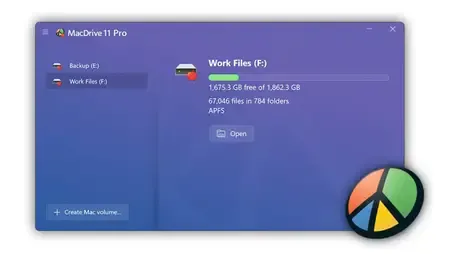
MacDrive Pro 12.0.1.23 (x64) | 11.28 Mb
The Easy Solution for Accessing Mac Disks, Drives, and even RAID Volumes in Windows. Working in a multi-platform environment is a daily occurrence in schools, companies, in the studio, and on set. With MacDrive installed on your Windows PC, you can easily share files to and from APFS and HFS+ formatted internal drives, portable and desktop multi-bay drives, and even iPads. Regardless of the platform, you can read and write to the drive and then share those files. MacDrive gives you fully compatible and reliable out-of-this-world data sharing convenience.


By installing OWC MacDrive on a Windows PC, you make it become "Mac aware" and can access Mac-formatted drives easily. There is nothing to launch or learn. MacDrive 11 Standard allows users to simply connect a Mac-formatted drive to your PC and it will behave like any other disk on the system. You will be able to read and write to almost any hard drive, SSD, CD, DVD, and more. You can even access SoftRAID and Apple RAID 0 and RAID 1 volumes with MacDrive 11 Pro.
What's New in MacDrive 11?
OWC MacDrive has been the industry leader for accessing Mac disks in Windows for over 25 years. With the introduction of MacDrive 11, we're excited to bring full support for Apple's new file system APFS to Windows.
MacDrive's support for APFS is unmatched. You get more speed, features, and protection than any other solution. MacDrive provides full read and write support, APFS crash protection, multi-volume APFS disks, APFS formatting, and much, much more.
New APFS Features:
Full read and write support for APFS volumes
APFS crash protection
Supports multi-volume APFS disks
Mount any snapshot on APFS volumes
APFS formatting
Read/write duplicated APFS file
Read/write files that are included in snapshots
Packed With Features You Can't Find Anywhere Else:
FAST AND RELIABLE
From filmmakers to recording artists, IT professionals, and students and faculty, thousands of Windows users rely on MacDrive's speed and data protection.
HARD DISKS AND MORE
Access almost any type of Mac-formatted disk including hard drives, DVDs, CDs and more just like you were using a PC disk. You can even mount a Mac in Target Disk mode!
MANAGE MAC DISKS
Along with quick access, MacDrive's Disk Manager enables you to take control of Mac disks with easy formatting, partitioning and even disk deletion.
REPAIR MAC DISKS
MacDrive's Disk Repair feature will automatically detect issues with Mac disk and will fix common errors on disks. (HFS+ only)
TIME MACHINE BACKUPS
MacDrive allows you to browse through Time Machine backups as well as copy those files and folders to your PC.
NATIVE OR VIRTUAL
You can use MacDrive on a Mac with VMware Fusion or Parallels.
READ ONLY
MacDrive Pro "Read Only" mode is perfect for forensic specialists to prevent changes to disks.
FILE DEFRAGMENTATION
Improve your disk performance with automatic file defragmentation and optimization. (HFS+ only)
EVEN MORE DISK ACCESS WITH MACDRIVE PRO
MacDrive 11 Pro takes Mac disks access in Windows even further with full read and write access to Mac APFS and HFS+ formatted SoftRAID and Apple RAID 0/1 volumes.
With MacDrive 11 Pro your Windows PC can access almost any Mac disk available.
MacDrive is Perfect For:
Anyone using both Mac and Windows computers and needing to move data seamlessly and easily between systems
Video and audio professionals editing projects in a cross-platform environment
Students and educators with mixed computer labs or for example use Mac at school and PC at home
Business users can easily exchange work between work and home computers.
IT/System admins can easily manage mixed media without worrying about format complexities
Law enforcement and data forensics can take advantage or read only mode and access disks without knowing their format and preserving data integrity
Home Page -
Код:
https://www.macdrive.com/

Rapidgator
Код:
https://rapidgator.net/file/d0343383410ffe9995e8eba81aa09998/4b2bh.MacDrive.Pro.12.0.1.23.x64.rar.html

Код:
https://nitroflare.com/view/C0E7F0BDE5ECEA5/4b2bh.MacDrive.Pro.12.0.1.23.x64.rar
 
41bd6ea90b528dd3655974b1dc294575.webp

MediaHuman YouTube To MP3 Converter 3.9.21 (1906) Multilingual (x64) | 76 Mb
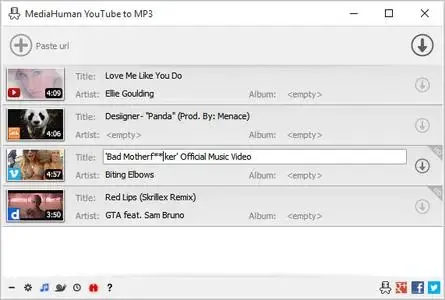
You like to listen to music on YouTube or SoundCloud and want to save it for offline playing. Or you want to download soundtrack of a new movie. Then we recommend you to try out this software developed specifically for this purpose.


Downloads all music from playlist or channel
Downloads highest available quality up to 320 kbps
Supports YouTube, Vimeo, SoundCloud, Dailymotion, VEVO, etc.
Downloads simultaneously several tracks
Includes simple tag editor with cover art support
Works on all modern platforms (macOS, Windows, Ubuntu)
Imports into iTunes
Playlists and channels
The software supports downloading all videos of a playlist or a channel. And there is also an option for subscribing to and downloading only newly uploaded tracks.
iTunes support
In the preferences of the application you can select an option to add downloaded tracks into iTunes automatically. You can also specify iTunes playlist, where the converted track should be added.
Saves your time & traffic
The app detects audio track in YouTube video clip and downloads it, skipping the video part. As a result download speed increases dramatically, especially on HD-quality content.
Simple tag editor
Application automatically detects artist name and track title of the video and saves it in the downloaded file. But at the same time, you can easily change tags to whatever you want. You can even change a cover art image.
Original format, no conversions
You can save audio tracks in original quality without any conversion. It means that there will be no loss of quality and it greatly reduces the downloading time.
Free music
There is a great amount of music on YouTube. You can always find the one you like there. And YouTube to MP3 Converter allows you to save it on your computer for free. Just find the track you like and download it in the quality you need.
Not only YouTube
Vevo.com, Vimeo, DailyMotion, Soundcloud, Bandcamp, HypeMachine, MixCloud, UOL and many other sites are also supported. So you can download music as easy as from YouTube.
Clipboard tracking
The program tracks the content of the system clipboard. It means that you can easily add a video clip without switching from your favorite browser. Just copy an URL into the clipboard and it will be added to the download queue.
System Requirements:
Windows 11, Windows 10, Windows 8, Windows 7, Windows Vista, Windows 2003, Windows XP for PC systems
About 80 Mb of free hard drive space
Home Page-
Код:
https://www.mediahuman.com/

Rapidgator
Код:
https://rapidgator.net/file/7882fc6fa804d97d96049c8a7b3f8541/t12gy.MediaHuman.YouTube.To.MP3.Converter.3.9.21.1906.Multilingual.x64.rar.html

Код:
https://nitroflare.com/view/3DC28486EA8F35A/t12gy.MediaHuman.YouTube.To.MP3.Converter.3.9.21.1906.Multilingual.x64.rar
 
bef493c09f8c52e296de4b4a9d880a4f.webp

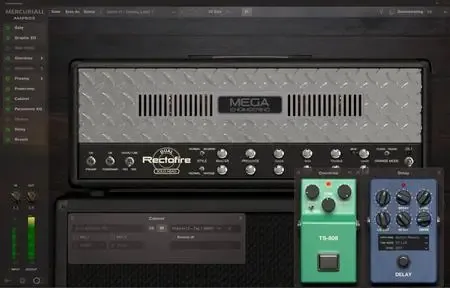
Mercuriall Ampbox v1.9.0 | 123.3 Mb
Mercuriall Ampbox is a next-gen VST/AU/AAX + standalone amp modeling plugin for PC/Mac. It's an ever-evolving platform for all* our products, current and future. You will get Ampbox for free when purchasing one of the supported plugins*. The platform has everything you need to create perfect tones with just one plugin. It's simple, elegant and versatile. Powered by Mercuriall Neural Hybrid Engine v2.0 technology.


* Ampbox supports the following products at this point: Dual Rectofire, Euphoria, ReAxis, U530. More products will be added to the platform in future.
Features:
NEW! Neural Hybrid Engine version 2.0
Used in Dual Rectofire model.
NEW! Power Link technology
Affects the power supply linkage between poweramp and preamp.
Freely movable module windows inside the plugin
Keep open only those modules that you need.
Preamp/poweramp can be switched off independently
More options, more flexibility.
Same oversampling cycle for pedals/preamp/poweramp
No latency build-up and no additional sound quality losses.
Stereo-mode
When used, right/left channels are modeled independently.
Delay and reverb can be used in parallel
No extra routing!
Plugin supports CPU multi-threading
More cores = better plugin performance.
Standalone version
No DAW? No problem, you can still use Ampbox.
Factory and user presets
Robust preset system and manual preset sharing options.
Home Page-
Код:
https://mercuriall.com/cms/details_ampbox

Rapidgator
Код:
https://rapidgator.net/file/1acd3941717cb01fe9d891d670110add/11p1q.Mercuriall.Ampbox.v1.9.0.rar.html

Код:
https://nitroflare.com/view/8B7483A08D1C6C9/11p1q.Mercuriall.Ampbox.v1.9.0.rar
 
29c9996f4167b2671c7529c5218da39f.avif


Obsidian Ebook Reader Premium 2.0.0 Simply your library. Designed for privacy. Obsidian is a Windows ebook reader built around library management and privacy. Point it at your folders, organize EPUBs and PDFs, and read entirely offline - with no accounts, ads, or telemetry.

Built for your library and your privacy
Organize books from your own folders, keep everything on your machine, and read without handing data to anyone else.

Languages: English
File Size: 141.59 MB


Add books your way
Import one file at a time, pull in a whole folder, include nested subfolders, or set up folder sync so your library stays up to date automatically.

- Add File - single EPUB or PDF
- Add Folder - bulk import
- Include Subfolders
- Sync Folders - auto-scanned directories

Edit book metadata
Fix titles, authors, and cover art after import so large collections stay organized. Premium lets you curate every detail of your shelf.

- Edit title and author
- Replace cover images
- Reset to defaults when needed

Browse and organize at a glance
See covers, titles, authors, and formats in a sortable list. Mark favorites, switch views, and manage growing collections without losing track of a single book.

- Sort and filter your collection
- List and grid-style browsing
- Light and dark interface themes

Typography and layout controls
Open the styling panel while you read to adjust fonts, spacing, and margins. Dial in a comfortable layout for long sessions on any screen.

- Font family and size
- Line, word, and letter spacing
- Margin presets and page layout

Release Notes
System Requirements
Windows 10 version 14316.0 or higher


HOMEPAGE


Код:
https://obsidianreader.app/


DOWNLOAD

Код:
https://rapidgator.net/file/845bb0bdedf971065c8c8443fe15436e/Obsidian.Ebook.Reader.Premium.2.0.0.rar.html

Код:
https://nitroflare.com/view/810298C19C1368C/Obsidian.Ebook.Reader.Premium.2.0.0.rar
 
1932220e34f350513a75f4bf2fd09578.webp

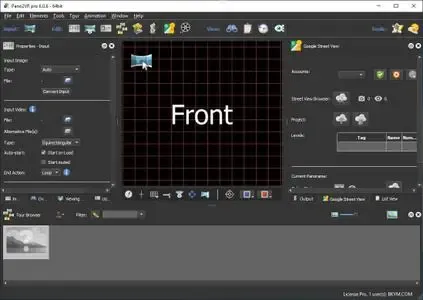
Pano2VR Pro 8.0.2 (x64) Multilingual Fast Links | 132.5 Mb
Pano2VR allows you to publish your panoramic images within minutes. No matter what type of project you're working on, whether, a gigapixel panorama or virtual tours with hundreds of nodes, Pano2VR will help you to quickly get your project up and running on the desktop as well as mobile devices.


mprove your images.
Sometimes panoramas are not level and have unwanted tripods...it happens. Straightening the horizon and removing the tripod from the panorama can be accomplished with a few simple clicks.
Build a Virtual Tour.
No matter how large the tour, Pano2VR Pro can help you quickly and easily put it together with automatic linking, filtering, master node editing and a built-in Tour Map.

Enhance the experience.
Add interactive elements like hotspots, directional sound and video to your panoramas. Use the powerful Skin Editor to design custom buttons and controllers - all of which can be made responsive so the design fits to any screen. No coding required. We promise!
Seamlessly change projections.
Easily reproject spherical panoramas during viewing or open a panorama from a little planet view to a rectilinear view on opening or create a standard format video that moves through different projections.
Reveal the highlights.
Guide viewers by creating an animation path through your panoramas or tour to show off the best areas. At any time, the viewer can interact and explore further. You can even export this walk-through as a video file.
Contribute to Google Street View.
Pano2VR offers an easy way to add and edit existing panoramas and tours to Google Street View. Once you've connected your account, you will see all tours and panoramas that you've uploaded to Google Street View. You can continue to add to your gallery or even download the existing images.
Show your work.
Export your panoramas as HTML5, Flash or QuickTime VR formats or use our handy plugins to post them directly to your Wordpress, Joomla or Drupal site. Pano2VR will also help you to transform your images into different projections for printing.
Pano2VR 6.0
Pano2VR 6.0 brings major updates to the Tour Map, Animation Editor and Viewer. You can now add floor plans to your project and correctly geolocate indoor nodes, control and animate skin elements with the Animation Editor, and view and interact with 360 video in the Viewer.
Tour Map
The Tour Map received, perhaps, the biggest update. It can now better assist in general tour building and with Google Street View tours with the addition of being able to add custom floor plans.
Floor plans, are maps of the interior of buildings where it is also likely that location data has not been recorded during a shoot. So, we added the ability to geolocate the floor plan to the tour map so that when a tour node is added to the floor plan, it will be given location data. This is especially helpful for those building tours for Google Street View and need accurate placement of nodes inside of buildings. Floor plans that have been added to the Tour Maps, can also be used in the Skin Editor using the Map element. In addition to the floor plans, map pins can now be moved in bulk.
Animation Editor
The Animation Editor is now a panel and it, too, is more powerful. You can now connect skin elements to the animation. This lets you apply, for example, subtitles or text boxes that can appear and disappear at a defined time in the animation.
Previously, the animation editor only had the ability to create a single series of clips. Now, we can create sequences, which are a group of clips, in the same project. We can then, select a specific sequence to output as an animation or as auto rotation. This makes it much easier to create multiple versions of an animation without having to create multiple projects.
Skin Editor
The Skin Editor got new features, too. The most notable feature would be the changes made to the Maps element. This is how you would add a map or floor plan overlay to your project. Previously, only a map could be added to the map element.
We've also added a way to change skins without having to open the Skin Editor - making it easier to adapt a skin to the current project using the Edit Skin Configuration button. Finally, positioning in the Skin Editor has been completely reworked to better reflect the way positioning works in HTML5. This means that when you open older skins, you may find that the positioning measurements have changed. Don't worry, it's not broken; just, the numbers have changed.
Viewer
The Viewer has been updated to be able to playback 360º video, making it much easier to work with the medium. Once the panoramic video has been added to the Viewer or Tour Browser, a transport control will appear in the Viewer.
More Features:
- Improved gigapixel support with tiled multi-resolution
- Fast loading for tours with more than 10,000 nodes
- Custom Fly-in effect
- Custom map tiles
- Filtered actions
- Flash and QuickTime outputs no longer supported
Requirements:Windows 7 and higher (64-bit).
Home Page -
Rapidgator
Код:
https://rapidgator.net/file/65792eea82af30921ef0f5d50637dd0c/q6up3.Pano2VR.Pro.8.0.2.x64.Multilingual.rar.html

Код:
https://nitroflare.com/view/D0FBD78EAEA6BE7/q6up3.Pano2VR.Pro.8.0.2.x64.Multilingual.rar
 
70763141d12fcb8f412006c4f216bd49.webp

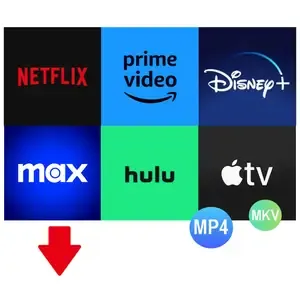
Pazu StreamGet 3.1.4 Multilingual Fast Links | 244.4 Mb
Download movies and shows from various streaming platforms to MP4/MKV on your Windows device and enjoy them anywhere you want.


Download videos from the most popular streaming services including Netflix, Prime Video, Disney Plus, Max, Hulu, Apple TV Plus, and more.
Download movies and shows to MP4/MKV
High-quality downloads up to 1080p.
Freely choose to keep any or all audio and subtitles.
8x fast downloading speed
Multiple downloads at a time
Select how subtitles are saved (hardcoded, softcoded, or external files).
Multilingual interface: English, Deutsch, Espanol, Francais
Download All, Download Now
StreamGet All-In-One Video Downloader is the ultimate download solution for you. It supports downloading any movies and shows from the most popular streaming websites including Netflix, Prime Video, Disney Plus, Max, Hulu, and Apple TV Plus. The downloader is continuously updated to support more platforms in the future.
Support downloading from various streaming platforms
Download as many movies and shows as you want
Watch on any supported device
Download movies in up to 1080P
Continuously updated
User-friendly Interface and built-in browser
StreamGet All-In-One Video Downloader simplifies your download process by offering a built-in browser. This allows you to directly search for movies or TV shows within the application. Simply select your preferred streaming service from the homepage, enter a title or keywords, and let StreamGet present the search results for you.
One-stop browsing experience with the built-in browser
Simple and clear user interface
Multilingual Support
Search the movie/show title or copy&paste the link
Download videos in high quality at a fast speed
StreamGet All-In-One Video Downloader delivers the perfect combination of speed and quality. You can download high-quality videos starting from 720p(HD) and up to 1080p (FHD). Moreover, it uses multi-threading to increase download speed. Experience downloads 8x faster than standard speeds.
8x fast downloading speed
One click to download all seasons and epidodes
Choose the format, audio track, and subtitle you want
Download videos in H.265(High-Efficiency Video Coding, HEVC) or H.264(Advanced Video Coding, AVC).
Audio and subtitle customization
StreamGet All-In-One Video Downloader offers comprehensive multi-language support for downloaded videos. You can choose to download audio tracks and subtitles in any language available on the original streaming service. This flexibility ensures you can enjoy your content in your preferred language.
Freely choose to keep any audio and subtitles available.
Save subtitles as Soft subtitles, External subtitles or Hard subtitles.
Support preserving all available audio track and subtitle languages.
Keep Audio description and Audio surround sound
Ultimate offline playback experiences
With StreamGet All-In-One Video Downloader, you can download videos from Netflix, Amazon Prime Video, Disney+, Max, Hulu, and Apple TV+ even with an ad-supported subscription. These downloaded videos can be transferred to various compatible devices and applications for offline playback, offering greater flexibility in how you enjoy your favorite content.
Download videos even with an ad-supported account
Watch streaming videos offline on any devices you want
No video streaming app is required
Downloaded videos are stored locally and will never expire.
Home Page-
Код:
https://www.pazu-video.com/streamget-all-in-one-for-windows.html

Rapidgator
Код:
https://rapidgator.net/file/c98766cd5b02d500f936595aca548483/44xwc.Pazu.StreamGet.3.1.4.Multilingual.rar.html

Код:
https://nitroflare.com/view/4A1CE3F97AC88B1/44xwc.Pazu.StreamGet.3.1.4.Multilingual.rar
 
70763141d12fcb8f412006c4f216bd49.webp

Pazu StreamGet v3.1.4 Multilingual Portable Fast Links | 229 Mb
Download movies and shows from various streaming platforms to MP4/MKV on your Windows device and enjoy them anywhere you want.


Download videos from the most popular streaming services including Netflix, Prime Video, Disney Plus, Max, Hulu, Apple TV Plus, and more.
Download movies and shows to MP4/MKV
High-quality downloads up to 1080p.
Freely choose to keep any or all audio and subtitles.
8x fast downloading speed
Multiple downloads at a time
Select how subtitles are saved (hardcoded, softcoded, or external files).
Multilingual interface: English, Deutsch, Espanol, Francais
Download All, Download Now
StreamGet All-In-One Video Downloader is the ultimate download solution for you. It supports downloading any movies and shows from the most popular streaming websites including Netflix, Prime Video, Disney Plus, Max, Hulu, and Apple TV Plus. The downloader is continuously updated to support more platforms in the future.
Support downloading from various streaming platforms
Download as many movies and shows as you want
Watch on any supported device
Download movies in up to 1080P
Continuously updated
User-friendly Interface and built-in browser
StreamGet All-In-One Video Downloader simplifies your download process by offering a built-in browser. This allows you to directly search for movies or TV shows within the application. Simply select your preferred streaming service from the homepage, enter a title or keywords, and let StreamGet present the search results for you.
One-stop browsing experience with the built-in browser
Simple and clear user interface
Multilingual Support
Search the movie/show title or copy&paste the link
Download videos in high quality at a fast speed
StreamGet All-In-One Video Downloader delivers the perfect combination of speed and quality. You can download high-quality videos starting from 720p(HD) and up to 1080p (FHD). Moreover, it uses multi-threading to increase download speed. Experience downloads 8x faster than standard speeds.
8x fast downloading speed
One click to download all seasons and epidodes
Choose the format, audio track, and subtitle you want
Download videos in H.265(High-Efficiency Video Coding, HEVC) or H.264(Advanced Video Coding, AVC).
Audio and subtitle customization
StreamGet All-In-One Video Downloader offers comprehensive multi-language support for downloaded videos. You can choose to download audio tracks and subtitles in any language available on the original streaming service. This flexibility ensures you can enjoy your content in your preferred language.
Freely choose to keep any audio and subtitles available.
Save subtitles as Soft subtitles, External subtitles or Hard subtitles.
Support preserving all available audio track and subtitle languages.
Keep Audio description and Audio surround sound
Ultimate offline playback experiences
With StreamGet All-In-One Video Downloader, you can download videos from Netflix, Amazon Prime Video, Disney+, Max, Hulu, and Apple TV+ even with an ad-supported subscription. These downloaded videos can be transferred to various compatible devices and applications for offline playback, offering greater flexibility in how you enjoy your favorite content.
Download videos even with an ad-supported account
Watch streaming videos offline on any devices you want
No video streaming app is required
Downloaded videos are stored locally and will never expire.
Home Page -

Rapidgator
Код:
https://rapidgator.net/file/0a9b264aaab9fdfab9ca41f00ef55128/gegtb.Pazu.StreamGet.v3.1.4.Multilingual.Portable.rar.html

Код:
https://nitroflare.com/view/BF35FCD60A6D808/gegtb.Pazu.StreamGet.v3.1.4.Multilingual.Portable.rar
 
6fa6d2ccc535bcfcfc4015134fa0c34e.webp


Proxima FontExpert 2026 21.0 Release 1 Multilingual Install new fonts and organize existing ones, correct errors and eliminate duplicates with the help of this easy to use application. If you are often required to work with fonts, then a good manager for all the entries might be quite useful to have around. FontExpert is a nice tool that was built to make the task of picking a fond easier.

The program has a clean interface and an intuitive layout, making it easy to handle even by the less experienced users.
The entire list of available fonts is available in a list, complete with the name, family style, character set and ID. They are also presented with their name written in the font. By clicking on any of the entries, it's possible to view all the characters that come with the font, including the regular letters, symbols and special characters. To get a better view of each letter, it's possible to change the font size.

Windows x64 | File size: 16.89 MB


Features

View and Preview Fonts
FontExpert displays the list of all installed typefaces and lets you explore folders and preview uninstalled fonts located on your compact disks or DVDs, local disks, removable disks or network drives. You can preview the font as a paragraph of text or as a detailed character map. It is easy to choose the desired font size, font style or color.

Assign Keywords, Ratings and Categories to Fonts
Assign keywords, categories, ratings and captions in new Tags view.

Search in Database
Search for fonts in the database by keywords, ratings and categories in new DB Search view.

Search for Fonts on Local Discs and Network Drives
FontExpert can search your local disks, CDs or DVDs, network drives for fonts, and put all fonts to a special list for your further work.

Search for Duplicates and Corrupted Fonts
FontExpert automatically detects corrupted and incomplete fonts, and allows you to search for and manage duplicate fonts.

Manage Fonts
It is easy to manage any typefaces that are shown in any view of the program. You can sort, filter, preview fonts, copy, move, delete font files, activate or deactivate fonts, add or link fonts to font groups (sets). The program can control fonts located in the Windows Fonts and Psfonts folder (used by Adobe Type Manager), so you do not need to remove fonts from standard folders as some font managers require.

Create Font Library
FontExpert imports fonts and creates font library. You can keep your fonts organized in groups (sets), and activate or deactivate font sets. A group may include either the font file, or a link to a file located in any folder on your computer or network drive. It is easy to add fonts or links by drag-and-dropping from the Windows Explorer to the Groups view.

Print Fonts
FontExpert can print selected fonts. It is easy to print character map, "water flow" or face name reports for selected fonts, either installed or uninstalled. You can customize and format page headers and footers as desired, for example, by adding the name of your company.

View Advanced Font Properties
The program displays detailed information about the selected font, including type foundry or copyright, TrueType tables, number of kerning pairs in a font, Panose attributes, Windows font metrics and more.

Examine your System for Font Errors
With the help of Detect Font Problems feature, it is easy to find errors in installed fonts and to optimize Windows by resolving typeface conflicts and by removing records about missing fonts.

Export Fonts to HTML Web Album
FontExpert can create HTML Web Album from selected fonts. You can create GIF, JPG, PNG, TIFF, and BMP images of selected font faces. See the sample of HTML page created by FontExpert.

Automatic Activation of Missing Fonts
FontExpert includes Missing Fonts Loader plug-in for Adobe InDesign, and for Adobe Illustrator.

Windows Shell Extensions
The program adds Open, Print and Install Font custom menu commands to Windows Explorer context menu, and adds custom property page that displays detailed attributes of selected .ttf or .otf file. FontExpert adds font management capabilities to the shell so it is easy to activate or print any font in a folder you browse in Windows Explorer.

What's new

System Requirements: Windows 11, 10, 8.1, 8, 7 (x64 bit only)


HOMEPAGE


Код:
https://proximasoftware.com/


DOWNLOAD

Код:
https://rapidgator.net/file/ea8ebd992def4ee229a8e9b2a9704bb5/FontExpert.21.0.1.rar.html

Код:
https://nitroflare.com/view/2E0805D435BBFE8/FontExpert.21.0.1.rar
 
570fbc73149fec4497a10c736f8d27f1.webp

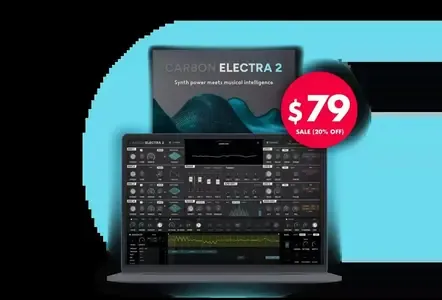
Scaler Music Carbon Electra 2 v2.0.3 | 111.7MB
Synth power meets musical intelligence


Create sounds, grooves and chord progressions with Waveterrain oscillators, Scale Lock, musical filters and a scale-aware note/chord sequencer.
Dive into the Features
Scale Lock and Musical Control
Oscillators can lock to musical scale degrees instead of only traditional pitch values.
Sequencer can lock to diatonic notes and chords within the selected scale.
Musical filter can lock to scale notes, incoming chord tones or interval relationships.
Designed to keep sound design, sequencing and modulation musically connected.
Wave Terrain Oscillators
All-new waveterrain oscillator mode based on topographic terrain-style sound generation.
Upload your own terrain images in .png format to create custom oscillator behaviour.
Control how the sound interacts with terrain edges in 3D aspect.
Adjust terrain size and movement for different tonal results.
A new alternative to wavetable synthesis, with its own movement, texture and character.
Also includes classic analogue waveforms and wavetable oscillator modes.
Four-Oscillator Synth Engine
Four independent oscillators.
Classic, wavetable and waveterrain oscillator options.
Per-oscillator pitch, tune, width, cascading FM and position-style controls depending on oscillator type.
Unison support across oscillators.
Flexible oscillator blending through the central mixer.
Note and Chord Sequencer
Scale-based note and chord sequencer.
Write freely in chromatic mode or stay locked to the chosen scale.
Chord mode allows diatonic chord programming.
Supports chord extensions and inversions.
Ideal for musical riffs, basslines, arps, chord patterns and evolving harmonic sequences.
Multi-Shape Step Sequencer
Multi-shape modulation step sequencer.
Assignable to multiple parameters.
Can run independently from the note/chord sequencer.
Timing can be divided or multiplied against the main sequencer rate.
Useful for rhythmic movement, filter patterns, pitch modulation, wavetable movement and FX automation.
Musical Filter System
New musical filter modes including interval, chord and scale-based behaviour.
Filter movement can follow musical relationships rather than only static cutoff values.
Designed for harmonic filtering, resonant movement and scale-aware sound shaping.
Includes traditional filter controls such as cutoff/offset, resonance, focus/window and keytracking.
Flexible Mixer and Routing
Four-channel oscillator mixer.
Per-oscillator level and panning.
Re-routable oscillator/filter paths.
Optional gain boost mode.
Designed for complex layering and movement between oscillator sources.
Reorderable FX Stack
Powerful onboard effects section.
Includes delay, distortion, chorus, EQ and reverb.
Effects can be reordered.
FX parameters can be modulated.
Designed for creating finished sounds directly inside the instrument.
New Assignable Modulation System
Flexible modulation assignment workflow.
Assign modulation sources to multiple destinations.
Clear visual destination lists per modulation source.
Supports LFOs, envelopes, sequencer modulation and performance controls.
Multiple LFOs and Envelopes
Three dedicated LFOs.
Amp envelope and modulation envelope.
LFO sync, trigger and mono modes.
Adjustable LFO waveforms and destinations.
Velocity control for envelope behaviour.
Performance and Voice Controls
Main output section with level control.
Mono, retrigger, legato and limiter options.
Unison voice controls.
Detune, width, tune, pitch bend range and glide controls.
Mod wheel assignment support.
Advanced Preset and Sequence System
User sequence area with visual waveform/shape display.
Save and recall musical sequences and arps.
Designed for both sound design and musical phrase creation.
Stronger link between preset design, harmony and performance.
Includes 362 presets in total, with artist presets from producers including Carl Cox, Timo Garcia, Faze Action and Christian Laffitte.
Home Page-
Код:
https://scalermusic.com/products/carbon-electra-2/

Rapidgator
Код:
https://rapidgator.net/file/361ef3254a4ec60c6f053833381f6e57/3hukr.Scaler.Music.Carbon.Electra.2.v2.0.3.rar.html

Код:
https://nitroflare.com/view/3E8773D55AD26E7/3hukr.Scaler.Music.Carbon.Electra.2.v2.0.3.rar
 
c786a24127be8b5d1c85c4e332b99029.webp

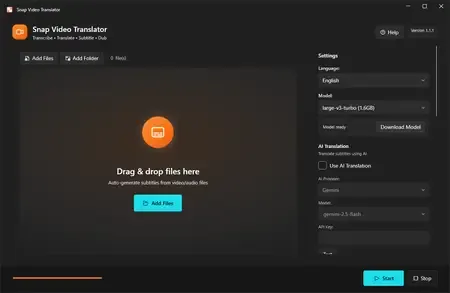
Snap Video Translator 1.1.1 | 395 MB
Snap Video Translator brings every step of localizing a video into a single Windows app. Load a video and it takes you straight through transcription, AI translation, and either subtitle burn-in or an AI voice-over.


Transcription (runs locally)
Runs OpenAI Whisper on your own PC. Choose from small / medium / large-v3-turbo / large-v3 to balance speed and accuracy. Your audio is never sent to an external server for transcription.
AI translation
Works with AI services such as Gemini, OpenAI, and Claude, or with an OpenAI-compatible local LLM. Produces natural translations of your video's content.
Subtitle burn-in
Adjust font size, text color, outline, and position, then burn subtitles directly into the video.
AI dubbing
Converts the translation into speech and generates a voice-over in 7 languages (Japanese, English, Chinese, Korean, French, German, Spanish). Mix it with the original audio or replace it.
Subtitle file export
Export subtitle files in SRT / VTT format.
Review & edit mode
Check the subtitle text on screen before burn-in and edit it if needed.
Batch processing
Process multiple videos at once.
Who it's for
- Video creators who want to reach viewers in other languages
- Education and training teams localizing lectures and tutorials
- Companies localizing internal videos
Before you start
- Transcription runs locally with Whisper; your audio is not sent anywhere.
- Using a cloud AI service for translation requires that service's API key. You can also use an OpenAI-compatible local LLM.
- AI translation and AI dubbing require an internet connection (no API key is needed for dubbing).
- Subtitles and dubbed audio are AI-generated. Please review the output before public or business use.
- FFmpeg is bundled as the video processing engine.
System Requirements
Windows 10 version 19041.0 or higher (64-bit)
* Japanese / English UI, selected automatically.
Home Page -

Rapidgator
Код:
https://rapidgator.net/file/c4b26db8d4cffb730007f6cc4dc860c7/5oyn0.Snap.Video.Translator.1.1.1.rar.html

Код:
https://nitroflare.com/view/873F6A035DCB69D/5oyn0.Snap.Video.Translator.1.1.1.rar
 
537580e9103a85e3f1cd375f20763415.webp

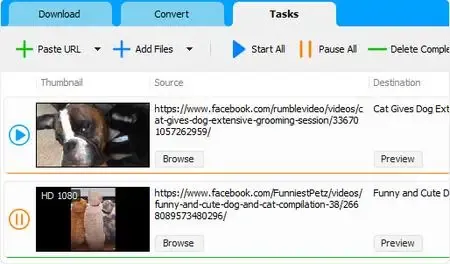
Social Media Downloader 8.5.5 (x64) | 146.2 Mb
Social Media Downloader is a simple and easy-to-use app for downloading and converting your favorite videos and audio from social web sites.


Home Page-
Код:
https://www.socialmediaapps.com/

Rapidgator
Код:
https://rapidgator.net/file/87990c1cf7698bf7f6c2a54adb101994/nkjwe.Social.Media.Downloader.8.5.5.x64.rar.html

Код:
https://nitroflare.com/view/9BABC7FEA2B212B/nkjwe.Social.Media.Downloader.8.5.5.x64.rar
 
12c0d9966fe9606a4597069199bc7e4f.webp

SoftPerfect RAM Disk 26.6 (x64) Multilingual Fast Links | 6 Mb
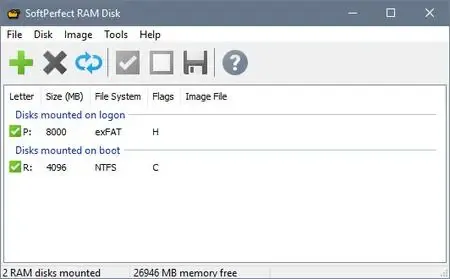
SoftPerfect RAM Disk is a high-performance RAM disk application that lets you have a disk on your computer entirely stored in its memory. As the memory is much faster than physical hard disks, storing temporary data on a fast in-memory disk achieves a higher performance. Whatever your job is, read on to find out what a RAM disk can offer you.


SoftPerfect RAM Disk creates a virtual disk residing in the computer RAM accessible in Windows Explorer and other applications, allowing you to store any temporary information on this disk. Furthermore, Windows can be configured to use the RAM disk for temporary files, so that the system and most applications would use the fast in-memory disk for their temporary data. As Windows and other third-party applications often create a large number of temporary files for a short time only, using a RAM disk will extend your hard disk's life by sparing it from excessive reading and writing.
Modern computers are equipped with at least 4 GB of RAM, and most of the time there is a lot of unused memory that could be used as a high-performance alternative to the slower HDD storage. This product lets you create any number of virtual RAM disks limited only by the memory available. You can also work with on-disk images and RAM disks associated with an on-disk file, that ensures your data is preserved between sessions.
While regular users will benefit from moving web-browser caches and Windows temporary files to a RAM disk, IT professionals may find even more advantages. For example, programmers can speed-up the development process by redirecting intermediate compiler output to a RAM disk, database administrators can improve performance by using a RAM drive for things like tempdb, and so on.
Key features of the RAM Disk:
Any number of RAM disks. In practice, up to 26 disks due to the number of drive letters available.
Any RAM disk size on 64-bit systems. Up to approximately 3.5 GB on 32-bit systems.
Persistent RAM disks with an associated on-disk image.
Volatile RAM disks whose content disappears on shutdown.
Built-in disk image manipulation tools.
Five very good reasons to use the RAM Disk:
Higher computer performance. Provided you have a sufficient amount of RAM, using a fast in-memory disk for temporary data will boost the computer performance.
Reduced wear-and-tear of the physical disk. Because temporarily files are not written to the hard disk, there will be fewer read/write cycles, which is especially important for prolonging the life of Solid State Drives (SSD) commonly installed in laptops.
Less junk on the hard disk. Many software applications create temporary files that remain undeleted although no longer needed. The contents of RAM disks is cleared every time the computer is restarted or switched off, so the unneeded files won't clutter your hard drive.
Reduced file system fragmentation. The file system on your hard disk will be far less fragmented as the temporary files will never be written to the hard disk.
Less noise and heat from the hard disk because the system will use the hard disk less intensively.
Supported platforms:
Windows XP through Windows 10,
Windows Server 2003 through 2016
32-bit and 64-bit
Home Page -
Код:
https://www.softperfect.com/

Rapidgator
Код:
https://rapidgator.net/file/cc16a50b94abebcfdfa069e4c2a39a92/2id0q.SoftPerfect.RAM.Disk.26.6.x64.Multilingual.rar.html

Код:
https://nitroflare.com/view/15600D7CD13F9D5/2id0q.SoftPerfect.RAM.Disk.26.6.x64.Multilingual.rar
 
9cf169efffe7af7195dd6360f9c60fa2.webp

Syncovery Premium 12.1.1.36 (x64) Multilingual Fast Links | 100.1 Mb
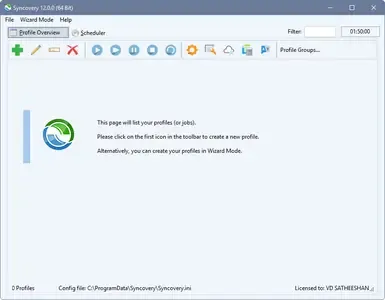
Create your first sync or backup job step by step, with explanations of the main settings you need to make. Each job (or profile) works with two paths - source and destination, or just the left and right path (since profiles can be 2-way copy tasks also).


Extremely Fast Scanning
Syncovery's multi-threaded folder listing algorithm provides an unparalleled speed, and easily handles millions of files and huge numbers of folders. Even more speed can be gained with our Destination File List Cache and Remote Service features.
Block Level Copying
This will help you save bandwidth as well as backup space. Syncovery can detect changed blocks in large files, and copy only these. The detection works by keeping checksums in a database, or with the help of the Syncovery Remote Service, or by using our revolutionary File System Monitoring Service (the File Sytem Monitoring Service is Windows only).
Real-Time Synchronization
Real-Time Synchronization will make sure that changes are synced quickly. Syncovery listens to file system events and quickly performs the appropriate actions. For cloud servers, it can use polling to detect changes. These features are available on Windows and macOS only.
SmartTracking
The SmartTracking sync mode is frequently used in two-way sync jobs. It can detect moved files, deleted files, and conflicts (files changed on both sides).
Versioning
Syncovery allows you to keep multiple versions of modified files, allowing you to restore your files from an earlier date. The restore date can be chosen for individual files or multiple files, in our Restore Wizard.
File Server Migration
Syncovery's advanced NTFS copying features, high speed, and scaleability enable you to perform large-scale migrations. Read our new, comprehensive Server Migration Guide.
Advanced Mode
Keep Everything Under Control
Advanced Mode allows you to unleash Syncovery's full potential. The Profile Overview shows your jobs (or profiles), their last and next run times, and the last result or current progress. You can easily create, edit, and run profiles. Syncovery offers various ways to start profiles. These are available when right-clicking a profile:
Attended Mode
This mode has detailed progress dialogs, and shows the Sync Preview for you to confirm before proceding to the copying phase. It may also show additional confirmation dialogs according to your settings.
Unattended Mode
Unattended Mode also shows detailed progress dialogs, but does not show a Sync Preview and won't ask any further questions. Some confirmations must be given beforehand, in the profile settings (for example, to delete files).
Run in Background
Running a job in the background is the most unobtrusive way to run a profile. You will see basic progress information in the Profile Overview, but no extra dialogs. This is how the scheduler runs profiles. You can still see detailed progress info by right-clicking the job that's already running and choosing "Show Detailed Progress".
Background With Preview
This new feature in Syncovery 9 has proven to be extremely useful. You won't see detailed progress dialog, and the job doesn't block the Syncovery GUI. You can run multiple jobs simultaneously, and check the Sync Preview for each profile when it's ready. After confirming the preview dialog, the job goes into the background again.
System Requirements:
All versions of Windows since Windows Vista and Windows Server 2008 are fully supported, including Windows 10/11 and Server 2019-2025 and all other versions and editions of Windows that have a graphical user interface.
Home Page-
Код:
https://www.syncovery.com/

Rapidgator
Код:
https://rapidgator.net/file/98ef4c0b3ba3de68e7c80560c0d38c75/4qb7l.Syncovery.Premium.12.1.1.36.x64.Multilingual.zip.html

Код:
https://nitroflare.com/view/8380389DAFD8970/4qb7l.Syncovery.Premium.12.1.1.36.x64.Multilingual.zip
 
c2bd68756f01d10983aa4b327a7a1376.webp

TweakNow WinSecret Plus 9.5.1 + Portable Fast Links | 34.6 Mb
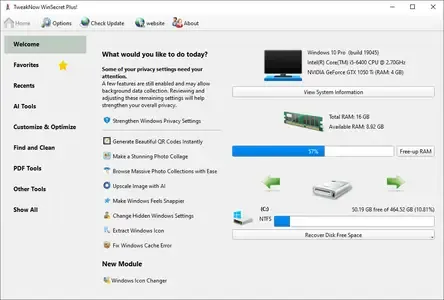
The Ultimate All-in-One Toolkit for Windows 11 and 10. Streamline, optimize, and maintain your PC effortlessly with this top-rated utility suite. It includes over 25 powerful tools designed to help you clean, tweak, repair, and enhance your system. Whether you're a casual user or a power tweaker, this toolkit is your ideal companion for achieving a faster and smoother Windows experience.


Auto Dark Mode - Smarter, Seamless Theme Switching
Windows lets you choose between light and dark mode, but it doesn't offer much flexibility when it comes to switching between them automatically.
Convert Images to PDF, Split & Merge Files - All Offline, All in One App
The new PDF Tools section brings powerful, built-in utilities that eliminate the need for separate apps or risky online converters.
Safely Unlock Windows 11 and 10 Hidden Settings
Effortlessly personalize hidden settings in Windows 11 and 10 to customize your taskbar, desktop, privacy preferences, and more.
Powerful and Comprehensive System Information at Your Fingertips
System Information module is designed to quickly and lightweightly provide all the detailed information you need about your PC's performance and components.
Looking to Supercharge Your Apps or Games Performance?
You can increase the priority level of apps or games to allocate more system resources, such as CPU time and RAM, to them.
Effortlessly Connect to Wi-Fi With QRr Codes
Using a QR code to share your Wi-Fi is super convenient and easy. Instead of typing out a long password, your friends can just scan the code with their phone and connect instantly.
View and Extract Icons From Windows Library (imageres.dll, shell32.dll, Etc.)
Windows 11 has a lot of attractive icons that make both the system look good and fun to use. Have you ever wondered where Windows may bury them in the system?
Keep Your PC Awake While You Are Leaving!
There are times when you might need to keep your PC running and prevent it from going into sleep mode or hibernation.
Effortlessly Convert PDF Into Images
At times, you may need to transform PDF documents into image files.
Quickly Convert HEIC to JPG on Windows
HEIC (High Efficiency Image Format) is a file format for images introduced by Apple with the release of iOS 11 in 2017.
Operating System: Windows 10/11
Home Page -

Rapidgator
Код:
https://rapidgator.net/file/69a62528c5ac9a8ddebbca3726000a98/j6afv.TweakNow.WinSecret.Plus.9.5.1.Portable.rar.html
https://rapidgator.net/file/049464dea58efb8b522f0cb7b1d59d0b/j6afv.WinSecret9.zip.html

Код:
https://nitroflare.com/view/98F82B8EC5D19AD/j6afv.TweakNow.WinSecret.Plus.9.5.1.Portable.rar
https://nitroflare.com/view/4998EBCC635392E/j6afv.WinSecret9.zip
 
34d1f18487eba59b3b8bc44f8130a2dd.webp

Wondershare UniConverter 17.4.1.603 (x64) Multilingual Portable Fast Links | 735 Mb
UniConverter - Best Video Converter Ultimate. Convert, Download, Compress, Edit, Burn Videos in 1000 formats and do more.


Easy-to-Use Video Editor, Makes Your Video Stand Out
You can customize home movies through advanced editing features and get professional-looking works in minutes.
Save Videos From Over 10,000 Sites With One Click
Download or record your favorite 4K/HD videos from popular video sharing sites for enjoyment without Internet connection; Or convert them to compatible formats for playback on TV, smartphone, or other devices.
A Flawless DVD & Blu-ray Experience Anywhere
Powerful DVD toolkit of UniConverter (originally Wondershare Video Converter Ultimate) helps you to create and edit DVD files in an easy way.
Transfer Videos to Devices & External Hard Drives
Transfer media files to Apple devices, Android devices, USB flash drives or external hard drivers easily. More importantly, all unsupported formats will be intelligently converted to compatible ones during the transfer.
All-Purpose Video Toolbox
Wondershare UniConverter (originally Wondershare Video Converter Ultimate) also offers a full set of optimized video tools which will come in handy sometime.
System requirements:
Windows 11 / Windows 10 / Windows 8 / Windows 7 (64 bit OS)
Processor: 750MHz Intel or AMD CPU
Free Hard Disk Space: 100MB or above
RAM: 256MB or above
Home Page-
Код:
https://videoconverter.wondershare.com/

Rapidgator
Код:
https://rapidgator.net/file/bb992621c21debbdbd0f87c281561bac/bj2ts.Wondershare.UniConverter.17.4.1.603.Portable.rar.html

Код:
https://nitroflare.com/view/5B6DB6F819E43D4/bj2ts.Wondershare.UniConverter.17.4.1.603.Portable.rar
 
7cca1407c8581e1f7017544b7015528f.webp

XRecode 3 v1.184 (x64) Multilingual + Portable Fast Links | 34.4/36.5 Mb
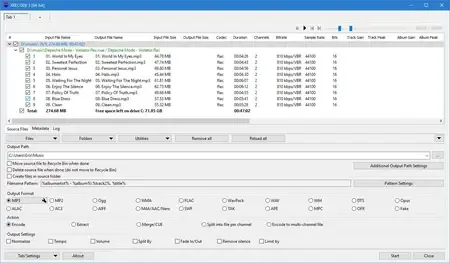
XRECODE3 is audio converter, which supports most of the common audio formats, such as mp3, wav, flac, dsd, etc. It also supports extracting audio file from most video files as well as Audio-CD grabbing. Command Line parameters are supported. Please visit Forum and Wiki for more information on how to use the program.


Home Page -

Rapidgator
Код:
https://rapidgator.net/file/189778086aa9c45da8ab4d3bd8765869/ksiet.XRecode.3.v1.rar.html
https://rapidgator.net/file/7ded42c76d5ece5e6d52d482f676ee0a/ksiet.XRECODE3Portable1.184.rar.html

Код:
https://nitroflare.com/view/7D89A9BBB6402B9/ksiet.XRecode.3.v1.rar
https://nitroflare.com/view/6DE613A0B28C56F/ksiet.XRECODE3Portable1.184.rar
 
5469ab20ce7571791b1d85692a1949fb.webp

UPDF 2.5.5 (x64) Multilingual Fast Links | 225.1 Mb
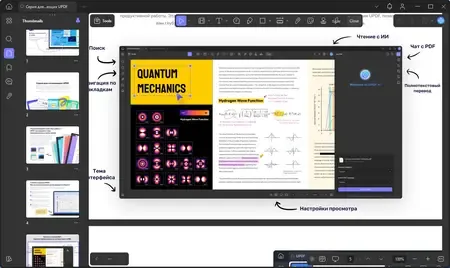
An all-in-one AI PDF editor on Windows that allows you to efficiently and easily edit, annotate, summarize, translate, and convert PDFs.


Editing PDF on PC is as Easy as in Word
UPDF for Windows is an easy-to-use Windows PDF software! Enjoy powerful editing tools for text, images, links, and more in your PDF. Customize backgrounds, watermarks, and page sizes with simplicity like in Word.
Analyze PDFs with 10X Efficiency
Upload a PDF with 100+ pages to get lightning-fast summaries, precise translations, in-depth explanations, and engaging conversations from your documents. Experience a new era of efficiency and accuracy with AI in this PDF editor software for Windows!
Read and Annotate, All in UPDF on Windows
UPDF for Windows offers diverse page display modes and scaling options for an optimal reading experience. Utilize its practical annotation toolkit, including sticky notes, stickers, stamps, highlighters, underlines, and more, to enhance your PDF review.
PDF Conversion. So Fast, So Accurate, So Easy
UPDF PDF editor for Windows offers a complete solution for transforming documents across formats. It provides 7 methods to create PDFs and supports converting PDF to 14 formats.
Digitize Paperwork for Better Collaboration
This PDF editor for PC can help you create fillable forms, share for collaborative filling, embed signatures, and enhance your PDF capabilities. Experience a seamless and customizable PDF journey that boosts versatility for improved collaboration.
Operating System: Windows 10 and higher
Home Page -

Rapidgator
Код:
https://rapidgator.net/file/c195077de4b9df878725bec854f691ce/zx3gt.UPDF.2.5.5.x64.Multilingual.rar.html

Код:
https://nitroflare.com/view/C29F678B66005CF/zx3gt.UPDF.2.5.5.x64.Multilingual.rar
 
0218ea69015f1b0bb5c94950738dbbcc.webp

VideoForge AI Pro 1.0.3 | 547 MB
VideoForge AI Pro - AI video upscaling to 4K - pro features, fully offline. VideoForge AI Pro is the professional solution for AI-based video upscaling on Windows. Batch queue, multiple models, ProRes output - all directly on your GPU, no cloud, no subscription.


- Batch queue: process multiple videos in sequence
- Photo/Realistic + Anime/Illustration model selectable
- Output: 4K / 1080p / 720p / Custom - H.265, H.264, ProRes
- Denoise filter · audio preserved in full
- 100% offline · AMD, NVIDIA, Intel (Vulkan/GPU)
BATCH QUEUE
Drop multiple videos and process them all in one run. Each file shows live status: Queued → Processing → Done . Perfect for processing complete Seedance or Kling projects in one go - start it before bed, wake up to 4K.
TWO AI MODELS
- Photo / Realistic - optimized for cinematic footage, people, real-world scenes
- Anime / Illustration - optimized for animated content, stylized AI art, illustrations
FLEXIBLE OUTPUT RESOLUTION
- 4K Native - full Real-ESRGAN 4x output
- FHD 1080p - 1920x1080 (landscape) or 1080x1920 (portrait)
- HD 720p - ideal for social media drafts and previews
- Custom - enter any width x height you need
PROFESSIONAL OUTPUT FORMATS
- H.265 (HEVC) - maximum quality, smallest file
- H.264 (AVC) - broadest compatibility
- ProRes 422 (.mov) - professional quality for DaVinci Resolve, Adobe Premiere, and Final Cut Pro
DENOISE FILTER
Optional hqdn3d pre-filter reduces noise in source footage before AI upscaling - useful for lower-quality source clips.
SAVE AI CREDITS - SCALE PROFESSIONALLY
Generate at 480p, upscale to 4K for free. Why pay 3x more per clip in Seedance when VideoForge AI Pro handles the quality overnight?
System Requirements
- Windows 10 (1809) and Windows 11
- GPU-accelerated - AMD, NVIDIA, Intel all supported
Home Page -

Rapidgator
Код:
https://rapidgator.net/file/4aeeaae523699fbdeb5564854258b9e3/qsbvy.VideoForge.AI.Pro.1.0.3.rar.html

Код:
https://nitroflare.com/view/FB7B16DC21C0966/qsbvy.VideoForge.AI.Pro.1.0.3.rar
 
a70cee4c390853272c74c0a914d771eb.webp

Video Repair Tool 5.0.0.7 (Win/macOS) | 74 Mb (in total)
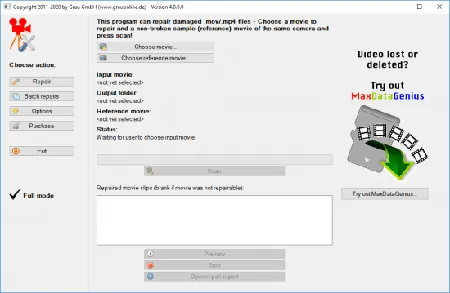
Video Repair Tool can repair and fix broken or damaged video files (MOV, MP4, 3GP, M4V) that do not play in your media player. What exactly means REPAIR? Repair means that only video and audio portions can be repaired that are not lost: On some of your corrupt files, it MAY NOT repair anything at all, on some files it MAY repair some video portions, and on some other files it MAY repair both video and audio portions (It fully depends on the grade of corruption).


Features:
- Repairs video files that are truncated, broken, corrupt or damaged
- Repairs video files that do not play in QuickTime or Windows Media player
- Repairs movies that were not finalized by the camera
- The repair does not depend on a valid/correct container format - the raw video and audio stream data is fully automatically reconstructed
- Supports non-broken reference movies for finding missing movie meta-data and parameters
Currently, our software can automatically repair damaged .mov, .mp4, m4v, or .3gp movie files (generally, all movie files based on QuickTime container format) that use one of the following codec formats:
- avc1 (H264/AVC, used by most digital cameras, HD video cameras, iPhone, etc.)
- hevc (H265, used by modern digital cameras, video cameras etc.)
- mp4v (H264/ISO, used by a few cameras)
- MPG2 / xdvc / xd5d / xd5e (MPEG-2 / XDCAM, used by Sony cameras)
- jpg (Motion JPEG,used by Panasonic cameras)
- icod (Apple Intermediate Codec, used by Final Cut)
- dvc / dvpp / dvhp (DVCPRO / DVCPRO HD, used by Panasonic cameras)
- apch / apcn / apcs / apco / ap4h (ProRes 4444/422/LT/HQ/Proxy, used by Final Cut)
Requirements:
- Mac: OS X 12.3 or higher (requires Intel-based Mac, PowerPC not supported!)
- PC: Windows Vista / 7 / 8 / 10 or higher
Home Page -

Rapidgator
Код:
https://rapidgator.net/file/01571d0ec78eb730a193f72403586380/0lkpa.Video.Repair.Tool.5.0.0.7.macOS.zip.html
https://rapidgator.net/file/8e25deccf33734fd8dba5143a2eca6ff/0lkpa.Video.Repair.Tool.5.0.0.7.Win.rar.html

Код:
https://nitroflare.com/view/70E4E464B156377/0lkpa.Video.Repair.Tool.5.0.0.7.macOS.zip
https://nitroflare.com/view/FFE42E5E99B55AE/0lkpa.Video.Repair.Tool.5.0.0.7.Win.rar
 
Назад
Сверху Снизу