All mitsumi'1s Applications !! (updated daily)

630fdd5c46e97cd7b7caa33855351c87.webp


Easy German Platinum 11.0.3 | Size: 1.39 GB
Language: English


Easy German™ Platinum, designed by university language experts, is an interactive learning system that's proven to teach you German quickly and easily. With progressive learning lessons, speech recognition technology, and immersion learning, you'll have everything you need to become fluent in German. Build your vocabulary, practice real-world conversations, and perfect your pronunciation.

Beyond Reading, Writing, Listening & Speaking
- Pronunciation Workshop
- Simulated Conversations
- Interactive Dictionary
- Games to Reinforce Skills
- Cultural Movies

Tailor Learning to Your Specific Needs
- Pre-Assessment Testing
- Adjustable Plans
- Subject-Specific Courses
- Speech Analysis with Voice Recording & Playback
- Track Your Progress

Award-Winning Language Software
The Flexible Immersion System™ places you into real-world scenarios where you interact with native speakers to learn more quickly. Input your specific language objectives for personalized learning - you'll learn exactly what you need for travel, business, or school, right when you need it.

Levels 1, 2, 3 & 4
Develop your skills with four levels of progressive learning, intermediate, and advanced lessons, vocabulary exercises, and interactive games.

Learn at the Computer, While Driving, or on a Device
Includes both DVD & MP3 options, so that you can learn on the computer, while driving, or on a mobile device.

Develop Conversational Skills
Build fundamental vocabulary and gain the confidence to hold a conversation, ask questions, and interact in common situations.

Interactive Scenarios for Immersion Learning!
Converse with characters in real-life scenarios based on the most common travel situations.

Perfect Your Accent in the Pronunciation Workshop!
Improve your pronunciation with 3D phonetic diagrams that illustrate the correct movement of the mouth, lips, and tongue. Advanced speech analysis compares your voice with a native speaker's to perfect your accent.

Learn through Cultural Movies
Enrich your learning. Discover the traditions, vivid imagery, and rich history of Spanish culture with documentary-style movies, narrated in Spanish by a native speaker.

Language Workshops
See it-Hear it-Say it! Fine tune your accent in the speech lab. Record your voice and use advanced speech analysis tools to compare your pronunciation with native speakers. It's the fastest way to improve your accent and achieve conversational fluency!

Language Workshops
Start by learning basic words and phrases, and then advance to scenario-based conversations. Workshops include vocabulary, grammar, pronunciation, conversation, and interactive simulations.

Games & Activities
Interactive, multi-level games such as Go Fish, Hangman, and Crossword Puzzles add entertainment while reinforcing language skills.

Oral & Written Lessons
Proven and effective lessons emphasize sentence structure, language rules, and vocabulary foundation. Includes printable exercises and a comprehensive online reference book.

System Requirements
Microsoft® Windows 11, Windows 10, and Windows 8 • 128 MB RAM • 1.2 GB Available Hard Disk Space • SVGA Graphics • DVD-ROM • Mouse • Windows Sound Card • Internet Access • Recommended: Microphone for Speech Recognition • Mobile Device for playing MP3 files

HOMEPAGE:
Код:
https://www.individualsoftware.com/product/easy-german-platinum/


DOWNLOAD LINKS:


Код:
https://rapidgator.net/file/4ecc60ce5d9e0ab24ab3ef3aaaaa629a/Easy_German_Platinum_11.0.3.rar.html

Код:
https://nitroflare.com/view/BA54996ABD302C7/Easy_German_Platinum_11.0.3.rar
 
d444b8365f5979b9629925947e921d3f.webp

EdrawMax Ultimate 15.2.1.1532 Multilingual Fast Links | 347 Mb
All-in-One Diagram Software. Get the most powerful, professional diagram software on the market. Compare now to see why Lucidchart is a better diagramming solution. Over 10,000,000+ Users. Dedicated Support. Visio Import & Export.


Visualize, innovate, and collaborate with EdrawMax
Diagramming & Flowcharting
Create powerful flowcharts and visuals to show clear processes that drive the better decision for your business.
Floor Plan Design
Offer a flexible and easy-to-use floor planning solution to maximize your space potential for everyone.
Electrical Engineering
Bring clarity to a complex electrical system by providing a professional visual reference for any audience.
Software & System Planning
Develop strong foundational systems and deliver high software quality to keep your business up and running.
Meeting & Brainstorming
Run productive meetings and capture ideas with brainstorming to align everyone on the vision.
Org Chart Design
Build effective organizational structures and identify roles and responsibilities to achieve better team performance.
P&ID Drawing
Visualize the pipping systems and smooth the process modification to optimize your industrial solution.
Strategy & Project Planning
Help to achieve successful team outcomes with up-to-date strategy and clear visual of project process.
Simplify Your Visual Workflow
Plan, visualize, and present better results - all in EdrawMax. Get started easily with the Microsoft-like interface, drag and drop feature, and professional template resources. With 280 types of diagram solutions, you and your team can use EdrawMax for every stage of your workflow.
Scale Diagrams with Confidence
Everyone, in every industry, enjoys the right to make their ideas visualized and stand out by using EdrawMax. With more than 1500 built-in templates and over 26,000 symbols, the inspiration for diagram creation is unstoppable! Plus, join the template community and get inspired with innovative Edrawers.
Share Your Visuals Anywhere
Your teamwork deserves to be shared! EdrawMax keeps everyone on the same page at all times and in all places. Share your work and collaborate with your team in any file format, on any shareable channel you want, and anywhere. EdrwaMax is what makes a project to be connected and stand out.
Safeguard Your Privacy
Security is EdrawMax's middle name, your data is private, safe and secure here. With enterprise-scale security, all information and file transfers are safeguarded with the highest level of SSL encryption, no one can access your data without permission. EdrawMax puts data security and customer privacy as top priority.
Home Page-
Код:
https://www.edrawsoft.com/

Rapidgator
Код:
https://rapidgator.net/file/8babed2c3d18640147fad242d314b454/2q3s1.EdrawMax.Ultimate.15.2.1.1532.Multilingual.rar.html

Код:
https://nitroflare.com/view/FCAA38DC5C15D53/2q3s1.EdrawMax.Ultimate.15.2.1.1532.Multilingual.rar
 
c7683acfb5bcd2667108a67b6d8d0368.webp


ET Optimizer 6.10.05 | Size: 344.93 KB
Language: English


ET Optimizer provides a one-click option for performance optimization, privacy fixes, and bloatware removal.

ET Optimizer currently works on Windows 10 Home 23H2, Windows 11 Enterprise 23H2, and Windows 8.1 Build 9600 (partial support). This app packs a ton of stuff, like the removal of Microsoft3DViewer, MicrosoftPowerBIForWindows, Print3D XboxApp, ScreenSketch YourPhone PicsArt-PhotoStudio EclipseManager, and many more.
You can also disable unnecessary Startup apps and more. A complete (and lengthy) listing of all included exists at the author's repository. You also have the option to backup your registry, create a restore point, etc., from within the apps GUI.
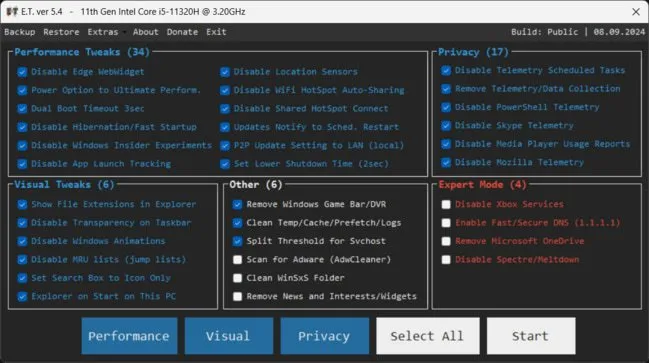
Once you run ET Optimizer (requires admin privileges), you are greeted with a straightforward interface broken into two specific areas of interest: Performance Tweaks, Visual Tweaks, Privacy, and Other. All Items are checked by default, but you can uncheck items you do not wish to alter or disable. Up top, your Backup and Restore options are listed and will deploy as soon as you click them - and we recommend that you utilize these options just in case you run into an issue. You can also access Extras like Msconfig, Cleanmgr, UAC Settings, Event Viewer, etc.
ET Optimizer packs a punch when you want to slim down and optimize your machine through a very user-friendly process. System Requirements: Windows 11, Windows 10 Password for ZIP: etgohome


DOWNLOAD LINKS:


Код:
https://rapidgator.net/file/abc9e1140bf92b5cdb66ed1f6d1d25e5/ET_Optimizer_6.10.05.rar.html

Код:
https://nitroflare.com/view/3F96796F4923F4B/ET_Optimizer_6.10.05.rar
 
5f98642969608fbec97c070b081fd14a.webp

ExamDiff Pro Master Edition 17.0.1 | 40.3 Mb
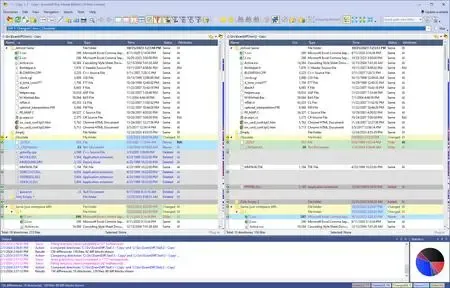
ExamDiff Pro is a powerful and easy-to-use file and directory comparison tool for Windows. It includes numerous helpful features for comparing and merging many kinds of files and folders - from source code to Office documents to Zip archives to files on remote computers. If you've been frustrated with other comparison utilities, you will find that ExamDiff Pro offers a much more user-friendly and customizable experience.


For developers
track changes in files and folders
perform code reviews
easily merge different versions of files using two- and three-way diff and merge.
share HTML and printed difference reports with your colleagues
compare a local website to an FTP server (using the FTP plug-in)
ignore programming language comments to focus only on the most important aspects of your source code
visualize different aspects of code through syntax highlighting
compare executable files (DLLs, EXEs, etc.) using built-in binary comparison
For regular computer users
quickly navigate through differences
synchronize files and directories between your PC and external media
create directory snapshots for future comparison and archiving
quickly find and undo mistakes by comparing files with previous versions
easily drag and drop files and directories
compare from Windows Explorer using the built-in Shell extension
For testers
validate test results by comparing them with a baseline
save test comparison results into reports
For writers
edit your documents within the comparison window using the built-in text editor
use synchronized word wrap to compare document paragraphs
compare Word, Excel, and PDF documents using plug-ins
Operating System: Windows XP, 2003, Vista, 7, 2008, 8, 2012, 8.1, 2012 R2, 10, 2016, 2019, 11, 2022
Home Page -
Код:
https://www.prestosoft.com/

Rapidgator
Код:
https://rapidgator.net/file/e471e8465b001abdc9a641af5a37e8c8/quxyj.ExamDiffProMasterEdition17.0.1.rar.html

Код:
https://nitroflare.com/view/B7C41D7EFBBD45F/quxyj.ExamDiffProMasterEdition17.0.1.rar
 
9165cdbbc2c1a73eb4ed83c66fb750d4.webp


Executor 2.3.5 | Size: 6.89 MB
Language: English


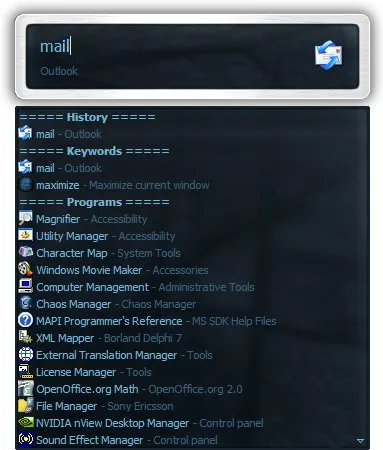
Executor is a multi purpose launcher sporting many optional customizable features and advanced setup. The program originated as I was sick of spending too much time searching for programs through my ever growing windows start-menu, and eye-balling desktop trying to mouse locate what ever I wanted to launch. Also I missed a tool that could ease and optimize my daily workflow. There was of course already programs like this available, but each had it's annoyance or missing features or too(!) geeky.

Features
Keywords have properties like shortcuts, and you can for example drag-drop a shortcut/file/folder/favorite to add it as a keyword.
Auto-completion for keywords, file system and history (can also be configured).
Url detection, Enter URLs directly (like , mail.google.com, google.com or
).
Keywords support parameters. Example "google latest executor" "wiki nirvana".
Besides keywords Executor can also optionally and dynamically add matching start-menu items, control panel items and other handy items to the drop-down/list.
Ability to add your own paths to scan for user defined file extensions.
Each keyword can be assigned a hotkey, so Executor can also perform like many popular hotkey managers.
Keyword control, have keyword open program(s) minimized, with admin access, make sure only one instance is running of program and more
Can add keyword integration with popular services like GMail, Twitter, GCal, RTM and many others (see forums for howto's, tutorials and tips).
Optional show icon for current keyword/input.
Optional show drop-down box for current keyword/input (auto-completion).
Optional drop-down box can be set to auto-open (like windows run) displaying auto-completion suggestions.
Optional list displaying matching items.
Layout can be customized. Set colors, font, dimensions, position, transparency and more.
Skinable. Supporting alpha blending effects and free positioning of all elements.
Many settings to customize the program as you like.
Can be launched from an user defined hotkey.
One keyword or text input can start multiple keywords/urls/programs/documents/files etc. Example one keyword opens three websites and/or programs.
Each keyword have properties like optional group (to organize into groups), customizable icon and other properties.
Keyword "find[text]" for using Windows Instant Search feature or Windows Desktop Search.
A number of special commands (like for example pause and replace tag with parameter).
Optional windows context-menu integration (as another way of easily adding new keywords).
Optional show title for the current input.
Can import keywords from windows start-menu.
Can auto import keywords from an url on startup, so you can share keywords between different Executor installations (for example for cooperate use).
Executor has a number settings on how you want it to find desired item(s). Text could "start with" or "contain text" (substring) or short form detection (for example typing ffox for firefox).
All file-paths can be auto-completed (also when file-path is a parameter), and you can use tab and shift-tab to browse filesystem path.
Keywords to manipulate the current active window (center, resize to specific size, maximize width or height etc).
Special keywords to list (and open) running applications, text previously copied to clipboard and recent documents. Can also strip formatting from clipboard text.
Many special keywords like for example lock computer, restart, shutdown, standby, turn off monitor(s), mute sound, show date/time/week number etc.
Shortcut keys for faster navigation.
Integrated calculator.
Integrated Notes, for quick notes etc.
Import/Export keywords (import can also import directly from an url rather than a file).
Option to override windows run hotkey (Win-R).
Optional sounds.
Integrated Windows context-menu (for example when right-clicking list items).
At startup a number of keywords/commands optionally be launched.
Set simple a simple alarm, timer, stop-watch (with optional alert sound).
Pressing enter with no valid input will launch first suggested item (optional).
Be able to grab text from hidden launched console applications and display text in input or in multi-lined text.
Several hidden experimental/minor settings to play with (Example show time/date/other stuff when idle).
Plus more...
Free (freeware for you old timers) MIT-licensed.
Free for commercial use (but feel free to donate if you forced your entire organization to use Executor! I have put a lot of hours in to this :)).

System Requirements: Windows 11, Windows 10, 8 , 7

HOMEPAGE:
Код:
http://www.executor.dk/


DOWNLOAD LINKS:


Код:
https://rapidgator.net/file/6e837fea562c41ebac628f97ac453e2a/Executor_2.3.5.rar.html

Код:
https://nitroflare.com/view/A497828C1627DFF/Executor_2.3.5.rar
 
6bf358d48fa7401b2e03dfa05ce5fa5d.webp

GlassWire Elite 3.8.1061 Multilingual Fast Links | 128.3 Mb
Although you may not always be notified about it, processes and applications sometimes connect to the Internet to send or receive data. Because of this, your computer can get hijacked or infected by malware, especially if you are not aware of the vulnerability and you do not take any measures to protect the system against unauthorized access.


Monitor applications and network activity
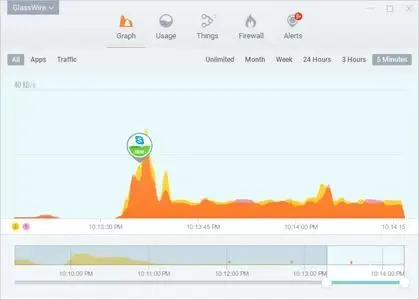
GlassWire is a software utility that provides you with around-the-clock security when it comes to your Internet connection, by monitoring the incoming and outgoing network traffic. Hence, it is able to detect and display information about every service or process that is currently making use of your bandwidth, as well as the IP addresses of each third party connection.
In order to make the data easier to read, the utility display this information in graph form, which is updated every few seconds with your network's activity feed. In addition, the notification service also alerts you whenever a new connection is detected and you can view separate feeds for applications and regular Internet traffic.
Block or allow applications through the firewall
The firewall capabilities of the utility can be used to protect yourself from any unwanted connections, as well as block certain applications from being able to transfer data over the Internet. Thus, you are able to choose which programs are allowed to use the network and send or receive information, by simply clicking on them in the provided list.
As far as your bandwidth is concerned, GlassWire is capable of monitoring every byte of data that passes through the system, as well as display the information in an intuitive manner, using graphs and statistics. Thanks to this, you can see exactly which applications use the most bandwidth, as well as the IP address at the receiving end and the protocol used in the transfer.
A vigilant system protector
All in all, GlassWire provides you everything you might need in order to monitor network activity and protect your computer against unauthorized connections. In addition, the modern interface is intuitive and easy-to-use, making it very simple for anyone to take full advantage of its capabilities, without any previous experience required.
System Requirements
Minimum:
Microsoft Windows 8, 10, 11 (x86,x64)
Intel Celeron 2GHz
1 GB RAM
Home Page -
Код:
https://www.glasswire.com/

Rapidgator
Код:
https://rapidgator.net/file/d9a87cc748d72196d591ed1abe12fa60/yso28.GlassWire3.8.1061.rar.html

Код:
https://nitroflare.com/view/C0FD8632751A5F9/yso28.GlassWire3.8.1061.rar
 
79b372d6486d05fca142409665da9829.avif


Hasleo BitLocker Anywhere 9.9.0.2 Multilingual

All Editions | File size: 44.5 MB


BitLocker Drive Encryption is a full disk encryption feature released by Microsoft as a native application in some versions of Windows. Unfortunately, this feature is not available in Windows 11/10/8.1/8/7 Home, Windows 8.1/8 Core and Windows 7 Professional. Hasleo BitLocker Anywhere For Windows is the world's first BitLocker solution for Windows Home and Windows 7 Professional, with it you can enjoy almost all the features of BitLocker in these editions of Windows. Thanks to the security of industrial-grade encryption algorithms, Hasleo BitLocker Anywhere can effectively help you prevent the risk of data leakage.

Backing up your data is just as important as encrypting it, so we recommend that you use our free Windows backup software Hasleo Backup Suite to back up your data to prevent data loss.

Encrypt Windows C: Drive or Data Partitions with BitLocker
The encryption algorithms implemented by Hasleo BitLocker Anywhere are fully compatible with Microsoft's BitLocker. The program also offers the following advanced features
Allow users to choose used space only encryption or full drive encryption.
Allow users to select the encryption strength (128-bit or 256-bit).
Allow users to choose compatible encryption mode (AES-CBC) or new encryption mode (XTS-AES).
Allow users to encrypt and start Windows with password or USB drive.

Decrypt BitLocker Encrypted Drives
By default, Windows 11/10/8.1/8/7 Home and Windows 7 Pro editions can read and write BitLocker-encrypted drives but cannot decrypt them. Hasleo BitLocker Anywhere has implemented the BitLocker decryption feature which can help decrypt BitLocker encrypted drives (FAT 12/16/32, exFAT and NTFS) in Windows 11/10/8.1/8/7 Home and Windows 7 Pro Editions.

Change Password for BitLocker Encrypted Drives
For BitLocker users, it is necessary to periodically change the password, as this can effectively prevent the risk of data leakage. With the help of Hasleo BitLocker Anywhere, it becomes possible to change the password for BitLocker encrypted drives (FAT 12/16/32, exFAT and NTFS) in Windows 11/10/8.1/8/7 Home & Windows 7 Pro Editions.

Export BitLocker Recovery Key & Startup Key
If you accidentally lose the BitLocker Recovery Key or Startup Key for a BitLocker encrypted drive, you can easily export BitLocker Recovery Key or Startup Key (.BEK file) from the BitLocker encrypted drive using Hasleo BitLocker Anywhere.

Easily Lock & Unlock BitLocker Encrypted Drives
In Windows, you can unlock a BitLocker drive by double-clicking it in File Explorer and entering your password. However, locking the same drive requires using the command-line tool manage-bde.exe-which is inconvenient for most users. Hasleo BitLocker Anywhere solves this by allowing you to easily lock and unlock BitLocker-encrypted drives through a simple graphical user interface (GUI).

Command Line Interface (CLI) Support for Use in Batch Scripts or cmd.exe
As a complement to the graphical user interface (GUI), the implementation of the command line interface (CLI) makes it possible to use scripts (such as batch file, PowerShell, etc.) or cmd.exe to encrypt and decrypt drives.

Whats New

System Requirements
Windows 7+ (x86/x64 processors), Windows 10+ (ARM64 processors)
Hard Disk Drive, SSD, USB Drive, Thunderbolt Drive, SD Card, CF Card, etc.
FAT 12/16/32
exFAT
NTFS


HOMEPAGE


Код:
https://www.easyuefi.com/bitlocker-anywhere/bitlocker-anywhere-home.html


DOWNLOAD

Код:
https://rapidgator.net/file/3612bc80a3caf826a16b27674aabf206/Hasleo_BitLocker_Anywhere_9.9.0.2.rar.html

Код:
https://nitroflare.com/view/D4569AD80EC2FEC/Hasleo_BitLocker_Anywhere_9.9.0.2.rar
 
9564a7405e754dcd097f05ec73ef0e93.webp


HHD Software Virtual USB Tools 3.10.00.0950 Multilingual Fast Links | 6.5 MB
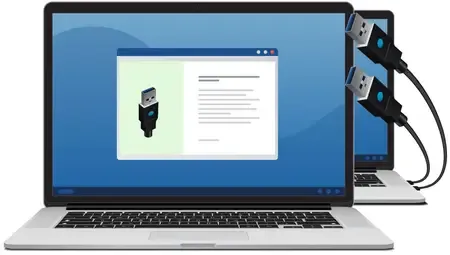
Virtual USB Tools is a client-server software application for sharing and accessing USB devices over a network. It uses reliable and robust USB redirector technology enabling USB over Network/USB over Ethernet virtualization and secure connections to your USB devices across a LAN or the Internet via TCP/IP protocol.


Whether you're looking to connect USB devices remotely over Wi-Fi, Ethernet, or even the Internet, this tool lets you share and access physical hardware devices as if they were directly plugged into your PC.

This USB over IP utility supports forwarding of Hi-Speed USB 2.X, SuperSpeed USB 3.X, USB4 (Thunderbolt 3) PnP devices with USB Type A, USB Type B and USB Type C interfaces including USB sticks/flash drives, bluetooth USB dongles, Smartphones, USB Printers, Scanners, Webcams, Biometrics, various industrial USB devices, communication equipment, etc.

For enhanced security and reliability, the client application communicates with the standard Windows USB device emulation (UDE) driver, which emulates the behavior of the USB host controller and the connected device using built-in Windows routines only.

Sharing local USB devices over a network
The Virtual USB Tools product enables you to virtualize physical USB devices and transfer them over Ethernet or a wireless network, providing immediate access to these devices from anywhere in the world using Internet connectivity. Support for automatic port forwarding makes sharing USB devices over the Internet and Public Area Networks as easy as sharing them over LANs.

Accessing remote USB devices from a local workstation
You can access any USB devices and equipment connected to the remote computer exactly the same way as if they were directly connected to the local workstation. Native support for UPnP and NAT PMP protocols makes access to USB devices hidden behind NAT and firewalls extremely simple requiring no technical expertise. Hi-Speed, SuperSpeed and Thunderbolt USB PnP devices are supported.

Fine-tuned emulation of USB hardware properties
All properties of hardware USB devices are precisely emulated, allowing even specialized copy-protected devices such as USB keys and dongles, USB smart cards, certificates, etc. to be transferred to the remote computers over LANs or the Internet.

Device access control
To prevent data loss or unauthorized access to shared devices, the product optionally supports password-based device access. When sharing a device, you can specify the authentication key required to access that device.

Share USB devices over Wi-Fi
The product allows simple and convenient USB over IP redirection, allowing you to share and connect USB devices over a wireless network. With this USB over Wi-Fi feature, you can access and use USB devices remotely with no physical connection required, for extra flexibility and convenience.

Access local USB devices in RDP session
If you need to access your local USB device in a remote desktop session, our product will definitely help you. Virtual USB can be used to redirect your local USB peripherals to RDP session. You will get a virtual copy of your hardware device as if it were physically plugged into the remote machine.

Transfer USB device to Virtual Machines
It supports seamless transfer of USB devices attached to a Windows host PC to VMware Workstation/ESXi, Oracle VirtualBox, Citrix XenDesktop, Microsoft Hyper-V guest machines. Just plug a USB device into a host computer with Virtual USB server installed, and pass it to the guest machine using Virtual USB client.

Automatic restoring of devices and connections
Product reliably stores device configuration, sharing settings, and connection properties, which are automatically restored when connection is broken. It fully complies with Windows Power Management, so the original configuration is also automatically restored upon shutdown, reboot, or hibernation.

Auto-Discovery of USB device servers
There is no need for you to know all network addresses of computers with shared USB devices. The USB client can broadcast requests across the network, receive responses from available USB device servers, and provide you with a list of potential connections. This allows you to easily find all accessible USB devices automatically.

Native support for Windows coloring themes
Our product provides native support for Windows color themes, including dark ones. All interface elements, including controls, automatically support Windows colors and styles, making the application experience visually appealing in any lighting condition.

Command-line configuration support
During product development, we paid special attention to the intuitiveness and convenience of the graphical user interface. We made it simple, clean and user-friendly. In addition to the GUI, the product also supports command line configuration management and control.

Turning PC into a software-based USB server
Install Virtual USB server on your computer, connect an unlimited number of USB devices and make them accessible via LAN or Internet. This immediately provides you with a convenient and affordable software-based USB device server. You don't need an expensive hardware anymore.

Support for unlimited number of connections
With our product, you can always gather your USB devices connected to different computers in different physical locations into a single pool and use it without being tied to your current location. You don't need to take all your USB devices with you on vacation or business trips, our product makes this unnecessary.

Sharing/connecting up to 10 USB devices simultaneously
Standard edition of our product allows sharing up to 10 USB devices simultaneously. This feature allows you to create flexible product usage patterns, allowing you to transfer your USB devices over TCP/IP protocol across your Local Area Network or even the Internet.

Sharing/connecting an unlimited number of USB devices
Advanced edition of our product allows sharing an unlimited number of USB devices connected to different remote computers. This feature, combined with authentication keys, allows you to create flexible product usage patterns, such as a virtual office for a development team working with a pool of USB devices.

End-to-end encryption for secure communications
Our product supports end-to-end encryption for secure communications. With 256-bit encryption, it is ensured that none of the security data from your surveillance cameras, hardware keys, usb license dongles or external storage devices can be accessed by any unauthorized individuals.

Server list management and control
Our product provides a convenient way to manage lists of available servers. This function can be particularly useful when you need to simultaneously use multiple USB devices connected to several different computers.

Developer API and scripting
Application programming interface (API) allows you to fully control application from your code or script. Different programming languages, like C++, C# or scripting languages like jаvascript or TypeScript are supported.

System Requirements
- OS: Windows 11, Windows 10, Windows Server 2025, Windows Server 2022, Windows Server 2019
- CPU: Multi-core x86, x64 or ARM64 compatible
- Memory: 2 GB

Home Page -
Код:
https://hhdsoftware.com

Rapidgator
Код:
https://rapidgator.net/file/a5292b68de94a0c396f63d015d282d55/7bxpf.Virtual.USB.Tools.3.10.00.0950.rar.html

Код:
https://nitroflare.com/view/B9AE8AC9D7AAC9E/7bxpf.Virtual.USB.Tools.3.10.00.0950.rar

 
b8352c30c94bacff6763816ec757d618.webp


HyperSnap 9.8.1

File size: 33 MB


HyperSnap is the fastest and easiest way to take screen captures from Windows screen, and text capture (TextSnap) from places where normal text copy is not possible. HyperSnap combines the power of a first-class screen capture application with an advanced image editing utility - wrapped into one easy-to-use tool! It's perfect for capturing images that you want to include in your Help system, online tutorials, manuals, training handouts, presentations, marketing materials, Web pages, emails and more. Use HyperSnap to quickly share a picture-perfect representation of anything on your screen. HyperSnap is versatile and extremely easy-to-use. You can quickly customize menus and toolbars to fit your needs. Assign your own keyboard shortcuts, create instant toolbars, and even control HyperSnap with voice commands!

You can switch between modern "ribbon" interface shown on the image above, or tranditional menu and toolbars. Optional HyperSnap portable setup allows you to install it on a portable disk (such as a USB key) and preserves all of your settings and customizations across machines.

Top Features
Image captures from any where on the screen or multiple monitors, in any shape or size.
New & powerful image capture, editing, annotation and manipulation tools. Objects drawn over images can now be selected, edited, shown and hidden, moved, deleted any time. A new native file format saves the objects drawn for further editing later, or save a standard image and have the object "imprinted" permanently on them.
Unlimited undo/redo.
NOTE: TextSnap is no longer supported for new programs using accelerated graphics or running under Windows 8.
TextSnap feature to capture editable text from almost anywhere on the screen. Can also capture tab-delimited data for easy paste into MS Excel.
Capture dropdown menus and lists with hotkey feature or delayed capture.
Image stamps, frames, drop shadow, free-hand capture, FTP server uploads, more.
Automatic color substitution.
Non-rectangular window capture.
Button Capture - perfect for professional technical writers who need to snap and document dozens of buttons!
Auto-scrolls and concurrently captures long web pages and other. documents, enabling it to grab more than is visible on the screen.
Tightly integrates with the MS Windows clipboard to automate repetitive tasks - will even automatically PASTE capture images where needed!
Automatically saves your captures to graphics files.
Doubles as effective image viewer, format converter (over 20 image formats supported).
Fully customizable user interface. Rearrange menus and toolbars any way you want, assign any keyboard shortcuts you like, tear off menus to create instant toolbars, even control HyperSnap with voice commands!
Extended Window Capture function resizes a window to be much bigger than the screen before the capture - in one quick step, no auto-scrolling.
Much, much more!.

System Requirements: Windows 10, 11


HOMEPAGE


Код:
https://hyperionics.com/index.asp


DOWNLOAD

Код:
https://rapidgator.net/file/cfeec832c2d5fcfebc2206f137b76983/HyperSnap9..zip.html

Код:
https://nitroflare.com/view/3BD04CAEB5E899E/HyperSnap9..zip
 
ababa88eea6ab0950c9fe021e968aa8c.webp


IDimager Photo Supreme 2026.3.0.9187 Multilingual

Windows x64 | File size: 166.88 MB


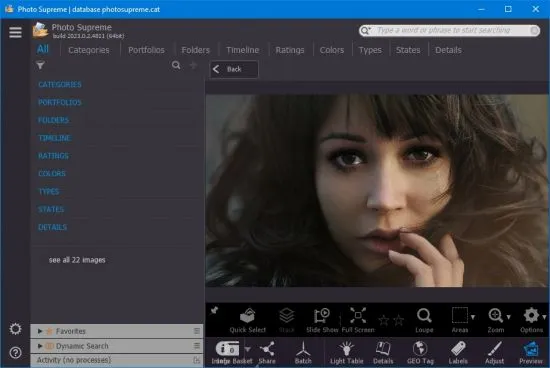
Do you own a digital camera? Then in no time you will have thousands of images on your computer, and finding that one image you are looking for will become a chore. But Photo Supreme can change all that. Whether you have 1,000 or 500,000 images in your archive, Photo Supreme's integrated photo cataloging and photo management features will help you quickly find and work with your desired image.

Extremely powerful yet easy-to-use
From the ground up, Photo Supreme was developed with easy-of-use as the primary focus. We were able to pack most of the features requested by our user base into a user interface that is clean and efficient, yet extremely powerful.
Photo Supreme comes with every essential image management feature you'll need to bring structure in your image archive. Assigning catalog labels, importing images to your computer, search features, etc. And once you have your images cataloged then you'll be able to find that one image you need within seconds to then view, duplicate, email, share on your favorite photo site, upload it to your FTP server, or edit it in your favorite photo editor.

Integrates with your favorite tools
Photo Supreme makes integration with your favorite photo editing tools seaminglessly. At installation it will automatically find and add the most common used image editing tools to the user interface.
Simply select an image and click on the application icon to start editing your image.

Unparalleled Speed
Digital Asset Management software uses a catalog database and should be optimized to work with thousands of images in the database. We took this seriously and were able to get the speed up, there where it belongs. Searches will return results in just milliseconds.

Always take your images with you
With Photo Supreme you can store previews of your images inside the database. Then, even if your images are physically located on your network, they travel with you. The previews can be stored in the size that you prefer, from small to large ones, up to 1680 pixels

Open architecture
Right from the start, Photo Supreme was designed with an open cataloging architecture in mind. Because existing industry standards are used to store its data, you can extract your information at any time, even without our software. Should you ever decide to switch applications (although once you've tried Photo Supreme, you'll never go back!), you won't have to repeat the time consuming operation of re-cataloging your data. After all, it is YOUR data, not the application's data!

Share with friends and family
Photo Supreme easily interfaces to public photo sharing sites like Facebook, Flickr, PicasaWeb, Zenfolio, or SmugMug. Resize or rename your images as you upload them to your on-line account without having to prepare them first. Also, add or remove your metadata, convert color space, or add your personal signature to your uploaded images.

Get started right away
If you already use some sort of image collection tool then Photo Supreme can help you get your existing data into Photo Supreme, saving you lots of time. There are import feature available for iPhoto™, Aperture™, Lightroom™ 3 and 4, iMatch™, and FotoTime™. At the same time, PSU is able to read and import meta-data that was written with XMP supporting tools, including Adobe products, Nikon software, iView™, MediaPro™.

Vocabularies
In addition there are import features to support market standard vocabularies, including David Rieck's ControlledVocabulary™, UltraTAG™, Lightroom™-Keyword Files, or any other tool that supports exporting to Formatted Vocabulary Files.

Main Features & Highlights
Advanced search capabilities
Multi Tab Browsing
Import/Ingest images
Side-by-Side comparison (up to 6 images)
Keyword tagging
Advanced GEO Tagging
Image organization in portfolios
Duplicate Detection
Share images with Flickr, Smugmug, Zenfolio, Picasaweb, FTP, EMail
Dual Monitor Support
Creative Commons support
Face Detection
Area Tagging
Extensible metadata with Custom Fields
Take your previews with you while travelling
Color Managed
Lossless Image Editing
Fully Scriptable
Available for Windows and MacOSX platform
Multi-User network/server version available for PostgreSQL and SQLServer (Server Edition)
English, German, French, Italian, Dutch, Portuguese, and Russian locale

What's new

System Requirements: Windows 7, 8, 8.1, 10 or 11. Windows 10 or higher recommended


HOMEPAGE


Код:
https://www.idimager.com/


DOWNLOAD

Код:
https://rapidgator.net/file/221cf6d6143c148e9f524aabe1be3c76/IDimager.Photo.Supreme.2026.3.0.9187.rar.html

Код:
https://nitroflare.com/view/F2EF1717EE50B8E/IDimager.Photo.Supreme.2026.3.0.9187.rar
 
5fc8b0e7944f66a2097d4174a22df0ff.webp

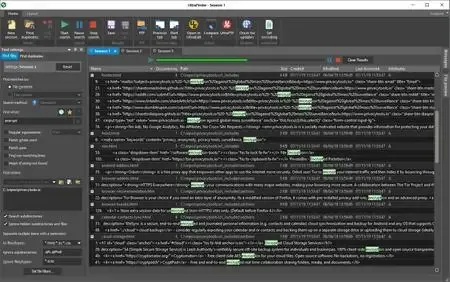
IDM UltraFinder 24.0.0.17 (x64) | 41 Mb
Find any file, word, text string, pattern, duplicate and everything else you need in seconds...on your hard drive, on your shared and network volumes, on your removable drives, or even on a remote FTP/SFTP server! UltraFinder is a quick and lightweight Windows search program designed to find text in files anywhere. UltraFinder also allows you to find duplicates and eliminate or delete duplicates, keeping your computer clean and uncluttered while conserving hard drive space. Search your way with a variety of settings to tweak your search to perfection.


Your Windows operating system offers limited find options - UltraFinder includes two powerful but quick and easy to use modes for finding what you need when you need it: Find Files and Find Duplicates.
Features:
Master File Table (MFT) search methods for lightning fast results
Search for files by content or by name (partial or full)
Search file contents or ✅File Names with regular expressions (Perl, Unix, and UltraEdit native)
Search network or FTP locations
Specify specific folders, entire drives, or even specific files as search targets
Filter subdirectories, ✅File Names, and file extensions to exclude from the search
Search based on whole or partial word match
Search for case sensitive matches
Negative search (find files that DON'T match)
Search for text in PDF files
Search for text in Word documents (.doc/.docx)
FIND DUPLICATES
Search folders or entire drives
Search duplicates by a variety of criteria:
- Content
- Name
- Dates
- Size
Tweak duplicate searches with a variety of criteria settings (file dates, ✅File Sizes, etc.)
Ignore special case files like 0-byte, system/hidden files, Recycle Bin files, etc.
Set include/exclude filters for files and folders
Powerful searches using regular expressions (Perl, Unix, or native)
Resolve found duplicates (rename, delete, move, open)
Operating System:Windows 7, 8/8.1, 10, 11
Home Page-
Код:
https://www.ultraedit.com/

Rapidgator
Код:
https://rapidgator.net/file/f4f674e1d12db061e643ffc68a6334c5/k9t74.IDM.UltraFinder.24.0.0.17.x64.rar.html

Код:
https://nitroflare.com/view/67353B8A1BDF664/k9t74.IDM.UltraFinder.24.0.0.17.x64.rar
 
004a9d7e5077fa48c265e70aa4875e01.avif


InnovMetric PolyWorks Metrology Suite 2025 IR10 (x64)

File Size: 2.5 GB


PolyWorks (PW) is a multifunctional software manufactured by InnovMetricSoftwareInc., Used to process laser scanning dаta: reverse engineering, product geometry control, architecture tasks, deformation monitoring of the earth's surface and many others. The PolyWorks software package allows you to efficiently and quickly work with very large amounts of data. PolyWorks consists of several modules and has a wide range of tools that simplify and accelerate the work with data. It is important to note that the complex allows you to work with data obtained from three-dimensional scanners of all known brands.

IMAlign
• This module is designed for primary data processing.
• Initially, data is imported using a terrestrial 3D scanner or data that has already been processed in other programs. Already at this stage, there are some processing possibilities: the data is imported with the specified accuracy (the step of sampling points is specified); data can be filtered by distance.
• Primary processing of point clouds: scaling of point clouds; filtering on the subject of coincident points, that is, ordering (points that diverge to distances less than the specified ones are deleted). In the module, you link to the external coordinate system and link the scans.
• The program allows you to select the stitching method, which can be divided into: visual stitching methods; on reference objects. And that is not unimportant: the program produces statistics and histograms of association errors, primary polygonal models are created.
• Data can be exported in many formats (AC, BRE, PIF, PTX, SURF) and as polygonal models in DXF, IGES.
IMMerge
• Designed to create a triangulation model, the module allows you to manually determine the parameters responsible for the quality and accuracy of the model being created.

IMEdit
• The module is designed to work with TIN-surfaces created in PW or imported from other programs.
• The module contains functions for smoothing, filling "holes", retryangulation (individual areas can be triangulated again with less accuracy), various mechanisms for creating curves and tools for editing them.
• This module implements the functions of creating and editing NURBS surfaces - surfaces that are created by curves, and the module provides many ways to create these curves: manually - certain curves are drawn at the specified points, the curves are constructed by intersections with the plane model, by sections , a grid of curves is automatically compiled from the model with a given accuracy (the step and the maximum distance to which they are separated from the model).

IMInspect
Includes tools that allow
• to enter the points of geometric primitives into the cloud (circle, cone, cylinder, plane, point, polyline, sphere and vector);
• construction of polygonal surfaces;
• combining data and reference objects into a single and unique coordinate system;
• profiling, creating arbitrary and specified sections;
• make detailed comparisons, statistics and reports within or between data, reference objects, and primitives;
• All types of measurements, control of position and condition of complex structures (measurement of geometric dimensions, both linear and angular, areas, volumes);
• export data and reference objects to many formats.
IMCompress
• Reduction, mainly, of colored polygonal 3D models. An auxiliary module that allows you to reduce the weight of the model by reducing the number of its constituent elements (triangles or patches).
IMTexture
• The module allows you to combine the model and its texture map, that is, get a model with textures that displays not only the geometric, but also the physical properties of the model. The texture map should be obtained from the scanner, that is, in the obtained data from the scanner, in addition to coordinates, there should be information about the intensity. Combining two types of data, as a result, the model has the form closest to reality.

IMView
• Module for viewing data.
• Models created in the program are saved in the internal format and can be viewed in the free module provided. The software product PolyWorks is intended for a certain range of tasks, the solution of which in other software products is not possible.
• This range of tasks covers many aspects. For example: Monitoring of deformations of the earth's surface, landslide processes and subsidence of soil under the influence of technogenic factors. By superimposing models created at different times, one can obtain the magnitude and direction of the displacements. And to characterize the data for these offsets will not be individual control points.
• Since continuous scanning is performed during scanning, the necessary information can be obtained practically at any point on the surface. The data obtained are presented in the form of a colored three-dimensional model with color distribution depending on the magnitude of deformations.
• With a simple click

What's New
official site does not provide any info about changes in this version.

System Requirements: Windows 10/11


HOMEPAGE


Код:
https://www.polyworks.com/en-us


DOWNLOAD

Код:
https://rapidgator.net/file/25fbfb641da6cb491efac8c1604ddcf2/InnovMetric.PolyWorks.Metrology.Suite.2025.IR10.Win64-SSQ..part1.rar.html
https://rapidgator.net/file/fb0da3a22d75da6e3d2d6512bd9bd130/InnovMetric.PolyWorks.Metrology.Suite.2025.IR10.Win64-SSQ..part2.rar.html
https://rapidgator.net/file/baa6e24b8d054004ddb0ec2a60b9ece5/InnovMetric.PolyWorks.Metrology.Suite.2025.IR10.Win64-SSQ..part3.rar.html

Код:
https://nitroflare.com/view/338F0E956FD36E3/InnovMetric.PolyWorks.Metrology.Suite.2025.IR10.Win64-SSQ..part1.rar
https://nitroflare.com/view/E8311C948E26B53/InnovMetric.PolyWorks.Metrology.Suite.2025.IR10.Win64-SSQ..part2.rar
https://nitroflare.com/view/71BDC8FD8D52759/InnovMetric.PolyWorks.Metrology.Suite.2025.IR10.Win64-SSQ..part3.rar
 
85742c2a693f3536570839a4101a5e00.webp


LuBan 3D 11.05.2026 (x64) Multilingual

File size: 68 MB


LuBan is generative design software that helps designers and makers in rapid production of their creations. LuBan automatically generates 3D models in various forms, such as lithophane, stack, hash, plate, relief, module, and wireframe. The generated model can be fabricated by 3D printing, laser cutting, and CNC milling.

LuBan is next-generation, generative CAD/CAM software discovered at Massachusetts Institute of Technology (MIT) and developed at Singapore University of Technology and Design (SUTD) to help designers and makers improve physical production of their creations.

LuBan automatically generates 3D models in the form of (1) stacking, (2) interlocking, (3) finger joint, and (4) 3D printed models. Parts of a model can be fabricated by laser cutting and 3D printing. LuBan is not dependent on specific fabrication methods; instead, it can interface with many types of machines through several standard file formats such as DXF, EPS, OBJ, STL, and SVG.

Luban was designed to split large print jobs into smaller sized chunks that make it easy to make GIANT prints on a typical (200mm x 200mm) print bed,

LuBan: Easy Way to Make Large 3D Prints!
Luban is an application for breaking apart an STL file into 'chunks' that you can print easily on any printer. You can define the size of the chunks for each axis, attachment method, and error correction. Most people would look at this as an opportunity to print GINORMOUS things on their CR10 style printers. I am going to go in a different direction with my first Luban print. Let's try and write some regular sized CR10 prints on a mini printer!


HOMEPAGE


Код:
https://www.luban3d.com/


DOWNLOAD

Код:
https://rapidgator.net/file/4406b1bf2f581e6e1fab2cd0a9c07e92/LuBan_3D_11.05.2026.s.rar.html

Код:
https://nitroflare.com/view/55B988F040F6D47/LuBan_3D_11.05.2026.s.rar
 
fe5aac7ff24bcbb1810faf5eff9e020f.webp


MediaHuman YouTube To MP3 Converter 3.9.20 (2405) Multilingual

Windows x64 | File size: 82.92 MB


You like to listen to music on YouTube or SoundCloud and want to save it for offline playing. Or you want to download soundtrack of a new movie. Then we recommend you to try out this software developed specifically for this purpose.

• Downloads all music from playlist or channel
• Downloads highest available quality up to 320 kbps
• Supports YouTube, Vimeo, SoundCloud, Dailymotion, VEVO, etc.
• Downloads simultaneously several tracks
• Includes simple tag editor with cover art image support
• Works on all modern platforms (macOS, Windows, Ubuntu)
• Exports to iTunes

Main Features

Playlists and channels
The software supports downloading all videos of a playlist or a channel. And there is also an option for subscribing to and downloading only newly uploaded tracks.

iTunes support
In the preferences of the application you can select an option to add downloaded tracks into iTunes automatically. You can also specify iTunes playlist, where the converted track should be added.

Saves your time & traffic
The app detects audio track in YouTube video clip and downloads it, skipping the video part. As a result download speed increases dramatically, especially on HD-quality content.

Simple tag editor
Application automatically detects artist name and track title of the video and saves it in the downloaded file. But at the same time, you can easily change tags to whatever you want. You can even change a cover art image.

Original format, no conversions
You can save audio tracks in original quality without any conversion. It means that there will be no loss of quality and it greatly reduces the downloading time.

Free music
There is a great amount of music on YouTube. You can always find the one you like there. And YouTube to MP3 Converter allows you to save it on your computer for free. Just find the track you like and download it in the quality you need.

Not only YouTube
Vevo.com, Vimeo, DailyMotion, Soundcloud, Bandcamp, HypeMachine, MixCloud, UOL and many other sites are also supported. So you can download music as easy as from YouTube.

Clipboard tracking
The program tracks the content of the system clipboard. It means that you can easily add a video clip without switching from your favorite browser. Just copy an URL into the clipboard and it will be added to the download queue.

Multilingual interface
Localized to: Arabic, Armenian, Azerbaijani, Bulgarian, Catalan, Chinese (Taiwan), Croatian, Czech, Danish, Dutch, English, Esperanto, French, German, Greek, Hebrew (Israel), Hungarian, Indonesian, Italian, Japanese, Korean, Latvian, Lithuanian, Malay, Norwegian Bokmål, Polish, Portuguese, Portuguese (Brazil), Romanian, Russian, Spanish, Swedish, Turkish, Vietnamese

Version history

System Requirements: Windows 11, Windows 10, Windows 8, Windows 7 for PC systems (64bit)


HOMEPAGE


Код:
https://www.mediahuman.com/en23/


DOWNLOAD

Код:
https://rapidgator.net/file/98805a3f8276ee96b08a0c178a026d2d/YouTubeToMP3.2405.rar.html

Код:
https://nitroflare.com/view/90AA573381E4B6D/YouTubeToMP3.2405.rar
 
52f13b5f28e64b31d32a4946fb3bcf18.webp


Mindjet MindManager 25.2.160 Multilingual Fast Links | 871.43 Mb
MindManager makes it easier to think, plan, and communicate. Information is invaluable. But it's also overwhelming. MindManager puts you in command of the information surrounding your work, business and world - instead of controlled, confused or overwhelmed by it.


The World's Most Powerful Mind Mapping Software
- Turn mental & digital clutter into actionable clarity
- Work like your brain does: quickly & dynamically
- See the big picture and little details in one view
- Stop things from falling through the cracks
- And more!

See Everything
Built-in sync with the tools you use every day, plus available integration with 800+ apps, gives you one-stop access to all the information that matters.

Share Everywhere
With improved HTML5 export, you can easily share your maps and create alignment with just about anyone - on your team, in your org and beyond.

Customize Your View
Make your maps communicate exactly what you need, with new capabilities like Timeline layout, more powerful filtering, easier navigation and walk-through mode.

Work at the speed of mind.
Rigid, linear tools can leave your best thinking on the table. MindManager lets your brain work with information the way it was designed to - fast & dynamically - so you don't lose a single brilliant insight or critical detail.

- Quickly break main concepts into smaller details, while keeping connections simple and clear.
- Add detail and context to tasks as you create them, without stepping out of the flow.
- Rearrange or replicate information with simple drag & drop.

Take the devil out of the details.
Productivity isn't productive if you're working on the wrong things. MindManager shows your tasks, ideas, data and detail in a shared context, so you immediately see what's relevant, what should be prioritized and what you can let go.

- Uncover hidden connections between topics, tasks and data.
- Eliminate redundancies, identify risks and uncover opportunities.
- Make better decisions by seeing the downstream impact of actions before you take them.

Seal your communication cracks.
Disjointed email chains, unproductive meetings and misalignment are project killers. MindManager lets you consolidate all information related to a project, plan or concept into one central, shared portal that keeps your team on task, on time and most importantly, on the same page.

- Transparently communicate ownership, priorities, deadlines and more.
- Visually connect related and dependent action items, to eliminate redundancy and encourage collaboration.
- View projects by resource, tasks, timeline, in Gantt charts and more for visibility into progress, status, red flags and risks.

See your world in a single glance.
Knowledge is only power if you can access it.
MindManager integrates scattered data into a single, structured dashboard and presents it as a unified whole, so everything is connected and accounted for, it all makes sense and it all gets done.

- Sync related data from Microsoft Office files, content repositories and over 800 apps.
- Easily add, correlate and view files, images, links, media and more - for consolidated control over your day, work and world.
- Fluidly change the information you're seeing or showing, without switching windows or splitting screens.

System Requirements:

Supported Operating Systems:
Microsoft® Windows® 11 64-bit
Microsoft® Windows® 10 64-bit

Processor: 1.6 GHz or faster, 2-core
2 GB RAM or greater
1.5 GB available disk space
Recommended minimum display: 1280 x 720 pixels*
The SharePoint Linker feature supports the following authentication methods: NTLM, Forms Based, SAML for SharePoint 2013, Azure ADFS/On Premises, Office 365, and Multi-Factor Authentication

Additional requirements to use certain features:
Microsoft Office Professional 2016 or later (32-bit and 64-bit)
Microsoft Project 2016 or later (32-bit and 64-bit)
Microsoft Edge WebView2 Runtime
Internet Connection


Home Page -
Код:
https://www.mindjet.com/

Rapidgator
Код:
https://rapidgator.net/file/1f99e8411a273bf3bab613f977094ae3/jwil7.MindManager.v.25.2.160.x32-x64.Cracked-igorca..rar.html

Код:
https://nitroflare.com/view/FC00F7CC353C064/jwil7.MindManager.v.25.2.160.x32-x64.Cracked-igorca..rar
 
8ab7c585b97653d73c55db029cee0de4.webp


MKVToolNix 99.0 Multilingual | Size: 64.19 MB
Language: English


MKVToolnix is a set of video utilities to make, alter and inspect Matroska MKV files for free. MKVToolnix works as the mkvmerge GUI and mkvextract GUI. mkvmerge is to merge multimedia streams into a Matroska MKV file, while mkvextract (with MKVExtractGUI2) is to extract audio, video or subtitle tracks from Matroska MKV files into other files.

Then, You could use MKVToolnix as a MKV Creator, MKV Muxing Tool, MKV Splitter, MKV Cutter or MKV Extractor.

Note: MKVToolnix Portable was updated to 6.7.0 (32-bit) on 2014/01/09.

What's new in MKVToolnix 6.7.0?
It contains tons of bug fixes all over the place, but also a couple of enhancements.
The most important bug fix is probably the change to how MPLS files are handled.
This is the first release for which I'm providing 64bit binaries for Windows as well.

OS: Windows XP / Vista / 7 / 8

HOMEPAGE:
Код:
https://www.bunkus.org/


DOWNLOAD LINKS:


Код:
https://rapidgator.net/file/86c2f51e286096fbb5b8f9facd271bbb/MKVToolNix_99.0_Multilingual.rar.html

Код:
https://nitroflare.com/view/552554E7A9C21B4/MKVToolNix_99.0_Multilingual.rar
 
9d86ef66820f9bff8fd0131f967bce7c.webp


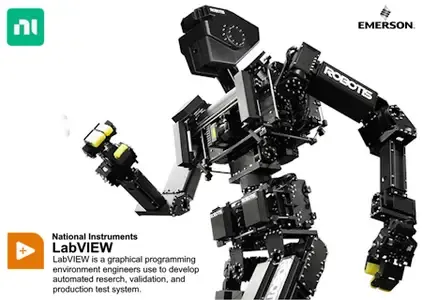
NI LabVIEW 2026 Q1 Patch 1 | 7.8 Gb
NI is now part of Emerson's new Test & Measurement business group has released LabView 2026 Q1 Patch 1 is a programming environment used to create applications using the G programming language.

LabVIEW 2026 Q1 delivers exciting new capabilities, such as, code completion with Nigel AI, improvements to the debugging workflow, added interoperability with .NET, and more!
- Now, Nigel AI can make provide code suggestions giving you next steps as you develop, review LabVIEW Projects, and offer suggestions based on your hardware.
- Additional updates include: a Web Browser front panel control, LabVIEW in Windows Docker containers, VI Comparison improvements, and more.


What's new in LabVIEW 2026 Q1 Patch 1
Workaround:Fixed in LabVIEW 2026 Q1 Patch 1.

3766237LabVIEW Code Completion with Nigel AI in Localized Versions of LabVIEW Never Suggests Some Palette Functions
3766237LabVIEW Code Completion with Nigel AI Never Suggests Code Containing Functions from Some NI Driver APIs
LabVIEW Code Completion with Nigel AI lacks support for NI-SCOPE, NI-FGEN, NI-DMM, NI-DCPower, NI-SWITCH, and NI-Digital driver APIs.
3462803, 3742258Calling .NET (Core) 8.0 Code Leaks Memory
3712082LabVIEW Crashes When Displaying Context Help for Polymorphic VI with No Instance VIs
3716259Building "My Application" Build Specification in "Actor Framework Template" Project Fails
3736642Manage Trusted Files Dialog Takes a Long Time to Populate
3739525LabVIEW Sometimes Crashes When Using Executejаvascript and FireUserEvent in Web Browser Control
3741628Externally Changed Files List Opens Erroneously When Running Some VI Tools
3749227To Lower Case Function Works Incorrectly in LabVIEW for macOS
3743979Vulnerability CVE-2026-32861.
Fixed out-of-bounds write vulnerability when opening a specifically corrupted .lvclass file: CVE-2026-32861.
3749030Vulnerability CVE-2026-32860
Fixed out-of-bounds write vulnerability when opening a specifically corrupted .lvlib file: CVE-2026-32860.
3749034Vulnerabilities CVE-2026-32862, CVE-2026-32863, and CVE-2026-32864
Fixed memory corruption vulnerabilities when loading specifically corrupted VIs: CVE-2026-32862, CVE-2026-32863, CVE-2026-32864
3716343"Cannot Find libniDotNETCoreInterop.so" Message When Starting LabVIEW on Linux
On launch, LabVIEW on Linux outputs "Can't find libniDotNETCoreInterop.so." However, LabVIEW launches and functions correctly.
3662020String Constants Suggested by LabVIEW Code Completion With Nigel AI Are Empty
When LabVIEW Code Completion by Nigel AI suggests code that contains a string constant, the string is set to empty instead of the value specified in the code suggestion.
3695843Right-click Highlight Probe Command Draws Red Rectangle On Diagram When Debug Window is Not Open
3445050Externally Changed Files List May Appear Behind Other Windows
After closing the Externally Changed Files List and modifying an open project file on disk, LabVIEW displays the Externally Changed Files List again, but doesn't open the window in front of other windows.

LabVIEW (Laboratory Virtual Instrument Engineering Workbench)is a graphical programming language that uses icons instead of lines of text to create applications. In contrast to text-based programming languages that use instructions to determine the order of program execution, LabVIEW uses dataflow programming. In data flow programming, the flow of data through the nodes on the block diagram determines the execution order of the VIs and functions. VIs, or virtual instruments, are LabVIEW programs that imitate physical instruments. In LabVIEW, you build a user interface by using a set of tools and objects. The user interface is known as the front panel. After you build the front panel, you add code using graphical representations of functions to control the front panel objects. You add this graphical code, also known as G code or block diagram code, to the block diagram. The block diagram somewhat resembles a flowchart. The block diagram, front panel, and graphical representations of code compose a VI.

Introduction to the LabVIEW+ Suite

We're excited to announce the release of the NI LabVIEW+ Suite. It's a suite of LabVIEW, plus, more NI software that provides purpose-built tools for automating measurement, analysis, and test. The software works together to save you time.
Emerson is a global technology and software company providing innovative solutions for the world's essential industries. Through its leading automation portfolio, including its majority stake in AspenTech, Emerson helps hybrid, process and discrete manufacturers optimize operations, protect personnel, reduce emissions and achieve their sustainability goals.
(October 11, 2023) - Emerson has announced it has closed its acquisition of NI (National Instruments), a leading provider of software-connected automated test and measurement systems. The acquisition of NI advances Emerson's position as a global automation leader and expands its opportunity to capitalize on key secular trends like nearshoring, digital transformation, and sustainability and decarbonization. NI brings a portfolio of software, control and intelligent devices that is expected to accelerate Emerson's revenue growth aligned to its 4-7% through the cycle organic growth target.

Owner:Emerson
Product Name:NI LabVIEW
Version:2026 Q1 Patch 1 (version 26.1.1)
Supported Architectures:x64 & x86
Website Home Page :
Код:
www.ni.com

Languages Supported:english
System Requirements:Windows *
Size:7.8 Gb

Rapidgator
Код:
https://rapidgator.net/file/848ba9be9a3b81266b0f8d042e4de099/y71v0.NI-LabVIEW-2026-Q1-Patch-1.part1.rar.html
https://rapidgator.net/file/de4f2c8bfad4a41f1762413631052f3c/y71v0.NI-LabVIEW-2026-Q1-Patch-1.part2.rar.html

Код:
https://nitroflare.com/view/770D13899814877/y71v0.NI-LabVIEW-2026-Q1-Patch-1.part1.rar
https://nitroflare.com/view/AF0DB8B3B74A0A8/y71v0.NI-LabVIEW-2026-Q1-Patch-1.part2.rar
 
7f14f518fc98f68a19794d36d6c23776.webp


Real Cut 1D 11.14 Multilingual | Size: 1.84 MB
Language: English


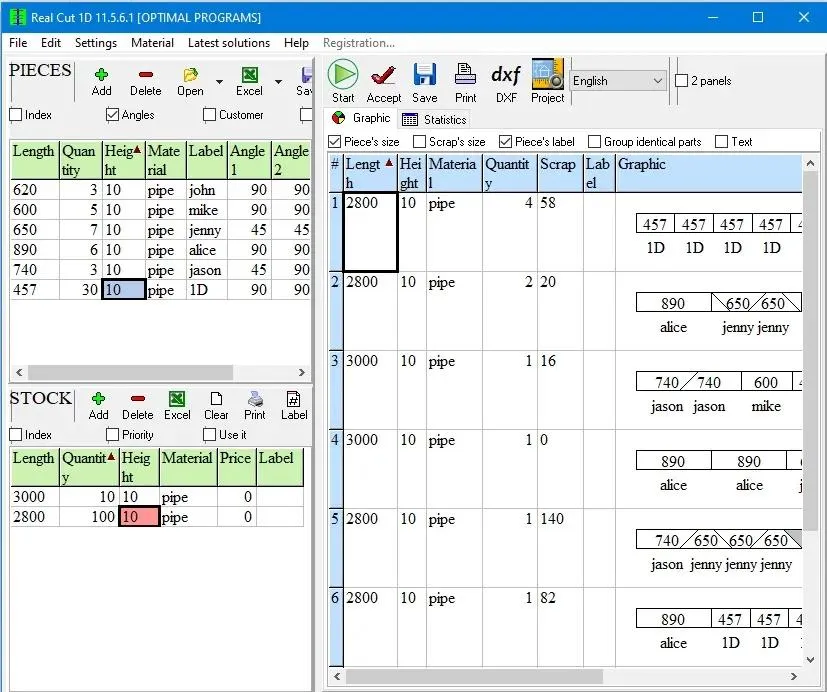
Real Cut 1D is a computer program used for obtaining optimal cutting designs of one dimensional pieces which might have angles different of 90 degrees at their extremities.

Real Cut 1D can be used for cutting linear pieces such as Bars, Pipes, Beams, Tubes, Steel bars, Roof profiles, Balustrade, Fence bars, Timber Frames, Aluminium profiles, PVC profiles, Nylon profiles, Bridge Rails, Universal Columns, Window frames etc. Real Cut 1D generates optimal solutions using the minimum quantity of materials.

Features:
Pieces to be cut can have angles different of 90 degrees at their extremities. A lot of material can be saved by properly matching 2 pieces having sharp extremities. For instance, if you match 2 pieces having 45 degrees at their extremities you will save as much as the height of the pieces.
Fractional input. Parts and bars can be entered either as real numbers (such as 100.5) or as fractional values (100 1/2)
Compute the cutting order - which is very important if the extremities have angles different of 90 degree. If all angles have 90 degrees the cutting order is not important.
Any number of pieces in the Stock and Parts - virtually no limit for the number of pieces that you want to optimize.
Any size less than 2 billion units- the size of the pieces is limited by the size of the data types introduced by the C++ language.
Any measurement metric- The way in which you introduce the data is a general one. You don't have to specify a metric. Just choose a metric in your mind and enter all data using that metric only.
Adjustable cutting blade thickness.
Adjustable optimization level- One may specify how many layouts to be generated before the solution is outputted. If you don't have too much time and you don't have a good computer you may set the Optimization Level to a low level. This feature helps you to run your program on any kind of computer (from 486 to the best processors available today)
DXF export - obtained layouts can be exported to AutoCAD dxf format.
Reduces panel waste and costs - By using the latest achievements in the field of Artificial Intelligence you may obtain reduce the waste.
Automatic offcuts handling - the useful waste is automatically added to the Stock of materials.
Printing the obtained layouts - on any printer.
Printing multiple layouts on the same page - this will save a lot of paper.
Printing the Stock and the Parts of the customer - you may print the pieces that you want to optimize.
Graphical and text display of the obtained results.
The cuttings are shown in text format which can be easily adapted for use to a CNC machine.
Copy-Paste from Excel - select some data from excel, click on a cell in Demand or Inventory and then press Ctrl+V.
Statistics related to the current cut / layout- At the end of the optimisation process you will have access to the: cuttings definition (starting and ending point), number of waste pieces, the waste pieces, number of utilized pieces, the placement of the utilized pieces, used length, .
Load data from *.xml (specific files), *.xls, *.csv (Excel files).
Automatically computing of the order price
The Stock and the Parts can be sorted - by using various criteria: Length, Width, Quantity, Material, Rotation, Labels etc
Maximises productivity saves time and money ..
Data can be exported into very popular formats: Word, Excel, and XML files.
All panels and table's columns are resizable - You may customize the workspace. The new positions are automatically stored.
Very fast running time - Solutions are obtained within seconds.
Win32 native application. No dependencies required.
Single file application. You can move a single file to a new computer and it will run without installation.
Very efficient written. .exe has about 5 MB and the installation kit just over 1 MB.
Desktop application. You are in control of your data. You do not risk loosing data if some distant server fails. You can run the application without problems even if the internet is not working.
Interface in multiple languages

HOMEPAGE:
Код:
https://optimalprograms.com/


DOWNLOAD LINKS:


Код:
https://rapidgator.net/file/87424011543fe9c34609801f27a11885/Real_Cut_1D_11.14_Multilingual.rar.html

Код:
https://nitroflare.com/view/C2F1A92FEF2CE8A/Real_Cut_1D_11.14_Multilingual.rar
 
5cd7f740ac45289ef023e21d053adb88.avif


Reclaim Time FocusMe 7.7.4 (x64)

File size: 50.5 MB


Take Back Control of Your Time. Conquer digital distractions with the world's most powerful focus software. FocusMe blocks distractions, reveals your online habits and helps you build the routines that make deep work possible.

How FocusMe Works
In a world of highly addictive websites and apps, FocusMe studies your digital patterns and reveals your online behavior. Where your attention drifts, when you work best and what needs stronger boundaries. Your AI Coach is an optional feature which then turns those insights into practical recommendations for blocking plans and focus routines, which you can immediately apply using the tools built directly into FocusMe.

The app runs in the background limiting exposure to distractions, setting screen time limits and scheduling focused work sessions. These are fully customizable to your daily schedule. If you want extra accountability, you can lock your set-up using Force Mode. With built-in Pomodoro timers, break reminders and real-time progress tracking, FocusMe becomes your digital productivity coach.

Whats New
Updates: official site does not provide any info about changes in this version

System Requirements: Windows 10 and later


HOMEPAGE


Код:
https://www.individualsoftware.com/


DOWNLOAD

Код:
https://rapidgator.net/file/f8b1611e2507081884d9c69895415adb/ReclaimTimeFocusMe7..zip.html

Код:
https://nitroflare.com/view/C355376A73D0D0B/ReclaimTimeFocusMe7..zip
 
95a1b57047287efb79a04783d1e07a76.webp


Registry Finder 2.62.0 | Size: 6.77 MB
Language: English


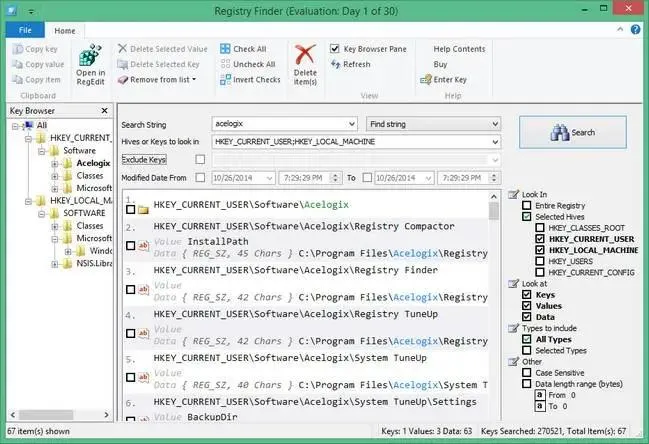
Registry Finder provides a powerful search engine that allows you to find Registry information based on a search criterion. The software employs a fast and efficient scanning algorithm allowing you to find information based on your search parameter. The search results are presented to you as a list, allowing you easy access to the registry entries found and perform a variety of operations.

OS : Windows XP, 2003, Vista, 7, 8, 8.1, Windows 10
Language : English

HOMEPAGE:
Код:
http://www.acelogix.com


DOWNLOAD LINKS:


Код:
https://rapidgator.net/file/6354c85e7d822f64314b4082caef4c30/Registry_Finder_2.62.0.rar.html

Код:
https://nitroflare.com/view/7DB184917F1085D/Registry_Finder_2.62.0.rar
 
Назад
Сверху Снизу