All mitsumi'1s Applications !! (updated daily)

23df37a21b6b39bcf6da9d46c9078032.png


Sante PACS Server PG 4.4.2

File size: 513.1 MB


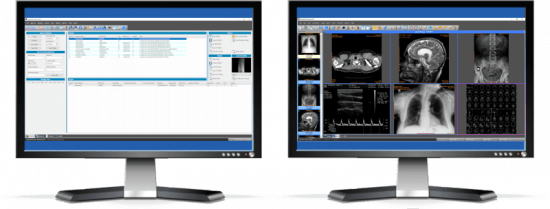
Sante PACS Server PG is a DICOM 3.0 compliant PACS server, a Modality Worklist server, an HTTP (web) server for DICOM files and a CD/DVD Burning and Printing server that offers high performance and reliability at an affordable price. It provides connectivity to all DICOM modalities (CT, MR, US, CR, NM, XA, MG, DX etc.). Reviewing the DICOM images can be done using the Sante PACS Viewer (the Built-in full-featured DICOM viewer of the system). The built-in web server can be used as a free cloud server for DICOM files!

The program modules
Sante PACS Server PG consists of 4 modules

The Database module
The program uses the Postgres SQL server for database management and offers storage of unlimited number of patients/studies/series/images (it depends only on hard disk size).

The DICOM Server module
The built-in DICOM server supports all the DICOM network services (C-FIND SCU/SCP, C-MOVE SCU/SCP, C-STORE SCU/SCP, C-GET SCU/SCP, C-ECHO SCU/SCP), it is compatible with all the modalities (CT, MR, NM, US, XA, MG, CR, DX etc.), all manufacturers and all DICOM 3.0 and NEMA 2 file types. Moreover, it supports unlimited number of connections with unlimited number of DICOM nodes and DICOM clients.

The Worklist Server module
The built-in Worklist server module can receive via HL7 communication messages the patients demographics and scheduling information of exams that are stored in a HIS/RIS system (Hospital Information System / Radiology Information System) and transfer them to any modality/medical scanner via DICOM communication protocols (C-FIND).

The Web Server module
The Web Server module lets remote users of the system to connect with it, query and retrieve studies that have been stored in the database of the DICOM Server. The Web Server module, for these connections, uses the HTTP ot HTTPS protocol of the internet and the remote user must use a web browser like Edge, Chrome or Mozilla to query and retrieve studies. The web server supports SSL secure connections. This module lets the user to connect, query, retrieve and review DICOM studies stored in the system from anywhere in the world and it can be used as a free cloud server!

The remote user, from the initial web page of the system can download and install two free applications for use with this web server, Sante Web Downloader and Sante DICOM Web Viewer.

Sante Web Downloader lets the user to inspect the downloading procedure. In the end of receiving Sante Web Downloader saves the received studies in a zip file. The user can configure Sante Web Downloader to open the saved zip file with a DICOM Viewer of his/her choice like Sante DICOM Viewer Pro or Sante DICOM Editor. The DICOM Viewer must support opening zip files from command line. For more information please read the User Guide of Sante Web Downloader. This application is useful when a user wishes to use a DICOM Viewer other than Sante DICOM Web Viewer.

Sante DICOM Web Viewer lets the user to inspect the downloading procedure as Sante Web Downloader does, but it is also a high quality, full featured, completely free 2D/3D DICOM Viewer, with all the necessary tools like measurements, roi statistics, MPR and study/series comparison. It allows the user to work smoothly in a multi-modality, multi-manufacturer environment because it has all the features of Sante DICOM Viewer Pro and Sante DICOM Viewer 3D Pro except the post-processing functions like anonymizing (de-identification)


HOMEPAGE


Код:
https://www.santesoft.com/


DOWNLOAD

Код:
https://rapidgator.net/file/a16a23986bd4adc863292cd618eaeae0/SantePACSServerPG4.rar.html

Код:
https://nitroflare.com/view/9B14195A9A0B240/SantePACSServerPG4.rar

 
5a0df27b1d80e95c7abad2435912b334.webp

Free Download Siemens Simcenter FloEFD 2512.0.0 v6992 | 11.4 Gb
Languages Supported: English, Deutsch, Français, 中文, 日本語, Русский
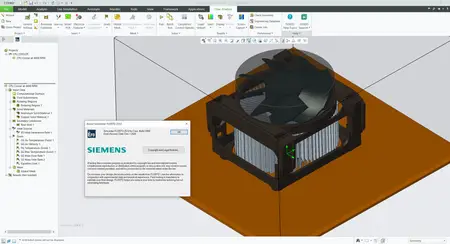
Siemens Digital Industries Software has released Simcenter FLOEFD 2512, is a fully CAD-embedded CFD software with multiphysics capabilities, for designers to analysts.
The new Simcenter FLOEFD 2512 software release as of December 12, 2025 is now available in all its CAD-embedded CFD variants, and also the Simcenter 3D embedded variant. This release delivers focused improvements for fast sealing of geometry for internal flow analyses for all general purpose CFD applications through to multiple enhancements for electronics thermal analysis workflows.

=
What's new in Simcenter FLOEFD 2512
In this blog post we are summarizing the highlights from the new features of version 2512 of Simcenter FLOEFD.
Sealing for internal flow simulations
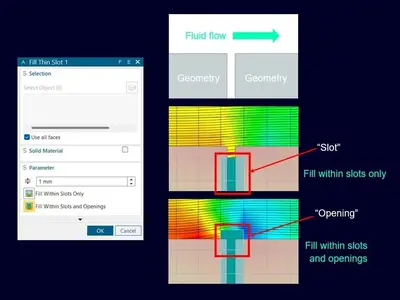
In version 2512 the Fill thin slots feature is extended with the additional option "Fill within slots and openings". The Fill thin slots feature was added last year. It allows for closing narrow channels that should be closed or where you don't want to resolve the fluid flow. The addition of filling the openings as well will ease closing your geometry and prepare a water-tight fluid domain. In simulation for internal flow the requirement is to have a water-tight domain, and with this sealing you are guaranteed to get this requirement fulfilled. In the picture below you see the new feature setup window along with the expected mesh for both "Fill thin slots" and "Fill within slots and openings". The parameter value will limit for which maximum value you set/choose to use, to close slots and openings. The possibility to select which solid material should fill the slots and openings can be set manually - if customizing default values is desired. For visualization, you can show Closed thin slots cells in your meh Description. Also worth mentioning is that this feature can be applied globally, but then your local settings have higher priority than these faces. The default thermal condition for closed cells is set to your default outer wall condition.
2fbf860d8a921bbfae67f8634a93a035.webp

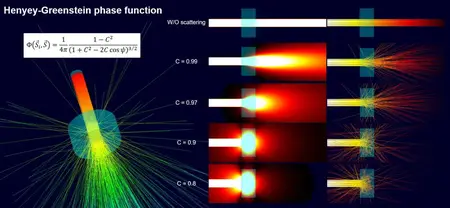
Henyey-Greenstein phase function for optic scattering
In version 2512 a new phase function for scattering of light was added. Previously, only a linear phase function was available, and that corresponds to radiation without scattering, as seen in the picture below. With the new implementation of the Henyey-Greenstein phase function you can simulate scattering of light through semi-transparent materials. In the Engineering database you can create new materials and modify the radiation properties, and this is where to set which scattering phase function to use. Copying existing materials to the user-defined folder will save you time - by not needing to define a new material from scratch. Choosing the Henyey-Greenstein function instead of the linear function enables the possibility to define the scattering coefficient C, which is defined per millimeter. The coefficient can also be defined with anisotropic properties. Phosphor particles are enabled in the Engineering database as well.
e06138dd5fba7aec1e35a9af292b118c.webp

Honorable mentions
- Faster calculations with two-resistor models: In version 2512 the preparation time for setting up this type of analysis is optimized. What previously could take 1.5 hours with a memory peak load of 150GB will in this reference case now only take 6 minutes and with a peak load of 38GB. This makes two-resistor calculations both faster and less computationally heavy.
- And as a bonus, the compatibility now goes both ways from 2512, were XTXML formats are possible to export from Simcenter FLOEFD, but FLOEFD for Catia will first get this possibility in future versions. The export support transfer for geometry, solid material conditions, etc. but not general project settings.
d053f58efe39c7c0fa33c045fb371a9c.webp


Simcenter FloEFDis a fully CAD-embedded CFD software with multiphysics capabilities, for designers to analysts, which enables design engineers to perform simulation earlier in the design process when it is more cost-effective to identify and fix problems or explore improvements. It helps shorten development by up to 65-75% compared to typical CFD approaches by frontloading fluid flow simulation and thermal analysis and using native CAD geometry.
Simcenter FLOEFD
Siemens Digital Industries Softwareis driving transformation to enable a digital enterprise where engineering, manufacturing and electronics design meet tomorrow. The Xcelerator portfolio helps companies of all sizes create and leverage digital twins that provide organizations with new insights, opportunities and levels of automation to drive innovation.
Owner:Siemens Digital Industries Software
Product Name:Simcenter FloEFD
Version:2512.0.0 v6992 *
Supported Architectures:x64
Website Home Page :
Languages Supported:multilanguage
System Requirements:Windows **
Size:11.4 Gb

Siemens Simcenter FloEFD 2512.0.0 v6992 for CATIA V5
Siemens Simcenter FloEFD 2512.0.0 v6992 for PTC Creo Parametric
Siemens Simcenter FloEFD 2512.0.0 v6992 for Siemens NX / Simcenter 3D
Siemens Simcenter FloEFD 2512.0.0 v6992 Standalone
Siemens Simcenter FloEFD 2512.0.0 v6992 for Siemens Solid Edge

Rapidgator
Код:
https://rapidgator.net/file/b422b14c108f71083f7f58f08fcdb6e0/rgoun.Siemens-Simcenter-FloEFD-2512-0-0-v6992.part1.rar.html
https://rapidgator.net/file/457dea3a108820852f8ba190a14198da/rgoun.Siemens-Simcenter-FloEFD-2512-0-0-v6992.part2.rar.html
https://rapidgator.net/file/24801be10eda538d278e1284a9b1b935/rgoun.Siemens-Simcenter-FloEFD-2512-0-0-v6992.part3.rar.html
https://rapidgator.net/file/f9cecb34fbcdc5686081dc252db52083/rgoun.Siemens-Simcenter-FloEFD-2512-0-0-v6992.part4.rar.html

Код:
https://nitroflare.com/view/B2343277CC9166C/rgoun.Siemens-Simcenter-FloEFD-2512-0-0-v6992.part1.rar
https://nitroflare.com/view/BBDC5C9A03A6CBF/rgoun.Siemens-Simcenter-FloEFD-2512-0-0-v6992.part2.rar
https://nitroflare.com/view/18DE623F115B38E/rgoun.Siemens-Simcenter-FloEFD-2512-0-0-v6992.part3.rar
https://nitroflare.com/view/152F5DF82ECE4E1/rgoun.Siemens-Simcenter-FloEFD-2512-0-0-v6992.part4.rar
 
428b12a987b15e1c900a83f4161a5e93.jpg


SysTools MBOX Converter 8.3

File size: 45.1 MB


SysTools MBOX Converter - Convert MBOX / MBS / MBX Files from 20+ Email Clients to Preferred Formats.

Batch Export MBOX Files
MBOX Converter software is a powerful utility to convert multiple MBOX files into different file formats. One can easily convert MBOX emails into the desired file format in bulk along with attachments. The tool is also allows users to recover deleted emails from MBOX file as well as restore the deleted MBOX emails into healthy format.

Convert Single or Multiple MBOX Files
Depending upon the varying requirements of users, the MBOX Converter can generate either a single or multiple output files.

Multiple Export Types to Convert MBOX Files
SysTools MBOX Converter Wizard provides multiple export formats to migrate MBOX files. Users can export MBOX files into any file format of their choice. Advanced settings are available for each export format.

Support Multiple MBOX Formats
An MBOX file can be created by numerous applications in different formats such as MBOX, MBX, and .mbox. The MBOX Converter software is capable to work with the MBOX file of multiple email clients.


HOMEPAGE


Код:
https://www.systoolsgroup.com/mbox-converter.html


DOWNLOAD

Код:
https://rapidgator.net/file/5aa83467d5219c510f5ddbebbb81e7c4/SysTools_MBOX_Converter_8.3..rar.html

Код:
https://nitroflare.com/view/3F24B184097D978/SysTools_MBOX_Converter_8.3..rar
 
6116cc2ad4b677a61a89663da64a9df6.webp

Free Download SysTools vCard Export 7.0 | 101.7 Mb
Batch Export Microsoft Outlook Contacts into vCard, WAB, Google CSV, Yahoo CSV, PDF, HTML, MSG, CSV, and PST File Format.


Converts Outlook Contacts to vCard from Default Outlook Profile Address Books
Export Outlook Contacts to vCard, WAB, PDF, PST, CSV, MSG, HTML, Google, Yahoo
Preserves All Contacts Details During Outlook Contacts to vCard Conversion
Detects Outlook Profile while Exporting Outlook Contacts to vCard Automatically
Open and Preview Outlook Contacts with All Attributes Before Conversion
Exports Outlook Contacts Attributes: Name, Emails Address, Phone, Etc.
Scans and Load Multiple MS Outlook PST Contacts File in a Single Attempt
Converts Outlook Contacts to vCard from Corrupted Outlook PST Contact File
Export Outlook Address Book to vCard (.vcf) Format on Windows 11 and Below Versions
Home Page-
Код:
https://www.systoolsgroup.com/

Rapidgator
Код:
https://rapidgator.net/file/a62c3865e382b62b9d00c44d5ef4ba7f/umtqd.SysTools.vCard.Export.7.0.rar.html

Код:
https://nitroflare.com/view/8A7D55F7DE6DE1C/umtqd.SysTools.vCard.Export.7.0.rar
 
3e31399f938455da66bc68135e37a474.png


VovSoft Auto Mouse Clicker 3.0

File size: 5.2 MB


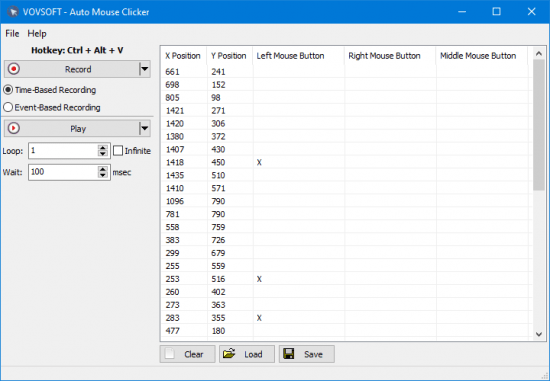
Vovsoft Auto Mouse Clicker is a simple and straightforward desktop clicker software that automates mouse clicks. With this program, you can automate your workflow, increase productivity, and save time by eliminating the need to perform tedious tasks manually.

This program can simulate left, right and middle mouse button clicks on any window, and frees users from repetitive click work. The software maps the screen based on the coordinates to ensure that it clicks precisely where the user wants it.

Automate repetitive tasks
Whether you're a gamer, or a professional who needs to perform repetitive tasks on a regular basis, Vovsoft Auto Mouse Clicker can help you achieve your goals quickly and easily. This software can be used to automate a wide range of tasks, such as clicking on buttons, and navigating web pages.

There is nothing as boring as clicking thousands of times while playing your favorite games to complete certain tasks. Attacking enemies, building structures, and more tasks need a lot of clicks can waste your time and make you get bored, they can even cause wrist pain and harm your mouse. Some games can force you to click on the same point hundreds of times. What you need and what you have been looking for is a software that enables you to create automatic clicks as many times as you want.

Automatic mouse mover and clicker
This easy to use software is an automatic mouse mover and clicker utility for your auto click needs. This tool is not only best to automate clicks on games, but also on the computer as a whole as it can trigger any tasks.

You can play your recordings whenever you want. This program allows you to choose the number of loops. So you can choose the number of clicks as you want or create an infinite loop. Infinite loop option plays the recording continuously, until you stop it using hotkey.

The software comes with hotkey functionality and can be used as a macro recorder. The feature to save the recorded macro as a CSV file is also there. That file includes the X position, Y position, middle mouse button, left mouse button, and right mouse button data. You can delete entries from the data before saving the macro. The software supports drag and drop files, save to file, load from file, and running with command line arguments. These features add more flexibility and convenience to your workflow.

Users are free to choose between Time-Based Recording and Event-Based Recording. Time-Based Recording takes into account the time elapsed between mouse movements, whereas Event-Based Recording neglects them.


HOMEPAGE


Код:
https://vovsoft.com/software/auto-mouse-clicker/


DOWNLOAD

Код:
https://rapidgator.net/file/6e6109afe7847449e42af911732cd065/VovSoftAutoMouseClicker3..rar.html

Код:
https://nitroflare.com/view/2AA39A2AE99E998/VovSoftAutoMouseClicker3..rar
 
66f057b7fb5d37616a8938543b788dc7.avif


VovSoft Duplicate File Finder 2.1

File Size: 5.6 MB


Duplicate File Finder is a tool to find duplicate files on your computer. It can scan filenames, filesizes or file contents (using SHA-1 algorithm).

You may have hundreds of photos, videos, music files or documents that you have lost track of. You are running out of disk space on your PC, but sorting through your files seems overwhelming because there are just too many of them. This utility will help you locate and remove useless file duplicates to free up disk space and better organize your file collections. You will have full control in being able to look through the list of duplicates and decide which copy to keep.

Key Features
Checkmark Filename comparison
Checkmark File size comparison
Checkmark File content comparison (SHA-1)
Checkmark Drag & drop folders
Checkmark Export file list using CSV format
Checkmark Export duplicate list using CSV format


HOMEPAGE


Код:
https://vovsoft.com/


DOWNLOAD

Код:
https://rapidgator.net/file/d6d74b3baf586e32e3a07190cbe576aa/VovSoft.Duplicate.File.Finder.2..rar.html

Код:
https://nitroflare.com/view/72682510DE4B660/VovSoft.Duplicate.File.Finder.2..rar
 
0bb8ea35c658aaad2075e0eef9b342b7.jpg


VovSoft SEO Checker 10.5.0 Multilingual

File Size: 2.3 MB


Search engine optimization (SEO) or organic search marketing, refers to software designed to improve the ranking of websites in search engine results pages (SERP) without paying for placement. These products provide insights through features, such as keyword analysis and backlink tracking to identify the best strategies for improving search relevance.

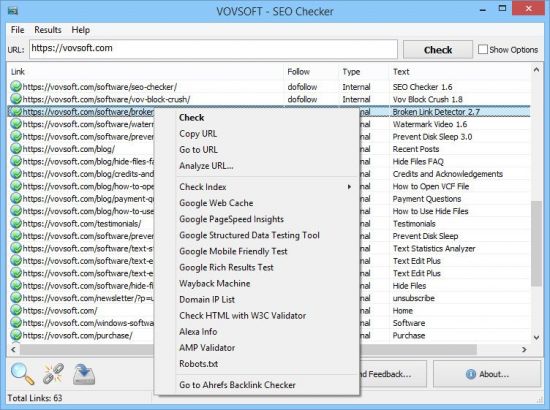
SEO Checker is an easy to use website crawler, able to crawl both small and very large websites efficiently, while allowing you to find broken links, analyze the results in real-time, gather onsite data, distinguish internal and external links, check dofollow and nofollow links, analyze META descriptions, H1, H2, H3 tags.


HOMEPAGE


Код:
https://vovsoft.com


DOWNLOAD

Код:
https://rapidgator.net/file/6ac27210cb0df6fe35c8325273e1c0c6/SEO.Checker.10.rar.html

Код:
https://nitroflare.com/view/E3612FCB20AE8A5/SEO.Checker.10.rar
 
4f9509100b898c6802a03e582ea78c0a.jpg


VX Search 17.6.18

File Size: 26 MB


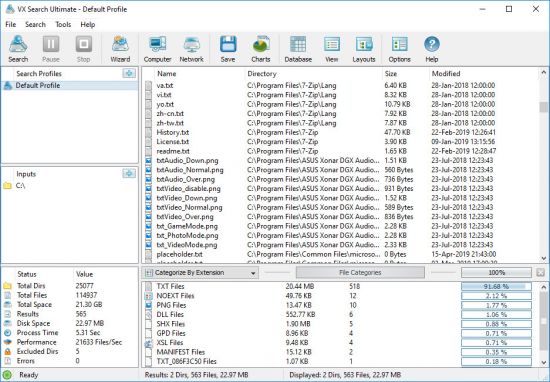
VX Search is an automated, rule-based file search solution allowing one to search files by the file type, category, extension, file name, file size, location, creation, modification and last access dates, regular expressions, user name, file attributes, binary and text patterns, JPEG EXIF tags, etc.

VX Search Rule-Based File Search
The user is provided with the ability to categorize and filter file search results, perform file management operations, generate various types of pie and bars charts, save reports to a number of standard formats such as HTML, PDF, Excel, text, CSV, XML and export search results to an SQL database.

VX Search Main GUI Application
IT administrators are provided with advanced file search capabilities including the ability to search files in multiple servers and/or NAS storage devices simultaneously, periodic file search operations, automatic report generation, conditional file search actions allowing one to send E-Mail notifications and/or execute custom commands when a file search operation finds a user-specified number of files.

Searching Files in Network Servers and NAS Storage Devices
VX Search allows one to scan the network, discover network servers and NAS storage devices, automatically detect all accessible network shares and search files in hundreds of network servers and NAS storage devices. In addition, the user is provided with the ability to export the list of detected servers and NAS storage devices (including lists of network shares for each server) into HTML, PDF, Excel, text, XML and CSV reports.

VX Search Network Search Servers
In order to search files in one or more servers or NAS storage devices, press the 'Network' button located on the main toolbar and wait while VX Search will scan the network and show a list of detected network servers and NAS storage devices. On the network servers and NAS storage devices dialog, select the required servers and press the 'Search' button.

VX Search Network Search Command
VX Search will show all network shares hosted on the selected servers and NAS storage devices allowing one to search files and save various types of file search reports and charts. In addition, VX Search provides a large number of advanced file search options allowing one to tune and customize file search operations for user specific needs and hardware configurations.

VX Search Command Line Utility
In addition to the VX Search GUI application, the user is provided with a command line utility, which can be used to execute pre-configured file search operations and integrated into user-custom shell scripts and batch files. The VX Search command line utility may be used to execute file search operations locally or control file search operations in one or more VX Search Servers via the network.

VX Search Command Line Utility
VX Search Server
IT and storage administrators are provided with the server product version, which runs in the background as a service and provides the ability to perform fully-automated, periodic file search operations, generate various types of file search reports, analyze file search results and execute conditional actions based on user-defined rules and policies.

VX Search Client GUI Application
VX Search Server may be controlled using a full-scale client GUI application and the command line utility, which provides the ability to perform file search operations, review results and save reports locally and through the network. Finally, enterprise customers are provided with VX Search Enterprise - a server-based product version allowing one to perform search operations, review results and save reports using a regular web browser locally or through the network.

Batch File Search Operations
VX Search Server and VX Search Enterprise provide the ability to scan the network, detect all network servers and NAS storage devices, execute one or more pre-configured file search commands on hundreds of network servers and NAS storage devices and generate an individual file search report for each network server, NAS storage device or network share.

Batch File Search Operations
In the simplest case, just press the 'Network' button located on the main toolbar, search all network servers and NAS storage devices on the network, select one or more servers, press the right mouse button and select the 'Batch File Search' menu item. VX Search will show a list of pre-configured file search commands allowing one to select one or more commands to be executed on all selected network servers and NAS storage devices.

Batch File Search Mode
Depending on the selected configuration, VX Search Server will save in the built-in reports database an individual file search report for each network server, NAS storage device or network share. Once the batch file search operation is completed, the user will be provided with the ability to open saved file search reports, review file search results, generate various types of pie charts and export reports to a number of standard formats including HTML, PDF, text, Excel CSV and XML.


HOMEPAGE


Код:
https://www.vxsearch.com/


DOWNLOAD

Код:
https://rapidgator.net/file/ade86d4158f3fd20c1fb83bdffcbf3aa/VX.Search.17.rar.html

Код:
https://nitroflare.com/view/FAB468C017611E1/VX.Search.17.rar
 
Назад
Сверху Снизу