All mitsumi'1s Applications !! (updated daily)

639ae24713fab45728411a3cd6e5961d.png


Minimal Firewall 2.9.0 | Size: 1.52 MB
Language: English


Minimal Firewall works in conjuncton with Windows Firewall to block all unknown connections by default, prompting you to create application based rules to mitigate malware, telemetry, and data leaks. Completely rid yourself of apps phoning home without your knowledge.

Core Features
Lockdown Mode: The core of Minimal Firewall. Enable this mode to block all network connections without Windows Firewall rules by default. No program connects without your explicit say-so.
Real-Time Connection Alerts: Get instant notifications when a blocked program tries to connect, allowing you to make a decision on the spot. You can choose whether to have annoying pop-ups or quiet, in-application notifications.
Simple Rule Creation: Allow or block any application permanently with a single click, or temporarily allow or block.
Wildcard Rules: Easily manage programs that update frequently (like web browsers) by creating rules that apply to any version within a specific folder.
UWP & Service Support: Manage rules for modern Windows Store apps and background system services, not just traditional desktop programs.

Light & Dark Themes: A clean user interface that's easy on the eyes, day or night.
100% Local and Private: Minimal Firewall contains no telemetry, does not connect to the internet itself, and all your rules and logs are stored locally on your machine.

System Requirements: Windows 11/10

HOMEPAGE: Code:
Код:
https://github.com/deminimis/minimalfirewall


DOWNLOAD LINKS:


Код:
[url]https://rapidgator.net/file/e86d5307195a9aa0d000f88e8353088c/Minimal_Firewall_2.9.0.rar.html[/url]

Код:
https://clicknupload.click/ceeztskzka9m/Minimal_Firewall_2.9.0.rar
 
e125a29ba33a8ec7fc0deb8022094ac9.webp

Free Download MobiKin Assistant for iOS 4.0.7 Multilingual | File size: 37.46 MB
MobiKin Assistant for iOS is a desktop application designed to help iPhone, iPad, and iPod users transfer, back up, restore, and organize device data through a Windows computer. It provides access to different categories of iOS content, making it easier to manage personal information and media files without depending entirely on iTunes.
The software offers tools for copying files between an iOS device and a PC, as well as adding, deleting, and editing supported content directly from the desktop interface. These functions are useful for maintaining local copies of important data, organizing device contents, and transferring files for personal use.
In addition to standard data management, the application includes iTunes backup and restore functions. Users can create and restore backups, transfer existing iTunes backup data from a computer to an iOS device, and remove unwanted backup files stored on the PC.


Software Overview
MobiKin Assistant for iOS combines device data management with backup and restoration capabilities in a single Windows application. It is intended for users who want more direct control over the information stored on their iPhone, iPad, or iPod through a computer.
The file transfer functionality supports copying large amounts of data between an iOS device and a PC. This provides a practical way to preserve important files, create additional copies of personal content, or move media between devices and computers.
The desktop management interface also allows users to add, delete, and edit supported iOS data. Rather than performing every organization task directly on the device, users can manage available content from their computer.
Another important component is the integrated iTunes backup management functionality. The application can back up and restore data between an iOS device and iTunes, import existing iTunes backups from a PC to a device, and delete backup files that are no longer needed.
MobiKin Assistant for iOS is also designed to work with multiple generations of iPhone, iPad, and iPod devices. Its multi-device support makes it suitable for users who manage more than one compatible Apple mobile device.

Key Features
  • Transfer files between iPhone, iPad, iPod, and Windows computers.
  • Back up iOS device content to a computer.
  • Restore backed-up information when required.
  • Add supported data directly from the desktop interface.
  • Delete unwanted content from connected iOS devices.
  • Edit supported device information using a computer.
  • Create iTunes backups with a single-click operation.
  • Restore data through the integrated iTunes backup functionality.
  • Import existing iTunes backups from a PC to an iOS device.
  • Remove unwanted iTunes backup files stored on the computer.
  • Manage multiple compatible iOS devices through one application.

Why Choose MobiKin Assistant for iOS
MobiKin Assistant for iOS is intended for users who need a desktop-based approach to managing iPhone, iPad, and iPod content. Its combination of file transfers, direct data management, and backup tools covers several common device maintenance tasks.
The integrated iTunes backup management functions are particularly useful for users who want to handle backup creation, restoration, and existing backup files from a computer. Support for multiple iOS devices also makes the application suitable for households or users working with several Apple mobile devices.

System Requirements
Windows 10/8/7/XP/Vista

Home Page

Код:
https://www.mobikin.com/

Product Information
  • Software Name: MobiKin Assistant for iOS
  • Version: 4.0.7
  • Languages: Multilingual
  • License type: Full Version
  • File Size: 37.46 MB

    Rapidgator
    Код:
    https://rapidgator.net/file/fb5b439ce51d86529b16022b595a0f95/yf3j6.MobiKin_Assistant_for_iOS_4_0_7_Multilingual_Download.rar.html

    Код:
    https://clicknupload.click/wdy2rfiv5fmz/yf3j6.MobiKin_Assistant_for_iOS_4_0_7_Multilingual_Download.rar
 
4a42400dc7443fdf550deb91c385c576.jpg


qBittorrent 5.3.1 (x64) | Size: 48.22 MB
Language: English


qBittorrent is a multi-platform Bittorrent client developed in C++/Qt4. The qBittorrent project aims to provide a Free Software alternative to µtorrent. Its main features are its integrated search engine (allows searching for torrent from the main torrent Web sites simultaneously in a transparent fashion), its support for l'UPnP/NAT-PMP, Bittorrent protocol encryption (Azureus-compatible), Peer Exchange (PeX) compatible with µTorrent, IP filtering (eMule-like "ipfilter.dat" or PeerGuardian filters), Torrents (and the files they contain) prioritizing, remote control through a secure Web User Interface.

Features
•Polished familiar user interface
•Integrated search engine (adding new sites is not currently supported)
•All Bittorrent extensions: DHT, Peer Exchange, Full encryption, Magnet/BitComet URIs, etc
•Remote control through a Web user interface
•Advanced control over trackers, peers and torrents (queueing and prioritizing)
•UPnP / NAT-PMP port forwarding support
•Available in ~25 languages (Unicode support)
•Torrent creation tool
•Advanced RSS support with download filters (inc. regex)
•Bandwidth scheduler

•IP Filtering (eMule and PeerGuardian compatible)
•IPv6 compliant

System Requirements: Windows 11, Windows 10, 8 , 7

HOMEPAGE: Code:
Код:
https://www.qbittorrent.org/


DOWNLOAD LINKS:


Код:
[url]https://rapidgator.net/file/c93954e5c30f16ba1e42b6f326ee2bf1/qBittorrent_5.3.1_x64.rar.html[/url]

Код:
https://clicknupload.click/cuna4buysr1e/qBittorrent_5.3.1_x64.rar
 
9d452bda1cd87f611e5805d5236d1383.png


Quick Access Popup 12.4.4 Multilingual | Size: 4.73 MB
Language: English


Quick Access Popup (QAP) lets you move like a breeze between your frequently used FOLDERS, DOCUMENTS, APPLISave thousands of clicks while browsing your favorite folders in Windows Explorer or file dialog boxes. Launch your most used applications, documents or web sites instantly with this easy popup menu and mouse/keyboard shortcuts manager. Gather related favorites in SUBMENUS. Assign favorites or submenus to keyboard or mouse SHORTCUTS. Or GROUP favorites and launch them in one click.

To launch the popup menu, click the QAP icon in the Notification zone, hit the Middle Mouse Button or press Windows+W (these triggers can be changed in Options). In the SETTINGS window, customize your QAP menu. Review shortcuts assigned to favorites or submenus in the HOTKEYS window.

To quickly ADD a new favorite FOLDER to your popup menu: 1) go to a frequently used folder, 2) click the QAP hotkey and choose ADD THIS FOLDER, 3) give the folder a short name ans save it.

In the MY QAP ESSENTIALS menu, choose the SWITCH menu to switch to any other running Explorer or application window. Use the REOPEN A FOLDER menu to reopen one of the folders already open in an Explorer window (very useful in file dialog boxes). Choose the RECENT FOLDERS menu to show an updated list of the Windows recent folders. Access the files or URLs in your Clipboard with the CLIPBOARD menu. Click the DRIVES menu to see the list of drives with current disk space.

In the OPTIONS dialog box, choose your preferred language, menu icons size, windows colors. Select the number of recent folders to display, add numeric keyboard shortcuts to the folders menu or shortcut reminders. Pin the popup menu at a fix position or remember the Settings window position.

All this for free in very intuitive app. Quick Access Popup is available on Windows 7 and more recent. Works with Windows Explorer, Directory Opus, Total Commander and 15 other file managersCATIONS, WEB PAGES and much more!

System Requirements
Quick Access Popup works on all international versions of Windows 7, Windows 8/8.1, Windows 10 and Windows 11, both client and server versions, with Explorer windows, File Dialog Boxes (Open, Save As, etc.), Console Window (CMD command prompt and PowerShell), Directory Opus, Total Commander and many other popular alternative file managers.

HOMEPAGE: Code:
Код:
https://www.quickaccesspopup.com/


DOWNLOAD LINKS:


Код:
https://rapidgator.net/file/7d4561c9cb4487a28c550ff3a6e6bbca/Quick_Access_Popup_12.4.4_Multilingual.rar.html

Код:
https://clicknupload.click/mrncnb1it4jl/Quick_Access_Popup_12.4.4_Multilingual.rar
 
_c0145cd2411fb02ff7bcda6bc0e30551.jpeg


RealVoice Pro 1.2.8 | Size: 692.14 MB
Language: English


Bring your words to life with RealVoice Pro. Create text-to-speech narration, mix background music, and add voiceovers to your videos-all in one Windows app. RealVoice Pro brings together Script Studio and Video Studio to help you move from a written script to finished audio or video.

Turn scripts into narration
Write or paste your text in Script Studio, choose a voice, and adjust speaking speed and pitch. Preview your narration, add background music, and export your finished mix as an MP3.

Bring sound and video together
Import videos into Video Studio and arrange narration, music, and titles on the timeline. Control when each cue begins, adjust track volumes, and build a mixed preview before exporting.

Make your words visible
Add captions to generated narration and customize their font, size, colors, and placement. Use individual block settings for more control, or export captions as an SRT subtitle file.

Take control of your audio
Keep the original video sound or mute it while retaining your added narration and music. Adjust levels, fades, and looping, and lower background music during narration.

Key Features
- Text-to-speech narration with selectable voices, speed, and pitch
- Script Studio for writing, speech generation, and music mixing
- Video Studio with separate video, narration, music, and title lanes
- Multiple video clips with transitions
- Customizable captions and timed titles
- Original-video audio muting
- Full mixed previews and selected-range previews
- MP3 audio, MP4 video, and vertical short-video exports
- Portable video projects, autosave recovery, and undo/redo

Whether you're creating a tutorial, presentation, narrated story, or social video, RealVoice Pro helps you bring your script, sound, and visuals together.

System Requirements
Windows 10 version 17763.0 or higher

* Internet connection required for text-to-speech generation and loading the voice catalog. Script text is sent to an online speech service. Video editing, mixing, and export run locally on your computer.

HOMEPAGE: Code:
Код:
https://apps.microsoft.com/detail/9n150hbvjmmx


DOWNLOAD LINKS:


Код:
[url]https://rapidgator.net/file/eb2276815221bd6678491737b74dd1b4/RealVoice_Pro_1.2.8.rar.html[/url]

Код:
https://clicknupload.click/ioxqq8ncak9c/RealVoice_Pro_1.2.8.rar
 
_39950a755fdee68c95c587a9648af5dc.jpeg


RealVoice Text to Speech 5.7.0 | Size: 758.85 MB
Language: English


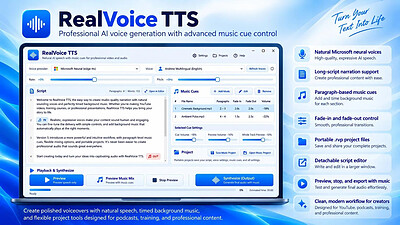
RealVoice TTS turns your text into natural-sounding speech using Microsoft neural voices. Preview instantly, fine-tune rate and pitch, then export high-quality audio. Add background music, adjust volumes, and optionally fade the music at the end for a clean finish. The app is designed to be simple, fast, and reliable-great for creators, educators, podcasters, and anyone who needs voiceover audio quickly.

No sign-in required. Voice preview and voice-only export work out of the box. If bundled, the app also mixes voice + music into one MP3 without extra installs. Clean, modern UI with a light-blue theme and your choice of voice. Save to MP3 and keep everything local to your PC.

Realistic voices
Uses Microsoft neural voices via secure HTTPS.

Instant preview
Hear changes to text, voice, rate, and pitch immediately.

Music mixing
Add a background track, set levels, and fade-out at the end.

Voice-only or mixed export
Save clean MP3s

No account required
Works locally; you control your files.

Modern UI
Light-blue theme, clear controls, and helpful defaults.

Resilient synthesis
Automatic retry + fallback voice if a network hiccup occurs.

System Requirements
Windows 10 version 17763.0 or higher

HOMEPAGE: Code:
Код:
https://apps.microsoft.com/detail/9nzn9fws7pb1


DOWNLOAD LINKS:


Код:
[url]https://rapidgator.net/file/33067731d3c9949ab9cef517e8a0f2a4/RealVoice_Text_to_Speech_5.7.0.rar.html[/url]

Код:
https://clicknupload.click/0t9j0natw9se/RealVoice_Text_to_Speech_5.7.0.rar
 
f7c166fc02ef2a46ed3176846e582864.jpg


Rons File Wrangler Pro 2026.11.21.1213 | Size: 12.51 MB
Language: English


Rons File Wrangler streamlines the process of renaming tens to thousands of files simultaneously by leveraging rule-based search and replace functions. With an unlimited combination of customizable rules, this utility can handle file renaming tasks across multiple directories with ease. Designed from concept to execution with user efficiency in mind, Rons File Wrangler transforms a traditionally tedious task into a quick and intuitive process.

Why Choose Rons File Wrangler?
Rons File Wrangler is engineered for speed and reliability. It has been rigorously tested with tens of thousands of files, ensuring that even the most demanding renaming tasks are handled efficiently. Its intuitive interface and robust functionality make it the ideal tool for
Organizing digital photo libraries,
Tidying up extensive music collections, and
General document management.
With its unique combination of power and ease-of-use, Rons File Wrangler turns a difficult task into a simple one, saving you valuable time and effort.

Advanced Rule-Based System
Choose from 19 easy-to-use renaming rules (see the Feature List) and combine them into custom rule sets. Save these sets for instant access to your frequently used renaming tasks.

File Tag Support
Automatically extract and apply metadata from Exif tags in photographs or MP3 tags in music files. Rename files based on album names, song titles, dates, locations, and more.

Safe and Reliable Renaming
Preview Functionality: Preview new file names before committing to changes to ensure accuracy.
Conflict & Error Checks: Built-in mechanisms detect conflicts and illegal file name patterns.
Rollback Option: Easily revert changes after renaming, offering an additional layer of security.

Command Line Support & Automation
Save complete rule sets as scripts for seamless automation, integrating the renaming process into larger workflows and ensuring consistent file management.

System Requirements
Windows 11 (x32 and x64)
Windows 10 (x32 and x64)
Windows 8/8.1 (x32 and x64)

HOMEPAGE: Code:
Код:
https://www.ronsplace.ca/


DOWNLOAD LINKS:


Код:
[url]https://rapidgator.net/file/572a3c41439518613e44aab9ffab7b05/1213_26.11.21.rar.html[/url]

Код:
https://clicknupload.click/7ryb6qr2rt0t/1213_26.11.21.rar
 
80e9d05e0b82682483e52be28d6c93ab.jpg


Rons WebLynx Pro 2026.11.23.742 | Size: 16.76 MB
Language: English


Rons WebLynx is a Windows desktop application, for organizing and managing bookmarks. Bookmarks are stored in WebLynx documents on the local computer, so are not 'shared' in the cloud and do not rely on third party storage.

Ideal for research, marketing, or just organizing a lot (1000's) of links. Nowadays, almost everyone can do with a good bookmark manager as the internet has become part of our daily lives - you typically don't realize you need a bookmark manager until you start using one.

WebLynx combines power, elegance and ease of use, and is full of features like automatic link checking to make it a great tool for anyone who uses the Internet.

Clear and Easy to Manage
Links are organized using well known folder and tag concepts, and have additional Views to quickly check new, broken and duplicate links (and more).
Searches can be done in folders, or across tabs, or both, and folders and tags can be collected into Groups to create custom views.

Loads of Ways to get Links IN
Getting links into WebLynx could not be simpler:
Import your browser bookmarks.
Drag and drop anything - selected text from you browser or a file or directory from your computer.
Use the import to find links from pretty much anywhere including Outlook, Word documents, 'Outertech Linkman' or even entire websites.
Paste, or finally, just enter by hand.
The built in browsing/reading panels add convenience when checking links, and all of this is clearly presented in a logical way.

Loads of Ways to get Links OUT
Export links with their tags and folders, or export the link Content (reading view).
Export to File or Clipboard, in the following formats HTML, XML, Linker Exchange or Content.

Power and Automation
WebLynx is about automation power.
Aside from the automatic checks that are done on all links periodically, any number of selected links can be re-checked, cleaned and organized. Folders and tags have options like 'Merge' or 'Remove Empty'.
Groups show collections of folders and tags, and Automatic filing performs movement or removal of links based on configurable rules.

RSS Reader Included
RSS feeds are automatically extracted from linked web pages, and listed in the Link Information panel. To make things even easier the 'Page with Feed' View shows all pages that contain feeds.
Feeds can be added to any folder as an Active Folder, then merged into one or more feed 'In-boxes' using Groups.

Browser Integration
Use the Web Browser integration available for Google Chrome, Edge, Brave and Firefox to send links directly into WebLynx so your browsing is not disturbed by switching to another application.
Links come into WebLynx in a place called the 'Landing Zone', which is a side panel shared between all open WebLynx windows, so that links can be filed appropriately.

Operating System Support:
Windows 11
Windows 10 (x32 and x64)
Windows 8/8.1 (x32 and x64)
Windows 7 (x32 and x64)
Windows Vista (x32 and x64)

HOMEPAGE: Code:
Код:
https://www.ronsplace.ca/Products/RonsWebLynx


DOWNLOAD LINKS:


Код:
[url]https://rapidgator.net/file/fb7777f3182cf12d7d1c97d55ebad351/742_26.11.23.rar.html[/url]

Код:
https://clicknupload.click/olopixa2jbh9/742_26.11.23.rar
 
c877d715b184c3d415d0326a8e8b7a59.png


S-IT BRC - Backup • Restore • Cleanup v4.0.141 | Size: 59.65 MB
Language: English


Back up, restore and tidy up your user data - all in one tool.

• Backup
Backs up your personal data (Desktop, Documents, Pictures, Music, Videos, Downloads, AppData), OneDrive and up to seven additional folders to another drive.
A schedule runs your backups automatically - daily, weekly, monthly or at intervals.

• Restore
Restores data from a backup - to the original location, to another system or to a freely selectable target folder. From a Backup (.brc) you restore individual folders or files without unpacking the whole backup.

• Cleanup
For the file backup, Cleanup moves files that no longer exist on the PC into an archive folder - with a simulation before the real run. For Backups (.brc) it shows your backups and removes those you no longer need.

System requirements: Windows 10 (64-bit), Windows 11

Setup options
Install - with shortcuts and an entry in the Control Panel
Portable - into a folder of your choice, for example on a USB stick

HOMEPAGE: Code:
Код:
https://sattlerit.github.io/sit-brc/index_en.html


DOWNLOAD LINKS:


Код:
https://rapidgator.net/file/2eabf4126e52d4e40b2a921a95a98912/S-IT_BRC_-_Backup_â¢_Restore_â¢_Cleanup_v4.0.141.rar.html

Код:
https://clicknupload.click/8zn8jx61kw1p/S-IT_BRC_-_Backup_â¢_Restore_â¢_Cleanup_v4.0.141.rar
 
e9bf8bd8e3b627326a35d93da32abc7e.jpg


Supremo 5.1.0.4261 | Size: 16.63 MB
Language: English


Supremo Remote Desktop is an easy-to-use software that will enable users to easily connect to other computers. It is a complete and powerful utility for remote access and support over the internet. With Supremo you can remotely control any computer, without the need to change any firewall/router settings, combining an extremely easy setup with one of the highest security level available.

It is a complete and powerful utility for remote access and support over the internet. With Supremo you can remotely control any computer, without the need to change any firewall/router settings, combining an extremely easy setup with one of the highest security level available.
Thanks to its integrated encryption and SSL support, Supremo guarantees the highest security combined with optimal performance.
Supremo is a lightweight and non-intrusive software, constituted by only one executable file that includes all program's features. Finally, Supremo is optimized to use minimum system resources and is continually updated and improved.

Here are some key features of "Supremo Remote Desktop"
Small and easy to use
· Supremo is a remote desktop software created to be a fast, portable and easy to use solution to provide remote assistance to customers. Supremo is constituted by only one executable file, that is very small and doesn't need any installation. The customer must simply download the file Supremo.exe from this website, activate the connection and accept the support request.
No router / firewall configuration
· Supremo uses a fast and versatile data transfer protocol, to easily allow you to connect to remote computers even behind routers and firewalls, without change any network configuration. Supremo doesn't need any installation or setup, and its connection is extremely secure thanks to its integrated encryption and HTTPS protocol (SSL).
Multi connection
· Supremo allows multiple users to connect to the same computer. This can be very useful when you need to do complex assistance sessions or when you need to do an internet presentation. For example, you customers can connect at the same time to a computer in your company and see a presentation of your products and services.
File transfer with FTP client style and Drag & Drop
· Supremo provides an integrated file transfer application, that allows you to explore the disks of the remote computer and transfer files and folders in both directions. You can send a folder from your PC to the customer's PC with a simple click, or you can download a file/folder from the customer's PC to your local PC.
Security and protection
· Supremo is a secure and reliable application. All the data transferred by Supremo over the internet are encrypted with a strong encryption algorithm. In addition Supremo uses the secure HTTPS (SSL) protocol, ensuring in this way one of the highest security level for data transfer.
· Regarding the security measures for remote desktop connections, Supremo allows to configure some important parameters to avoid unauthorized accesses. You can set and IP filter to block or allow multiple IPs or specify a password that can be specified by remote users in order to connect.
A lot of useful features
· Supremo provides a lot of useful features in order to simplify the remote assistance work. You can install Supremo as a Windows service, to make the connection always available in background. You can set connection filters for certains IPs or IDs, in order to limit the possibility of connection only to some users. You can create a detailed address book where you can register all your contacts and customers.
· With Supremo you can transfer files and folders in both directions, and you have several advanced features to adjust bandwidth usage and visual aspect, to send remote commands and to automatically transfer clipboard. Finally, Supremo provides an integrated chat application, that allows you to chat with multiple users while you are connected for remote asissatance.

System Requirements: Windows 11, Windows 10, 8 , 7

HOMEPAGE: Code:
Код:
https://www.supremocontrol.com/


DOWNLOAD LINKS:


Код:
[url]https://rapidgator.net/file/c5b860b4681f90c40a91a92720e06ac8/Supremo_5.1.0.4261.rar.html[/url]

Код:
https://clicknupload.click/6xute6l7ibba/Supremo_5.1.0.4261.rar
 
fcc80144ffa9766cb5d6419b154273c3.jpg


SweetScape 010 Editor 17.0.2 | Size: 53.1 MB
Language: English


SweetScape 010 Editor is a professional-grade text editor and hex editor designed to quickly and easily edit any file or drive on your computer. Combining an easy-to-use interface with a whole range of editing tools, 010 Editor is a valuable tool for anyone working with text or binary files.

One of the most powerful features of 010 Editor is the ability to parse virtually any binary file using a Binary Template. Instead of browsing through a long range of hex bytes as with traditional hex editors, Binary Templates allow a file to be understood. Templates are easy to write and can be used to completely parse any data format, such as BMP or ZIP files (Templates for reading these files are included with 010 Editor).

A Binary Template looks similar to a C/C++ structure, but is actually run as a program. Every time a variable is declared in a Template, that variable is mapped to a set of hex bytes in a file. Data in the file can then be read or written by modifying the variable. Because the Template is run as a program, if, for, or while statements as well as functions or complex expressions can be used. When a Template is run, the defined variables can be edited using the Template Results, as shown on the left. New Templates can be added to 010 Editor and can even be configured to run automatically when a file is loaded.

010 Editor: Pro Text Editor
- Edit text files, XML, HTML, Unicode and UTF-8 files, C/C++ source code, PHP, etc.
- Unlimited undo and powerful editing and scripting tools.
- Huge file support (50 GB+).
- Column mode editing.

010 Editor: World's Best Hex Editor
- Unequalled binary editing performance for files of any size.
- Use powerful Binary Templates technology to understand binary data.
- Edit 200+ formats.
- Find and fix problems with hard drives, memory keys, flash drives, CD-ROMs, etc.
- Investigate and modify memory from processes.
- Digital forensics, reverse engineering and data recovery.

Reverse Engineering
- Binary format analysis.
- Disassembly of X86, ARM, MIPS, PowerPC, SPARC, SystemZ and XCore.
- Interpret binary data in many different formats.

Forensic Analysis
- Digital forensics.
- Malware analysis.
- Powerful search tools and visualizations.
- Analyze memory and processes.

Data Recovery
- Low-level hard drive editor.
- View NTFS, FAT16, FAT32, exFAT, and HFS drives.
- MBR and EFI partitions.
- View directories, file blocks and slack space.

Binary Templates - Hex Editing to a New Level
Why is 010 Editor so powerful? Unlike traditional hex editors which only display the raw hex bytes of a file, 010 Editor can also parse a file into a hierarchical structure
using a Binary Template. The results of running a Binary Template are much easier to understand and edit than using just the raw hex bytes.

- Binary Templates are easy to write and look similar to C/C++ structs except they may contain if, for, or while statements as well as functions or complex expressions.
- Powerful enough to parse almost any binary file format.
- Can be set to run automatically when files are opened.
- Templates may be shared and a list of templates for download is available in our Template Repository.

Analysis Tools - Drill into your Data
A number of sophisticated tools are included with 010 Editor for analyzing and editing binary files

- Full Find, Replace, Find in Files, and Replace in Files functionality for many different data types.
- Powerful Binary Comparison tool for analyzing byte-by-byte differences between two files.
- Visualize data with the Mini Map or the Visualize tab.
- Computes Check Sum/Hash Algorithms including CRC-16, CRC-32, Adler32, MD2, MD4, MD5, RIPEMD160, SHA-1, SHA-256, TIGER, etc.
- Disassembler for X86, ARM, MIPS, PowerPC, SPARC, SystemZ and XCore.
- Use the Histogram tool to count and visualize byte occurrences.

Scripting - Automate your Editing
- Simple or complex editing operations can be automated using a syntax similar to C/C++.
- Features over 350 different functions for operating on data.
- Integrated with Binary Templates to intuitively edit files. Simply assign to variables defined in a Binary Template to modify a file.
- Scripts may be shared and a list of scripts for download is available in our Script Archive.
- Run scripts from the command line with no user interface for batch processing.

Column Mode
- Hold down Ctrl and drag the mouse to make a column selection.
- Hold down Ctrl and drag straight down to make a column insertion cursor. Type to insert on each line.
- Copy and paste to move columns around.

Themes
- Dark and light themes are available.

Drive Editing
- Edit NTFS, FAT16, FAT32, exFAT, and HFS drives.
- Parse logical and physical drives including MBR and EFI partitions.
- View directories, files and slack space.

Auto Line Numbers
- Mouse-over the left-most column to view line numbers for text files.
- Click View > Addresses > Show Addresses to always show line numbers.
- Column numbers are also displayed when the mouse is over the ruler.

.plus much more.
- Powerful Workspace view including file explorer.
- Convert data between ASCII, EBCDIC, Unicode, UTF-8, etc.
- Inspector allows data to be quickly interpreted in different formats.
- Mark important bytes using Bookmarks.
- Full integrated expression calculator.
- Apply Highlighting rules to identify bytes in a file.
- Import or export data in Intel Hex Format, Motorola S-Records, Hex Text, C/C++/Java Code, Base64, Uuencoding, RTF, or HTML.
- Printing with full print preview, headers, footers, and margins.
- Powerful integrated debugger for Templates and Scripts.

OS: macOS 10.12 or higher

HOMEPAGE: Code:
Код:
http://www.sweetscape.com/


DOWNLOAD LINKS:


Код:
[url]https://rapidgator.net/file/8e9a000d251c95e27033ac49ddb5a690/SweetScape_010_Editor_17.0.2.rar.html[/url]

Код:
https://clicknupload.click/huy9ojh7sxor/SweetScape_010_Editor_17.0.2.rar

 
75e32b9ee5136867becd222638d8b503.webp

Free Download TechSmith Snagit 27.0.1.13273 (x64) Multilingual | File Size: 418.8 MB
TechSmith Snagit is a screen capture and recording application that helps users create visual documentation, tutorials, presentations, and instructional materials. It combines screenshot capture, video recording, image editing, and content management tools in a single desktop environment.
The application supports a variety of capture methods, including full-screen screenshots, selected regions, fixed dimensions, and scrolling content. Users can also record desktop activity, webcam footage, microphone input, and system audio to produce demonstrations and explanatory videos.
Beyond capturing images and videos, Snagit provides annotation tools, text recognition, Smart Move technology, and customizable templates. Its built-in Library offers a centralized place to manage visual assets, with tagging, filtering, and cloud synchronization options for organizing content.


Software Overview
TechSmith Snagit is designed to simplify the process of creating and managing visual information. It combines screen capture, video recording, and image editing capabilities to support everyday communication as well as more structured documentation tasks.
The application provides tools for capturing content that extends beyond the visible desktop, editing recognized text within screenshots, and modifying individual interface elements. Its customizable capture settings and keyboard shortcuts also help users repeat common tasks without configuring their capture preferences each time.
Snagit is suitable for educators, technical writers, software developers, customer support specialists, business professionals, and anyone who regularly needs to explain information through screenshots or screen recordings.

Key Features
  • Capture entire screens, individual windows, selected regions, and fixed-size areas.
  • Create scrolling screenshots of extended web pages and documents.
  • Record desktop activity across the entire screen or a selected area.
  • Include webcam footage in screen recording sessions.
  • Capture microphone input and system audio.
  • Configure reusable capture presets and keyboard shortcuts.
  • Convert screenshots into simplified user interface (SUI) graphics.
  • Use Smart Move to identify individual interface components.
  • Reposition, rearrange, or remove recognized objects in screenshots.
  • Recognize and modify text within screenshots and scanned documents.
  • Customize recognized text, including its font, size, and color.
  • Manage screenshots and recordings through the integrated Library.
  • Filter and sort stored content by date, file type, and application.
  • Assign tags to organize images and video recordings.
  • Synchronize supported content with Google Drive, OneDrive, and other services.
  • Annotate captured images using built-in editing tools and templates.

Screen Capture and Scrolling s
Snagit offers several capture methods to accommodate different types of content. Users can capture the complete desktop, individual screen areas, or predefined dimensions. Scrolling capture extends beyond the currently visible portion of a window, making it useful for documenting lengthy web pages, application interfaces, and digital documents.
Custom capture profiles and keyboard shortcuts provide quick access to frequently used configurations, reducing repetitive setup when creating screenshots.

Screen Recording and Audio Capture
The recording functionality allows users to produce video demonstrations directly from their desktop. Recording can cover the entire screen or a selected region, depending on the material being presented.
Webcam footage can be incorporated alongside screen activity, while microphone and system audio capture provide additional context. These capabilities make the application suitable for software walkthroughs, training sessions, presentations, and instructional recordings.

Image Editing and Smart Recognition
Snagit includes editing features that allow users to refine screenshots after capturing them. Smart Move identifies interface elements within an image, enabling individual objects to be repositioned, rearranged, or removed.
Text recognition provides another editing option by identifying text within screenshots and scanned documents. Recognized content can be modified, including adjustments to its font, size, and color, making it easier to prepare images for documentation and presentations.

Library and Content Management
The integrated Snagit Library provides a central location for managing captured images and video recordings. Users can organize their content with tags and apply filters based on dates, file types, and applications.
Supported cloud synchronization services, including Google Drive and OneDrive, provide additional options for accessing and managing content across devices. Combined with the built-in organization tools, the Library helps maintain an accessible collection of visual materials.

Why Choose TechSmith Snagit?
TechSmith Snagit brings screenshot capture, screen recording, and image editing together in one application. This makes it practical for users who regularly create technical documentation, software tutorials, training resources, and visual explanations.
Its scrolling capture, Smart Move functionality, text recognition, and content organization features provide additional flexibility beyond basic screenshot utilities. Whether preparing a presentation, documenting an application, or recording a step-by-step demonstration, Snagit offers tools for handling these tasks within a consistent workflow.

System Requirements
  • Operating System: Windows 11, Windows 11 on ARM (23H2 or higher), Windows 10 (20H2 or higher), Windows Server 2016, Windows Server 2019, or Windows Server 2022.
  • Architecture: 64-bit Windows only.
  • Windows N Editions: Media Foundation Pack required.
  • Processor: Intel Core i5 6th Generation or AMD equivalent.
  • Video Recording Processor: Intel 8th Generation or newer, or AMD Ryzen 2000 series or newer.
  • Memory: 8 GB RAM recommended.
  • Hard Disk Space: 1.6 GB for program installation.
  • .NET Framework: Version 4.7.2 or later.
  • WebView2 Runtime: Included with the installer.
  • Windows on ARM Limitation: Snagit Printer is not available.

Frequently Asked Questions

Can TechSmith Snagit capture scrolling web pages?
Yes. Snagit supports scrolling capture, allowing users to save content that extends beyond the visible screen area, including lengthy web pages and documents.

Can Snagit record both screen activity and webcam footage?
Yes. The recording functionality supports desktop capture alongside webcam footage, microphone input, and system audio.

Can I edit text directly inside a screenshot?
Yes. Snagit's text recognition functionality identifies text within screenshots and scanned documents, allowing users to modify recognized content and adjust its font, size, and color.

Does Snagit support Windows on ARM?
Yes. Windows 11 on ARM (23H2 or higher) is listed as a supported operating system. However, Snagit Printer is not available on Windows ARM systems.

Home Page

Код:
https://www.techsmith.com

Product Information
  • Software Name: TechSmith Snagit
  • Version: 27.0.1.13273
  • Architecture: x64
  • Languages: Multilingual
  • License type: Full Versi
  • File Size: 418.8 MB

    Rapidgator
    Код:
    https://rapidgator.net/file/9399694982816ab74a46d8ee0ed8a8e5/TechSmith_Snagit_27_0_1_13273_x64_Multilingual.rar.html

    Код:
    https://clicknupload.click/w6e9nbga1k3w/TechSmith_Snagit_27_0_1_13273_x64_Multilingual.rar
 
ed3e23027587c4cbdfb639272f3680d6.webp

Free Download The Bat Professional 12.4.1 (x64) Multilingual
The Bat! is a desktop email client for managing multiple mailboxes, organizing correspondence and storing messages locally. It provides message filters, reusable templates and a dispatcher for reviewing mail before it is downloaded.
The client is intended for people who manage several email accounts or large archives of correspondence. Its sorting and search features help locate messages by subject or recipient, while an address book and import tools support ongoing mail organization.


Security is a major part of its design. The software describes encrypted storage and encrypted mail traffic, alongside PGP, GnuPG and S/MIME capabilities. It also includes controlled handling of attachments and remote HTML images, reducing reliance on browser-based webmail interfaces.

Software Overview
The Bat! combines mail composition and account management with sorting rules, message templates and archive searching. A built-in editor includes spell checking, and the Sorting Office can direct incoming messages according to defined conditions. Its Mail Dispatcher and selective-download options offer controls over messages before they enter the local store. The application also lists Exchange connectivity, mail synchronization, RSS subscriptions and an import wizard for formats including .mbox.

Key Features
  • Manage multiple email accounts and local message archives
  • Create sorting rules and reusable mail templates
  • Use PGP, GnuPG and S/MIME for supported secure correspondence
  • Encrypt local message storage and email traffic
  • Review messages through Mail Dispatcher and selective download
  • Search archived mail and import .mbox-format messages
  • Use an integrated address book and address history
  • Control retrieval of remote images in HTML messages
  • Access synchronization, Exchange connectivity and RSS feeds

Why Choose The Bat!
The Bat! is useful for people who prefer a dedicated email application with local organization and detailed control over message handling. Its filtering, templates and security-related features address both productivity and privacy needs in multi-account correspondence.

System Requirements
Windows 10, 11 and Windows Server 2016 & R2, 2019

Home Page

Код:
https://www.ritlabs.com

Product Information
  • Software Name: The Bat!
  • Version: 12.4.1
  • Architecture: x64
  • Languages: Multilingual
  • License type: Full Version
  • File Size: 69 MB

    Rapidgator
    Код:
    https://rapidgator.net/file/ba9fc5508d39625a761363dce66fa5b0/dpmex.The_Bat_Professional_12_4_1_x64_Multilingual.rar.html

    Код:
    https://clicknupload.click/mlwgmuky44t1/dpmex.The_Bat_Professional_12_4_1_x64_Multilingual.rar
 
f2510bfbbd0ffdcd3de47c5fc09b22e2.jpg


TickTick Premium 8.2.6 Multilingual | Size: 46.21 MB
Language: English


TickTick turns your Windows device into an office platform that is flexible, easy-to-use and highly efficient.

Organize everything
Stay organized and productive with work-related tasks, personal goals, and more.

Add task faster and easier
Use shortcut Ctrl+Shift+A to capture ideas in a second.

Powerful calendar views
View your tasks in a calendar, and manage them simply with draft & drop.

Collaborate with anyone
Share your lists and tasks with anyone - colleagues, friends or family. Stay productive in any kinds of groups.

Stay focused
Stay concentrated with the built-in Pomo Timer, which helps you power through distractions to accomplish more.

Manage tasks from the desktop widget
With the desktop widget on Windows, view and complete tasks have never been this easy.

Operating System: Windows 7, 8/8.1, 10, 11

HOMEPAGE: Code:
Код:
https://ticktick.com/


DOWNLOAD LINKS:


Код:
[url]https://rapidgator.net/file/69c7cfe6cb56dd148bc3396ef1fd365b/TickTick_Premium_8.2.6_Multilingual.rar.html[/url]

Код:
https://clicknupload.click/rgayw9qrl3t2/TickTick_Premium_8.2.6_Multilingual.rar
 
_3e46269e7181212ae5aaf1fa0445dbbc.jpeg


TransType 5.0.0.9756 | Size: 53.86 MB
Language: English


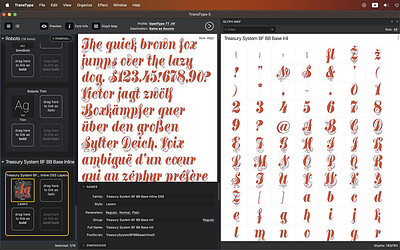
With TransType 5, your fonts work when and where you want them to. TransType organizes font families, fixes font problems, and allows you to play and experiment with monochrome and multi-color fonts. Fully redesigned, built on a brand-new software core, amazingly fast and versatile.

HOMEPAGE: Code:
Код:
N/A


DOWNLOAD LINKS:


Код:
[url]https://rapidgator.net/file/7e1c4631d6f18289f429a4bcfe6ce477/TransType_5.0.0.9756.rar.html[/url]

Код:
https://clicknupload.click/loh37fmgzj71/TransType_5.0.0.9756.rar
 
85b5d3414c8189574f7808c09a76dbeb.jpg


VCap Downloader Pro 0.1.50.7546 Multilingual | Size: 96.19 MB
Language: English


VCap Downloader (VCapDL) is a universal software that allows you to capture video and audio from internet sites. The software interface resembles that of a regular browser, which makes it easier for the user to get to know and work with this software. The user just needs to copypast the video url from favorite browser and transfer it to VCap Downloader. VCap Downloader will capture the video and offer available quality for downloading. You can also extract audio track from any video and convert it to MP3 format.

One of the advantages of VCap Downloader is a simple built-in video editor. It allows you to do simple most common actions like trimming, cropping or resizing videos.

Simple and Easy
Familiar browser interface
Simple and user-friendly interface
Easy access to download the files
Drag&Drop
Multilanguage
Support of 4K monitors

Fast and Effective
Downloading files quickly on how much your Internet connection allows
Multithreaded downloading
Supports media stream M3U8, MPEG-DASH, VIMEO-STREAM protocols
Automatic MP3 conversion
Simple video editor

HOMEPAGE: Code:
Код:
https://vcapdl.com/


DOWNLOAD LINKS:


Код:
https://rapidgator.net/file/111040d4d7ac2b17547eb03b39984856/VCap_Downloader_Pro_0.1.50.7546_Multilingual.rar.html

Код:
https://clicknupload.click/vdfrwqvu6dcd/VCap_Downloader_Pro_0.1.50.7546_Multilingual.rar
 
16888a28b8e22a6ed86d4e7c30f6af8c.webp

Free Download Visual Subst 6.3 Multilingual
Visual Subst is a Windows utility for associating frequently used folders with virtual drive letters. Instead of repeatedly navigating to a long directory path, users can open the same location through a drive letter in File Explorer or another application.
Windows includes a command-line tool named subst, but its standard behavior has limitations involving elevated processes, drive labels and persistence across restarts. Visual Subst provides a graphical interface for managing these mappings and addresses the limitations outlined in the source.


The utility is helpful when working with project directories that are accessed repeatedly, including folders referenced by older applications or scripts. Users can create, edit and remove mappings without entering subst commands by hand.

Software Overview
A virtual drive created through this mechanism refers to a directory rather than a separate physical storage device. Visual Subst can make mappings available to elevated applications, assign editable drive labels and restore saved drive mappings at Windows startup. Its interface keeps the configured drive letters together, while the startup option controls whether they are recreated after a restart.

Key Features
  • Assign a virtual drive letter to a frequently accessed folder
  • Create, edit and remove drive mappings through a graphical interface
  • Make mapped drives available to elevated applications
  • Assign custom labels to virtual drive letters
  • Save drive mappings for restoration at system startup
  • Manage project-directory shortcuts without command-line subst syntax

Why Choose Visual Subst
Mapping a deep directory to a drive letter can simplify file paths used throughout a project. Visual Subst adds label management and startup persistence to the basic Windows subst concept, which is useful for users who rely on the same directory mappings across sessions.

System Requirements
Windows 11, 10, 8, 7 and Vista (32-bit and 64-bit)

Home Page

Код:
https://www.ntwind.com/

Product Information
  • Software Name: Visual Subst
  • Version: 6.3
  • Languages: Multilingual
  • License type: Full Version
  • File Size: 6.17 MB

    Rapidgator
    Код:
    https://rapidgator.net/file/30687c0a55505a7f5c309722f8f92617/80o2l.Visual_Subst_6_3_Multilingual_Download.rar.html

    Код:
    https://clicknupload.click/lcw6gpy5mhvs/80o2l.Visual_Subst_6_3_Multilingual_Download.rar
 
33a817b90889b6ecb26c6975c0b41556.png


VMware Tools 13.1.10 (x64) | Size: 143.47 MB
Language: English


VMware Tools is a suite of add-ons that make VMWare better, less annoying, and more worth using.

Mouse and Display Integration: No more dragging your cursor and getting stuck in the VM window. With Tools installed, your mouse moves between guest and host like they're part of the same screen. It also supports dynamic screen resizing and multiple monitors. Just resize the VM window, and your guest OS will automatically adjust.
Copy, Paste, and Drag-and-Drop: Move files and text between your physical machine and the virtual one easily. Clipboard sharing works both ways. You can even drag files directly from the desktop to the VM. Super handy for testing, development, or everyday use.
Improved Performance: VMware Tools adds optimized drivers, so your virtual hardware behaves like it should. This includes video acceleration, improved disk and network handling, and smoother graphics overall.

Time Sync Between Host and Guest: Your guest OS automatically syncs its clock with your main system. No more time drift during long-running VMs or snapshots.
Shared Folders: Set up shared folders between host and guest for quick file access without needing cloud sync or FTP. Perfect for working on code, sharing documents, or transferring files without networking headaches.

Faster Shutdown and Reboots: It enables clean shutdown, restart, suspend, and resume actions straight from your host system's interface-there is no need to go inside the VM to hit shutdown manually.
Enhanced Guest Metrics: Running VMs in a server or enterprise environment? Tools feed detailed performance and health data back to vSphere or your hypervisor dashboard. Helps with monitoring, automation, and resource management.
Full Screen Mode with VMware Tools: Once VMware Tools is installed, your Windows guest OS can properly detect and adjust to dynamic screen sizes, including full screen. That means your guest display resolution updates automatically to match when you hit Full Screen (Ctrl+Alt+Enter) or drag your VM window to a new size. No more scrolling around or seeing black borders. Without VMware Tools? You'reYou're stuck with fixed resolutions, limited display scaling, and a VM that refuses to stretch its legs, which sucks.

System Requirements: Windows 11, Windows 10

HOMEPAGE: Code:
Код:
http://www.vmware.com/


DOWNLOAD LINKS:


Код:
[url]https://rapidgator.net/file/a17d8df3897f2de1939fd3efb46cbba0/VMware_Tools_13.1.10_x64.rar.html[/url]

Код:
https://clicknupload.click/h7ke61cz5e47/VMware_Tools_13.1.10_x64.rar
 
6e3f996cd6218443e438253fc4c69010.jpg


VovSoft Health Break Reminder 2.8 Multilingual | Size: 5.86 MB
Language: English


We all work too much. Many don't realize how important it is to step away from the monitor and take a break. This isn't just for your physical health, but your mental health. For some users breaks come naturally. For others, a bit of a heads up is necessary.

Break reminder software
Health Break Reminder is a 'take a break reminder' software for long-time computer users. You do not have to test the limits of your eyes, your hands, or your sanity. Use Health Break Reminder to ensure you take a break during long days of computer usage.

Whenever the specified "work time" is over, a notification will be displayed. The software can also detect your mouse and keyboard actions; when you start using your computer after the specified "idle time", your "work time" will automatically reset and start over.

Operating System: Windows 11, Windows 10, Windows 8, Windows 7, Windows Vista, Windows XP (32-bit and 64-bit)

HOMEPAGE: Code:
Код:
https://vovsoft.com/


DOWNLOAD LINKS:


Код:
https://rapidgator.net/file/f9a49f7fcd996214ec971551f5a67e1c/VovSoft_Health_Break_Reminder_2.8_Multilingual.rar.html

Код:
https://clicknupload.click/oztzlroqpfvr/VovSoft_Health_Break_Reminder_2.8_Multilingual.rar
 
51952b1cbba6bb3663b9401e5eebbf9f.jpg


Windows 11 Classic Context menu 1.3 | Size: 504.3 KB
Language: English


Restore the classic Context Menu in Win11 so that you can access extra functions and features without having to click on the Show More options with this tool.

If you happen to take a closer look at Windows 11, then you probably noticed that a lot of things have changed compared to the previous versions. Let's take the Context Menu, for instance, that includes the basic file management actions and hides other commonly used actions. You can still access them, but every time you do, you need to click on the Show More Options.

Windows 11 Classic Context menu is a lightweight tool designed to restore the classic Context Menu in Windows 11, so you can access what you need faster.

Toggle the classic menu on and off as needed
The application does not require installation, so you can simply download and you are ready to tweak your Context menu. The program comes with a small and intuitive interface that includes three main options, enabling the default menu, classic menu and restarting the explorer. As you probably hinted, if you want to get the old context menu back, you need to toggle the Enable Win11 Classic Context Menu Style on.

It is worth mentioning that you can also restore the classic Windows 10 menu by editing the registry keys. Then again, let's not forget that modifying registry keys can be risky and you may end up having to reinstall the operating system, if you do not know what you are doing. The app on the other hand, provides a one-click solution to restoring the classic menu.

A simple and straightforward tool that can increase productivity
While it may not seem like much at first, the truth is that if you are using Windows 11 on a work computer that entails accessing the Context menu regularly, that means a lot of time wasted. Windows 11 Classic Context menu comes to address this issue and lend a hand to anyone who wants to be more productive with the new Windows operating system.

System Requirements: Windows 11, Windows 10, 8 , 7

HOMEPAGE: Code:
Код:
https://www.sordum.org/


DOWNLOAD LINKS:


Код:
[url]https://rapidgator.net/file/b89e222de340f78dc86effb3af79eebb/Windows_11_Classic_Context_menu_1.3.zip.html[/url]

Код:
https://clicknupload.click/22bu1yziy0ii/Windows_11_Classic_Context_menu_1.3.zip
 
Назад
Сверху Снизу