All mitsumi'1s Applications !! (updated daily)

764729ed8f926fc671312d7bfeba6823.jpg


GPU-Z 2.72 | Size: 12.43 MB
Language: English


GPU-Z is a lightweight utility designed to scan your computer system and display information regarding video card and GPU. It gets you acquainted with a wide array of technical specification, thus enabling you to have a better knowledge of your computer's abilities. GPU-Z features support for the latest NVIDIA and ATI cards and includes a GPU load test to check PCI-Express configurations. In addition, it grants you permission to default clocks, 3D clocks (if any) and overclock information. Reports are incredibly detailed, containing specifications about basically, every characteristic of video cards, such as name, GPU, process technology, chip, memory type, DirrectX / PixelShader support, memory bandwidth, type of bus, memory clock, version driver, sensors, speed fans and version BIOS. You can save the complete report on the sensors as a text files.

GPU-Z is also able to take pictures of the report and export it locally or to a free image hosting service so you can easily share it with your friends across the Internet.
Assessing the graphic capabilities of your video card is a very important task. GPU-Z can easily accomplish that for you; it satisfies the needs of the regular home users and professionals alike, such as system administrators.
All in all, hardcore users who constantly need to know what's going on under the hood of their machine are going to appreciate GPU-Z and its accurate reports. Since searching for these results through traditional methods can be a very difficult task, you can use this nifty application to offer you a complete overview of your video card's graphic capabilities.

Here are some key features of "GPU-Z"
Support NVIDIA and ATI cards
Displays adapter, GPU and display information
Displays overclock, default clocks and 3D clocks (if available)
Validation of results
No installation required System Requirements: Windows 11, Windows 10, 8 , 7

HOMEPAGE: Code:
Код:
https://www.techpowerup.com/


DOWNLOAD LINKS:


Код:
https://rapidgator.net/file/b6ae623735acc0f9b5c1a8fa8bd6cbfd/GPU-Z_2.72.rar.html

Код:
https://nitroflare.com/view/BF1E3F91DFAF2B9/GPU-Z_2.72.rar
 
34ea0766d49ae978a4f1d811821c2e04.jpg


HDClone Free 16.1.3.1 | Size: 104.05 MB
Language: English


HDClone creates physical or logical copies (clones) and file images of hard disks and other mass storage media. HDClone is a perfect tool for backups and copies of entire software or operating system installations. A special 'SafeRescue' mode makes HDClone an invaluable tool for rescuing defective hard disks and other media. HDClone works independent of partitioning scheme, file system, and operating system. It also works with proprietary formats which otherwise would be unaccessible.

Free EditionThe Free Edition of it offers all necessary abilities to copy a complete hard disk onto another, larger hard disk. This can be utilized to migrate an existing installation to a new hard disk as well as for data rescue. The Free Edition is real freeware without obligation to buy and is intended for the short-term usage at no cost.
The Free Edition supports IDE/ATA and SATA/eSATA hard disks and is able to copy up to 300 MB/min.

System Requirements: Windows 11, Windows 10, 8 , 7

HOMEPAGE: Code:
Код:
https://www.miray.de/


DOWNLOAD LINKS:


Код:
https://rapidgator.net/file/82a57b5cad36f26d437bec59b1f409fe/HDClone_Free_16.1.3.1.rar.html

Код:
https://nitroflare.com/view/D215EA0C856962F/HDClone_Free_16.1.3.1.rar
 
2a3cd81158d906fc6882d112e5ac5123.webp

Free Download iZotope Equinox 1.2.0
iZotope Equinox is a reverb audio plugin for music production and audio post-production, including surround and immersive mixing. It combines reverberation algorithms originating from Exponential Audio Stratus and Symphony with adaptive unmasking to help keep important source material audible.
Mix engineers can place dialogue, vocals, and instruments into simulated acoustic environments or build more stylized spatial effects. The plugin provides detailed reverb parameters alongside macro tone controls and a large preset library for starting different sound designs.


Software Overview
Equinox includes more than 1,250 presets and controls for shaping room character and reflections. Its two inherited reverb engines cover realistic spaces as well as effects that are deliberately less natural.
Adaptive unmasking adjusts how reverberation occupies space around material such as speech or lead instruments. This can help reduce the masking that occurs when long or dense reverb tails compete with the original audio.

Key Features
  • Create reverb effects for music, dialogue, and audio post-production.
  • Use reverberation engines based on Stratus and Symphony.
  • Mix in immersive and surround formats as described by the source.
  • Apply adaptive unmasking to reduce conflicts between dry audio and reverb.
  • Adjust detailed reverb settings and macro tone controls.
  • Browse more than 1,250 preset configurations.

Why Choose iZotope Equinox
Equinox is useful when reverberation must add a sense of space without obscuring dialogue or prominent instruments. The combination of extensive presets and detailed editing supports both quick setup and more controlled acoustic design.

What's New
  • Fixed an audio burst that could occur after inactivity or certain parameter changes during playback.
  • Corrected overlapping text in inline edit fields on macOS Tahoe.
  • Fixed a crash involving corrupted user presets and addressed legacy preset loading.
  • Added support for the BorisFX licensing method.
  • Changed plugin and installer branding.
  • Adjusted operating system and DAW compatibility listings, including macOS Golden Gate support and the removal of macOS Sonoma support.

System Requirements
Windows 10, 11

Product Information
  • Software Name: iZotope Equinox
  • Version: 1.2.0
  • Languages: English
  • License type: Full Version
  • File Size: 26.1 MB

    Rapidgator
    Код:
    https://rapidgator.net/file/72beadbe0f3804d1ac11968bd0383522/m80ou.iZotope_Equinox_1_2_0.rar.html

    Код:
    https://nitroflare.com/view/BD9B950EB040559/m80ou.iZotope_Equinox_1_2_0.rar
 
4364b50eee0fe2f7e4152ca128e0c45a.jpg


JRiver Media Center 36.0.57 (x64) Multilingual | Size: 49.91 MB
Language: English


JRiver Media Center - all-in-one media management app turns any Windows PC into an entertainment hub for complete control of your digital media: Audio, Video, Images, and Television. It connects PC to stereo, TV, remote control devices, digital cameras, scanners, and portable MP3 players. It plays all media, rips, burns, and organizes all your music, images, and video. MC encodes and plays all popular media formats.

Powerful utilities include Media Server for streaming music and images to remote PCs. Media Center is more than a world class player. It's also a Media Network, a whole house music, movie, TV, and photo solution. The leader in audiophile quality sound. The most powerful media database available; an essential tool for large collections.

Features:
- Native support of DirectShow DSP filters
- Audiophile - WASAPI exclusive output using high-end USB DACs
- Audiophile - Added ability to play files from memory instead of disk
- Audiophile - Support for high end USB DAC's with WASAPI

- Headphone DSP makes listening more natural and comfortable.
- SoundcardSwitch command for the launcher, allows soundcard selection
- 3D album view adjusts text size to display more tracks when necessary
- 3D album view allows playing, adding, shuffling, and adding as next to play

Operating System: Windows 11, Windows 10, and Windows 8.1 (64-bit only)

HOMEPAGE: Code:
Код:
https://jriver.com/


DOWNLOAD LINKS:


Код:
https://rapidgator.net/file/9a329048445fcf94fe494b57260420ff/JRiver_Media_Center_36.0.57_x64_Multilingual.rar.html

Код:
https://nitroflare.com/view/0E77B0D300EE6E8/JRiver_Media_Center_36.0.57_x64_Multilingual.rar
 
1bf318468615f95b27f38a4fba8fa67d.webp

Free Download MediaHuman YouTube Downloader 3.9.24 (1611) Multilingual (x64)
MediaHuman YouTube Downloader is a desktop application for saving online videos and extracting their audio tracks. It is designed for users who need control over download quality, file format, and the organization of videos from supported online platforms.
The software can queue several downloads, retrieve entire playlists or channels, and monitor chosen sources for new uploads. It also integrates with the system clipboard, reducing the need to enter every video address manually.


Software Overview
Users can select available video resolutions from 720p and 1080p through 4K and 8K, including 30 or 60 fps where offered by the source. Videos can be saved in original formats such as MP4 or WebM, while audio can be extracted into MP3 files.
For music libraries, an ID3 tag editor supports song and artist information. The source also describes automatic transfer of downloaded media to iTunes or Music.app and support for sites including Vimeo, Dailymotion, Facebook, TikTok, Twitch, SoundCloud, Reddit, and others.

Key Features
  • Download videos from supported hosting and social-media sites
  • Retrieve complete playlists and channel collections
  • Monitor selected playlists and channels for additional uploads
  • Queue and download several videos concurrently
  • Select HD, 4K, and 8K resolutions when available
  • Save original MP4 or WebM streams without conversion when supported
  • Extract audio as MP3 and edit ID3 metadata
  • Add supported links through clipboard monitoring or drag and drop
  • Send downloaded items to iTunes or Music.app

Why Choose MediaHuman YouTube Downloader
MediaHuman YouTube Downloader brings together link collection, quality selection, playlist management, and audio extraction in one application. It is useful for organizing locally saved material when the source platform and the user's permissions allow downloading.


System Requirements
Windows 11, Windows 10, Windows 8, Windows 7

Frequently Asked Questions

Can an entire playlist be downloaded?
Yes. The source describes both playlist and channel downloads.

Which video quality options are available?
The application supports available resolutions through 8K, including 30 fps and 60 fps streams where provided.

Can audio files be tagged?
Yes. The program offers an ID3 tag editor for downloaded audio.

Home Page

Код:
https://www.mediahuman.com/

Product Information
  • Software Name: MediaHuman YouTube Downloader
  • Version: 3.9.24 (1611)
  • Architecture: x64
  • Languages: Arabic, Armenian, Azerbaijani, Bulgarian, Catalan, Chinese (Hong Kong SAR China), Chinese (Simplified), Chinese (Taiwan), Croatian, Czech, Danish, Dutch, English, Esperanto, French, German, Greek, Hebrew (Israel), Hungarian, Indonesian, Italian, Japanese, Korean, Latvian, Lithuanian, Malay, Norwegian Bokmål, Polish, Portuguese, Portuguese (Brazil), Romanian, Russian, Serbian, Slovenian, Spanish, Swedish, Turkish, Vietnamese.
  • License type: Full Version
  • File Size: 88.4 MB

    Rapidgator
    Код:
    https://rapidgator.net/file/c057cb4ea8bedec0b751d322aff6b47d/09onq.MediaHuman_YouTube_Downloader_3_9_24_1611_Multilingual_x64.rar.html

    Код:
    https://nitroflare.com/view/43F0D3EA83FC430/09onq.MediaHuman_YouTube_Downloader_3_9_24_1611_Multilingual_x64.rar
 
2c2ac35a62c6a51263ebda4c42aa93ef.webp

Free Download Mercuriall Ampbox 1.10.8
Mercuriall Ampbox is a guitar amplifier and effects modeling environment offered as a standalone application and as VST, AU and AAX plugins. It brings supported Mercuriall amplifier products into a modular interface for shaping electric-guitar tones.
Guitarists and recording engineers can adjust the modeled amplification stages, arrange the visible modules and save presets for repeatable sessions. The software also supports playing through its standalone version without opening a digital audio workstation.


Model-specific behavior is handled by Mercuriall Neural Hybrid Engine technology, while the separate preamp, power-amp and effects controls allow targeted tone adjustments.

Software Overview
Ampbox supports the Dual Rectofire, Euphoria, ReAxis and U530 products identified in the source material. Its Power Link control adjusts the modeled relationship between the preamp and power amplifier; stereo processing models the left and right channels separately. Delay and reverb can operate in parallel without additional routing.

Key Features
  • Use the Neural Hybrid Engine 2.0 in supported amplifier models.
  • Adjust Power Link behavior between the power-amp and preamp stages.
  • Enable or disable preamp and power-amp stages separately.
  • Rearrange module windows and keep only the necessary controls visible.
  • Use a shared oversampling cycle across pedal and amplifier stages.
  • Model the left and right stereo channels independently.
  • Run delay and reverb in parallel.
  • Use CPU multithreading, standalone operation and factory or user presets.

System Requirements
Windows 8 or newer

Home Page

Код:
https://mercuriall.com/cms/details_ampbox

Product Information
  • Software Name: Mercuriall Ampbox
  • Version: 1.10.8
  • Languages: English
  • License type: Full Version
  • File Size: 133.5 MB
Rapidgator
Код:
https://rapidgator.net/file/cef65b3d5013fff85eb098ee547ee997/60mf7.Mercuriall_Ampbox_1_10_8.rar.html

Код:
https://nitroflare.com/view/6843A971560A124/60mf7.Mercuriall_Ampbox_1_10_8.rar
 
344957fa893472ef747b051fe4e81926.webp

Free Download NCH Doxillion Plus 12.01
Doxillion is a document format converter for transferring text documents, office files and e-books between common formats. It is aimed at people who exchange documents created in different word processors and need to prepare files for compatible editing or distribution.
Users can convert a single document through the interface or add large groups of files for batch conversion. Drag-and-drop input and Windows context-menu integration provide alternatives to opening files individually.


Its conversion features also cover OCR-based text extraction from images and combining PDF files, making it useful when reorganizing mixed document collections.

Software Overview
The supported document formats listed in the source include DOC, DOCX, PDF, WPS, XLS, XLSX, ODT, TXT and WordPerfect formats. Doxillion can also handle EPUB and MOBI e-books, with output options such as DOCX, PDF and HTML. These workflows help users migrate older documents or share copies in formats that their recipients can open.

Key Features
  • Convert Word, Microsoft Works and OpenDocument files into other document formats.
  • Work with DOC, DOCX, XLS, XLSX, PDF, WPS and additional supported types.
  • Convert EPUB and MOBI e-books to formats such as DOCX, PDF and HTML.
  • Use optical character recognition where image-to-text conversion is required.
  • Process large batches of documents in one conversion operation.
  • Send documents to the converter using drag and drop or the right-click menu.
  • Merge multiple PDF files into a single document.

System Requirements
Windows 10, 11

Home Page

Код:
https://www.nchsoftware.com

Product Information
  • Software Name: Doxillion
  • Version: 12.01
  • Languages: English
  • License type: Full Version
  • File Size: 6.0 MB

    Rapidgator
    Код:
    https://rapidgator.net/file/04ccf1eb8c9fea1aedd475d35a6ca758/c7og8.NCH_Doxillion_Plus_12_01.rar.html

    Код:
    https://nitroflare.com/view/126490579C8935F/c7og8.NCH_Doxillion_Plus_12_01.rar
 
9b2118f79f40bc1ebfe2c92d1eb724df.webp

Free Download NCH Express Scribe Pro 15.13
Express Scribe is a transcription playback application for recorded speech and video. It provides keyboard and foot-pedal controls so transcriptionists can move through recordings while keeping their hands on the text they are producing.
The application is used for interviews, dictation, legal hearings, lectures and other material that must be transcribed accurately. Playback speed can be adjusted without changing pitch, and recordings can be managed as a working queue.


Audio can arrive from portable recorders, CDs, email, FTP or a local network. Finished transcriptions can then be sent from within the program, depending on the user's workflow.

Software Overview
Express Scribe handles common media and dictation formats including MP3, M4A, DSS and WAV, as well as encrypted dictation files. It works alongside word processors such as Microsoft Word and supports USB transcription pedals. The source also describes integration with Dragon speech recognition and FastFox text expansion tools.

Key Features
  • Control variable-speed playback while maintaining the original pitch.
  • Use customizable keyboard shortcuts for hands-free mouse operation.
  • Control playback with supported professional USB foot pedals.
  • Load audio and video recordings, including encrypted dictation files.
  • Import recordings from portable devices, CDs, FTP, email or network sources.
  • Manage transcription files and send completed work to clients.
  • Work with word processors, Dragon speech recognition and FastFox text expansion.

System Requirements
Works on Windows 7 to 11

Home Page

Код:
https://www.nch.com.au/

Product Information
  • Software Name: Express Scribe
  • Version: 15.13
  • Languages: English
  • License type: Full Version
  • File Size: 3.0 MB

    Rapidgator
    Код:
    https://rapidgator.net/file/17d78cb4561bca091e1d97c74fb50fcd/4xwlv.NCH_Express_Scribe_Pro_15_13.rar.html

    Код:
    https://nitroflare.com/view/C22EEF832AE2B7F/4xwlv.NCH_Express_Scribe_Pro_15_13.rar
 
ace1566fa4d2087cc8b9f55d7b2771f9.webp

Free Download NCH MixPad 14.36
MixPad is a multitrack recording and mixing application for creating music, podcasts and other audio productions. It combines simultaneous recording, track arrangement and signal processing in a single mixing workspace.
Users can record vocals or instruments onto separate tracks, import existing recordings and balance several sources before producing a final mix. Effects can be applied as part of the session rather than preparing each track in a separate editor.


The software supports VST plugins and ASIO recording, providing options for external effects, virtual instruments and low-latency audio hardware.

Software Overview
The mixer can combine an unlimited number of music, voice and audio tracks . Built-in processing includes equalization, compression and reverb, and the included library supplies sound effects and music clips. Completed productions may be exported as audio files, burned to CD or uploaded.

Key Features
  • Combine multiple music, vocal and spoken-word tracks in a single session.
  • Record one track or several tracks simultaneously.
  • Apply equalization, compression, reverb and other audio effects.
  • Extend productions with VST effects and instruments.
  • Use ASIO for low-latency, sample-accurate recording.
  • Work at sample rates from 6 kHz to 96 kHz.
  • Export audio at bit depths up to 32-bit floating point.
  • Create MP3 or WAV mixes, burn discs and use the supplied audio clip library.

System Requirements
Works on Windows 7 to 11

Home Page

Код:
https://www.nch.com.au

Product Information
  • Software Name: MixPad
  • Version: 14.36
  • Languages: English
  • License type: Full Version
  • File Size: 5.0 MB

    Rapidgator
    Код:
    https://rapidgator.net/file/fb91bfd5dff3ec13fa504a2484829ef0/n4n6d.NCH_MixPad_14_36.rar.html

    Код:
    https://nitroflare.com/view/CA95D3D5F600644/n4n6d.NCH_MixPad_14_36.rar
 
3f470ed2d5862fd7482628736ceeed2a.webp

Free Download NCH Pixillion Plus 14.03
Pixillion is a batch image converter for changing pictures and graphics between supported file formats. It helps users prepare photographs for websites, exchange files with other applications and reduce the storage requirements of image collections.
Individual pictures or groups of files can be converted with settings for dimensions, compression and output type. Image previews allow the results and conversion options to be checked before the operation begins.


Alongside format conversion, Pixillion includes basic image preparation tools such as rotation, resizing, captions and watermarking.

Software Overview
The source lists JPEG, GIF, PNG, PDF, BMP, TIFF, RAW, PSD, ICO and HEIC among the formats handled by the converter. It also describes conversion between vector formats with preservation of vector graphics. Users can invoke conversion from the right-click menu or process thousands of images as a batch.

Key Features
  • Convert between JPEG, PNG, GIF, BMP, TIFF, PDF and other image formats.
  • Handle source files including RAW, PSD, ICO and HEIC.
  • Batch-convert or compress large image collections.
  • Change image dimensions, rotation and compression settings.
  • Add text captions or watermarks during conversion.
  • Preview input images and conversion options before exporting.
  • Preserve vector graphics during supported vector-to-vector conversions.
  • Launch conversion from the file context menu.

System Requirements
Windows 10, 11

Home Page

Код:
https://www.nchsoftware.com

Product Information
  • Software Name: Pixillion
  • Version: 14.03
  • Languages: English
  • License type: Full Version
  • File Size: 6.0 MB

    Rapidgator
    Код:
    https://rapidgator.net/file/cf6c4ecf897f8796646e5b36f534b097/xr1iy.NCH_Pixillion_Plus_14_03.rar.html

    Код:
    https://nitroflare.com/view/13AC4B35A723F44/xr1iy.NCH_Pixillion_Plus_14_03.rar
 
a76829a1957ee84e03a959a6ddbafbed.webp

Free Download NCH VideoPad Pro 18.62
VideoPad is a nonlinear video editor for assembling recordings, still images, titles and audio into finished movies. Its workspace separates media, clips, tracks, transitions and effects so users can organize footage before exporting a project.
Video can be imported from files or captured from devices such as webcams, camcorders and TV capture cards. Clips are arranged on the timeline, where playback speed, overlays and transitions can be modified.


Further editing options include subtitle preparation, audio effects, narration recording, image adjustments and stereoscopic 3D output.

Software Overview
VideoPad provides filters for stabilization, brightness, color temperature, cropping and various stylized looks. Its audio effects include amplification, compression, chorus, distortion and reverb. The source specifies numerous video and image formats for import and lists DVD, Blu-ray and common video containers among the export choices.

Key Features
  • Capture footage and assemble clips on video, audio and overlay tracks.
  • Adjust clip position, speed and stabilization settings.
  • Create subtitles and import or export subtitle files.
  • Use chroma key, overlays and stereoscopic 3D output.
  • Apply transitions including fades, reveals and geometric wipes.
  • Process audio with compression, chorus, reverb and other effects.
  • Record narration and combine music with video material.
  • Export video files or author supported optical-disc formats.

System Requirements
Works on Windows 7 to 11

Home Page

Код:
https://www.nchsoftware.com

Product Information
  • Software Name: VideoPad
  • Version: 18.62
  • Languages: English
  • License type: Full Version
  • File Size: 10 MB

    Rapidgator
    Код:
    https://rapidgator.net/file/08463b3064fb9737c70e0f8998873c95/q7tq2.NCH_VideoPad_Pro_18_62.rar.html

    Код:
    https://nitroflare.com/view/D74FB5BA8C4F1A5/q7tq2.NCH_VideoPad_Pro_18_62.rar
 
9b1d9d03036d58d3f45d583f950be7fa.webp

Free Download NCH WavePad 24.57
WavePad is an audio recording and waveform editing application for music, voice and other sound material. Users can record new audio, remove unwanted sections and apply processing to prepare clips for distribution or further production.
For editing longer recordings, the program provides scrubbing, search tools, bookmarks and regions. Noise-reduction and click-removal controls can assist with cleaning up voice recordings or older source material.


WavePad also supports batch operations, making it practical for converting or processing groups of audio files without repeating each edit manually.

Software Overview
The editor offers common cutting and insertion functions together with amplification, normalization, equalization, echo, reverb and reversal. VST plugin support extends the available processing options. The source also lists FFT spectral analysis, text-to-speech, voice changing and compatibility with MixPad.

Key Features
  • Cut, copy, paste, trim and silence selected audio passages.
  • Normalize levels and apply equalization, amplification or reverb.
  • Remove background noise, clicks and pops from recordings.
  • Use VST plugins for additional editing and signal-processing tools.
  • Batch-process or convert multiple audio files in one operation.
  • Navigate recordings through scrubbing, bookmarks and regions.
  • Inspect audio with FFT spectral analysis and use speech tools.
  • Work with formats including WAV, MP3, FLAC, OGG, AAC and M4A.

System Requirements
Works on Windows 7 to 11

Home Page

Код:
https://www.nchsoftware.com

Product Information
  • Software Name: WavePad
  • Version: 24.57
  • Languages: English
  • License type: Full Version
  • File Size: 5.0 MB

    Rapidgator
    Код:
    https://rapidgator.net/file/4819acf4afb03978fa828b261130719d/l23e4.NCH_WavePad_24_57.rar.html

    Код:
    https://nitroflare.com/view/E2E4E4AAEA0BAC3/l23e4.NCH_WavePad_24_57.rar
 
b4c1f8c0fb4102afc682b4c8de03e6c7.webp

Free Download Nero AI Motion Tracker Pro 1.4.2.0
Nero AI Motion Tracker is a video object-tracking application that follows moving subjects and defined areas across footage. It is intended for editors who need to attach visual elements to motion, monitor regions of a scene or obscure identities in recorded video.
Segment tracking follows selected people or objects, including cases where their appearance changes or they move behind obstacles. A face-tracking mode maintains a track on faces as they turn or change expression.


Zone tracking offers an alternative for predefined regions. The application can apply blur or mosaic treatment to tracked subjects and export completed material as MP4.

Software Overview
Segment, face and zone tracking provide different ways to follow activity in video. Text, clipart or visual effects can be attached to tracked movement, while face blurring supports privacy treatment of interviews or public footage. NVIDIA GPU acceleration is used during processing; the stated GPU requirements are preserved below.

Key Features
  • Track moving people and objects using segment tracking.
  • Follow faces through changes in orientation or expression.
  • Monitor or cover a predefined area with zone tracking.
  • Handle partial occlusion and appearance changes during subject tracking.
  • Attach text, clipart and effects to moving subjects.
  • Apply blur or mosaic effects to tracked faces or sensitive regions.
  • Use NVIDIA GPU acceleration for processing.
  • Export processed results in MP4 format.

What's New
Magic Mask adds a segment-tracking mode for precise subject tracking.

System Requirements
- Operating System: Windows 10 64-bit (Version 22H2) or Windows 11 64-bit
- Processor (CPU): Intel Core i5 (8th generation) or AMD Ryzen 5 (3000 series) / Minimum 4 physical cores
- Memory (RAM): 16 GB RAM / Virtual memory (page file) enabled and system-managed
- Graphics (GPU): NVIDIA GPU with CUDA support
- Minimum 6 GB VRAM
- Example: GTX 1660, RTX 2060 (6 GB)
- Driver version supporting CUDA 11+
- Storage: 20 GB available disk space / SSD strongly recommended

Product Information
  • Software Name: Nero AI Motion Tracker
  • Version: 1.4.2.0
  • Languages: Multilingual
  • License type: Full Version
  • File Size: 576.89 MB

    Rapidgator
    Код:
    https://rapidgator.net/file/ecfc4f18262cfe22695f2dc2aa42a605/igeyy.Nero_AI_Motion_Tracker_Pro_1_4_2_0.rar.html

    Код:
    https://nitroflare.com/view/99ADB907E86663A/igeyy.Nero_AI_Motion_Tracker_Pro_1_4_2_0.rar
 
4d8e141dc071473c0399840d8a3a23b6.webp

Free Download NetSpot Enterprise 6.1.0.830 Multilingual
NetSpot is a wireless site survey and Wi-Fi analysis application for evaluating network coverage and investigating connection problems. It measures radio conditions across a mapped area and converts collected observations into visualizations that are easier to interpret than isolated signal readings.
Network installers, administrators, and office users can survey rooms or larger spaces to identify weak coverage, noisy locations, and channel congestion. The resulting maps support practical decisions about access point placement and network configuration.


Software Overview
A survey starts by loading a floor plan or area map and identifying measurement positions while moving through the location. NetSpot records wireless readings at those points and produces heatmaps that illustrate coverage patterns and potential dead zones.
Its analysis views can help uncover interfering networks, excessive noise, and uneven channel distribution. The source describes planning and troubleshooting tools that use these visualizations to guide access point positioning and channel selection.

Key Features
  • Survey Wi-Fi coverage using a floor plan or area map.
  • Collect wireless readings at selected locations.
  • Generate heatmaps to visualize weak and strong signal areas.
  • Identify coverage gaps and sources of interference.
  • Inspect channel utilization and noise conditions.
  • Evaluate access point positions and channel assignments.
  • Use troubleshooting views to examine connectivity problems.

Why Choose NetSpot
Site surveys are especially valuable when a network appears functional near the router but unreliable elsewhere. NetSpot helps relate connection symptoms to physical locations, making it easier to plan coverage improvements and document network conditions.

System Requirements
Windows 7, 8, 10, 11

Home Page

Код:
https://www.netspotapp.com

Product Information
  • Software Name: NetSpot
  • Version: 6.1.0.830
  • Languages: Multilingual
  • License type: Full Version
  • File Size: 39.2 MB

    Rapidgator
    Код:
    https://rapidgator.net/file/657d8430bbc96204d2e170b31da5be6a/i90os.NetSpot_Enterprise_6_1_0_830_Multilingual.rar.html

    Код:
    https://nitroflare.com/view/C83200EB86E083B/i90os.NetSpot_Enterprise_6_1_0_830_Multilingual.rar
 
4f6c917e7922b41ec8fd45eed95b7f44.webp

Free Download NoteCase Pro 5.0.6 Multilingual
NoteCase Pro is an information and note management application for organizing text, tasks, references, and attached files. Its structured documents allow users to keep related material together and retrieve it through tags and other organizational tools.
Researchers, writers, and people managing detailed personal or work notes can gather information from different sources, format entries, attach files, and set task reminders. Documents may be moved between supported systems and exchanged through several import and export formats.


Software Overview
NoteCase Pro can import content from more than 30 formats, including Evernote, XMind, TreePad, and Tomboy, and export to formats such as HTML, RTF, and OPML. Rich text notes can include hyperlinks, embedded images, and audio recordings, while attached files are stored within the document.
Tasks may carry due dates, repetition rules, and priorities. Users can also apply tags, run spellchecking, print selected branches, and automate operations using Lua scripts, plugins, and the documented scripting API.

Key Features
  • Capture and organize rich text notes with images and hyperlinks.
  • Import data from Evernote, XMind, TreePad, Tomboy, and other supported sources.
  • Export content to HTML, RTF, OPML, and additional formats.
  • Attach files directly to note documents.
  • Record and retain audio notes.
  • Use tags and spelling dictionaries to manage written content.
  • Create tasks with due dates, priorities, and recurring schedules.
  • Print a document, individual branch, or single note.
  • Extend and automate workflows through Lua scripts and plugins.

Why Choose NoteCase Pro
NoteCase Pro is useful when information must remain organized beyond a simple collection of text files. Attachments, task data, and structured note documents make it suitable for reference material that develops over time.

System Requirements
Windows 7, 8, 10, 11 or newer (64-bit)

Home Page

Код:
https://www.notecasepro.com/

Product Information
  • Software Name: NoteCase Pro
  • Version: 5.0.6
  • Architecture: x64
  • Languages: Multilingual
  • License type: Full Version
  • File Size: 49.73 MB

    Rapidgator
    Код:
    https://rapidgator.net/file/e5cbf4735fbd47730a7023edc4b0e12c/nwz8a.NoteCase_Pro_5_0_6_Multilingual_Download.rar.html

    Код:
    https://nitroflare.com/view/22F77CE8DD5A077/nwz8a.NoteCase_Pro_5_0_6_Multilingual_Download.rar
 
605989517334a4d2fd978fbe7286a5e5.jpg


nTopology 6.4.3 | Size: 1.51 GB
Language: English


nTop has released nTop 6.4.3 is a computational design software platform that enables engineers to create, analyze, and optimize complex geometry using implicit modeling
This release introduces the new Line Normal to Curve block, along with a Bounding Box from Center overload and a new Mesh from Implicit by AT overload that gives finer control over the meshes it creates.

nTop 6.4 - What's New
Line Normal to Curve
- The new Line Normal to Curve block creates a line segment from the closest point on a curve to a point you choose, so the line is normal to the curve at that location.
- Use it to connect a point to a guide curve with the shortest path, or to measure the distance from a point to a curve.
- Location: Create > Curves
- Inputs:
. Curve: Curve to intersect with the line.
. Point: End point of the line segment.
- Output: Line
and field-driven design methodologies.

Bounding Box from Center
- The new Bounding Box from Center overload of the Bounding Box block creates a bounding box from a center point, length, width and height, which is useful when you know where a box is centered rather than where its corners are.
- Location: Create > Primitives
- Inputs:
. Center: Center point of the bounding box
. Length: Length of the box along X-axis.
. Width: Width of the box along Y-axis.
. Height: Height of the box along Z-axis.
- Output: Bounding Box

Mesh from Implicit by AT
- The Mesh from Implicit by AT block has a new overload that exposes more inputs to allow finer control over the meshes created with the block.
- Location: Utilities > Conversion
- Inputs:
. Body: Implicit body to convert.
. Tolerance: Maximum allowable deviation of the mesh from the implicit geometry.
. Sharpen: Preserve sharp edges, corners and walls thinner than the tolerance.
. Remesh: Remesh the adaptive tessellation for better triangle quality.
. Low Face Count: Reduce triangle count along thin walls, small gaps and high-curvature ridges.
. Max. Edge Length: Largest edge size allowed on the mesh. Defaults to 10% of the body's bounding box diagonal.
. Remesh Surf. Proj.: When remeshing, project vertices to the implicit surface.
. Remesh Sag Refine: When remeshing, refine high-curvature regions so edges stay within this fraction of the tolerance.
. Remesh Anisotropic: When remeshing with Sag Refine below 1.0, elongate triangles along curvature to reduce triangle count.
. Remesh Feature Align: When remeshing, align triangles to sharpened edges. On by default.
. Component Min. Size: Remove disconnected components smaller than this size. Defaults to 5x the tolerance.
- Output: Mesh

nTop introduced the concept of implicit modeling for mechanical design, which is an innovative, modern, and scalable way define parts and products. It has many benefits to end-users and companies, such as the elimination of model failures, speed of changes or iterations, and scalability to name a few. But implicit modeling enables so much more. In this informational session, we'll explore a topic that is redefining product development - field-driven design. In short, field-driven design is a way for design, analysis, and manufacturing teams to overlay information into one engineering model. This approach enables orders of magnitude increase in design iteration speed and greatly improves collaboration between teams.

How Field-Driven Design Allows Engineers to Design for Additive Manufacturing

Watch this information session where we'll define field-driven design, show examples of how it enables better knowledge sharing, and show how it promotes the development of more sophisticated, highly engineered products. You'll also better understand how nTopology is addressing today's engineering problems through its nTop Platform product.
nTop, formerly known as nTopology, is a leading computational design software company founded in 2015. The company specializes in empowering engineers across industries to innovate without the limitations of traditional CAD tools. Built on proprietary technologies, nTop enables the creation of complex geometries, instantaneous optimization, and automated workflows, making it ideal for applications such as additive manufacturing and advanced product development.

Сopyright holder \ Distributor: nTop
Product Name: nTop
Version: 6.4.3
Supported Architectures: x64 Languages Supported: english
System Requirements: Windows *

HOMEPAGE: Code:
Код:
http://www.ntop.com


DOWNLOAD LINKS:


Код:
https://rapidgator.net/file/4a23c97d837e480e97ba23ed44bb9aa4/nTopology_6.4.3.rar.html

Код:
https://nitroflare.com/view/432C0FFDEA3DF26/nTopology_6.4.3.rar

 
_b524a2b714f1b11766f2c817d68a96aa.jpeg


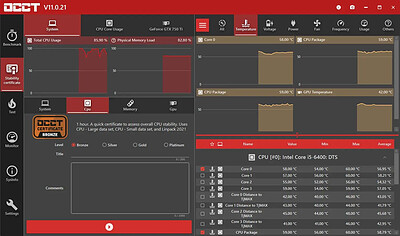
OCCT 17.1.12 (x64) Multilingual | Size: 197.94 MB
Language: English


OCCT is the most popular all-in-one stability check & stress test tool available. OCCT is great at generating heavy loads on your components ( CPU, GPU, Memory, GPU Memory & Power supply ) , and aims at detecting hardware errors or stability issues faster than anything else. A monitoring engine is also embedded, to ease diagnostic and see how your computer reacts under heavy load using graphs.

6 TESTS
OCCT includes 6 different tests : OCCT and Linpack for your CPU, Memory for testing system RAM, 3D and VRAM for your Graphic card, and Power to stress your power supply. You can even monitor your PC while using an external app to generate reports using the Monitoring-only test !

MONITORING
OCCT will monitor your computer's reading and present you real-time graphs showing you temperatures, voltages, fan speed, frequencies, component usage, and power consumption during your tests. We are using the AWESOME engine from HwInfo !

BUILT-IN PROTECTION FOR YOUR COMPUTER
Worried about frying your components ? Turn the maximum temperature threshold in OCCT's options ! Should a component reach this critical temperature during a test, OCCT will stop itself immediately.

TEST REPORT
At the end of a test, you will be able to save a full graphical report of what happened during the test, for diagnostic purposes.

HOMEPAGE: Code:
Код:
https://www.ocbase.com/


DOWNLOAD LINKS:


Код:
https://rapidgator.net/file/d1078fe4ccb522b8d5d974a25ee6f2e0/OCCT_17.1.12_x64_Multilingual.rar.html

Код:
https://nitroflare.com/view/275B8FFEA4D39E3/OCCT_17.1.12_x64_Multilingual.rar
 
485ce3d4885e181b165cac664a1cc776.webp

Free Download PassFab 4EasyPartition 4.5.1.12 (x64) Multilingual
PassFab 4EasyPartition is a Windows disk management program for copying drives, migrating an operating system, and changing partition layouts. It provides tools for moving information between HDDs, SSDs, and other supported storage devices during upgrades or reorganizations.
A typical use case is replacing an existing system drive with a larger or faster disk. Users can clone the contents or migrate the operating system and applications, then manage partition sizes and drive letters to match their storage needs.


Software Overview
Disk and partition cloning can transfer data from one volume to another. The system migration function is intended for relocating Windows and installed applications without performing a conventional reinstall.
Partition management covers resizing, moving, creating, deleting, splitting, and formatting volumes. The source also describes changing drive letters and adapting partitions to use available disk space.

Key Features
  • Clone an entire disk or a selected partition.
  • Transfer data between HDDs, SSDs, and other listed storage devices.
  • Migrate a Windows installation and its applications to another drive.
  • Resize or move partitions to reorganize available capacity.
  • Create, delete, split, and format disk partitions.
  • Change drive letters to suit a storage layout.
  • Use cloning as part of a drive upgrade or backup workflow.

Why Choose PassFab 4EasyPartition
PassFab 4EasyPartition concentrates common storage migration and partition tasks in one interface. It is relevant to people replacing disks, relocating Windows, or restructuring partitions without managing each operation through a separate utility.

System Requirements
Windows 7, 8, 8.1, 10, 11

Home Page

Код:
https://www.passfab.com/

Product Information
  • Software Name: PassFab 4EasyPartition
  • Version: 4.5.1.12
  • Architecture: x64
  • Languages: Multilingual
  • License type: Full Version
  • File Size: 106.5 MB

    Rapidgator
    Код:
    https://rapidgator.net/file/6cc7217a0c65ff207a7705aae4f1ca18/c2kcu.PassFab_4EasyPartition_4_5_1_12_x64_Multilingual.zip.html

    Код:
    https://nitroflare.com/view/7EAFDA88D63E9D1/c2kcu.PassFab_4EasyPartition_4_5_1_12_x64_Multilingual.zip
 
d92b9bd0ce05144be9bb200f2e52d384.jpg


Photo Reducer 6.3 | Size: 37.14 MB
Language: English


Reduce the size of pictures under various formats by choosing from a multitude of presets, or defining values yourself, then send via email or save locally.

Choose a preset reduction method or define your own values
The overall process of compressing image files is done in three steps. These are all found in a single window, while still managing to keep things clear, thanks to the intuitive layout. You first need to choose the preferred method, add images of interest, and choose what to process and how to save new items.
In terms of optimization, the application comes with a decent variety of preset configurations. These are found in a drop-down menu, with options for ideal printing size, digital frame, display for HD TV and 4K TV, ideal size for the web, as well as custom options. The latter choice lets you adjust the quality through a slider, set maximum width and height, and whether or not to preserve EXIF data.
Support for various formats and export options
On the bright side of things, the application allows you to process multiple pictures at a time. It supports a decent variety of formats, such as JPG, GIF, PCD, PCX, PNG, PSD, TGA, TIF, BMP, EMF, WMF, ICO, ICW, CUR, PDF, and SVG. These can either be imported through a drag and drop operation, or loading an entire folder.

Additionally, you find a new entry in the Send To context menu to add pictures as you browse files. You first need to choose the reduction rate and then add your files. Reduction ratio is shown in percentage, with the total export size also displayed in MB. Exporting can mean sending items via email, saving into a ZIP archive, or copying to a location of choice.
To end with
All things considered, we can state that Photo Reducer is a reliable application when you need to meet a maximum size value when trying to upload pictures on the web or send via email. Quality can be defined to prevent damaging content, while file support ensures processing of an impressive variety of picture types.

System Requirements: Windows 11, Windows 10, 8 , 7

HOMEPAGE: Code:
Код:
https://www.emjysoft.com/


DOWNLOAD LINKS:


Код:
https://rapidgator.net/file/42a3373e32381b717ae648c9d61bafe7/Photo_Reducer_6.3.rar.html

Код:
https://nitroflare.com/view/3E527F14E4F0693/Photo_Reducer_6.3.rar
 
c135f30f785c46d5acb36a533080ad20.webp

Free Download Remo Recover Windows 6.1.0.15
Remo Recover Windows is a data recovery application for Windows systems that helps locate files lost through deletion, formatting, partition problems, or operating system changes. It scans storage media for recoverable items, including documents, photos, videos, and other file types.
Users can investigate data loss from emptied Recycle Bins, Shift+Delete actions, inaccessible partitions, and external storage devices. Its scanning and filtering functions help identify candidate files before selecting what to restore.


Software Overview
The source describes recovery from formatted, deleted, and re-partitioned volumes as well as drives affected by Windows reinstallation. Signature-based scanning can identify file types even when ordinary directory information is unavailable.
Disk imaging supports work with troublesome drives and bad sectors, and saved scan information allows a recovery session to be resumed without scanning again. The listed storage types include internal hard drives, memory cards, USB devices, and FireWire drives.

Key Features
  • Search for files deleted normally or with Shift+Delete.
  • Examine formatted, missing, or damaged partitions.
  • Perform raw signature searches for supported file types.
  • Recover common documents, media, and RAW photographs.
  • Create disk images and scan previously created images.
  • Save scan information for later recovery sessions.
  • Sort recovered results by name, date, size, or file type.
  • Work with supported FAT, NTFS, and exFAT file systems.
  • Inspect the RAID configurations identified in the source.

Why Choose Remo Recover Windows
Remo Recover Windows addresses several loss scenarios with a combination of volume scanning and file signature detection. The option to save scan results is particularly useful when working through a large set of recoverable files.

System Requirements
Windows 11/10/8/7 and Windows Server 2019/2016/2012

Home Page

Код:
https://www.remosoftware.com/

Product Information
  • Software Name: Remo Recover Windows
  • Version: 6.1.0.15
  • Languages: English
  • License type: Full Version
  • File Size: 115.1 MB

    Rapidgator
    Код:
    https://rapidgator.net/file/fec758e3afc7536d701a708b9e5d8df4/yb2z1.Remo_Recover_Windows_6_1_0_15.zip.html

    Код:
    https://nitroflare.com/view/607B5A9F3A7DD78/yb2z1.Remo_Recover_Windows_6_1_0_15.zip
 
Назад
Сверху Снизу