







All mitsumi'1s Applications !! (updated daily)

02e18c64f3b3538850ca549807d46454.jpg


ASCOMP Easy Slideshow Professional 2.203 Multilingual | Size: 74.46 MB
Language: English


Create Stunning Slideshows with Ease! Easy Slideshow turns your photos into impressive slideshows - with music, effects, and 4K video export.

- Create slideshows with music and transitions
- Over 200 effects for creative transitions
- Export as MPEG in Full HD, 4K, or custom resolution

Select Photos. Create Slideshows. Make an Impression.
Easy Slideshow makes slideshow creation easier than ever.

More than 200 effects and MP3 support
Perfect slideshow with music and transitions
- Select photos via drag and drop
- Set display duration and order
- Add subtitles and captions

Export in Full HD, 4K, or custom resolution
Maximum image quality in compact MPEG format
- Export as MPEG/MP4
- Full HD, 4K, and custom resolutions
- No watermark in the Professional Edition

The Simple Solution for Creative Slideshows

Easy Slideshow - Stunning slideshows with music and transition effects for Windows
Discover Easy Slideshow, the user-friendly Windows software for creating stunning slideshows with music and transition effects. With Easy Slideshow, you can turn your photos into creative slideshows - quickly, intuitively, and without any prior experience. Perfect for memories, presentations, social media, or special occasions.

A special highlight: flexible video export. Create your slideshows with integrated music (MP3) and export them as high-quality videos in MPEG or MP4 format - including 4K and higher. With the Professional Edition, you benefit from ad-free use and can export your slideshows without watermarks.

Create smooth transitions with 200+ effects
A special feature: over 200 built-in effects for impressive transitions between your photos. Whether soft fades, dynamic zooms or creative slide animations - Easy Slideshow offers a wide variety of styles to match any mood or occasion. Designing visually appealing slideshows has never been easier.

Create slideshows quickly and intuitively - without any prior knowledge
Creating a slideshow has never been easier. With Easy Slideshow, simply drag and drop your photos, set the order and display duration. You can also add individual subtitles or captions to make your slideshow even more personal. Whether for personal memories, professional presentations, or creative projects - in just a few steps, you can create a professional-quality slideshow with transitions, effects, and music. Easy Slideshow is the ideal solution for anyone looking to create impressive slideshows on Windows with minimal effort.

Highest image quality thanks to MPEG export in 4K
Easy Slideshow supports exporting your slideshows in Full HD, 4K, and even custom resolutions - tailored to your needs. The final slideshow is saved in the widely used and efficiently compressed MPEG format, ensuring optimal compatibility with almost all devices. Despite the high compression, image quality remains at the highest level - perfect for razor-sharp presentations on monitors, TVs, or projectors.

Private use free of charge - without function limit, with watermark
Easy Slideshow is completely free for private use and offers full functionality. In the free version, a watermark is displayed in the exported video. This watermark is removed in the Professional Edition - for ad-free slideshows without limitations.

HOMEPAGE: Code:
Код:
https://www.ascompsoftware.com/en/products/easyslideshow


DOWNLOAD LINKS:


Код:
https://rapidgator.net/file/92dcd85a5b5a2d14d4ce58f5eb69a001/ASCOMP_Easy_Slideshow_Professional_2.203_Multilingual.rar.html

Код:
https://clicknupload.click/tcdvvp658phw/ASCOMP_Easy_Slideshow_Professional_2.203_Multilingual.rar
 
cca944bf9689cad97f77fdfc6cdfd138.png


Attribute Changer 11.51 | Size: 6.39 MB
Language: English


Attribute Changer is a powerful Windows Explorer add-on, available at your fingertips whenever you right-click on files, folders and even drives in Windows Explorer. The application is loaded with exciting features and helps you manage your day to day tasks in Microsoft Windows. A fairly complete Help system is included to solve all your doubts about its usage. Includes 32 and 64-bit support. Many popular third-party file managers provide an integration with Attribute Changer.

Features
Shell Extension ( right-click on files and folders in Windows Explorer )
Manage ReadOnly, Hidden, Archive, System, Compress and Index attributes
Manage Created, Modifed and Accessed date and time stamps
Manage photo ( EXIF ) date and time stamps
Apply absolute and offset values to date and time
Apply random date and time stamps
Synchronise date and time stamps
Change case of file and folder names and extensions
Apply filters on selection to restrict processing

Realtime and detailed reporting
Simulation mode
Extensive, localized user guide in PDF format

System Requirements: Windows 11, Windows 10, 8 , 7

HOMEPAGE: Code:
Код:
https://www.petges.lu/


DOWNLOAD LINKS:


Код:
https://rapidgator.net/file/929ad3b2ee68a3c1c5d01c2291dfa476/Attribute_Changer_11.51.rar.html

Код:
https://clicknupload.click/k12617z4nrfy/Attribute_Changer_11.51.rar
 
0db3e92096be44bdc95ef7f51b2c2957.jpg


Cockos REAPER 7.86 (x64) | Size: 19.18 MB
Language: English


REAPER is a powerful but sensible Windows application that lets you record, arrange, edit, and render multi-track waveform audio. It provides an extensive set of features, but is a very small and lightweight application (the installer is less than 1 megabyte, and includes many effects and a sample project). REAPER supports ASIO, Kernel Streaming, WaveOut, and DirectSound for playback and recording. It reads WAV, OGG, and MP3 files, and records WAV files. You can arrange any number of items in any number of tracks and use audio processing plug-ins (DirectX and Jesusonic). REAPER also supports volume, pan controls and envelopes per track, multi-layer undo/redo, and user creatable color themes.

Basic features:
- Portable - supports running from USB keys or other removable media
- 64 bit audio engine
- Excellent low-latency performance
- Multiprocessor capable
- Direct multi-track recording to many formats including WAV/BWF/W64, AIFF, WavPack, FLAC, OGG, and MIDI.
- Extremely flexible routing
- Fast, tool-less editing

- Supports a wide range of hardware (nearly any audio interface, outboard hardware, many control surfaces)
- Support for VST, VSTi, DX, DXi effects
- ReaPlugs: high quality 64 bit effect suite
- Tightly coded - installer is just over 2MB

Editing features:
- Tool-less mouse interface - spend less time clicking
- Drag and drop files to instantly import them into a project
- Support for mixing any combination of file type/samplerate/bit depth on each track
- Easily split, move, and resize items
- Each item has easily manipulated fades and volume
- Tab to transient support
- Configurable and editable automatic crossfading of overlapping items
- Per-item pitch shift and time stretch
- Arbitrary item grouping
- Markers and envelopes can be moved in logical sync with editing operations
- Ripple editing - moving/deletion of items can optionally affect later items
- Multiple tempos and time signatures per project
- Ability to define and edit project via regions
- Automation envelopes

Operating System: Windows XP/Vista/7/8/10/11

HOMEPAGE: Code:
Код:
http://www.reaper.fm/


DOWNLOAD LINKS:


Код:
https://rapidgator.net/file/59ba82ef9cacb7ae47013750558e0203/Cockos_REAPER_7.86_x64.zip.html

Код:
https://clicknupload.click/jueqbvajfjw7/Cockos_REAPER_7.86_x64.zip
 
3901c99cd737326a359cd19ee9391660.webp

Free Download Coolutils Total Doc Converter 5.1.0.445_222 Multilingual | File Size: 190.66 MB
Coolutils Total Doc Converter is a document conversion utility designed to transform DOC, DOCX, DOCM, RTF, TXT, and RVF files into various output formats. It supports conversions to HTML, PDF, XLS, JPG, TIFF, and plain text, providing a practical way to handle different document formats with one application.
The software offers a straightforward interface for selecting files and configuring conversion settings. It also integrates with Windows Explorer, allowing users to start a conversion by right-clicking a document and choosing the conversion command. Command-line support is available for users who need to run conversions from scripts or other applications.
Total Doc Converter includes batch processing for converting large numbers of documents in a single operation. Additional formatting options let users customize output fonts, text styles, and page layout to achieve more consistent results.


Software Overview

Coolutils Total Doc Converter provides a centralized solution for converting multiple document formats without opening each file individually. It supports common Microsoft Word formats, including DOC, DOCX, and DOCM, as well as RTF, TXT, and RVF files.
Users can select individual documents or process entire batches. Windows Explorer integration makes routine conversions accessible directly from the desktop, while command-line functionality supports automated workflows. The application also offers controls for adjusting font appearance and document layout during conversion.

Key Features

  • Convert DOC, DOCX, DOCM, RTF, TXT, and RVF documents.
  • Export documents to HTML, PDF, XLS, JPG, TIFF, RTF, and text formats, depending on the source format.
  • Batch conversion for processing multiple documents.
  • Windows Explorer integration for quick access through the right-click context menu.
  • Command-line support for launching conversions from scripts and other applications.
  • WordWrap option for controlling text wrapping in converted documents.
  • Customize the output font name and font size.
  • Apply font styles including bold, underline, italic, and strikethrough.
  • Autosize option to fit landscape and portrait documents to the page.
  • Support for DOCX conversion with the Microsoft Office Compatibility Pack installed.

Why Choose Coolutils Total Doc Converter

Coolutils Total Doc Converter is useful for users who regularly work with documents in different formats. Its batch-processing capability helps simplify large conversion tasks, while Windows Explorer integration reduces the steps required for everyday use. Command-line support and adjustable output formatting provide additional flexibility for more specific workflows.

What's New

The official website does not provide version-specific release notes for this release.

System Requirements

  • Operating System: Windows 7 / 8 / 10 / 11

FAQ

What file formats can Total Doc Converter process?

It supports DOC, DOCX, DOCM, RTF, TXT, and RVF input files.

Can it convert multiple documents at once?

Yes. The batch conversion feature allows users to process multiple documents in one operation.

Does the software support command-line conversion?

Yes. Command-line support allows conversions to be launched from scripts or other applications.

Can I customize the appearance of converted documents?

Yes. You can configure the output font name, font size, and styles such as bold, underline, italic, and strikethrough. The WordWrap and Autosize options provide additional layout controls.

Home Page

Код:
https://www.coolutils.com

Product Information

  • Software Name: Coolutils Total Doc Converter
  • Version: 5.1.0.445_222
  • Architecture: Not specified
  • Interface Language: Multilingual
  • License Type: Full Version
  • File Size: 190.66 MB
Rapidgator
Код:
https://rapidgator.net/file/066c95a887479f90ffb6134b96d5d7a2/r4csw.Coolutils_Total_Doc_Converter_5_1_0_445_222_Multilingual_Download.rar.html

Код:
https://clicknupload.click/dmz0tnm64znv/r4csw.Coolutils_Total_Doc_Converter_5_1_0_445_222_Multilingual_Download.rar
 
5ab70e595d8496ed6856ea4fe1a8004f.webp

Free Download Corona Renderer 15 Hotfix 2 for 3ds Max 2018-2027
Corona Renderer is a photorealistic rendering engine for Autodesk 3ds Max, designed for architectural visualization, product rendering, interior design, and other 3D production workflows. Its CPU-based rendering technology supports both biased and unbiased rendering approaches, giving artists flexibility in balancing render performance and image quality.
The renderer focuses on producing physically plausible results while keeping the rendering workflow accessible. Interactive rendering allows users to adjust materials, lighting, and geometry while viewing updates, without repeatedly restarting the rendering process. Its denoising and adaptive rendering capabilities help reduce visible noise and improve rendering efficiency.
Corona Renderer also includes workflow features such as multiple interactive render regions, a Visual Frame Buffer for comparing saved renders, and viewport support for Corona Lights, proxies, and Scatter objects.


Software Overview

Corona Renderer 15 Hotfix 2 provides a rendering solution for Autodesk 3ds Max versions 2018 through 2027. It is built around CPU-based rendering and supports both biased and unbiased techniques, allowing users to choose an approach suited to their production requirements.
The renderer includes denoising based on 3D scene information, adaptive rendering, and improved handling of scenes containing more than 255 lights. Interactive rendering supports real-time workflow adjustments, while viewport integration helps users work with Corona-specific scene objects directly inside 3ds Max.
The Visual Frame Buffer provides tools for saving and comparing rendered images, and multiple render regions make it easier to inspect specific areas during interactive rendering.

Key Features

  • CPU-based photorealistic rendering for Autodesk 3ds Max.
  • Support for both biased and unbiased rendering methods.
  • Physically plausible rendering results with flexible production controls.
  • Denoising based on 3D scene information to reduce image noise.
  • Adaptive rendering to help reduce noise and grain.
  • Efficient handling of scenes containing more than 255 lights.
  • Interactive rendering with automatic updates when materials, lights, or geometry are modified.
  • Multiple render regions for inspecting selected areas during interactive rendering.
  • Visual Frame Buffer for saving renders and performing A/B comparisons.
  • Nitrous viewport drawing support for Corona Lights, proxies, and Scatter objects.
  • Point-cloud viewport display for Corona Scatter objects.
  • Flexible rendering controls for adjusting the appearance of physically based scenes.
  • Workflow enhancements for improving everyday 3D production tasks.

Why Choose Corona Renderer

Corona Renderer combines photorealistic output with an accessible workflow for 3D artists and visualization professionals. Its interactive rendering capabilities make it easier to experiment with lighting, materials, and geometry, while denoising and adaptive rendering help manage image noise. Integration with Autodesk 3ds Max and dedicated viewport tools also make it a practical choice for established 3D production workflows.

What's New

For the latest improvements, new features, and fixes included in Corona Renderer 15, Hotfix 2, refer to the official release information:

Код:
https://www.chaos.com/corona/whats-new

System Requirements

  • Operating System: Windows 10 / Windows 11
  • Software: Autodesk 3ds Max 2018-2027
  • Architecture: x64

FAQ

What is Corona Renderer used for?

Corona Renderer is used for photorealistic rendering in Autodesk 3ds Max, including architectural visualization, interior design, and other 3D visualization projects.

Does Corona Renderer use the CPU or GPU?

The release described here is a CPU-based renderer.

Does it support interactive rendering?

Yes. Interactive rendering lets users modify materials, lighting, and geometry while the render updates automatically.

Which versions of 3ds Max are supported?

This release supports Autodesk 3ds Max versions 2018 through 2027.

What is the purpose of denoising?

Denoising reduces visible noise in rendered images. Corona's denoising capability uses 3D scene information to help improve the result.

Home Page

Код:
https://www.chaos.com/corona

Product Information

  • Software Name: Corona Renderer
  • Version: 15 Hotfix 2
  • Architecture: x64
  • Interface Language: English
  • License Type: Full Version
  • File Size: 1 GB
Rapidgator
Код:
https://rapidgator.net/file/0b0d854b9c478e1f72f4133511554ee7/51qtd.Corona_Renderer_15_Hotfix_2_for_3ds_Max_2018_2027.rar.html

Код:
https://clicknupload.click/zvtp182c9r2m/51qtd.Corona_Renderer_15_Hotfix_2_for_3ds_Max_2018_2027.rar
 
_3deec98ffa9ae5552162af4ba9e022f3.jpeg


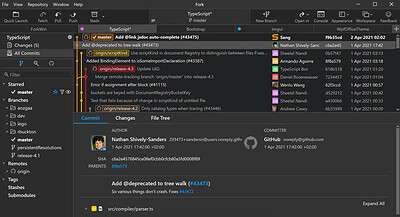
Danil Pristupov Fork 2.24 (x64) | Size: 73.73 MB
Language: English


Fork is getting better and better day after day and we are happy to share our results with you.

Merge Conflicts
Resolve your merge-conflicts easily using the merge-conflict helper and built-in merge-conflict resolver.

Interactive Rebase
Edit, reorder and squash your commits using visual interactive rebase.

History
With history view you can find all commits where a particular file or directory was changed.

Blame
With blame view you can find the last commit which changed a particular file line.

Basic features
Fetch, pull, push
Commit, amend
Create and delete branches and tags
Create and delete remote repos
Checkout branch or revision

Cherry-pick
Revert
Merge
Rebase
Stashes
Submodules

Operating System: Windows 7+

HOMEPAGE: Code:
Код:
https://fork.dev/


DOWNLOAD LINKS:


Код:
https://rapidgator.net/file/5e48588eb70b1713df41baf2c86c0502/Danil_Pristupov_Fork_2.24_x64.rar.html

Код:
https://clicknupload.click/h72l57secrl9/Danil_Pristupov_Fork_2.24_x64.rar
 
59bebd62765ce3b9c93857ecdedc4a1e.png


Dehancer Pro 7.5.1 (x64) for Premiere Pro & After Effects | Size: 104.34 MB
Language: English


You asked, we listened! Now Premiere Pro and After Effects users can fully enjoy 60+ film profiles and various analog tools of Dehancer. Create cinematic looks and experiment with color grading. Unleash your creativity with Dehancer.

Tools included:
Input camera profiles
Cineon Film Log support
63 Film profiles with print options
Kodak 2383 Print Film
CMY Color Head
Film Grain
Bloom
Halation
Gate Weave
Film Breath
Defringe
Vignette
False Colors
LUT Generator

System Requirements:

Hardware requirements:
PC with Nvidia or AMD GPU
CUDA and OpenCL compatible
External and multi-GPU are supported

GPU memory consumption:
FullHD video - 4GB minimum / 8GB recommended
4K video - 8GB / 12GB
6K video - 12GB / 16GB
8K video - 16GB / 24GB

Software compatibility:
Windows 10 64 bit (genuine licensed installation is required)
DaVinci Resolve 16 and 17

Known issues:
Windows 11 not yet officially supported.

HOMEPAGE: Code:
Код:
https://www.dehancer.com/store/video/aepr


DOWNLOAD LINKS:


Код:
https://rapidgator.net/file/e670dfeffb5b5931f8d811eacb2b1a4c/Dehancer_Pro_7.5.1_x64_for_Premiere_Pro__After_Effects.rar.html

Код:
https://clicknupload.click/ueuc9j7cqonc/Dehancer_Pro_7.5.1_x64_for_Premiere_Pro__After_Effects.rar
 
ef9d7a3b6f096f31e7300e4fe61b8f51.jpg


FolderMatch 5.2.6.0 Multilingual | Size: 21 MB
Language: English


FolderMatch is an award-winning Windows software that makes it easy to compare folders & files and find duplicate files. Winner of the prestigious Shareware Industry Award for three consecutive years, FolderMatch is a must-have insurance against data loss.

Compare Folders
FolderMatch is an essential software for anyone who needs to compare two folders. Its intuitive user interface makes it easy to quickly compare two folders and see their differences in a side-by-side layout. With various criteria available to filter the results (Name, Type, Date, Size), you can easily see only the changes that you want to see.

If you want to resolve the differences, FolderMatch allows you to manually copy, move, delete, & rename files and subfolders. If you want, FolderMatch can even synchronize the folders for you! Get FolderMatch today and you'll never have to worry about manually comparing and synchronizing two folders ever again!

Compare Files
FolderMatch is the perfect choice for anyone looking to compare two files quickly and accurately. Whether you need to compare the properties of two files or their text content, we've got you covered. Our program can compare the text content of files and display the differences in a side-by-side layout. We support a variety of formats, including Microsoft Office, OpenDocument, Adobe PDF, RTF, HTML, and XML (both older and newer versions).

With FolderMatch, you have the ability to ignore white space and letter case differences, view differences at the character, word, or line-level, and even configure the output to show line numbers and formatting characters. Plus, you can choose to view all lines or only those that are different, so you can focus on the differences that matter most to you. Try FolderMatch today and take your file comparison to the next level!

Find Duplicates
Are you tired of searching through your files and folders to find and delete duplicates? FolderMatch can help! With one of the fastest duplicate search engines available, our program can quickly locate all your duplicate files, even if the names are different. Simply specify your criteria for what constitutes a duplicate (such as name, size, date, or content), choose which file types to search for (including all types, applications, audio, documents, images, text, and video), and decide which files to include or exclude.

Once the duplicates are found, you can easily select which ones to remove and safely delete them in a variety of ways. And if you ever need to recover a file you've moved, FolderMatch makes it easy to do so. Upgrade your file management with FolderMatch and save time and space on your device.

So much more!
FolderMatch also provides other tools to help manage the contents of your folders. Tools offered include
- A mass file renamer.
- A mass file time stamp editor
- A hex content viewer
- An atomic clock sync utility
- And so much more!

FolderMatch feature list:

Comparison features
- Compares files or folders (including sub-folders) floppy drives, hard drives, CD-ROM drives, zip drives, and network drives (UNC paths supported)
- Supports the following file systems: FAT, VFAT, FAT32, HPFS, NTFS, CDFS, and UDF
- Offers choice of six comparison types: Filename Only, Size Only, Size and Date/Time, Contents, Attributes, Version Stamp
- Supports HUGE files (> 4 GB)
- Supports Unicode folder/file names
- Compares only files and folders that match Include and Exclude filter pattern lists which you define (wildcards supported)
- Include/Exclude System and Hidden Files
- Handles NTFS and FAT timestamp incompatibilities
- Auto-recognizes Daylight Savings Time differences
- Allows for user-specified number of bytes (chunk size) to be read and compared during a Content comparison.
- Remembers the last 20 folder/file pairs compared.
- Shows text differences between two text files, Microsoft Office, Open Document, or PDF documents. (MS Word, MS Excel, and Adobe Reader not required)

Additional features:
- Find duplicate files, even if their names are different
- Safely remove duplicate files
- Rename multiple files and folders
- Sync the dates/times of two files
- Set the date/times of multiple files
- View Hexadecimal binary contents of files (HexDump)
- Sync your PC's system clock with an atomic time server
- Print folder/file comparison results
- Export folder/file comparison results
- Save/Load unlimited Session Settings
- Conforms with Windows Windows 11 32 & 64 standards
- Ridiculously simple to use

HOMEPAGE: Code:
Код:
http://www.foldermatch.com/


DOWNLOAD LINKS:


Код:
https://rapidgator.net/file/cbf99e39b7ad34667b5658ffbfa73139/FolderMatch_5.2.6.0_Multilingual.rar.html

Код:
https://clicknupload.click/0yuu3xc7kplf/FolderMatch_5.2.6.0_Multilingual.rar
 
b7a21b4afe4d79b996b04449cbb7379d.jpg


Goversoft Privazer 5.0 Multilingual | Size: 27.9 MB
Language: English


PrivaZer is a program that is designed to ensure the protection of personal data. It scans your hard disk for which data were on it after conventional treatment optimizers. You can then view the data and found to remove them completely, permanently. The program shows the tracks left in the process of surfing the Web, CD burning, the use of IM-clients. Also analyzes the "Start" menu, memory, registry.

Operating System: XP, Vista, Win7, Win8/8.1, Win10, Win11, 32bits & 64bits

HOMEPAGE: Code:
Код:
https://privazer.com/


DOWNLOAD LINKS:


Код:
https://rapidgator.net/file/24671f25a20e33c2f8734902d1a7e290/Goversoft_Privazer_5.0_Multilingual.zip.html

Код:
https://clicknupload.click/7f1oye8l94pt/Goversoft_Privazer_5.0_Multilingual.zip
 
6d9efeb65df3d3640e02b566083cc771.jpg


JAlbum 42.0.4 (x64) Multilingual | Size: 359.03 MB
Language: English


Turn your photos into a stunning website in minutes. Drag in your photos, pick a style, press Make. jAlbum generates a complete gallery website you can host anywhere - no coding needed.

Drop your photos
Drag images and videos from your computer straight into jAlbum. Organize into folders, add captions, crop and edit - all in one place.

Choose a skin & press Make
Pick from dozens of professionally designed templates. Customize colors, layout and features to match your style. One click builds your gallery.

Upload to any website
Publish to your own domain via the built-in FTP uploader, or host on jalbum.net. Your gallery works everywhere - no server-side code needed.

HOMEPAGE:
Код:
https://jalbum.net/en/


DOWNLOAD LINKS:


Код:
https://rapidgator.net/file/5050c2164871afd96beab4b08ab99849/JAlbum_42.0.4_x64_Multilingual.rar.html

Код:
https://clicknupload.click/u2e1fv5fa9vv/JAlbum_42.0.4_x64_Multilingual.rar
 
8eef2af58286838a88e11c9bbcb21c09.jpg


JAlbum 42.0.5 (x64) Multilingual | Size: 359.05 MB
Language: English


Turn your photos into a stunning website in minutes. Drag in your photos, pick a style, press Make. jAlbum generates a complete gallery website you can host anywhere - no coding needed.

Drop your photos
Drag images and videos from your computer straight into jAlbum. Organize into folders, add captions, crop and edit - all in one place.

Choose a skin & press Make
Pick from dozens of professionally designed templates. Customize colors, layout and features to match your style. One click builds your gallery.

Upload to any website
Publish to your own domain via the built-in FTP uploader, or host on jalbum.net. Your gallery works everywhere - no server-side code needed.

HOMEPAGE:
Код:
https://jalbum.net/en/


DOWNLOAD LINKS:


Код:
https://rapidgator.net/file/fa7218c399ab20a9fe549bf8fa1f602c/JAlbum_42.0.5_x64_Multilingual.rar.html

Код:
https://clicknupload.click/8f8dsubbb6w5/JAlbum_42.0.5_x64_Multilingual.rar
 
67b6e1be4181fca072b52a02a5095ad0.jpg


JixiPix Chromatic Edges 1.0.40 | Size: 483.87 MB
Language: English


JixiPix takes vintage to a whole new extreme. Gone are the days of having a few tiny choices when it comes to adding flare to your imagery. Chromatic Edges brings back the subtle magic of photo processing with glass, silver and paper plates all with a few taps and your unique photo.

It's all about the edge! There is something artistic about the old days of plate photography. The silky smooth images and fabulously artistic edges are just amazing to look at.

Before the days of digital or film photography, photographers had to process their images using glass plates, metal plates, and paper to get their final image. These processes took tremendous skill and passion to produce the final product. Some of the processing techniques even required the processing of the glass plate within minutes of taking the photograph. Boy have times changed!

Until today you had only a few choices if you wanted to recreate some of the old-style photo art. You would pick a stock photo and blend it into your photography. And since there are only a few choices you were left with your artwork starting to look oh-so-familiar. Chromatic Edges changes all that and gives you unlimited artistic photography styles while only taking a few steps to create.

Operating System: Windows 7, 8/8.1, 10 (64-bit only)

HOMEPAGE:
Код:
https://jixipix.com/


DOWNLOAD LINKS:


Код:
https://rapidgator.net/file/06e9268e6ea58c67bb0a79f693db11bc/JixiPix_Chromatic_Edges_1.0.40.rar.html

Код:
https://clicknupload.click/g9ayn7hctfoz/JixiPix_Chromatic_Edges_1.0.40.rar
 
4e287be7ba67ce33ca4ec377e473d6ce.jpg


JixiPix Hand Tint Pro 1.0.31 | Size: 102.85 MB
Language: English


Hand Tint Pro supplies everything you need - color palettes, paper and smart brushes - for creating beautiful and timeless hand painted photography.

Like all art forms, preparing a good base for hand coloring is like stretching a canvas for painting, so every image placed in the app is stripped of color and transformed into a classic Black & White, a dreamy Luminescent or an aged Vintage photo we call a Background Effect. To keep your painting organized and in control, we give you Layers and a handy Selective Color tool to define areas for accurate brushing. Both pro features are designed to keep color where you want them.

Photo tinting or hand tinting adds soft, otherworldly colors to a photo, and can lend an antique feel to even the most modern subjects. Brush on color to add a life-like blush to the cheeks of a child, or draw attention to a single element, like a flower or sunset. Hand painting is a beautiful technique to take photography to a higher realm. The key is simplicity, light tinting each photography, scrapbook or craft project lends a nostalgic and timeless quality to every project you will love.

An easy workflow with a professional layering system has modes for tint, tone, color, multiply, soft paint or paint that can be changed per layer, and a powerful color selection tool to keep brushing inside isolated areas for fast colorization and accuracy. It is important to have fun while creating beautiful photo memories so a forgiving erase brush is there to wash away mistakes occurred during the painting process. If you need to stop, not a problem! Use the save project feature and return to finish when you are ready.

Tiny styles:
Black and White - turns a photo into a classic black and white with options to adjust the RGB channels. A strength slider gradually blends the photo's original colors back in, if desired, for a variety of customized looks before the tinting process begins.
Luminescent - adds dreamy brightness combined with subtle texture - that you control, as you brush on color, tint or tone
Vintage - ages the photo with image toning and adds distressed paper for a beautiful and unique basis of your tinting project.

Includes:
3 Photo Effects - Black & White, Luminescent & Vintage (also known as background effects, creates the base photo layer for hand tinting)
3 Layer Styles - Colorize Layer allows the original color to be brushed back in, Paint Layer allows customizable coloring using paintbrushes and color palettes, Auto Paint Layer allows original color to be removed, and a base layer called Background Effect to change photo effects styles on-the-fly without changing the hand colored layers above it - this allows you to be creative without repainting the image.
Layer Modes - on every layer feature Color, Tint, Tone, Multiply, Soft Paint and Paint modes. These modes are designed to change the look of painted or colorized areas for unique and infinite variations.
RGB Sliders - found on the Background Effect allow for pro mixing of light and dark areas in the Black & White and Luminescent effects.
Film Grain Slider
Soften Slider
6 Paper Surface Textures
25 Color Palettes - consist of multiple swatches created for seasons, hair color, eye color and skin tones plus 2 Romantic palettes for dreamy gardens and seascapes.
36 Textures for adding an aged and worn paper effect
15 One-touch customizable Presets - create the Background Effect
3 Paint Presets - with layer styles and brush colors already in place for learning and understanding the layering process.
Save Project - will save your hand tint project externally, or share projects with co-workers and friends. This feature keeps all layers and brush colors in tact.
Randomize Button - automatically changes the settings on the Background Effects

System Requirements:
OS: Vista or later
Adobe Photoshop CS3+, All Photoshop CC (Win), Photoshop Elements 10+ (Win) or Lightroom 4+ (Win) Corel PaintShop Pro X7+ (Win) Serif Affinity Photo on Windows

HOMEPAGE: Code:
Код:
https://jixipix.com/


DOWNLOAD LINKS:


Код:
https://rapidgator.net/file/30c14fccd2db052b46d493b75adf4f50/JixiPix_Hand_Tint_Pro_1.0.31.rar.html

Код:
https://clicknupload.click/7gla287az8fe/JixiPix_Hand_Tint_Pro_1.0.31.rar
 
9b3c975d9a30cf8812b29d143128a5b3.jpg


JixiPix Pastello 6.0.108 | Size: 212.82 MB
Language: English


Introducing Pastello, a brand-new companion app to JixiPix's Impresso Pro. Pastello takes you back in time to the 15th century. Away from brushes and large strokes and into the realm of dry media with color that is both brilliant and subtle. The "Dry color method" made famous by Leonardo da Vinci is so powerful in its simplicity and beauty with its black and red chalk and yellow pastel highlights. Later, artists would paint charming portraits in a smooth heavily blended fashion. Move forward a few centuries later and pastel quickly became filled with brilliant color and crisp detail. Fast forward to today and a digital age has made it so you, the artist, can mix and match media that is difficult or impossible in a traditional setting.

Description:
Pastello makes it simple and convenient to take an image and change it into Pastel, Chalk, Charcoal, Crayon, Colored Pencil and Graphite drawings. Use alone or combine these medias using powerful layers to produce interesting expressive sketch effects filled with colorful personality and passion. And the best part is Pastello does all the work.

With Pastello, photographers and artists can now go beyond the camera to turn image files into creative works that resemble traditional handmade media using a professional workflow that is easy and comfortable to operate.

Features:
Pastello has a pro workflow that automatically transforms a photo into a pastel drawing and places it on an art paper with options to customize. The Pastel can then be changed to Chalk, Charcoal, Colored Pencil, Graphite, Conte or Crayon using Layer styles. The medias start out delicate like traditional drawings do, then allows you to build them up using fills, shading and detail layers. The medias are beautiful as they are, or mix them for an expressive artwork.

Pastello includes plenty of traditional sketch styles as well as a DaVinci effect using a mixed media of pencil, charcoal, crayon and old paper. It's easy to use! We have mixed the media into one-click presets with all the freedom to customize, blend and fine-tune for your own unique artwork filled with age, depth and timeless beauty as if created by the renaissance artist himself.

Pastel Styles:
Colored Pencil, Graphite, Charcoal, and Chalk come with a fill and detail option that can be layered for infinite variation. Conte has a dynamic sketch feature that lets you fill in shadows, mid-tones and highlights with crosshatching or scumbling. All with the ability to change stroke direction, size, volume and variation.

• Pastel-(Soft) is a soft, buttery consistency and intense color. This effect is dense and filled with the grain of the paper. Artists find this media especially good for plein air landscapes because the color ranges are vibrant and the media itself is dustless and portable.
• Chalk-(Hard Pastel) is a light dusty effect with little specks of preserved paper. This chalky pastel is known for it's soft strokes and velvety texture. This style is great for creating a fine web of color by stacking or duplicating layers, letting the ones below show through to create a drawing sparkling with interest.
• Charcoal-creates a velvety black charcoal effect with shades of grey. Use it for warming up the under painting of a composition, or to complete a finished charcoal piece.
• Colored Pencil-creates soft colorful strokes in the drawing that can be layered to build up color then burnished with a light Pencil Layer, or the Smudge tool.
• Pencil-creates pencil drawings with fluid outlines and soft, limpid tonal shadings for a drawing filled with warmth and charm.
• Conté-is a beautiful crayon media for enhancing highlights, midtones and shadows in drawings using five classic colors: Bistre, Sanguine, White, Grey, Gold and a color picker to choose your own-with options for crosshatching and scumbling.
• Crayon-creates a colorful waxy base to a drawing, then burnish it with a Conte White for highlights or Bistre for shading.
• Fill Brush- Choose to brush in areas of the drawing with chalk, charcoal, colored pencil or pencil on the layer or fill the entire layer as a base for Pencil, Chalk and Charcoal.
• NEW Signature Layer-Add a personalized touch to any drawing in the form of two styles: One that uses a type face from fonts installed on your computer, and the other you paint by hand. Both signatures can be fine-tuned using the stroke size and stroke volume sliders.

Includes:
• Pastel, Chalk, Charcoal, Conte, Colored Pencil, Pencil and Crayon style effects true to real media. Each one has control over stroke size, stroke volume, color and other refinements.
• Da Vinci style effect mixes 5 fully customizable medias onto aged paper for an old world appearance.
• Stroke technology inspired by real-world Pastellists
• Smart Layers for blending pastel styles with options to reorder, duplicate and delete. This powerful feature is great for mixing media.
• Fill Layer for hand brushing color and texture
• Paper Layer that reacts to dry media like real paper would. The more you layer the media the more it fills into the paper's texture.
• Smart Brushes for touching up brush strokes
• Smudge Brush for smearing media for a softer appearance
• Brush Masking to invert, clear or fill in brushed areas
• Presets for a quick start
• Customizable Presets to develop your own unique and personal style, or to save your projects with all strokes and layers intact for future editing.
• User Preset category to store your personalized style in
• Favorite preset feature sends presets to the front when marked
• 5 Paper Textures
• 41 Artistic and Aged Papers
• 70 Artistic Finishes for adding light and color to drawings
• Smart links to globally unify color and finishes across all layers
• 24 Artistic Edges for creating sketchy vignettes around artwork. Each one has options for edge stroke size and blend.
• Plugin for Photoshop CS3+, Lightroom and Elements for Mac & Windows
• New Live Presets render your image using each preset and displays them in the browser below. When using Mac or Windows a hovering feature makes it fast to view, and choose, rendered designs.

HOMEPAGE: Code:
Код:
http://jixipix.com/


DOWNLOAD LINKS:


Код:
https://rapidgator.net/file/d67dd8eb4a27a304d6de94421ce51620/JixiPix_Pastello_6.0.108.rar.html

Код:
https://clicknupload.click/4imaqz5hrznf/JixiPix_Pastello_6.0.108.rar
 
f254eb97e1e179c1710cd3d897c5f78b.jpg


JixiPix Photo Formation 1.0.31 | Size: 154.77 MB
Language: English


Photo Formation is a photo effect that auto-transforms images into super creative paper formations then uses a 3D light engine to cast ultra cool shadows. Use it to fragment, join, weave, slice and fold photos into fascinating eye-catching pieces, with all the subtle creases, curls and bends as if painstakingly assembled by hand.

Photo Formation comes with a library of one-touch presets to get you started fast, and a randomize button that automatically renders a variety of paper creations over and over until you get something catered to you. Moving, rotating and scaling tools can then be used to customize each composition-the sky is the limit to what can be done!

We make it easy to use without taking control away from you, the artist. If you are the hands on type who likes to make stuff from scratch, an Auto Generate button gets you in the creative mode by starting the initial paper effect for you then presents a control panel so you can make it exactly the way you like. It's not as much work as it sounds, just specify how many strips, tiles or folds; how much curl, crinkle or depth; and if you want exposure, opacity, texture and grain. An apply button renders the creation to the document where you finish it off by moving around paper elements (only if you want), and adding optional photo settings.

What sets Photo Formation apart from others is it's powerful lighting system. Oriented in a 2D space, Photo Formation renders true 3D popping folds and creases along with all their perspective distortions that cast realistic shadows for an amazing high-end result! The lighting is fully adjustable and by simply moving it around the document you can change the direction of the shadows. You can also set up multiple light sources by duplicating the light to create fantastic double and triple shadows-how many is up to you!

Photo Formation comes as a standard application or blend it into your workflow with an included plugin for: Photoshop, Elements, Lightroom, PaintShop Pro and Affinity Photo

INCLUDES 8 Creative Paper Styles
• Photo Weave renders one or multiple photos into a basket weave
• Panographic turns a photo into a patchwork art of multiple photos
• Photo Slice uses a line tool to slice or rip photos
• Photo Strips auto-slices a photo into strips and conforms them into shapes
• Fold Defy auto-folds a photo with 3D perspective to give it lift
• Rip uses a lasso tool to tear the corners off an image and rip holes anywhere on your photo

System requirements:
Windows Vista or later 32/64-Bit

PHOTOSHOP PLUGIN
Each products includes a Plugin for use with Photoshop, Elements, Lightroom and PaintShop Pro. Supports actions, transparency, blending, last filter command, batch processing and 16bit RGB/Greyscale modes.

PLUGIN HOST REQUIRMENTS
Adobe Photoshop CS3+, CC, CC 2014, CC 2015, CC 2017, Photoshop Elements 10+ and Lightroom 4+ (Win)
Corel PaintShop Pro X7 and X8 (Win)

HOMEPAGE: Code:
Код:
https://jixipix.com/


DOWNLOAD LINKS:


Код:
https://rapidgator.net/file/e76532e9e5a4dfc8760ea2a8a45db09d/JixiPix_Photo_Formation_1.0.31.rar.html

Код:
https://clicknupload.click/q93yt2jn77zq/JixiPix_Photo_Formation_1.0.31.rar
 
Назад
Сверху Снизу