








All mitsumi'1s Applications !! (updated daily)

d633c7a418173c19a2d0b1e2987d2c21.webp

Free Download Hasleo Disk Clone 5.9.2 Multilingual All Editions | 32.6 Mb
Hasleo Disk Clone is a disk cloning utility for Windows that provides tools for migrating Windows installations, cloning complete disks, and copying individual partitions to other storage locations. It supports Windows systems running on x86, x64, and ARM64 processors and can be used when upgrading storage devices or reorganizing disk layouts.
The software can migrate a Windows installation without requiring the operating system or applications to be reinstalled. It can transfer system settings, drivers, applications, and other data to another disk while preserving the existing working environment.
Hasleo Disk Clone also provides sector-by-sector cloning, adjustable destination partition layouts, MBR and GPT conversion during cloning, and Delta Clone technology for copying changed blocks. A bootable WinPE emergency medium can be created for performing cloning operations outside the normal Windows environment.


Software Overview
Hasleo Disk Clone provides separate workflows for system, disk, and partition cloning. System Clone is designed to migrate a Windows installation to another disk, while Disk Clone copies an entire disk and Partition Clone transfers an individual partition to another location.
The software supports multiple disk alignment modes and allows destination partitions to be resized or moved before the cloning process. This provides flexibility when the target disk has a different capacity or requires a specific partition layout.
Delta Clone uses a block-level change detection algorithm to identify data blocks that have changed on the source drive. By cloning only the changed blocks, this method can reduce the amount of data that needs to be transferred during applicable cloning operations.
Hasleo Disk Clone can also convert MBR disks to GPT or GPT disks to MBR during cloning. The software is designed to preserve data during the conversion and maintain Windows boot functionality on the converted disk.
The application provides native support for Windows running on x86, x64, and ARM64 processors. It also includes a WinPE media creation function that allows users to prepare bootable emergency media for disk and partition cloning operations.

Key Features
  • Migrate Windows from one disk to another without reinstalling the operating system or applications.
  • Transfer Windows user settings, drivers, applications, and the existing working environment.
  • Clone an entire disk to another storage device.
  • Clone individual partitions while preserving their data.
  • Use sector-by-sector cloning for supported disk and partition operations.
  • Resize and move destination partitions before cloning.
  • Convert MBR to GPT or GPT to MBR during cloning.
  • Use Delta Clone technology to copy changed blocks.
  • Create bootable WinPE emergency media for cloning operations.
  • Support Windows systems running on x86, x64, and ARM64 processors.
  • Use optimized cloning algorithms for high-speed data transfer.
  • Support multiple disk alignment modes during cloning.

Why Choose Hasleo Disk Clone
Hasleo Disk Clone is suited to users who need to migrate a Windows installation, replace an existing storage device, or copy disks and partitions without rebuilding the operating system environment from scratch. Its system, disk, and partition cloning modes cover different migration and storage-management requirements.
The combination of adjustable partition layouts, MBR/GPT conversion, Delta Clone, and bootable WinPE media provides additional flexibility when working with different disk configurations. Native ARM64 support also allows the software to operate on compatible Windows ARM64 systems.

System Requirements
  • Operating System: Windows Vista/Server 2008 or later
  • Processor Architecture: X86/X64/ARM64

Frequently Asked Questions

What can Hasleo Disk Clone be used for?
Hasleo Disk Clone can migrate Windows installations, clone complete disks, and clone individual partitions to other storage locations.

Can Windows be migrated without reinstalling applications?
Yes. System Clone is designed to transfer Windows, including user settings, drivers, and applications, to another disk without reinstalling and reconfiguring the existing environment.

Can Hasleo Disk Clone convert MBR and GPT disks?
Yes. The software can convert MBR to GPT or GPT to MBR during the cloning process.

What is Delta Clone?
Delta Clone uses an algorithm to identify blocks that have changed on a drive and clones those changed blocks instead of transferring all data again.

Can I create bootable media for cloning?
Yes. Hasleo Disk Clone can create bootable WinPE media that can be used to start a cloning environment and perform disk or partition operations.

Home Page

Код:
https://www.easyuefi.com/disk-clone/disk-clone-home.html

Product Information
  • Software Name: Hasleo Disk Clone
  • Version: 5.9.2
  • Languages: Multilingual
  • License type: Full Version
  • File Size: 32.6 Mb
Rapidgator
Код:
https://rapidgator.net/file/e82412989ede437a66e459721de44f8f/sedrn.Hasleo.Disk.Clone.5.9.2.Multilingual.zip.html

Код:
https://nitroflare.com/view/B3AC54383C77B85/sedrn.Hasleo.Disk.Clone.5.9.2.Multilingual.zip
 
_3860aa75dbd7665611bcfc96c34c4b19.jpeg


Hex Editor Neo 8.25.00.9580 | Size: 17.3 MB
Language: English


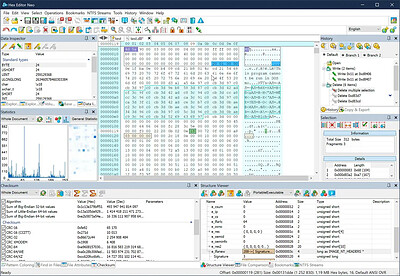
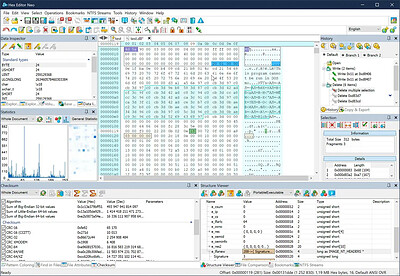
Hex Editor Neo is a binary files editing software utility for Windows. It's rich and handy set of features will help all software and hardware developers working with ASCII, hex, decimal, float, double and binary data.

Highly optimized performance, carefully tuned user interface among with new level of application stability will save a lot of your time, money and precious nerves while working with binary files.

Make patches with just two mouse clicks; manipulate your EXE, DLL, DAT, AVI, MP3, JPG files with unlimited undo/redo. Taste the visual operation history with branching.

Features: Editing Files of ANY Size; Built-In Explorer; Unlimited Undo/Redo; Multiple Selection; Selection Save and Load; Find All; Replace All; History Browsing; History Save and Load; Patch Creation; Clipboard Operations; Bytes, Words, Double Words, Quad Words, Floats and Doubles Edit Mode; Pattern Coloring; Data Inspector; Bookmarks; Base Converter; Advanced copy & export; Encodings.

Hexeditor is highly optimized to quickly perform the requested actions. It also allows you to continue working with a document while application is busy performing lengthy operation on another opened document. We take special care about extreme performance while developing tools for you and your convenience.

Opening and efficient handling of huge files
During hex editor program development we focused on its performance and reliability, so the product is based on the most advanced and efficient data processing algorithms. We have created an absolutely unique data editing software, which is able to successfully handle files of ANY size and has absolutely no analogues in this regard. Thus, any extra large file supported by the underlying file system (FAT, FAT32, NTFS) is automatically supported by our product.

Instant data processing regardless of size
Thanks to the use of highly efficient algorithms, hardware acceleration and extensive use of multi-threading technology, the product always remains responsive and quickly performs all binary data editing and file modification operations (including basic I/O, search, replace and clipboard operations) with data blocks of unlimited size. Thus, only using our hex editing software you avoid situations when you lose all modifications due to unpredictably long data processing operations.
Basic file editing features
Using this binary file editing software, you can perform most manipulations with the file data. You can type data, write data to file (direct hex file modification), select data, remove selections, insert data into file, delete binary data from file, insert another file, fill selection with raw hex data patterns, save/load files. It supports overwrite/insert writing modes and allows you to use clipboard: cut, copy/paste, merge data. Modified data is highlighted. You can use 'goto offset' command or make quick address bookmarks for easy navigation.

System Requirements:
OS: Windows XP, Vista, 7/8/10/11 and Server 2003 - 2022
CPU: Dual-core x86, x64 compatible
Memory: 2 GB
Storage: 30 MB

HOMEPAGE: Code:
Код:
https://www.hhdsoftware.com/


DOWNLOAD LINKS:


Код:
https://rapidgator.net/file/25e514a9e4e0456caa54782baf0a6568/Hex_Editor_Neo_8.25.00.9580.rar.html

Код:
https://nitroflare.com/view/D3991CC40AE69E5/Hex_Editor_Neo_8.25.00.9580.rar
 
_48256a0e604e9c9f89105308f5853aff.jpeg


Hex Editor Neo 8.25.01.9585 | Size: 17.35 MB
Language: English


Hex Editor Neo is a binary files editing software utility for Windows. It's rich and handy set of features will help all software and hardware developers working with ASCII, hex, decimal, float, double and binary data.

Highly optimized performance, carefully tuned user interface among with new level of application stability will save a lot of your time, money and precious nerves while working with binary files.

Make patches with just two mouse clicks; manipulate your EXE, DLL, DAT, AVI, MP3, JPG files with unlimited undo/redo. Taste the visual operation history with branching.

Features: Editing Files of ANY Size; Built-In Explorer; Unlimited Undo/Redo; Multiple Selection; Selection Save and Load; Find All; Replace All; History Browsing; History Save and Load; Patch Creation; Clipboard Operations; Bytes, Words, Double Words, Quad Words, Floats and Doubles Edit Mode; Pattern Coloring; Data Inspector; Bookmarks; Base Converter; Advanced copy & export; Encodings.

Hexeditor is highly optimized to quickly perform the requested actions. It also allows you to continue working with a document while application is busy performing lengthy operation on another opened document. We take special care about extreme performance while developing tools for you and your convenience.

Opening and efficient handling of huge files
During hex editor program development we focused on its performance and reliability, so the product is based on the most advanced and efficient data processing algorithms. We have created an absolutely unique data editing software, which is able to successfully handle files of ANY size and has absolutely no analogues in this regard. Thus, any extra large file supported by the underlying file system (FAT, FAT32, NTFS) is automatically supported by our product.

Instant data processing regardless of size
Thanks to the use of highly efficient algorithms, hardware acceleration and extensive use of multi-threading technology, the product always remains responsive and quickly performs all binary data editing and file modification operations (including basic I/O, search, replace and clipboard operations) with data blocks of unlimited size. Thus, only using our hex editing software you avoid situations when you lose all modifications due to unpredictably long data processing operations.
Basic file editing features
Using this binary file editing software, you can perform most manipulations with the file data. You can type data, write data to file (direct hex file modification), select data, remove selections, insert data into file, delete binary data from file, insert another file, fill selection with raw hex data patterns, save/load files. It supports overwrite/insert writing modes and allows you to use clipboard: cut, copy/paste, merge data. Modified data is highlighted. You can use 'goto offset' command or make quick address bookmarks for easy navigation.

System Requirements:
OS: Windows XP, Vista, 7/8/10/11 and Server 2003 - 2022
CPU: Dual-core x86, x64 compatible
Memory: 2 GB
Storage: 30 MB

HOMEPAGE: Code:
Код:
https://www.hhdsoftware.com/


DOWNLOAD LINKS:


Код:
https://rapidgator.net/file/355daba31b4a5854c54ad0ac44c23e6c/Hex_Editor_Neo_8.25.01.9585.rar.html

Код:
https://nitroflare.com/view/3ED71C470540694/Hex_Editor_Neo_8.25.01.9585.rar
 
e442278eaa313c1f6f3a04f46b982117.webp

Free Download Hex Editor Neo 8.25.01.9585 + Portable | 17.4/39.2 Mb
Hex Editor Neo is a binary file editing utility for Windows that provides tools for working with hexadecimal, ASCII, decimal, floating-point, and binary data. It is designed for software and hardware developers who need to inspect, modify, search, replace, and manipulate data directly within files.
The editor supports files of any size supported by the underlying file system and is built around high-performance data processing. It uses multi-threading and hardware acceleration to keep editing operations responsive while other documents are being processed.
Hex Editor Neo can be used with a wide range of file types, including EXE, DLL, DAT, AVI, MP3, and JPG files. The release includes both the standard and Portable editions, providing two formats for working with binary data.


Software Overview
Hex Editor Neo provides a comprehensive environment for direct binary data editing. Users can overwrite or insert data, remove or insert binary content, merge data through clipboard operations, and save or load modified files. Changes are visually highlighted, while offset navigation and bookmarks provide convenient ways to move through large datasets.
The application includes advanced history management with unlimited undo and redo operations, branching history browsing, and the ability to save and load editing history. Its patch creation tools can generate file patches with a small number of operations, while search and replacement functions support efficient manipulation of binary content.
For detailed data inspection, Hex Editor Neo provides multiple numeric editing modes, pattern coloring, a Data Inspector, base conversion, encoding tools, and advanced copying and exporting options. Its built-in Explorer also assists with file navigation.

Key Features
  • Edit files of any size supported by the underlying file system.
  • Work with ASCII, hexadecimal, decimal, binary, float, and double data.
  • Support overwrite and insert editing modes.
  • Perform unlimited undo and redo operations with branching history.
  • Search for all matching data and replace all occurrences.
  • Create and manage file patches.
  • Use multiple selections and save or load selection data.
  • Inspect data with the built-in Data Inspector.
  • Edit bytes, words, double words, quad words, floats, and doubles.
  • Use bookmarks and offset navigation for large files.
  • Apply pattern coloring for easier data identification.
  • Convert values between different number bases.
  • Perform advanced clipboard, copy, and export operations.
  • Work with multiple opened documents while lengthy processing continues on another document.
  • Use encoding tools for binary and text data.

Why Choose Hex Editor Neo
Hex Editor Neo is designed for developers and technical users who need direct access to binary file contents. Its combination of editing, search, replacement, inspection, navigation, history, and patch creation tools covers common binary editing workflows.
The application is also suited to work involving very large files, with processing methods designed to handle extensive data without requiring the entire file to be treated as a conventional small document.

System Requirements
System Requirements:
OS: Windows XP, Vista, 7/8/10/11 and Server 2003 - 2022
CPU: Dual-core x86, x64 compatible
Memory: 2 GB
Storage: 30 MB

Frequently Asked Questions

What is Hex Editor Neo used for?
Hex Editor Neo is used to inspect and modify binary files and data represented in hexadecimal, ASCII, decimal, floating-point, and binary formats.

Can Hex Editor Neo handle very large files?
Yes. The software is designed to process files of any size supported by the underlying FAT, FAT32, or NTFS file system.

Does Hex Editor Neo provide undo and redo functionality?
Yes. It supports unlimited undo and redo operations, along with branching history browsing and options for saving and loading editing history.

Which types of data can be edited?
The editor provides modes for bytes, words, double words, quad words, floats, doubles, ASCII, hexadecimal, decimal, and binary data.

Does this release include a Portable edition?
Yes. The release contains both the standard edition and the Portable edition.

Home Page

Код:
https://www.hhdsoftware.com/

Product Information
  • Software Name: Hex Editor Neo
  • Version: 8.25.01.9585
  • Architecture: x86, x64
  • Languages: English
  • License type: Full Version + Portable
  • File Size: 17.4/39.2 Mb
Rapidgator
Код:
https://rapidgator.net/file/163cee815a84c030b2e3ef84828d0174/a5jtx.HexEditorNeo8.rar.html
https://rapidgator.net/file/ad2b020142f0bfc9cd3da48f10ce4e99/a5jtx.HexEditorNeo8Portable8.25.01.9585.zip.html

Код:
https://nitroflare.com/view/45C3F7E0BA92DA6/a5jtx.HexEditorNeo8.rar
https://nitroflare.com/view/4E6206345B902A9/a5jtx.HexEditorNeo8Portable8.25.01.9585.zip
 
24c5e2eb10cbaa030df72458a0600e4c.webp

Free Download Hitek Software AbleFTP 14.06 (x64) | 72.2 Mb
AbleFTP is an automated FTP client designed to simplify file transfers and build scheduled file management workflows. It provides an interactive interface for standard FTP operations while also allowing users to create automated tasks that can run manually or according to a schedule.
The software can transfer files between a local computer and FTP servers, monitor local and remote directories, trigger actions when files or directories change, and execute task chains based on defined conditions. It also supports variables, command-line execution, logging, and email notifications.
AbleFTP can be used for recurring file transfers, website monitoring, automated downloads, archiving, and other file management workflows. Its background task engine can also run as a service on supported operating systems.


Software Overview

AbleFTP combines FTP file transfer capabilities with task automation features. Users can schedule transfers, work with multiple files and subdirectories, apply dynamic filenames, and automate actions based on directory or file changes.
The software includes local and remote directory monitoring, task chains, dynamic variables, FTP command execution, web downloads, and notification options. Automated tasks can also be launched through the command line or controlled remotely through the available command-line module.

Key Features

  • Automate FTP transfers between a local computer and intranet or internet servers.
  • Schedule file transfers to run automatically or manually.
  • Rename transferred files dynamically using the current month, day, or time.
  • Support FTP wildcards for flexible file selection.
  • Transfer multiple files and subdirectories.
  • Monitor remote FTP directories for changes.
  • Monitor local directories for file and directory changes.
  • Trigger FTP, ZIP, copy, and delete tasks based on monitored changes.
  • Detect file size, file count, and file modification dates for task conditions.
  • Send email notifications based on task exit codes.
  • Use dynamic variables across supported tasks.
  • Create task chains for advanced automation workflows.
  • Execute RFC FTP commands sequentially with the FTP Command task.
  • Download web pages automatically and save them using dynamic filenames.
  • Monitor websites for updates and download modified web pages.
  • Support proxy authorization for web downloads.
  • Run multiple simultaneous task threads.
  • Open multiple FTP browser sessions.
  • Cache remote FTP directories during automated tasks.
  • Run tasks from the command line with the Task Runner feature.
  • Control the software remotely through SSH using the command-line module.
  • Run the background task engine as a Windows, macOS, or Linux service.
  • Create bootless automated workflows without requiring continuous manual interaction.

Why Choose AbleFTP

AbleFTP is suited to users who need more than a conventional FTP browser. Its scheduling, monitoring, variable handling, and task-chain capabilities allow recurring file operations to be organized into automated workflows.
The software can also be integrated into server and desktop environments where background tasks, command-line execution, notifications, or remote administration are required.

System Requirements

  • Windows 8.1, 10, 11, 2012R2 server, 2016 server, 2019 server, 2022 server.
  • Includes JRE 17 (java 17).
  • Requires JRE 17 (java 17) to be installed separately from OpenJDK.

Frequently Asked Questions

What is AbleFTP?

AbleFTP is an automated FTP client for transferring files and creating scheduled file management tasks.

Can AbleFTP automate FTP transfers?

Yes. It can schedule transfers between a local computer and FTP servers and automate related file operations.

Can AbleFTP monitor directories?

Yes. It can monitor both remote FTP directories and local directories and trigger configured tasks when changes are detected.

Does AbleFTP support command-line operation?

Yes. Tasks can be run from the command line using the Task Runner feature, while the command-line module can also provide remote control through SSH.

Which platforms are supported?

The supplied release information lists Windows 8.1, Windows 10, Windows 11, and Windows Server 2012 R2, 2016, 2019, and 2022. The background task engine can also run as a service on macOS and Linux.

Home Page

Код:
http://www.hiteksoftware.com/

Product Information
  • Software Name: Hitek Software AbleFTP
  • Version: 14.06
  • Architecture: x64
  • Languages: English
  • License type: Full Version
  • File Size: 72.2 Mb
Rapidgator
Код:
https://rapidgator.net/file/32c418a713e341daa58d787fbb0ebdc6/8xp15.Hitek.Software.AbleFTP.14.06.x64.rar.html

Код:
https://nitroflare.com/view/974AE41CAC1A7F9/8xp15.Hitek.Software.AbleFTP.14.06.x64.rar
 
f4044914560641ccfd2b91bd6181985d.webp

Free Download Hitek Software AutoKrypt 14.06 (x64) | 68.1 Mb
AutoKrypt is encryption software that combines file encryption and decryption with task scheduling and automation features. It uses a command-line wrapper around GnuPG and supports OpenPGP password-based encryption, public/private key operations, signing, verification, and combined encryption and signing workflows.
The software allows users to create profiles for different encryption methods and reuse them in automated encryption tasks. Files can be processed according to their filenames or timestamps, while original and processed files can be backed up to other directories.
AutoKrypt also provides task scheduling, dynamic variables, directory and file monitoring, task chains, email notifications, command-line execution, and remote control through SSH. The background task engine can run as a service on supported operating systems.


Software Overview

AutoKrypt is designed for users who need repeatable encryption workflows without manually processing individual files. Encryption and decryption tasks can be configured using predefined profiles and applied automatically according to file-related conditions.
The software can process complete folder trees, rename encrypted or decrypted files using regular expressions, create backups, and execute scheduled tasks. Its automation features can also be combined with variables, file monitors, and task chains.

Key Features

  • Encrypt and decrypt files using OpenPGP password-based encryption.
  • Support public/private key encryption and decryption.
  • Sign and verify files using encryption keys.
  • Combine encryption and signing or decryption and verification.
  • Create profiles for different encryption methods.
  • Use encryption profiles with automated tasks.
  • Automatically encrypt or decrypt files based on filename or file timestamp.
  • Process files throughout an entire folder tree.
  • Back up original files to other folders.
  • Back up encrypted or decrypted files to other folders.
  • Automatically rename encrypted and decrypted files using REGEX.
  • Schedule encryption, decryption, and other tasks.
  • Execute other software programs and applications through scheduled tasks.
  • Send email notifications based on task exit codes.
  • Use dynamic variables in supported tasks.
  • Create task chains combining multiple automation operations.
  • Combine tasks with directory and file monitors.
  • Run tasks from the command line using the Task Runner feature.
  • Run tasks from other programs through the Task Runner feature.
  • Control the software remotely through SSH using the command-line module.
  • Run the background task engine as a Windows, macOS, or Linux service.

Why Choose AutoKrypt

AutoKrypt is intended for users who need to automate recurring file encryption and decryption operations. Its profile-based approach allows encryption settings to be reused across scheduled tasks and automated workflows.
The combination of file processing, backups, regular-expression renaming, task scheduling, variables, and command-line control makes it suitable for structured encryption workflows that need to run with limited manual intervention.

System Requirements

  • Windows 8.1, 10, 11, 2012R2 server, 2016 server, 2019 server, 2022 server. Includes JRE 17 (java 17).
  • Requires JRE 17 (java 17) to be installed separately from OpenJDK.

Frequently Asked Questions

What is AutoKrypt?

AutoKrypt is encryption software based on a command-line wrapper around GnuPG, with additional scheduling and automation features.

What encryption methods does AutoKrypt support?

It supports OpenPGP password encryption and decryption, public/private key encryption and decryption, signing and verification, and combined encryption/signing operations.

Can AutoKrypt encrypt files automatically?

Yes. Encryption and decryption tasks can be configured to process files automatically according to filenames or file timestamps.

Can AutoKrypt process an entire folder structure?

Yes. It can encrypt or decrypt files throughout an entire folder tree and can also back up the original and processed files to other folders.

Does AutoKrypt support command-line control?

Yes. Tasks can be launched from the command line using the Task Runner feature, and the command-line module can provide remote control through SSH.

Home Page

Код:
http://www.hiteksoftware.com/

Product Information
  • Software Name: Hitek Software AutoKrypt
  • Version: 14.06
  • Architecture: x64
  • Languages: English
  • License type: Full Version
  • File Size: 68.1 Mb
Rapidgator
Код:
https://rapidgator.net/file/6f42b5df6652ffef4fe098977f6f9c25/rdezf.Hitek.Software.AutoKrypt.14.06.x64.rar.html

Код:
https://nitroflare.com/view/08919FEA4824487/rdezf.Hitek.Software.AutoKrypt.14.06.x64.rar
 
99f33c57bbd8cb654d9a9a742498bfb4.webp

Free Download Hitek Software Automize Enterprise 14.06 (x64) | 81 Mb
Automize Enterprise is an automation software suite for creating scheduled tasks and repeatable workflows on Windows and Mac. It provides a task scheduler, command execution, file and directory monitoring, FTP transfers, database operations, email handling, web downloads, scripting, and other automation functions without requiring programming knowledge for standard tasks.
The software allows users to combine individual tasks into sequences and define actions based on task exit codes. It can automate applications, scripts, batch files, file operations, network commands, database queries, email processing, and other recurring activities.
Automize Enterprise also includes scripting capabilities for advanced users. Scripts can be developed using Java, jаvascript, Groovy, Ruby, Python, Tcl, AWK, and other supported languages, while the background task engine can run as a service on supported operating systems.


Software Overview

Automize Enterprise is designed to organize recurring computer and server operations into scheduled or event-driven workflows. Its task scheduler can launch applications, commands, scripts, file operations, network tasks, and other supported actions according to configured schedules.
The Chain Task Integrator can combine commands, database SQL operations, email checks, FTP transfers, web downloads, URL monitoring, Telnet, ping, copying, printing, and other tasks into sequences. Tasks can use variables and directory or file monitors, while exit codes can determine subsequent actions.

Key Features

  • Schedule tasks and applications without requiring programming or scripting knowledge.
  • Send email notifications based on task exit codes.
  • Use dynamic variables across supported tasks.
  • Create task chains combining multiple automation operations.
  • Monitor files and directories for changes.
  • Run batch files, scripts, and executable programs with Command and Windows Command tasks.
  • Terminate launched programs and obtain their exit codes for use in other tasks.
  • Combine commands, database SQL, email, FTP, web downloads, URL monitors, Telnet, ping, copying, and printing in task sequences.
  • Create advanced automation scripts using Java, jаvascript, Groovy, Ruby, Python, Tcl, AWK, and other languages.
  • Automate FTP transfers to and from intranet or internet servers.
  • Schedule FTP transfers and automatically rename files using date and time variables.
  • Support FTP wildcards and multiple file transfers.
  • Use FTP logging and FTP daemon functionality.
  • Run RFC FTP commands sequentially with the FTP Command task.
  • Automate XML loops, XML monitoring, and XML validation.
  • Automate PGP encryption and decryption tasks.
  • Schedule web page downloads and save files using dynamic filenames.
  • Monitor websites for changes and download modified pages.
  • Use proxy authorization for web downloads.
  • Check email and download attachments based on subject, date, or sender conditions.
  • Schedule email messages with attachments for multiple recipients.
  • Send SQL statements automatically to databases.
  • Monitor database tables for changes.
  • Schedule Telnet commands and wait for command completion before continuing.
  • Ping servers to check availability and maintain uptime statistics.
  • Launch programs with command-line arguments, working directories, and other startup parameters.
  • Schedule ZIP operations for files and directories using wildcards.
  • Copy files and directories on a schedule with wildcard support.
  • Automate Microsoft Access, Excel, Word, and PowerPoint macros or command-line startup switches.
  • Schedule Access macros and database compact or repair operations.
  • Schedule document printing and file deletion.
  • Schedule alarms and message reminders.
  • Run tasks from the command line using the Task Runner feature.
  • Run tasks from other programs through the Task Runner feature.
  • Control the software remotely through SSH using the command-line module.
  • Run the background task engine as a Windows, macOS, or Linux service.

Why Choose Automize Enterprise

Automize Enterprise provides a broad set of automation tasks that can be combined into scheduled workflows. It is suitable for recurring file operations, server maintenance, data processing, email handling, network checks, database monitoring, and application automation.
The Enterprise edition also provides scripting capabilities for users who need to extend predefined tasks with custom automation logic. Command-line and SSH features allow tasks to be integrated into other programs or controlled from remote systems.

System Requirements

  • Windows 8.1, 10,11, 2012R2 server, 2016 server, 2019 server, 2022 server. Includes JRE 17 (java 17).
  • Requires JRE 17 (java 17) to be installed separately from OpenJDK.

Frequently Asked Questions

What is Automize Enterprise?

Automize Enterprise is an automation software suite for scheduling and combining tasks such as file operations, FTP transfers, database commands, email processing, web downloads, and application execution.

Does Automize Enterprise require programming knowledge?

Standard task scheduling and automation can be configured without programming or scripting knowledge. The Enterprise edition also provides scripting features for advanced users.

Which scripting languages are supported?

The supplied information lists Java, jаvascript, Groovy, Ruby, Python, Tcl, AWK, and other languages for automation scripting.

Can Automize Enterprise automate FTP and email tasks?

Yes. It can schedule FTP transfers, run FTP commands, check and download email attachments based on conditions, and send scheduled email messages with attachments.

Can Automize Enterprise run tasks remotely?

Yes. Tasks can be run through the command line, and the command-line module can provide remote control through SSH.

Home Page

Код:
http://www.hiteksoftware.com/

Product Information
  • Software Name: Hitek Software Automize Enterprise
  • Version: 14.06
  • Architecture: x64
  • Languages: English
  • License type: Full Version
  • File Size: 81 Mb
Rapidgator
Код:
https://rapidgator.net/file/905ec6af7013fff3c6ac0286ab317e8b/lic7a.Hitek.Software.Automize.Enterprise.14.06.x64.rar.html

Код:
https://nitroflare.com/view/26B0410EE0F986B/lic7a.Hitek.Software.Automize.Enterprise.14.06.x64.rar
 
e751a9e1c39fc7acdc2841b755ff0263.webp

Free Download Hitek Software JaSFTP 14.06 (x64) | 77.1 Mb
JaSFTP is an automated Secure File Transfer Protocol (SFTP) client designed for interactive file transfers and scheduled file management workflows. It allows users to transfer files between local systems and SFTP servers while automating recurring operations through scheduled tasks.
The software supports multiple file transfers, subdirectory operations, wildcard matching, directory monitoring, dynamic variables, task chains, and automated notifications. It can also monitor websites, download modified web pages, and perform SFTP commands as part of automated workflows.
JaSFTP provides SSH1 and SSH2 support, password and public key authentication, HTTP and SOCKS proxy support, command-line task execution, and remote control through SSH. Its background task engine can run as a service on supported operating systems.


Software Overview

JaSFTP combines SFTP file transfer capabilities with task scheduling and automation. Users can create tasks that transfer files between a PC and remote servers, automatically rename files, monitor directories, and trigger additional operations when specified conditions are detected.
Remote and local directory monitors can detect changes in files and directories and initiate configured actions such as SFTP transfers, ZIP operations, copying, or deletion. Task chains and dynamic variables can be used to build more structured automation workflows.

Key Features

  • Automate SFTP transfers between a local computer and intranet or internet servers.
  • Schedule SFTP transfers to run automatically or manually.
  • Automatically rename files using the current month, day, or time.
  • Support SFTP wildcards for file selection.
  • Transfer multiple files simultaneously.
  • Transfer complete subdirectories.
  • Monitor remote SFTP directories for changes.
  • Monitor local directories for changes.
  • Detect file size, total file count, and file modification dates.
  • Trigger SFTP, ZIP, copy, and delete tasks based on directory changes.
  • Send email notifications based on task exit codes.
  • Use dynamic variables in supported tasks.
  • Create task chains for advanced automation workflows.
  • Support SFTP logging and SFTP daemon functionality.
  • Execute SFTP commands sequentially with the SFTP Command task.
  • Schedule web page downloads and save them using dynamic filenames.
  • Monitor websites for updates and download modified web pages.
  • Support proxy authorization for web downloads.
  • Support multiple connections and simultaneous task threads.
  • Open multiple SFTP browser sessions.
  • Cache remote SFTP directories during automated tasks.
  • Support SSH1 and SSH2 protocols.
  • Authenticate using passwords or public keys.
  • Support HTTP, SOCKS 4, and SOCKS 5 proxies.
  • Run tasks from the command line using the Task Runner feature.
  • Run tasks from other programs through the Task Runner feature.
  • Control the software remotely through SSH using the command-line module.
  • Run the background task engine as a Windows, macOS, or Linux service.

Why Choose JaSFTP

JaSFTP is designed for users who need automated SFTP transfers rather than occasional manual file copying. Its scheduling and monitoring functions allow recurring file operations to run according to defined conditions and schedules.
The combination of SFTP authentication, proxy support, directory monitoring, task chains, command-line operation, and service-based execution provides tools for integrating secure file transfers into automated workflows.

System Requirements

  • Windows 8.1, 10, 11, 2012R2 server, 2016 server, 2019 server, 2022 server. Includes JRE 17 (java 17).
  • Requires JRE 17 (java 17) to be installed separately from OpenJDK.

Frequently Asked Questions

What is JaSFTP?

JaSFTP is an automated SFTP client for transferring files between local systems and remote SFTP servers and creating scheduled file transfer workflows.

Can JaSFTP automate SFTP transfers?

Yes. Users can schedule SFTP transfers, rename files automatically, transfer multiple files, and process subdirectories as part of automated tasks.

Can JaSFTP monitor directories?

Yes. It can monitor both remote SFTP directories and local directories and trigger configured tasks when changes are detected.

Which authentication methods does JaSFTP support?

The supplied information lists password and public key authentication, along with support for SSH1 and SSH2 protocols.

Does JaSFTP support proxy connections?

Yes. It supports HTTP, SOCKS 4, and SOCKS 5 proxies, as well as proxy authorization for web downloads.

Home Page

Код:
http://www.hiteksoftware.com/

Product Information
  • Software Name: Hitek Software JaSFTP
  • Version: 14.06
  • Architecture: x64
  • Languages: English
  • License type: Full Version
  • File Size: 77.1 Mb
Rapidgator
Код:
https://rapidgator.net/file/46b29acae300db2780e0dbeb0ded7081/ac3om.Hitek.Software.JaSFTP.14.06.x64.rar.html

Код:
https://nitroflare.com/view/9E59629B4851B69/ac3om.Hitek.Software.JaSFTP.14.06.x64.rar
 
8dd28f685b3c8d91d52e2a9ad69b194f.jpg


HWiNFO 8.54.6090 (x64) | Size: 20.41 MB
Language: English


HWiNFO64 are professional hardware information and diagnostic tools supporting latest components, industry technologies and standards. These tools are designed to collect and present the maximum amount of information possible about computer's hardware which makes them suitable for users searching for driver updates, computer manufacturers, system integrators and technical experts as well. Retrieved information is presented in a logical and easily understandable form and can be exported into various types of reports.

Features
- comprehensive hardware information of your computer
- system health monitoring (Thermal, Voltage, Fan, Power)
- table, Logfile, Graph, Tray, Gadget, LG LCD reporting
- text, CSV, XML, HTML, MHTML report formats
- frequent updates
- available as SDK (custom client)
- 3rd party add-ons (Rainmeter plug-in, Samurize plug-in, Sidebar Gadget to display any sensor value, LCDHost plug-in, Mini WebServer, RivaTuner/MSI Afterburner/EVGA Precision On-Screen Display, HWiNFOMonitor Sidebar Gadget including graphs, bars, etc.)

System Requirements: Windows 7 64-bit and later, x64 or ARM64 platform


DOWNLOAD LINKS:


Код:
https://rapidgator.net/file/5a6fa0c8da062d4818928ca60ef3b8ad/HWiNFO_8.54.6090_x64.rar.html

Код:
https://nitroflare.com/view/6EE7A322E7462F2/HWiNFO_8.54.6090_x64.rar
 
29f8afc9736bd482a9285719eeb0615a.jpg


IDimager Photo Supreme 2026.4.3.9670 Multilingual | Size: 190.07 MB
Language: English


Photo Supreme v2026 is a thoughtful and forward-looking release. This update has focused on smarter discovery, faster performance, and modern workflow expectations, especially around large catalogs, mobile integration, searches, and team environments.

Import and Select
One of the standout additions in Photo Supreme v2026 is the new multi-pass Import and Select workflow. This allows users to review and refine image selections in multiple stages instead of making all decisions in one pass. It's especially useful for large shoots, letting photographers cull images more deliberately and with less pressure. In addition, the Import and Select feature now loads images faster than ever. Mac users will also appreciate direct iOS device importing, which makes it possible to bring photos straight from an iPhone or iPad into the catalog without relying on intermediary software. This significantly streamlines mobile-first workflows.

Powerful Searches
Photo Supreme now supports natural language searching, allowing users to find images using plain, conversational phrases rather than rigid metadata queries. This feature is powered by AI services such as OpenAI, Google Gemini, or local models with Ollama. This gives users flexibility in how advanced features are enabled. In addition, a new classification system enhances search accuracy by grouping images into meaningful categories upon import, making it easier to surface relevant results in large or complex catalogs.

Video & Media Handling
For users working with video, Photo Supreme v2026 introduces hover-based video previews. Simply hovering over a video thumbnail now reveals a short animated preview, making it much faster to identify clips without opening them individually. Support for modern formats has also been expanded, ensuring the software keeps pace with current media standards.

Sharing with ZIP
Exporting images is more flexible in v2026 thanks to ZIP output support in transfer profiles. This makes it easy to bundle images into a single archive for delivery, backup, or client sharing, all directly from within Photo Supreme. These enhancements simplify distribution workflows and reduce the need for external tools.

GEO Maps
GEOgraphic-Mapping features can now generate maps using not only Google Maps, but also OpenFreeMap with OpenStreetMaps. This removes the need for API keys while still delivering rich, interactive map displays. This update makes location-based browsing easier to configure and more accessible for all users.

Performance and Refinements
Photo Supreme v2026 delivers notable performance enhancements, resulting in faster browsing and a more responsive overall experience. Response times are improved by up to 10%, with especially noticeable gains for large libraries containing many catalog labels.
Catalogs with numerous stacks also see significant performance improvements, particularly when displayed in stacked views.
v2026 includes a wide range of refinements, such as: "Visually similar" stack detection, numerous stability fixes and workflow enhancements, polished UI behavior in collections, searches, and metadata handling

Wait, there's more, a lot more.
New "RAW Files" and "Video Files" catalog states
Added support for Google Gemini as an AI service
Added support for OpenAI GPT-5.2 as an AI Service
Added support for Ministral3 model with Ollama
Added file management support for ACR sidecar files
Update HTTP Server with Photo Supreme Online (Server Edition)
Faster face recognition
Added "AI-Estimated GEO Location" to the AI Panel
Faster result display in the Collection Viewer
"Cascade Metadata" from image to Stack or Version Set is now a background process
A highlighted stroke has been added to the active tabs, improving navigation
Now you can display metadata charts and graphs across multiple tabs
Added support for Ctrl/Cmd+Z functionality in text and memo fields
Defined the new Affinity v3 .AF and .AVIF file format as a supported "other file format"
Switching the collection viewer's view style is faster (eg from Basic to Grid to Clean to Custom Thumb Info)
Advanced Search now has an option to search by "File Size" and "File Size MB"
Finetuned the check for "need to compact" on PostgreSQL (Server Edition)
Bookmark keyboard shortcuts are now a "toggle", similar to ratings and color labels
Expanding nodes in the Catalog Tree is ~25% faster
When using the "Dump Full to Catalog File" feature, there's now the option to create either a "catalog dump" file, or a "catalog with thumbs" dump files
Added a XMP Storage Location for "original file AND non-standard sidecar file"
In "Stacked View", you can now select a specific item from the stack to show
Support for PostgreSQL 18.
And more.

Highlights for v2026
Multi-Pass "Import and Select": Seamlessly transition through passes with a fast-culling system that optimizes your workflow.
Direct iOS Image Import on macOS: Import images directly from your iOS devices with ease.
Video Thumbnail Preview: Hover over a video thumbnail or open the Quick View to view a live video preview.
Natural Language Search Powered by AI: Search your content using plain language, with smart integration through OpenAI, Google Gemini, or Ollama models.
Transfer Profiles can now create ZIP output files: Copy or send sets of images as a single ZIP file for easier sharing.
Maps with OpenFreeMap: Display images on interactive maps using OpenFreeMap/OpenStreetMaps with no API key needed.
Server Edition Thumbnail Caching: Enjoy faster performance with local thumbnail caching, automatic cleanup, and customizable settings for retention and cache size.
Classifications: Enhance search accuracy with an automatic image classification mechanism on import.

Operating System: Windows 10 or higher

HOMEPAGE: Code:
Код:
https://www.idimager.com/


DOWNLOAD LINKS:


Код:
https://rapidgator.net/file/4f6edebd66be09e5ce402773f4e532dc/IDimager_Photo_Supreme_2026.4.3.9670_Multilingual.rar.html

Код:
https://nitroflare.com/view/01367CFBDC94734/IDimager_Photo_Supreme_2026.4.3.9670_Multilingual.rar
 
e24845455549066c2a8c30c55e623d1d.jpg


IDimager Photo Supreme 2026.4.3.9680 Multilingual | Size: 184.7 MB
Language: English


Photo Supreme v2026 is a thoughtful and forward-looking release. This update has focused on smarter discovery, faster performance, and modern workflow expectations, especially around large catalogs, mobile integration, searches, and team environments.

Import and Select
One of the standout additions in Photo Supreme v2026 is the new multi-pass Import and Select workflow. This allows users to review and refine image selections in multiple stages instead of making all decisions in one pass. It's especially useful for large shoots, letting photographers cull images more deliberately and with less pressure. In addition, the Import and Select feature now loads images faster than ever. Mac users will also appreciate direct iOS device importing, which makes it possible to bring photos straight from an iPhone or iPad into the catalog without relying on intermediary software. This significantly streamlines mobile-first workflows.

Powerful Searches
Photo Supreme now supports natural language searching, allowing users to find images using plain, conversational phrases rather than rigid metadata queries. This feature is powered by AI services such as OpenAI, Google Gemini, or local models with Ollama. This gives users flexibility in how advanced features are enabled. In addition, a new classification system enhances search accuracy by grouping images into meaningful categories upon import, making it easier to surface relevant results in large or complex catalogs.

Video & Media Handling
For users working with video, Photo Supreme v2026 introduces hover-based video previews. Simply hovering over a video thumbnail now reveals a short animated preview, making it much faster to identify clips without opening them individually. Support for modern formats has also been expanded, ensuring the software keeps pace with current media standards.

Sharing with ZIP
Exporting images is more flexible in v2026 thanks to ZIP output support in transfer profiles. This makes it easy to bundle images into a single archive for delivery, backup, or client sharing, all directly from within Photo Supreme. These enhancements simplify distribution workflows and reduce the need for external tools.

GEO Maps
GEOgraphic-Mapping features can now generate maps using not only Google Maps, but also OpenFreeMap with OpenStreetMaps. This removes the need for API keys while still delivering rich, interactive map displays. This update makes location-based browsing easier to configure and more accessible for all users.

Performance and Refinements
Photo Supreme v2026 delivers notable performance enhancements, resulting in faster browsing and a more responsive overall experience. Response times are improved by up to 10%, with especially noticeable gains for large libraries containing many catalog labels.
Catalogs with numerous stacks also see significant performance improvements, particularly when displayed in stacked views.
v2026 includes a wide range of refinements, such as: "Visually similar" stack detection, numerous stability fixes and workflow enhancements, polished UI behavior in collections, searches, and metadata handling

Wait, there's more, a lot more.
New "RAW Files" and "Video Files" catalog states
Added support for Google Gemini as an AI service
Added support for OpenAI GPT-5.2 as an AI Service
Added support for Ministral3 model with Ollama
Added file management support for ACR sidecar files
Update HTTP Server with Photo Supreme Online (Server Edition)
Faster face recognition
Added "AI-Estimated GEO Location" to the AI Panel
Faster result display in the Collection Viewer
"Cascade Metadata" from image to Stack or Version Set is now a background process
A highlighted stroke has been added to the active tabs, improving navigation
Now you can display metadata charts and graphs across multiple tabs
Added support for Ctrl/Cmd+Z functionality in text and memo fields
Defined the new Affinity v3 .AF and .AVIF file format as a supported "other file format"
Switching the collection viewer's view style is faster (eg from Basic to Grid to Clean to Custom Thumb Info)
Advanced Search now has an option to search by "File Size" and "File Size MB"
Finetuned the check for "need to compact" on PostgreSQL (Server Edition)
Bookmark keyboard shortcuts are now a "toggle", similar to ratings and color labels
Expanding nodes in the Catalog Tree is ~25% faster
When using the "Dump Full to Catalog File" feature, there's now the option to create either a "catalog dump" file, or a "catalog with thumbs" dump files
Added a XMP Storage Location for "original file AND non-standard sidecar file"
In "Stacked View", you can now select a specific item from the stack to show
Support for PostgreSQL 18.
And more.

Highlights for v2026
Multi-Pass "Import and Select": Seamlessly transition through passes with a fast-culling system that optimizes your workflow.
Direct iOS Image Import on macOS: Import images directly from your iOS devices with ease.
Video Thumbnail Preview: Hover over a video thumbnail or open the Quick View to view a live video preview.
Natural Language Search Powered by AI: Search your content using plain language, with smart integration through OpenAI, Google Gemini, or Ollama models.
Transfer Profiles can now create ZIP output files: Copy or send sets of images as a single ZIP file for easier sharing.
Maps with OpenFreeMap: Display images on interactive maps using OpenFreeMap/OpenStreetMaps with no API key needed.
Server Edition Thumbnail Caching: Enjoy faster performance with local thumbnail caching, automatic cleanup, and customizable settings for retention and cache size.
Classifications: Enhance search accuracy with an automatic image classification mechanism on import.

Operating System: Windows 10 or higher

HOMEPAGE: Code:
Код:
https://www.idimager.com/


DOWNLOAD LINKS:


Код:
https://rapidgator.net/file/1b3a3e523646317139771a4f802a1b39/IDimager_Photo_Supreme_2026.4.3.9680_Multilingual.rar.html

Код:
https://nitroflare.com/view/A2AF15452C2F62D/IDimager_Photo_Supreme_2026.4.3.9680_Multilingual.rar
 
1adec11210423991771dabba1a4e43d4.jpg


IRedSoft Batch It Ultra 6.79 (x64) | Size: 26.61 MB
Language: English


Batch It Ultra is our flag ship comprehensive Batch Image Processor. This current version 5 has been totally redesigned and rewritten from bottom up to support the latest Windows Operating System.

Batch Resizing. It supports popular resizing methods which includes Downsizing By Pixels, Upsizing By Pixels, By Percentage, By Ratio, By Cropping and By Frame. You can resize the photos while retaining its original Ratio Aspect or perform a batch cropping to remove any undesirable borders especially when the documents are being scanned. In order to allow you to fine-tune the resultant photos, Batch It Ultra offers you the option to utilize different Resampling Algorithm to enhance the image quality.

The Resizing By Frame method allows you to keep the same width and height dimensions while keeping the same ratio aspect for all your images by padding the smaller dimensions with the frame color. Resizing By Frame can either downsize or upsize the pictures to fit. In order to save you time, you can use Batch It Ultra to resize the same images into 3 different sizes in a single run. You can use this to make adjustment to your original file and save an additional two more sizes for perhaps for different screen displays or as thumbnail photos.

Batch Format Conversion. It supports importing of images of many commonly used formats such as JPEG, PNG, TIFF (Single Page), BMP, JPEG 2000, PCX, Windows HD Photo, GIF, TARGA, DIB, RLE, PIX, Truevision Vista Graphic, Portable Bitmap, GFI Fax, Adobe Photoshop, Paint Shop Pro, Dr Halo Cut and Kodak PhotoCD. It supports export to JPEG, PNG, BMP, GIF, TIFF, JPEG 2000, PCX, PBM, PPM, PGM and Windows HD Photo Formats.

System Requirements:
32 Bit Edition - Windows 8 (32 Bit & 64 Bit), Windows 10 (32 Bit & 64 Bit), Windows Server 2012 (32 Bit & 64 Bit) and Windows Server 2016 (32 Bit and 64 Bit)
64 Bit Edition - Windows 10 (64 Bit), Windows 8 (64 Bit), Windows Server 2012 (64 Bit) and Windows Server 2016 (64 Bit)

HOMEPAGE: Code:
Код:
https://www.batchimage.com/product/batchitultra/


DOWNLOAD LINKS:


Код:
https://rapidgator.net/file/7f11a569651063f72712e60b67cfbef6/IRedSoft_Batch_It_Ultra_6.79_x64.rar.html

Код:
https://nitroflare.com/view/633A8DC225E0822/IRedSoft_Batch_It_Ultra_6.79_x64.rar
 
24fc7ced90b37959fadc76368dc350fe.jpg


Marmoset Toolbag 5.03 (5033) (x64) | Size: 275.7 MB
Language: English


Marmoset Toolbag is the all-in-one creative software package for 3D artists. Create cutting-edge art for games, film, product viz, and beyond with Toolbag's industry-leading texture baking engine, intuitive texturing & painting tools, and physically-accurate ray-traced and raster renderers.

EDIT
Get comfortable with a setup of your choice using Toolbag's lightweight, user-friendly editor.

BAKE
Bake a wide array of maps with precision using Toolbag's blazing-fast, real-time baking tools.

TEXTURE
Paint physically accurate materials and leverage intuitive texturing tools with Toolbag's Texture Projects.

RENDER
Create breathtaking renders with speed using Toolbag's advanced rendering solutions.

LIBRARY
Access a world of free content with Toolbag's integrated Library - Materials, Textures, Brushes, and more!

HOMEPAGE: Code:
Код:
https://marmoset.co/


DOWNLOAD LINKS:


Код:
https://rapidgator.net/file/d0401a0176a4a9fbbb502d7dd1457f88/Marmoset_Toolbag_5.03_5033_x64.rar.html

Код:
https://nitroflare.com/view/215E874E301DCD9/Marmoset_Toolbag_5.03_5033_x64.rar
 
4362f342d9af0ae3cabde4ea19f6da27.png


MemoryCleaner 3.0.0 | Size: 1.53 MB
Language: English


MemoryCleaner utilizes many functions already built into Windows to free memory with no impact on your system.You can also access Memory Cleaner functions right from your systray without having to open up the program. The cleaning procedures are both silent and the only time you will see an alert is to show the amount of RAM recovered briefly.

Feature
A program that cleans up memory.
Only Working Set, Standby automatically cleans up the memory.
Cleans up memory every specified time.
Automatically cleans up when the specified memory usage rate is exceeded.

System Requirements: Windows 11, Windows 10, 8 , 7


DOWNLOAD LINKS:


Код:
https://rapidgator.net/file/eed7f81f883070e9565bdb697a20dc42/MemoryCleaner_3.0.0.zip.html

Код:
https://nitroflare.com/view/F9CF1E1BFE32FBA/MemoryCleaner_3.0.0.zip
 
cd7013d1fa41bb288591f72758bf0ec1.jpg


MetatOGGer 7.7.3.0 Multiligual | Size: 117.96 MB
Language: English


MetatOGGer is a comprehensive software application designed for managing your music collection when it comes to tagging, renaming and organizing audio tracks with the OGG and MP3 format. It primarily addresses users with some background in such apps. The interface of the utility is clean and intuitive. Importing audio tracks into the workspace is done by using either the file browser, folder view or "drag and drop" method; you can add as many items as you want. For each song in the list you can view the artist, title, date, album, genre and track number, as well as edit any of these fields by simply clicking them. An important feature of MetatOGGer lets you apply tailor-made tags, and all you have to do is write a name and value.

In addition, you can view a file's audio properties (e.g. codec, duration, bit rate, channel mode, sample rate), add covers (embedded and external), and edit tags with IronPython scripts (e.g. convert to uppercase, trim the white space, capitalize the first letter).

Other features of MetatOGGer let you get tags from acoustic fingerprints, download lyrics, copy covers, look for duplicate files, play tracks and import tags as keywords. It is also possible to remove any tags you want (e.g. common, uncommon, embedded pictures) and create an inclusion or exclusion list, get tags from a file's name or path, as well as rename and sort files according to their tags, among others.

MetatOGGer offers multilingual support, lets you customize the quick access toolbar and track columns, and gives you the possibility of restoring all settings to their factory values. It has a good response time and uses a moderate-to-high quantity of CPU and system memory.

We have not experienced any issues throughout our evaluation. As you can see, MetatOGGer comes bundled with numerous options and configuration settings concerning audio tagging, and it is definitely worth taking into consideration as a powerful application in this domain.

System Requirements: Windows 10 (64-bit) or Windows 11 are officially supported for current versions, though older versions may run on earlier OS versions.

HOMEPAGE: Code:
Код:
https://www.luminescence-software.org/fr/


DOWNLOAD LINKS:


Код:
https://rapidgator.net/file/53f3aac0703025389cb75244da39aa20/MetatOGGer_7.7.3.0_Multiligual.rar.html

Код:
https://nitroflare.com/view/5684BD55F3B0B24/MetatOGGer_7.7.3.0_Multiligual.rar
 
b862b61d1b073d2e9a1798e5286ed600.png


Microsoft Edge 154.0.4258.48 Stable Multilingual | Size: 383.43 MB
Language: English


Introducing the new Microsoft Edge: Rebuilt from the ground up to bring you world-class compatibility and performance, the security and privacy you deserve, and new features designed to bring you the best of the web. The new Microsoft Edge is a modern web browser - designed for faster, safer browsing. Get more done on the web with built-in tools for notetaking, reading and more.

The new Microsoft Edge is based on the Chromium project, so you can use the extensions/add-ons from Google Chrome extensions web store and from Microsoft Edge extensions web store for free. Choose your style
News, images, search-choose what you want to see when you open a new tab. Select a layout best for you: Focused, Inspirational, or Informational.
Take control of your data
Microsoft Edge and Bing give you more control over your data, and more transparency into what information is being collected, while you browse with new features like Tracking Prevention and InPrivate mode.
Browse with peace of mind
Microsoft Defender SmartScreen automatically protects you online from security issues, phishing schemes, and malicious software.
Browse anywhere
The new Microsoft Edge is now available on all supported versions of Windows, macOS, iOS, and Android.
Experience 4K streaming
Get the best browser for high definition media on Windows 10 with unique support for streaming in 4K Ultra HD.
Customize with extensions
The new Microsoft Edge is now compatible with your favorite extensions, so it's easy to personalize your browsing experience.

System Requirements: Windows 11, Windows 10


DOWNLOAD LINKS:


Код:
https://rapidgator.net/file/6d36deabf7d68ca25bfece874ac6690c/Microsoft_Edge_154.0.4258.48_Stable_Multilingual.rar.html

Код:
https://nitroflare.com/view/A679C34F5FE7F64/Microsoft_Edge_154.0.4258.48_Stable_Multilingual.rar
 
01d0ce9cb92ff474a07df9ac07e35b6a.jpg


Microsoft Office Professional Plus 2021-2024 VL v2609 Build 20430.20118 Multilingual | Size: 12.77 GB
Languages: Arabic,English,German,Greek,French,Spanish,Italian,Portuguese-Portuguese,Portuguese-Brazil,Turkish,Dutch,Czech


Microsoft has officially announced the availability of the final version of its Office 2021/2024 release for Windows and Mac users. Following the release of the preview version in the first half of this year, the product has been refined and is now available to users. Office 2021/2024 includes updated versions of apps from the suite, Word, Excel, PowerPoint, Outlook, Access, and Publisher.

Office 2021/2024 includes virtually every change that has been added to the suite of programs in Office 365 over the past 3 years, although some features remain exclusive to subscribers. In addition to the main programs Word, Excel, PowerPoint, and Outlook, which are available for both Windows and macOS, the Access and Publisher versions are only available for Windows and are included, as usual, only in premiums. Visio and Project for Windows are also available, although they are not part of the ongoing release of Office.

Microsoft Office 2021-2024 includes:
Microsoft Office 2021-2024 Professional Plus
Microsoft Access 2021-2024
Microsoft Excel 2021-2024
Microsoft Lync 2021-2024
Microsoft OneNote 2021-2024
Microsoft Outlook 2021-2024
Microsoft PowerPoint 2021-2024
Microsoft Publisher 2021-2024
Microsoft Visio Viewer 2021-2024
Microsoft Word 2021-2024
Microsoft Visio pro 2021-2024
Microsoft Project 2021-2024
Skype for business 2021-2024
OneDrive for Business 2021-2024
Office Shared Features
Profing Tools Only 2021-2024
And many more

System Requirements:
OS: Windows 10/11.

HOMEPAGE: Code:
Код:
http://www.microsoft.com


DOWNLOAD LINKS:


Код:
https://rapidgator.net/file/f7c662907f21c7c3dac5e735f7da1fdd/Office_21-24_v20430.20118_x64..part1.rar.html
https://rapidgator.net/file/88b053832427991ba1f8f1b69a8e34ac/Office_21-24_v20430.20118_x64..part2.rar.html
https://rapidgator.net/file/439fb22ccdbce1d68566a8d31b2d576b/Office_21-24_v20430.20118_x64..part3.rar.html
https://rapidgator.net/file/b1e609e5b607f94ee088ac6c588e9b61/Office_21-24_v20430.20118_x64..part4.rar.html
https://rapidgator.net/file/e9a23fbad355d671c8c9234ec6a7c4ac/Office_21-24_v20430.20118_x86..part1.rar.html
https://rapidgator.net/file/15f58ce9a8160b9ea53c9e6621ad48bd/Office_21-24_v20430.20118_x86..part2.rar.html
https://rapidgator.net/file/31a6f7ce79fbfeb1d30a98fa75383d3e/Office_21-24_v20430.20118_x86..part3.rar.html
https://rapidgator.net/file/613e493299f6b9c9178139ef0d989730/Office_21-24_v20430.20118_x86..part4.rar.html

Код:
https://nitroflare.com/view/B45A9EA9D4952B3/Office_21-24_v20430.20118_x64..part1.rar
https://nitroflare.com/view/B18078F3B4A32E3/Office_21-24_v20430.20118_x64..part2.rar
https://nitroflare.com/view/375EBB502304EF7/Office_21-24_v20430.20118_x64..part3.rar
https://nitroflare.com/view/AA5A9727DCF61EB/Office_21-24_v20430.20118_x64..part4.rar
https://nitroflare.com/view/10B62644363377B/Office_21-24_v20430.20118_x86..part1.rar
https://nitroflare.com/view/F44C94B82D57E0D/Office_21-24_v20430.20118_x86..part2.rar
https://nitroflare.com/view/7F37A163B5E26DF/Office_21-24_v20430.20118_x86..part3.rar
https://nitroflare.com/view/55087AA7FFCD9AE/Office_21-24_v20430.20118_x86..part4.rar
 
6c2c43196c1651b5c77b8449c3134207.png


Mipony Free 4.0.0 | Size: 14.4 MB
Language: English


Mipony is a download manager that gives you access to content on a wide variety of sites, so you can save it to your computer or mobile device. Through the app's intuitive interface and built-in browser, you can quickly find the items you're looking for and begin the downloading process.

Features
Continuous download
· Once the link has been added to the download list, the files will be downloaded while you navigate and if you close the download program, the downloads will be restarted when you start the program again.
· Possibility to give priority to files in the waiting list
· Control how many files can be downloaded simultaneously from each server..
· Many of the files hosted in free servers are divided into parts, Mipony has the option to join the downloaded files (HJSplit).
· Mipony can capture from the clipboard individual links or any text that contains any number of links.

Download attempts
· If by any chance the file shows an error during the download, Mipony will be in charge of performing the necessary attempts automatically until the file is downloaded.

Browser
· It has an embedded browser from where the download links are detected.
· Automatic update of the data base with the sites supported. Mipony updates automatically to keep working with files download sites and it is constantly adding new sites to the supported websites.
· Mipony can analyze full sites looking for links, indicating if they are still available in the server to be downloaded or if they have been erased.
· It allows the configuration of Flashgot to send links to Mipony
Plug-in
· In a bar format to launch downloads from Firefox and Explorer directly to Mipony or to open the site that is being viewed in the browser of Mipony.

Remote control
· Mipony has a web interface to control it remotely. With the web interface you can view the downloads and manipulate them, and also you can enter the captcha codes remotely. The web interface design is adapted for both desktops and mobile clients.

Captcha Trader Plugin
· With this plugin, you will have access to the captchas decoding system developed by captchatrader.com. CaptchaTrader solve captchas for you so you don't have to. If you earn credits by solving captchas then you can spend them later when you need them.

System Requirements: Windows 11, Windows 10, 8 , 7

HOMEPAGE: Code:
Код:
https://www.mipony.net/


DOWNLOAD LINKS:


Код:
https://rapidgator.net/file/ceddeae5ec0d6439bb74cb8f9034de7a/Mipony_Free_4.0.0.rar.html

Код:
https://nitroflare.com/view/F12F574BF3CA646/Mipony_Free_4.0.0.rar
 
16cae9e217fe26f53d651e356b293e5e.webp

Free Download MoneyWorks Gold 9.2.6r1 macOS | 36 Mb
MoneyWorks Gold is a business accounting and management application that combines core financial functions with tools for sales, purchasing, inventory, job costing, budgeting, reporting, and business analysis. It is designed for organizations that need more than basic bookkeeping while retaining the option to run the software locally or through a hosted environment.
The application provides integrated accounting modules for cashbook, general ledger, accounts receivable, accounts payable, fixed assets, and budgeting. Additional business functions cover quoting, order tracking, job costing, inventory management, multi-currency operations, and bills of material.
MoneyWorks also provides reporting, data search, customizable list views, user security controls, and multiple deployment options for Windows and Mac environments.


Software Overview

MoneyWorks Gold brings accounting and business management functions together in a native desktop application. Users can work with financial records, sales and purchasing data, inventory, jobs, and other business information from a centralized system.
The software supports both individual desktop installations and server-based deployments, with options for self-hosting or cloud access. Windows and Mac computers can also be used together on the same network.

Key Features

  • Integrated cashbook, general ledger, accounts receivable, and accounts payable.
  • Budgeting and fixed asset management.
  • Quoting and order tracking for sales operations.
  • Job costing and billing tools.
  • Inventory management with batch and serial number tracking across multiple locations.
  • Multi-currency support for businesses handling different currencies.
  • Bills of material for managing product components and related information.
  • Financial reports including Profit & Loss, Balance Sheet, and Cash Flow.
  • Reports for general ledger, sales, purchasing, stock, inventory, receivables, and payables.
  • Dashboard and executive summary reporting.
  • Tools for creating customized reports.
  • GST, VAT, HST, and sales tax tracking and reporting.
  • Online filing support for New Zealand, the United Kingdom, and Singapore, with BAS reporting for Australia.
  • Import bank statements from QIF, CSV, OFX, and QBO files where supported.
  • Support for available online bank feeds.
  • Powerful search and on-screen lists for accessing historical data.
  • Enquiry and analytics screens for examining sales, purchasing, and accounting information.
  • Customizable list views with database fields, calculations, and lookups.
  • Multi-level general ledger and cost-centre or departmental subledgers.
  • Security levels and user privileges for controlling access to sensitive information.
  • Access logging to record account access activity.

Why Choose MoneyWorks Gold

MoneyWorks Gold combines accounting functions with operational tools such as inventory, job costing, purchasing, sales, and reporting. This makes it suitable for businesses that need their financial records connected with day-to-day business information.
Its native application approach allows the software to run directly on a computer rather than requiring a browser-based interface. Deployment can be configured for a single-user desktop, a server environment, a self-hosted installation, or a supported cloud service.

System Requirements

  • Platform: macOS
  • Computer: Modern Mac computer

Frequently Asked Questions

What is MoneyWorks Gold used for?

MoneyWorks Gold is used for accounting, financial management, sales, purchasing, inventory, job costing, budgeting, and business reporting.

Can MoneyWorks Gold manage inventory?

Yes. It supports inventory management with batch and serial number tracking across multiple locations.

Does MoneyWorks support multiple currencies?

Yes. MoneyWorks includes multi-currency functionality for businesses working with different currencies.

Can MoneyWorks be used with both Windows and Mac computers?

The supplied information states that Windows and Mac computers can be mixed on the same network.

Can MoneyWorks be hosted on a server?

Yes. The software supports desktop installations as well as server-based deployment, self-hosted environments, and supported cloud services.

Home Page

Код:
https://www.cognito.co.nz/

Product Information

  • Software Name: MoneyWorks Gold
  • Version: 9.2.6r1
  • Platform: macOS
  • Interface language: English
  • License type: Full Version
  • File Size: 36 Mb

```
Rapidgator
Код:
https://rapidgator.net/file/3e777acbab74a83e3b91c5e121f7bc94/tj4c2.MoneyWorks.Gold.9.2.6r1.zip.html

Код:
https://nitroflare.com/view/52E0ED4398BEF64/tj4c2.MoneyWorks.Gold.9.2.6r1.zip
 
8fc8d84545aafc177be92e73fea19035.webp

Free Download O&O ShutUp10 Premium Edition 3.6.1135 Multilingual | 65 Mb
O&O ShutUp10 Premium is a Windows privacy management utility designed to give users direct control over data collection, telemetry, diagnostics, app permissions, system services, and other privacy-related settings in Windows 10 and Windows 11. It allows users to configure their preferred settings once and maintain them automatically as Windows changes over time.
Unlike a one-time privacy configuration tool, O&O ShutUp10 Premium continuously monitors selected settings and can restore them when Windows updates or system changes reactivate previously disabled options. This reduces the need to repeatedly review privacy settings after feature updates.
The software is suitable for both individual users and professional environments where consistent privacy configurations are required. Administrators and organizations can create profiles, export and import configurations, and apply defined settings across Windows workstations.


Software Overview

O&O ShutUp10 Premium provides centralized control over approximately 300 privacy and system settings in Windows 10 and Windows 11. Each setting is presented with understandable information and recommendation levels, helping users determine which options should be enabled or disabled.
The Premium edition adds automated enforcement through a background component that monitors selected configurations and reapplies them when Windows changes the corresponding settings. It also supports profiles and policy-oriented configuration for more consistent management across multiple systems.

Key Features

  • Privacy Control: Manage around 300 privacy and system settings in Windows 10 and Windows 11.
  • Telemetry and Diagnostics: Control settings related to data collection, diagnostics, application access, and system services.
  • Recommended Configurations: Apply predefined privacy recommendations with a single action and review every resulting change.
  • Continuous Monitoring: Monitor selected privacy settings and automatically restore defined configurations when they are changed.
  • Windows Update Protection: Reapply configured privacy settings after Windows updates, feature updates, and relevant system changes.
  • Automatic Enforcement: Maintain selected privacy requirements without requiring constant manual intervention.
  • Company Profiles: Create and manage privacy profiles for recurring configurations and consistent Windows settings.
  • Configuration Import and Export: Export defined configurations and import them on other systems where the same settings are required.
  • Background Service: Use a dedicated background component for continuous monitoring and enforcement while keeping the user interface separate from the technical service.
  • Reduced Administrator Dependency: Support implementation of defined privacy requirements without requiring end users to have permanent administrator privileges.
  • Windows Feature Protection: Adapt configurations to new Windows privacy options and help disable unwanted features introduced through system changes.
  • AI Feature Controls: Support disabling unwanted AI-related functionality, including Copilot and Recall-related features.
  • Profile Editor: Organize defined privacy settings into structured profiles for recurring use.
  • System Restore Points: Create system restore points before making changes to sensitive Windows settings.
  • Recovery: Restore previous system states when necessary after configuration changes.
  • Transparent Changes: Display the impact of individual settings and provide recommendation levels for easier classification.
  • Advanced Editing: Provide an editing mode for users who require more detailed control over individual settings.
  • Notifications: Provide information about automatically reapplied settings and changes detected in Windows.
  • Traceability: Track automatic corrections and maintain a clearer overview of the current protection status.
  • Managed Environments: Support uniform privacy configurations for small businesses, organizations, and managed IT environments.
  • Persistent Protection: Keep selected privacy requirements active even when Windows changes or reactivates related options.

System Requirements

  • Windows 10
  • Windows 11

Home Page

Код:
https://www.oo-software.com/en/ooshutup10premium

Product Information

  • Software Name: O&O ShutUp10 Premium Edition
  • Version: 3.6.1135
  • Architecture: Not specified
  • Languages: Multilingual
  • License type: Full Version
  • File Size: 65 Mb
Rapidgator
Код:
https://rapidgator.net/file/706ac653770a837ed300a2f40f5fb96c/m7a7s.OO.ShutUp10.Premium.Edition.3.6.1135.Multilingual.rar.html

Код:
https://nitroflare.com/view/F100F3BF770BDB1/m7a7s.OO.ShutUp10.Premium.Edition.3.6.1135.Multilingual.rar
 
Назад
Сверху Снизу