All mitsumi'1s Applications !! (updated daily)

23df37a21b6b39bcf6da9d46c9078032.png


Sante PACS Server PG 4.4.2

File size: 513.1 MB


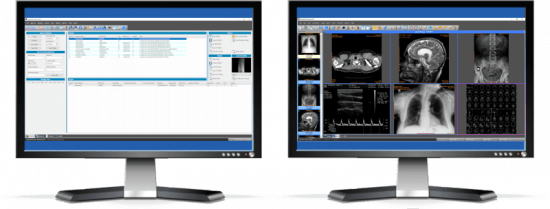
Sante PACS Server PG is a DICOM 3.0 compliant PACS server, a Modality Worklist server, an HTTP (web) server for DICOM files and a CD/DVD Burning and Printing server that offers high performance and reliability at an affordable price. It provides connectivity to all DICOM modalities (CT, MR, US, CR, NM, XA, MG, DX etc.). Reviewing the DICOM images can be done using the Sante PACS Viewer (the Built-in full-featured DICOM viewer of the system). The built-in web server can be used as a free cloud server for DICOM files!

The program modules
Sante PACS Server PG consists of 4 modules

The Database module
The program uses the Postgres SQL server for database management and offers storage of unlimited number of patients/studies/series/images (it depends only on hard disk size).

The DICOM Server module
The built-in DICOM server supports all the DICOM network services (C-FIND SCU/SCP, C-MOVE SCU/SCP, C-STORE SCU/SCP, C-GET SCU/SCP, C-ECHO SCU/SCP), it is compatible with all the modalities (CT, MR, NM, US, XA, MG, CR, DX etc.), all manufacturers and all DICOM 3.0 and NEMA 2 file types. Moreover, it supports unlimited number of connections with unlimited number of DICOM nodes and DICOM clients.

The Worklist Server module
The built-in Worklist server module can receive via HL7 communication messages the patients demographics and scheduling information of exams that are stored in a HIS/RIS system (Hospital Information System / Radiology Information System) and transfer them to any modality/medical scanner via DICOM communication protocols (C-FIND).

The Web Server module
The Web Server module lets remote users of the system to connect with it, query and retrieve studies that have been stored in the database of the DICOM Server. The Web Server module, for these connections, uses the HTTP ot HTTPS protocol of the internet and the remote user must use a web browser like Edge, Chrome or Mozilla to query and retrieve studies. The web server supports SSL secure connections. This module lets the user to connect, query, retrieve and review DICOM studies stored in the system from anywhere in the world and it can be used as a free cloud server!

The remote user, from the initial web page of the system can download and install two free applications for use with this web server, Sante Web Downloader and Sante DICOM Web Viewer.

Sante Web Downloader lets the user to inspect the downloading procedure. In the end of receiving Sante Web Downloader saves the received studies in a zip file. The user can configure Sante Web Downloader to open the saved zip file with a DICOM Viewer of his/her choice like Sante DICOM Viewer Pro or Sante DICOM Editor. The DICOM Viewer must support opening zip files from command line. For more information please read the User Guide of Sante Web Downloader. This application is useful when a user wishes to use a DICOM Viewer other than Sante DICOM Web Viewer.

Sante DICOM Web Viewer lets the user to inspect the downloading procedure as Sante Web Downloader does, but it is also a high quality, full featured, completely free 2D/3D DICOM Viewer, with all the necessary tools like measurements, roi statistics, MPR and study/series comparison. It allows the user to work smoothly in a multi-modality, multi-manufacturer environment because it has all the features of Sante DICOM Viewer Pro and Sante DICOM Viewer 3D Pro except the post-processing functions like anonymizing (de-identification)


HOMEPAGE


Код:
https://www.santesoft.com/


DOWNLOAD

Код:
https://rapidgator.net/file/a16a23986bd4adc863292cd618eaeae0/SantePACSServerPG4.rar.html

Код:
https://nitroflare.com/view/9B14195A9A0B240/SantePACSServerPG4.rar

 
5a0df27b1d80e95c7abad2435912b334.webp

Free Download Siemens Simcenter FloEFD 2512.0.0 v6992 | 11.4 Gb
Languages Supported: English, Deutsch, Français, 中文, 日本語, Русский
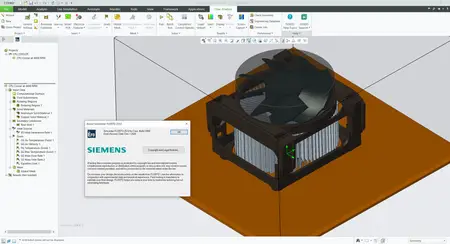
Siemens Digital Industries Software has released Simcenter FLOEFD 2512, is a fully CAD-embedded CFD software with multiphysics capabilities, for designers to analysts.
The new Simcenter FLOEFD 2512 software release as of December 12, 2025 is now available in all its CAD-embedded CFD variants, and also the Simcenter 3D embedded variant. This release delivers focused improvements for fast sealing of geometry for internal flow analyses for all general purpose CFD applications through to multiple enhancements for electronics thermal analysis workflows.

=
What's new in Simcenter FLOEFD 2512
In this blog post we are summarizing the highlights from the new features of version 2512 of Simcenter FLOEFD.
Sealing for internal flow simulations
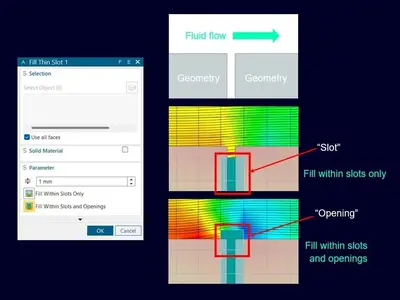
In version 2512 the Fill thin slots feature is extended with the additional option "Fill within slots and openings". The Fill thin slots feature was added last year. It allows for closing narrow channels that should be closed or where you don't want to resolve the fluid flow. The addition of filling the openings as well will ease closing your geometry and prepare a water-tight fluid domain. In simulation for internal flow the requirement is to have a water-tight domain, and with this sealing you are guaranteed to get this requirement fulfilled. In the picture below you see the new feature setup window along with the expected mesh for both "Fill thin slots" and "Fill within slots and openings". The parameter value will limit for which maximum value you set/choose to use, to close slots and openings. The possibility to select which solid material should fill the slots and openings can be set manually - if customizing default values is desired. For visualization, you can show Closed thin slots cells in your meh Description. Also worth mentioning is that this feature can be applied globally, but then your local settings have higher priority than these faces. The default thermal condition for closed cells is set to your default outer wall condition.
2fbf860d8a921bbfae67f8634a93a035.webp

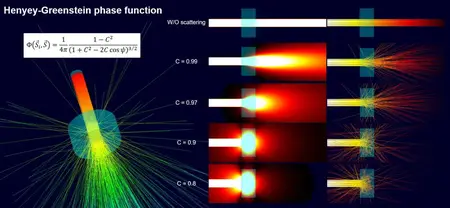
Henyey-Greenstein phase function for optic scattering
In version 2512 a new phase function for scattering of light was added. Previously, only a linear phase function was available, and that corresponds to radiation without scattering, as seen in the picture below. With the new implementation of the Henyey-Greenstein phase function you can simulate scattering of light through semi-transparent materials. In the Engineering database you can create new materials and modify the radiation properties, and this is where to set which scattering phase function to use. Copying existing materials to the user-defined folder will save you time - by not needing to define a new material from scratch. Choosing the Henyey-Greenstein function instead of the linear function enables the possibility to define the scattering coefficient C, which is defined per millimeter. The coefficient can also be defined with anisotropic properties. Phosphor particles are enabled in the Engineering database as well.
e06138dd5fba7aec1e35a9af292b118c.webp

Honorable mentions
- Faster calculations with two-resistor models: In version 2512 the preparation time for setting up this type of analysis is optimized. What previously could take 1.5 hours with a memory peak load of 150GB will in this reference case now only take 6 minutes and with a peak load of 38GB. This makes two-resistor calculations both faster and less computationally heavy.
- And as a bonus, the compatibility now goes both ways from 2512, were XTXML formats are possible to export from Simcenter FLOEFD, but FLOEFD for Catia will first get this possibility in future versions. The export support transfer for geometry, solid material conditions, etc. but not general project settings.
d053f58efe39c7c0fa33c045fb371a9c.webp


Simcenter FloEFDis a fully CAD-embedded CFD software with multiphysics capabilities, for designers to analysts, which enables design engineers to perform simulation earlier in the design process when it is more cost-effective to identify and fix problems or explore improvements. It helps shorten development by up to 65-75% compared to typical CFD approaches by frontloading fluid flow simulation and thermal analysis and using native CAD geometry.
Simcenter FLOEFD
Siemens Digital Industries Softwareis driving transformation to enable a digital enterprise where engineering, manufacturing and electronics design meet tomorrow. The Xcelerator portfolio helps companies of all sizes create and leverage digital twins that provide organizations with new insights, opportunities and levels of automation to drive innovation.
Owner:Siemens Digital Industries Software
Product Name:Simcenter FloEFD
Version:2512.0.0 v6992 *
Supported Architectures:x64
Website Home Page :
Languages Supported:multilanguage
System Requirements:Windows **
Size:11.4 Gb

Siemens Simcenter FloEFD 2512.0.0 v6992 for CATIA V5
Siemens Simcenter FloEFD 2512.0.0 v6992 for PTC Creo Parametric
Siemens Simcenter FloEFD 2512.0.0 v6992 for Siemens NX / Simcenter 3D
Siemens Simcenter FloEFD 2512.0.0 v6992 Standalone
Siemens Simcenter FloEFD 2512.0.0 v6992 for Siemens Solid Edge

Rapidgator
Код:
https://rapidgator.net/file/b422b14c108f71083f7f58f08fcdb6e0/rgoun.Siemens-Simcenter-FloEFD-2512-0-0-v6992.part1.rar.html
https://rapidgator.net/file/457dea3a108820852f8ba190a14198da/rgoun.Siemens-Simcenter-FloEFD-2512-0-0-v6992.part2.rar.html
https://rapidgator.net/file/24801be10eda538d278e1284a9b1b935/rgoun.Siemens-Simcenter-FloEFD-2512-0-0-v6992.part3.rar.html
https://rapidgator.net/file/f9cecb34fbcdc5686081dc252db52083/rgoun.Siemens-Simcenter-FloEFD-2512-0-0-v6992.part4.rar.html

Код:
https://nitroflare.com/view/B2343277CC9166C/rgoun.Siemens-Simcenter-FloEFD-2512-0-0-v6992.part1.rar
https://nitroflare.com/view/BBDC5C9A03A6CBF/rgoun.Siemens-Simcenter-FloEFD-2512-0-0-v6992.part2.rar
https://nitroflare.com/view/18DE623F115B38E/rgoun.Siemens-Simcenter-FloEFD-2512-0-0-v6992.part3.rar
https://nitroflare.com/view/152F5DF82ECE4E1/rgoun.Siemens-Simcenter-FloEFD-2512-0-0-v6992.part4.rar
 
428b12a987b15e1c900a83f4161a5e93.jpg


SysTools MBOX Converter 8.3

File size: 45.1 MB


SysTools MBOX Converter - Convert MBOX / MBS / MBX Files from 20+ Email Clients to Preferred Formats.

Batch Export MBOX Files
MBOX Converter software is a powerful utility to convert multiple MBOX files into different file formats. One can easily convert MBOX emails into the desired file format in bulk along with attachments. The tool is also allows users to recover deleted emails from MBOX file as well as restore the deleted MBOX emails into healthy format.

Convert Single or Multiple MBOX Files
Depending upon the varying requirements of users, the MBOX Converter can generate either a single or multiple output files.

Multiple Export Types to Convert MBOX Files
SysTools MBOX Converter Wizard provides multiple export formats to migrate MBOX files. Users can export MBOX files into any file format of their choice. Advanced settings are available for each export format.

Support Multiple MBOX Formats
An MBOX file can be created by numerous applications in different formats such as MBOX, MBX, and .mbox. The MBOX Converter software is capable to work with the MBOX file of multiple email clients.


HOMEPAGE


Код:
https://www.systoolsgroup.com/mbox-converter.html


DOWNLOAD

Код:
https://rapidgator.net/file/5aa83467d5219c510f5ddbebbb81e7c4/SysTools_MBOX_Converter_8.3..rar.html

Код:
https://nitroflare.com/view/3F24B184097D978/SysTools_MBOX_Converter_8.3..rar
 
6116cc2ad4b677a61a89663da64a9df6.webp

Free Download SysTools vCard Export 7.0 | 101.7 Mb
Batch Export Microsoft Outlook Contacts into vCard, WAB, Google CSV, Yahoo CSV, PDF, HTML, MSG, CSV, and PST File Format.


Converts Outlook Contacts to vCard from Default Outlook Profile Address Books
Export Outlook Contacts to vCard, WAB, PDF, PST, CSV, MSG, HTML, Google, Yahoo
Preserves All Contacts Details During Outlook Contacts to vCard Conversion
Detects Outlook Profile while Exporting Outlook Contacts to vCard Automatically
Open and Preview Outlook Contacts with All Attributes Before Conversion
Exports Outlook Contacts Attributes: Name, Emails Address, Phone, Etc.
Scans and Load Multiple MS Outlook PST Contacts File in a Single Attempt
Converts Outlook Contacts to vCard from Corrupted Outlook PST Contact File
Export Outlook Address Book to vCard (.vcf) Format on Windows 11 and Below Versions
Home Page-
Код:
https://www.systoolsgroup.com/

Rapidgator
Код:
https://rapidgator.net/file/a62c3865e382b62b9d00c44d5ef4ba7f/umtqd.SysTools.vCard.Export.7.0.rar.html

Код:
https://nitroflare.com/view/8A7D55F7DE6DE1C/umtqd.SysTools.vCard.Export.7.0.rar
 
3e31399f938455da66bc68135e37a474.png


VovSoft Auto Mouse Clicker 3.0

File size: 5.2 MB


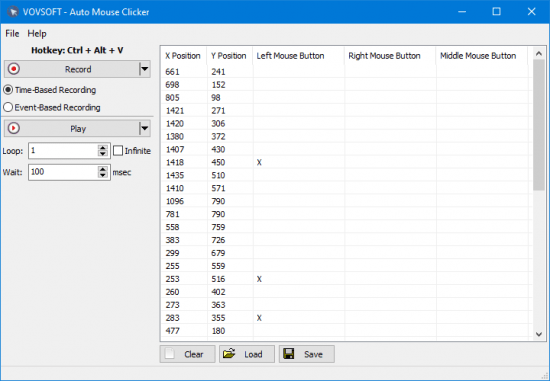
Vovsoft Auto Mouse Clicker is a simple and straightforward desktop clicker software that automates mouse clicks. With this program, you can automate your workflow, increase productivity, and save time by eliminating the need to perform tedious tasks manually.

This program can simulate left, right and middle mouse button clicks on any window, and frees users from repetitive click work. The software maps the screen based on the coordinates to ensure that it clicks precisely where the user wants it.

Automate repetitive tasks
Whether you're a gamer, or a professional who needs to perform repetitive tasks on a regular basis, Vovsoft Auto Mouse Clicker can help you achieve your goals quickly and easily. This software can be used to automate a wide range of tasks, such as clicking on buttons, and navigating web pages.

There is nothing as boring as clicking thousands of times while playing your favorite games to complete certain tasks. Attacking enemies, building structures, and more tasks need a lot of clicks can waste your time and make you get bored, they can even cause wrist pain and harm your mouse. Some games can force you to click on the same point hundreds of times. What you need and what you have been looking for is a software that enables you to create automatic clicks as many times as you want.

Automatic mouse mover and clicker
This easy to use software is an automatic mouse mover and clicker utility for your auto click needs. This tool is not only best to automate clicks on games, but also on the computer as a whole as it can trigger any tasks.

You can play your recordings whenever you want. This program allows you to choose the number of loops. So you can choose the number of clicks as you want or create an infinite loop. Infinite loop option plays the recording continuously, until you stop it using hotkey.

The software comes with hotkey functionality and can be used as a macro recorder. The feature to save the recorded macro as a CSV file is also there. That file includes the X position, Y position, middle mouse button, left mouse button, and right mouse button data. You can delete entries from the data before saving the macro. The software supports drag and drop files, save to file, load from file, and running with command line arguments. These features add more flexibility and convenience to your workflow.

Users are free to choose between Time-Based Recording and Event-Based Recording. Time-Based Recording takes into account the time elapsed between mouse movements, whereas Event-Based Recording neglects them.


HOMEPAGE


Код:
https://vovsoft.com/software/auto-mouse-clicker/


DOWNLOAD

Код:
https://rapidgator.net/file/6e6109afe7847449e42af911732cd065/VovSoftAutoMouseClicker3..rar.html

Код:
https://nitroflare.com/view/2AA39A2AE99E998/VovSoftAutoMouseClicker3..rar
 
66f057b7fb5d37616a8938543b788dc7.avif


VovSoft Duplicate File Finder 2.1

File Size: 5.6 MB


Duplicate File Finder is a tool to find duplicate files on your computer. It can scan filenames, filesizes or file contents (using SHA-1 algorithm).

You may have hundreds of photos, videos, music files or documents that you have lost track of. You are running out of disk space on your PC, but sorting through your files seems overwhelming because there are just too many of them. This utility will help you locate and remove useless file duplicates to free up disk space and better organize your file collections. You will have full control in being able to look through the list of duplicates and decide which copy to keep.

Key Features
Checkmark Filename comparison
Checkmark File size comparison
Checkmark File content comparison (SHA-1)
Checkmark Drag & drop folders
Checkmark Export file list using CSV format
Checkmark Export duplicate list using CSV format


HOMEPAGE


Код:
https://vovsoft.com/


DOWNLOAD

Код:
https://rapidgator.net/file/d6d74b3baf586e32e3a07190cbe576aa/VovSoft.Duplicate.File.Finder.2..rar.html

Код:
https://nitroflare.com/view/72682510DE4B660/VovSoft.Duplicate.File.Finder.2..rar
 
0bb8ea35c658aaad2075e0eef9b342b7.jpg


VovSoft SEO Checker 10.5.0 Multilingual

File Size: 2.3 MB


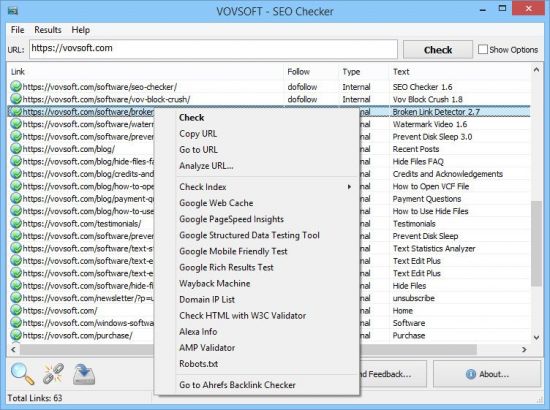
Search engine optimization (SEO) or organic search marketing, refers to software designed to improve the ranking of websites in search engine results pages (SERP) without paying for placement. These products provide insights through features, such as keyword analysis and backlink tracking to identify the best strategies for improving search relevance.

SEO Checker is an easy to use website crawler, able to crawl both small and very large websites efficiently, while allowing you to find broken links, analyze the results in real-time, gather onsite data, distinguish internal and external links, check dofollow and nofollow links, analyze META descriptions, H1, H2, H3 tags.


HOMEPAGE


Код:
https://vovsoft.com


DOWNLOAD

Код:
https://rapidgator.net/file/6ac27210cb0df6fe35c8325273e1c0c6/SEO.Checker.10.rar.html

Код:
https://nitroflare.com/view/E3612FCB20AE8A5/SEO.Checker.10.rar
 
4f9509100b898c6802a03e582ea78c0a.jpg


VX Search 17.6.18

File Size: 26 MB


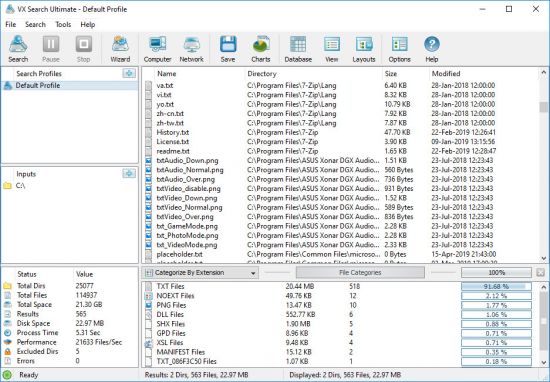
VX Search is an automated, rule-based file search solution allowing one to search files by the file type, category, extension, file name, file size, location, creation, modification and last access dates, regular expressions, user name, file attributes, binary and text patterns, JPEG EXIF tags, etc.

VX Search Rule-Based File Search
The user is provided with the ability to categorize and filter file search results, perform file management operations, generate various types of pie and bars charts, save reports to a number of standard formats such as HTML, PDF, Excel, text, CSV, XML and export search results to an SQL database.

VX Search Main GUI Application
IT administrators are provided with advanced file search capabilities including the ability to search files in multiple servers and/or NAS storage devices simultaneously, periodic file search operations, automatic report generation, conditional file search actions allowing one to send E-Mail notifications and/or execute custom commands when a file search operation finds a user-specified number of files.

Searching Files in Network Servers and NAS Storage Devices
VX Search allows one to scan the network, discover network servers and NAS storage devices, automatically detect all accessible network shares and search files in hundreds of network servers and NAS storage devices. In addition, the user is provided with the ability to export the list of detected servers and NAS storage devices (including lists of network shares for each server) into HTML, PDF, Excel, text, XML and CSV reports.

VX Search Network Search Servers
In order to search files in one or more servers or NAS storage devices, press the 'Network' button located on the main toolbar and wait while VX Search will scan the network and show a list of detected network servers and NAS storage devices. On the network servers and NAS storage devices dialog, select the required servers and press the 'Search' button.

VX Search Network Search Command
VX Search will show all network shares hosted on the selected servers and NAS storage devices allowing one to search files and save various types of file search reports and charts. In addition, VX Search provides a large number of advanced file search options allowing one to tune and customize file search operations for user specific needs and hardware configurations.

VX Search Command Line Utility
In addition to the VX Search GUI application, the user is provided with a command line utility, which can be used to execute pre-configured file search operations and integrated into user-custom shell scripts and batch files. The VX Search command line utility may be used to execute file search operations locally or control file search operations in one or more VX Search Servers via the network.

VX Search Command Line Utility
VX Search Server
IT and storage administrators are provided with the server product version, which runs in the background as a service and provides the ability to perform fully-automated, periodic file search operations, generate various types of file search reports, analyze file search results and execute conditional actions based on user-defined rules and policies.

VX Search Client GUI Application
VX Search Server may be controlled using a full-scale client GUI application and the command line utility, which provides the ability to perform file search operations, review results and save reports locally and through the network. Finally, enterprise customers are provided with VX Search Enterprise - a server-based product version allowing one to perform search operations, review results and save reports using a regular web browser locally or through the network.

Batch File Search Operations
VX Search Server and VX Search Enterprise provide the ability to scan the network, detect all network servers and NAS storage devices, execute one or more pre-configured file search commands on hundreds of network servers and NAS storage devices and generate an individual file search report for each network server, NAS storage device or network share.

Batch File Search Operations
In the simplest case, just press the 'Network' button located on the main toolbar, search all network servers and NAS storage devices on the network, select one or more servers, press the right mouse button and select the 'Batch File Search' menu item. VX Search will show a list of pre-configured file search commands allowing one to select one or more commands to be executed on all selected network servers and NAS storage devices.

Batch File Search Mode
Depending on the selected configuration, VX Search Server will save in the built-in reports database an individual file search report for each network server, NAS storage device or network share. Once the batch file search operation is completed, the user will be provided with the ability to open saved file search reports, review file search results, generate various types of pie charts and export reports to a number of standard formats including HTML, PDF, text, Excel CSV and XML.


HOMEPAGE


Код:
https://www.vxsearch.com/


DOWNLOAD

Код:
https://rapidgator.net/file/ade86d4158f3fd20c1fb83bdffcbf3aa/VX.Search.17.rar.html

Код:
https://nitroflare.com/view/FAB468C017611E1/VX.Search.17.rar
 
b23296b5e89630f970d1c44b5efd1843.jpg


Agisoft Metashape Professional 2.3.0 Build 21778 (x64) Pre-release Multilingual
File size: 188.8 MB


Agisoft Metashape (formerly PhotoScan) is a stand-alone software product that performs photogrammetric processing of digital images and generates 3D spatial data to be used in GIS applications, cultural heritage documentation, and visual effects production as well as for indirect measurements of objects of various scales.

Wisely implemented digital photogrammetry technique enforced with computer vision methods results in smart automated processing system that, on the one hand, can be managed by a new-comer in the field of photogrammetry, yet, on the other hand, has a lot to offer to a specialist who can adjust the workflow to numerous specific tasks and different types of data. Throughout various case studies Metashape proves to produce quality and accurate results.

Features
Photogrammetric triangulation
Processing of various types of imagery: aerial (nadir, oblique) & close-range.
Auto calibration: frame (incl. fisheye), spherical & cylindrical cameras.
Multi camera projects support.

Dense point cloud: editing and classification
Elaborate model editing for accurate results.
Points classification to customize geometry reconstruction.
.LAS export to benefit from classical point data processing workflow.

Digital elevation model: DSM/DTM export
Digital Surface and/or Digital Terrain Model - depending on the project.
Georeferncing based on EXIF meta data/flight log: GPS/GCPs data.
EPSG registry coordinate systems support: WGS84, UTM, etc.

Georeferenced orthomosaic export
Georeferenced orthomosaic: most-GIS-compatible GeoTIFF format; .KML file to be located on Google Earth.
Export in blocks for huge projects.
Color correction for homogeneous texture.

Measurements: distances, areas, volumes
Inbuilt tools to measure distances, areas and volumes.
To perform more sophisticated metric analysis Metashape products can be smoothly transferred to external tools thanks to a variety of export formats.


HOMEPAGE


Код:
https://www.agisoft.com/


DOWNLOAD

Код:
https://rapidgator.net/file/f3f07c0d6519e561e70b3e23bee14763/AgisoftMetashape2..rar.html

Код:
https://nitroflare.com/view/AE14F41F074E2A9/AgisoftMetashape2..rar
 
febfe00835490c6400f4061bfc155b63.jpg


Allround Automations PL/SQL Developer 16.0.8.2176 Multilingual

File size: 123.8 MB


PL/SQL Developer is an Integrated Development Environment that is specifically targeted at the development of stored program units for Oracle Databases. Over time we have seen more and more business logic and application logic move into the Oracle Server, so that PL/SQL programming has become a significant part of the total development process. PL/SQL Developer focuses on ease of use, code quality and productivity, key advantages during Oracle application development.

The following are major features of PL/SQL Developer
Powerful PL/SQL Editor
With its Syntax Highlighting, SQL and PL/SQL help, Object Descriptions, Code Assistant, Compiler Hints, Refactoring, PL/SQL Beautifier, Code Contents, Code Hierarchy, Code Folding, Hyperlink Navigation, Macro Library and many other sophisticated features, the Unicode compliant editor will even appeal to the most demanding user. Information is automatically presented to you when you need it, or is at most one click away.

Integrated Debugger
The integrated debugger offers all features you could wish for: Step In, Step Over, Step Out, Run Until Exception, Breakpoints, View & Set Variables, View Call Stack, and so on. You can debug any program unit without making any modification to it, including triggers and object types.

PL/SQL Beautifier
The PL/SQL Beautifier allows you to format your SQL and PL/SQL code through a user-defined set of rules. Your code can automatically be beautified when you compile, save, or open a file. This feature will increase your coding productivity and will improve the readability of your PL/SQL code if you are working in large project teams.

SQL Window
The SQL Window allows you to enter any SQL statement or multiple statements and view or edit the results in a grid. The result grid supports a Query By Example mode to search specific records in a result set. You can easily recall previously executed SQL statements from a history buffer. The SQL editor provides the same powerful features as the PL/SQL Editor.

Command Window
To develop and execute SQL scripts you can use PL/SQL Developer's Command Window. This window has the same look and feel as SQL*Plus, and additionally has a built-in script editor with corresponding syntax highlighting. Now you can develop your scripts without the "edit script / save it / switch to SQL*Plus / run script" cycle, and without leaving the comfortable PL/SQL Developer IDE.

Reports
To run reports against your application data or against the Oracle dictionary, you can use PL/SQL Developer's built-in Report functionality. There are a number of standard reports, and you can easily create your own custom reports. These custom reports can be saved in a report file, which can in turn be included in the reports menu. This makes it very easy to run your own frequently used custom reports.

Diagrams
The Diagram Window allows you to create a graphical representation of a selection of objects. This way you can easily visualize (a part of) the database objects of your application or project and their relations. A diagram can be used for documentation purposes, but can also serve as a workspace. Right-clicking on an object provides access to all object functions, and double-clicking on an object will invoke the default action for the object type.

Projects
To organize your work you can use PL/SQL Developer's built-in project concept. A project consists of a collection of source files, database objects, notes, and options. It allows you to work within the scope of a specific set of items, instead of a complete database or schema. This makes it easy to find the project items you need, to compile all project items, or to move a project from one location or database to another.

Regression Testing
For regression testing you can use PL/SQL Developer's built-in Test Manager. You can define and run a Test Set, and quickly determine if all tests run correctly. In case of an error, the Test Manager can launch the Debugger to investigate the cause of the error. You can run Test Sets from the Command Window for automated regression testing.

To-Do Items
You can use To-Do Items in any SQL or PL/SQL source file to make a quick note that something needs to be done in this source file. You can access this information later from the To-Do List, either at the object level or at the project level.
and other...


HOMEPAGE


Код:
https://www.allroundautomations.com/


DOWNLOAD

Код:
https://rapidgator.net/file/4f87f52065ec088f4248804321bbe08f/AllroundAutomationsPLSQLDeveloper16..rar.html

Код:
https://nitroflare.com/view/ABDAB2541A315DF/AllroundAutomationsPLSQLDeveloper16..rar
 
d8131ab46f1f593076317dfec1eece69.avif


All Video Downloader Pro 10.0.7 (x64)

File size: 146.1 MB


All Video Downloader Pro is a professional Windows app for downloading and converting your favorite videos from video sharing sites. It accelerates your downloads by up to 5 times!

Download videos from hundreds of video sharing sites.
All Video Downloader Pro can download videos from YouTube, Facebook, Dailymotion, and hundreds of other video sharing sites. After downloaded, you'll be able to play them smoothly on your PC or mobile devices, even if you don't have internet access.

Accelerate downloads by up to 5 times.
All Video Downloader Pro features a multithreading download acceleration engine that can boost and increase your download speeds by up to 500% faster.

Download 4K, 2K, HD 1080p, HD 720p, and 3D videos.
All Video Downloader Pro allows you to download videos in different resolutions, including 4K/2160p, 2K/1440p, HD 1080p, HD 720p, 480p, 360p, and 240p. You can download 1080p HD videos to enjoy quality graphics on your TV, you can also download 240p videos in order to save space on your mobile devices.

YouTube to MP3 downloader.
All Video Downloader Pro allows you to download only audio stream directly from YouTube and save it as MP3, without downloading the entire video file.

Download entire playlist from YouTube at one time.
All Video Downloader Pro enables you to download an entire YouTube playlist with just a few clicks. All videos in the playlist can be downloaded automatically at one time.

Download multiple videos at a time.
All Video Downloader Pro supports simultaneous downloads that allows you to download more than one video at the same time.

Download subtitles in selected language and format.

Pause and resume downloads.
You may pause your downloads at any time. All Video Downloader Pro can resume broken download from where it was interrupted. You don't need to start from the beginning again.

Preview incomplete video while downloading.
While downloading, you can click the Preview button to play incomplete video and make sure that the content you are downloading is really the video of your choice.

Convert downloaded videos to any format.
All Video Downloader Pro can automatically convert downloaded videos to the format you choose. It supports MP4, FLV, WMV, MOV, ASF, AVI, DV, M4V, MKV, MPG, OGV, SWF, TS, VOB, WEBM, DVD, VCD, SVCD, and many others.

Optimize downloaded videos for any device.
All Video Downloader Pro can automatically optimize downloaded videos for your mobile devices, so you can watch them on your iPhone, iPad, Android phone, Android tablet, Xbox, Windows phone, PSP/PS4/PS3, Samsung Galaxy, etc.

Video to MP3 converter.
All Video Downloader Pro is capable of extracting audio streams from videos and save them as MP3, WAV, WMA, AC3, AAC, OGG, M4A, FLAC, MP2, or any other audio format.

Video and audio converter.
All Video Downloader Pro is a powerful video and audio converter too. It allows you to convert any video/audio files on your disk to the format you wish so that they are playable on your media player or mobile devices.

Ready-made video/audio format presets.
All Video Downloader Pro provides ready-made presets for all popular video and audio formats. You can also custom output video/audio format settings.

Schedule downloads.
All Video Downloader Pro can automatically start downloads at a set time, and shut down your computer when all done. You will no longer have to wait for your long list of videos to finish downloading.

Support drag-and-drop.
You may simply drag and drop a video link/URL from your web browser to All Video Downloader Pro's Drop Box to start a download. You don't even need to copy and paste video link/URL manually.

All Video Player.
All Video Downloader Pro includes a simple and easy-to-use media player - All Video Player, for playing MP4, WebM, FLV, MP3, AAC, and any other format video/audio files that Windows Media Player cannot play.


HOMEPAGE


Код:
https://www.kotato.com/all-video-downloader-pro/index.html


DOWNLOAD

Код:
https://rapidgator.net/file/55039c8282723986c76ab59a1f9738fa/All_Video_Downloader_Pro_10.0.7.rar.html

Код:
https://nitroflare.com/view/05C625A3176BC38/All_Video_Downloader_Pro_10.0.7.rar
 
d313cd048ab7fda7bc88132133436eac.avif

Altair Compose 2026.0 (x64)
File size: 3.1 GB


Altair Compose software is an environment for doing calculations, manipulating and visualizing data (including from CAE simulations or test results), programming and debugging scripts useful for repeated computations and process automation. Altair Compose allows users to perform a wide variety of math & linear algebra (including matrix analysis and differential equations), filter signals, fit polynomials through data, approximate or check results from commercial simulation software, perform optimization.
Whats New
Compose_2026_ReleaseNotes_English.pdf

download
Код:
https://rapidgator.net/file/2fc5161f8e449bc0c69bca96a1d72169/Altair.2026.Compose.Win64-SSQ.part4.rar.html
https://rapidgator.net/file/477240b18cd02b54266fe6c76ccf0904/Altair.2026.Compose.Win64-SSQ.part3.rar.html
https://rapidgator.net/file/ea6d51343bc39b4edfa2c510aa76e6db/Altair.2026.Compose.Win64-SSQ.part2.rar.html
https://rapidgator.net/file/ea41f473ccc9137479e68bf3178d5e55/Altair.2026.Compose.Win64-SSQ.part1.rar.html

Код:
https://nitroflare.com/view/F4B3D5B5E246016/Altair.2026.Compose.Win64-SSQ.part4.rar
https://nitroflare.com/view/BE07BD7CEBAEC0A/Altair.2026.Compose.Win64-SSQ.part3.rar
https://nitroflare.com/view/34BD66C4BC2CF4C/Altair.2026.Compose.Win64-SSQ.part2.rar
https://nitroflare.com/view/47FC08AFCF91D40/Altair.2026.Compose.Win64-SSQ.part1.rar
 
a384c73e6d36c40d57ea923158d8e4e8.avif


Altair HWDesktop 2026.0 (x64)
File size: 6 GB


HyperWorks provides the most comprehensive, open-architecture, multiphysics CAE platform to enhance product performance, design lightweight components, get products to the market faster and access to new technologies.

Altair HyperWorks is the most comprehensive, open architecture CAE simulation platform in the industry, offering the best technologies to design and optimize high performance, weight efficient and innovative products. HyperWorks includes best-in-class modeling, linear and nonlinear analyses, structural and system-level optimization, fluid and multi-body dynamics simulation, electromagnetic compatibility (EMC), multiphysics analysis, model-based development, and data management solutions

Among various CAE tools, HyperWorks Desktop is on the top of the list. It is used to create complex meshes with advance decision making and design exploration capabilities. It provides a very friendly environment with all the basic tools for simulation and many options at one click. You can perform many advanced operations like structure analysis, mesh handling, physics management, and structural optimization. As it focusses on decision-making so it uses the complex analysis with advanced engineering information to provide a perfect environment.


HOMEPAGE


Код:
https://altairhyperworks.com


DOWNLOAD

Код:
https://rapidgator.net/file/abc72baef86f3f5d533df721990e6291/Altair.2026.HWDesktop.Win64-SSQ.part1.rar.html
https://rapidgator.net/file/f504e9e932c0e96b06760dcbb0991b62/Altair.2026.HWDesktop.Win64-SSQ.part2.rar.html
https://rapidgator.net/file/08a138fa7d7909dcdbb21e23642532b9/Altair.2026.HWDesktop.Win64-SSQ.part3.rar.html
https://rapidgator.net/file/0c1f90b9d80768fccb6eaf94a55fd456/Altair.2026.HWDesktop.Win64-SSQ.part4.rar.html
https://rapidgator.net/file/3eb84e4485ea7e655d9eac95d13d034b/Altair.2026.HWDesktop.Win64-SSQ.part5.rar.html
https://rapidgator.net/file/3a63bf5efcb35512d5ee6967496a8f3f/Altair.2026.HWDesktop.Win64-SSQ.part6.rar.html

Код:
https://nitroflare.com/view/121A570B58C184A/Altair.2026.HWDesktop.Win64-SSQ.part1.rar
https://nitroflare.com/view/1D2D6A7A55FA1F6/Altair.2026.HWDesktop.Win64-SSQ.part2.rar
https://nitroflare.com/view/D77CD95BC12076C/Altair.2026.HWDesktop.Win64-SSQ.part3.rar
https://nitroflare.com/view/84E441F55EC3D8A/Altair.2026.HWDesktop.Win64-SSQ.part4.rar
https://nitroflare.com/view/F38CC98A0FBB2EC/Altair.2026.HWDesktop.Win64-SSQ.part5.rar
https://nitroflare.com/view/BEA7296D437F2C2/Altair.2026.HWDesktop.Win64-SSQ.part6.rar
 
03d863d11260320e7e9b00210f9171ff.jpg

Altair Hw Feko 2026.0 (x64)
File Size: 3.9 GB


Altair Feko™ is a comprehensive computational electromagnetics (CEM) code used widely in the telecommunications, automobile, space and defense industries.
Feko is a comprehensive computational electromagnetics (CEM) software used widely in the telecommunications, automobile, aerospace and defense industries. Feko offers several frequency and time domain EM solvers under a single license. Hybridization of these methods enables the efficient analysis of a broad spectrum of EM problems, including antennas, microstrip circuits, RF components and biomedical systems, the placement of antennas on electrically large structures, the calculation of scattering as well as the investigation of electromagnetic compatibility (EMC). WinProp is a dedicated tool for wave propagation modeling and radio network planning.
Feko also offers tools that are tailored to solve more challenging EM interactions, including dedicated solvers for characteristic mode analysis (CMA) and bi-directional cables coupling. Special formulations are also included for efficient simulation of integrated windscreen antennas and antenna arrays.
Combined with the MLFMM, and the true hybridization of the solvers, Feko is considered the global market leader for antenna placement analysis.
Benefits
One Product, Multiple Solvers
Electromagnetic applications vary in complexity and electrical size and no single numerical method is capable of handling the entire range efficiently. By offering a selection of different solvers, Feko users can choose the method that is most suitable to the problem that they are trying to solve, or use more than one solver for cross validation purposes. All solvers are included in Feko, and are not licensed separately.
True Hybridization
In some instances a single solver might still not be enough to solve a challenging problem. Feko offers industry leading hybridization of different solvers, combining the beneficial characteristics. This allows more efficient and accurate analysis of multi-scale problems, that are both complex and electrically large.
Solver Accuracy and Performance
Extensive validation (analytical solutions, measurement, cross validation) of the numerical methods and enhancements in Feko is carried out to ensure the accuracy of our approaches. Solver performance and parallel scaling is continually optimized to achieve leading computational efficiency.
HWU License Value
As part of the HyperWorks suite, Feko can be used with other products (e.g. HyperMesh or HyperStudy) at no extra cost. This is the value of the patented HyperWorks unit licensing scheme.
Specialized Solutions
Feko offers the only commercial CMA solver. Furthermore, specialized numerical solutions for bidirectional cable coupling, windscreen antennas and large finite arrays reduce computational requirements. Model decomposition workflows for classical antenna placement problems enable equivalent representation of the transmitting/receiving antenna. WinProp is used for indoor/outdoor wave propagation analysis and radio network planning.
User Interface and User Experience
Intuitive and easy to use User Interface designed to simplify main workflows and enrich the user experience.
Technical Support and Training
Excellent local technical support network. Comprehensive and in-depth training sessions can be requested to accelerate the learning curve.
What's New
Read: Altair_Feko_Release_Notes.pdf

download
Код:
https://rapidgator.net/file/f17c7bc2541d10f4a008ec49ed3f1e0d/Altair.2026.Feko.Win64-SSQ.part4.rar.html
https://rapidgator.net/file/aea764a300cfe115458761eee7ef87fe/Altair.2026.Feko.Win64-SSQ.part3.rar.html
https://rapidgator.net/file/4046681c1644190ce2cfbd1aa906ef0b/Altair.2026.Feko.Win64-SSQ.part2.rar.html
https://rapidgator.net/file/6361cfe2156e1967b42f7cc7e9e18ddf/Altair.2026.Feko.Win64-SSQ.part1.rar.html

Код:
https://nitroflare.com/view/A1D38A89069D0FF/Altair.2026.Feko.Win64-SSQ.part4.rar
https://nitroflare.com/view/0AEE22970A7DB17/Altair.2026.Feko.Win64-SSQ.part3.rar
https://nitroflare.com/view/FEAD71A5CE429B5/Altair.2026.Feko.Win64-SSQ.part2.rar
https://nitroflare.com/view/81E7286F615A5CB/Altair.2026.Feko.Win64-SSQ.part1.rar
 
a12e780070051d2b551d6dc28d02d839.avif

Altair Pollex 2026.0 (x64)
File size: 865 MB


Design and engineering require a system-level view of products and systems. The integrated design of mechanical behavior and electronics is a trademark of today's product development. Based on a strong foundation of mechanical simulation software, Altair has expanded into areas of systems simulation and electromagnetics. Altair's Pollex PCB solvers and verification tools extend these capabilities into a new domain, allowing Altair to provide software for system-level design decisions.
Altair PollEx is the most comprehensive and integrated set of PCB design viewing, analysis and verification tools in the market for electrical, electronics and manufacturing engineers. PollEx is an open solution, which transfers data flawlessly between different ECAD and simulation environments. While PCB design tools are traditionally reserved for PCB design engineers, engineers from other disciplines like hardware design, manufacturing, testing and mechanical need to also access, review and analyze the design and manufacturing data of PCBs and their Integrated Circuit (IC) packages.
PollEx provides unsurpassed connectivity to all relevant ECAD systems and formats as well to third party PCB simulation software and brings Design for Excellence (DfX) through a common application and a powerful set of rule-based design checks addressing post-design process constraints in the early design stages.
Its many features include query, measure, finding objects, and various reporting. PollEx operates in an open environment, which can transfer data flawlessly between different ECAD and simulation environments.
Key Features
PCB Modeler
PollEx PCB Modeler reads entire PCB design data quickly in an intuitive and flexible interface to explore design details. Users can do queries, measurements, find objects, view topologies, analyze nets, compare PCB designs, and receive import and export support for all standard ECAD packages and PCB layout formats.
Unified Part Editor
PollEx PCB Unified Part Editor (UPE) is a unified electronic part data management software allowing users to create and edit part data (from manufacturers, including physical, logical, thermal, electrical, manufacturing and testing); generate part data using automatic and manual generation wizards (including 3D package geometry for mechanical design); manage mount data for mounting analysis and control (from specific equipment); and it supports many EDA vendor formats and tools.
PCB Solvers
PollEx PCB Solvers investigate Signal Integrity (SI) and thermal PCB problems thanks to intuitive and easy to use solvers which are fully integrated into the PollEx PCB Modeler and the Unified Part Editor (UPE). Included are efficient domain SI solvers with SPICE and IBIS model support for wave propagation delay, reflection, crosstalk, eye diagrams, scattering, admittance and impedance matrix calculations.
Whats New
Read: AltairPollEx_2025.1_ReleaseNotes.pdf

download
Код:
https://rapidgator.net/file/f6e3a57056d5ed0a506efe52304c2ef5/Altair.2026.PollEx.Win64-SSQ.rar.html

Код:
https://nitroflare.com/view/C5DBB65EEA65F44/Altair.2026.PollEx.Win64-SSQ.rar
 
67e564052adc4b51a4fc8679fed826df.jpg

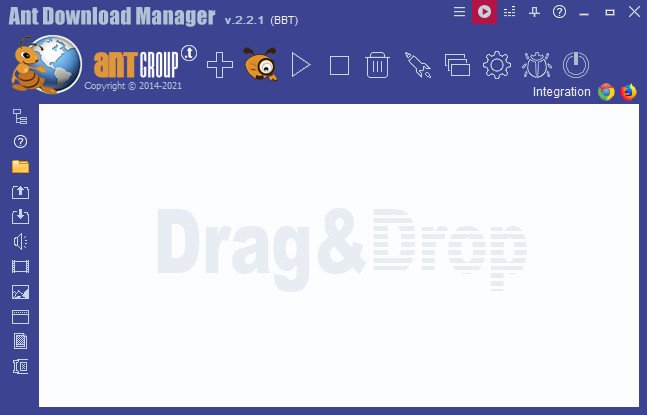
Ant Download Manager Pro 2.16.4.92194 (x64) Multilingual
File size: 49.4 MB


Ant Download Manager (AntDM) is a quick download manager for any Internet file, that fully integrates with all popular browsers. AntDM allows to download free streaming video and audio from numerous web sites, supports P2P peer-to-peer protocol. AntDM supports downloading files from the most popular Premium Link Generators (Debrids).
Ant Download Manager (AntDM) - is a tool that allows you to repeatedly increase the speed of file downloads due to multiple download streams, resume, schedule downloads, capture and download audio and video streams.
Automatically processes download errors, recovers from temporary network errors, reconnects in case of server response delays, has the ability to resume interrupted downloads due to loss of connection, network problems, computer shutdown, or unexpected power outages.
The standard GUI for softwares of this class makes AntDM friendly and easy to use. It has two screens - the first is more common for regular downloads and the second is using video preview for easy tracking of video downloads.
Has download queues, which allows you to accumulate download links at a convenient or scheduled time for the user.
Supports proxy-servers, HTTP and FTP file protocols and their protected versions of HTTPS and FTPS, as well as the main streaming protocols for audio and video content M3U8, MPEG-DASH, VIMEO-STREAM, firewalls, redirects, cookies, authorization, processing of audio and video content.
Supports BitTottrent a P2P (peer-to-peer) file sharing protocol.
Can be easily integrated into the main popular browsers Microsoft EDGE (Chromium-based), Google Chrome, Mozilla Firefox and their numerous clones: 360Chrome, Brave, CCleaner, Chedot, CocCoc, Comodo Dragon, Comodo IceDragon, Maxthon6, Opera, Slimjet, SRWare Iron, Torch, UC Browser, Vivaldi, Yandex, Waterfox, etc. The integration of extension into browsers is used to automatically capture file or media links and download them. Also you can not integrate AntDM extensions into your browsers, but use AntDM autonomously. For example, drag and drop download links from a browser into AntDM, download any single links manually, in a list or in batch mode from a file.
Allows not only downloading audio files, but also extracting audio tracks from video files, converting them to the popular MP3 format and adding basic accompanying information to them.
Supports most popular Generators Premium Links (Debrids): alldebrid.com, cocoleech.com, debrid-link.fr, ffdownloader.com, mega-debrid.eu, real-debrid.com, premium.rpnet.biz, simply-debrid.com, premiumize.me, etc.
Other features include multilingual support, download categories, download log, priorities and changes of download speed, task scheduler, sounds of various events, CHM User Guide, virus protection when download completion and many more.

Код:
https://rapidgator.net/file/9a86d38934e2bd7d529985f512a427a7/AntDownloadManagerPro2.rar.html

Код:
https://nitroflare.com/view/0E590ECD971AB01/AntDownloadManagerPro2.rar
 
45e5593a478b1510162c573d15760792.png


AnyMP4 Data Recovery 3.0.32 (x64) Multilingual
File size: 29.4 MB


AnyMP4 Data Recovery is the professional and safe data recovery software. It can help you restores almost all lost files like photos, documents, emails, audio, videos and more from computer drive, flash drive, memory card/stick on mobile phone or camera easily. Whether you lost files for deletion, format, etc., or your data are gone for the system crash, virus attack, etc., you can also use this powerful data retrieval program to help you.

Recover various data from computer and flash media drive/card
Recover all deleted files like photos, documents, emails, etc.
Restore lost data like videos, audio and other system files.
Undelete files from computer, flash drive, memory card/stick, etc.
Data loss for deletion/format/system crash, etc. can be restored.
Rescue data from disk accident, re-partition, system re-installation, and more.
Fast and reliable to scan and recover lost data on your computer.

Rescue data from computer and flash media drive
Restoring Lost Data
AnyMP4 Data Recovery is the process of restoring lost data from laptops, desktops, and other computer system. It is mighty to recover the files from empty Trash Bin. You can also use it to scan your computer RAW hard drive, RAW partition, and disk from an internal and external drive, and recover the lost data safely to your computer.

SD Card
This data recovery software can be the powerful flash media drive for portable devices. It is great to be compatible with USB flash drive, SD card, Compact Flash, Memory Stick, and memory card on Android mobile phone and camera. What you need is the card reader or USB adapter to let it be detected by your computer for data scan and recovery.

Recover data from Recycle Bin
If you delete important data by mistake and empty the Recycle Bin, or "Shift + Delete" files, you can't get them back from Recycle Bin, but you can use this data recovery software to help you scan and get back the deleted files on your computer.

Recover Data from Deletion
Restore data for system crash or error
If your files are inaccessible, hidden, corrupted, or your data are gone for system damage, system crash, system format, system reinstallation, disk accident, re-partition, improper clone, virus attack, etc., you can also use this program to help you scan and find back the missing or inaccessible data conveniently.

Restore Data for System Crash
Recover various data safely and quickly
Recover Documents
Recover documents like DOC/DOCX, XLS/XLSX, PPT/PPTX, PDF, CWK, HTML/HTM, INDD, EPS, RTF, TXT, LOG, XML, DAT, SIG, JS, etc.

Retrieve Lost Images
Retrieve lost images in various formats, like JPG, TIFF/TIF, PNG, BMP, GIF, PSD, CRW, CR2, NEF, ORF, RAF, SR2, MRW, DCR , WMF, DNG, ERF, RAW, etc.

Get Back Data
Get back other data types like ZIP, RAR, SIT, TEMP, WBK, CAB, database (.db, .exe, .lnk, .chk, .api, .dll, etc.), PLIST, and more to your computer.

Find Back the Email
Undelete video files like AVI, MOV, MP4, M4V, 3GP, 3G2, WMV, ASF, FLV, SWF, MPG, RM/RMVB, DivX, XviD, etc.

Undelete Video
Find back the lost audio files like AIF/AIFF, M4A, MP3, WAV, WMA, MID/MIDI, OGG, AAC, AC3, AU, MKA, etc.

Find back the lost Audio Files
Find back the deleted or lost email messages and attachments like PST, DBX, EMLX, EDB, MBX, MSG, etc.


HOMEPAGE


Код:
https://www.anymp4.com/


DOWNLOAD

Код:
https://rapidgator.net/file/93ee34e7f4b7f4178c9ed9cac1478022/AnyMP4DataRecovery3.rar.html

Код:
https://nitroflare.com/view/45E4C35141132B7/AnyMP4DataRecovery3.rar
 
0a0acf09c763f201a141a6e6c285576d.avif


AOMEI Backupper Technician 8.1 (x64) WinPE
File size: 1.07 GB


AOMEI Backupper is a professional-like, easy-to-use backup and recovery software. But is free for home users and commercial use, fully protects your computer from data loss. It lets you securely backup PC and Server, provides one-click backup your system partition or disk and does it in minutes. This software also can explore the created image and restore it to the hard drive if your data gets lost or corrupted. In addition, you can create a bootable rescue disk for recovering your data when the system crashes and the application cannot be accessed from the Windows interface.

AOMEI Backupper lets you clone the partition or disk, too. The software already supports the Microsoft Volume Shadow Copy Service (VSS) that enables the data backup process and does not interfere the running applications. This option of AOMEI Backupper is very efficient because backup data can still be made when you're working.
To prevent data loss, so we need to make data backup, AOMEI Backupper with the following features to ensure the safety of your data.

System Backup. One-click back up all data of system drive, including system files and installed applications without interrupting system run.
Disk Backup. Backup your hard disk drives including MBR disk, GPT disk, external hard drive, USB disk, and other storage devices that can be recognized by Windows.
Partition and Volume Backup. If you just want to backup a partition or volume, not the entire disk, the feature will be your best choice. With it, you can backup one or multiple partitions/volumes (including dynamic volumes) to an image file.
When your computer occurs some problems, such as accidentally deleted files, the system can not start, virus damage, by using the created backup before, you can restore system to its previous normal state or retrieve lost data.

System Recovery. Easily and quickly restore system partition and ensure system bootable after completing the recovery process.
Disk and Partition Recovery. Reliably recover the whole hard disk drive, partition or dynamic volume to original state.
Selective file restore. Selectively restore individual files and folders from a backup image file without recovering the entire backup.

In addition to backup and restore functions, AOMEI Backupper supports cloning operations. If you need to upgrade hard drive, or replace old disk, or migrate hard drive to new one, this feature can be more convenient to your work.

Disk Clone: Directly copy one hard drive to another without creating an image file. The program allows you to resize partitions during this cloning process, and supports to clone small disk to larger disk as well as copy traditional hard drive to solid state drive.
Partition and Volume Clone: Directly create an exact duplication of partition or dynamic volume and exactly transfer it to another partition or volume.

AOMEI Backupper Other Features
Incremental and differential backups. Based on a full backup, the software supports to create incremental or differential backups to taking less time and save storage space.
Encryption and Compression. You can set a password for each backups to prevent unauthorized access. When the backup process, specify an industry leading compression algorithm to compress image file in order to take up less disk space.
Image file checker and explorer. Check data integrity of image file to ensure the backups can be restored successfully. Mount image files to a virtual partition so that you can browse the contents of the backups in Windows Explorer.
Comment Backups and Splitting Backups. Add comments to backups so that the backups can be further identified and clarified. Let you know what a backup is for or what it contains. Splitting Backups can split backup an image file into proper sizes to fit storage media.
Create Bootable Rescue Media. You can create a bootable media (e.g. CD or USB media) to restore system drive on the condition that Windows can not boot.
Supported OS: Windows XP, Vista, Windows 7, Windows 8/8.1, Windows 10 (32-bit, 64-bit).

Storage Devices: Supports all storage devices recognized by Windows, such as IDE, SATA, SCSI, SSD, USB external disks, Hardware RAID and so on. Moreover, supports MBR and GPT style, and fully support capacities greater than 2TB.


HOMEPAGE


Код:
https://www.backup-utility.com/


DOWNLOAD

Код:
https://rapidgator.net/file/964ba66b20a038e8a43a4c71bb937803/AOMEI_Backupper_Technician_8.1_WinPE.iso.html

Код:
https://nitroflare.com/view/A21E6C6D0526160/AOMEI_Backupper_Technician_8.1_WinPE.iso
 
db67c21e89c7c177bc437195e34324cb.avif


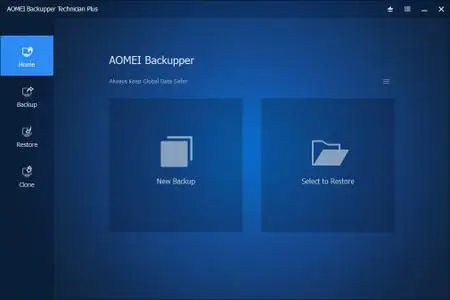
AOMEI Backupper Technician Plus 8.1.0 Multilingual

File Size: 188 MB


AOMEI Backupper is a professional-like, easy-to-use backup and recovery software. But is free for home users and commercial use, fully protects your computer from data loss. It lets you securely backup PC and Server, provides one-click backup your system partition or disk and does it in minutes. This software also can explore the created image and restore it to the hard drive if your data gets lost or corrupted. In addition, you can create a bootable rescue disk for recovering your data when the system crashes and the application cannot be accessed from the Windows interface.

AOMEI Backupper lets you clone the partition or disk, too. The software already supports the Microsoft Volume Shadow Copy Service (VSS) that enables the data backup process and does not interfere the running applications. This option of AOMEI Backupper is very efficient because backup data can still be made when you're working.
To prevent data loss, so we need to make data backup, AOMEI Backupper with the following features to ensure the safety of your data.

System Backup. One-click back up all data of system drive, including system files and installed applications without interrupting system run.
Disk Backup. Backup your hard disk drives including MBR disk, GPT disk, external hard drive, USB disk, and other storage devices that can be recognized by Windows.
Partition and Volume Backup. If you just want to backup a partition or volume, not the entire disk, the feature will be your best choice. With it, you can backup one or multiple partitions/volumes (including dynamic volumes) to an image file.
When your computer occurs some problems, such as accidentally deleted files, the system can not start, virus damage, by using the created backup before, you can restore system to its previous normal state or retrieve lost data.

System Recovery. Easily and quickly restore system partition and ensure system bootable after completing the recovery process.
Disk and Partition Recovery. Reliably recover the whole hard disk drive, partition or dynamic volume to original state.
Selective file restore. Selectively restore individual files and folders from a backup image file without recovering the entire backup.

In addition to backup and restore functions, AOMEI Backupper supports cloning operations. If you need to upgrade hard drive, or replace old disk, or migrate hard drive to new one, this feature can be more convenient to your work.

Disk Clone: Directly copy one hard drive to another without creating an image file. The program allows you to resize partitions during this cloning process, and supports to clone small disk to larger disk as well as copy traditional hard drive to solid state drive.
Partition and Volume Clone: Directly create an exact duplication of partition or dynamic volume and exactly transfer it to another partition or volume.

AOMEI Backupper Other Features
Incremental and differential backups. Based on a full backup, the software supports to create incremental or differential backups to taking less time and save storage space.
Encryption and Compression. You can set a password for each backups to prevent unauthorized access. When the backup process, specify an industry leading compression algorithm to compress image file in order to take up less disk space.
Image file checker and explorer. Check data integrity of image file to ensure the backups can be restored successfully. Mount image files to a virtual partition so that you can browse the contents of the backups in Windows Explorer.
Comment Backups and Splitting Backups. Add comments to backups so that the backups can be further identified and clarified. Let you know what a backup is for or what it contains. Splitting Backups can split backup an image file into proper sizes to fit storage media.
Create Bootable Rescue Media. You can create a bootable media (e.g. CD or USB media) to restore system drive on the condition that Windows can not boot.


HOMEPAGE


Код:
https://www.ubackup.com/


DOWNLOAD

Код:
https://rapidgator.net/file/f598279ea25b63b071faf12de46fb5d3/Backupper.8.rar.html

Код:
https://nitroflare.com/view/0AECDB2081FE460/Backupper.8.rar
 
aed7b75d53a0b85d202eed1975717615.webp

Free Download AOMEI Backupper Technician Plus 8.1 Multilingual + WinPE | 121.6 Mb
AOMEI Backupper is a professional-like, easy-to-use backup and recovery software. But is free for home users and commercial use, fully protects your computer from data loss. It lets you securely backup PC and Server, provides one-click backup your system partition or disk and does it in minutes.


This software also can explore the created image and restore it to the hard drive if your data gets lost or corrupted. In addition, you can create a bootable rescue disk for recovering your data when the system crashes and the application cannot be accessed from the Windows interface.
AOMEI Backupper lets you clone the partition or disk, too. The software already supports the Microsoft Volume Shadow Copy Service (VSS) that enables the data backup process and does not interfere the running applications. This option of AOMEI Backupper is very efficient because backup data can still be made when you're working.
System Backup. One-click back up all data of system drive, including system files and installed applications without interrupting system run.
Disk Backup. Backup your hard disk drives including MBR disk, GPT disk, external hard drive, USB disk, and other storage devices that can be recognized by Windows.
Partition and Volume Backup. If you just want to backup a partition or volume, not the entire disk, the feature will be your best choice. With it, you can backup one or multiple partitions/volumes (including dynamic volumes) to an image file.
When your computer occurs some problems, such as accidentally deleted files, the system can not start, virus damage, by using the created backup before, you can restore system to its previous normal state or retrieve lost data.
System Recovery. Easily and quickly restore system partition and ensure system bootable after completing the recovery process.
Disk and Partition Recovery. Reliably recover the whole hard disk drive, partition or dynamic volume to original state.
Selective file restore. Selectively restore individual files and folders from a backup image file without recovering the entire backup.
Home Page-

Rapidgator
Код:
https://rapidgator.net/file/c60eed8551557867d7059abb411eea4f/g7rk1.AOMEI.Backupper.Technician.8.1.WinPE.iso.html

Код:
https://nitroflare.com/view/D925014BE2A03F9/g7rk1.AOMEI.Backupper.Technician.8.1.WinPE.iso
 
Назад
Сверху Снизу