All Emperor2011's Software in one thread !! (updated daily)

7e5241ef41664727f5dbb2e6da2408cd.jpg


Graitec Advance PowerPack 2027 For Autodesk Advance Steel 2027 (x64) | Size: 6.75 GB
Language: English

Improve your daily workflows and expand functionality of Advance Steel using PowerPack for Advance Steel. Take control of accuracy and efficiency, so you can increase your productivity.

1.Deliver steel projects with enhanced efficiency and accuracy.
2.Gain a competitive advantage in your structural designs with faster project delivery using over 60 productivity-enhancing features.
3.Unlock the full potential of Autodesk Advance Steel with PowerPack for Advance Steel, plus benefit from free, expert support to optimize your Advance Steel experience.

5 Key benefits of PowerPack for Advance Steel
-Fully integrate Advance Steel, from steel structure modelling or connections to exporting different file formats for fabrication.
-Improve the flexibility of your design work with specialized commands and a dedicated user interface. Generate multiple configurations of steel stairs and railings and save them in your own user library.
-Design more easily using custom connections between elements such as plates, beams, bracings, purlins, platform covers, or compounds.
-Optimize your steel sections earlier in the project and leverage a powerful link to exchange models, including geometry and sections. Easily import, export or synchronize steel BIM models.
-Stay ahead of the curve by utilizing the latest features and improvements in your design workflow. Access expert support from GRAITEC and benefit from a wealth of online resources, including help documentation and tutorials.

Complement and balance your projects perfectly with PowerPack for Advance Steel.

Modeling Tools
The PowerPack for Advance Steel comes with a large number of modelling tools that aim to boost productivity and accuracy. The user has a set of simple and intuitive commands like Beam Repeated or Beam Continuous that creates straight, and curved/ poly beams. For more complex sections the Corrugated, Castellated, Cellular, or Beam with Openings are the right choice.

Connection Vault
PowerPack for Advance Steel extends the standard library with a variety of parametric and intelligent advanced connections: Threaded Rod Connection, Tube to Tube Connection, Purlin Connection, Plates on Profile, Plate for Multiple Bracings, Curved End Plate - Plate & Grating Stiffeners

Platform Cover Creator
Platform Cover Creator is one of the stars of the PowerPack thanks to its versatility. The joint helps to automatically create grating or plate cover based on selected members, and gives the user many possibilities: Create covers even if the contours are not closed, Split covers directly from the joint by beams or by points, Add bolts on edges, Add additional contours

IGES/STEP Export
Formats are widely requested by many manufacturers for designing molds or for pricing manufactured parts, the export in IGES and STEP formats completes the PowerPack solution. These types of file formats are helping the user to be more productive when it comes to sending files to third applications for the fabrication process.

Stairs and Railings
Stairs and Railings can be easily customised within the PowerPack for Advance Steel dialogue box. The interface elements offer a consistent structure, which makes it fast and efficient. Users can choose from numerous features and options for stairs & railings configuration, with editable parameters (dimensions, steps, treads, strides, connection types, etc.) to get the required structure.

Synchronization
Based on the GTCX file format, the synchronisation mechanism completes the BIM workflow. The main benefits of the synchronisation mechanism are: Possibility to bring the changes made in the Advance Design model without losing the information already available in the Advance Steel model; Control any detail of the synchronisation process

System Requirements:
Compability: Autodesk Advance Steel 2027

HOMEPAGE:
Код:
https://graitec.com/

FREE DOWNLOAD LINKS:

Код:
https://rapidgator.net/file/e32bd423a1ede39ac2c9265a5a7339c9/_GRAITEC_STEEL_2027.part01.rar
https://rapidgator.net/file/35311e443b5cffe294161266861abf4c/_GRAITEC_STEEL_2027.part02.rar
https://rapidgator.net/file/ac9997d19ff5ecc8f561704233ebbe15/_GRAITEC_STEEL_2027.part03.rar
https://rapidgator.net/file/bf975c60d27f550adb32b155a9c9de9d/_GRAITEC_STEEL_2027.part04.rar
https://rapidgator.net/file/1cd2658cf6ee1ccd733bd87063cc5dba/_GRAITEC_STEEL_2027.part05.rar
https://rapidgator.net/file/31200ce39170d7026de0b38dbc2241a8/_GRAITEC_STEEL_2027.part06.rar
https://rapidgator.net/file/8e6397e17854920de9df032dfda27789/_GRAITEC_STEEL_2027.part07.rar

Код:
https://nitroflare.com/view/50D50528549F99F/_GRAITEC_STEEL_2027.part01.rar
https://nitroflare.com/view/5D916CE5FD06950/_GRAITEC_STEEL_2027.part02.rar
https://nitroflare.com/view/FB8AAF19CA216F4/_GRAITEC_STEEL_2027.part03.rar
https://nitroflare.com/view/E851B196F0203E0/_GRAITEC_STEEL_2027.part04.rar
https://nitroflare.com/view/F005B0769E9E289/_GRAITEC_STEEL_2027.part05.rar
https://nitroflare.com/view/BCCA267F92FDBFC/_GRAITEC_STEEL_2027.part06.rar
https://nitroflare.com/view/8CBACB906F59891/_GRAITEC_STEEL_2027.part07.rar
 

d663f81c45dd49789e0c44ee3d193e03.jpg


HEU KMS Activator 64.0 | Size: 4.49 MB
Language: English

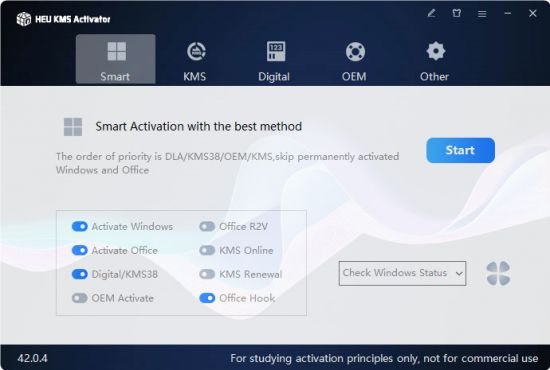
HEU KMS Activator is an easy to use Windows and Office activation program that can activate Windows 10, 11 and MS Office 2021 within 1 click.

The program will choose the best method for you to locally activate all Microsoft products. You can choose your own activation channel, with 4 modes to choose from: Digital License, KMS38, OEM and KMS, plus many useful tools like Change Windows 10 version, Backup and restore Windows, Change MS Office Edition, Key Settings manually in case you purchased the original Key and more.

Features
Easy to use
Smart activation with the best method.
Activate Windows XP / Vista / 7 / 8.1 / 10 / 11
Activate MS Office 2010, 2013, 2016, 2019, 2021 and Office 365
Automatically identify and bypass permanently activated Windows/Office.
Install/uninstall auto-renew function.
Work schedule mode.
Delete KMS customer information.
Set up a KMS server.
Digital activation.
OEM activation.
Change Windows 10 version.
Windows/Office key management.
Smart activation.
Windows Backup/Restore.
And more.

Supported
Windows XP / Vista / 7 / 8.1 / 10 / 11
Microsoft Office 2010, 2013, 2016, 2019, 2021, 2024, Office 365
All versions of Windows Server

System Requirements
Windows XP / Vista / 7 / 8.1 / 10 / 11
All versions of Windows Server

FREE DOWNLOAD LINKS:

Код:
https://rapidgator.net/file/9bf1ced495898458924b3187b035700e/HEU_KMS_Activator_64.0.rar

Код:
https://nitroflare.com/view/12B987A95D571EF/HEU_KMS_Activator_64.0.rar
 
9984b9436f44ebc020df4a0823ff9cdd.jpg


Maplesoft Maple 2026.1.1 (x64) Multilingual | Size: 2.33 GB
Language: English

Maple is math software that combines the world's most powerful math engine with an interface that makes it extremely easy to analyze, explore, visualize, and solve mathematical problems.

Solve math problems easily and accurately, without worrying that you've lost a minus sign somewhere
Solve math problems quickly that you could never do by hand (or that you wouldn't want to do by hand because life is too short!)
Solve problems from virtually any branch of mathematics or field that relies on mathematics, such as calculus, algebra, differential equations, statistics, control design, linear algebra, physics, optimization, group theory, differential geometry, signal processing, special functions, number theory, financial modeling, etc. etc.
Gain insight into your problem, solution, data, or concept using a huge variety of customizable 2-D and 3-D plots and animations
Keep problems, solutions, visualizations, and explanations all together in a single, easy-to-follow document, so you don't have to waste time reconstructing your thought processes
Develop complex solutions using a sophisticated programming language designed for mathematics, so your code is shorter, easier to write, easier to debug, and easier to maintain
Create interactive applications for yourself, your students, or your colleagues, without having to be an expert programmer, and share them over the web

System Requirements
Windows 10, Windows 11, Windows Server 2025, 2022

HOMEPAGE:
Код:
http://www.maplesoft.com

FREE DOWNLOAD LINKS:

Код:
https://rapidgator.net/file/7313f845cd52ca8da9c35cd6aa2b7b81/Maplesoft_Maple_2026.1.1..part1.rar
https://rapidgator.net/file/0ad1efe0cfe8c9c024298e54552ff639/Maplesoft_Maple_2026.1.1..part2.rar

Код:
https://nitroflare.com/view/D8B713B812620AE/Maplesoft_Maple_2026.1.1..part1.rar
https://nitroflare.com/view/8B56FBE66FD157B/Maplesoft_Maple_2026.1.1..part2.rar
 
f971331e79530de13d308bad2c10bb7b.jpg


Marvelous Designer Enterprise 2026.0.315 (x64) Multilingual | Size: 1.89 GB
Language: English

One of a kind solution for 3D artists. Marvelous Designer is the best solution for making, editing and reusing 3D clothes. Save your time to make tiny wrinkles on the clothes. Create intricate custom outfits with a few clicks.

Fast & Easy
Marvelous Designer adopted real traditional cloth production method into 3D cloth modeling.
Anyone can create natural 3D wrinkles with Marvelous Designer.

Effective & Efficient
Create re-usable 3D asset for various 3D characters.
Standardize high quality result for every artist.
Create countless variations with one clothing asset.

Fast & Accurate Cloth Simulation
Marvelous Designer provides the most accurate and fastest cloth simulation.
Check the natural and realistic wrinkles formed automatically.

Features:

CLOTH SIMULATION
Use the strongest cloth simulation engine with different presets, CPU and GPU simulation.

EASY PATTERN CREATION
Customize 2D patterns to create a perfect fit on your own avatar. Trace 2D patterns from UV to reuse old works into a new outfit.

3D FILE COMPATIBILITY
Transfer data between other 3D software by using OBJ, FBX, Alembic, Maya Cache, PC2, LXO and MDD file formats.

MESH TRANSFORMATION
Remesh, Subdivision and Retopology function to optimize the mesh for your production pipeline.

TRIMS & DETAILS
Add buttons, zippers and stitch to your clothes. Simulate weight of trims to make realistic effect on the clothes.

ANIMATION
Record the interactive cloth simulation with a flow of wind. Create Pin animation by editing pins frame by frame

MODULAR DESIGN
Mix and match outfits from the pattern database in the Modular Mode and Configurator.

AVATAR
Arrangement Points automatically added to A or T-pose avatars enable you to drape clothes readily on the avatar.

HOMEPAGE:
Код:
https://www.marvelousdesigner.com/

FREE DOWNLOAD LINKS:

Код:
https://rapidgator.net/file/4b133c90c3e5429f9cb57461247049cf/Marvelous_Designer_Enterprise_2026.0.315_x64_Multilingual.rar

Код:
https://nitroflare.com/view/A62128A040831DB/Marvelous_Designer_Enterprise_2026.0.315_x64_Multilingual.rar
 
b5725788673835affaef0707763564e9.jpg


PDF Architect Pro+OCR 9.1.133.23134 | Size: 461.9 MB
Language: English

Edit PDF files with PDF Architect 9. Go beyond PDF creation and edit your PDF files according to your requirements. Our PDF editor helps you to stay up-to-date with future-oriented features. Take full control over your PDF files with our PDF editor. Modify text, images and pages and convert PDFs to Word and Excel and much more.

The easy way to edit PDF documents
- PDF Architect is a PDF viewer and editor that lets you create, view and modify PDF files.
- It gives you full control over your PDFs and allows you to adjust them to your requirements.
- This powerful PDF editing tool grows with your demands.

Create
With the Create feature, you can create PDFs from documents containing important or private information, and use its security features to keep your files safe as well as control access to them. By choosing to use a PDF document, you are assured that your file will always look the same and will be compatible with any PDF software no matter what system or software it was created with.

Edit PDF
As PDF documents become an essential part of your work, you may find that you sometimes need to edit their content. PDF Architect's powerful Edit feature allows you to make modifications directly within your PDF file without the need to export it or copy the content to another format.

Page
Working with multiple documents, particularly if they are all different formats, can be a headache. With PDF Architect's Page feature, you can merge all the files you are working with into one PDF document making it easier to manage and share. Organize and categorize your PDFs by inserting and customizing page elements as well as other such details into your document.

Convert
Although PDF is one of the most convenient and portable file formats, it is sometimes necessary to convert existing PDF documents into other types of files or back to their original format without loss of information. Use our powerful Convert feature to instantly convert your PDFs into several popular file formats.

Convert your PDF files to
- MS Word (.doc, .docx)
- MS Excel (.xls, .xlsx)
- HTML viewable in a web browser
- Text files (.txt)
- Images (.png / .jpeg / .gif / .tif)

Review/Comment
PDFs are known for their tight format locking abilities, but you can now also review and add notes to work on a document with your peers. The Review/Comment feature is specifically designed to help you collaborate on your documents using the review tools to annotate your PDFs as well as compare two documents.

Forms
PDF Architect's Forms feature lets you create beautiful, fillable forms from scratch or fill in pre-designed ones as well. Create invoices, survey forms and custom PDF form documents for any need.

Secure
With the vast number of files being e-mailed and shared every day, document security is more important now than ever. Protect and secure your documents digitally with passwords and permission levels with the Secure feature. You can also sign your documents with a digital signature.

OCR Advanced
Optical Character Recognition (OCR) is the finishing touch that makes PDF Architect the complete PDF solution. Use our OCR feature to unlock the text in a single document or increase your productivity and use the Batch Recognition feature to simultaneously recognize multiple files.

System Requirements
- Operating System: Windows 11, 10, 8/8.1, 7 (64-bit)
- Processor: Pentium III or above
- RAM: 1GB
- Disk Space: 100 MB or more
- Microsoft Office is required for plug-in use & conversion to Word

Supported Languages
English, French, German, Italian, Spanish, Portuguese, Russian, Japanese

HOMEPAGE:
Код:
https://www.pdfforge.org/pdfarchitect

FREE DOWNLOAD LINKS:

Код:
https://rapidgator.net/file/5479065c4bc2e9b99d8289ff62e4c651/PDF_Architect_Pro_OCR_9.1.133.23134.rar

Код:
https://nitroflare.com/view/95C450637FF9553/PDF_Architect_Pro%2BOCR_9.1.133.23134.rar
 

39483bfd3b542a4b8b541e9228d15ed3.png


PSOFT Pencil+ v4.2.7 (x64) | Size: 45.77 MB
Language: English | WiN x64 | 3ds Max 2024 - 2027

PSOFT Pencil+ 4 for 3ds Max is a non-photorealistic rendering plugin which can reproduce the appearance of pen-and-ink and color pencils drawings as well as animation cels.

Materials with high level of expressiveness
Fast and beautiful line drawing
Unique modifiers
Powerful render elements output

Materials with a high level of expressiveness.
Pencil+ 4 can reproduce the flat look of cel shading and the texture of pencil sketches. It provides fine control over shading and enables unique presentations where only specific materials are drawn to the foreground. It makes it possible to create revolutionary artistic textures.

Nitrous Shader
Pencil+ 4 Materials can be displayed in real-time in the Nitrous viewport. Highlights and zones can be reviewed with a quality close to the rendering result.

Material Penetration
With material penetration, materials hidden behind objects can penetrate those objects to be rendered as if they were in front.

Light Intensity Control
Light intensity can be modified for individual materials, providing more detailed control over highlights and shading.

Improved Usability
The user interface is more user-friendly and the affinity with 3ds Max is increased.
Enhanced gradation bar editing
Support for gamma / LUT correction
Adjustable line set list height
Display of data in lists
Switch the display language of the user interface

Material Functionality
Gradation Bar
Edit material colors intuitively using the gradation bar.

Highlight
Make highlights curve along or expand and contract into a crescent along the shape of the object.

Highlight Design
Control the shape of highlights visually.

Line Related Functions
Configure line drawing for individual materials.

Gradation Offset
Control gradations using maps. Use this to display darker colors at specific locations.

Light Color
Make the color of lights and ambient lighting affect materials.

Shadow Blend
Set the color of shadows separately from the zone gradation colors.

Stroke Map
Create hatching and rough strokes like those in hand-drawn pictures.

What's New
Version 4.2.7 (April 23, 2026)
New Features
- Adds compatibility with 3ds Max 2027.

Modifications
- The manual that used to be included in the installer has been changed to an online manual.
Minor bug fixes.

System requirements
- 64-bit Microsoft Windows 10 (version 1909 or higher) or Windows 11
- 64-bit Intel or AMD multi-core processor with SSE4.2 instruction set support
- 16 GB minimum
- DirectX 12 compatible with at least 4 GB VRAM

FREE DOWNLOAD LINKS:

Код:
https://rapidgator.net/file/a52518e5584eaedb7fcc2bfc4cdc3026/PSOFT_Pencil__v4.2.7_x64.rar

Код:
https://nitroflare.com/view/0D01B35E110018D/PSOFT_Pencil%2B_v4.2.7_x64.rar
 
014b9b7e2a5b5b1f1e941fcf0f52be83.jpg


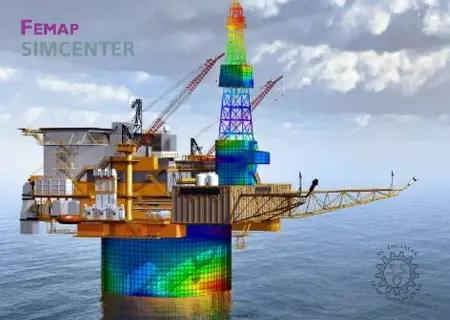
Siemens Simcenter FEMAP 2606.0 with NX Nastran (x64) | Size: 4.39 GB
Language: English

Siemens PLM Software pleased to announce the release of Simcenter Femap version 2020.1.1. This latest release provides a variety of improvements that will help your productivity across the simulation workflow.

Updates and Enhancements

GUI - Dockable Panes
PostProcessing Toolbox - General
- Added buttons to the Digits fields in the Deform, Contour, and Freebody Tools, which control the display of digits in the graphics window via the Digit Options dialog box.
Interfaces - ABAQUS
- Added checking for unsupported *ASSEMBLY and *PART usage, warning the user to exit FEMAP and "flatten" the model in Abaqus CAE before importing.

Corrections

Graphics
- Corrected issue that caused labels for Nodes and Contour Arrow which lied on free edges to not be drawn properly.
Interfaces - Simcenter Nastran (formally NX Nastran)
- Corrected issue that prevented PLSTRN material nonlinearity from being specified when Analysis Type is set to "28..Multi-Step Nonlinear Kinematic" (SOL 402).
- Corrected issue that prevented the appropriate temperature load case control from being exported if the "0..From Load Set" option was selected for temperature loads when Analysis Type is set to "27..Multi-Step Structural" (SOL 401) or "28..Multi-Step Nonlinear Kinematic" (SOL 402). Also, grayed "Initial Temperature" combo box in subcases, as these should only be specified globally.
- Corrected issue reading and attaching to strain output on wedge elements creating by SOL 401.
Interfaces - ABAQUS
- Corrected issue that could cause FEMAP to exit unexpectedly when a reading an NSET entry which was used as the reference node on a COUPLING entry (instead of single node ID).
Loads and Boundary Conditions
- Corrected an issue when creating Pressure loads using the Vector option in the Direction portion of the Create Loads dialog box and a Data Surface (PR# 9512542)
Output and Post-Processing
- Corrected multiple issues when using the Model, Output, Transform command. One issue caused transformed corner output for tetrahedron elements to not be saved when a .op2 file was attached. The other issue caused transformed corner output to not be saved if all corner vectors for solid elements were not selected for transformation (PR# 9645733).
API
- Corrected issue in the Results Browsing Object API interface that caused the NumberOfRows and VectorID methods to become corrupted.
- Corrected issue with "Saved Sets" in the API where renumbering or deleting entities could incorrectly cause certain IDs to be removed from saved sets
Simcenter Femap is a finite element modeling and post-processing environment. It interacts with solvers such as Nastran to model physical behavior to assist in the drawing of conclusions about said behavior. Solvers typically require strict text file-based formatting of your analysis setup, which nobody does directly anymore. Instead, programs such as Femap are used to prepare those text file inputs to the solver using a combination of a modern graphical user interface built-in functions to automate tedious tasks.

Simcenter Nastran is a separate "solver" product that is usually bundled within Femap. Simcenter Nastran (formerly NX Nastran) is an actively-developed offshoot of the Nastran code base, but is one of the most common solvers for finite element analysis (FEA). Nastran is essentially the math behind FEA. As a pre-processor, Femap assists with building a model of a part, and then translates it into Nastran code. Nastran then computes the behavior. Following this, Femap reads the results and provides interpretation tools to facilitate the processing of output data. Oftentimes, the amount of information from the model is substantial, and Femap can enable a more rapid understanding of gross behavior.

Short video showcasing new capabilities in Simcenter Femap 2020.1 around postprocessing.

Siemens PLM Software. a business unit of the Siemens Digital Factory Division, is a leading global provider of software solutions to drive the digital transformation of industry, creating new opportunities for manufacturers to realize innovation. With headquarters in Plano, Texas, and over 140,000 customers worldwide, Siemens PLM Software works with companies of all sizes to transform the way ideas come to life, the way products are realized, and the way products and assets in operation are used and understood.

Product: Siemens Simcenter FEMAP
Version: 2020.1.1 (2020.1 MP1) with NX Nastran *
Supported Architectures: x64 Language: 中文 (Simplified), 中文 (Traditional), English, Deutsch, 日本語
System Requirements: PC **
Supported Operating Systems: **
Size: 2.9 Gb

Siemens.Simcenter.FEMAP.2020.1.1.Full.Setup
Siemens.FEMAP.2020.1.1.Update.Only
Welcome to FEMAP! This document will help you to setup your computer so that you can immediately begin to explore the many capabilities of FEMAP.

This document contains information specific to getting started on a PC, which includes 64-bit versions for Windows 7, Win-dows 8, Windows 8.1, and Windows 10.

The FEMAP installer contains only the 64-bit version of FEMAP, as a 32-bit version is no longer available.

Hardware/Software Requirements

There are no special hardware/software requirements for FEMAP beyond those imposed by the Windows operating systems. There are many types of hardware that will allow you to use FEMAP. Proper choice of hardware, however, can often make the difference between frustration and productivity. Here are a few suggestions:

- Memory, RAM
- Memory, (Hard Disk)
- Graphics Boards
-Abaqus ODB Requirements

Memory, RAM
You will need at least 128 Mbytes of RAM to run FEMAP and the Parasolid solid modeling engine, which is the default. Obviously, the more amount of RAM the better. Adding RAM can be one of the most cost effective means of increasing per-formance.If using the "Standard" geometry Engine in FEMAP, you can actually run with as little as 32 Mbytes of RAM. This is not a recommended configuration.

Memory, (Hard Disk)
Required hard disk space is very difficult to estimate, but in general you will never have enough. Analysis results will be the main driver of any disk space requirement. Models are typically relatively small. A model with 1000 nodes and 1000 ele-ments would typically be less than 1 Mbyte in size. Output from an analysis of that model, however, could be 5 Mbytes, 10 Mbytes or even larger, depending on the output you request. To estimate total disk space, you need to first estimate how many models you will have on-line simultaneously, the approximate size of those models, and the type of output you will request. It is recommend to have as much disk space as budget will allow, as each version of FEMAP can support larger and larger models, which in turn create larger and larger amounts of output.

Graphics Boards
While, standard graphics adapters may work very well with FEMAP, having a specialized board with support for OpenGL will provide increased graphical performance when dynamically rotating large, complex models. They also usually provide higher resolution and more colors, which make graphics easier to see and more realistic. Also, in order to use the "Perfor-mance Graphics" option, a graphics card which supports OpenGL 4.2 is required.

HOMEPAGE:
Код:
http://www.plm.automation.siemens.com

FREE DOWNLOAD LINKS:

Код:
https://rapidgator.net/file/2c14addc702ad7828e6dbfe3f4b6ecf1/Siemens.Simcenter.FEMAP.2606.0.Win64-SSQ..part1.rar
https://rapidgator.net/file/c6227620c044d356747c0d890f186688/Siemens.Simcenter.FEMAP.2606.0.Win64-SSQ..part2.rar
https://rapidgator.net/file/1dbc1eda6ee9b88185c4cf1c8df87696/Siemens.Simcenter.FEMAP.2606.0.Win64-SSQ..part3.rar
https://rapidgator.net/file/4600a505b58446c0f014dd383d0d766f/Siemens.Simcenter.FEMAP.2606.0.Win64-SSQ..part4.rar
https://rapidgator.net/file/9a1474c8b15c8a4af33c85824250bbd9/Siemens.Simcenter.FEMAP.2606.0.Win64-SSQ..part5.rar

Код:
https://nitroflare.com/view/4DC527A622210E8/Siemens.Simcenter.FEMAP.2606.0.Win64-SSQ..part1.rar
https://nitroflare.com/view/A4C41AD981CFC2C/Siemens.Simcenter.FEMAP.2606.0.Win64-SSQ..part2.rar
https://nitroflare.com/view/E164E5D65C23450/Siemens.Simcenter.FEMAP.2606.0.Win64-SSQ..part3.rar
https://nitroflare.com/view/A0A227EB2DA0AA4/Siemens.Simcenter.FEMAP.2606.0.Win64-SSQ..part4.rar
https://nitroflare.com/view/FE8796A4F2818AC/Siemens.Simcenter.FEMAP.2606.0.Win64-SSQ..part5.rar
 
5d231f332021a653f3dfc62d4cea3710.jpg


Wolfram SystemModeler 15.0 Multilingual | Size: 366.75 MB
Language: English

Wolfram Research has released System Modeler 15.0.0 is a very general environment that handles modeling of systems with mechanical, electrical, thermal, chemical, biological, and other components, as well as combinations of different types of components.

What's New in Wolfram System Modeler 15.0.0
Get a first look at the latest features and libraries coming to Wolfram System Modeler-and see how they can accelerate your modeling workflows. Explore new domain-specific libraries for modeling buildings, power grids and photovoltaic plants. Learn how enhanced tools enable you to build your own custom AI assistant for faster learning, or use SystemModelValidate to express and verify requirements directly in your models. From smarter workflows to expanded modeling capabilities, this session will highlight what's new and how you can put it to work in your projects right away.

Wolfram SystemModeler is a software platform for simulating multidimensional, physical systems, which can be created per drag and drop thanks to the intuitive user interface. Using the Wolfram System Modeler, high-precision modeling simulations can be performed, because, unlike almost every other system, the System Modeler computes not only numerically but also symbolically, i.e. with arbitrary accuracy. Numerous libraries, including the related modeling tools, simplify these multiphysical or cyber-physical simulations. The models are created by drag-and-drop components from integrated or added libraries. The liberaries contain components from a variety of technical fields, e.g. electrical, mechanical, fluidic, and chemical applications, as well as from biological applications and energy management.

System Modeler Overview

Jan Brugård, CEO of Wolfram MathCore, gives a general overview of System Modeler..
Founded by Stephen Wolfram in 1987, Wolfram Research is one of the world's most respected computer, web and cloud software companies-as well as a powerhouse of scientific and technical innovation. As a pioneer in computation and computational knowledge, we have pursued a long-term vision to develop the science, technology and tools to make computation an ever-more-potent force in today's and tomorrow's world.

Owner: Wolfram Research
Product Name: System Modeler
Version: 15.0.0
Supported Architectures: x86_x64 Languages Supported: multilanguage
System Requirements: Windows, macOs & Linux *
Size: 1.6 Gb

HOMEPAGE:
Код:
http://www.wolfram.com

FREE DOWNLOAD LINKS:

Код:
https://rapidgator.net/file/760edbcc2cc31f0c667566ea37f433d8/Wolfram_SystemModeler_15.0_Multilingual.rar

Код:
https://nitroflare.com/view/1ACA72291716A1C/Wolfram_SystemModeler_15.0_Multilingual.rar
 
f48b037202181587f3535aaca155441d.jpg


XML Blueprint 22.20260704 Multilingual | Size: 81.86 MB
Language: English

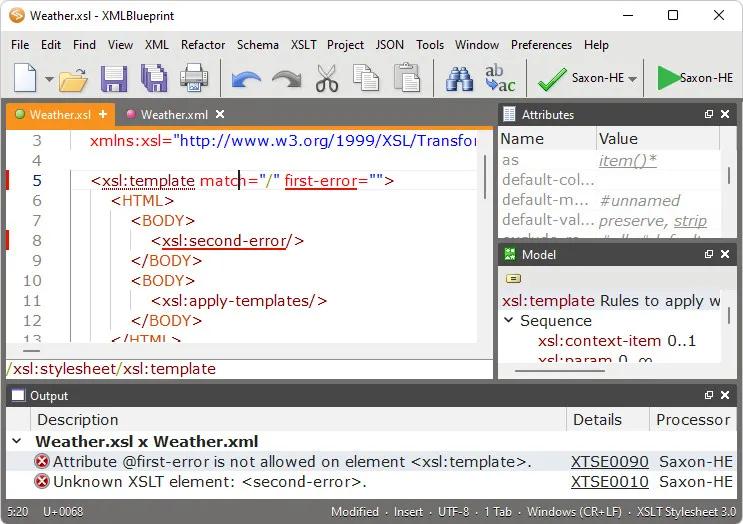
The smart XML Editor in XMLBlueprint has full support for DTD, Relax NG, Schematron, XSD, XSLT (1.0, 2.0, 3.0) and XPath (1.0, 2.0, 3.1). Its unique combination of just the right features and an affordable price for both professionals as well as home users makes it the smart choice for all your XML-related work. With XMLBlueprint you can edit and validate very large XML files (1GByte and larger). With its intuitive user interface, XMLBlueprint makes XML editing fast and easy. XMLBlueprint is the best choice for professional XML developers and home users alike.

XML Validator
The XML Editor automatically validates XML files against XSD, DTD, Relax NG Schema, and Schematron. All files are automatically validated as-you-type. XMLBlueprint provides wizards to associate your XML Document with a DTD, Relax NG schema or XSD. Supported Processors: Xerces, MSXML and Jing.

XML Catalogs
XML Catalogs lets you redirect schemas on the Internet to your local computer, which makes validating your XML files much faster and more reliable.

XML Tag Completion
Context-Sensitive XML Helpers, or IntelliSense, based on XSD, DTD, and Relax NG Schema, for element names, attribute names and attribute values. Closing tags are automatically added. Annotations are read from the XML Schema and presented as tooltips, to provide context sensitive help.

XML Refactoring
XMLBlueprint has an extensive range of XML editing features, such as: XML Refactoring helps you change the structure of your xml documents. Sometimes a simple find/replace of text is not powerful enough to make subtle changes in your XML Document. For instance, if want to change all "p" elements into "div" elements you cannot globally replace "p" into "div" because this would also change text such as "simple" into "simdivle". Nor could you change "p" into "div" because then the "/p" would still remain. It's much faster to use the XML editor's refactoring functions for this type of changes.

XML Formatter
The XML Formatter lets you indent text, split long lines, remove whitespace, handle empty elements, format attributes. You can specify how XMLBlueprint should format your xml file. For instance, what to do with empty elements and where to place attributes and text. XMLBlueprint correctly handles whitespace (the xml:space attribute), and you can override this behavior for specific elements.

XML Generator
XML Generator to generate sample XML based on XSD, DTD, or Relax NG Schema. You can specify if you want XMLBlueprint to generate optional elements, optional attributes, attribute values, etc. XSD Generator to generate XSD, DTD, or Relax NG Schema from multiple sample XML files. Convert CSV to XML and Convert Excel to XML. Once you have created your scenario you can run it from the command line. To run conversions on a regular basis, you can use Windows' Task Scheduler. Schema Viewer.

XML Folding
To simplify working with large XML Documents, XMLBlueprint provides XML Folding.

Non-English Languages
XMLBlueprint supports languages such as French, Russian, Japanese, and Chinese.

FTPS, SFTP, and WebDAV
With XMLBlueprint you can edit files stored on a remote FTPS server, SFTP server or WebDAV server.

Large Files
XMLBlueprint is optimized for large files, up to 1GByte and larger. Even large files are open quickly without losing any of the XML features.

Outline View
The Outline View shows all XML elements and attributes. The outline is updated in real time as you type. Selecting an XML element in the outline automatically selects the corresponding XML in the editor.

Jump to element definition in XML Schema
While editing your XML file you can jump directly to the corresponding element definition in the associated XML Schema.

Breadcrumbs
The breadcrumbs tool displays the path from the root of your xml file to the current xml node.

Additional Features
Folding simplifies working with large XML documents.
Syntax Coloring is supported for XML documents, but also for HTML, CSS, Java and JavaScript files. You can customize the text colors and the background colors.

HOMEPAGE:
Код:
https://www.xmlblueprint.com/

FREE DOWNLOAD LINKS:

Код:
https://rapidgator.net/file/b463b6e2f899eb2b928db529e8baab39/Multilingual_20260704.rar

Код:
https://nitroflare.com/view/221D57244C17A47/Multilingual_20260704.rar
 
088d43cd8ce92774df690c7f539e1591.jpg


Ashampoo Driver Updater 2.6.2 Multilingual | Size: 16.25 MB
Language: English

Wrong or old drivers are the enemy of every computer system. Often, drivers are missing or hopelessly outdated. Ashampoo Driver Updater not only finds the best drivers but also installs them for you. Ashampoo Driver Updater provides updates for a wide variety of components and devices from professional to lesser known brands. As soon as new drivers become available, the instantly get added to Ashampoo Driver Updater's huge database and therefore become available to you.

Optimal performance through up-to-date drivers!
More than 400,000 drivers available
Over 150,000 devices supported
Maximum system stability

Scan - install - done
There's no need for menu acrobatics with Ashampoo Driver Updater. The well-designed program performs its job of keeping your computer up to date quickly and with a high degree of usability. It analyzes your hardware components and drivers, compares the results against a gigantic database - and then replaces outdated drivers with their latest versions.

Always there for you
You decide when Ashampoo Driver Updater will spring into action. The built-in scheduler gives you reliable control over when the program will scan your system for updates. Once set up, you don't have to waste another thought on it and your system will stay up-to-date, always!

Problems? There's a solution!
Crashes, sound problems, graphics issues or bad performance frequently stem from wrong, corrupt or outdated drivers. After the transition to Windows 10, many system are now running "somehow" but not optimally. Let Ashampoo Driver Updater fix what Windows itself can't fix for you!

Maximum gaming performance
Drivers are constantly being developed and updated to avoid crashes and make the most out of installed hardware components. Especially games immensely benefit from a high system performance. Current graphics drivers can give you that extra boost when you need it.

Safety to the max
You won't take any risk with Ashampoo Driver Updater. Its built-in backup feature allows you to save and restore any driver if needed. Keep only what really benefits you!

The good feeling when everything just works
Even without noticeable crashes, your system components might not be working optimally. WLAN dropouts, hissing sound or disconnected printers are frequent issues. Often, it's Windows default drivers to provide less than ideal functionality. Leave no more room for subpar drivers!

The perfect Windows system
The transition to Windows 10 meant a lot of trouble for many users. Will installed hardware components still be supported, what are they called and where can suitable drivers be obtained? Ashampoo Driver Updater does the hard work and instantly finds all available Windows 10 drivers for you.

Operating System: Windows 7, 8/8.1, 10, 11

HOMEPAGE:
Код:
https://www.ashampoo.com/

FREE DOWNLOAD LINKS:

Код:
https://rapidgator.net/file/6182add72f9ec7275fb0050ea540b5fe/Ashampoo_Driver_Updater_2.6.2_Multilingual.rar

Код:
https://nitroflare.com/view/21E3983CC7C2254/Ashampoo_Driver_Updater_2.6.2_Multilingual.rar
 
3d7976262dcafb43dbed0b26f5fd664c.jpg


Automatic Email Processor 4.2 | Size: 86.07 MB
Language: English

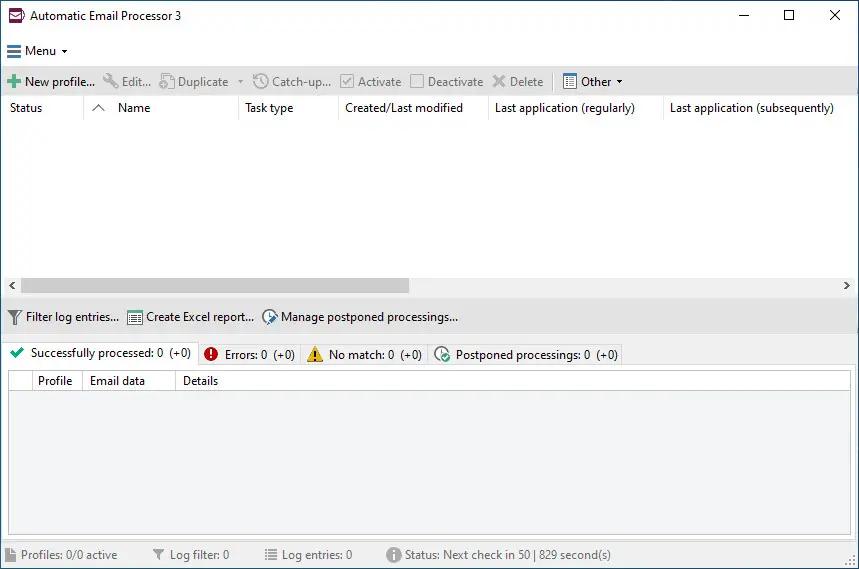
Automatic Email Processor is the complete solution for Outlook to store and print incoming emails and their attachments automatically. For this, various filters, flexible configuration options, such as individually definable storage folders and the possibility of subsequent processing are available. For example, the path of the location where you want Automatic Email Processor to save certain emails or email attachments, can be assembled dynamically from individual properties of an email.

For storing email messages, among other things, the output format can be specified (e.g. PDF, RTF or HTML). The standard Outlook message format (save email as MSG file) is particularly suitable for archiving important messages. The program supports the creation of an unlimited number of rules in order to be able to make separate settings for different email accounts. In addition, rules can be applied to emails of a certain period of time or to all emails already received in an Outlook folder.

Monitor Outlook folders
Examine incoming emails and apply appropriate rules.

Automatically save emails and attachments
Save emails and email attachments from Outlook automatically into dynamically created folders.

Print emails automatically
Send certain emails and attachments directly to the printer (for example, fax emails).

Optional further processing
Perform subsequent tasks, e.g., run a program with the filename of a saved attachment passed as parameter.

With Automatic Email Processor, you can:
• save emails automatically (as PDF file or in the original format)
• automatically print emails and email attachments (PDF files, Office documents etc.)
• save attachments automatically (save all or certain attachments of an email by using a filter)
• extract or print certain or all files from ZIP files
• monitor an unlimited number of Outlook folders
• create custom rules for different tasks
• filter by subject, sender, recipient, attachment file name .
• receive status reports by email, forward messages or inform the sender
• use command line parameters: only one run, exit, catch-up
• create storage folders dynamically from properties of an email
• perform subsequent actions such as start a program with parameters, mark the message as read, or move the email into another Outlook folder
• re-process all emails (with certain criteria) of an Outlook email folder
• archive emails from any Outlook folder and period (e.g. as MSG files)
• have the email moved to a different Outlook folder after processing and have subfolders generated dynamically from properties of the email
• have an Excel report with an overview and detailed information sent to you on a regular basis
• limit the automatic processing of email messages to certain days and times

Automatically print emails and attachments from Outlook
Automatic Email Processor monitors Outlook and allows you to send emails or attachments that meet pre-defined criteria directly to a printer upon receipt. Different print settings can be defined for each rule, for example to be able to print certain emails in a different quality. The respective printer can be defined individually for each rule as well as separately for printing the email message or attachment. You can also specify that only certain pages of the email should be printed automatically (for example, print only the first or last page of a PDF attachment of the email).

Automatically save incoming emails as PDF files
With Automatic Email Processor, emails received in Outlook can automatically be saved into a specified directory as PDF file, for example, in order to keep a copy of the message for backup purposes. Attachments and the email itself can also be embedded (as MSG file with or without digital signature) in the PDF file. The path as well as the folder and file name of the PDF file to be saved can be composed of various properties of the email, such as the date and, for example, a part of the subject.

Automatically save and optionally detach Outlook email attachments
In addition to archiving the complete email, Automatic Email Processor can also automatically save attachments. The properties of the email and the name of the attachment can become part of the path, i.e. properties such as the sender name can be integrated in the folder and file name. After successfully saving the attachments, they can be detached or, more precisely, replaced by a link file containing only the path of the saved attachment. This can prevent problems caused by too large Outlook PST files and save storage space. The detachment of the attachment can optionally be done with a time delay - for example, two weeks.

Operating System: Windows 11, 10, 8, 7 or Server (32-bit or 64-bit version)

HOMEPAGE:
Код:
https://gillmeister-software.com/

FREE DOWNLOAD LINKS:

Код:
https://rapidgator.net/file/7f0128123c7487fa3bb40435566d81c8/Automatic_Email_Processor_4.2.rar

Код:
https://nitroflare.com/view/5BD65E23855E824/Automatic_Email_Processor_4.2.rar
 
29c692a8448588d7727f494075d82a1b.jpg


DbVisualizer Pro 26.2.1 (x64) | Size: 212.52 MB
Language: English

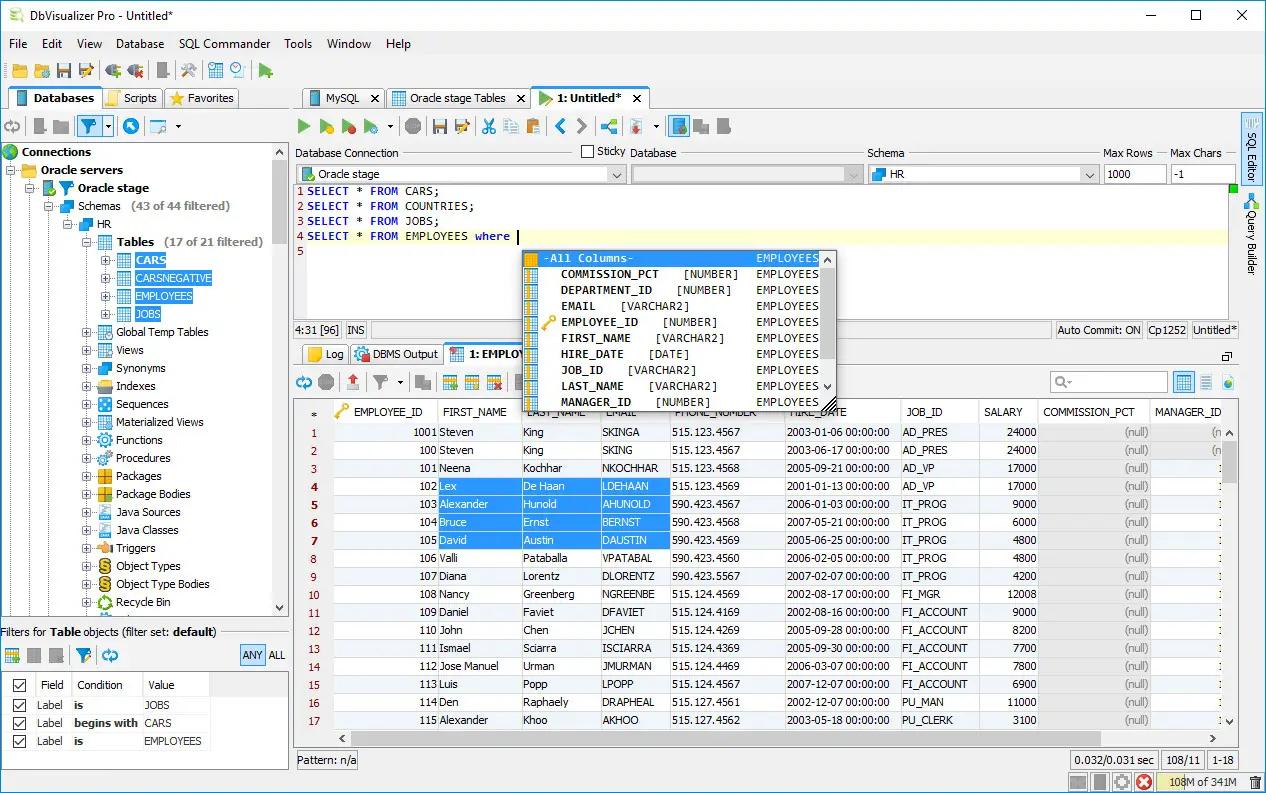
DbVisualizer is the universal database tool for developers, DBAs and analysts. It is the ultimate solution since the same tool can be used on all major operating systems accessing a wide range of databases.

Supported Databases
Amazon Redshift, DB2 LUW, Exasol, H2, Informix, JavaDB/Derby, Microsoft SQL Server, Mimer SQL, MySQL, Netezza, NuoDB, Oracle, PostgreSQL, SQLite, Sybase ASE, and Vertica.

SQL Tools
SQL editor with support for auto completion, parameterized SQLs, SQL formatter, visual query builder, explain plan, and, a command-line based interface.

Database Browser
Tree based navigation through database objects. Multiple objects can be displayed side-by-side.

Object Management
Visual tools to manage database objects. Edit, compile and, run procedures, functions, triggers, and, a lot more.

Table Data Management
Spreadsheet-like table data editor including binary/BLOB and CLOB data types, import from CSV and Excel files.

Export
Export database objects and table data as CREATE/INSERT statements, CSV, XML and more. Support for exporting very large result.

System requirements:
Windows 10/8/7
Java 8 is recommended

HOMEPAGE:
Код:
https://www.dbvis.com/

FREE DOWNLOAD LINKS:

Код:
https://rapidgator.net/file/e5a79c9b72ed464639a50f9670153cd5/DbVisualizer_Pro_26.2.1_x64.rar

Код:
https://nitroflare.com/view/128132FC4E1D4D0/DbVisualizer_Pro_26.2.1_x64.rar
 

b972a1a1dd7e9a12be0d3dbe7ede95e1.jpg


Desktop Calendar 3.30.296.9122 Multilingual | Size: 7.07 MB
Language: English

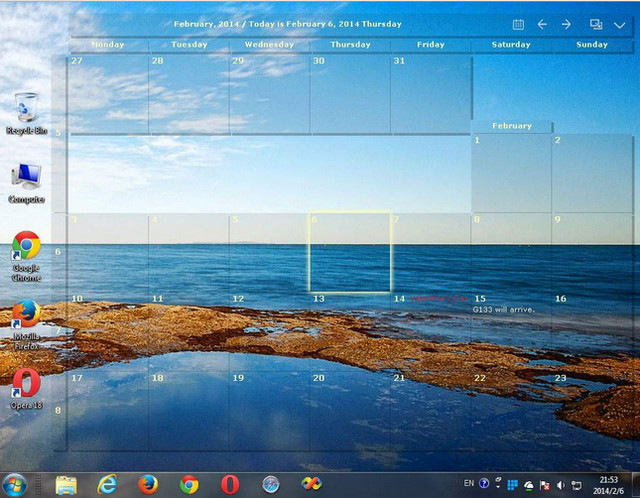
DesktopCal is a very useful piece of software that helps change your normal desktop into a calendar, so that time management can be done with more ease.The interface of the application is pretty straightforward, thus allowing any type of person to easily work with it. Moreover, the interface is highly customizable, enabling users to change the background colors, level of transparency, font of all the text, and gaps between the cells.

The utility can also control the entire desktop and what it looks like. For example, you can leave the wallpaper existent, delete it altogether or loop certain pictures of your choosing. The latter option enables you to add entire folders with hundreds of files and program them to change every 5, 10, 20, 30 minutes or even more. The position of the images can be modified, from "Fill" to "Stretch," "Center," "Fit" or "Tile".

All of the features aforementioned make this software tool highly efficient and should suit any person's taste.

The interface supports multiple languages such as English, French, Vietnamese, Chinese and Spanish.

In order to make annotations to a certain date in the calendar, all you have to do is double click on the corresponding panel and write. You should also know that each and every cell can be colored in a different way, so as to help you color-code specific events according to importance.

All in all, DesktopCal is a very useful piece of software, if you like being organized. You are able to input important occasions and meetings to the calendar with just two clicks, use a color-coded system, while also being able to manipulate the desktop.

Key features
- Record anything by double clicking on the windows desktop.
- Offers a variety of common festivals, anniversaries and other information.
- Move your data from one deveice to another with powerful tools.
- Print any page of calendar with wallpaper as you work.
- Set background color for any day you want. So, the days are colorful.
- Powerful and easy-to-use settings allows you to easily customize your own calendar.

System Requirements: Windows XP, Vista, Windows 7, 8, 10, 11

FREE DOWNLOAD LINKS:

Код:
https://rapidgator.net/file/61f3508c7c7270b139bfb317d78de068/Desktop_Calendar_3.30.296.9122_Multilingual.rar

Код:
https://nitroflare.com/view/849621C52658FFA/Desktop_Calendar_3.30.296.9122_Multilingual.rar
 
0a0bde74d2b7eae1c8bf8d3d0f715c1d.png


Directory Opus 13.24.1 Beta (x64) Multilingual | Size: 29.66 MB
Language: English

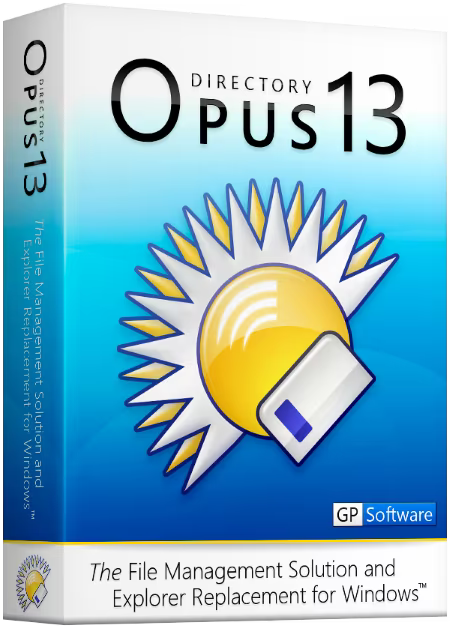
Are you frustrated by the limitations of Windows Explorer? Directory Opus provides a complete Explorer Replacement with far more power and functionality than any other file manager available today.

Just some of the features include:
- Single or dual pane file display and folder trees
- Tabbed interface let you keep multiple folders open and switch quickly between them
- Unique Explorer Replacement mode provides a full replacement for Windows Explorer
- Quickly filter, sort, group and search your folders
- Color-code your files, assign status icons, star ratings, tags and descriptions
- View images, documents and more. Image marking lets you sort your photos quickly and easily
- Batch renaming including easy-to-use keyboard macros
- View and edit file metadata
- Support for FTP and archive formats like Zip, 7Zip and RAR
- Built-in tools including synchronize and duplicate file finder
- Calculate folder sizes and print or export folder listings
- Queue multiple file copies for improved performance
- Fully configurable user interface - colors, fonts, toolbars, keyboard hotkeys, and a full scripting interface let you tailor Opus exactly to suit your needs
- Efficient, multi-threaded, modern design. Supports the latest 4K monitors. Available in both 32 and 64 bit versions.

What makes Opus unique?

Built for speed
Opus is written in native C++ multi-threaded code; compiled for the latest 64 bit CPUs, with high performance our number one design principle.

Fully configurable
Change the colors. Change the fonts. Change the toolbars and menus. Set up hotkeys. Opus adapts to how you want to use it.

Makes file management a breeze
Powerful searching, sorting, grouping, labelling and tagging features let you take control of your files like never before.

Endlessly extensible
Work with third-party tools as easily as with the built-in features. A full scripting interface, including scriptable dialogs, means your imagination is really the only limit.

Replace Windows Explorer and don't look back
Our unique Explorer Replacement mode provides a full replacement for Windows Explorer.
Single or dual pane file display and folder trees
Tabbed interface let you keep multiple folders open and switch quickly between them
Integrated viewer, metadata editor and utility panel
Built-in tools including synchronize and duplicate file finder
Leverage indexed search engines like Windows Search and Everything

HOMEPAGE:
Код:
https://www.gpsoft.com.au/

FREE DOWNLOAD LINKS:

Код:
https://rapidgator.net/file/34e0fa3d2694a9cba7a8df1bae3ef036/Directory_Opus_13.24.1_Beta_x64_Multilingual.rar

Код:
https://nitroflare.com/view/EDCF09BCD9C6C05/Directory_Opus_13.24.1_Beta_x64_Multilingual.rar
 
c491a5bb31dcc5d70bec4ea56e15c083.png


Draftable Desktop 26.6.200 | Size: 560.26 MB
Language: English

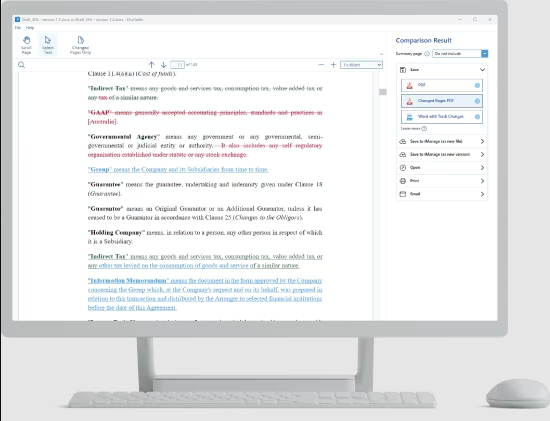
Go home early. The fastest document comparison tool. Compare 300+ pages in seconds. Draftable Desktop 2.0 is now available - faster and more powerful than ever! See all the changes in your documents, locally and offline. Take your work to the next level.

Confidential and private
Comparisons don't use the internet and your documents never leave your computer.

Compare anything to anything
Draftable compares any combination of files:

- PDF (.pdf)
- Word (.doc, .docx, .docm, .rtf)
- PowerPoint (.ppt, .pptx, .pptm)
- Excel (.xls, .xlsx, .xlsxm, .csv)

Compare spreadsheets
Compatible with .xls, .xlsx, .xlsxm. With Office 2013, 2016, or 365, you can compare text in Excel.

Password protected document?
Simple. Just enter the password when prompted and you can compare password-protected documents.

Intuitive user interface
Our simple interface means no downtime for training. You and your team can start comparing in minutes.

Draftable Desktop
Think of all the time you will save over the course of a year. It's a no-brainer.

System Requirements:
- Draftable Desktop requires Windows 7+.
- Comparing Word documents, PowerPoint presentations and Excel spreadsheets requires Office 2007+.

HOMEPAGE:
Код:
https://draftable.com/desktop

FREE DOWNLOAD LINKS:

Код:
https://rapidgator.net/file/f0ce6ce4263abce338e9865e5cd9fcbf/Draftable_Desktop_26.6.200.rar

Код:
https://nitroflare.com/view/46C6742A351C238/Draftable_Desktop_26.6.200.rar
 
7c68c082a4d9031c7ba68578364437b5.jpg


Driver Magician Lite 5.82 | Size: 2.89 MB
Language: English

Driver Magician is an easy-to-use and powerful tool for driver backup and restoration in Windows operation system.

Driver Magician helps you to extract device drivers from your hard disk and back up them to any location you specified.

Driver Magician can backup, extract device and restore drivers.

When you reinstall operation system after system crash, you just selects device drivers you want to restore, then Driver Magician can restore them from driver backup quickly and easily without inserting any driver disk.

After one system reboot, all hardware in your computer works well. Moreover, Driver Magician can back up and restore more items such as My Documents folder, Desktop, Registry, Internet Explorer favorite folder, Outlook Express mail files, Outlook Express mail rule, Outlook Express mail accounts, Outlook Express address book, Outlook data files and outlook mail account.

Key features
· Back up device drivers of your computer in four modes.
· Restore device drivers from backup in one mouse click.
· Update device drivers of your PC to improve system performance and stability.
· Live Update device identifier database and driver update database.
· Detect unknown devices.
· Back up more items such as My Documents and Registry.
· Restore more items from backup.
· Get detailed information of the hardware drivers.
· Clone all drivers to an auto-setup package (.EXE), so you can restore drivers without installing Driver Magician.

FREE DOWNLOAD LINKS:

Код:
https://rapidgator.net/file/bc1e9543c6bd3d405c328a59da6a1ebd/Driver_Magician_Lite_5.82.rar

Код:
https://nitroflare.com/view/652DEED8A0C2D48/Driver_Magician_Lite_5.82.rar
 
d173e6274ee6b59268b0b00b366b3cd7.jpg


Dup Scout 18.2.38 | Size: 80.15 MB
Language: English

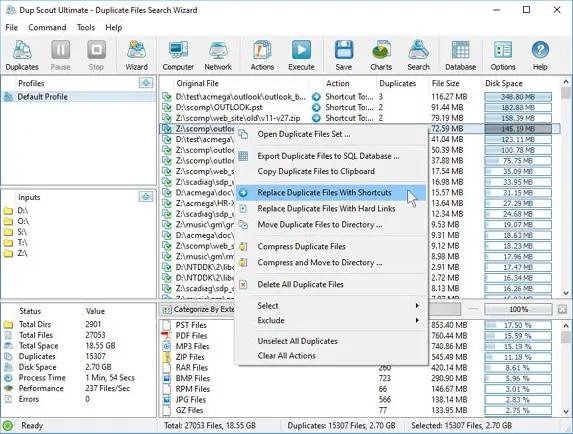
Dup Scout is a duplicate files finder allowing one to search and cleanup duplicate files in local disks, network shares, NAS storage devices and enterprise storage systems. Users are provided with the ability to search duplicate files, save reports, replace duplicates with links, delete duplicate files or move duplicate files to another location.

DupScout Main GUI Application
The DupScout main GUI application provides the ability to search duplicate files, categorize and filter detected duplicate files, save reports to the HTML, PDF, Excel, text, CSV and XML formats, export duplicate files to an SQL database, replace duplicate files with links, move duplicate files to another directory, delete duplicate files, etc.

Search Duplicate Files Dialog
The search duplicate files dialog allows one to specify disks, directories and/or network shares that should be processed. In addition, the user is provided with the ability to detect servers and NAS storage devices on the network and search duplicate files in network shares in one or more servers or NAS storage devices.

Remove Duplicate Files
DupScout provides the ability to replace duplicate files with links, move duplicate files to another directory, compress duplicate files, delete duplicate files, etc. Before executing duplicate files removal actions, DupScout shows the duplicate files removal actions preview dialog allowing one to select/unselect specific duplicate files.

Duplicate Files Statistics and Pie Charts
The pie charts dialog is capable of showing the amount of duplicate disk space and the number of duplicate files per file type, extension, user name, last access, modification and creation dates, etc. In addition, the user is provided with the ability to copy the chart image to the clipboard allowing one to easily integrate DupScout charts into user-custom presentations and documents.

Searching Duplicate Files in Network Servers and NAS Storage Devices
DupScout allows one to scan the network, discover network servers and NAS storage devices, automatically detect all accessible network shares and search duplicate files in hundreds of network servers and NAS storage devices.

Duplicate Files Search Options
The duplicate files search options dialog allows one to specify the default report title, the type of file signature algorithm to use, the maximum number of duplicate file sets to display and provides an option to enable processing and display of duplicate files user names.

Supported Operating Systems:
Windows XP, Vista, 7, 8, 8.1, 10 Server 2003, 2008, 2008 R2, 2012, 2012 R2, 2016

HOMEPAGE:
Код:
https://www.dupscout.com/

FREE DOWNLOAD LINKS:

Код:
https://rapidgator.net/file/21694eec4c04d5c7719b5e6f4b3a8442/Dup_Scout_18.2.38.rar

Код:
https://nitroflare.com/view/4EC9FC2A7AC2136/Dup_Scout_18.2.38.rar
 
f617148f898855c5685c2505f9dee4b2.jpg


EF Commander 26.07 Multilingual | Size: 11.12 MB
Language: English

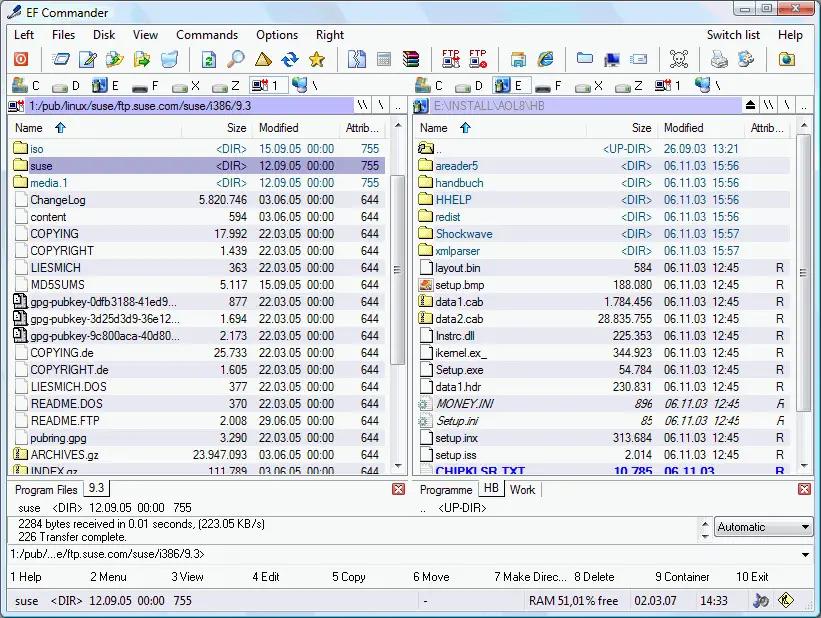
EF Commander is a complex and multi-featured file manager that a wide range of users, from beginners to professionals, will find easy to use. It is the result of many requests received by the author. The first version was written in 1994, under the OS/2 operating system using Presentation Manager, as a personal replacement for the old DOS program Norton Commander™. In 1996 it was ported to the 32-bit Microsoft Windows operating system.

Here are some key features of "EF Commander":

Easy to use
The modern interface helps you to have full control over your files and folders.

Tabbed interface
Define just the views you need in each pane for your folders and files.

Thumbnails
Quickly and easily get an overview your photos or other image collections.

32 bit multi-threading, parallel file operations
All long operations are run with multi-tasking. You can run any number of different operations at the same time, or several instances of the same operation - for example, you can have several "copy" commands going simultaneously.

Direct link to PDAs with Windows CE
EF Commander was the first file manager worldwide with this feature. Handle your data in the same way as on your desktop or laptop computer.

Internal packers for more than 20 archive formats
Use EF Commander to pack files or whole folders in any of the common archive formats. No external programs are required.
Supported formats: 7-Zip, ACE, ARC, ARJ, BZIP2, CAB, CPIO, GZIP, IMG, ISO (ISO9660), LHA, RAR, RPM, SFX, SQX, TAR, TBZ, TGZ, ZIP, ZOO

Internal viewer for more than 30 file formats
View picture files and movies, and play MP3, Ogg/Vorbis, FLAC, WMA and WAV audio files, without having to use any other software.

Use XnView and IrfanView as add-ons
Enlarge the number of available formats to 400 or more. EF Commander runs quietly in the background, but remains fully available to you. Files can also be managed in the internal viewer, in the quick view mode, or as thumbnails.

Fast FTP-client
The built-in FTP client features resume download and FxP (server to server transfers).

Internal text and HEX editor
EF Commander has full text and hex editors for files that are limited only by your system resources.

Functions to split/join large files
Split large files into smaller parts, and recombine the parts.

Create/Verify checksums
Check the integrity of your data. EF Commandersupports the SFV, MD5 and SHA1 formats.

Synchronize function
Synchronize your notebook or your LAN with your work station.

Built-in media player
Play MP3, Ogg/Vorbis, FLAC, WMA and WAV.

External plug-in support for packers, viewers, file system and contents
Extend the functionality of EF Commander with external plugins. Supported formats include WLX, WCX, WFX and Winamp decode plugins.

The following languages are included in the package: English, German, Bulgarian, Catalan, Chinese, Croatian, Czech, Danish, Dutch, French, Galician, Hungarian, Italian, Korean, Latvian, Lithuanian, Macedonian, Polish, Portuguese, Romanian, Russian, Slovak, Spanish, Swedish, Taiwan, Ukrainian.

Operating System: Windows 7, 8/8.1, 10, 11

HOMEPAGE:
Код:
http://www.efsoftware.com/

FREE DOWNLOAD LINKS:

Код:
https://rapidgator.net/file/fc55a6336386c5df82fdf870c3e963d0/EF_Commander_26.07_Multilingual.rar

Код:
https://nitroflare.com/view/791E0D014A7DE9B/EF_Commander_26.07_Multilingual.rar
 
bbb3dff96c6e428e9553772e6a8d83b0.jpg


Evernote 11.24.3.43761 Multilingual | Size: 318.13 MB
Language: English

Evernote allows you to easily capture information in any environment using whatever device or platform you find most convenient, and makes this information accessible and searchable at any time, from anywhere.

EverNote is an application/service which lets you capture, store and sync anything on multiple devices. EverNote works on any OS, whether PC, Mac or phone and can capture anything you throw at it, from notes, to images, media or passwords. All your information is stored in the program and you can use tags and notes to categorize it.

Now that we can access the internet from almost anywhere and any device the difficulty is getting access to your information all at once. It can be store all online or you can keep everything synced up on all your devices.

If you have EverNote installed on your devices, all it takes is having an internet connection and pressing the 'Synchronize' button from the menu, to ensure that you have the same information stored on all devices.

EverNote is a very promising application that captures, stores and syncs any sort of information on all your devices.

Stop forgetting things. Capture everything now so you will be able to find it all later.
- Tasks and to-dos
- Notes and research
- Web pages
- Whiteboards
- Business cards
- Scribbles
- Snapshots
- Wine labels

System Requirements: Windows 10 and newer (32-bit and 64-bit)

FREE DOWNLOAD LINKS:

Код:
https://rapidgator.net/file/b63d11c14e046312c97b56486a1b0ab8/Evernote_11.24.3.43761_Multilingual.rar

Код:
https://nitroflare.com/view/E9FAF367AD168A0/Evernote_11.24.3.43761_Multilingual.rar
 
c7b123e3c7e2c5dc512abec9a2008991.jpg


Executor 2.3.9 | Size: 6.9 MB
Language: English

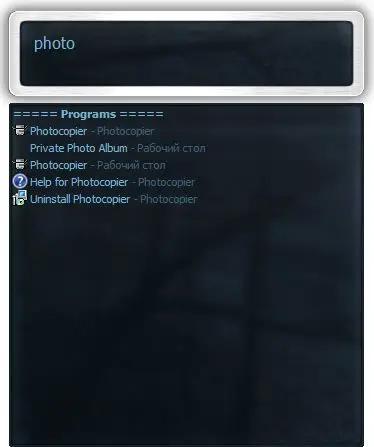
Executor is a multi purpose launcher sporting many optional customizable features and advanced setup. The program originated as I was sick of spending too much time searching for programs through my ever growing windows start-menu, and eye-balling desktop trying to mouse locate what ever I wanted to launch. Also I missed a tool that could ease and optimize my daily workflow. There was of course already programs like this available, but each had it's annoyance or missing features or too(!) geeky.

Features
Keywords have properties like shortcuts, and you can for example drag-drop a shortcut/file/folder/favorite to add it as a keyword.
Auto-completion for keywords, file system and history (can also be configured).
Url detection, Enter URLs directly (like , mail.google.com, google.com orhttps://www.google.com).
Keywords support parameters. Example "google latest executor" "wiki nirvana".
Besides keywords Executor can also optionally and dynamically add matching start-menu items, control panel items and other handy items to the drop-down/list.
Ability to add your own paths to scan for user defined file extensions.
Each keyword can be assigned a hotkey, so Executor can also perform like many popular hotkey managers.
Keyword control, have keyword open program(s) minimized, with admin access, make sure only one instance is running of program and more
Can add keyword integration with popular services like GMail, Twitter, GCal, RTM and many others (see forums for howto's, tutorials and tips).
Optional show icon for current keyword/input.
Optional show drop-down box for current keyword/input (auto-completion).
Optional drop-down box can be set to auto-open (like windows run) displaying auto-completion suggestions.
Optional list displaying matching items.
Layout can be customized. Set colors, font, dimensions, position, transparency and more.
Skinable. Supporting alpha blending effects and free positioning of all elements.
Many settings to customize the program as you like.
Can be launched from an user defined hotkey.
One keyword or text input can start multiple keywords/urls/programs/documents/files etc. Example one keyword opens three websites and/or programs.
Each keyword have properties like optional group (to organize into groups), customizable icon and other properties.
Keyword "find[text]" for using Windows Instant Search feature or Windows Desktop Search.
A number of special commands (like for example pause and replace tag with parameter).
Optional windows context-menu integration (as another way of easily adding new keywords).
Optional show title for the current input.
Can import keywords from windows start-menu.
Can auto import keywords from an url on startup, so you can share keywords between different Executor installations (for example for cooperate use).
Executor has a number settings on how you want it to find desired item(s). Text could "start with" or "contain text" (substring) or short form detection (for example typing ffox for firefox).
All file-paths can be auto-completed (also when file-path is a parameter), and you can use tab and shift-tab to browse filesystem path.
Keywords to manipulate the current active window (center, resize to specific size, maximize width or height etc).
Special keywords to list (and open) running applications, text previously copied to clipboard and recent documents. Can also strip formatting from clipboard text.
Many special keywords like for example lock computer, restart, shutdown, standby, turn off monitor(s), mute sound, show date/time/week number etc.
Shortcut keys for faster navigation.
Integrated calculator.
Integrated Notes, for quick notes etc.
Import/Export keywords (import can also import directly from an url rather than a file).
Option to override windows run hotkey (Win-R).
Optional sounds.
Integrated Windows context-menu (for example when right-clicking list items).
At startup a number of keywords/commands optionally be launched.
Set simple a simple alarm, timer, stop-watch (with optional alert sound).
Pressing enter with no valid input will launch first suggested item (optional).
Be able to grab text from hidden launched console applications and display text in input or in multi-lined text.
Several hidden experimental/minor settings to play with (Example show time/date/other stuff when idle).
Plus more...
Free (freeware for you old timers) MIT-licensed.
Free for commercial use (but feel free to donate if you forced your entire organization to use Executor! I have put a lot of hours in to this :)).

System Requirements: Windows 11, Windows 10, 8 , 7

FREE DOWNLOAD LINKS:

Код:
https://rapidgator.net/file/64e4e16dda1ba6cb839b771a988789f3/Executor_2.3.9.rar

Код:
https://nitroflare.com/view/EE4EFAF68B20CAC/Executor_2.3.9.rar
 
Назад
Сверху Снизу