All sanddisk Software's Collection [Daily Updated]

ezgif-59cb482d4eb0d48f.jpg


Luminar Neo 1.27.1.17225 Multilingual

Languages: Multilingual
File Size: 2.18 GB

Luminar Neo is a powerful, next-generation photo editing software designed to inspire creativity and deliver professional results with ease. It features an intuitive interface and a modern toolkit powered by cutting-edge AI technologies. With a flexible, performance-focused engine at its core, Luminar Neo offers faster editing, seamless layer-based workflows, and precise control over every detail. Whether you're enhancing portraits, transforming landscapes, or exploring your artistic vision, Luminar Neo makes the editing experience both efficient and enjoyable.

AI-Powered
Advanced AI features automatically enhance your photos and save you time.

Easy to use
An intuitive interface and smart tools make editing simple for everyone.

Connected Ecosystem
Start editing on your phone or tabled, finish on desktop — your work stays synced.

Use as a plugin
Integrate seamlessly with Lightroom classic and Photoshop for smooth, flexible editing.

Experience Luminar Neo's capabilities
With support for raw files, exporting in all major file formats, layers, masking, and much more, photography editing software Luminar Neo meets all your editing needs.

- AI image enhancement
- Clone tool
- Raw editing
- Dodge & burn
- Layers support
- Color enhancement
- Non-destructive editing
- Crop and resize
- Lens correction
- Batch processing

Release Notes
What's New

Код:
https://skylum.com/whats-new/luminar-neo

System Requirements
- Hardware: Windows PC with a mouse or similar input device
- Processor: Intel® Core™ i5 8 gen or better, AMD Ryzen™ 5 or better
- OS version: Windows 10 version 1909 or higher (only 64-bit OS)
- RAM: 8 GB or more (16+ GB recommended)
- Disk space: 10 GB free space; SSD for best performance
- Display: 1280×768 or higher resolution
- Graphics: Compatible with OpenGL 3.3 or later

Homepage
Код:
https://skylum.com

DOWNLOAD:

Код:
https://rapidgator.net/file/a8e357de18209727843fa6f3fb6f2255/Luminar.Neo.1.27.1.17225.rar.html

https://ddownload.com/ly8blugrkqpv/Luminar.Neo.1.27.1.17225.rar
 
ezgif-591d19914c50eaab.jpg


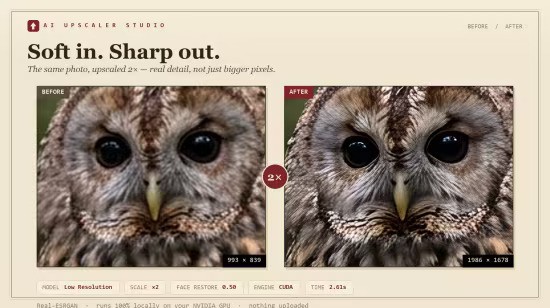
AI Upscaler Studio 1.0.3

Languages: English
File Size: 2.41 GB

Studio-grade upscaling for printable art. Batch-upscale a whole folder at once, up to 10× - to exact print sizes at 300 DPI, entirely on your own NVIDIA GPU. No uploads, no accounts, no slow cloud queue.

Built for people who actually print.
No frills, no fluff - just a fast, local batch image upscaler for Windows that turns low-res art into print-ready files on your own NVIDIA GPU. Six things that matter, when each one matters.

Press-grade speed
FP16, TF32, torch.compile, 768-pixel tiles. A 4K upscale of a 1080p mockup finishes in about eight seconds on an RTX 3060 Ti.

Whole-folder batch
Drop a folder, set the scale, get an archive back. No limits, no babysitting individual files.

1× to 10× scale
A smooth slider, not three preset buttons. Hit exact print dimensions every time.

Stickers stay crisp
The alpha channel runs through the model on its own. No serrated edges on transparent PNGs.

Stays on your machine
Nothing uploads. Or, if you'd rather, use the optional cloud press with your own Replicate key.

Three models, three jobs
Pick by intent, not by filename. Low Resolution for compressed source, CGI / Anime for digital art, High Fidelity for grain-preserving photo work - each backed by a different ESRGAN weight.

Print-size presets, baked DPI
Pick a poster size in inches (5×7 up to 24×36, plus A2 / A1). The output lands at the exact pixel count for the chosen DPI, with the print-DPI tag written into the file so Etsy and Redbubble accept it on first upload.

Release Notes
- Release notes were unavailable when this listing was updated.

System Requirements
AI Upscaler Studio needs an NVIDIA GPU to press at the speed it's built for. If you don't have one, please read this before buying.

- Windows 10 or 11
- NVIDIA GPU with 4 GB+ VRAM (GTX 1660 / RTX 2060 or newer) - required for local mode, 64-bit
- 5 GB free disk space for installer and models

Optional
A free Replicate API key for cloud upscaling - no GPU needed, but per-image cost applies

Not supported
AMD, Intel Arc, or Mac - these fall back to CPU and run 20-60× slower

Homepage
Код:
https://www.getupscalerstudio.com

DOWNLOAD:

Код:
https://rapidgator.net/file/862bc0ab24a4d03c8f349879aa7bde0f/AI.Upscaler.Studio.1.0.3.rar.html

https://ddownload.com/dq0x1d3vc11v/AI.Upscaler.Studio.1.0.3.rar
 
ezgif-5df04df1974d727f.jpg


Audiobook Converter Pro 1.1.8

Languages: English
File Size: 659.32 MB

Convert M4B audiobooks to MP3, AAC, or FLAC — chapters perfectly preserved. Your M4B audiobooks are stuck. They play in one app, on specific devices, and the moment you switch players you lose your chapters and progress.

Audiobook Converter Pro converts your M4B files to MP3, AAC, or FLAC — with every chapter perfectly preserved. Switch to any device, any app, any player. Your entire library, finally portable. If a book has no embedded chapter markers, Audiobook Converter Pro can also infer chapter breaks from silence during interactive conversion, giving markerless audiobooks a reliable split-by-chapters path instead of forcing everything into one long file.

Pro features unlock batch conversion, parallel processing, recursive folder scanning, Watch Folder automation, and flexible naming templates like {Album}/{TrackPadded}-{ChapterTitle} to organise your library exactly how you want it.

Chapter-Perfect Precision
Most converters flatten your audiobook into one long file and discard chapters entirely. Audiobook Converter Pro preserves every chapter marker from your original M4B — titles, timestamps, and order — so your MP3, AAC, or FLAC output behaves exactly like the original in any player that supports chapters.

Blazing Fast Conversions
Optimised conversion engine gets your audiobooks ready in record time. Full Pro unlocks parallel M4B and chapter processing — convert multiple files and chapters simultaneously.

Crystal Clear Quality
Convert to MP3, AAC, or FLAC with pristine audio quality. Choose from multiple bitrate settings up to 320 kbps, or go lossless with FLAC output.

Multi-File & Batch Processing
Full Pro: queue entire collections for conversion. Recursively scan folders to find and convert every M4B file in your library automatically. Choose your own output folder.

Advanced Editing & Naming Templates
Pro feature: edit filenames using metadata — title, artist, album. Apply flexible naming templates like {Album}/{TrackPadded}-{ChapterTitle} to organise your library exactly how you want it.

Intuitive Interface
Drag-and-drop your M4B files, select your output format, and convert. Designed for simplicity — even advanced Pro features are a single click away.

Retro-Inspired Design
A clean, focused interface with a distinctive retro colour palette that makes audiobook management a pleasure rather than a chore.

Privacy First
Everything runs locally on your device. No uploads, no cloud processing, no account required. Your audiobook library stays entirely under your control.

Release Notes
- Release notes were unavailable when this listing was updated.

System Requirements
Windows 10 or later (64-bit)

Homepage
Код:
https://www.indie4tune.com/apps

DOWNLOAD:

Код:
https://rapidgator.net/file/9be9af0641556a138977f22cd6ed0c2c/Audiobook.Converter.Pro.1.1.8.rar.html

https://ddownload.com/roifcoa945uf/Audiobook.Converter.Pro.1.1.8.rar
 
c84Tt-NUgqnjbjt-Iizz-Rs-GNn-P2ih-Lv-COH.png


VueScan Pro 9.8.56 (x64) Multilingual

File Size: 62.6 MB

VueScan is a powerful scanning application that allows you to acquire high-quality images using a flatbed or film scanner. If you are not satisfied with the software delivered by the scanner vendor or if you want to improve it with new functions you should try this program.

Scan Documents
Whether you need to scan a single page or a hundred page book, VueScan has the tools to help you.
Scan with Flatbed and Automatic Document Feeders (ADF)
Scan to PDF (Single and Multipage)
Optical Character Recognition (OCR)
Automatic Color Detection
Small document file sizes
Automatic document deskewing

Scan Photos
Do you have a box full of photos in your drawer? Use VueScan to get them on your computer, and off your to-do list.

Scan to JPG or TIFF
Whether you're saving a few snapshots or archiving boxes of prints, VueScan has the tools you need to output your scans at either the highest possible quality or a large number of good quality scans.

Scan with Flatbed and Automatic Document Feeders (ADF)
VueScan supports over 3000+ different scanners from 35 manufacturers, even scanners that don't have drivers from their manufacturers anymore.

Preset photo sizes for faster scans
VueScan improves one of the slowest parts about scanning by scanning only the part of the flatbed where your photo is. So you can spend less time scanning, and more time enjoying your photos.

Scan multiple photos on the flatbed
Scanning multiple photos with VueScan is very simple. Just put them in the corners of the flatbed, do a preview, and manually crop each of the photos without needing to do another scan.

Automatic file naming for faster scans
Don't waste time manually naming every photo, use VueScan's auto naming feature to include dates, numbers, or other prefixes and suffixes in your file names.

Remove fading and correct colors
Stay out of photoshop and save the best version possible of your photos with VueScan's built in features to remove fading, and correct colors.

Scan Film and Slides
VueScan is the ultimate tool for all your film and slide scanning needs.
Works with almost all film/slide scanners
Scan to JPEG/TIFF/RAW
Infrared Dust Removal
Color correction
IT8 Calibration
Photoshop Integration

Whats New
Код:
https://www.hamrick.com/vuescan/vuescan.htm#changes

System Requirements: Windows 11, 10 x64, 8 x64, 7 x64, Vista x64

Homepage
Код:
https://www.hamrick.com/

DOWNLOAD:

Код:
https://rapidgator.net/file/6ce7986f0958a66b792177b71b277baf/VueScan.9.rar.html

https://ddownload.com/tndsi73bh66n/VueScan.9.rar
 
th-f1ww-LThq-Or-Q02VGdg-Oz-Rk2h-NRQzor-Ne4.jpg


Scooter Beyond Compare 5.2.3.32296

File Size: 27.7 MB

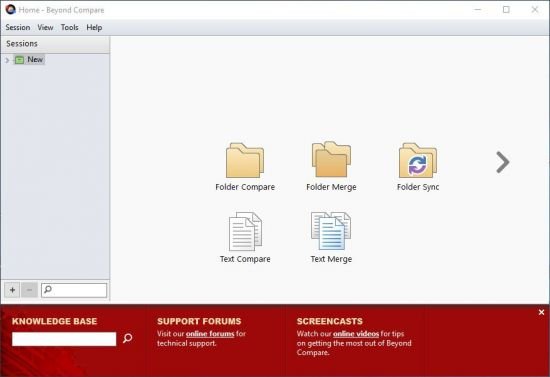
Change is inevitable, so manage it with the best tools. Beyond Compare is the popular choice for data comparison. Compare folders, text files, images, and tables. Review differences efficiently and merge changes with confidence.

Compare
Compare files and folders using simple, powerful commands that focus on the differences you're interested in and ignore those you're not.

Merge
Combine changes from two versions of a file or folder into a single output.

Synchronize
Synchronize your local data, FTP sites, and cloud storage.

Whats New
Код:
https://www.scootersoftware.com/download/v5changelog

Homepage
Код:
https://www.scootersoftware.com/

DOWNLOAD:

Код:
https://rapidgator.net/file/088667cd22a57bced9d790256e7e89f6/Scooter.Beyond.Compare.5.rar.html

https://ddownload.com/bi1ppkvlyk7o/Scooter.Beyond.Compare.5.rar
 
ezgif-36d218c4f6b4a6b3.jpg


ChessBase 26.8 Multilingual

Languages: Multilingual
File Size: 581.33 MB

ChessBase is a personal, stand-alone chess database that has become the standard throughout the world. Everyone uses ChessBase, from the World Champion to the amateur next door. It is the program of choice for anyone who loves the game and wants to know more about it. Start your personal success story with ChessBase and enjoy the game even more.

Whether it is preparation for an individual opponent or tournament, administration and analysis of one's own games, development of training material for self-study or for training groups, or publication of games on the web or in print: ChessBase o.ers an incredible wealth of functions for all areas of study and playing levels. Anyone who is seriously involved in chess, plays tournaments or simply wants to understand chess, needs ChessBase: youth players, amateurs, tournament players, coaches, grandmasters, professional players etc.

New in ChessBase´26

More targeted preparation
Club players need different statistics than top grandmasters. Prepare for your level, not for the World Champion. The ChessBase’26 opening books reflect mainstream theory and often suggest lines that are not easy for the opponent you are preparing for to play.

New tools and improved functions
- Top players immediately recognize the latest trends and the statistics for different move orders. With ChessBase’26, you too can understand the typical variations along with their strategic themes and common plans.
- Train by reviewing selected instructive games.
- Solve the typical tactical motifs – this is revolutionary for opening training and great fun.
- New reference filters
- Instant preparation: simply enter the name.
- Filter out blitz and rapid games with one click.
- New detection of duplicate games.
- Ten times faster and much more precise. Database maintenance has never been so easy.
- Monte-Carlo analysis
- AI description of plans
- Explains a position to you like a good personal trainer.
- (Valuable insights, but be aware that hallucinations are still possible.)
- Real-time ray tracing
- The ray-traced 3D boards have become ultra-fast and reach high resolution within seconds.

Release Notes
- Release notes were unavailable when this listing was updated.

Minimum Requirements
Desktop PC or Notebook, 4 Threads, 8 GB RAM, Windows 10 64bit, DirectX 10 graphics card with 1 GB RAM

Recommended Requirements
Intel core i7 or AMD Ryzen Processor with 8 Threads, 16 GB RAM, Windows 10/11 64bit, DirectX 11 graphics card (or compatible) with 1 GB RAM or more, full HD Monitor

Supported Languages
German, English, Spanish, French, Italian

Homepage
Код:
https://shop.chessbase.com

DOWNLOAD:

Код:
https://rapidgator.net/file/64fb6b93e69799fd99fa3765420f6001/ChessBase.26.8.rar.html

https://ddownload.com/ac0hrvlzus27/ChessBase.26.8.rar
 
ezgif-3980025c7535936d.jpg


FRITZ 21.1 Multilingual

Languages: Multilingual
File Size: 621.18 MB

FRITZ is more than just a chess engine – it’s a training revolution! Whether you’re taking your first steps into the world of club chess, or already playing at a tournament level: with FRITZ, you can train more efficiently, intelligently and with a more personalised approach than ever before.

- COMPETE AGAINST LEGENDS
- FRITZ is fun! BETTER CALCULATIONS – EVEN UNDER TIME PRESSURE!
- STYLE SIMULATION AT THE HIGHEST LEVEL
- EVEN STRONGER. EVEN MORE BEAUTIFUL. EVEN MORE DIRECT.
FRITZ is more than just a chess engine – it’s a training revolution! Whether you’re taking your first steps into the world of club chess, or already playing at a tournament level: with FRITZ, you can train more efficiently, intelligently and with a more personalised approach than ever before.

COMPETE AGAINST LEGENDS
Take on the greatest masters: Lasker, Tal, Fischer, Karpov – with authentic style, and an ELO rating tailored to you. The unique style engine simulates their human playing styles even more realistically - only FRITZ can do that. Your opponents – legendary masters or animalistic foes – now appear as animated characters in video form and comment on your moves!

FRITZ is fun! BETTER CALCULATIONS – EVEN UNDER TIME PRESSURE!
Perfect your variation calculations: FRITZ offers furtherimproved calculation training with the Bullet Training mode - learn to keep your cool, even under pressure!

STYLE SIMULATION AT THE HIGHEST LEVEL Train realistically and practically: use the style analysis from ChessBase’26 to configure whether FRITZ should play aggressively, positionally, exchange-oriented, or take risks. Style Simulation at the Highest Level Train in a realistic and practical way: choose whether FRITZ should play aggressively, take risks, focus on positional play, or be willing to make exchanges.

- Aggressive, positional, exchange-happy — you choose the style
- Risk-taking or solid — the playing style adapts to you
- Practical training against realistic playing styles

EVEN STRONGER. EVEN MORE BEAUTIFUL. EVEN MORE DIRECT.
- Multiple computer chess world champion
- Rating: 3,620 ELO
- Matches against legends: Lasker, Tal, Fischer, Karpov, with video animations
- Calculation training with a new evaluation system ChessBase Premium Account (3 months) – access to the ChessBase mobile world anytime, anywhere: Live database with 12 million games, tactic training with over 50,000 puzzles, remote engines on 4 CPU machines, the Opening Training app, video library with hundreds of training videos, and online games on playchess.

Release Notes

- Release notes were unavailable when this listing was updated.

System Requirements
- Minimum: Desktop PC or notebook, 4 threads, 8 GB RAM, Windows 10 with 64-bit
- Recommended: PC Intel i7, i9 or Ryzen 7/9, 16 GB RAM, Windows 11 with 64-bit, Windows Media Player, graphics card with 1 GB RAM

Homepage
Код:
https://shop.chessbase.com

DOWNLOAD:

Код:
https://rapidgator.net/file/99595843ee44c31488df03bb3e32b132/FRITZ.21.1.rar.html

https://ddownload.com/pxdnj53thon7/FRITZ.21.1.rar
 
2606301103240112.jpg


SysTools PDF Unlocker 6.0.0

File size: 32.18 MB

SysTools PDF Unlocker software is an easy-to-use and thus one of the best PDF restriction remover tools that you can easily use to unlock PDF files. Are you looking for an easy-to-use PDF unlocker tool to unlock PDF restrictions from your locked Adobe Acrobat PDF files so that you can perform the operations (editing, printing, copying, extractions) on them easily? Do you need a PDF Unlocker software tool to remove “Owner” password from your protected PDF file? Then, SysTools PDF Unlocker software will prove to be one of the best PDF unlocker solutions for you.

• Remove PDF restrictions: Printing / Copying / Editing / Page Extraction
• Supports Unlocking of PDF files from Owner Level Password Security
• Unlock PDF File in Batch with Business or Enterprise License
• Facility to Remove Comment Restrictions from PDF
• Easily Remove Document Assembly Restriction from PDF Files
• Remove Signature restrictions and Enable Form Filling in PDF
• Adobe Acrobat is not required to Remove PDF Document Restrictions
• PDF Unlocker Tool Supports Adobe Acrobat PDF with 128 / 256 bit encryption.
• Does not Recover or Remove Restrictions from Corrupt Files
• PDF Password Remover is Compatible with all Windows versions (32 & 64 bit) OS.

List of Key Features in SysTools PDF Unlocker Tool
Find the Unique Features of the Software to Unlock PDF Files

Remove PDF Restrictions
This PDF password recovery software allows users to remove PDF document restrictions. The tool can unlock PDF files for editing, printing, copying & extracting pages. Users can also remove restrictions like comment, sign, document assembly and After unlocking PDF file, save unsecured PDF at any desired location. Also, with single file mode, users can unlock single PDF at a time.

Unlock Password Protected PDF File
The Adobe PDF Unlocker tool can remove owner level password security and unlock PDF restrictions. Also, if there is any user level password applied on the PDF document then users can unlock it by providing the respective password when prompted. However, once the PDF gets unlocked, the resultant PDF document will not prompt for password to open

Unrestrict PDF File in Batch
If the user has multiple PDF files & all are having a common PDF file restriction or with some special restrictions. Then PDF Unlocker Software can remove PDF password for printing, copying, editing and extracting data. For batch operation, it is needed to order for Business or Enterprise license of the tool as single user license will work in single file mode only.

Preview Permissions of PDF File
As you browse & load any PDF file, the PDF password remover software will immediately list the associated permissions. Users can see the current status of PDF file permission in ‘After’ & ‘Before’ columns respectively while the software will unlock restricted PDF files. Once, PDF file gets unlocked, the permission status preview will changes accordingly.

Maintains the File Integrity
While unlocking and saving a Portable document format file, this PDF password recovery software maintains the data integrity. It will not make any changes to the original formatting of the PDF file. Also, It will keeps the attachments and other formatting intact for the respective document.

Save File in New Folder
In order to save the PDF files after unlocking, this Adobe PDF Unlocker software allows you to choose any desirable location. Once the software remove PDF restrictions from the selected files, you can create a new folder straight away from the software panel itself and save the file into for further convenience.

Remove PDF Signing and Comment Restriction
This PDF Restriction Remover Tool facilitates the user to unlock PDF comment restrictions. However, after removing restrictions users can easily add comments in sticky notes or highlighted text format. Moreover, this tool also supports to remove signing restriction PDF files so that users can easily sign their PDF. Basically, signing makes the document authentic and assures the person that the document comes from a verified source.

Remove Document Assembly & Form Restrictions
Use this Adobe PDF Unlock tool to remove document assembly restrictions from PDF files. After removing this security users can easily assemble PDF documents without any hassle. Moreover, if users are unable to fill details in the PDF forms due to security then, they can use this software. Because it will remove PDF document restrictions and.

What's new
• Provided support for Offline activation using a new License Generator code instead of .Lic file.
• Added the Search Files option to locate and load PDF files from selected drives for quick processing

System Requirements: Windows 11, Windows 10 , Windows 8.1, Windows 8, Windows 7, Windows Vista, Windows XP and Windows Server 2025, 2022, 2019, 2016, 2012 R2, 2008 R2, and 2003 (64-bit)

Homepage
Код:
https://www.systoolsgroup.com/

DOWNLOAD:

Код:
https://rapidgator.net/file/9cf21c6112511394608352c2ecea9e8e/SysTools.PDF.Unlocker.6.0.0.rar.html

https://ddownload.com/q6mjubnm9msm/SysTools.PDF.Unlocker.6.0.0.rar
 
ezgif-30345469f9a18480.jpg


TeraCopy v4.0.0.28

File Size: 11.67 MB | Languages: English, Deutsch, Español, Italiano, Português, Français, ...

TeraCopy is designed to copy and move files at the maximum possible speed.
Pause and resume file transfer activities.
Can perform multiple copying operations at the same time.
Option to use Shadow Copy (copy locked files).

TeraCopy is a utility designed to copy/move files faster and more secure. Can resume broken file transfers. TeraCopy skips bad files during copy and even shows the skipped files at the end of files transfer. TeraCopy will calculate files checksum on the fly to speed up source and target files comparsion. Seamless integration with Windows Explorer allows you to keep working with files as usual.

Release Notes
Код:
https://blog.codesector.com/2026/06/20/teracopy-4/

Changes in v4.0.0.28: some improvements.

System requirements: Windows 10, 11

Homepage
Код:
https://blog.codesector.com

DOWNLOAD:

Код:
https://rapidgator.net/file/9097d49191f27f31b809211dc3b43051/TeraCopy-v4.0.0.28.rar.html

https://ddownload.com/7ftrrykfudlp/TeraCopy-v4.0.0.28.rar
 
ezgif-5487968bb60219af.jpg


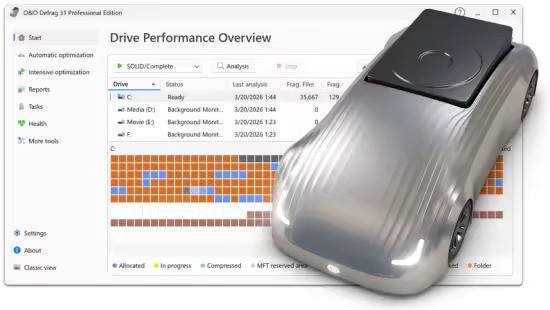
O&O Defrag Professional 31.3.26057

Windows x64 | File size: 65.37 MB

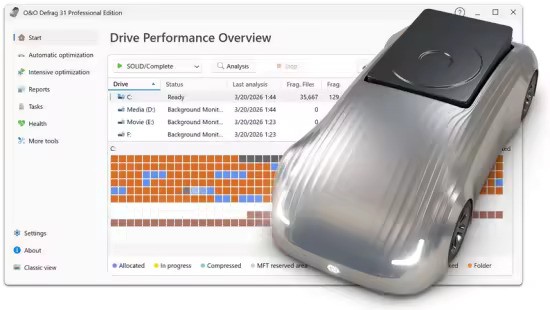
O&O Defrag tidies up this shoebox by combining the snippets of a file and writing them one after the other to the hard drive or SSD. In addition, the files are reorganized so that the access times during loading are minimized. This saves you time and protects your data carriers. Regular use of O&O Defrag noticeably increases the access speed and overall performance of your Windows system. And so that you never have to worry about “file snippets” again, O&O Defrag can also be run completely automatically in the background.

Simply simple
Everyone should have a fast computer. That’s why we’ve made O&O Defrag 31 so simple that anyone can use it. The new modern view does not require complicated settings.
Not a difficult decision as to which is the best defragmentation strategy for your PC. O&O Defrag takes care of everything itself. All you have to do is choose whether you want to start O&O Defrag manually yourself or whether you want it to take care of everything automatically.

O&O VisualDisk
Visualization of write access to SSDs
With O&O VisualDisk, write access to the hard drive as it takes place on flash-based storage media such as SSDs and NVMe drives is clearly displayed. This innovative feature shows how defragmentation can help reduce future write accesses and extend the lifespan of SSDs. The user gets a clear picture of how the hard drive works and how its performance can be optimized through targeted measures. O&O VisualDisk helps you understand how O&O Defrag can get the most out of a hard drive and protect it from unnecessary wear and tear – for a long-lasting and fast PC system.

O&O StartupManager
Remove unnecessary ballast at take-off
The new O&O StartupManager offers a clear overview of all programs, tasks and services that are automatically executed when Windows starts. With detailed information about each program – including how it affects the system’s startup time – it is easy to decide which programs should be enabled or disabled. Unnecessary applications are marked as such and can be deactivated with a mouse click. Defective start entries are also detected and can be deleted. This shortens the startup time of the computer and ensures that it is ready for use faster.

New Boot-Time Optimization and improved O&O IntensiveOptimize
The new boot time optimization optimizes the system fully automatically even before Windows starts – so even locked system files and other critical files can be reliably accelerated.
With the revised O&O IntensiveOptimize, demanding users can also optimize their system in their own Windows environment – with full access to all user and system files. Thanks to the improvements in version 31, a single mouse click is now enough, even for Bitlocker-encrypted drives.

My individual O&O Defrag
O&O Defrag 31 also gives you the opportunity to choose your own personal defragmentation strategy. In the classic view, you can make all professional settings yourself.
In O&O Defrag 31, you can switch at any time between the classic view with all professional settings and the modern view, which is reduced to the essentials.

System maintenance of your data carriers
O&O Defrag 31 checks your hard drive or SSD for inconsistencies that can lead to problems. It examines the component memory and Windows system files for errors.
O&O Defrag will show you whether and which errors have been found after the check has been completed. With the repair function, most errors can be fixed directly.

Remove ballast and free up space
Over time, more and more ballast accumulates on a PC. Temporary files, internet cache and the like can take on considerable proportions. This can lead to a storage space problem, especially on modern SSDs. But backups also take much longer than necessary.
With the improved O&O DiskCleaner in O&O Defrag, you can put an end to files that are no longer needed.

Remove superfluous programs
Programs that are no longer in use can pose a security risk. Definitely, they are wasting disk space. You probably won’t need a 2011 tax filing program anymore. But do you even know it’s still installed?
O&O Defrag 31 now clearly displays all installed programs. And with one click, you can easily uninstall the ones you no longer need. This saves storage space (important for SSDs) and increases your security.

Automatic defragmentation in the background
The automatic defragmentation optimizes your data carriers in the background without negatively affecting your computer’s performance. O&O Defrag can be set up so that defragmentation starts automatically at a certain level of fragmentation, on certain days of the week, or whenever your screensaver is active.

Native support for the ARM platform
For the first time, O&O Defrag 31 now supports the family of CPUs based on the ARM architecture (Advanced RISC Machine) in addition to the previous Intel and AMD processors. These are currently mainly used in new Windows PCs with AI support and will take a significant market share in the coming period due to their energy efficiency and lower costs.

O&O Defrag ensures maximum drive performance at all times
Intelligent optimization technology adapts to the type of drive and keeps systems reliably fast, whether in daily office operations or under heavy load. With comprehensive automation functions, detailed analyses and proven optimization methods, O&O Defrag offers full control and measurable performance benefits – for individual workstations as well as for professional IT environments.

Automatic Drive Optimization
- Fully automatic defragmentation of classic hard drives (HDD)
- SSD-optimized procedures without unnecessary write access
- Automatic detection of drive type (HDD / SSD)
- Separate optimization of system and data drives
- Long-term performance maintenance without manual intervention

Powerful defragmentation methods
- Multiple optimization strategies for different requirements
- Contiguous storage of fragmented files
- Consolidation of free storage areas
- Reducing future fragmentation
- Optimization of folder and directory structures
- Improved access times to frequently used files

Automation & Background Operation
- Fully automatic background operation
- Start of optimization when the system is idle
- Time-controlled optimizations according to schedule
- Event-based execution on inactivity
- Automatically pause on user activity
- Individual time windows per drive

Offline & Boot-Time Optimization
- Optimization of locked system files before Windows starts
- Processing files that are not accessible during operation
- Scheduled offline optimization with automatic restart
- Particularly effective in highly fragmented systems

Resource and system conservation
- Low-priority defragmentation
- Intelligent control of CPU and I/O load
- No impact on running applications
- Optimization only with sufficient system resources
- Optional deactivation on battery power

Analysis & Transparency
- Detailed analysis of the fragmentation state
- Clear display of all drives
- Display of last and next optimization operations
- Logging of all optimization jobs
- Traceable history of all measures

User-friendly operation
- Single interface for all drives
- One-click optimization with recommended settings
- Automatic mode for maximum simplicity
- Advanced Expert Options for Power Users
- Clear status indicators and understandable feedback

Drive & File System Support
- Optimizing NTFS Volumes
- Internal and external drive support
- Suitable for large disks and many files
- Optimal management of large file structures
- Security & Stability
- Gentle optimisation processes
- File System Integrity Protection
- Clean cancel on restart or shutdown
- Continuation of interrupted optimizations
- Stable continuous operation on productive systems

Optimization for different application scenarios
- Ideal for office and workstation computers
- Optimizes workstations with large project files
- Suitable for systems with SSD and HDD combinations
- Long-term performance stability for archive and data drives

What's new
Код:
https://www.oo-software.com/en/products/oodefrag

System Requirements: Windows 10 & 11

Homepage
Код:
https://www.oo-software.com/

DOWNLOAD:

Код:
https://rapidgator.net/file/c50924f9164d4dedbd59eb181cf4e3cc/OO.Defrag.Professional.31.3.26057.rar.html

https://ddownload.com/csjkwy5ggt11/OO.Defrag.Professional.31.3.26057.rar

 
l-Lpp-Drs-Gwxz7gk20Dpqhio9bm-I1c5tfr.jpg


WinRAR 7.23 (x64) Final Multilingual

File size: 3 MB

WinRAR is a powerful archive manager for Windows. This is a powerful compression tool with many integrated additional functions to help you organize your compressed archives. It can backup your data and reduce size of email attachments, decompress RAR, ZIP and other files downloaded from Internet and create new archives in RAR and ZIP file format. The archiver puts you ahead of the crowd when it comes to compression. By consistently creating smaller archives, WinRAR is often faster than the competition. This will save you disc space, transmission costs AND valuable working time as well. WinRAR is ideal for multimedia files. It automatically recognizes and selects the best compression method.

The special compression algorithm compresses multimedia files, executables and object libraries particularly well. RAR files can usually compress content by 8 percent to 15 percent more than ZIP files can.

Features
It is a powerful compression tool with many integrated additional functions to help you organize your compressed archives.
It puts you ahead of the crowd when it comes to compression. By consistently creating smaller archives, WinRAR is often faster than the competition. This will save you disk space, transmission costs AND valuable working time as well.
Supports all popular compression formats (RAR, ZIP, CAB, ARJ, LZH, ACE, TAR, GZip, UUE, ISO, BZIP2, Z and 7-Zip).
It is ideal for multimedia files. Automatically recognizes and selects the best compression method. The special compression algorithm compresses multimedia files, executables and object libraries particularly well.
Allows you to split archives into separate volumes easily, making it possible to save them on several disks for example.
Allows you to create selfextracting and multivolume archives.
Recovery record and recovery volumes allow to reconstruct even physically damaged archives.
It is also ideal, if you are sending data through the web. Its 256 bit password encryption and its authenticated signature technology will give you the peace of mind you have been looking for.
It is easier to use than many other archivers with the inclusion of a special "Wizard" mode which allows instant access to the basic archiving functions through a simple question and answer procedure. This avoids confusion in the early stages of use.
It is a trial product, meaning you have the chance to thoroughly test it. The program can be used absolutely free of charge for 40 days!
Licenses are valid for all available language and platform versions. If you have purchased several licenses, you can even mix versions to meet your own personal needs.

Whats New
Код:
https://www.rarlab.com/rarnew.htm

System Requirements: Windows 7, 8, 8.1, 10, 11

Homepage
Код:
https://www.rarlab.com

DOWNLOAD:

English


Код:
https://rapidgator.net/file/b4b0cfa0948299393b9f7cfa391ed926/7.23_English.zip.html

https://ddownload.com/6f5pn6mwxfqm/7.23_English.zip

Arabic

Код:
https://rapidgator.net/file/153e1c253526ed5d9561362c6f121e3f/Arabic.winrar-x64-723ar.zip.html

https://ddownload.com/9dajlpv1i26x/Arabic.winrar-x64-723ar.zip

Azerbaijani

Код:
https://rapidgator.net/file/d6ea7b97a75ff4301ad076399ea6a00b/Azerbaijani.winrar-x64-723az.zip.html

https://ddownload.com/lib7pgsk2qle/Azerbaijani.winrar-x64-723az.zip

Armenian

Код:
https://rapidgator.net/file/ed20550885b991b46319f22e4c2ddb86/Armenian.winrar-x64-723am.zip.html

https://ddownload.com/8k03ut92axs7/Armenian.winrar-x64-723am.zip

Croatian

Код:
https://rapidgator.net/file/04d76da381218497c8f411db5bc7ee70/Croatian.winrar-x64-723cro.zip.html

https://ddownload.com/45uaopykgei6/Croatian.winrar-x64-723cro.zip

Catalan

Код:
https://rapidgator.net/file/e1318f0324c9ec893a66da4bf679f8cc/Catalan.winrar-x64-723ca.zip.html

https://ddownload.com/u6afzhbj1vkk/Catalan.winrar-x64-723ca.zip

German

Код:
https://rapidgator.net/file/cf2921c758208dc6d02b8b469519560e/German.winrar-x64-723d.zip.html

https://ddownload.com/fs9nptddijmq/German.winrar-x64-723d.zip

Turkish

Код:
https://rapidgator.net/file/7ed2d9755c0f38891757ac7465a3b504/Turkish.winrar-x64-723tr.zip.html

https://ddownload.com/a4ngzguoldd4/Turkish.winrar-x64-723tr.zip

Thai

Код:
https://rapidgator.net/file/5e9daff5fe49976d17a9e2d9aef11d66/Thai.winrar-x64-723th.zip.html

https://ddownload.com/h30bnfkx83so/Thai.winrar-x64-723th.zip

Vietnamese

Код:
https://rapidgator.net/file/aa59466de6cc543570026dc7e6308e2e/Vietnamese.winrar-x64-723vn.zip.html

https://ddownload.com/ddlvxnmgx91f/Vietnamese.winrar-x64-723vn.zip

Ukrainian

Код:
https://rapidgator.net/file/849bea85fb836a538584f791f3c51a26/Ukrainian.winrar-x64-723uk.zip.html

https://ddownload.com/bcwtkyw2lz56/Ukrainian.winrar-x64-723uk.zip
 
ezgif-3a24cad78ecdc346.jpg


WinRAR 7.23 (x64) Final Portable

Language: English | File size: 7.33 MB

WinRAR is a powerful archive manager for Windows. This is a powerful compression tool with many integrated additional functions to help you organize your compressed archives. It can backup your data and reduce size of email attachments, decompress RAR, ZIP and other files downloaded from Internet and create new archives in RAR and ZIP file format. The archiver puts you ahead of the crowd when it comes to compression. By consistently creating smaller archives, WinRAR is often faster than the competition. This will save you disc space, transmission costs AND valuable working time as well. WinRAR is ideal for multimedia files. It automatically recognizes and selects the best compression method.

The special compression algorithm compresses multimedia files, executables and object libraries particularly well. RAR files can usually compress content by 8 percent to 15 percent more than ZIP files can.

Features
It is a powerful compression tool with many integrated additional functions to help you organize your compressed archives.
It puts you ahead of the crowd when it comes to compression. By consistently creating smaller archives, WinRAR is often faster than the competition. This will save you disk space, transmission costs AND valuable working time as well.
Supports all popular compression formats (RAR, ZIP, CAB, ARJ, LZH, ACE, TAR, GZip, UUE, ISO, BZIP2, Z and 7-Zip).
It is ideal for multimedia files. Automatically recognizes and selects the best compression method. The special compression algorithm compresses multimedia files, executables and object libraries particularly well.
Allows you to split archives into separate volumes easily, making it possible to save them on several disks for example.
Allows you to create selfextracting and multivolume archives.
Recovery record and recovery volumes allow to reconstruct even physically damaged archives.
It is also ideal, if you are sending data through the web. Its 256 bit password encryption and its authenticated signature technology will give you the peace of mind you have been looking for.
It is easier to use than many other archivers with the inclusion of a special "Wizard" mode which allows instant access to the basic archiving functions through a simple question and answer procedure. This avoids confusion in the early stages of use.
It is a trial product, meaning you have the chance to thoroughly test it. The program can be used absolutely free of charge for 40 days!
Licenses are valid for all available language and platform versions. If you have purchased several licenses, you can even mix versions to meet your own personal needs.

Whats New
Код:
https://www.rarlab.com/rarnew.htm

System Requirements: Windows 7, 8, 8.1, 10, 11 (x64)

NOTE : This portable not work in windows 11 24h2

Homepage

Код:
https://www.rarlab.com

DOWNLOAD:

Код:
https://rapidgator.net/file/4f1ef1367260ac79330390f029fb4cde/WinRAR.7.23.Portable.zip.html

https://ddownload.com/hp9y5lzveh38/WinRAR.7.23.Portable.zip
 
ezgif-65c4d7f5f2c02f3d.jpg


Photo Organizer AI Premium 5.5.0

Languages: English
File Size: 460.36 MB

Organize Scattered Photos into Proper Event Albums. Tame the chaos in your directories. Photo Organizer AI automatically clusters random, unstructured files into clean, chronologically matched event albums while sorting out duplicates and low-quality photos.

Supercharged Culling & Organization
A high-performance workspace designed specifically for professional photographers and digital collectors.

AI Subject & Scene Classification
Automatically tag subjects and classify scenes like mountains, water, rain, document, and documents using embedded local ONNX classifiers.

Blur & Focus Inspection
Detect blurry, grainy, out-of-focus photos, and red eyes automatically. Slide to cull items beneath your customized quality threshold.

DirectML GPU Acceleration
Unchain the power of your graphics hardware. Runs all deep learning culling networks locally using DirectML with stunning frame speeds.

Virtual Event Albums
Group similar chronological events together dynamically. Split, merge, paste, and organize virtual albums without altering physical folders.

Identical & Near-Duplicates
Scan for files with identical image checksums or extremely high visual similarities, and group them so you can retain the best frame.

100% Local & Private
Zero cloud uploads. All analysis, photo scanning, duplicate detection, and file management happen entirely on your computer, keeping your photos secure.

Turn Scattered Photos into Proper Event Albums Today
Save hours of manual sorting and culling. Let local AI group your random scattered pictures into clean, beautifully structured event albums automatically.

Release Notes
Dynamic Sidebar Preferences
Pin the left sidebar to anchor and auto-resize the active photo workspaces side-by-side, or unpin to auto-hide.

Instant Workspace Toggles
Experience 100% instantaneous switching between the Photos Culler grid and the Photo Albums.

Onboarding Empty States
Added high-contrast dark onboarding cards for newly opened workspaces.

Sub-Album Directory Structure
Hierarchical directory creation when physical transfer is committed to disk.

System Requirements
Windows 10 and 11 (64-bit)

Homepage
Код:
https://aipo.bytecar.in

DOWNLOAD:
Код:
https://rapidgator.net/file/4c7d8adfd28ab463aa4690c6adcfe6aa/Photo.Organizer.AI.Premium.5.5.0.rar.html

https://ddownload.com/85emakmo5hoh/Photo.Organizer.AI.Premium.5.5.0.rar
 
ezgif-6b88626c724f8b85.jpg


Document Scanner 2.2.5 Multilingual

Languages: Multilingual
File Size: 1.75 GB

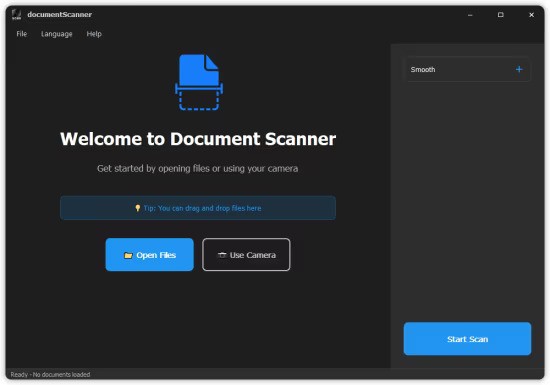
Document Scanner is a professional desktop document scanning and management application that provides complete document digitization solutions for individual and enterprise users.

Multi-Format Support
- Import: Common formats such as PDF, PNG, JPG, JPEG, TIFF, BMP, etc.
- Export: High-quality PDF, PNG, JPG, etc.
- Batch Processing: Process multiple document pages at once.

Powerful OCR Recognition
- Text Extraction: Quickly extract plain text from any image for fast copying and editing
- Full Structure Extraction: Advanced AI identifies layouts, preserving tables, headings, images, formulas, and paragraphs
- Multi-Format Export: Convert scans directly into PDF (searchable), TXT, MARKDOWN, WORD (DOCX), and HTML
- Multi-Language Engine: High-accuracy recognition for 60+ global languages

Professional Image Editing
- Smart Cropping: Automatically detects document boundaries
- Rotation Adjustment: 90-degree rotation, free rotation
- Color Optimization: Brightness, contrast, saturation adjustment
- Filter Effects: Black and white, grayscale, sharpening, etc.
- Annotation Tools: Rectangle, circle, arrow, text annotation
- Blur Tool: Protects privacy information

Camera Scanning
- Real-time camera capture
- Autofocus and exposure adjustment
- Instant scanning for rapid digitization

Multi-Page Document Management
- Thumbnail grid view
- Reorder
- Deletion and editing
- Page preview

Flexible Export Options
- PDF Export: Supports multiple page layouts (single-page, double-page, grid)
- Print Support: Adjustable scaling and margins
- Batch Export: Saves all pages at once

Modern Interface
- Dark theme design, eye protection
- Borderless window, clean and beautiful
- Smooth animation effects
- Responsive layout, adapts to various screens

Supported OCR Languages
Our high-precision AI engine now supports an extensive range of global languages across multiple scripts.

Release Notes

- Supports importing PDF files
- Added OCR recognition feature
- OCR results can be exported in PDF, WORD, HTML, MARKDOWN and other formats
- Fixed known bugs

System Requirements
- OS: Windows 10 version 17763.0 or higher
- Memory: 8 GB (Minimum), 16 GB (Recommended)
- Processor: Intel Core i7-10th Gen / AMD Ryzen 7 4000 (Minimum), Intel Core i9-12th Gen / AMD Ryzen 9 5900X (Recommended)

Homepage
Код:
https://tuguoba.com/scanner

DOWNLOAD:

Код:
https://rapidgator.net/file/be5d087262d2ae3f45e7637f41f653d1/Document.Scanner.2.2.5.rar.html

https://ddownload.com/nt8um13le062/Document.Scanner.2.2.5.rar
 
th-wb-LUzo-Ge-Ulvhpnj7SXHr-TL0j0k-UTah9v.png


FolderMatch 5.1.3.0 Multilingual

File size: 19.16 MB

FolderMatch is an award-winning Windows software that makes it easy to compare folders & files and find duplicate files. Winner of the prestigious Shareware Industry Award for three consecutive years, FolderMatch is a must-have insurance against data loss.

Compare Folders
FolderMatch is an essential software for anyone who needs to compare two folders. Its intuitive user interface makes it easy to quickly compare two folders and see their differences in a side-by-side layout. With various criteria available to filter the results (Name, Type, Date, Size), you can easily see only the changes that you want to see.
If you want to resolve the differences, FolderMatch allows you to manually copy, move, delete, & rename files and subfolders. If you want, FolderMatch can even synchronize the folders for you! Get FolderMatch today and you'll never have to worry about manually comparing and synchronizing two folders ever again!

Compare Files
FolderMatch is the perfect choice for anyone looking to compare two files quickly and accurately. Whether you need to compare the properties of two files or their text content, we've got you covered. Our program can compare the text content of files and display the differences in a side-by-side layout. We support a variety of formats, including Microsoft Office, OpenDocument, Adobe PDF, RTF, HTML, and XML (both older and newer versions).
With FolderMatch, you have the ability to ignore white space and letter case differences, view differences at the character, word, or line-level, and even configure the output to show line numbers and formatting characters. Plus, you can choose to view all lines or only those that are different, so you can focus on the differences that matter most to you. Try FolderMatch today and take your file comparison to the next level!

Find Duplicates
Are you tired of searching through your files and folders to find and delete duplicates? FolderMatch can help! With one of the fastest duplicate search engines available, our program can quickly locate all your duplicate files, even if the names are different. Simply specify your criteria for what constitutes a duplicate (such as name, size, date, or content), choose which file types to search for (including all types, applications, audio, documents, images, text, and video), and decide which files to include or exclude.
Once the duplicates are found, you can easily select which ones to remove and safely delete them in a variety of ways. And if you ever need to recover a file you've moved, FolderMatch makes it easy to do so. Upgrade your file management with FolderMatch and save time and space on your device.

So much more!
FolderMatch also provides other tools to help manage the contents of your folders. Tools offered include
- A mass file renamer.
- A mass file time stamp editor
- A hex content viewer
- An atomic clock sync utility
- And so much more!

FolderMatch feature list

Comparison features
- Compares files or folders (including sub-folders) floppy drives, hard drives, CD-ROM drives, zip drives, and network drives (UNC paths supported)
- Supports the following file systems: FAT, VFAT, FAT32, HPFS, NTFS, CDFS, and UDF
- Offers choice of six comparison types: Filename Only, Size Only, Size and Date/Time, Contents, Attributes, Version Stamp
- Supports HUGE files (> 4 GB)
- Supports Unicode folder/file names
- Compares only files and folders that match Include and Exclude filter pattern lists which you define (wildcards supported)
- Include/Exclude System and Hidden Files
- Handles NTFS and FAT timestamp incompatibilities
- Auto-recognizes Daylight Savings Time differences
- Allows for user-specified number of bytes (chunk size) to be read and compared during a Content comparison.
- Remembers the last 20 folder/file pairs compared.
- Shows text differences between two text files, Microsoft Office, Open Document, or PDF documents. (MS Word, MS Excel, and Adobe Reader not required)

Additional features
- Find duplicate files, even if their names are different
- Safely remove duplicate files
- Rename multiple files and folders
- Sync the dates/times of two files
- Set the date/times of multiple files
- View Hexadecimal binary contents of files (HexDump)
- Sync your PC's system clock with an atomic time server
- Print folder/file comparison results
- Export folder/file comparison results
- Save/Load unlimited Session Settings
- Conforms with Windows Windows 10 32 & 64 standards
- Ridiculously simple to use

What's new
Код:
https://www.foldermatch.com/fmhistory.htm

System Requirements: Windows 10,11 32 & 64 standards

Homepage
Код:
https://www.foldermatch.com/

DOWNLOAD:

Код:
https://rapidgator.net/file/3c009c152e97ea9ca5342dd016ece5df/FolderMatch.5.1.3.0.rar.html

https://ddownload.com/jynxmvffwyu6/FolderMatch.5.1.3.0.rar
 
ezgif-3da87e022ff3fcc6.jpg


O&O Defrag Professional 31.3.26064 (x64)

Windows x64 | File size: 65.37 MB

O&O Defrag tidies up this shoebox by combining the snippets of a file and writing them one after the other to the hard drive or SSD. In addition, the files are reorganized so that the access times during loading are minimized. This saves you time and protects your data carriers. Regular use of O&O Defrag noticeably increases the access speed and overall performance of your Windows system. And so that you never have to worry about “file snippets” again, O&O Defrag can also be run completely automatically in the background.

Simply simple
Everyone should have a fast computer. That’s why we’ve made O&O Defrag 31 so simple that anyone can use it. The new modern view does not require complicated settings.
Not a difficult decision as to which is the best defragmentation strategy for your PC. O&O Defrag takes care of everything itself. All you have to do is choose whether you want to start O&O Defrag manually yourself or whether you want it to take care of everything automatically.

O&O VisualDisk
Visualization of write access to SSDs
With O&O VisualDisk, write access to the hard drive as it takes place on flash-based storage media such as SSDs and NVMe drives is clearly displayed. This innovative feature shows how defragmentation can help reduce future write accesses and extend the lifespan of SSDs. The user gets a clear picture of how the hard drive works and how its performance can be optimized through targeted measures. O&O VisualDisk helps you understand how O&O Defrag can get the most out of a hard drive and protect it from unnecessary wear and tear – for a long-lasting and fast PC system.

O&O StartupManager
Remove unnecessary ballast at take-off
The new O&O StartupManager offers a clear overview of all programs, tasks and services that are automatically executed when Windows starts. With detailed information about each program – including how it affects the system’s startup time – it is easy to decide which programs should be enabled or disabled. Unnecessary applications are marked as such and can be deactivated with a mouse click. Defective start entries are also detected and can be deleted. This shortens the startup time of the computer and ensures that it is ready for use faster.

New Boot-Time Optimization and improved O&O IntensiveOptimize
The new boot time optimization optimizes the system fully automatically even before Windows starts – so even locked system files and other critical files can be reliably accelerated.
With the revised O&O IntensiveOptimize, demanding users can also optimize their system in their own Windows environment – with full access to all user and system files. Thanks to the improvements in version 31, a single mouse click is now enough, even for Bitlocker-encrypted drives.

My individual O&O Defrag
O&O Defrag 31 also gives you the opportunity to choose your own personal defragmentation strategy. In the classic view, you can make all professional settings yourself.
In O&O Defrag 31, you can switch at any time between the classic view with all professional settings and the modern view, which is reduced to the essentials.

System maintenance of your data carriers
O&O Defrag 31 checks your hard drive or SSD for inconsistencies that can lead to problems. It examines the component memory and Windows system files for errors.
O&O Defrag will show you whether and which errors have been found after the check has been completed. With the repair function, most errors can be fixed directly.

Remove ballast and free up space
Over time, more and more ballast accumulates on a PC. Temporary files, internet cache and the like can take on considerable proportions. This can lead to a storage space problem, especially on modern SSDs. But backups also take much longer than necessary.
With the improved O&O DiskCleaner in O&O Defrag, you can put an end to files that are no longer needed.

Remove superfluous programs
Programs that are no longer in use can pose a security risk. Definitely, they are wasting disk space. You probably won’t need a 2011 tax filing program anymore. But do you even know it’s still installed?
O&O Defrag 31 now clearly displays all installed programs. And with one click, you can easily uninstall the ones you no longer need. This saves storage space (important for SSDs) and increases your security.

Automatic defragmentation in the background
The automatic defragmentation optimizes your data carriers in the background without negatively affecting your computer’s performance. O&O Defrag can be set up so that defragmentation starts automatically at a certain level of fragmentation, on certain days of the week, or whenever your screensaver is active.

Native support for the ARM platform
For the first time, O&O Defrag 31 now supports the family of CPUs based on the ARM architecture (Advanced RISC Machine) in addition to the previous Intel and AMD processors. These are currently mainly used in new Windows PCs with AI support and will take a significant market share in the coming period due to their energy efficiency and lower costs.

O&O Defrag ensures maximum drive performance at all times
Intelligent optimization technology adapts to the type of drive and keeps systems reliably fast, whether in daily office operations or under heavy load. With comprehensive automation functions, detailed analyses and proven optimization methods, O&O Defrag offers full control and measurable performance benefits – for individual workstations as well as for professional IT environments.

Automatic Drive Optimization
- Fully automatic defragmentation of classic hard drives (HDD)
- SSD-optimized procedures without unnecessary write access
- Automatic detection of drive type (HDD / SSD)
- Separate optimization of system and data drives
- Long-term performance maintenance without manual intervention

Powerful defragmentation methods
- Multiple optimization strategies for different requirements
- Contiguous storage of fragmented files
- Consolidation of free storage areas
- Reducing future fragmentation
- Optimization of folder and directory structures
- Improved access times to frequently used files

Automation & Background Operation
- Fully automatic background operation
- Start of optimization when the system is idle
- Time-controlled optimizations according to schedule
- Event-based execution on inactivity
- Automatically pause on user activity
- Individual time windows per drive

Offline & Boot-Time Optimization
- Optimization of locked system files before Windows starts
- Processing files that are not accessible during operation
- Scheduled offline optimization with automatic restart
- Particularly effective in highly fragmented systems

Resource and system conservation
- Low-priority defragmentation
- Intelligent control of CPU and I/O load
- No impact on running applications
- Optimization only with sufficient system resources
- Optional deactivation on battery power

Analysis & Transparency
- Detailed analysis of the fragmentation state
- Clear display of all drives
- Display of last and next optimization operations
- Logging of all optimization jobs
- Traceable history of all measures

User-friendly operation
- Single interface for all drives
- One-click optimization with recommended settings
- Automatic mode for maximum simplicity
- Advanced Expert Options for Power Users
- Clear status indicators and understandable feedback

Drive & File System Support
- Optimizing NTFS Volumes
- Internal and external drive support
- Suitable for large disks and many files
- Optimal management of large file structures
- Security & Stability
- Gentle optimisation processes
- File System Integrity Protection
- Clean cancel on restart or shutdown
- Continuation of interrupted optimizations
- Stable continuous operation on productive systems

Optimization for different application scenarios
- Ideal for office and workstation computers
- Optimizes workstations with large project files
- Suitable for systems with SSD and HDD combinations
- Long-term performance stability for archive and data drives

What's new
Код:
https://www.oo-software.com/en/products/oodefrag

System Requirements: Windows 10 & 11

Homepage
Код:
https://www.oo-software.com/

DOWNLOAD:

Код:
https://rapidgator.net/file/da6b422bb1b5f725384198ccf5469d46/OO.Defrag.Professional.31.3.26064.rar.html

https://ddownload.com/m365surcniw4/OO.Defrag.Professional.31.3.26064.rar
 
th-TCo-QCGxxivvr-N92V7tb-Hdn-OWs0WW2T6W.jpg


Icecream PDF Editor Pro 3.32 Multilingual

File Size: 23 MB

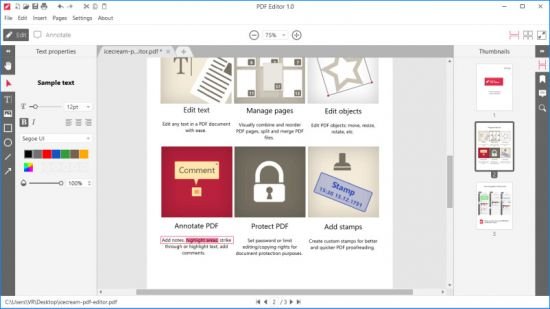
Meet Icecream PDF Editor - software that enables you to edit PDF files easier than ever before. Get access to all the tools and PDF editing modes you need with the help of smart tools panel. You can edit text, add notes, redact, protect files, manage pages and much more with the PDF editor.

Features
Edit text
Edit any text in a PDF document with ease.

Manage pages
Visually combine and reorder PDF pages, split and merge PDF files.

Edit objects
Edit PDF objects: move, resize, rotate, etc.

Protect PDF
Set password or limit editing/copying rights for document protection purposes.

Annotate PDF
Add notes, highlight areas, strike through or highlight text, add comments and more.

Add stamps
Create custom stamps for better and quicker PDF proofreading.

System Requirements: Windows 11, Windows 10, Windows 8.1, Windows 8, Windows 7

Whats New
Код:
https://icecreamapps.com/PDF-Editor/changelog.html

Homepage
Код:
https://icecreamapps.com

DOWNLOAD:

Код:
https://rapidgator.net/file/b03d10b7233c623b3866f85d77653bd9/IcecreamPDFEditor2.rar.html

https://ddownload.com/xe81s3m34ygt/IcecreamPDFEditor2.rar
 
ezgif-3f69b1f058240c24.jpg


Blackmagic Design DaVinci Resolve Studio 21.0.2 (x64) Multilingual

File size: 9.5 GB

DaVinci Resolve Studio supports up to 120fps at a massive 32K resolution, as well as support for multiple GPUs for real time playback of professional 10-bit formats, and accelerated H.264 and H.265 hardware decoding and encoding. There’s a full suite of immersive audio tools, DaVinci Neural Engine AI voice isolation, music remixer and dialogue separator. It also includes Dolby Vision and HDR10+ grading and rendering, and 45 extra Resolve FX such as AI UltraNR noise reduction, SuperScale and de-interlacing. You also get workflow and media asset management integration, remote scripting API, and rendering and encoder plug-in support. Plus there’s full screen playback on a second monitor!

More GPU Acceleration
DaVinci Resolve Studio turbo charges your system’s GPU performance! Fully optimized for Metal and Apple Silicon unified memory GPUs on a Mac, or OpenCL and CUDA on Windows and Linux, plus you’ll get incredible performance gains with additional GPUs.

Advanced Noise Reduction
DaVinci Resolve Studio includes some of the most powerful and sophisticated noise reduction. Temporal and AI spatial noise reduction tools can be used independently or together to help clean up and remove unwanted noise in virtually any image.

Lens Distortion
DaVinci Resolve Studio includes a lens correction feature that allows you to analyze a clip and correct for spherical lens distortion or other aberrations. It uses optical flow image analysis and processing algorithms for incredible quality results!

Professional HDR Scopes
The HDR scopes in DaVinci Resolve Studio are capable of measuring and providing detailed information about ST.2084 and HLG images. This allows you to replace the 10‑bit scale of the scopes with a scale based on nit values, or cd/m2, instead.

Stereoscopic 3D
DaVinci Resolve Studio features a complete set of tools for editing and grading stereoscopic 3D projects. You have total control over stereo specific clip properties such as convergence, floating windows, eye alignment, mastering and output.

Remote Monitoring and Grading
Remote monitoring allows clients to view a real time feed via computer, iPad or iPhone with extreme high quality! Remote grading lets you work interactively so that changes made on your DaVinci Resolve system are immediately visible remotely.

DaVinci Color Transform Language
Unlike LUTs, which rely on simple lookup tables, DaVinci color transformation scripts are GPU accelerated bits of code that directly transform images using combinations of math functions. That makes them extremely fast and non destructive.

Scripting and Automation
DaVinci Resolve Studio features support for both Python and LUA scripting, along with developer APIs that allow you to add workflow integrations and custom encoding options. This lets studios of all sizes create deeply integrated custom workflows.

Workflow Integration Plug‑ins
DaVinci Resolve Studio supports workflow integration plug-ins for connecting to local and remote asset management, automation systems and more. Users can write their own plug-in and interact with DaVinci Resolve's JavaScript APIs.

Whats New
Код:
https://forum.blackmagicdesign.com/viewtopic.php?f=21&t=236904

Minimum System Requirements
Windows 10 Creators Update.
16 GB of system memory or 32 GB when using Fusion.
For monitoring, Blackmagic Design Desktop Video 12.9 or later.
Integrated GPU or discrete GPU with at least 4 GB of VRAM.
At least 16 GB VRAM for advanced AI tools.
At least 32 GB RAM and 12 GB VRAM for background rendering.
GPU which supports OpenCL 1.2 or CUDA 12.8.
AMD/Intel official drivers from your GPU manufacturer.
NVIDIA Studio driver 581.57 or newer.

Homepage
Код:
https://www.blackmagicdesign.com/

DOWNLOAD:

Код:
https://rapidgator.net/file/22e6d0a32bc1fc306df76523e4245aed/DaVinci_Resolve_Studio_21.0.2.part1.rar.html
https://rapidgator.net/file/1054bec154a43db034235cd0519e9fe9/DaVinci_Resolve_Studio_21.0.2.part2.rar.html
https://rapidgator.net/file/3ac7cf66cdfe3ba095977a5f1393a4e3/DaVinci_Resolve_Studio_21.0.2.part3.rar.html
https://rapidgator.net/file/8481cf4b75a28fee6c760eb2e679ef23/DaVinci_Resolve_Studio_21.0.2.part4.rar.html
https://rapidgator.net/file/b340d4b258ec90a7eae0aa83c4898a06/DaVinci_Resolve_Studio_21.0.2.part5.rar.html

Код:
https://ddownload.com/s4p1gfju8jxo/DaVinci_Resolve_Studio_21.0.2.part1.rar
https://ddownload.com/g6mq8axn8pmj/DaVinci_Resolve_Studio_21.0.2.part2.rar
https://ddownload.com/9e2rciv2ihx7/DaVinci_Resolve_Studio_21.0.2.part3.rar
https://ddownload.com/sy5qydjdiddj/DaVinci_Resolve_Studio_21.0.2.part4.rar
https://ddownload.com/b9wi4moex43j/DaVinci_Resolve_Studio_21.0.2.part5.rar
 
th-Qteg-Sb-UBAe-N5Bgq95s-QFl-JV939x-Jh7f-F.jpg


Icecream Video Editor Pro 3.26 Multilingual

File Size: 70.7 MB

Icecream Video Editor is an easy-to-use free video editing software for Windows that enables you to edit videos and create new ones from both videos and photos in a few minutes. Combine videos and photos, add transitions, trim videos, add titles and background audio, apply visual effects. You can also rotate, speed up, blur videos and much more.

Features
Simple video editor
Enjoy powerful video editing software with intuitive GUI.

Timeline
Merge videos and photos on a single timeline.

Add transitions
Choose one of 15 scene transitions or make it random.

Trim videos
Trim videos added to video editor.

Add video effects
Blur video, apply old movie effect or others.

Crop videos
Crop photo and video scenes if needed.

Add audio to video
Add music soundtrack or voice over.

Add titles
Add text to any video or photo scene on timeline.

Adjust image
Set brightness, contrast, saturation and hue with video editor.

Whats New
Код:
https://icecreamapps.com/Video-Editor/changelog.html

System Requirements: Windows 11, Windows 10, Windows 8.1, Windows 8, Windows 7

Homepage
Код:
https://icecreamapps.com/

DOWNLOAD:

Код:
https://rapidgator.net/file/c81c5240e69a08c553d2ff34ed10a021/VideoEditorPro3.rar.html

https://ddownload.com/oa44mmvdr5wk/VideoEditorPro3.rar
 
ezgif-8732cdfde1a56721.jpg


Obsidian Ebook Reader Premium 2.1.0

Languages: English
File Size: 143.18 MB

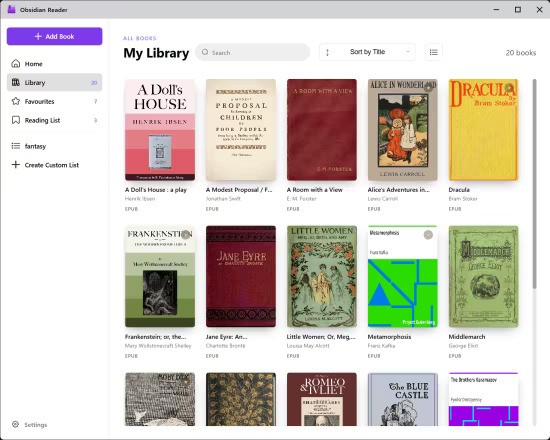
Simply your library. Designed for privacy. Obsidian is a Windows ebook reader built around library management and privacy. Point it at your folders, organize EPUBs and PDFs, and read entirely offline — with no accounts, ads, or telemetry.

Built for your library and your privacy
Organize books from your own folders, keep everything on your machine, and read without handing data to anyone else.

Add books your way
Import one file at a time, pull in a whole folder, include nested subfolders, or set up folder sync so your library stays up to date automatically.

- Add File — single EPUB or PDF
- Add Folder — bulk import
- Include Subfolders
- Sync Folders — auto-scanned directories

Edit book metadata
Fix titles, authors, and cover art after import so large collections stay organized. Premium lets you curate every detail of your shelf.

- Edit title and author
- Replace cover images
- Reset to defaults when needed

Browse and organize at a glance
See covers, titles, authors, and formats in a sortable list. Mark favorites, switch views, and manage growing collections without losing track of a single book.

- Sort and filter your collection
- List and grid-style browsing
- Light and dark interface themes

Typography and layout controls
Open the styling panel while you read to adjust fonts, spacing, and margins. Dial in a comfortable layout for long sessions on any screen.

- Font family and size
- Line, word, and letter spacing
- Margin presets and page layout

Release Notes

- Completely redesigned UI
- Reading list tab for better organization of your books
- Custom collections for greater book management
- Performance optimizations

System Requirements
Windows 10 version 14316.0 or higher

Homepage
Код:
https://obsidianreader.app

DOWNLOAD:

Код:
https://rapidgator.net/file/eb387e0d8f664ff2d503e48ed0de1bb1/Obsidian.Ebook.Reader.Premium.2.1.0.rar.html

https://ddownload.com/wc2c73hte60e/Obsidian.Ebook.Reader.Premium.2.1.0.rar
 
Назад
Сверху Снизу